Keep Up to Date !         Allison Bell
             Gerstein Science Library
                      March 29, 2012
Practical methods for LLL
Good current awareness programs are:

• Efficient, preferably AUTOMATED “Set it
  and forget it”
• Focused on your highest priorities
• Manageable (you can make time to read
  what arrives)
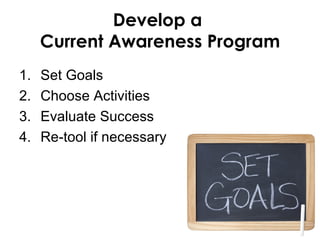
Develop a
     Current Awareness Program
1.   Set Goals
2.   Choose Activities
3.   Evaluate Success
4.   Re-tool if necessary
First: Set Goals
• What news do I need to hear to do my job
  properly?

• What news do I need to hear to keep up to date
  with my professional development?

• Identify knowledge gaps

• Passionate interests
Think of some current
 awareness goals for
      yourself.
   What are they?
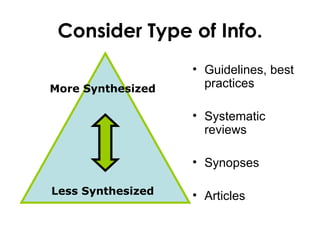
Consider Type of Info.
                   • Guidelines, best
More Synthesized     practices

                   • Systematic
                     reviews

                   • Synopses

Less Synthesized   • Articles
Second: Develop Activities
• Browser ‘Favourites’ or Bookmarks

• RSS

• Email Alerts

• TOC Alerts
Turn Each Goal into Activity


Example:
• GOAL: Read everything new that comes out
  about the Gardasil vaccine

• ACTIVITY: Set up an automated search or
  RSS feed in Pubmed for any new articles on the
  Gardasil/HPV vaccine
Key to Success:
Make time in your schedule!
Third: Evaluate Effectiveness
• Too much? Too little? Bad/no results?

• Missing anything?

• Adjust, then try again
RSS Feed Readers
•   Google Reader
•   Bloglines
•   IE or Outlook
•   FeedReader


           Choose one that you find easy
             to use, easy to remember
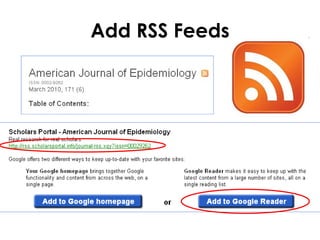
Add RSS Feeds
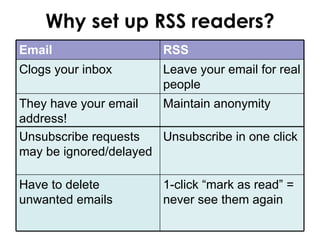
Why set up RSS readers?
Email                   RSS
Clogs your inbox        Leave your email for real
                        people
They have your email   Maintain anonymity
address!
Unsubscribe requests   Unsubscribe in one click
may be ignored/delayed

Have to delete          1-click “mark as read” =
unwanted emails         never see them again
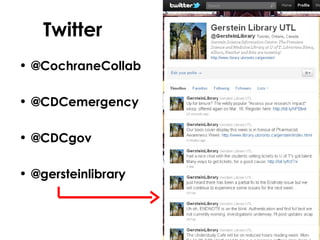
Twitter
• @CochraneCollab

• @CDCemergency

• @CDCgov

• @gersteinlibrary
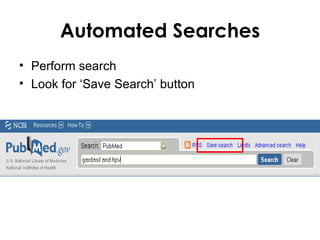
Automated Searches
• Perform search
• Look for ‘Save Search’ button
Keep Current Using Pubmed
• RSS or Automated Searches
• Clinical Queries (for evidence based
  results)
• Regular Pubmed search (for all results)
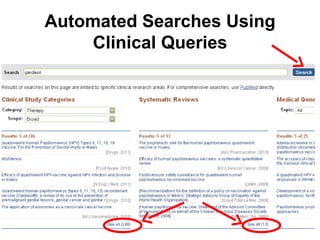
Automated Searches Using
    Clinical Queries
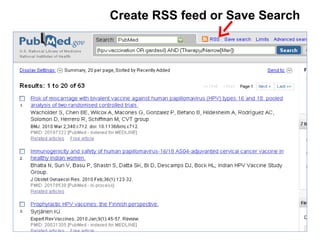
Create RSS feed or Save Search
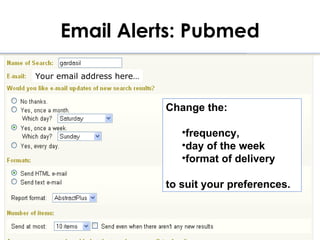
Email Alerts: Pubmed

Your email address here…


                           Change the:

                              •frequency,
                              •day of the week
                              •format of delivery

                           to suit your preferences.
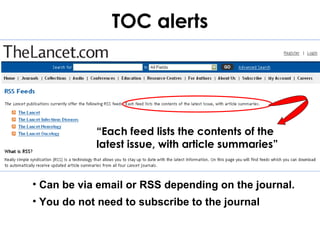
TOC alerts


            “Each feed lists the contents of the
            latest issue, with article summaries”


• Can be via email or RSS depending on the journal.
• You do not need to subscribe to the journal
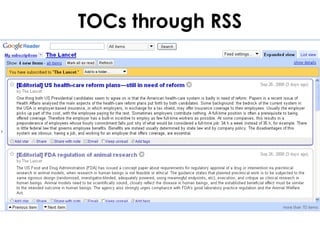
TOCs through RSS
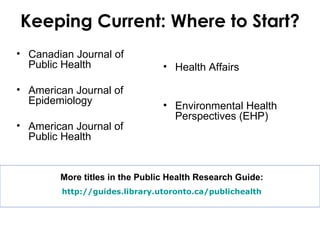
Keeping Current: Where to Start?
• Canadian Journal of
  Public Health                 • Health Affairs

• American Journal of
  Epidemiology                  • Environmental Health
                                  Perspectives (EHP)
• American Journal of
  Public Health


        More titles in the Public Health Research Guide:
        http://guides.library.utoronto.ca/publichealth
Be Picky when Picking Sources
Pick professional sources for….
• Reliability (both content AND schedule)
• Can it deliver in a set-and-forget mode?
• Relevance to your learning GOALS
What about your clients?
Some considerations:
• Pick patient information sources for…
  – Quality (reflect latest/best knowledge)
  – Readability (consider levels, language)
  – Usability/learning styles (Interactive? Print?)
Critical Evaluation of Web Sources
• More advertising= be more wary!
  – Pop ups? ‘Scam’ Ads?

• Statements of responsibility, credentials

• Quality of content, interface

• How current?

• Personal information collected/used?
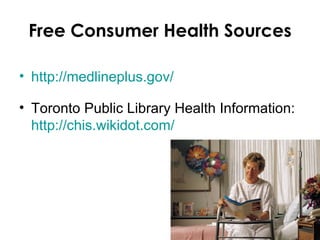
Free Consumer Health Sources

• http://medlineplus.gov/

• Toronto Public Library Health Information:
  http://chis.wikidot.com/
Questions?
Contact Info

     Allison.bell@utoronto.ca
     Ask.gerstein@utoronto.ca
http://www.library.utoronto.ca/gerstein

Keepuptodate_2012

  • 1.
    Keep Up toDate ! Allison Bell Gerstein Science Library March 29, 2012
  • 2.
    Practical methods forLLL Good current awareness programs are: • Efficient, preferably AUTOMATED “Set it and forget it” • Focused on your highest priorities • Manageable (you can make time to read what arrives)
  • 3.
    Develop a Current Awareness Program 1. Set Goals 2. Choose Activities 3. Evaluate Success 4. Re-tool if necessary
  • 4.
    First: Set Goals •What news do I need to hear to do my job properly? • What news do I need to hear to keep up to date with my professional development? • Identify knowledge gaps • Passionate interests
  • 5.
    Think of somecurrent awareness goals for yourself. What are they?
  • 6.
    Consider Type ofInfo. • Guidelines, best More Synthesized practices • Systematic reviews • Synopses Less Synthesized • Articles
  • 7.
    Second: Develop Activities •Browser ‘Favourites’ or Bookmarks • RSS • Email Alerts • TOC Alerts
  • 8.
    Turn Each Goalinto Activity Example: • GOAL: Read everything new that comes out about the Gardasil vaccine • ACTIVITY: Set up an automated search or RSS feed in Pubmed for any new articles on the Gardasil/HPV vaccine
  • 9.
    Key to Success: Maketime in your schedule!
  • 10.
    Third: Evaluate Effectiveness •Too much? Too little? Bad/no results? • Missing anything? • Adjust, then try again
  • 11.
    RSS Feed Readers • Google Reader • Bloglines • IE or Outlook • FeedReader Choose one that you find easy to use, easy to remember
  • 12.
  • 13.
    Why set upRSS readers? Email RSS Clogs your inbox Leave your email for real people They have your email Maintain anonymity address! Unsubscribe requests Unsubscribe in one click may be ignored/delayed Have to delete 1-click “mark as read” = unwanted emails never see them again
  • 14.
  • 15.
    Automated Searches • Performsearch • Look for ‘Save Search’ button
  • 16.
    Keep Current UsingPubmed • RSS or Automated Searches • Clinical Queries (for evidence based results) • Regular Pubmed search (for all results)
  • 17.
    Automated Searches Using Clinical Queries
  • 18.
    Create RSS feedor Save Search
  • 19.
    Email Alerts: Pubmed Youremail address here… Change the: •frequency, •day of the week •format of delivery to suit your preferences.
  • 20.
    TOC alerts “Each feed lists the contents of the latest issue, with article summaries” • Can be via email or RSS depending on the journal. • You do not need to subscribe to the journal
  • 21.
  • 22.
    Keeping Current: Whereto Start? • Canadian Journal of Public Health • Health Affairs • American Journal of Epidemiology • Environmental Health Perspectives (EHP) • American Journal of Public Health More titles in the Public Health Research Guide: http://guides.library.utoronto.ca/publichealth
  • 23.
    Be Picky whenPicking Sources Pick professional sources for…. • Reliability (both content AND schedule) • Can it deliver in a set-and-forget mode? • Relevance to your learning GOALS
  • 24.
    What about yourclients? Some considerations: • Pick patient information sources for… – Quality (reflect latest/best knowledge) – Readability (consider levels, language) – Usability/learning styles (Interactive? Print?)
  • 25.
    Critical Evaluation ofWeb Sources • More advertising= be more wary! – Pop ups? ‘Scam’ Ads? • Statements of responsibility, credentials • Quality of content, interface • How current? • Personal information collected/used?
  • 26.
    Free Consumer HealthSources • http://medlineplus.gov/ • Toronto Public Library Health Information: http://chis.wikidot.com/
  • 27.
  • 28.
    Contact Info Allison.bell@utoronto.ca Ask.gerstein@utoronto.ca http://www.library.utoronto.ca/gerstein

Editor's Notes

  • #3 LLL= life long learning
  • #5 -gaps “ you don’t know what you don’t know ”, but could come across questions or read in the lit something you are unfamiliar with. ‘managing IP team’ PUSH yourself, don’t just gravitate to what you are comfortable with -Goal ‘maintain current awareness in my field’ is WAY too broad, needs some parameters. -Could be something concrete like “read everything by my supervisor” or something like “stay current with three top journals in the field”
  • #6 Write them down! Couple of minutes
  • #7 There are sources to find these types of info in the Public Health research guide
  • #8 Activities to match your goals. Pull vs. Push You go to them vs. them coming to you. Favourites = find out while at U of T, talk to colleagues/professors RSS= News updates, key blogs, automated searches Automated Searches: RSS or email alerts RSS= News updates, key blogs, automated searches Automated Searches: RSS or email alerts Familiarize yourself with key journals/sources Podcasts – WHO and Harvard School of Public Health
  • #9 Turn Goals into activity Another Example: Stay current with the American Journal of Public Health, set up TOC email alerts
  • #10 Can be once per day, once per week, in the morning when you get to work, or Sunday evening with a glass of wine. Don’t just skim and delete Daily emails is temporary, you will fall behind ID your knowledge gaps and focus on them when time is short
  • #11 At any time or After 1 month critically evaluate success of goals and activities. Are you actively checking your feed reader or do you need email to come to you? Are your emails being deleted without being red due to volume?
  • #12 Easy to use or you won’t use it! -Show Google Reader
  • #13 Look for Symbol or text Will give you a feed URL or a link to click on Can also search from within Google Reader or Bloglines
  • #16 In databases like Pubmed or Pubget. Or U of T subscribed databases. No RSS feeds in Google Scholar, Bing, or Scirus
  • #17 Many other ways for keeping current using Pubmed
  • #18 Use Clinical Queries for Evidence-based searching. Use reg. Pubmed for everything.
  • #19 Demo - Show them how RSS feed: add to your feed reader, Saved Search, sign up for my NCBI. Email alerts. Pros and cons of both.
  • #20 NCBI email alerts feature for saved searches…
  • #21 If we do not subscribe to the journal you can read the abstracts and order through ILL, or search Google Scholar to see if the article is freely available online.
  • #22 Example of what it looks like
  • #23 Big FIVE medicine journals as well
  • #24 If it’s a top journal, this does not apply. If it is a website, it does. Relevance: one goal might be management of an IP team, may not be covered by a PH journal. Find a management journal instead.
  • #26 Scam ads– if a source you perceive as reliable has shady advertising or pop-ups, don’t hesitate to contact them. May be willing to remove offending ads.
  • #27 Patients also face problems around critical evaluation of sources My favorite site: medline plus. From the states BUT there isn’t a great canadian alternative, unfortunately -Check with your local public library for recommendations. Upon starting in a community, one of the first things you should do. -Can use ILL for articles from Public Libraries.