jQuery Plugins Authoring Code for Reuse
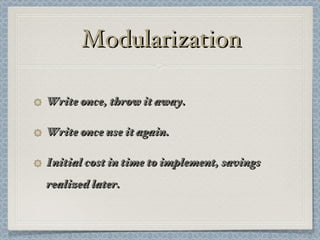
Modularization Write once, throw it away. Write once use it again. Initial cost in time to implement, savings realized later.
jQuery Integration Attach it directly to the jQuery object. $.plugIn1 = function() { console.log("This is plugin ONE!"); };
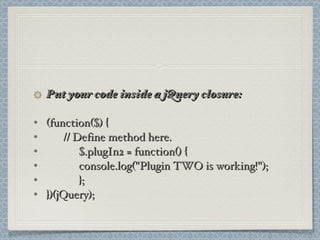
Put your code inside a jQuery closure: (function($) { // Define method here. $.plugIn2 = function() { console.log("Plugin TWO is working!"); }; })(jQuery);
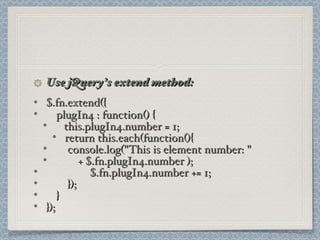
Use jQuery’s extend method: $.fn.extend({ plugIn4 : function() { this.plugIn4.number = 1; return this.each(function(){   console.log("This is element number: "  + $.fn.plugIn4.number );   $.fn.plugIn4.number += 1;   }); } });
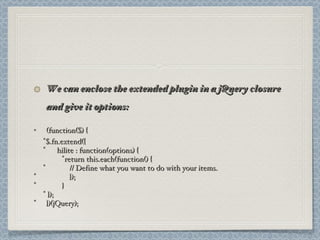
We can enclose the extended plugin in a jQuery closure and give it options: (function($) { $.fn.extend({ hilite : function(options) { return this.each(function() {   // Define what you want to do with your items.   });   } }); })(jQuery);
Attaching code directly to the jQuery object is the most limited type of plugin. This is a very poor choice. Using a jQuery closure provides namespacing, but lacks built-in jQuery functionality. This is appropriate for many types of widgets Using the jQuery extend method gives your plugin all the built-in power that native jQuery methods have.
We’re Hiring! Bee Tan, Hiring Manager 510 307-8225

jQuery Plugin

  • 1.
  • 2.
    Modularization Write once,throw it away. Write once use it again. Initial cost in time to implement, savings realized later.
  • 3.
    jQuery Integration Attachit directly to the jQuery object. $.plugIn1 = function() { console.log("This is plugin ONE!"); };
  • 4.
    Put your codeinside a jQuery closure: (function($) { // Define method here. $.plugIn2 = function() { console.log("Plugin TWO is working!"); }; })(jQuery);
  • 5.
    Use jQuery’s extendmethod: $.fn.extend({ plugIn4 : function() { this.plugIn4.number = 1; return this.each(function(){ console.log("This is element number: " + $.fn.plugIn4.number ); $.fn.plugIn4.number += 1; }); } });
  • 6.
    We can enclosethe extended plugin in a jQuery closure and give it options: (function($) { $.fn.extend({ hilite : function(options) { return this.each(function() { // Define what you want to do with your items. }); } }); })(jQuery);
  • 7.
    Attaching code directlyto the jQuery object is the most limited type of plugin. This is a very poor choice. Using a jQuery closure provides namespacing, but lacks built-in jQuery functionality. This is appropriate for many types of widgets Using the jQuery extend method gives your plugin all the built-in power that native jQuery methods have.
  • 8.
    We’re Hiring! BeeTan, Hiring Manager 510 307-8225