Jmeter docker
executions
susmitha
What is docker
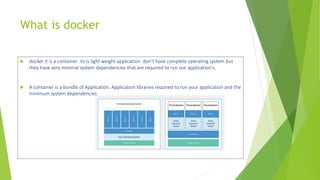
 docker it is a container .its is light weight application don’t have complete operating system but
they have very minimal system dependencies that are required to run our application's.
 A container is a bundle of Application, Application libraries required to run your application and the
minimum system dependencies.
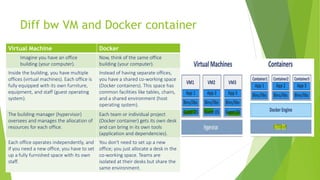
Diff bw VM and Docker container
Virtual Machine Docker
Imagine you have an office
building (your computer).
Now, think of the same office
building (your computer).
Inside the building, you have multiple
offices (virtual machines). Each office is
fully equipped with its own furniture,
equipment, and staff (guest operating
system).
Instead of having separate offices,
you have a shared co-working space
(Docker containers). This space has
common facilities like tables, chairs,
and a shared environment (host
operating system).
The building manager (hypervisor)
oversees and manages the allocation of
resources for each office.
Each team or individual project
(Docker container) gets its own desk
and can bring in its own tools
(application and dependencies).
Each office operates independently, and
if you need a new office, you have to set
up a fully furnished space with its own
staff.
You don't need to set up a new
office; you just allocate a desk in the
co-working space. Teams are
isolated at their desks but share the
same environment.
Why Docker-why jmeter executions in docker container.
1. Isolation and Reproducibility
1. Containers encapsulate dependencies, configurations
2. Enables consistent, reproducible test environments
3. Avoids "works on my machine" issues
2. Portability
1. Run consistently across dev, test, prod environments
2. Simplifies deployment, reduces compatibility issues
3. Resource Efficiency
1. Containers enable running multiple JMeter instances
2. More lightweight than virtual machines
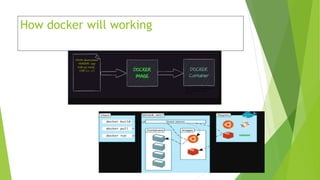
How docker will working
Pre requisites
 Docker Software
https://docs.docker.com/desktop/install/windows-install/
 Docker file-
 https://github.com/susmithatippireddy/Performance-Testing
Setting Up JMeter Docker Image
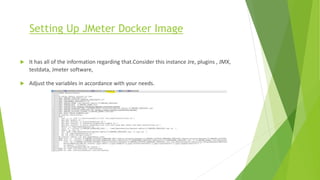
 It has all of the information regarding that.Consider this instance Jre, plugins , JMX,
testdata, Jmeter software,
 Adjust the variables in accordance with your needs.
Building JMeter in Docker Container
 cd docker docker>cd ex1
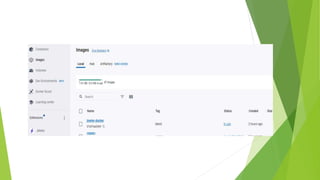
 build command: docker build -t jmeter-docker:latest .
 docker run -it --name any name image name
 docker run -it --name jmeterimage jmeter-docker:latest
 docker run -it --name jmeterimage11 jmeter-docker:latest
Build jmeter Docker images
 Steps:
1. Docker file and run.sh file we should keep in one folder and open cmd from the path.
2. Open command prompt
3. Pull the docker image or build the docker image. Using below command
4. docker build -t jmeter-docker:latest .
5. docker build -t jmeterimagegit1:latest .
Run the docker image
 docker run -it --name jmeterimage jmeter-docker:latest.
 Please check below screen shot for your reference
Creating html reports
 Once executed above command we can see the results will display in cmd promt.
 Once we got the results,these results need to be copied and stored in a file
 To do that, we should be aware of the container in which these results are stored.
 docker cp 1623631c9003:/jmeter/html-report C:UsersUSERdockerex1jmeterhtmlv7
 docker cp 050f2848185d:/jmeter/html-report C:UsersUSERdockerex1jmeterhtmlv1
docker cp 1623631c9003:/jmeter.jtl C:UsersUSERdockerex1jmeter.jtl
 docker run --nedodocker run --network host -it --name jmeterimagei4 jmeter-
docker:latestcker run --network host -it --name jmeterimagei4 jmeter-docker:latesttwork
host -it --name jmeterimagei4 jmeter-docker:latest
Html folder

Jmeter docker executions v2.0.pptx

  • 1.
  • 2.
    What is docker docker it is a container .its is light weight application don’t have complete operating system but they have very minimal system dependencies that are required to run our application's.  A container is a bundle of Application, Application libraries required to run your application and the minimum system dependencies.
  • 3.
    Diff bw VMand Docker container Virtual Machine Docker Imagine you have an office building (your computer). Now, think of the same office building (your computer). Inside the building, you have multiple offices (virtual machines). Each office is fully equipped with its own furniture, equipment, and staff (guest operating system). Instead of having separate offices, you have a shared co-working space (Docker containers). This space has common facilities like tables, chairs, and a shared environment (host operating system). The building manager (hypervisor) oversees and manages the allocation of resources for each office. Each team or individual project (Docker container) gets its own desk and can bring in its own tools (application and dependencies). Each office operates independently, and if you need a new office, you have to set up a fully furnished space with its own staff. You don't need to set up a new office; you just allocate a desk in the co-working space. Teams are isolated at their desks but share the same environment.
  • 4.
    Why Docker-why jmeterexecutions in docker container. 1. Isolation and Reproducibility 1. Containers encapsulate dependencies, configurations 2. Enables consistent, reproducible test environments 3. Avoids "works on my machine" issues 2. Portability 1. Run consistently across dev, test, prod environments 2. Simplifies deployment, reduces compatibility issues 3. Resource Efficiency 1. Containers enable running multiple JMeter instances 2. More lightweight than virtual machines
  • 5.
  • 6.
    Pre requisites  DockerSoftware https://docs.docker.com/desktop/install/windows-install/  Docker file-  https://github.com/susmithatippireddy/Performance-Testing
  • 7.
    Setting Up JMeterDocker Image  It has all of the information regarding that.Consider this instance Jre, plugins , JMX, testdata, Jmeter software,  Adjust the variables in accordance with your needs.
  • 8.
    Building JMeter inDocker Container  cd docker docker>cd ex1  build command: docker build -t jmeter-docker:latest .  docker run -it --name any name image name  docker run -it --name jmeterimage jmeter-docker:latest  docker run -it --name jmeterimage11 jmeter-docker:latest
  • 9.
    Build jmeter Dockerimages  Steps: 1. Docker file and run.sh file we should keep in one folder and open cmd from the path. 2. Open command prompt 3. Pull the docker image or build the docker image. Using below command 4. docker build -t jmeter-docker:latest . 5. docker build -t jmeterimagegit1:latest .
  • 11.
    Run the dockerimage  docker run -it --name jmeterimage jmeter-docker:latest.  Please check below screen shot for your reference
  • 12.
    Creating html reports Once executed above command we can see the results will display in cmd promt.  Once we got the results,these results need to be copied and stored in a file  To do that, we should be aware of the container in which these results are stored.  docker cp 1623631c9003:/jmeter/html-report C:UsersUSERdockerex1jmeterhtmlv7  docker cp 050f2848185d:/jmeter/html-report C:UsersUSERdockerex1jmeterhtmlv1 docker cp 1623631c9003:/jmeter.jtl C:UsersUSERdockerex1jmeter.jtl  docker run --nedodocker run --network host -it --name jmeterimagei4 jmeter- docker:latestcker run --network host -it --name jmeterimagei4 jmeter-docker:latesttwork host -it --name jmeterimagei4 jmeter-docker:latest
  • 13.