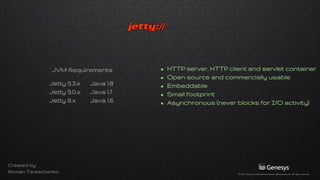
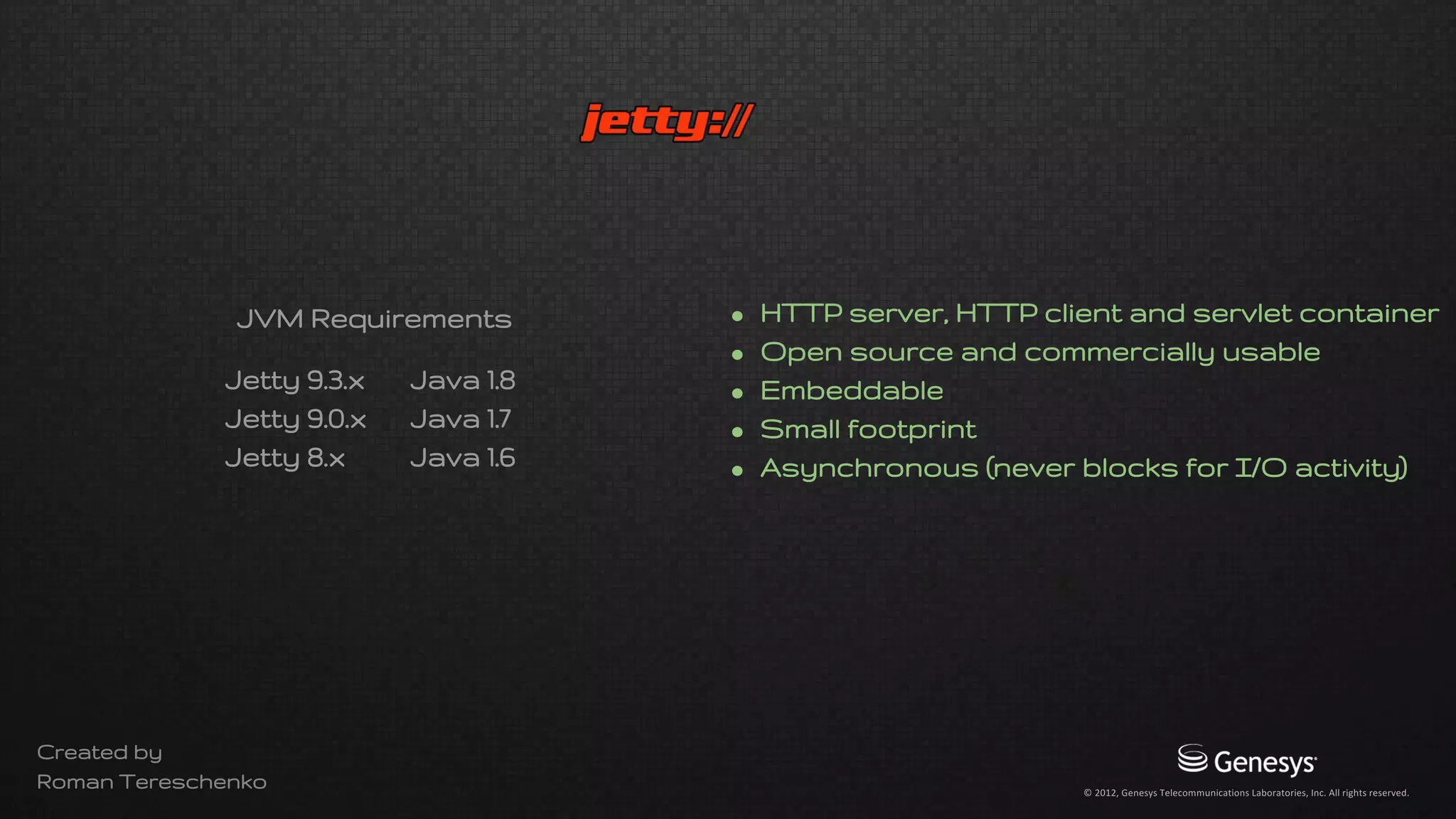
• HTTP server, HTTP client, servlet container
• Open source and commercially usable
• Embeddable
• Composable with small memory footprint
• Asynchronous (never blocks for I/O activity)
Jetty 9.3.x Java 1.8
Jetty 9.0.x Java 1.7
Jetty 8.x Java 1.6
JVM Requirements
Created by
Roman Tereschenko
Jetty 9.3.x Java 1.8
Jetty 9.0.x Java 1.7
Jetty 8.x Java 1.6
JVM Requirements
Created by
Roman Tereschenko
java.lang.UnsupportedClassVersionError: Unsupported major.minor version 52.0
JSE 8 = 52
JSE 7 = 51
JSE 6 = 50
• HTTP server, HTTP client, servlet container
• Open source and commercially usable
• Embeddable
• Composable with small memory footprint
• Asynchronous (never blocks for I/O activity)
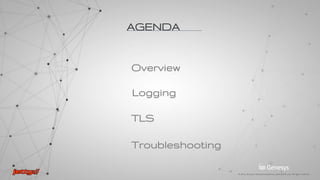
TLS
Logging
AGENDA
Overview
Troubleshooting
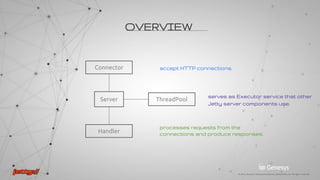
Server
Handler
ThreadPool
accept HTTP connections
processes requests from the
connections and produce responses
serves as Executor service that other
Jetty server components use
OVERVIEW
Connector
RUNNING
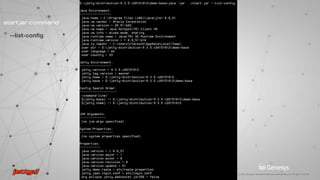
To start Jetty from $JETTY_HOME, run:
java -jar start.jar
Usage: java -jar start.jar [options] [properties] [configs]
java -jar start.jar --module=logging -Dorg.eclipse.jetty.server.LEVEL=ALL --list-config
java -jar start.jar --add-to-start=logging
start.ini
etcXML
libmod
Configuration Files
--list-config
start.jar command
ALL
DEBUG
INFO
WARN
IGNORE
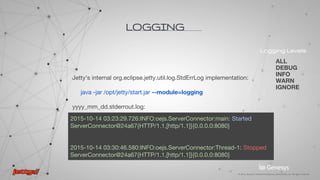
LOGGING
does not natively use any existing Java logging framework
prints messages to the console
uses built-in org.eclipse.jetty.util.log.StdErrLog implementation
Logging layer priorities:
1. Classpath resource jetty-logging.properties
2. System properties
3. If org.slf4j.Logger exists in the classpath use Slf4jLog
Logging LevelsFrameworks
Log4j
Logback
SLF4
JUL
Jetty
LOGGING
Jetty's internal org.eclipse.jetty.util.log.StdErrLog implementation:
java -jar /opt/jetty/start.jar --module=logging
yyyy_mm_dd.stderrout.log:
2015-10-14 03:23:29.726:INFO:oejs.ServerConnector:main: Started
ServerConnector@24a67{HTTP/1.1,[http/1.1]}{0.0.0.0:8080}
2015-10-14 03:30:46.580:INFO:oejs.ServerConnector:Thread-1: Stopped
ServerConnector@24a67{HTTP/1.1,[http/1.1]}{0.0.0.0:8080}
ALL
DEBUG
INFO
WARN
IGNORE
Logging Levels
2015-10-17 13:15:16.286:DBUG:oejs.Server:qtp14650762-19: REQUEST on
HttpChannelOverHttp@6f509d{r=1,c=false,a=DISPATCHED,uri=//ua-rteresch-lt:8080/}
POST //ua-rteresch-lt:8080/
2015-10-17 13:15:16.294:DBUG:oejs.Server:qtp14650762-19: RESPONSE for / h=true
404 null
LOGGING
URL
Search criteria
REQUEST/RESPONSE traces
1. Download required libraries: slf4j-api, logback-core, logback-classic.
2. Under resources/ folder create jetty-logging.properties file, containing
Slf4jLog logger implementation:
org.eclipse.jetty.util.log.class=org.eclipse.jetty.util.log.Slf4jLog
3. Create logback configuration in /resources/logback.xml
4. Add --module=logging command in start.ini file
LOGGING
Logback logging configuration via SLf4j facade
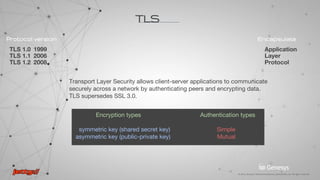
TLS 1.0 1999
TLS 1.1 2006
TLS 1.2 2008
Protocol version Encapsulate
Application
Layer
Protocol
Encryption types Authentication types
symmetric key (shared secret key) Simple
asymmetric key (public-private key) Mutual
Transport Layer Security allows client-server applications to communicate
securely across a network by authenticating peers and encrypting data.
TLS supersedes SSL 3.0.
TLS
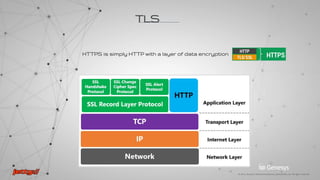
HTTPS is simply HTTP with a layer of data encryption
TLS
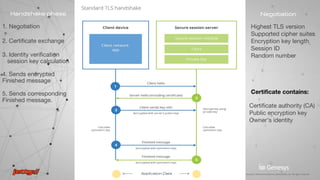
1. Negotiation
2. Certificate exchange
3. Identity verification
session key calculation
4. Sends encrypted
Finished message
5. Sends corresponding
Finished message.
Handshake phase Negotiation
Highest TLS version
Supported cipher suites
Encryption key length
Session ID
Random number
Certificate contains:
Certificate authority (CA)
Public encryption key
Owner’s identity
<------- Application Data ------->
CA is a trusted third party - by both the subject (owner) of the certificate and by the
party relying upon the certificate.
Certificates are verified using a chain of trust.
Public key
Subject
Issuer
CA signature
Certificate Chain of Trust
Issued To
Issued By
TLS
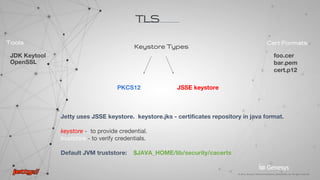
foo.cer
bar.pem
cert.p12
Cert Formats
JDK Keytool
OpenSSL
Tools
PKCS12 JSSE keystore
Keystore Types
Jetty uses JSSE keystore. keystore.jks - certificates repository in java format.
keystore - to provide credential.
truststore - to verify credentials.
Default JVM truststore: $JAVA_HOME/lib/security/cacerts
TLS
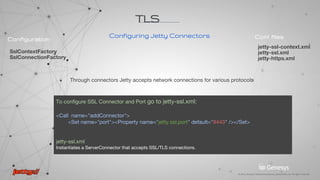
To configure SSL Connector and Port go to jetty-ssl.xml:
<Call name="addConnector">
<Set name="port"><Property name="jetty.ssl.port" default="8443" /></Set>
jetty-ssl.xml
Instantiates a ServerConnector that accepts SSL/TLS connections.
jetty-ssl-context.xml
jetty-ssl.xml
jetty-https.xml
Conf filesConfiguration
SslContextFactory
SslConnectionFactory
TLS
Configuring Jetty Connectors
Through connectors Jetty accepts network connections for various protocols
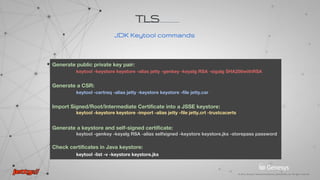
Generate public private key pair:
keytool -keystore keystore -alias jetty -genkey -keyalg RSA -sigalg SHA256withRSA
Generate a CSR:
keytool -certreq -alias jetty -keystore keystore -file jetty.csr
Import Signed/Root/Intermediate Certificate into a JSSE keystore:
keytool -keystore keystore -import -alias jetty -file jetty.crt -trustcacerts
Generate a keystore and self-signed certificate:
keytool -genkey -keyalg RSA -alias selfsigned -keystore keystore.jks -storepass password
Check certificates in Java keystore:
keytool -list -v -keystore keystore.jks
JDK Keytool commands
TLS
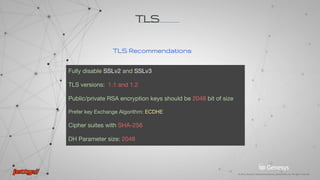
TLS Recommendations
Fully disable SSLv2 and SSLv3
TLS versions: 1.1 and 1.2
Public/private RSA encryption keys should be 2048 bit of size
Prefer key Exchange Algorithm: ECDHE
Cipher suites with SHA-256
DH Parameter size: 2048
TLS
Troubleshooting
NET
I/O
TLS
What?
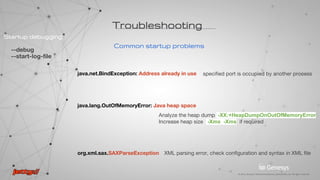
Common startup problems
java.net.BindException: Address already in use
java.lang.OutOfMemoryError: Java heap space
org.xml.sax.SAXParseException
specified port is occupied by another process
Analyze the heap dump -XX:+HeapDumpOnOutOfMemoryError
Increase heap size -Xmx -Xms if required
XML parsing error, check configuration and syntax in XML file
--debug
--start-log-file
Startup debugging
Troubleshooting
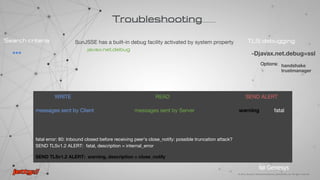
WRITE READ SEND ALERT
messages sent by Client messages sent by Server warning fatal
fatal error: 80: Inbound closed before receiving peer's close_notify: possible truncation attack?
SEND TLSv1.2 ALERT: fatal, description = internal_error
SEND TLSv1.2 ALERT: warning, description = close_notify
Troubleshooting
TLS debugging
-Djavax.net.debug=all
ssl
handshake
trustmanager
SunJSSE has a built-in debug facility activated by system property
javax.net.debug
Options:
***
Search criteria
***
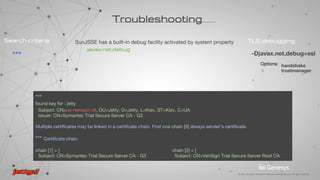
found key for : jetty
Subject: CN=ua-rteresch-dt, OU=Jetty, O=Jetty, L=Kiev, ST=Kiev, C=UA
Issuer: CN=Symantec Trial Secure Server CA - G3
Multiple certificates may be linked in a certificate chain. First one chain [0] always sender’s certificate.
*** Certificate chain
chain [1] = [ chain [2] = [
Subject: CN=Symantec Trial Secure Server CA - G3 Subject: CN=VeriSign Trial Secure Server Root CA
Troubleshooting
TLS debugging
-Djavax.net.debug=ssl
handshake
trustmanager
SunJSSE has a built-in debug facility activated by system property
javax.net.debug
Options:
***
Search criteria
Certificate verification succeeded, client recognises the certificate.
***
Found trusted certificate
If TLS handshake is completed successfully server sends Change Cipher Spec/Finished
thread_name, WRITE: TLSv1.2 Change Cipher Spec, length = 105 <-- client message
*** Finished
thread_name, READ: TLSv1.2 Change Cipher Spec, length = 74 <-- server message
*** Finished
Troubleshooting
TLS debugging
-Djavax.net.debug=ssl
handshake
trustmanager
SunJSSE has a built-in debug facility activated by system property
javax.net.debug
Options:
***
Search criteria
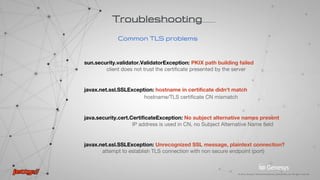
Common TLS problems
sun.security.validator.ValidatorException: PKIX path building failed
client does not trust the certificate presented by the server
javax.net.ssl.SSLException: hostname in certificate didn't match
hostname/TLS certificate CN mismatch
java.security.cert.CertificateException: No subject alternative names present
IP address is used in CN, no Subject Alternative Name field
javax.net.ssl.SSLException: Unrecognized SSL message, plaintext connection?
attempt to establish TLS connection with non secure endpoint (port)
Troubleshooting
QA
Thank you

Jetty TLS troubleshooting

  • 1.
    • HTTP server,HTTP client, servlet container • Open source and commercially usable • Embeddable • Composable with small memory footprint • Asynchronous (never blocks for I/O activity) Jetty 9.3.x Java 1.8 Jetty 9.0.x Java 1.7 Jetty 8.x Java 1.6 JVM Requirements Created by Roman Tereschenko
  • 2.
    Jetty 9.3.x Java1.8 Jetty 9.0.x Java 1.7 Jetty 8.x Java 1.6 JVM Requirements Created by Roman Tereschenko java.lang.UnsupportedClassVersionError: Unsupported major.minor version 52.0 JSE 8 = 52 JSE 7 = 51 JSE 6 = 50 • HTTP server, HTTP client, servlet container • Open source and commercially usable • Embeddable • Composable with small memory footprint • Asynchronous (never blocks for I/O activity)
  • 3.
  • 4.
    Server Handler ThreadPool accept HTTP connections processesrequests from the connections and produce responses serves as Executor service that other Jetty server components use OVERVIEW Connector
  • 5.
    RUNNING To start Jettyfrom $JETTY_HOME, run: java -jar start.jar Usage: java -jar start.jar [options] [properties] [configs] java -jar start.jar --module=logging -Dorg.eclipse.jetty.server.LEVEL=ALL --list-config java -jar start.jar --add-to-start=logging start.ini etcXML libmod Configuration Files
  • 6.
  • 7.
    ALL DEBUG INFO WARN IGNORE LOGGING does not nativelyuse any existing Java logging framework prints messages to the console uses built-in org.eclipse.jetty.util.log.StdErrLog implementation Logging layer priorities: 1. Classpath resource jetty-logging.properties 2. System properties 3. If org.slf4j.Logger exists in the classpath use Slf4jLog Logging LevelsFrameworks Log4j Logback SLF4 JUL Jetty
  • 8.
    LOGGING Jetty's internal org.eclipse.jetty.util.log.StdErrLogimplementation: java -jar /opt/jetty/start.jar --module=logging yyyy_mm_dd.stderrout.log: 2015-10-14 03:23:29.726:INFO:oejs.ServerConnector:main: Started ServerConnector@24a67{HTTP/1.1,[http/1.1]}{0.0.0.0:8080} 2015-10-14 03:30:46.580:INFO:oejs.ServerConnector:Thread-1: Stopped ServerConnector@24a67{HTTP/1.1,[http/1.1]}{0.0.0.0:8080} ALL DEBUG INFO WARN IGNORE Logging Levels
  • 9.
    2015-10-17 13:15:16.286:DBUG:oejs.Server:qtp14650762-19: REQUESTon HttpChannelOverHttp@6f509d{r=1,c=false,a=DISPATCHED,uri=//ua-rteresch-lt:8080/} POST //ua-rteresch-lt:8080/ 2015-10-17 13:15:16.294:DBUG:oejs.Server:qtp14650762-19: RESPONSE for / h=true 404 null LOGGING URL Search criteria REQUEST/RESPONSE traces
  • 10.
    1. Download requiredlibraries: slf4j-api, logback-core, logback-classic. 2. Under resources/ folder create jetty-logging.properties file, containing Slf4jLog logger implementation: org.eclipse.jetty.util.log.class=org.eclipse.jetty.util.log.Slf4jLog 3. Create logback configuration in /resources/logback.xml 4. Add --module=logging command in start.ini file LOGGING Logback logging configuration via SLf4j facade
  • 11.
    TLS 1.0 1999 TLS1.1 2006 TLS 1.2 2008 Protocol version Encapsulate Application Layer Protocol Encryption types Authentication types symmetric key (shared secret key) Simple asymmetric key (public-private key) Mutual Transport Layer Security allows client-server applications to communicate securely across a network by authenticating peers and encrypting data. TLS supersedes SSL 3.0. TLS
  • 12.
    HTTPS is simplyHTTP with a layer of data encryption TLS
  • 13.
    1. Negotiation 2. Certificateexchange 3. Identity verification session key calculation 4. Sends encrypted Finished message 5. Sends corresponding Finished message. Handshake phase Negotiation Highest TLS version Supported cipher suites Encryption key length Session ID Random number Certificate contains: Certificate authority (CA) Public encryption key Owner’s identity <------- Application Data ------->
  • 14.
    CA is atrusted third party - by both the subject (owner) of the certificate and by the party relying upon the certificate. Certificates are verified using a chain of trust. Public key Subject Issuer CA signature Certificate Chain of Trust Issued To Issued By TLS
  • 15.
    foo.cer bar.pem cert.p12 Cert Formats JDK Keytool OpenSSL Tools PKCS12JSSE keystore Keystore Types Jetty uses JSSE keystore. keystore.jks - certificates repository in java format. keystore - to provide credential. truststore - to verify credentials. Default JVM truststore: $JAVA_HOME/lib/security/cacerts TLS
  • 16.
    To configure SSLConnector and Port go to jetty-ssl.xml: <Call name="addConnector"> <Set name="port"><Property name="jetty.ssl.port" default="8443" /></Set> jetty-ssl.xml Instantiates a ServerConnector that accepts SSL/TLS connections. jetty-ssl-context.xml jetty-ssl.xml jetty-https.xml Conf filesConfiguration SslContextFactory SslConnectionFactory TLS Configuring Jetty Connectors Through connectors Jetty accepts network connections for various protocols
  • 17.
    Generate public privatekey pair: keytool -keystore keystore -alias jetty -genkey -keyalg RSA -sigalg SHA256withRSA Generate a CSR: keytool -certreq -alias jetty -keystore keystore -file jetty.csr Import Signed/Root/Intermediate Certificate into a JSSE keystore: keytool -keystore keystore -import -alias jetty -file jetty.crt -trustcacerts Generate a keystore and self-signed certificate: keytool -genkey -keyalg RSA -alias selfsigned -keystore keystore.jks -storepass password Check certificates in Java keystore: keytool -list -v -keystore keystore.jks JDK Keytool commands TLS
  • 18.
    TLS Recommendations Fully disableSSLv2 and SSLv3 TLS versions: 1.1 and 1.2 Public/private RSA encryption keys should be 2048 bit of size Prefer key Exchange Algorithm: ECDHE Cipher suites with SHA-256 DH Parameter size: 2048 TLS
  • 19.
  • 20.
    Common startup problems java.net.BindException:Address already in use java.lang.OutOfMemoryError: Java heap space org.xml.sax.SAXParseException specified port is occupied by another process Analyze the heap dump -XX:+HeapDumpOnOutOfMemoryError Increase heap size -Xmx -Xms if required XML parsing error, check configuration and syntax in XML file --debug --start-log-file Startup debugging Troubleshooting
  • 21.
    WRITE READ SENDALERT messages sent by Client messages sent by Server warning fatal fatal error: 80: Inbound closed before receiving peer's close_notify: possible truncation attack? SEND TLSv1.2 ALERT: fatal, description = internal_error SEND TLSv1.2 ALERT: warning, description = close_notify Troubleshooting TLS debugging -Djavax.net.debug=all ssl handshake trustmanager SunJSSE has a built-in debug facility activated by system property javax.net.debug Options: *** Search criteria
  • 22.
    *** found key for: jetty Subject: CN=ua-rteresch-dt, OU=Jetty, O=Jetty, L=Kiev, ST=Kiev, C=UA Issuer: CN=Symantec Trial Secure Server CA - G3 Multiple certificates may be linked in a certificate chain. First one chain [0] always sender’s certificate. *** Certificate chain chain [1] = [ chain [2] = [ Subject: CN=Symantec Trial Secure Server CA - G3 Subject: CN=VeriSign Trial Secure Server Root CA Troubleshooting TLS debugging -Djavax.net.debug=ssl handshake trustmanager SunJSSE has a built-in debug facility activated by system property javax.net.debug Options: *** Search criteria
  • 23.
    Certificate verification succeeded,client recognises the certificate. *** Found trusted certificate If TLS handshake is completed successfully server sends Change Cipher Spec/Finished thread_name, WRITE: TLSv1.2 Change Cipher Spec, length = 105 <-- client message *** Finished thread_name, READ: TLSv1.2 Change Cipher Spec, length = 74 <-- server message *** Finished Troubleshooting TLS debugging -Djavax.net.debug=ssl handshake trustmanager SunJSSE has a built-in debug facility activated by system property javax.net.debug Options: *** Search criteria
  • 24.
    Common TLS problems sun.security.validator.ValidatorException:PKIX path building failed client does not trust the certificate presented by the server javax.net.ssl.SSLException: hostname in certificate didn't match hostname/TLS certificate CN mismatch java.security.cert.CertificateException: No subject alternative names present IP address is used in CN, no Subject Alternative Name field javax.net.ssl.SSLException: Unrecognized SSL message, plaintext connection? attempt to establish TLS connection with non secure endpoint (port) Troubleshooting
  • 25.