Today We’ll Learn
 Javascript
 What is javascript
 Are Java & Javascript the Same?
 How to put javascript in an HTML page
 Ending statement with a Semicolon?
 Javascript Variables
 Operators in Javascript
 Popup Boxes in javascript
Ph. No. :9729666670,4000670 Website: www.batracomputercentre.com
JAVASCRIPT
JavaScript is used in millions of Web pages to
improve the design, validate forms, detect
browsers, create cookies, and much more.
JavaScript is the most popular scripting
language on the internet, and works in all
major browsers, such as Internet Explorer,
Mozilla, Firefox, Netscape, Opera.
Ph. No. :9729666670,4000670 Website: www.batracomputercentre.com
WHAT IS JAVASCRIPT
 JavaScript was designed to add interactivity to
HTML pages
 JavaScript is a scripting language (a scripting
language is a lightweight programming language)
 A JavaScript consists of lines of executable
computer code
 A JavaScript is usually embedded directly into
HTML pages
 JavaScript is an interpreted language (means that
scripts execute without preliminary compilation)
 Everyone can use JavaScript without purchasing a
license
Ph. No. :9729666670,4000670 Website: www.batracomputercentre.com
Are Java And Javascript The
Same?
 NO!
 Java and JavaScript are two completely
different languages in both concept and
design!
 Java (developed by Sun Microsystems) is a
powerful and much more complex
programming language - in the same category
as C and C++.
Ph. No. :9729666670,4000670 Website: www.batracomputercentre.com
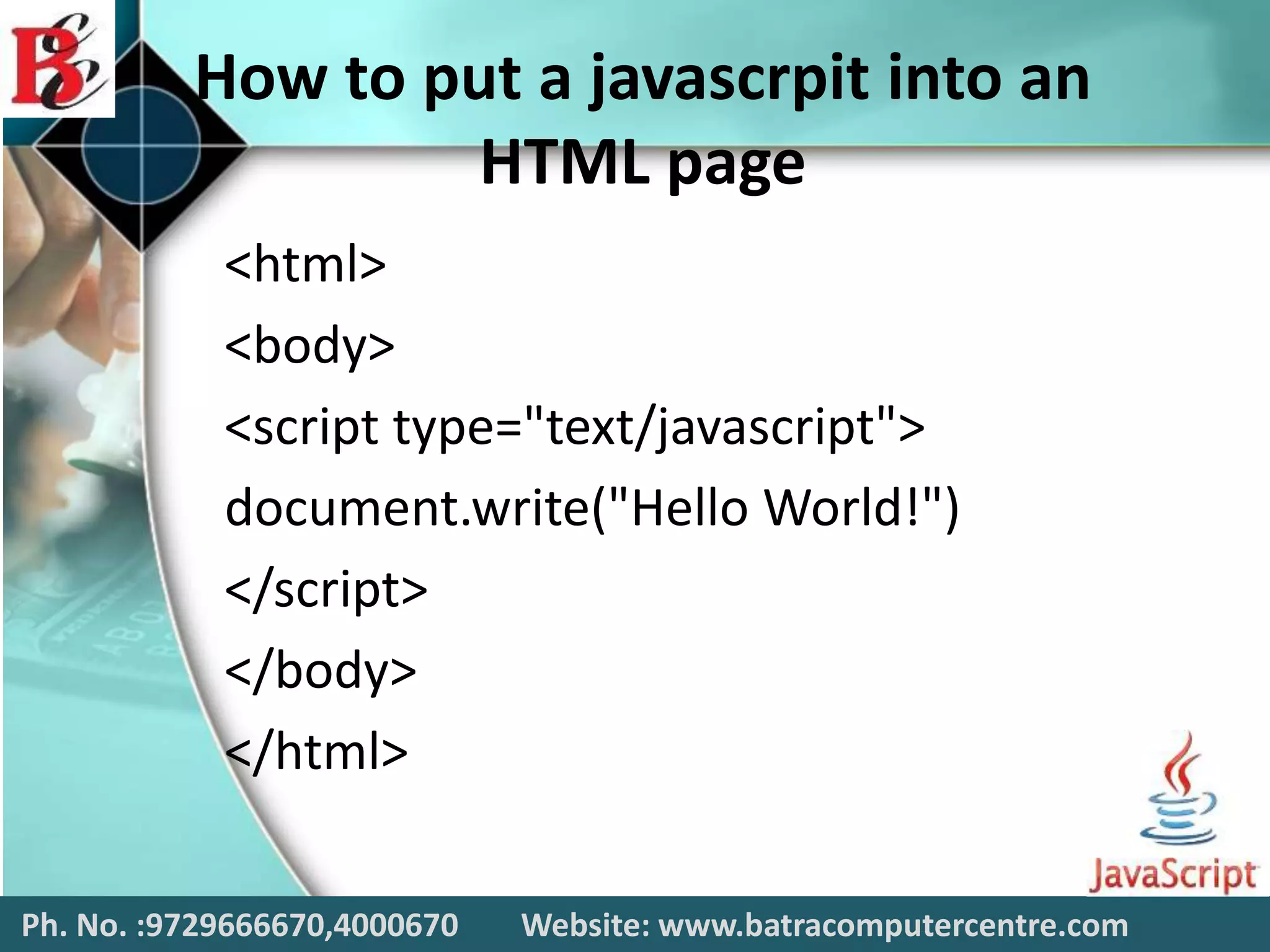
How to put a javascrpit into an
HTML page
<html>
<body>
<script type="text/javascript">
document.write("Hello World!")
</script>
</body>
</html>
Ph. No. :9729666670,4000670 Website: www.batracomputercentre.com
Ending Statement with a
Semicolon?
 With traditional programming languages, like
C++ and Java, each code statement has to end
with a semicolon (;).
 Many programmers continue this habit when
writing JavaScript, but in general, semicolons
are optional! However, semicolons are
required if you want to put more than one
statement on a single line.
Ph. No. :9729666670,4000670 Website: www.batracomputercentre.com
Operators
in
Javascript
There are following important operators used in
Javascripts:
 Arithmetic Operator
 Assignment Operator
 Comparison Operator
 Logical Operator
Ph. No. :9729666670,4000670 Website: www.batracomputercentre.com
Javascript Variables
 Variables are used to store data.
 A variable is a "container" for information you want
to store. A variable's value can change during the
script. You can refer to a variable by name to see its
value or to change its value.
 Rules for variable names:
• Variable names are case sensitive
• They must begin with a letter or the underscore character
o strname – STRNAME (not same)
Ph. No. :9729666670,4000670 Website: www.batracomputercentre.com
Arithmetic Operator
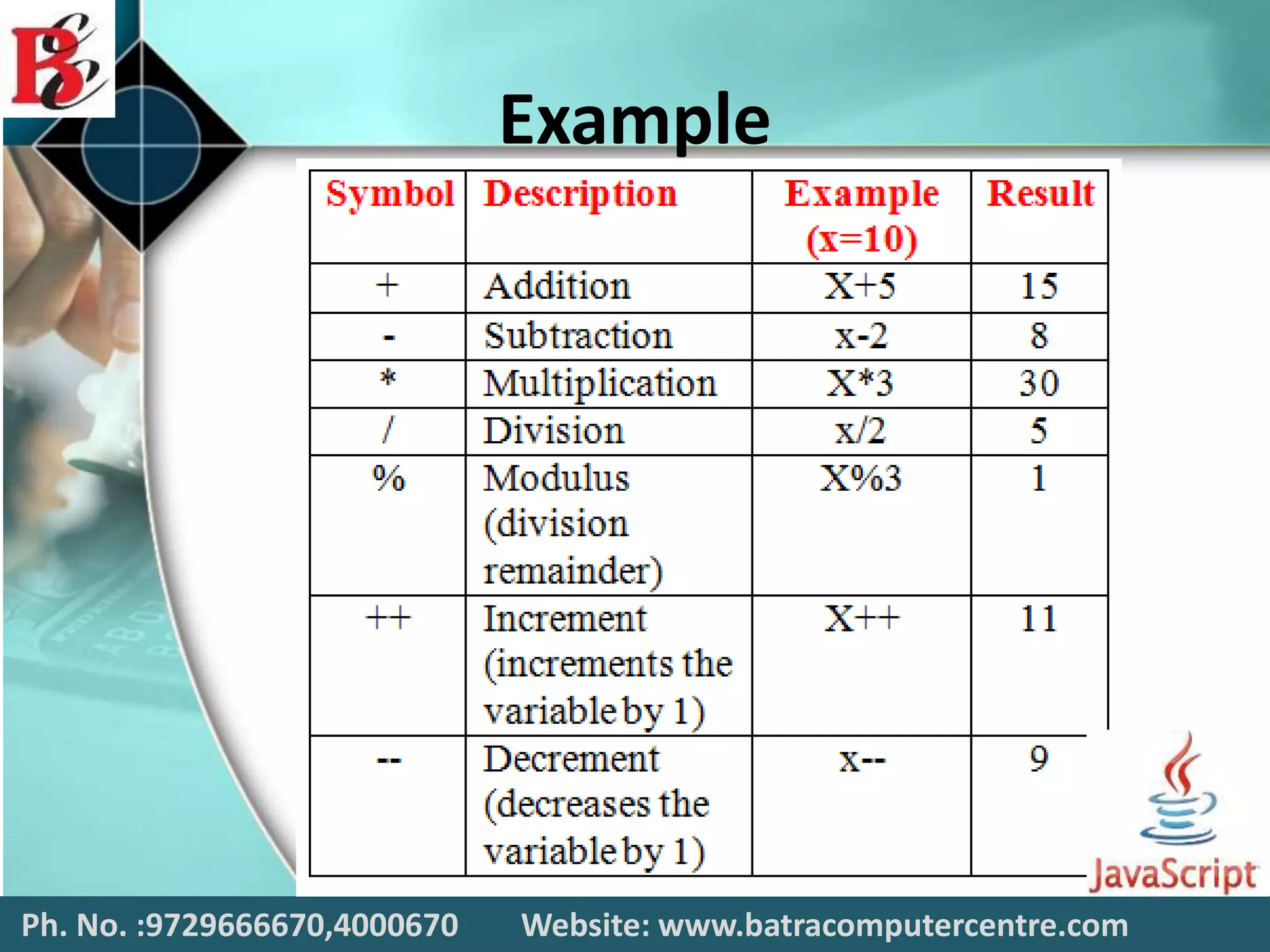
 Arithmetic operators are used to perform
arithmetic between variables and/or values.
 Given that y = 5, the table below explains the
arithmetic operators:
– Addition
– Subtraction
– Multiplication
– Division
– Modulus
– Increment
– Decrement
Ph. No. :9729666670,4000670 Website: www.batracomputercentre.com
Example
Ph. No. :9729666670,4000670 Website: www.batracomputercentre.com
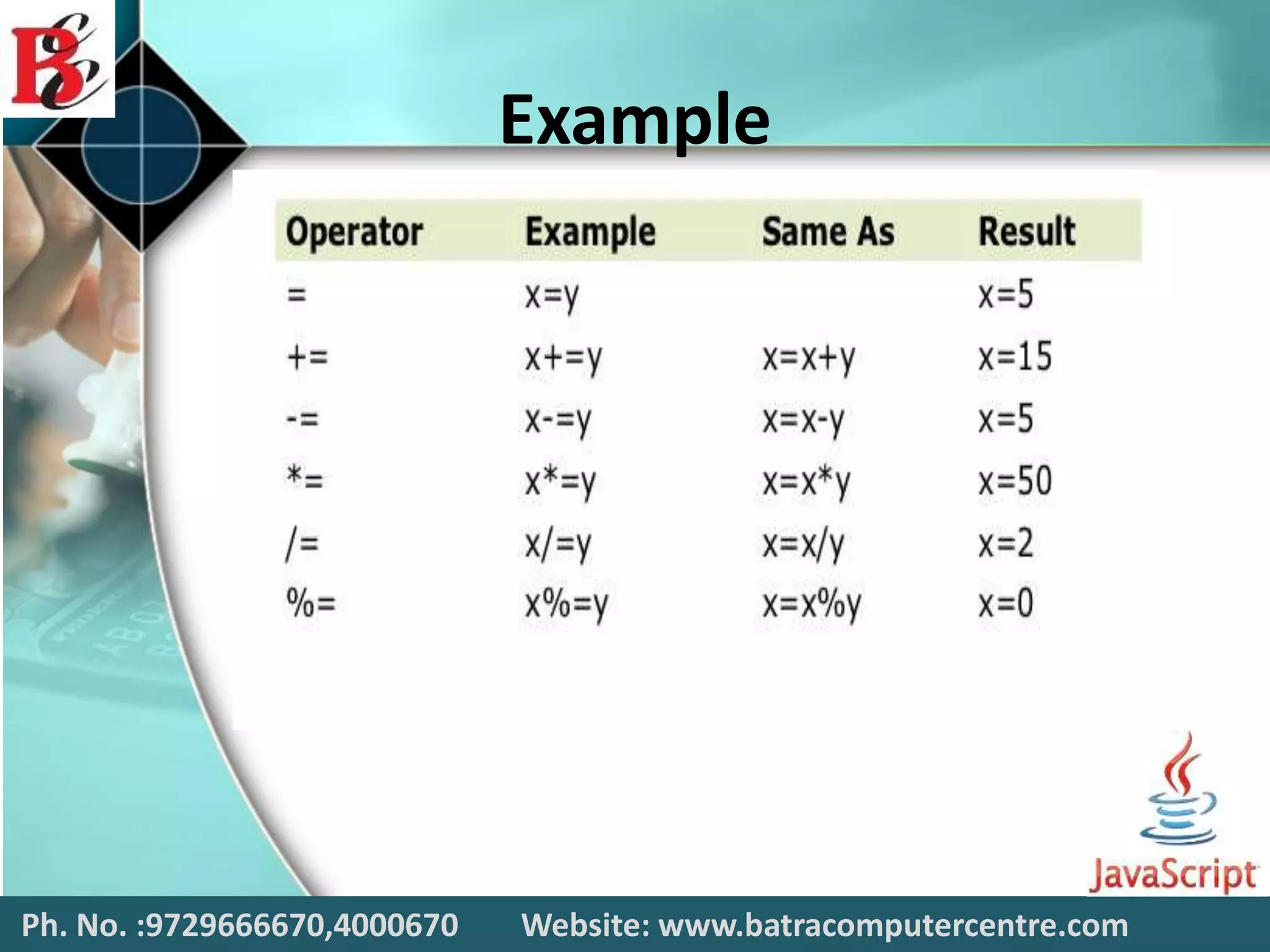
Assignment Operator
 Assignment operators are used to assign
values to JavaScript variables.
 The basic assignment operator is equal (=),
which assigns the value of its right operand to
its left operand. That is, x = y assigns the value
of y to x.
 Given that x = 10 and y = 5, the table below
explains the assignment operators:
Ph. No. :9729666670,4000670 Website: www.batracomputercentre.com
Example
Ph. No. :9729666670,4000670 Website: www.batracomputercentre.com
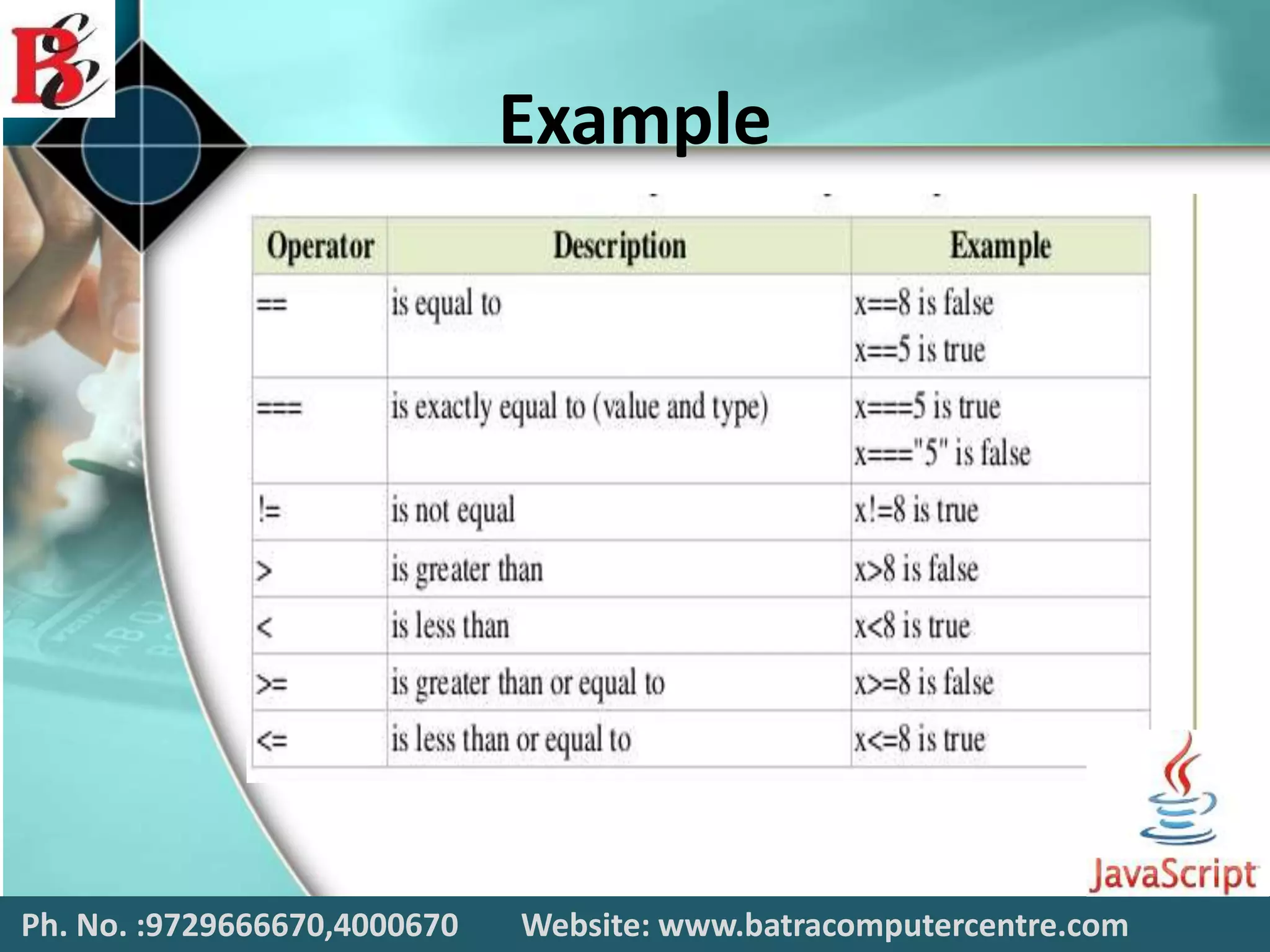
Comparison Operator
 Comparison operators are used in logical
statements to determine equality or difference
between variables or values.
 JavaScript has both strict and type–converting
comparisons.
 The more commonly-used abstract comparison
(e.g. ==) converts the operands to the same
type before making the comparison.
 For relational abstract comparisons (e.g., <=),
the operands are first converted to primitives,
then to the same type, before comparison.
Ph. No. :9729666670,4000670 Website: www.batracomputercentre.com
Example
Ph. No. :9729666670,4000670 Website: www.batracomputercentre.com
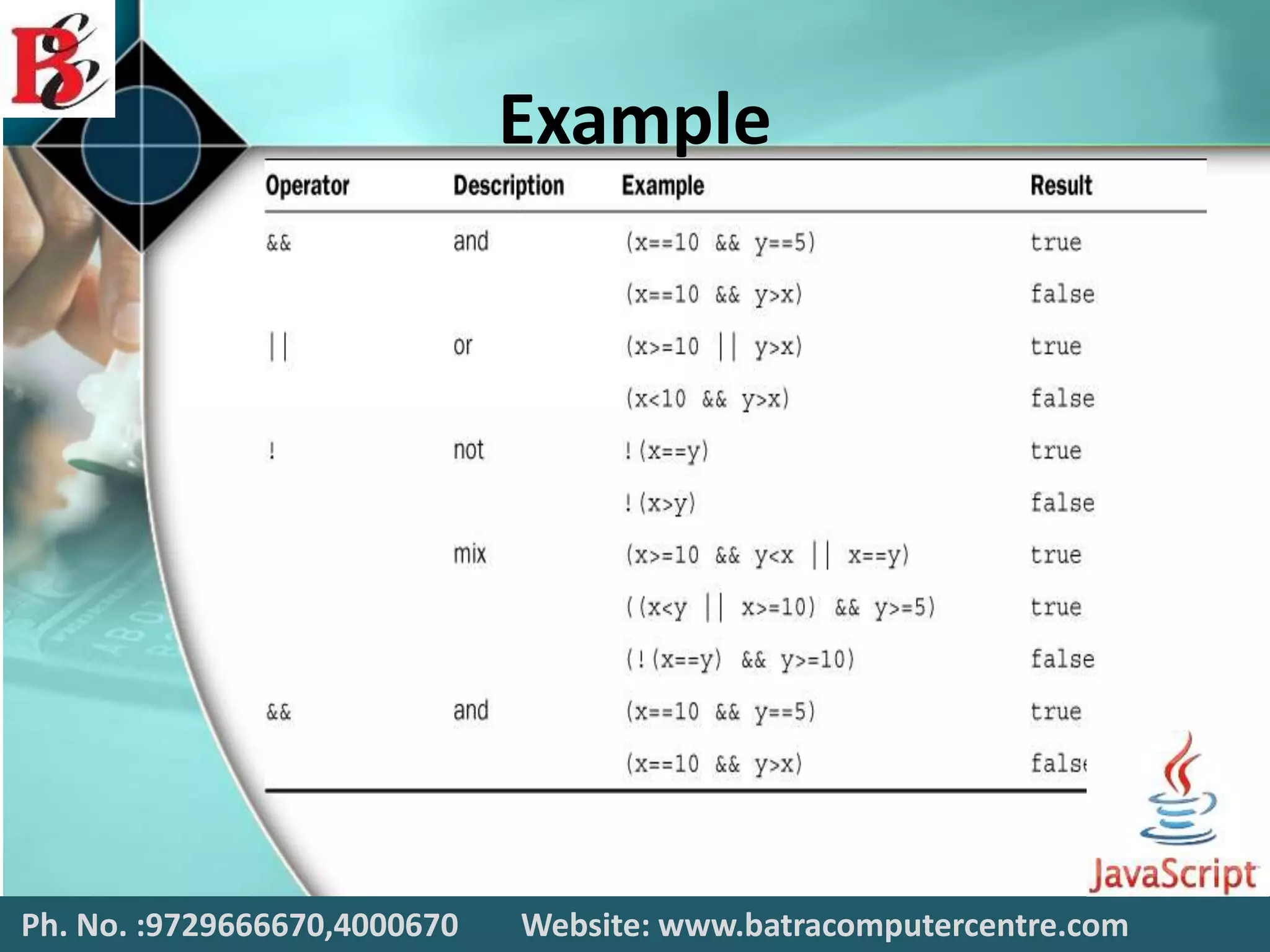
Logical Operator
 Logical operators are used to determine the
logic between variables or values.
 Logical operators are typically used
with Boolean (logical) values.
 However, the && and || operators actually
return the value of one of the specified
operands, so if these operators are used with
non-Boolean values, they may return a non-
Boolean value.
Ph. No. :9729666670,4000670 Website: www.batracomputercentre.com
Example
Ph. No. :9729666670,4000670 Website: www.batracomputercentre.com
Popup Boxes in
Javascript
JavaScript has three kind of popup boxes:
 Alert box
 Confirm box
 Prompt box
Ph. No. :9729666670,4000670 Website: www.batracomputercentre.com
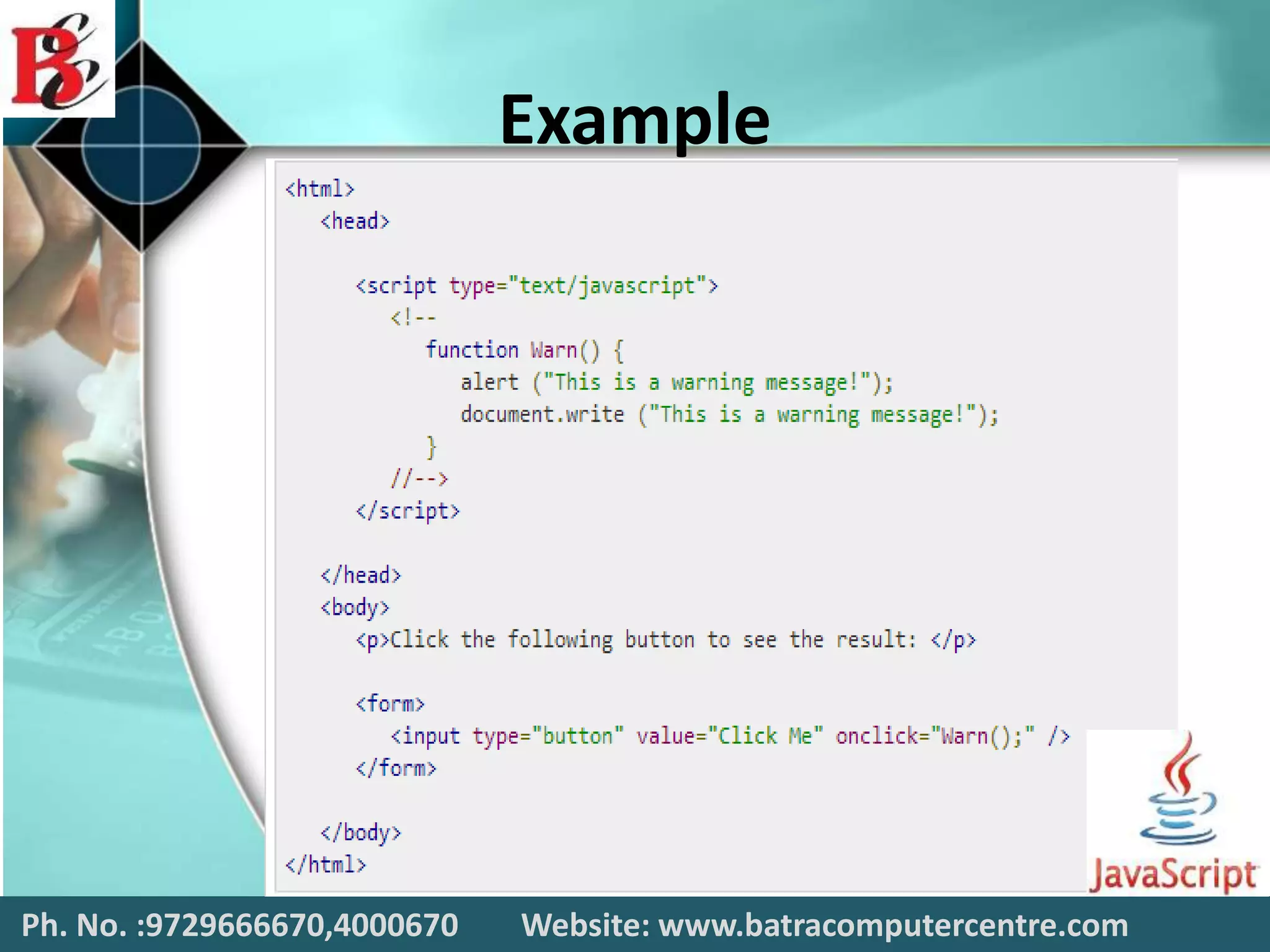
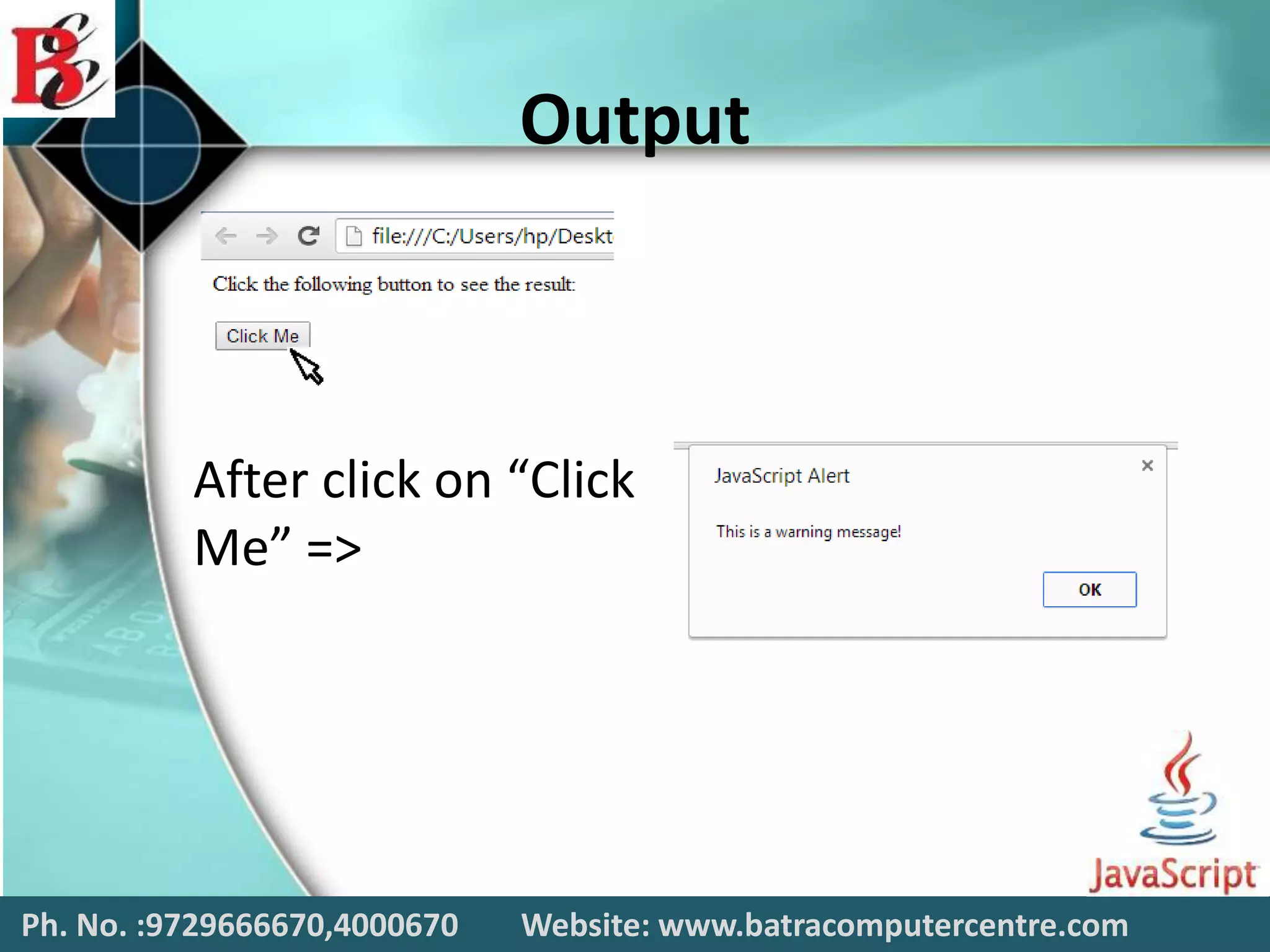
Alert dailog Box
An alert dialog box is mostly used to give a
warning message to the users. For example, if
one input field requires to enter some text but
the user does not provide any input, then as a
part of validation, you can use an alert box to
give a warning message.
Ph. No. :9729666670,4000670 Website: www.batracomputercentre.com
Example
Ph. No. :9729666670,4000670 Website: www.batracomputercentre.com
Output
Ph. No. :9729666670,4000670 Website: www.batracomputercentre.com
After click on “Click
Me” =>
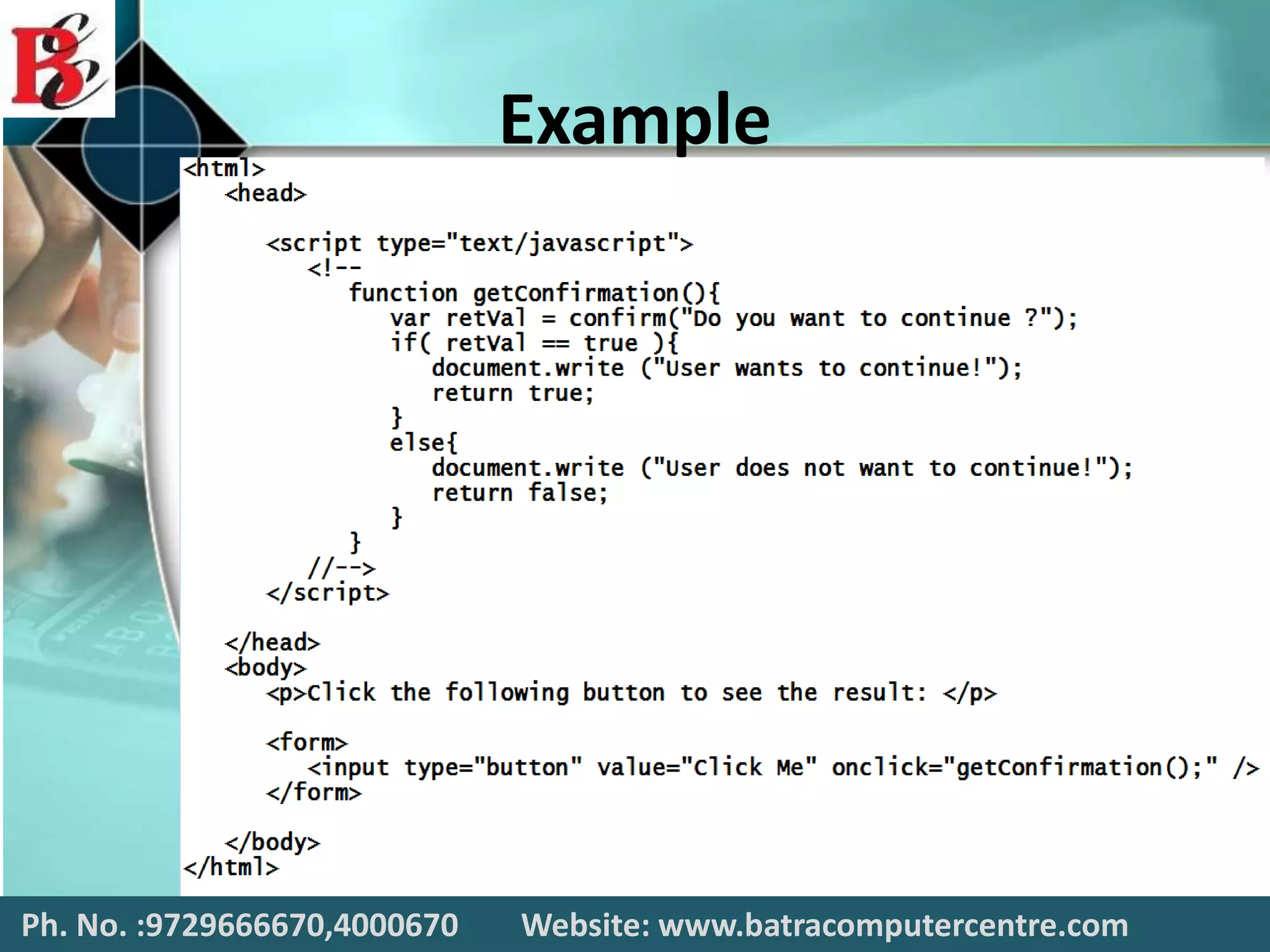
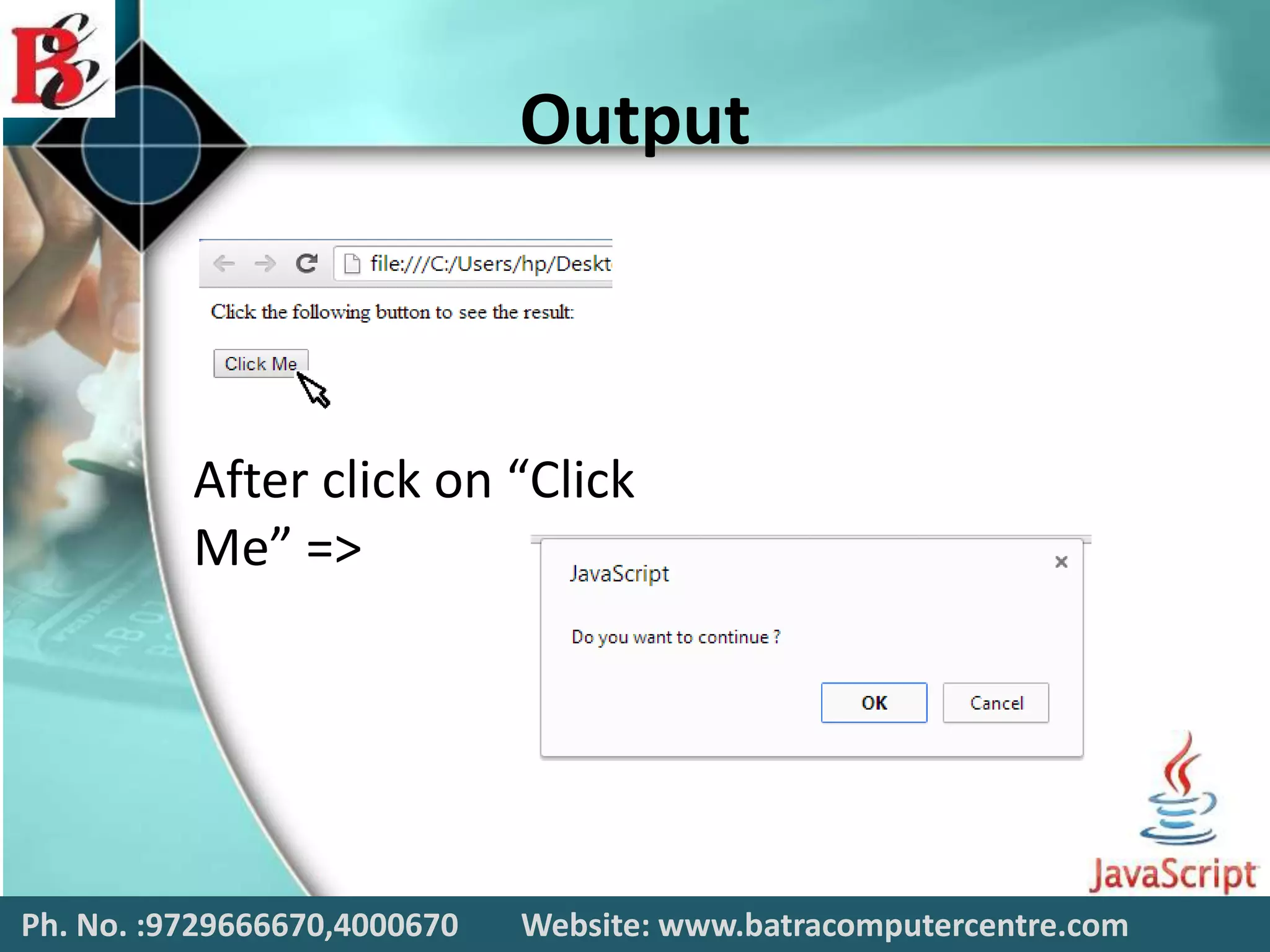
Confirmation Dialog Box
 A confirmation dialog box is mostly used to
take user's consent on any option. It displays a
dialog box with two buttons: Cancel.
 If the user clicks on the OK button, the
window method confirm() will return true. If
the user clicks on the Cancel button,
then confirm() returns false. You can use a
confirmation dialog box as follows.
Ph. No. :9729666670,4000670 Website: www.batracomputercentre.com
Example
Ph. No. :9729666670,4000670 Website: www.batracomputercentre.com
Output
After click on “Click
Me” =>
Ph. No. :9729666670,4000670 Website: www.batracomputercentre.com
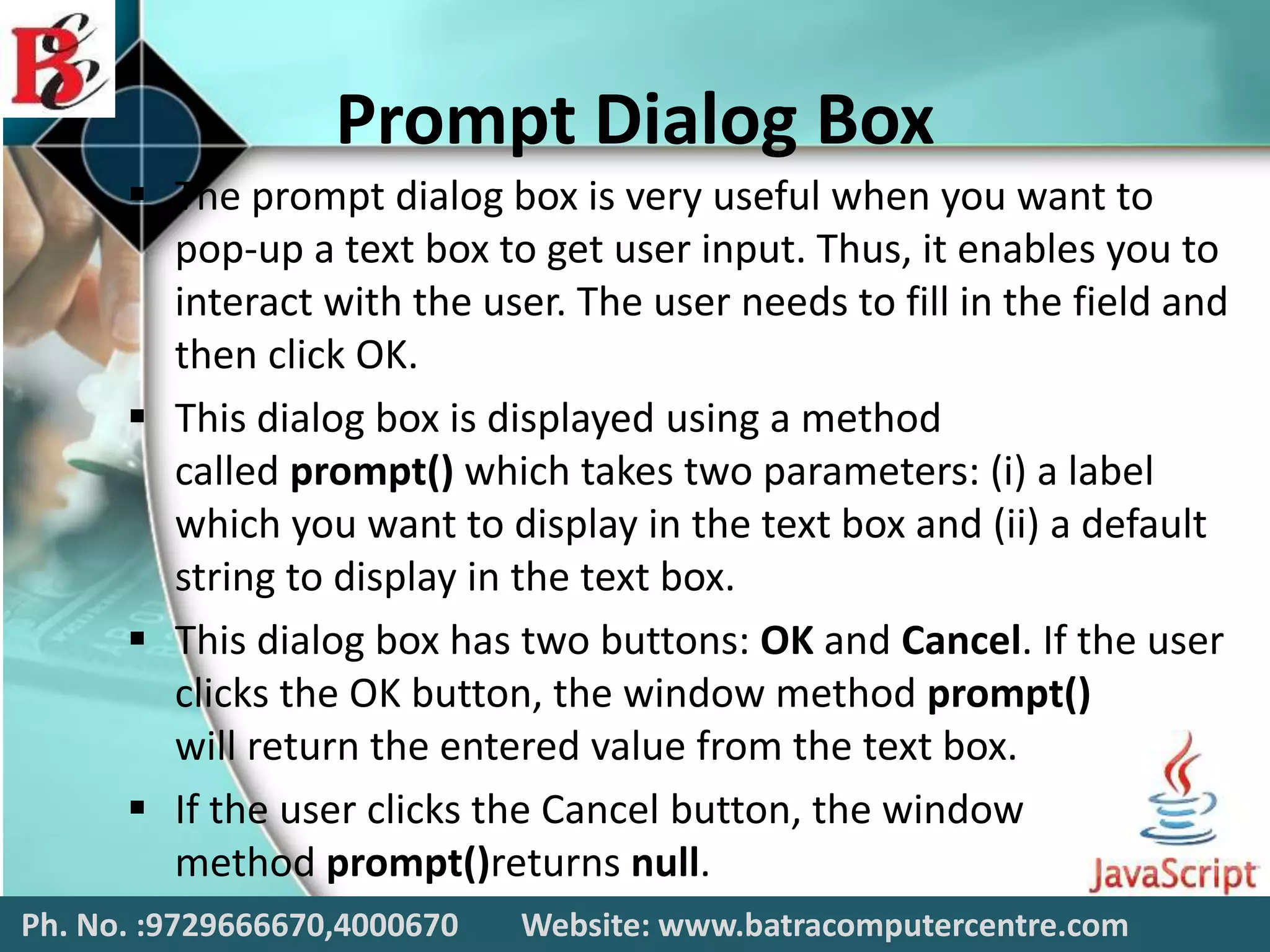
Prompt Dialog Box
 The prompt dialog box is very useful when you want to
pop-up a text box to get user input. Thus, it enables you to
interact with the user. The user needs to fill in the field and
then click OK.
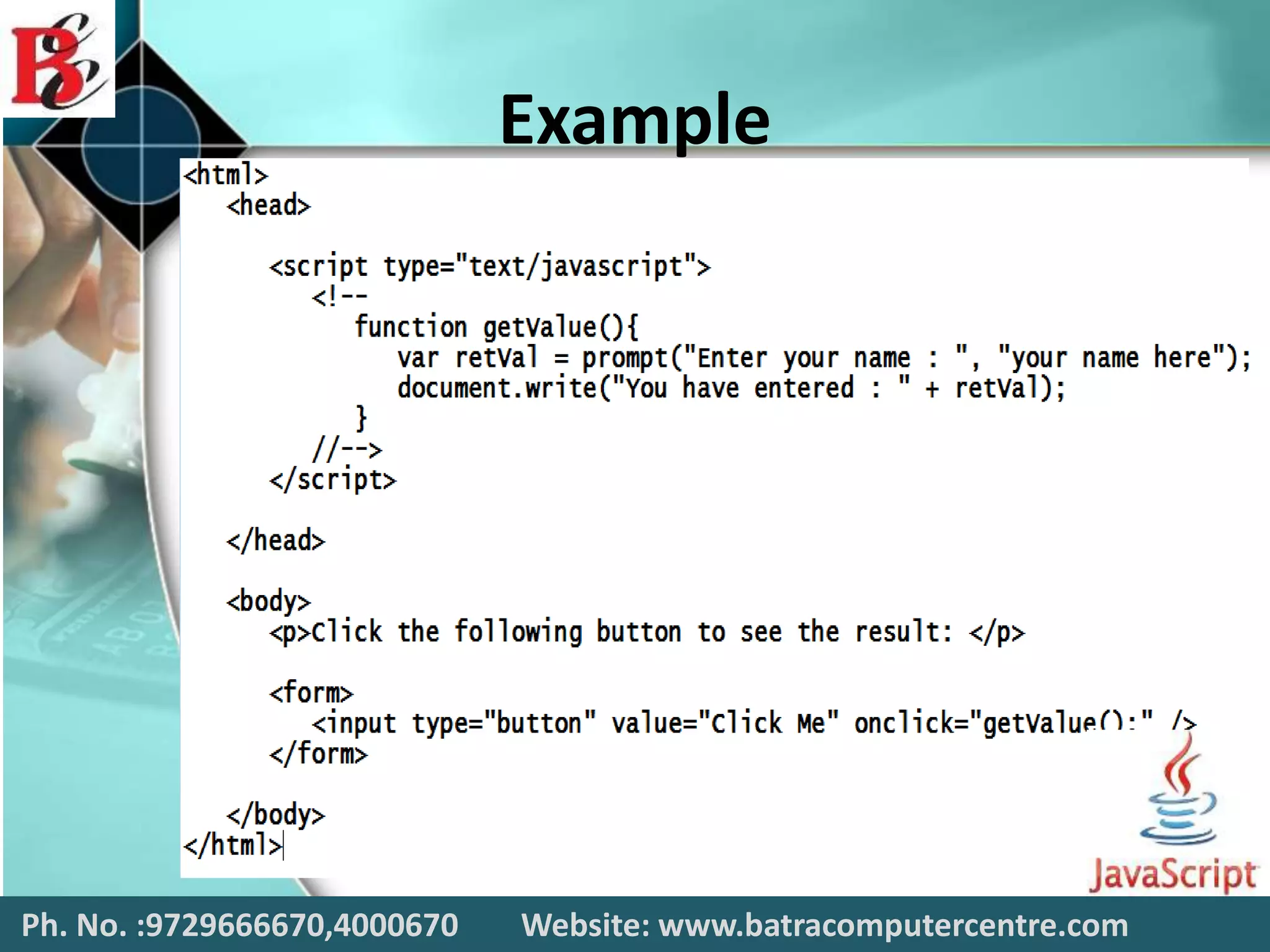
 This dialog box is displayed using a method
called prompt() which takes two parameters: (i) a label
which you want to display in the text box and (ii) a default
string to display in the text box.
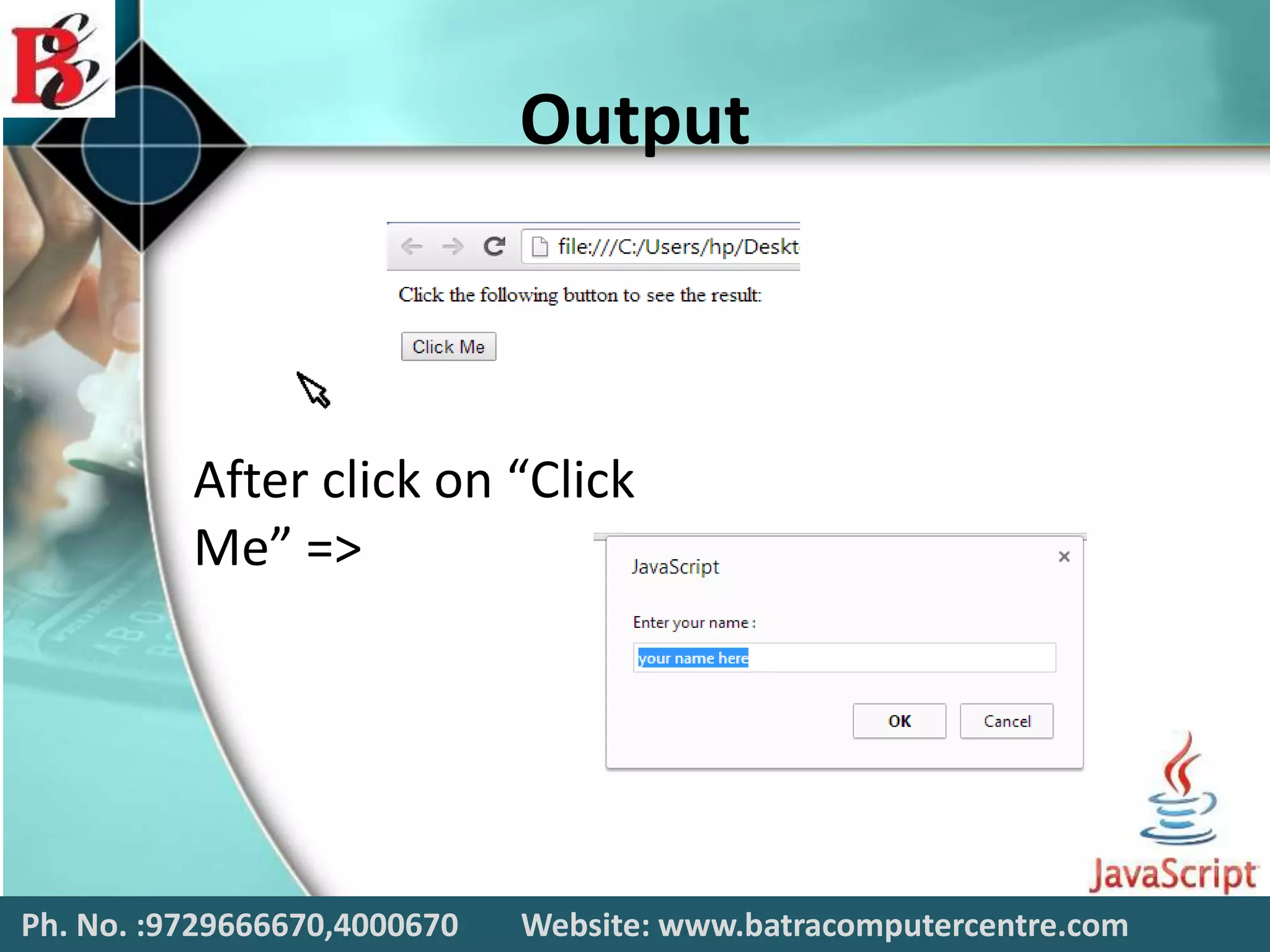
 This dialog box has two buttons: OK and Cancel. If the user
clicks the OK button, the window method prompt()
will return the entered value from the text box.
 If the user clicks the Cancel button, the window
method prompt()returns null.
Ph. No. :9729666670,4000670 Website: www.batracomputercentre.com
Example
Ph. No. :9729666670,4000670 Website: www.batracomputercentre.com
Output
After click on “Click
Me” =>
Ph. No. :9729666670,4000670 Website: www.batracomputercentre.com
CONTACT US
BATRA COMPUTER CENTRE
SCO 15, Dayal Bagh,
Near Hanuman Mandir,
Ambala Cantt.
Phn No.: 9729666670,0171-4000670
Email: info.jatinbatra@gmail.com
Website: www.batracomputercentre.com
Ph. No. :9729666670,4000670 Website: www.batracomputercentre.com

JavaScript Training in Ambala ! Batra Computer Centre

  • 2.
    Today We’ll Learn Javascript  What is javascript  Are Java & Javascript the Same?  How to put javascript in an HTML page  Ending statement with a Semicolon?  Javascript Variables  Operators in Javascript  Popup Boxes in javascript Ph. No. :9729666670,4000670 Website: www.batracomputercentre.com
  • 3.
    JAVASCRIPT JavaScript is usedin millions of Web pages to improve the design, validate forms, detect browsers, create cookies, and much more. JavaScript is the most popular scripting language on the internet, and works in all major browsers, such as Internet Explorer, Mozilla, Firefox, Netscape, Opera. Ph. No. :9729666670,4000670 Website: www.batracomputercentre.com
  • 4.
    WHAT IS JAVASCRIPT JavaScript was designed to add interactivity to HTML pages  JavaScript is a scripting language (a scripting language is a lightweight programming language)  A JavaScript consists of lines of executable computer code  A JavaScript is usually embedded directly into HTML pages  JavaScript is an interpreted language (means that scripts execute without preliminary compilation)  Everyone can use JavaScript without purchasing a license Ph. No. :9729666670,4000670 Website: www.batracomputercentre.com
  • 5.
    Are Java AndJavascript The Same?  NO!  Java and JavaScript are two completely different languages in both concept and design!  Java (developed by Sun Microsystems) is a powerful and much more complex programming language - in the same category as C and C++. Ph. No. :9729666670,4000670 Website: www.batracomputercentre.com
  • 6.
    How to puta javascrpit into an HTML page <html> <body> <script type="text/javascript"> document.write("Hello World!") </script> </body> </html> Ph. No. :9729666670,4000670 Website: www.batracomputercentre.com
  • 7.
    Ending Statement witha Semicolon?  With traditional programming languages, like C++ and Java, each code statement has to end with a semicolon (;).  Many programmers continue this habit when writing JavaScript, but in general, semicolons are optional! However, semicolons are required if you want to put more than one statement on a single line. Ph. No. :9729666670,4000670 Website: www.batracomputercentre.com
  • 8.
    Operators in Javascript There are followingimportant operators used in Javascripts:  Arithmetic Operator  Assignment Operator  Comparison Operator  Logical Operator Ph. No. :9729666670,4000670 Website: www.batracomputercentre.com
  • 9.
    Javascript Variables  Variablesare used to store data.  A variable is a "container" for information you want to store. A variable's value can change during the script. You can refer to a variable by name to see its value or to change its value.  Rules for variable names: • Variable names are case sensitive • They must begin with a letter or the underscore character o strname – STRNAME (not same) Ph. No. :9729666670,4000670 Website: www.batracomputercentre.com
  • 10.
    Arithmetic Operator  Arithmeticoperators are used to perform arithmetic between variables and/or values.  Given that y = 5, the table below explains the arithmetic operators: – Addition – Subtraction – Multiplication – Division – Modulus – Increment – Decrement Ph. No. :9729666670,4000670 Website: www.batracomputercentre.com
  • 11.
    Example Ph. No. :9729666670,4000670Website: www.batracomputercentre.com
  • 12.
    Assignment Operator  Assignmentoperators are used to assign values to JavaScript variables.  The basic assignment operator is equal (=), which assigns the value of its right operand to its left operand. That is, x = y assigns the value of y to x.  Given that x = 10 and y = 5, the table below explains the assignment operators: Ph. No. :9729666670,4000670 Website: www.batracomputercentre.com
  • 13.
    Example Ph. No. :9729666670,4000670Website: www.batracomputercentre.com
  • 14.
    Comparison Operator  Comparisonoperators are used in logical statements to determine equality or difference between variables or values.  JavaScript has both strict and type–converting comparisons.  The more commonly-used abstract comparison (e.g. ==) converts the operands to the same type before making the comparison.  For relational abstract comparisons (e.g., <=), the operands are first converted to primitives, then to the same type, before comparison. Ph. No. :9729666670,4000670 Website: www.batracomputercentre.com
  • 15.
    Example Ph. No. :9729666670,4000670Website: www.batracomputercentre.com
  • 16.
    Logical Operator  Logicaloperators are used to determine the logic between variables or values.  Logical operators are typically used with Boolean (logical) values.  However, the && and || operators actually return the value of one of the specified operands, so if these operators are used with non-Boolean values, they may return a non- Boolean value. Ph. No. :9729666670,4000670 Website: www.batracomputercentre.com
  • 17.
    Example Ph. No. :9729666670,4000670Website: www.batracomputercentre.com
  • 18.
    Popup Boxes in Javascript JavaScripthas three kind of popup boxes:  Alert box  Confirm box  Prompt box Ph. No. :9729666670,4000670 Website: www.batracomputercentre.com
  • 19.
    Alert dailog Box Analert dialog box is mostly used to give a warning message to the users. For example, if one input field requires to enter some text but the user does not provide any input, then as a part of validation, you can use an alert box to give a warning message. Ph. No. :9729666670,4000670 Website: www.batracomputercentre.com
  • 20.
    Example Ph. No. :9729666670,4000670Website: www.batracomputercentre.com
  • 21.
    Output Ph. No. :9729666670,4000670Website: www.batracomputercentre.com After click on “Click Me” =>
  • 22.
    Confirmation Dialog Box A confirmation dialog box is mostly used to take user's consent on any option. It displays a dialog box with two buttons: Cancel.  If the user clicks on the OK button, the window method confirm() will return true. If the user clicks on the Cancel button, then confirm() returns false. You can use a confirmation dialog box as follows. Ph. No. :9729666670,4000670 Website: www.batracomputercentre.com
  • 23.
    Example Ph. No. :9729666670,4000670Website: www.batracomputercentre.com
  • 24.
    Output After click on“Click Me” => Ph. No. :9729666670,4000670 Website: www.batracomputercentre.com
  • 25.
    Prompt Dialog Box The prompt dialog box is very useful when you want to pop-up a text box to get user input. Thus, it enables you to interact with the user. The user needs to fill in the field and then click OK.  This dialog box is displayed using a method called prompt() which takes two parameters: (i) a label which you want to display in the text box and (ii) a default string to display in the text box.  This dialog box has two buttons: OK and Cancel. If the user clicks the OK button, the window method prompt() will return the entered value from the text box.  If the user clicks the Cancel button, the window method prompt()returns null. Ph. No. :9729666670,4000670 Website: www.batracomputercentre.com
  • 26.
    Example Ph. No. :9729666670,4000670Website: www.batracomputercentre.com
  • 27.
    Output After click on“Click Me” => Ph. No. :9729666670,4000670 Website: www.batracomputercentre.com
  • 28.
    Ph. No. :9729666670,4000670Website: www.batracomputercentre.com
  • 29.
    Ph. No. :9729666670,4000670Website: www.batracomputercentre.com CONTACT US BATRA COMPUTER CENTRE SCO 15, Dayal Bagh, Near Hanuman Mandir, Ambala Cantt. Phn No.: 9729666670,0171-4000670 Email: info.jatinbatra@gmail.com Website: www.batracomputercentre.com
  • 30.
    Ph. No. :9729666670,4000670Website: www.batracomputercentre.com