● This module is intend to develop basic skills in
working with different types of variables that java
supports.
● Clearly differenciate the advantages and
disadvantages of working with different types of
variables.
Module Overview
2
 Use different types of variables in a program
 Participant should be able to identify the type of variable
to use according to the program needs.
 Understand between static and non-static variables.
 Undestand the memory allocations to different variables
in java.
 Understand the working of primitive variable and reference
variable
 Declare variables of class type
 Construct an object using new
 Describe default initialization
 Describe the significance of a reference variable
 State the consequences of assigning variables of class type
Objectives
3
Variable
Variable:A variable refers to a memory location with some value.
These memory locations are identified by identifiers. Amount of
memory allocation to the variables are decided by the data type
of the variable.
Syntax:
type identifier [ = value] ;
Example:
int weight=40;
float salary=22222.0f
String name = “Taksheel”
4
Java supports 3 types of variables .
 Local variables
 Instance variables
 Class/static variables
Types of Variables
5
Local variables :
 Local variables are declared in methods,
constructors, or blocks.
 Local variables are created when the method,
constructor or block is entered and the variable
will be destroyed once it exits the method,
constructor or block.
 Access modifiers cannot be used for local
variables.
 Local variables are visible only within the
declared method, constructor or block.
Local Variables
 Instance variables are declared in a class, but
outside a method, constructor or any block.
 Memory is allocated to them when object is
created and initialised with default values or
literals values.
 Instance variables are accessed directly by
methods, constructors, blocks, or essential
parts of an object.
 Instance variables can be declared in class
level which are called as static variables.
Instance Variables
7
 Class variables also known as static variables are
declared with the static keyword in a class, but
outside a method, constructor or a block.
 There would be only one copy ofstatic variable across
all objects of a single class.
 Static variables are stored in static memory. Normally
static variables are declared public /private and
final.Which then function as constants.
Class or Static Variables
<<Module name>>/<<Session #>>/<<Lesson Name>> >>
8
• Static variables are created when the program starts
and destroyed when the program stops.
• Visibility and Default values are similar to instance
variables. Static values can be assigned in static
initializer blocks.
• Static variables can be accessed by calling with the
class name . ClassName.VariableName.
Class or Static Variables(Cont…)
<<Module name>>/<<Session #>>/<<Lesson Name>> >>
9
Example Local Variable
public class Test{
public void machineAge(){
int age = 0;//local variable
age = age + 7;
System.out.println(“Machine age is : " + age)
}
public static void main(String args[]){
Test test = new Test();//test is an instance of Test class
Test.machineAge();
}
}
10
Example Instance Variable
<<Module name>>/<<Session #>>/<<Lesson Name>> >>
11
public class Machine{
String mname;//instance variable
float mcost;//instance variable
public float machineCost(){
float vat= 7/100;//local variable
this.mcost= mcost + vat;
System.out.println(“Machine age is : " + age)
}
public static void main(String args[]){
Machine sewing = new Machine();//machine is an instance of
Machine class
System.out.println(“Machine Cost:”+ sewing.machineCost());
}
}
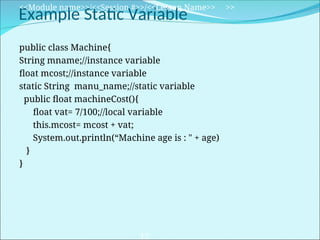
Example Static Variable
public class Machine{
String mname;//instance variable
float mcost;//instance variable
static String manu_name;//static variable
public float machineCost(){
float vat= 7/100;//local variable
this.mcost= mcost + vat;
System.out.println(“Machine age is : " + age)
}
}
<<Module name>>/<<Session #>>/<<Lesson Name>> >>
12
Static Variable(Cont…)
Class MachineApps{
public static void main(String args[]){
Machine sewing M= new Machine();//sewing is an instance of
Machine class
Machine.manu_name=“Usha”;
System.out.println(“Machine Cost:”+ sewingM.machineCost());
Machine fan= new Machine();/
System.out.println(“Machine manu Name:”+
sewingM.manu_name);
System.out.println(“Machine manu Name:”+ fan. manu_name);
}
}
<<Module name>>/<<Session #>>/<<Lesson Name>> >>
13
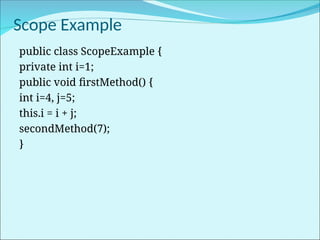
Scope Example
public class ScopeExample {
private int i=1;
public void firstMethod() {
int i=4, j=5;
this.i = i + j;
secondMethod(7);
}
Scope Example(Cont…)
public void secondMethod(int i) {
int j=8;
this.i = i + j;
}
}
public class TestScoping {
public static void main(String[] args) {
ScopeExample scope = new ScopeExample();
scope.firstMethod();
}
}
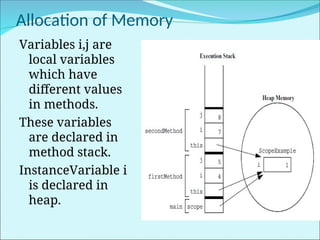
Allocation of Memory
Variables i,j are
local variables
which have
different values
in methods.
These variables
are declared in
method stack.
InstanceVariable i
is declared in
heap.
 Thank You

Java-Variables_about_different_Scope.ppt

  • 2.
    ● This moduleis intend to develop basic skills in working with different types of variables that java supports. ● Clearly differenciate the advantages and disadvantages of working with different types of variables. Module Overview 2
  • 3.
     Use differenttypes of variables in a program  Participant should be able to identify the type of variable to use according to the program needs.  Understand between static and non-static variables.  Undestand the memory allocations to different variables in java.  Understand the working of primitive variable and reference variable  Declare variables of class type  Construct an object using new  Describe default initialization  Describe the significance of a reference variable  State the consequences of assigning variables of class type Objectives 3
  • 4.
    Variable Variable:A variable refersto a memory location with some value. These memory locations are identified by identifiers. Amount of memory allocation to the variables are decided by the data type of the variable. Syntax: type identifier [ = value] ; Example: int weight=40; float salary=22222.0f String name = “Taksheel” 4
  • 5.
    Java supports 3types of variables .  Local variables  Instance variables  Class/static variables Types of Variables 5
  • 6.
    Local variables : Local variables are declared in methods, constructors, or blocks.  Local variables are created when the method, constructor or block is entered and the variable will be destroyed once it exits the method, constructor or block.  Access modifiers cannot be used for local variables.  Local variables are visible only within the declared method, constructor or block. Local Variables
  • 7.
     Instance variablesare declared in a class, but outside a method, constructor or any block.  Memory is allocated to them when object is created and initialised with default values or literals values.  Instance variables are accessed directly by methods, constructors, blocks, or essential parts of an object.  Instance variables can be declared in class level which are called as static variables. Instance Variables 7
  • 8.
     Class variablesalso known as static variables are declared with the static keyword in a class, but outside a method, constructor or a block.  There would be only one copy ofstatic variable across all objects of a single class.  Static variables are stored in static memory. Normally static variables are declared public /private and final.Which then function as constants. Class or Static Variables <<Module name>>/<<Session #>>/<<Lesson Name>> >> 8
  • 9.
    • Static variablesare created when the program starts and destroyed when the program stops. • Visibility and Default values are similar to instance variables. Static values can be assigned in static initializer blocks. • Static variables can be accessed by calling with the class name . ClassName.VariableName. Class or Static Variables(Cont…) <<Module name>>/<<Session #>>/<<Lesson Name>> >> 9
  • 10.
    Example Local Variable publicclass Test{ public void machineAge(){ int age = 0;//local variable age = age + 7; System.out.println(“Machine age is : " + age) } public static void main(String args[]){ Test test = new Test();//test is an instance of Test class Test.machineAge(); } } 10
  • 11.
    Example Instance Variable <<Modulename>>/<<Session #>>/<<Lesson Name>> >> 11 public class Machine{ String mname;//instance variable float mcost;//instance variable public float machineCost(){ float vat= 7/100;//local variable this.mcost= mcost + vat; System.out.println(“Machine age is : " + age) } public static void main(String args[]){ Machine sewing = new Machine();//machine is an instance of Machine class System.out.println(“Machine Cost:”+ sewing.machineCost()); } }
  • 12.
    Example Static Variable publicclass Machine{ String mname;//instance variable float mcost;//instance variable static String manu_name;//static variable public float machineCost(){ float vat= 7/100;//local variable this.mcost= mcost + vat; System.out.println(“Machine age is : " + age) } } <<Module name>>/<<Session #>>/<<Lesson Name>> >> 12
  • 13.
    Static Variable(Cont…) Class MachineApps{ publicstatic void main(String args[]){ Machine sewing M= new Machine();//sewing is an instance of Machine class Machine.manu_name=“Usha”; System.out.println(“Machine Cost:”+ sewingM.machineCost()); Machine fan= new Machine();/ System.out.println(“Machine manu Name:”+ sewingM.manu_name); System.out.println(“Machine manu Name:”+ fan. manu_name); } } <<Module name>>/<<Session #>>/<<Lesson Name>> >> 13
  • 14.
    Scope Example public classScopeExample { private int i=1; public void firstMethod() { int i=4, j=5; this.i = i + j; secondMethod(7); }
  • 15.
    Scope Example(Cont…) public voidsecondMethod(int i) { int j=8; this.i = i + j; } } public class TestScoping { public static void main(String[] args) { ScopeExample scope = new ScopeExample(); scope.firstMethod(); } }
  • 16.
    Allocation of Memory Variablesi,j are local variables which have different values in methods. These variables are declared in method stack. InstanceVariable i is declared in heap.
  • 17.

Editor's Notes

  • #2 Instructor Notes:
  • #3 Instructor Notes: By the end of this module, participants should be able to: <Obj1> <Obj 2>
  • #4 Instructor Notes: <<lesson Overview>>.
  • #5 Instructor Notes: <<Key Word>>: <<Definition>>
  • #7 Instructor Notes: <<Key Word>>: <<Definition>>
  • #8 Instructor Notes: <<Key Word>>: <<Definition>>
  • #9 Instructor Notes:
  • #11 Instructor Notes: <<Process flow steps>>
  • #12 Instructor Notes: <<Concept Description>>
  • #13 Instructor Notes: <<Concept Description>>