TOPIC 2
Java Programming Basic
CSC435:
Object Oriented Programming
OBJECTIVE
● To differentiate between Structured Programming and OOP.
● To understand the syntax of a Java statement.
● To code, compile and execute a Java application.
Introduction
Introduction to Java
Programming
Basic element of Java Programming
• Keyword, identifier, data type
• I/O statements, selection statement and repetition statement
Predefined Packages
Array of
primitives data
types
01 02
04
03
CONTENTS
Introduction to Java:
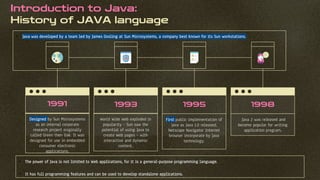
History of JAVA language
Designed by Sun Microsystems
as an internal corporate
research project originally
called Green then Oak. It was
designed for use in embedded
consumer electronic
applications.
1993
World Wide Web exploded in
popularity – Sun saw the
potential of using Java to
create Web pages – with
interactive and dynamic
content.
1995
First public implementation of
Java as Java 1.0 released.
Netscape Navigator Internet
browser incorporate by Java
technology.
1998
Java 2 was released and
become popular for writing
application program.
1991
• Java was developed by a team led by James Gosling at Sun Microsystems, a company best known for its Sun workstations.
• The power of Java is not limited to Web applications, for it is a general-purpose programming language.
• It has full programming features and can be used to develop standalone applications.
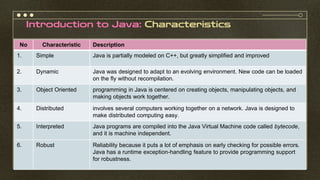
Introduction to Java: Characteristics
Images reveal large amounts of
data, so remember: use an image
instead of a long text. Your audience
will appreciate it
No Characteristic Description
1. Simple Java is partially modeled on C++, but greatly simplified and improved
2. Dynamic Java was designed to adapt to an evolving environment. New code can be loaded
on the fly without recompilation.
3. Object Oriented programming in Java is centered on creating objects, manipulating objects, and
making objects work together.
4. Distributed involves several computers working together on a network. Java is designed to
make distributed computing easy.
5. Interpreted Java programs are compiled into the Java Virtual Machine code called bytecode,
and it is machine independent.
6. Robust Reliability because it puts a lot of emphasis on early checking for possible errors.
Java has a runtime exception-handling feature to provide programming support
for robustness.
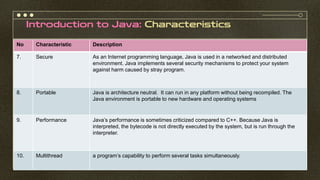
Introduction to Java: Characteristics
No Characteristic Description
7. Secure As an Internet programming language, Java is used in a networked and distributed
environment. Java implements several security mechanisms to protect your system
against harm caused by stray program.
8. Portable Java is architecture neutral. It can run in any platform without being recompiled. The
Java environment is portable to new hardware and operating systems
9. Performance Java’s performance is sometimes criticized compared to C++. Because Java is
interpreted, the bytecode is not directly executed by the system, but is run through the
interpreter.
10. Multithread a program’s capability to perform several tasks simultaneously.
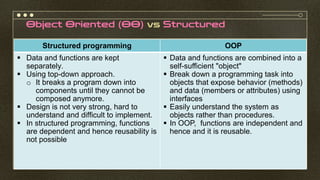
Object Oriented (OO) vs Structured
Structured programming OOP
▪ Data and functions are kept
separately.
▪ Using top-down approach.
o It breaks a program down into
components until they cannot be
composed anymore.
▪ Design is not very strong, hard to
understand and difficult to implement.
▪ In structured programming, functions
are dependent and hence reusability is
not possible
▪ Data and functions are combined into a
self-sufficient "object"
▪ Break down a programming task into
objects that expose behavior (methods)
and data (members or attributes) using
interfaces
▪ Easily understand the system as
objects rather than procedures.
▪ In OOP, functions are independent and
hence and it is reusable.
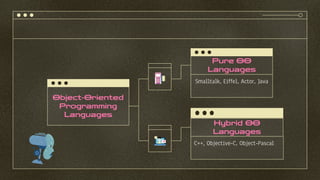
Object-Oriented
Programming
Languages
Pure OO
Languages
Smalltalk, Eiffel, Actor, Java
Hybrid OO
Languages
C++, Objective-C, Object-Pascal
Introduction To Java Application
 Java applications – standalone programs; applications can be executed from any computer with a
Java interpreter.
 Java source code is written in plain text, using a text editor.
• This could range from a plain text editor like Notepad, to a programmers' editor such as
TextPad, to a complex integrated development environment (IDE) like BlueJ, NetBeans or
Eclipse.
 Classes are the fundamental building blocks of Java programs.
 Every Java application must have main method.
 In Java, every source file that contain one public class, the name of public class must match the
name of the file containing the file.
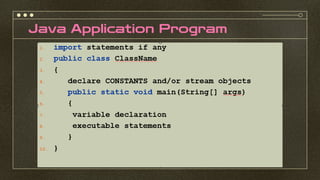
Java Application Program
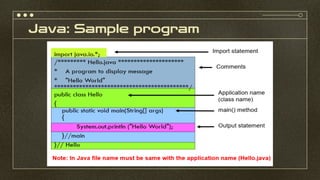
Java: Sample program
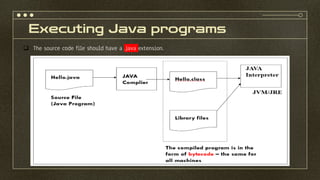
Executing Java programs
❑ The source code file should have a .java extension.
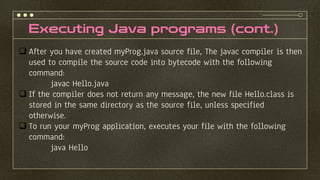
Executing Java programs (cont.)
❑ After you have created myProg.java source file, The javac compiler is then
used to compile the source code into bytecode with the following
command:
javac Hello.java
❑ If the compiler does not return any message, the new file Hello.class is
stored in the same directory as the source file, unless specified
otherwise.
❑ To run your myProg application, executes your file with the following
command:
java Hello
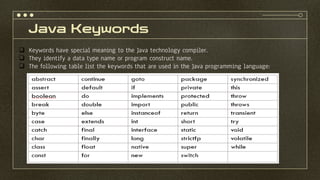
Java Keywords
❑ Keywords have special meaning to the Java technology compiler.
❑ They identify a data type name or program construct name.
❑ The following table list the keywords that are used in the Java programming language:
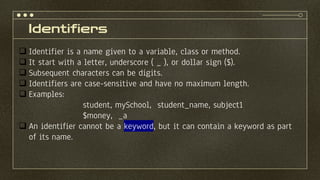
Identifiers
❑ Identifier is a name given to a variable, class or method.
❑ It start with a letter, underscore ( _ ), or dollar sign ($).
❑ Subsequent characters can be digits.
❑ Identifiers are case-sensitive and have no maximum length.
❑ Examples:
student, mySchool, student_name, subject1
$money, _a
❑ An identifier cannot be a keyword, but it can contain a keyword as part
of its name.
Java: Data Types
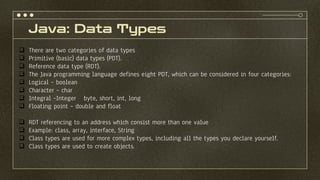
❑ There are two categories of data types
❑ Primitive (basic) data types (PDT).
❑ Reference data type (RDT).
❑ The Java programming language defines eight PDT, which can be considered in four categories:
❑ Logical – boolean
❑ Character – char
❑ Integral –Integer byte, short, int, long
❑ Floating point – double and float
❑ RDT referencing to an address which consist more than one value
❑ Example: class, array, interface, String
❑ Class types are used for more complex types, including all the types you declare yourself.
❑ Class types are used to create objects.
Java: Basic Data Types
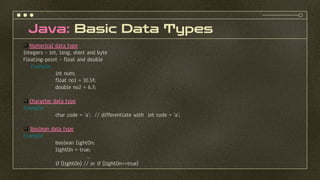
❑ Numerical data type
Integers – int, long, short and byte
Floating-point – float and double
Example:
int num;
float no1 = 10.5f;
double no2 = 6.7;
❑ Character data type
Example:
char code = ‘a’; // differentiate with int code = ‘a’;
❑ Boolean data type
Example:
boolean lightOn;
lightOn = true;
..
if (lightOn) // or if (lightOn==true)
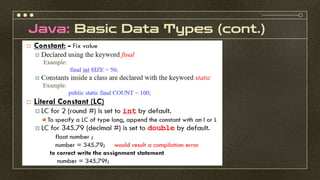
Java: Basic Data Types (cont.)
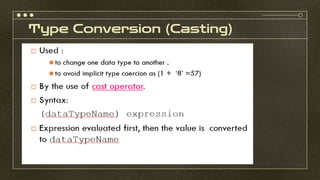
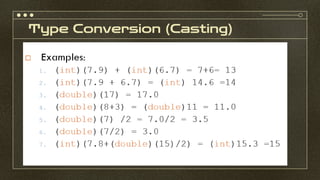
Type Conversion (Casting)
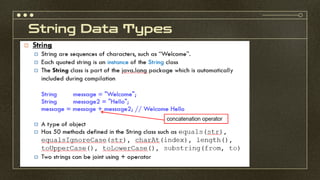
String Data Types
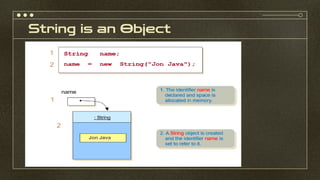
String is an Object
String Indexing
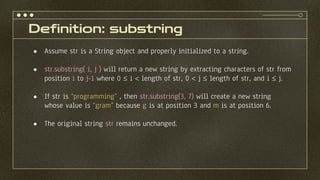
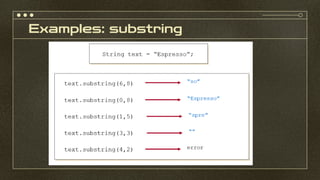
Definition: substring
● Assume str is a String object and properly initialized to a string.
● str.substring( i, j ) will return a new string by extracting characters of str from
position i to j-1 where 0  i  length of str, 0  j  length of str, and i  j.
● If str is “programming” , then str.substring(3, 7) will create a new string
whose value is “gram” because g is at position 3 and m is at position 6.
● The original string str remains unchanged.
Examples: substring
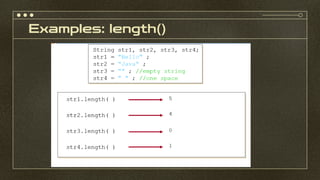
Definition: length()
● Assume str is a String object and properly initialized to a string.
● str.length( ) will return the number of characters in str.
● If str is "programming" , then str.length( ) will return 11 because there are
11 characters in it.
● The original string str remains unchanged.
Examples: length()
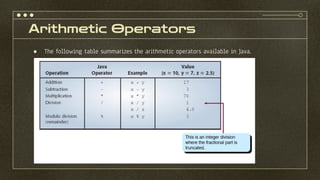
Arithmetic Operators
● The following table summarizes the arithmetic operators available in Java.
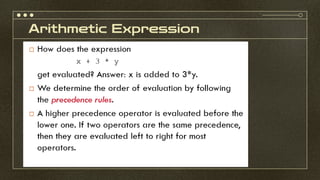
Arithmetic Expression
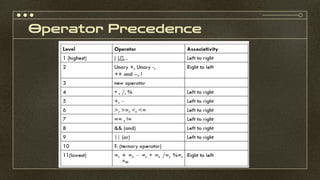
Operator Precedence
Operator +
Input Statement- Using Console I/O
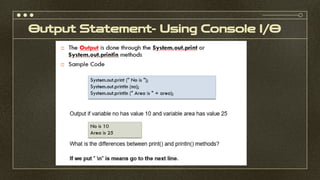
Output Statement- Using Console I/O
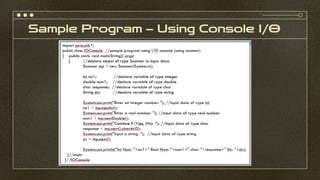
Sample Program – Using Console I/O
Input Statement Using Dialog Box (GUI interface)
Output Statement Using Dialog Box (GUI
interface)
Assign Statement
Selection statements
if, else statements
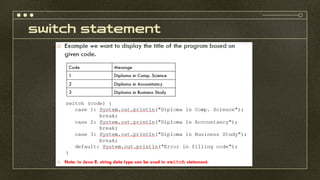
switch statement
Looping/repetition statement
The for Loops
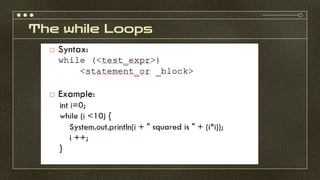
The while Loops
The do/while Loops
Special Loop Flow of Control
The break and continue statement
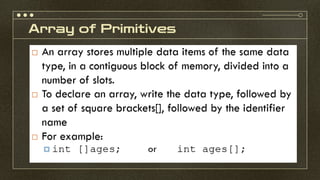
Array of Primitives
Array Instantiation
Array Instantiation
Accessing an Array Element
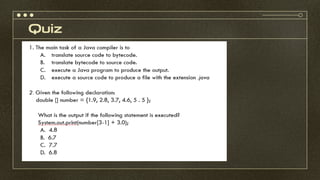
Quiz
Quiz
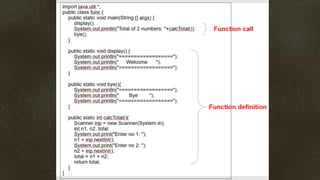
Independent Function (IF)-Static Method
Function Call
Function Call
Exercise
References
 http://en.wikipedia.org/wiki/Procedural_programming
 http://www.javatalk.org/2013/11/JAVA-BRIEF-HISTORY-VERSION-HISTORY.html
 Wu C. Thomas, An Introduction to Object-Oriented Programming with Java, 5th Edition, McGraw Hill , 2010
 Deitel H. M. & Deitel P. J., Java How To Program, Prentice Hall, 8th Edition, 2010

Topic 2 - Java Programming Basic.pdf CSC435 OOP

  • 1.
    TOPIC 2 Java ProgrammingBasic CSC435: Object Oriented Programming
  • 2.
    OBJECTIVE ● To differentiatebetween Structured Programming and OOP. ● To understand the syntax of a Java statement. ● To code, compile and execute a Java application.
  • 3.
    Introduction Introduction to Java Programming Basicelement of Java Programming • Keyword, identifier, data type • I/O statements, selection statement and repetition statement Predefined Packages Array of primitives data types 01 02 04 03 CONTENTS
  • 4.
    Introduction to Java: Historyof JAVA language Designed by Sun Microsystems as an internal corporate research project originally called Green then Oak. It was designed for use in embedded consumer electronic applications. 1993 World Wide Web exploded in popularity – Sun saw the potential of using Java to create Web pages – with interactive and dynamic content. 1995 First public implementation of Java as Java 1.0 released. Netscape Navigator Internet browser incorporate by Java technology. 1998 Java 2 was released and become popular for writing application program. 1991 • Java was developed by a team led by James Gosling at Sun Microsystems, a company best known for its Sun workstations. • The power of Java is not limited to Web applications, for it is a general-purpose programming language. • It has full programming features and can be used to develop standalone applications.
  • 5.
    Introduction to Java:Characteristics Images reveal large amounts of data, so remember: use an image instead of a long text. Your audience will appreciate it No Characteristic Description 1. Simple Java is partially modeled on C++, but greatly simplified and improved 2. Dynamic Java was designed to adapt to an evolving environment. New code can be loaded on the fly without recompilation. 3. Object Oriented programming in Java is centered on creating objects, manipulating objects, and making objects work together. 4. Distributed involves several computers working together on a network. Java is designed to make distributed computing easy. 5. Interpreted Java programs are compiled into the Java Virtual Machine code called bytecode, and it is machine independent. 6. Robust Reliability because it puts a lot of emphasis on early checking for possible errors. Java has a runtime exception-handling feature to provide programming support for robustness.
  • 6.
    Introduction to Java:Characteristics No Characteristic Description 7. Secure As an Internet programming language, Java is used in a networked and distributed environment. Java implements several security mechanisms to protect your system against harm caused by stray program. 8. Portable Java is architecture neutral. It can run in any platform without being recompiled. The Java environment is portable to new hardware and operating systems 9. Performance Java’s performance is sometimes criticized compared to C++. Because Java is interpreted, the bytecode is not directly executed by the system, but is run through the interpreter. 10. Multithread a program’s capability to perform several tasks simultaneously.
  • 7.
    Object Oriented (OO)vs Structured Structured programming OOP ▪ Data and functions are kept separately. ▪ Using top-down approach. o It breaks a program down into components until they cannot be composed anymore. ▪ Design is not very strong, hard to understand and difficult to implement. ▪ In structured programming, functions are dependent and hence reusability is not possible ▪ Data and functions are combined into a self-sufficient "object" ▪ Break down a programming task into objects that expose behavior (methods) and data (members or attributes) using interfaces ▪ Easily understand the system as objects rather than procedures. ▪ In OOP, functions are independent and hence and it is reusable.
  • 8.
    Object-Oriented Programming Languages Pure OO Languages Smalltalk, Eiffel,Actor, Java Hybrid OO Languages C++, Objective-C, Object-Pascal
  • 9.
    Introduction To JavaApplication  Java applications – standalone programs; applications can be executed from any computer with a Java interpreter.  Java source code is written in plain text, using a text editor. • This could range from a plain text editor like Notepad, to a programmers' editor such as TextPad, to a complex integrated development environment (IDE) like BlueJ, NetBeans or Eclipse.  Classes are the fundamental building blocks of Java programs.  Every Java application must have main method.  In Java, every source file that contain one public class, the name of public class must match the name of the file containing the file.
  • 10.
  • 11.
  • 12.
    Executing Java programs ❑The source code file should have a .java extension.
  • 13.
    Executing Java programs(cont.) ❑ After you have created myProg.java source file, The javac compiler is then used to compile the source code into bytecode with the following command: javac Hello.java ❑ If the compiler does not return any message, the new file Hello.class is stored in the same directory as the source file, unless specified otherwise. ❑ To run your myProg application, executes your file with the following command: java Hello
  • 14.
    Java Keywords ❑ Keywordshave special meaning to the Java technology compiler. ❑ They identify a data type name or program construct name. ❑ The following table list the keywords that are used in the Java programming language:
  • 15.
    Identifiers ❑ Identifier isa name given to a variable, class or method. ❑ It start with a letter, underscore ( _ ), or dollar sign ($). ❑ Subsequent characters can be digits. ❑ Identifiers are case-sensitive and have no maximum length. ❑ Examples: student, mySchool, student_name, subject1 $money, _a ❑ An identifier cannot be a keyword, but it can contain a keyword as part of its name.
  • 16.
    Java: Data Types ❑There are two categories of data types ❑ Primitive (basic) data types (PDT). ❑ Reference data type (RDT). ❑ The Java programming language defines eight PDT, which can be considered in four categories: ❑ Logical – boolean ❑ Character – char ❑ Integral –Integer byte, short, int, long ❑ Floating point – double and float ❑ RDT referencing to an address which consist more than one value ❑ Example: class, array, interface, String ❑ Class types are used for more complex types, including all the types you declare yourself. ❑ Class types are used to create objects.
  • 17.
    Java: Basic DataTypes ❑ Numerical data type Integers – int, long, short and byte Floating-point – float and double Example: int num; float no1 = 10.5f; double no2 = 6.7; ❑ Character data type Example: char code = ‘a’; // differentiate with int code = ‘a’; ❑ Boolean data type Example: boolean lightOn; lightOn = true; .. if (lightOn) // or if (lightOn==true)
  • 18.
    Java: Basic DataTypes (cont.)
  • 19.
  • 20.
  • 21.
  • 22.
  • 23.
  • 24.
    Definition: substring ● Assumestr is a String object and properly initialized to a string. ● str.substring( i, j ) will return a new string by extracting characters of str from position i to j-1 where 0  i  length of str, 0  j  length of str, and i  j. ● If str is “programming” , then str.substring(3, 7) will create a new string whose value is “gram” because g is at position 3 and m is at position 6. ● The original string str remains unchanged.
  • 25.
  • 26.
    Definition: length() ● Assumestr is a String object and properly initialized to a string. ● str.length( ) will return the number of characters in str. ● If str is "programming" , then str.length( ) will return 11 because there are 11 characters in it. ● The original string str remains unchanged.
  • 27.
  • 28.
    Arithmetic Operators ● Thefollowing table summarizes the arithmetic operators available in Java.
  • 29.
  • 30.
  • 31.
  • 32.
  • 33.
  • 34.
    Sample Program –Using Console I/O
  • 35.
    Input Statement UsingDialog Box (GUI interface)
  • 36.
    Output Statement UsingDialog Box (GUI interface)
  • 37.
  • 38.
  • 39.
  • 40.
  • 41.
  • 42.
  • 43.
  • 44.
  • 45.
  • 46.
    The break andcontinue statement
  • 47.
  • 48.
  • 49.
  • 50.
  • 51.
  • 52.
  • 53.
  • 54.
  • 55.
  • 57.
  • 58.
  • 59.
  • 60.
    References  http://en.wikipedia.org/wiki/Procedural_programming  http://www.javatalk.org/2013/11/JAVA-BRIEF-HISTORY-VERSION-HISTORY.html Wu C. Thomas, An Introduction to Object-Oriented Programming with Java, 5th Edition, McGraw Hill , 2010  Deitel H. M. & Deitel P. J., Java How To Program, Prentice Hall, 8th Edition, 2010