The document explains the use of the output statement in Java, specifically 'System.out.println()', detailing its components and function. It provides examples of basic Java programs that utilize this statement for displaying messages and performing arithmetic operations. Additionally, it includes instructions for compiling and executing Java code.
![Output Statement in java:-
In java, we use System.out.println() is the output statement to display a message, string or data on
the screen. It displays the argument that we pass to it.
Let’s understand each part of this statement:
1. System: It is a final class defined in the java.lang package.
2. out: It is an instance of PrintStream type and its access specifiers are public and final
3. println(): It is a method of PrintStream class.
As we know that we need to create the object of a class to invoke its method. Here instead of creating the
object of the PrintStream class we use System.out, it internally creates the object of PrintStream class so
we can use the statement System.out.println() to invoke println() method.
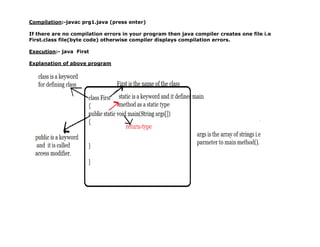
/*First Program in java language.
Save the file with name prg1.java*/
class First
{
public static void main(String args[])
{
System.out.println("HELLO WELCOME TO JAVA WORLD");
}
}
NOTE:- To Compile the above program we must set path and class path.
To set the path follow the command
D:second Bscset path=C:Program FilesJavajdk1.8.0_162bin;
To set the class path follow the command
D:Second Bscset classpath=C:Program FilesJavajdk1.8.0_162jrelibrt.jar;](https://image.slidesharecdn.com/5examples-1-241203161606-2deb98a5/85/java-languages-programs-compilation-and-execution-1-320.jpg)
![//Addition of Two numbers.(prg2.java)
class Add
{
public static void main(String args[])
{
int x,y,z;
x=11;
y=22;
z=x+y;//Assignment Expression.-single value produced
System.out.println(x);
System.out.println(y);
System.out.println(z);
}
}
Compilation:- D:Second B.Scjavac prg2.java
Execution:- D:Second B.Scjava Add
-------------------------------------------------------------
//Basic Program in java
class Sample
{
public static void main(String args[])
{
System.out.println("JAVA IS OBJECT ORIENTED");
System.out.println("JAVA IS PLATFORM INDEPENDENT & PORTABLE");
System.out.println("JAVA IS SECURE");
System.out.println("JAVA IS ROBUST");
System.out.println("JAVA IS DISTRIBUTED");
System.out.println("JAVA IS MULTITHREADING");
System.out.println("JAVA IS DYNAMIC");](https://image.slidesharecdn.com/5examples-1-241203161606-2deb98a5/85/java-languages-programs-compilation-and-execution-3-320.jpg)
![}
}//OUTPUT STATMENT IN JAVA IS----System.out.println();
OUTPUT:-
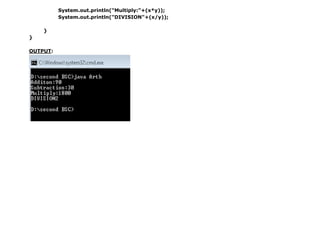
//3)Arthimetical operations
class Arth
{
public static void main(String[] args)
{
int x=60;
int y=30;
System.out.println("Additon:"+(x+y));
//++ is a concatenation operator.
//printf("Addition:%d",(x+y));
System.out.println("Subtraction:"+(x-y));](https://image.slidesharecdn.com/5examples-1-241203161606-2deb98a5/85/java-languages-programs-compilation-and-execution-4-320.jpg)