Chapter 1: Intro to
Java Programming
AP Computer Science A
Building Java Programs, 3rd Edition
In this chapter:
Binary numbers
The basics of programming
Display console output
Creating your own methods
Binary
Numbers
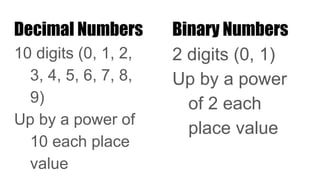
Decimal Numbers
10 digits (0, 1, 2,
3, 4, 5, 6, 7, 8,
9)
Up by a power of
10 each place
value
Binary Numbers
2 digits (0, 1)
Up by a power
of 2 each
place value
Hexadecimal Numbers
16 digits (0, 1, 2, 3, 4, 5, 6, 7,
8, 9, A, B, C, D, E, F)
Up by a power of 16 each
place value
Decimal → Binary
45
= 32 + 8 + 4 + 2 + 1
32’s 16’s 8’s 4’s 2’s 1’s
1 0 1 1 0 1
= 101101
Binary → Decimal
10110
16 + 4 + 2
= 22
16’s 8’s 4’s 2’s 1’s
1 0 1 1 0
Powers of 2
0: 1
1: 2
2: 4
3: 8
4: 16
5: 32
6: 64
7: 128
8: 256
9: 512
10: 1024
Java
Programming
Basics
The Process of Programming
1. Write
Code 2. Compile
3. Execute4. Debug
The Process of Writing
1. Write
Draft
2. Proofread
3. Share4. Revise
Types of Errors
Syntax
Writing code
incorrectly
Caught by
compiler
Example: clas
HelloWorld
public
Logic (bugs)
Code doesn’t work
as expected
Example: displaying
what you didn’t
want displayed
Runtime
Program is stopped
Example: infinite
loop
Class Method Statement
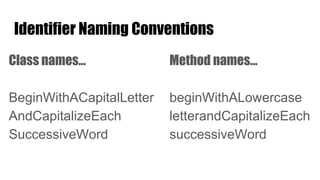
Identifier Naming Conventions
Class names…
BeginWithACapitalLetter
AndCapitalizeEach
SuccessiveWord
Method names…
beginWithALowercase
letterandCapitalizeEach
successiveWord
Identifier Do’s and Don’ts
Do’s:
Contain:
Letters
Numbers
Underscores ( _ )
Dollar signs ( $ )
Examples:
HelloWorld numberOfSpaces
$$money$$ _________ o_O
CAPS_LOCK iHave$0
Don’ts:
Start with a number
Contain spaces
Contain any characters not
listed to the left
Examples:
2Dimensional 3DPoint
funkySymbols@#$% :) :(
^o^
Console
Output
println vs. print
println: Write on the next line when displaying
things again
print: Continue writing on the same line when
displaying things again
Escape Sequences
System.out.print("hello worldn");
=
System.out.print("hello world");
System.out.println();
Escape
Sequence
Meaning
" "
 
n new line
t tab
Input # of Spaces
Afterward
Result
"Merrittt" 1 "Merritt "
"Mulvaneyt" 0 "Mulvaney"
"Millhollent" 6 "Millhollen "
Comments
//these comments
//take up one line each
/*
This comment
can take up as many
lines as I want.
*/
/*
I'm writing a
comment
/*/ inside
of a comment!
*/
//I'm free to
//"quote whatever
//I want"!
Optional (for now) Knowledge
public: can be used in other programs
static: not involved in a specific object
void: no return value
main: default method
String[] args/String args[]: pass an array of Strings
as an argument
System: predefined class
out: a constant in the System class
println: a method that takes a String as a parameter
Making
Methods
Use method naming
conventions
Nothing in here
(for now)
Procedural Decomposition
Breaking up a large task into smaller
subtasks
For example: breaking up your code into
methods
public static void main(String[] args) {
egg();
}
public static void egg() {
System.out.println(" ______");
System.out.println(" / ");
System.out.println("/ ");
System.out.println(" /");
System.out.println(" ______/");
System.out.println();
teaCup();
}
public static void teaCup() {
System.out.println(" /");
System.out.println(" ______/");
System.out.println("+--------+");
System.out.println();
stopSign();
}
public static void stopSign() {
System.out.println(" ______");
System.out.println(" / ");
System.out.println("/ ");
System.out.println("| STOP |");
System.out.println(" /");
System.out.println(" ______/");
System.out.println();
hat();
}
public static void hat() {
System.out.println(" ______");
System.out.println(" / ");
System.out.println("/ ");
System.out.println("+--------+");
}
public static void toInfinityAndBeyond()
{
toInfinityAndBeyond();
}
Strategy
Keep the main method at the top
Write the next method right above the method
you just wrote

Introduction to Java Programming

  • 1.
    Chapter 1: Introto Java Programming AP Computer Science A Building Java Programs, 3rd Edition
  • 2.
    In this chapter: Binarynumbers The basics of programming Display console output Creating your own methods
  • 3.
  • 4.
    Decimal Numbers 10 digits(0, 1, 2, 3, 4, 5, 6, 7, 8, 9) Up by a power of 10 each place value Binary Numbers 2 digits (0, 1) Up by a power of 2 each place value
  • 5.
    Hexadecimal Numbers 16 digits(0, 1, 2, 3, 4, 5, 6, 7, 8, 9, A, B, C, D, E, F) Up by a power of 16 each place value
  • 6.
    Decimal → Binary 45 =32 + 8 + 4 + 2 + 1 32’s 16’s 8’s 4’s 2’s 1’s 1 0 1 1 0 1 = 101101
  • 7.
    Binary → Decimal 10110 16+ 4 + 2 = 22 16’s 8’s 4’s 2’s 1’s 1 0 1 1 0
  • 8.
    Powers of 2 0:1 1: 2 2: 4 3: 8 4: 16 5: 32 6: 64 7: 128 8: 256 9: 512 10: 1024
  • 9.
  • 10.
    The Process ofProgramming 1. Write Code 2. Compile 3. Execute4. Debug
  • 11.
    The Process ofWriting 1. Write Draft 2. Proofread 3. Share4. Revise
  • 12.
    Types of Errors Syntax Writingcode incorrectly Caught by compiler Example: clas HelloWorld public Logic (bugs) Code doesn’t work as expected Example: displaying what you didn’t want displayed Runtime Program is stopped Example: infinite loop
  • 13.
  • 15.
    Identifier Naming Conventions Classnames… BeginWithACapitalLetter AndCapitalizeEach SuccessiveWord Method names… beginWithALowercase letterandCapitalizeEach successiveWord
  • 16.
    Identifier Do’s andDon’ts Do’s: Contain: Letters Numbers Underscores ( _ ) Dollar signs ( $ ) Examples: HelloWorld numberOfSpaces $$money$$ _________ o_O CAPS_LOCK iHave$0 Don’ts: Start with a number Contain spaces Contain any characters not listed to the left Examples: 2Dimensional 3DPoint funkySymbols@#$% :) :( ^o^
  • 17.
  • 18.
    println vs. print println:Write on the next line when displaying things again print: Continue writing on the same line when displaying things again
  • 19.
    Escape Sequences System.out.print("hello worldn"); = System.out.print("helloworld"); System.out.println(); Escape Sequence Meaning " " n new line t tab Input # of Spaces Afterward Result "Merrittt" 1 "Merritt " "Mulvaneyt" 0 "Mulvaney" "Millhollent" 6 "Millhollen "
  • 20.
    Comments //these comments //take upone line each /* This comment can take up as many lines as I want. */ /* I'm writing a comment /*/ inside of a comment! */ //I'm free to //"quote whatever //I want"!
  • 22.
    Optional (for now)Knowledge public: can be used in other programs static: not involved in a specific object void: no return value main: default method String[] args/String args[]: pass an array of Strings as an argument System: predefined class out: a constant in the System class println: a method that takes a String as a parameter
  • 23.
  • 24.
  • 25.
    Procedural Decomposition Breaking upa large task into smaller subtasks For example: breaking up your code into methods
  • 30.
    public static voidmain(String[] args) { egg(); } public static void egg() { System.out.println(" ______"); System.out.println(" / "); System.out.println("/ "); System.out.println(" /"); System.out.println(" ______/"); System.out.println(); teaCup(); } public static void teaCup() { System.out.println(" /"); System.out.println(" ______/"); System.out.println("+--------+"); System.out.println(); stopSign(); } public static void stopSign() { System.out.println(" ______"); System.out.println(" / "); System.out.println("/ "); System.out.println("| STOP |"); System.out.println(" /"); System.out.println(" ______/"); System.out.println(); hat(); } public static void hat() { System.out.println(" ______"); System.out.println(" / "); System.out.println("/ "); System.out.println("+--------+"); }
  • 31.
    public static voidtoInfinityAndBeyond() { toInfinityAndBeyond(); }
  • 32.
    Strategy Keep the mainmethod at the top Write the next method right above the method you just wrote

Editor's Notes

  • #14 Syntax for intro program