Writing
Programs
Using
Loops
-Jan Carl Briones
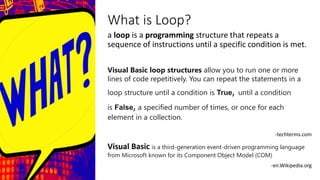
What is Loop?
a loop is a programming structure that repeats a
sequence of instructions until a specific condition is met.
Visual Basic loop structures allow you to run one or more
lines of code repetitively. You can repeat the statements in a
loop structure until a condition is True, until a condition
is False, a specified number of times, or once for each
element in a collection.
-techterms.com
Visual Basic is a third-generation event-driven programming language
from Microsoft known for its Component Object Model (COM)
-en.Wikipedia.org
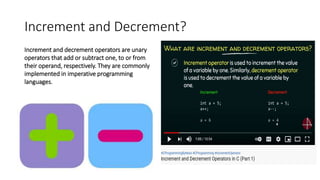
Increment and Decrement?
Increment and decrement operators are unary
operators that add or subtract one, to or from
their operand, respectively. They are commonly
implemented in imperative programming
languages.
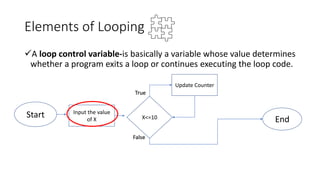
Elements of Looping
A loop control variable-is basically a variable whose value determines
whether a program exits a loop or continues executing the loop code.
Start Input the value
of X X<=10 End
Update Counter
True
False
Elements of Looping
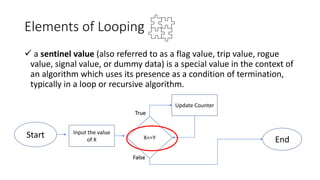
 a sentinel value (also referred to as a flag value, trip value, rogue
value, signal value, or dummy data) is a special value in the context of
an algorithm which uses its presence as a condition of termination,
typically in a loop or recursive algorithm.
Start Input the value
of X X<=Y End
Update Counter
True
False
Elements of Looping
 Updating loops-is done somewhere inside the loop, usually as the
last statement in the program can determine ahead of time how
many times the loop will repeat.
Start Input the value
of X X<=Y End
Update Counter
True
False
Types of Loops
While Loops
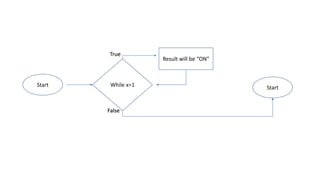
The While...End While construction runs a set of statements as
long as the condition specified in the While statement is True.-
https://docs.microsoft.com/
While x=1
Result will be “ON”
Start Start
True
False
Types of Loops
Do Loops
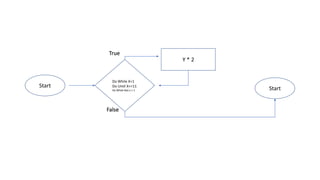
The Do...Loop construction allows you to test a condition at either the
beginning or the end of a loop structure. You can also specify whether to
repeat the loop while the condition remains True or until it becomes True.
.-https://docs.microsoft.com/
Do While X=1
Do Until X<=11
Do While Not x > 1
Y * 2
Start Start
True
False
Types of Loops
.-https://docs.microsoft.com/
For Loops
The For...Next construction performs the loop a set number of times. It uses a loop
control variable, also called a counter, to keep track of the repetitions. You specify the
starting and ending values for this counter, and you can optionally specify the amount
by which it increases from one repetition to the next.
For x=1 to 5
Input will repeat 5
times
Start Start
True
False
Types of Loops
.-https://docs.microsoft.com/
Nested For...Next Loop
When you have a loop within a loop, then you have created a
nested loop.
While x=1
Show “correct” 5
times
Start
end
True
False
Do until x > 2 For x= 1 to 5
the input value +1
JAN CARL BRIONES-Writing Programs Using Loops.pptx

JAN CARL BRIONES-Writing Programs Using Loops.pptx

  • 2.
  • 3.
    What is Loop? aloop is a programming structure that repeats a sequence of instructions until a specific condition is met. Visual Basic loop structures allow you to run one or more lines of code repetitively. You can repeat the statements in a loop structure until a condition is True, until a condition is False, a specified number of times, or once for each element in a collection. -techterms.com Visual Basic is a third-generation event-driven programming language from Microsoft known for its Component Object Model (COM) -en.Wikipedia.org
  • 5.
    Increment and Decrement? Incrementand decrement operators are unary operators that add or subtract one, to or from their operand, respectively. They are commonly implemented in imperative programming languages.
  • 6.
    Elements of Looping Aloop control variable-is basically a variable whose value determines whether a program exits a loop or continues executing the loop code. Start Input the value of X X<=10 End Update Counter True False
  • 7.
    Elements of Looping a sentinel value (also referred to as a flag value, trip value, rogue value, signal value, or dummy data) is a special value in the context of an algorithm which uses its presence as a condition of termination, typically in a loop or recursive algorithm. Start Input the value of X X<=Y End Update Counter True False
  • 8.
    Elements of Looping Updating loops-is done somewhere inside the loop, usually as the last statement in the program can determine ahead of time how many times the loop will repeat. Start Input the value of X X<=Y End Update Counter True False
  • 9.
    Types of Loops WhileLoops The While...End While construction runs a set of statements as long as the condition specified in the While statement is True.- https://docs.microsoft.com/
  • 10.
    While x=1 Result willbe “ON” Start Start True False
  • 11.
    Types of Loops DoLoops The Do...Loop construction allows you to test a condition at either the beginning or the end of a loop structure. You can also specify whether to repeat the loop while the condition remains True or until it becomes True. .-https://docs.microsoft.com/
  • 12.
    Do While X=1 DoUntil X<=11 Do While Not x > 1 Y * 2 Start Start True False
  • 13.
    Types of Loops .-https://docs.microsoft.com/ ForLoops The For...Next construction performs the loop a set number of times. It uses a loop control variable, also called a counter, to keep track of the repetitions. You specify the starting and ending values for this counter, and you can optionally specify the amount by which it increases from one repetition to the next.
  • 14.
    For x=1 to5 Input will repeat 5 times Start Start True False
  • 15.
    Types of Loops .-https://docs.microsoft.com/ NestedFor...Next Loop When you have a loop within a loop, then you have created a nested loop.
  • 16.
    While x=1 Show “correct”5 times Start end True False Do until x > 2 For x= 1 to 5 the input value +1