JADE Java Agent Development Framework Jelena Jovanovic Email:  [email_address]
JADE basics Software framework (middleware) for development of multi-agent systems Based on FIPA standards for intelligent agents FIPA – Foundation for Intelligent Physical Agents (http://www.fipa.org) Fully coded in Java 06/04/09
JADE basics JADE consists of:  A runtime environment for agents Compliant with the FIPA standard for agent platforms  A library of Java classes that provide: ready-made pieces of functionality and  abstract interfaces for custom, application dependent tasks. A suite of graphical tools  Facilitate administration and monitoring of running agents 06/04/09
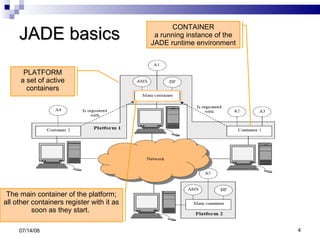
JADE basics 06/04/09 CONTAINER a running instance of the JADE runtime environment PLATFORM a set of active containers The main container of the platform; all other containers register with it as soon as they start.
The FIPA compliant agent platform The agent platform can be split on several hosts. Each host acts as a  container  of agents provides a complete run time environment for agent execution allows several agents to execute concurrently  each agent as a single Java Thread. The first container started is the  main  container maintains a central registry of all the other containers  => agents can discover and interact with each other across the whole platform. 06/04/09
The FIPA compliant agent platform Agent Management System (AMS)  The principle authority in the platform Keeps track of all other agents in the platform Only one AMS will exist in a single platform  The AMS maintains a directory of agents’ identifiers (AIDs) and agents’ states.  Each agent must register with the AMS in order to get a valid (i.e. unique) AID. 06/04/09
The FIPA compliant agent platform Directory Facilitator (DF)  the agent that provides the default ‘yellow page’ service in the platform. it publishes services of other registered agents from the platform, thus facilitating agents cooperation. Message Transport System also called Agent Communication Channel (ACC),  software component controlling all exchange of messages within the platform, including messages to/from remote platforms. 06/04/09
Creating an agent in JADE … is as simple as extending the   jade.core.Agent  class - a common base class for user defined agents; jade.core.Agent  class encompasses: a basic set of methods that can be called to implement the custom behaviour of an agent (e.g. send/receive messages, use standard interaction protocols,…). Each functionality/service provided by an agent should be implemented as one or more  behaviours  that are executed concurrently. 06/04/09
Agent identifier - AID Each agent has a unique ID – AID AID is an instance of the jade.core.AID class An AID object includes: a globally unique name of an agent in the form: <nickname>@<platform-name> a number of addresses  these are the addresses of the platform the agent lives in only used when an agent needs to communicate with another agent living on a different platform. 06/04/09
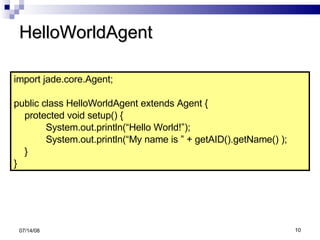
HelloWorldAgent 06/04/09 import jade.core.Agent; public class HelloWorldAgent extends Agent { protected void setup() { System.out.println(“Hello World!”);  System.out.println(“My name is ” + getAID().getName() ); } }
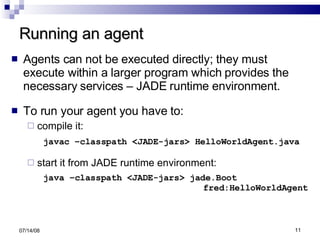
Running an agent Agents can not be executed directly; they must execute within a larger program which provides the necessary services – JADE runtime environment. To run your agent you have to: compile it: javac –classpath <JADE-jars> HelloWorldAgent.java start it from JADE runtime environment: java –classpath <JADE-jars> jade.Boot  fred:HelloWorldAgent 06/04/09
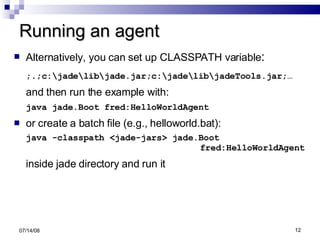
Running an agent Alternatively, you can set up CLASSPATH variable : ;.;c:\jade\lib\jade.jar;c:\jade\lib\jadeTools.jar;… and then run the example with: java jade.Boot fred:HelloWorldAgent or create a batch file (e.g., helloworld.bat): java -classpath <jade-jars> jade.Boot    fred:HelloWorldAgent inside jade directory and run it 06/04/09
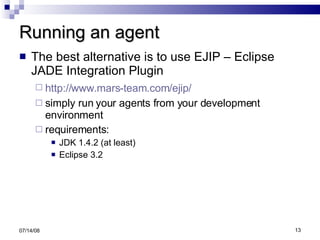
Running an agent The best alternative is to use EJIP – Eclipse JADE Integration Plugin http://www.mars-team.com/ejip/   simply run your agents from your development environment requirements: JDK 1.4.2 (at least) Eclipse 3.2 06/04/09
HelloWorldAgent Note that our agent is still running! If we want to stop it we have to tell it explicitly by executing its doDelete() method. Let’s learn more about an agent’s lifecycle 06/04/09
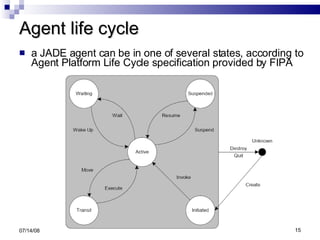
Agent life cycle a JADE agent can be in one of several states, according to Agent Platform Life Cycle specification provided by FIPA 06/04/09
Agent life cycle Initiated   - an Agent object is built, but hasn't registered itself yet with the AMS, has neither a name, nor an address and cannot communicate with other agents. Active  – the Agent object is registered with the AMS, has a regular name and an address and can access all the various JADE features. an agent is allowed to execute its behaviours (i.e. its tasks) only in this state. Suspended  – the Agent object is currently stopped; no agent behaviour is being executed. Waiting  – the Agent object is blocked, waiting for something; it is ‘sleeping’ and will wake up when a condition is met (typically when a message arrives). 06/04/09
Agent life cycle Unknown  – the Agent is definitely dead; it is no more registered with the AMS. Transit  – a mobile agent enters this state while it is migrating to the new location. The system continues to buffer messages that will then be sent to its new location. The   Agent  class contains : constants for representing agent’s possible states (e.g.   AP_ACTIVE ,  AP_WAITING ) public methods to perform transitions between the various states (e.g.  doWait() ,  doSuspend() ). 06/04/09
Starting an agent Includes the following steps:   The agent constructor is executed,  the agent is given an identifier (instance of  jade.core.AID  class)  it is registered with the AMS,  it is put in the  AP_ACTIVE  state, and finally the  setup()  method is executed. The programmer has to implement the  setup()  method in order to initialize the agent.  06/04/09
Starting an agent The most important (also obligatory) thing to do when initializing an agent (i.e. in its setup() method) is to add tasks (so called behaviours) to the queue of tasks to be executed The setup() method should add at least one task to the agent. After initialization, JADE automatically executes the first task from the agent’s queue of ready tasks  agents tasks (forming a queue of ready tasks) are executed according to the round-robin non-preemptive strategy - this will be discussed later in more details. 06/04/09
The notion of behaviour Agents operate independently and execute in parallel with other agents . The obvious way to implement this is to assign a java Thread to each agent - and this is how it is done in Jade . However, there is a need for further parallelism within each agent because an agent may be involved in different tasks. Possible solution: to use additional Threads to handle each concurrent agent activity;  06/04/09
The notion of behaviour To support efficiently parallel activities within an agent, Jade has introduced a concept called  Behaviour A behaviour is basically an Event Handler – it describes how an agent reacts to an event . an event is a relevant change of state e.g. a reception of a message or a Timer interrupt (after the specified time has elapsed). 06/04/09
Implementing a behaviour A behaviour is implemented as an object of a class that extends  jade.core.behaviours.Behaviour .  Each class extending Behaviour must implement: the action() method – defines the operations to be performed when the behaviour is in execution  the done() method – specifies whether or not a behaviour has completed, through the boolean value it returns 06/04/09
Implementing a behaviour To implement an agent-specific task one should: define one or more Behaviour subclasses,  add the behaviour objects to the agent’s task list using  addBehaviour(Behaviour) method 06/04/09
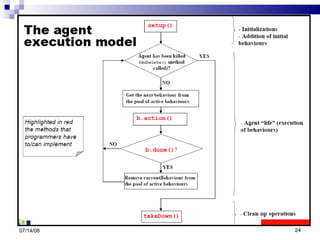
The agent execution model 06/04/09
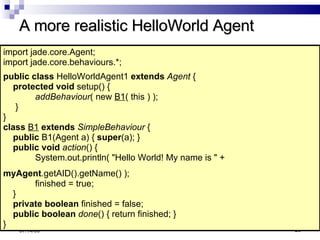
A more realistic HelloWorld Agent We have just learned that: Agent actions are normally specified through Behaviour classes, i.e. in the  action()  method of these behaviours. The setup method only serves to create instances of these behaviours and link them to the Agent object. A more typical implementation of the HelloWorldAgent would be:   06/04/09
A more realistic HelloWorld Agent 06/04/09 import jade.core.Agent;  import jade.core.behaviours.*;  public class  HelloWorldAgent1  extends   Agent  {  protected void  setup() {  addBehaviour ( new  B1 ( this ) ); }  }  class   B1   extends   SimpleBehaviour  {  public  B1(Agent a) {  super (a); }  public void   action () {  System.out.println( &quot;Hello World! My name is &quot; +    myAgent .getAID().getName() );  finished = true; }  private boolean  finished = false;  public boolean   done () { return finished; }  }
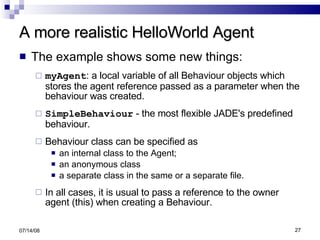
A more realistic HelloWorld Agent The example shows some new things: myAgent : a local variable of all Behaviour objects which stores the agent reference passed as a parameter when the behaviour was created. SimpleBehaviour  - the most flexible JADE's predefined behaviour. Behaviour class can be specified as an internal class to the Agent; an anonymous class  a separate class in the same or a separate file.  In all cases, it is usual to pass a reference to the owner agent (this) when creating a Behaviour. 06/04/09
A more realistic HelloWorld Agent The example shows some new things: even if the behaviour finishes the program does NOT terminate because: the agent still exists, the JADE environment which we started stays around to interact with other agents which could be started later in the network. 06/04/09
Back to behaviours A Behaviour can be added whenever it is needed, and not only within  Agent.setup()  method. JADE uses a  scheduler  to activate behaviours implemented by the Agent class and hidden to the programmer, carries out a round-robin non-preemptive scheduling policy among all behaviours available in the ready queue  executes each behaviour until it releases control 06/04/09
Behaviours Because of the non-preemptive multitasking model, programmers must avoid using: endless loops and  long operations within the action() method of a behaviour. Remember! when the action() method of one behaviour is running, no other behaviour can execute until the running one is finished. 06/04/09
Behaviours Every single Behaviour is allowed to block its computation using the  block  method . Warning:  block(milisec)  does not block execution of the behaviour; it just  delays  its  next  execution. All blocked behaviours are rescheduled as soon as:   a new message arrives  the programmer must take care of blocking again a behaviour if it was not interested in the arrived message. the agent is restarted. 06/04/09
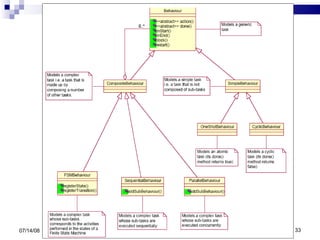
Behaviours The framework provides ready to use complex behaviours that contain sub-behaviours and execute them according to some policy. These are provided as subclasess of the Behaviour class For example, the SequentialBehaviour class executes its sub-behaviours one after the other. UML Model of the Behaviour class hierarchy: 06/04/09
06/04/09
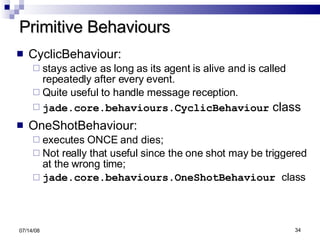
Primitive Behaviours CyclicBehaviour:  stays active as long as its agent is alive and is called repeatedly after every event.  Quite useful to handle message reception. jade.core.behaviours.CyclicBehaviour  class OneShotBehaviour:  executes ONCE and dies;  Not really that useful since the one shot may be triggered at the wrong time; jade.core.behaviours.OneShotBehaviour  class 06/04/09
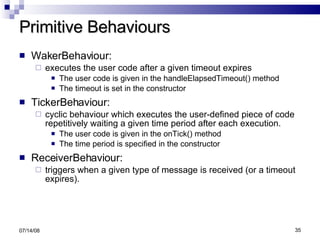
Primitive Behaviours WakerBehaviour:  executes the user code after a given timeout expires The user code is given in the handleElapsedTimeout() method The timeout is set in the constructor TickerBehaviour:  cyclic behaviour which executes the user-defined piece of code repetitively waiting a given time period after each execution. The user code is given in the onTick() method The time period is specified in the constructor ReceiverBehaviour:  triggers when a given type of message is received (or a timeout expires). 06/04/09
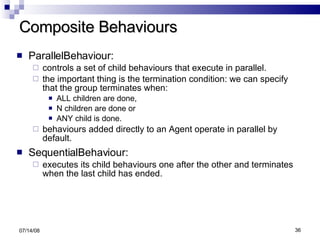
Composite Behaviours ParallelBehaviour:  controls a set of child behaviours that execute in parallel.  the important thing is the termination condition: we can specify that the group terminates when: ALL children are done,  N children are done or  ANY child is done. behaviours added directly to an Agent operate in parallel by default. SequentialBehaviour:  executes its child behaviours one after the other and terminates when the last child has ended. 06/04/09
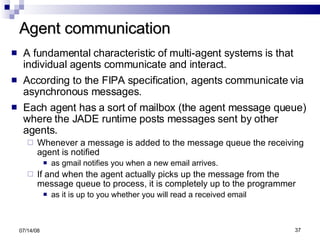
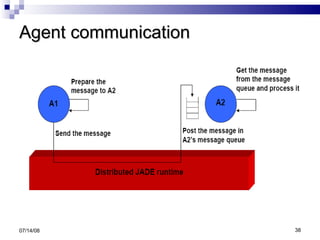
Agent communication A fundamental characteristic of multi-agent systems is that individual agents communicate and interact. According to the FIPA specification, agents communicate via asynchronous messages. Each agent has a sort of mailbox (the agent message queue) where the JADE runtime posts messages sent by other agents.  Whenever a message is added to the message queue the receiving agent is notified as gmail notifies you when a new email arrives.  If and when the agent actually picks up the message from the message queue to process, it is completely up to the programmer  as it is up to you whether you will read a received email 06/04/09
Agent communication 06/04/09
Agent communication The Agent class provides a set of methods for inter-agent communication. Method calls are completely transparent to where the agent resides the platform takes care of selecting the appropriate address and transport mechanism. 06/04/09
Agent communication To understand each other, it is crucial that agents agree on the format and the semantics of the messages they  exchange. In JADE, messages adhere strictly to the ACL (Agent Communication Language) FIPA standard. A message is an instance of the  jade.acl.ACLMessage  class Example: The simplest message 06/04/09 ACLMessage msg = new ACLMessage( ACLMessage.INFORM ); msg.setContent(&quot;I sell seashells at $10/kg&quot; );
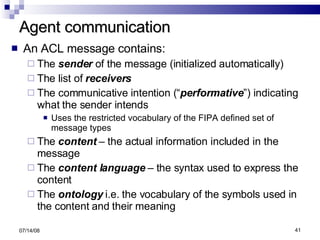
Agent communication An ACL message contains: The  sender  of the message (initialized automatically) The list of  receivers The communicative intention (“ performative ”) indicating what the sender intends  Uses the restricted vocabulary of the FIPA defined set of message types The  content  – the actual information included in the message The  content language  – the syntax used to express the content The  ontology  i.e. the vocabulary of the symbols used in the content and their meaning 06/04/09
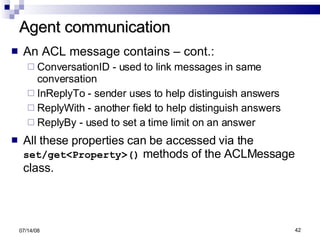
Agent communication An ACL message contains – cont.: ConversationID - used to link messages in same conversation InReplyTo - sender uses to help distinguish answers ReplyWith - another field to help distinguish answers ReplyBy - used to set a time limit on an answer All these properties can be accessed via the  set/get<Property>()  methods of the ACLMessage class. 06/04/09
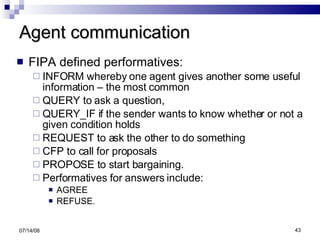
Agent communication FIPA defined performatives:  INFORM whereby one agent gives another some useful information – the most common QUERY to ask a question,  QUERY_IF if the sender wants to know whether or not a given condition holds REQUEST to ask the other to do something CFP to call for proposals PROPOSE to start bargaining.  Performatives for answers include: AGREE REFUSE. 06/04/09
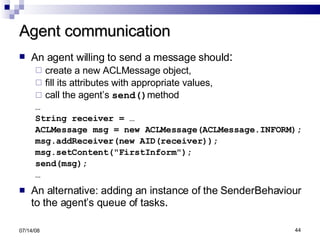
Agent communication An agent willing to send a message should : create a new ACLMessage object,  fill its attributes with appropriate values,  call the agent’s  send() method … String receiver = … ACLMessage msg = new ACLMessage(ACLMessage.INFORM); msg.addReceiver(new AID(receiver)); msg.setContent(&quot;FirstInform&quot;); send(msg); … An alternative: adding an instance of the SenderBehaviour to the agent’s queue of tasks . 06/04/09
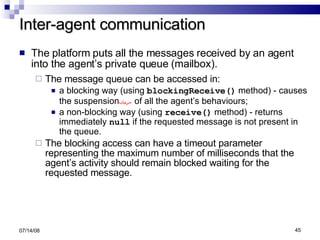
Inter-agent communication The platform puts all the messages received by an agent into the agent’s private queue (mailbox). The message queue can be accessed in: a blocking way (using  blockingReceive()  method) - causes the suspension حرمان   of all the agent’s behaviours; a non-blocking way (using  receive()  method) - returns immediately  null  if the requested message is not present in the queue. The blocking access can have a timeout parameter representing the maximum number of milliseconds that the agent’s activity should remain blocked waiting for the requested message. 06/04/09
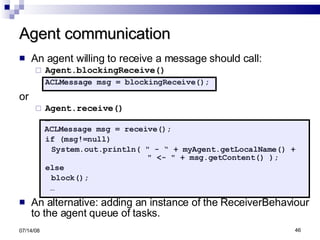
Agent communication An agent willing to receive a message should call:  Agent.blockingReceive() ACLMessage msg = blockingReceive(); or  Agent.receive() … ACLMessage msg = receive(); if (msg!=null) System.out.println( &quot; - “ + myAgent.getLocalName() +  &quot; <- &quot; + msg.getContent() ); else block();  … An alternative: adding an instance of the ReceiverBehaviour to the agent queue of tasks. 06/04/09
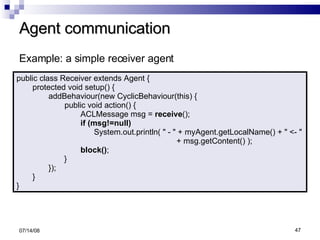
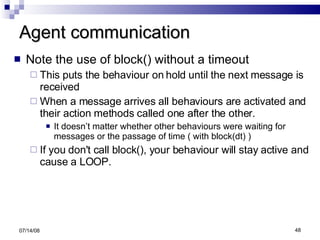
Agent communication 06/04/09 public class Receiver extends Agent { protected void setup() { addBehaviour(new CyclicBehaviour(this) { public void action() { ACLMessage msg =  receive (); if (msg!=null) System.out.println( &quot; - &quot; + myAgent.getLocalName() + &quot; <- &quot;  + msg.getContent() ); block() ; } }); } } Example: a simple receiver agent
Agent communication Note the use of block() without a timeout This puts the behaviour on hold until the next message is received  When a message arrives all behaviours are activated and their action methods called one after the other. It doesn’t matter whether other behaviours were waiting for messages or the passage of time ( with block(dt) )  If you don't call block(), your behaviour will stay active and cause a LOOP. 06/04/09
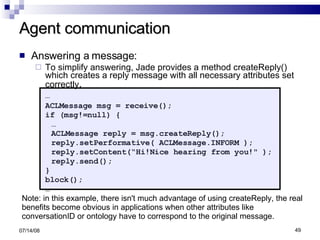
Agent communication Answering a message: To simplify answering, Jade provides a method createReply() which creates a reply message with all necessary attributes set correctly . … ACLMessage msg = receive(); if (msg!=null) { … ACLMessage reply = msg.createReply(); reply.setPerformative( ACLMessage.INFORM ); reply.setContent(“Hi!Nice hearing from you!&quot; ); reply.send(); } block(); … 06/04/09 Note: in this example, there isn't much advantage of using createReply, the real benefits become obvious in applications when other attributes like conversationID or ontology have to correspond to the original message.
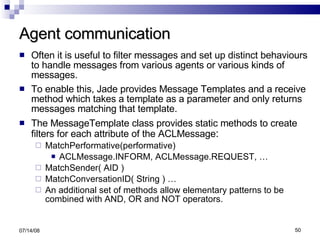
Agent communication Often it is useful to filter messages and set up distinct behaviours to handle messages from various agents or various kinds of messages. To enable this, Jade provides Message Templates and a receive method which takes a template as a parameter and only returns messages matching that template. The MessageTemplate class provides static methods to create filters for each attribute of the ACLMessage : MatchPerformative(performative) ACLMessage.INFORM, ACLMessage.REQUEST, … MatchSender( AID ) MatchConversationID( String ) … An additional set of methods allow elementary patterns to be combined with AND, OR and NOT operators. 06/04/09
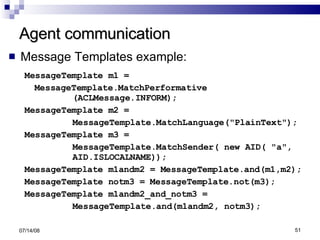
Agent communication Message Templates example: MessageTemplate m1 = MessageTemplate.MatchPerformative (ACLMessage.INFORM); MessageTemplate m2 = MessageTemplate.MatchLanguage(&quot;PlainText&quot;); MessageTemplate m3 = MessageTemplate.MatchSender( new AID( &quot;a&quot;,  AID.ISLOCALNAME)); MessageTemplate m1andm2 = MessageTemplate.and(m1,m2); MessageTemplate notm3 = MessageTemplate.not(m3); MessageTemplate m1andm2_and_notm3 = MessageTemplate.and(m1andm2, notm3); 06/04/09
Agent communication Tip: when your agent should have parallel negotiations with several other agents, you should: create a unique string (the  ConversationID ) to uniquely identify messages that your agent exchanges with each one of his collaborative agents. Then you set-up a behaviour for each negotiation which only responds to messages with that particular  ConversationID . You use a Message Template to filter messages from the agent’s messages queue 06/04/09
Agent communication Finding agents to talk to Different ways to get an agent ID: using the agent's local name (e.g. the one specified on the command line when starting a container), using JADE's GUI interface, from a directory entry in the DF, from the AMS  keeps AIDs of all active agents 06/04/09
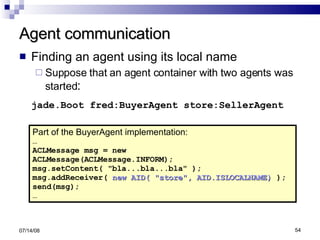
Agent communication Finding an agent using its local name Suppose that an agent container with two agents was started : jade.Boot fred:BuyerAgent store:SellerAgent 06/04/09 Part of the BuyerAgent implementation: … ACLMessage msg = new  ACLMessage(ACLMessage.INFORM); msg.setContent( &quot;bla...bla...bla&quot; ); msg.addReceiver(  new AID( &quot;store&quot;, AID.ISLOCALNAME)  ); send(msg); …
Agent communication Finding agents by searching the AMS: import jade.domain.AMSService; import jade.domain.FIPAAgentManagement.*; ... AMSAgentDescription [] agents = null; try { SearchConstraints c = new SearchConstraints(); c.setMaxResults ( new Long(-1) ); //-1 means ALL agents = AMSService.search( this,  new AMSAgentDescription (), c ); } catch (Exception e) { ... } To extract the AID from a descriptor we have to use something like  agents[i].getName() 06/04/09 the searching agent A description of the agent(s) we are looking for
Agent communication Example: saying hello to all other agents 06/04/09 … AID myID = getAID(); ACLMessage msg = new ACLMessage(ACLMessage.INFORM); msg.setContent( “Hello!&quot; ); for (int i=0; i<agents.length; i++) { AID agentID = agents[i].getName(); If ( !agentID.equals( myID ) ) msg.addReceiver( agents[i].getName() ); } send(msg); … All currently running agents found by using the code snippet from the previous slide
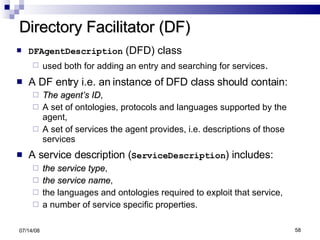
Directory Facilitator (DF) DF is often compared to the &quot;Yellow Pages&quot; phone book:   Agents wishing to advertise their services register with the DF. Visiting agents can then search the DF looking for other agents which provide the services they desire. More formally: DF is a centralized registry of entries which associate service descriptions to agent IDs. 06/04/09
Directory Facilitator (DF) DFAgentDescription  (DFD) class used both for adding an entry and searching for services . A DF entry i.e. an instance of DFD class should contain: The agent’s ID , A set of ontologies, protocols and languages supported by the agent, A set of services the agent provides, i.e. descriptions of those services A service description ( ServiceDescription ) includes: the service type , the service name ,  the languages and ontologies required to exploit that service, a number of service specific properties. 06/04/09
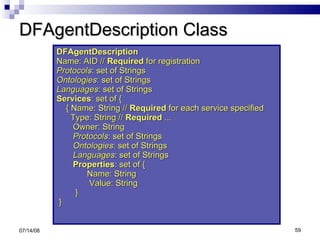
DFAgentDescription Class DFAgentDescription   Name: AID //  Required  for registration  Protocols : set of Strings  Ontologies : set of Strings  Languages : set of Strings  Services : set of {  { Name: String //  Required  for each service specified  Type: String //  Required  ...  Owner: String  Protocols : set of Strings  Ontologies : set of Strings  Languages : set of Strings  Properties : set of {  Name: String  Value: String } }   06/04/09
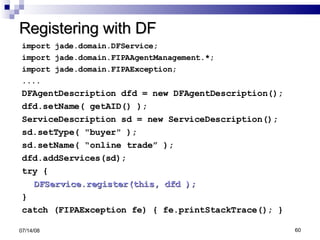
Registering with DF import jade.domain.DFService; import jade.domain.FIPAAgentManagement.*; import jade.domain.FIPAException; .... DFAgentDescription dfd = new DFAgentDescription(); dfd.setName( getAID() ); ServiceDescription sd = new ServiceDescription(); sd.setType( &quot;buyer&quot; ); sd.setName( “online trade” ); dfd.addServices(sd); try { DFService.register(this, dfd ); } catch (FIPAException fe) { fe.printStackTrace(); } 06/04/09
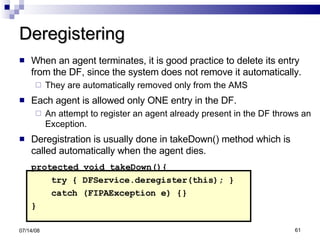
Deregistering When an agent terminates, it is good practice to delete its entry from the DF, since the system does not remove it automatically. They are automatically removed only from the AMS Each agent is allowed only ONE entry in the DF.  An attempt to register an agent already present in the DF throws an Exception. Deregistration is usually done in takeDown() method which is called automatically when the agent dies. protected void takeDown(){ try { DFService.deregister(this); } catch (FIPAException e) {} } 06/04/09
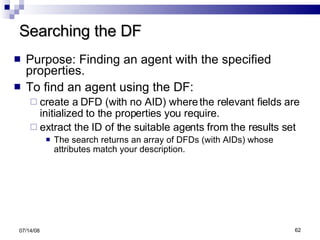
Searching the DF Purpose: Finding an agent with the specified properties. To find an agent using the DF:  create a DFD (with no AID) where the relevant fields are initialized to the properties you require.  extract the ID of the suitable agents from the results set The search returns an array of DFDs (with AIDs) whose attributes match your description. 06/04/09
Searching the DF Example: searching for agents of the type ‘buyer’ 06/04/09 DFAgentDescription dfd = new DFAgentDescription(); ServiceDescription sd = new ServiceDescription(); sd.setType( &quot;buyer&quot; ); dfd.addServices(sd); DFAgentDescription[] result =  DFService.search(this,dfd); System.out.println(“Buyer agets:”); for (int i = 0; i < result.length; ++i) { System.out.println(&quot; &quot; + result[i].getName() ); }
Searching the DF By default, the search returns an array which is either empty or contains a single DFD.  To get entries for all agents with specified properties, a third parameter of the searchConstraints type must be added: To get any available agent, just use a bare DFD with no service specification 06/04/09 … SearchConstraints all = new SearchConstraints(); all.setMaxResults(new Long(-1)); DFAgentDescription[] result =  DFService.search(this, dfd, all);
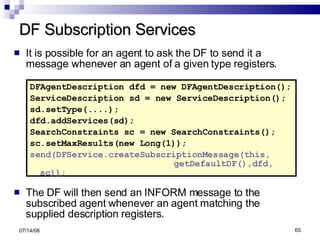
DF Subscription Services It is possible for an agent to ask the DF to send it a message whenever an agent of a given type registers. DFAgentDescription dfd = new DFAgentDescription(); ServiceDescription sd = new ServiceDescription(); sd.setType(....); dfd.addServices(sd); SearchConstraints sc = new SearchConstraints(); sc.setMaxResults(new Long(1)); send(DFService.createSubscriptionMessage(this,  getDefaultDF(),dfd, sc)); The DF will then send an INFORM message to the subscribed agent whenever an agent matching the supplied description registers. 06/04/09
Mobile Agents Agent mobility is the ability of an agent program to migrate or to make a copy (clone) of itself across one or multiple network hosts. The current version of JADE supports only intra-platform mobility, i.e. an agent can move only within the same platform from one container to the others. The Agent class contains a set of methods  dedicated for managing agent mobility. 06/04/09
Mobile Agents A typical behaviour pattern for a JADE mobile agent will be to ask the AMS for locations and then decide if, where and when to migrate. To move an agent, one just need to call the method  doMove(Location)  whose parameter is the new destination of the agent. To get a Location object, one must query this information with the AMS, by sending it a  REQUEST  with either  WhereIsAgentAction  or  QueryPlatformLocationsAction 06/04/09
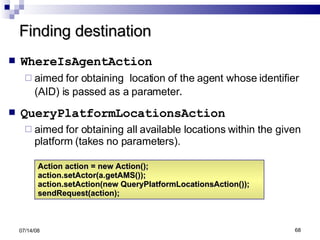
Finding destination WhereIsAgentAction   aimed for obtaining  location of the agent whose identifier (AID) is passed as a parameter . QueryPlatformLocationsAction   aimed for obtaining all available locations within the given platform (takes no parameters). 06/04/09 Action action = new Action(); action.setActor(a.getAMS()); action.setAction(new QueryPlatformLocationsAction()); sendRequest(action);
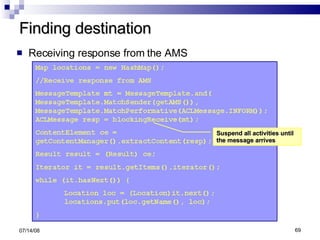
Finding destination Receiving response from the AMS 06/04/09 Suspend all activities until the message arrives
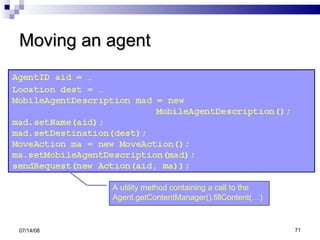
Moving an agent To make an agent move to a certain location another agent has to: create a new MoveAction object and fill its argument with a suitable  MobileAgentDescription  object,  create a  request ACL message  and set the MoveAction object as its content call the  Agent.getContentManager().fillContent(…)  method that turns the MoveAction object into a String and writes it into the content slot of the request. send the message to the agent that is supposed to move  06/04/09
Moving an agent 06/04/09 A utility method containing a call to the Agent.getContentManager().fillContent(…)
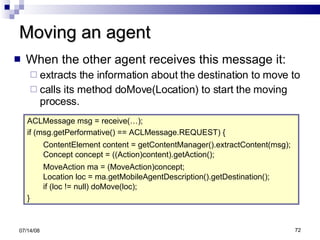
Moving an agent When the other agent receives this message it: extracts the information about the destination to move to calls its method doMove(Location) to start the moving process. 06/04/09 ACLMessage msg = receive(…); if (msg.getPerformative() == ACLMessage.REQUEST) { ContentElement content = getContentManager().extractContent(msg); Concept concept = ((Action)content).getAction();  MoveAction ma = (MoveAction)concept; Location loc = ma.getMobileAgentDescription().getDestination(); if (loc != null) doMove(loc); }
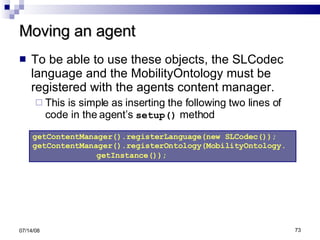
Moving an agent To be able to use these objects, the SLCodec language and the MobilityOntology must be registered with the agents content manager. This is simple as inserting the following two lines of code in the agent’s  setup()  method 06/04/09 getContentManager().registerLanguage(new SLCodec()); getContentManager().registerOntology(MobilityOntology. getInstance());
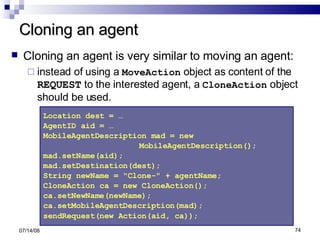
Cloning an agent Cloning an agent is very similar to moving an agent:   instead of using a  MoveAction  object as content of the  REQUEST  to the interested agent, a  CloneAction  object should be used. 06/04/09 Location dest = … AgentID aid = … MobileAgentDescription mad = new MobileAgentDescription();  mad.setName(aid);  mad.setDestination(dest);  String newName = &quot;Clone-&quot; + agentName;  CloneAction ca = new CloneAction(); ca.setNewName(newName); ca.setMobileAgentDescription(mad);  sendRequest(new Action(aid, ca));
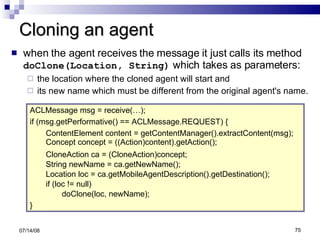
Cloning an agent when the agent receives the message it just calls its method  doClone(Location, String)  which takes as parameters: the location where the cloned agent will start and its new name which must be different from the original agent's name. 06/04/09 ACLMessage msg = receive(…);  if (msg.getPerformative() == ACLMessage.REQUEST) {  ContentElement content = getContentManager().extractContent(msg); Concept concept = ((Action)content).getAction();  CloneAction ca = (CloneAction)concept; String newName = ca.getNewName(); Location loc = ca.getMobileAgentDescription().getDestination(); if (loc != null)  doClone(loc, newName); }
Agents with GUI To build an agent with integrated GUI, one should extend the JADE’s GuiAgent class. This class has two specific methods:  postGuiEvent()  and  onGuiEvent() ,  aimed for   handling interactions between an agent and its GUI: GUI informs the agent about the user actions by posting events through the  postGuiEvent()  method. onGuiEvent()  method contains code for receiving and processing events posted by the GUI (via  postGuiEvent()  method ) . 06/04/09
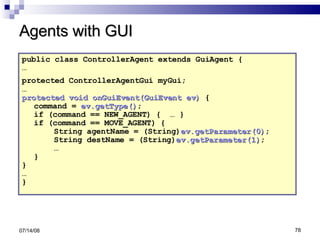
Agents with GUI The  onGuiEvent()  method may be viewed as the equivalent of the  actionPerformed()  method in Java Swing.  To post an event to the agent, the GUI simply creates a  jade.gui.GuiEvent  object and passes it as an argument to the  postGuiEvent() method .   A  GuiEvent  object has: two mandatory attributes : the source of the event and an integer identifying the type of event an optional list of parameters that can be added to the event object. 06/04/09
Agents with GUI public class ControllerAgent extends GuiAgent { … protected ControllerAgentGui myGui;   … protected void onGuiEvent(GuiEvent ev)  { command =  ev.getType() ;  if (command == NEW_AGENT) {  … } if (command == MOVE_AGENT) {  String agentName = (String) ev.getParameter(0) ; String destName = (String) ev.getParameter(1) ;  …  }  } … }  06/04/09
JADE’s suite of graphical tools IntrospectorAgent A tool useful for monitoring a running agent: the life cycle of the agent,  ACL messages it exchanges with other agents and  the agent’s behaviours in execution. Dummy Agent  a monitoring and debugging tool, use it for: composing and sending ACL messages to other agents, viewing the list of all the ACL messages sent or received, completed with timestamp information . 06/04/09
JADE’s suite of graphical tools Sniffer An agent that can intercept ACL messages while they are in flight, and display them graphically  notation similar to UML sequence diagrams Useful for observing how collaborating agents exchange ACL messages. 06/04/09
Jade Resources at WWW Jade Official Web Site: http://jade.cselt.it Jade Primer : http://www.iro.umontreal.ca/~vaucher/Agents/Jade/JadePrimer.html FIPA http://www.fipa.org 06/04/09
JADE Java Agent Development Framework Jelena Jovanovic Email:  [email_address]

Jade V

  • 1.
    JADE Java AgentDevelopment Framework Jelena Jovanovic Email: [email_address]
  • 2.
    JADE basics Softwareframework (middleware) for development of multi-agent systems Based on FIPA standards for intelligent agents FIPA – Foundation for Intelligent Physical Agents (http://www.fipa.org) Fully coded in Java 06/04/09
  • 3.
    JADE basics JADEconsists of: A runtime environment for agents Compliant with the FIPA standard for agent platforms A library of Java classes that provide: ready-made pieces of functionality and abstract interfaces for custom, application dependent tasks. A suite of graphical tools Facilitate administration and monitoring of running agents 06/04/09
  • 4.
    JADE basics 06/04/09CONTAINER a running instance of the JADE runtime environment PLATFORM a set of active containers The main container of the platform; all other containers register with it as soon as they start.
  • 5.
    The FIPA compliantagent platform The agent platform can be split on several hosts. Each host acts as a container of agents provides a complete run time environment for agent execution allows several agents to execute concurrently each agent as a single Java Thread. The first container started is the main container maintains a central registry of all the other containers => agents can discover and interact with each other across the whole platform. 06/04/09
  • 6.
    The FIPA compliantagent platform Agent Management System (AMS) The principle authority in the platform Keeps track of all other agents in the platform Only one AMS will exist in a single platform The AMS maintains a directory of agents’ identifiers (AIDs) and agents’ states. Each agent must register with the AMS in order to get a valid (i.e. unique) AID. 06/04/09
  • 7.
    The FIPA compliantagent platform Directory Facilitator (DF) the agent that provides the default ‘yellow page’ service in the platform. it publishes services of other registered agents from the platform, thus facilitating agents cooperation. Message Transport System also called Agent Communication Channel (ACC), software component controlling all exchange of messages within the platform, including messages to/from remote platforms. 06/04/09
  • 8.
    Creating an agentin JADE … is as simple as extending the jade.core.Agent class - a common base class for user defined agents; jade.core.Agent class encompasses: a basic set of methods that can be called to implement the custom behaviour of an agent (e.g. send/receive messages, use standard interaction protocols,…). Each functionality/service provided by an agent should be implemented as one or more behaviours that are executed concurrently. 06/04/09
  • 9.
    Agent identifier -AID Each agent has a unique ID – AID AID is an instance of the jade.core.AID class An AID object includes: a globally unique name of an agent in the form: <nickname>@<platform-name> a number of addresses these are the addresses of the platform the agent lives in only used when an agent needs to communicate with another agent living on a different platform. 06/04/09
  • 10.
    HelloWorldAgent 06/04/09 importjade.core.Agent; public class HelloWorldAgent extends Agent { protected void setup() { System.out.println(“Hello World!”); System.out.println(“My name is ” + getAID().getName() ); } }
  • 11.
    Running an agentAgents can not be executed directly; they must execute within a larger program which provides the necessary services – JADE runtime environment. To run your agent you have to: compile it: javac –classpath <JADE-jars> HelloWorldAgent.java start it from JADE runtime environment: java –classpath <JADE-jars> jade.Boot fred:HelloWorldAgent 06/04/09
  • 12.
    Running an agentAlternatively, you can set up CLASSPATH variable : ;.;c:\jade\lib\jade.jar;c:\jade\lib\jadeTools.jar;… and then run the example with: java jade.Boot fred:HelloWorldAgent or create a batch file (e.g., helloworld.bat): java -classpath <jade-jars> jade.Boot fred:HelloWorldAgent inside jade directory and run it 06/04/09
  • 13.
    Running an agentThe best alternative is to use EJIP – Eclipse JADE Integration Plugin http://www.mars-team.com/ejip/ simply run your agents from your development environment requirements: JDK 1.4.2 (at least) Eclipse 3.2 06/04/09
  • 14.
    HelloWorldAgent Note thatour agent is still running! If we want to stop it we have to tell it explicitly by executing its doDelete() method. Let’s learn more about an agent’s lifecycle 06/04/09
  • 15.
    Agent life cyclea JADE agent can be in one of several states, according to Agent Platform Life Cycle specification provided by FIPA 06/04/09
  • 16.
    Agent life cycleInitiated - an Agent object is built, but hasn't registered itself yet with the AMS, has neither a name, nor an address and cannot communicate with other agents. Active – the Agent object is registered with the AMS, has a regular name and an address and can access all the various JADE features. an agent is allowed to execute its behaviours (i.e. its tasks) only in this state. Suspended – the Agent object is currently stopped; no agent behaviour is being executed. Waiting – the Agent object is blocked, waiting for something; it is ‘sleeping’ and will wake up when a condition is met (typically when a message arrives). 06/04/09
  • 17.
    Agent life cycleUnknown – the Agent is definitely dead; it is no more registered with the AMS. Transit – a mobile agent enters this state while it is migrating to the new location. The system continues to buffer messages that will then be sent to its new location. The Agent class contains : constants for representing agent’s possible states (e.g. AP_ACTIVE , AP_WAITING ) public methods to perform transitions between the various states (e.g. doWait() , doSuspend() ). 06/04/09
  • 18.
    Starting an agentIncludes the following steps: The agent constructor is executed, the agent is given an identifier (instance of jade.core.AID class) it is registered with the AMS, it is put in the AP_ACTIVE state, and finally the setup() method is executed. The programmer has to implement the setup() method in order to initialize the agent. 06/04/09
  • 19.
    Starting an agentThe most important (also obligatory) thing to do when initializing an agent (i.e. in its setup() method) is to add tasks (so called behaviours) to the queue of tasks to be executed The setup() method should add at least one task to the agent. After initialization, JADE automatically executes the first task from the agent’s queue of ready tasks agents tasks (forming a queue of ready tasks) are executed according to the round-robin non-preemptive strategy - this will be discussed later in more details. 06/04/09
  • 20.
    The notion ofbehaviour Agents operate independently and execute in parallel with other agents . The obvious way to implement this is to assign a java Thread to each agent - and this is how it is done in Jade . However, there is a need for further parallelism within each agent because an agent may be involved in different tasks. Possible solution: to use additional Threads to handle each concurrent agent activity; 06/04/09
  • 21.
    The notion ofbehaviour To support efficiently parallel activities within an agent, Jade has introduced a concept called Behaviour A behaviour is basically an Event Handler – it describes how an agent reacts to an event . an event is a relevant change of state e.g. a reception of a message or a Timer interrupt (after the specified time has elapsed). 06/04/09
  • 22.
    Implementing a behaviourA behaviour is implemented as an object of a class that extends jade.core.behaviours.Behaviour . Each class extending Behaviour must implement: the action() method – defines the operations to be performed when the behaviour is in execution the done() method – specifies whether or not a behaviour has completed, through the boolean value it returns 06/04/09
  • 23.
    Implementing a behaviourTo implement an agent-specific task one should: define one or more Behaviour subclasses, add the behaviour objects to the agent’s task list using addBehaviour(Behaviour) method 06/04/09
  • 24.
    The agent executionmodel 06/04/09
  • 25.
    A more realisticHelloWorld Agent We have just learned that: Agent actions are normally specified through Behaviour classes, i.e. in the action() method of these behaviours. The setup method only serves to create instances of these behaviours and link them to the Agent object. A more typical implementation of the HelloWorldAgent would be: 06/04/09
  • 26.
    A more realisticHelloWorld Agent 06/04/09 import jade.core.Agent; import jade.core.behaviours.*; public class HelloWorldAgent1 extends Agent { protected void setup() { addBehaviour ( new B1 ( this ) ); } } class B1 extends SimpleBehaviour { public B1(Agent a) { super (a); } public void action () { System.out.println( &quot;Hello World! My name is &quot; + myAgent .getAID().getName() ); finished = true; } private boolean finished = false; public boolean done () { return finished; } }
  • 27.
    A more realisticHelloWorld Agent The example shows some new things: myAgent : a local variable of all Behaviour objects which stores the agent reference passed as a parameter when the behaviour was created. SimpleBehaviour - the most flexible JADE's predefined behaviour. Behaviour class can be specified as an internal class to the Agent; an anonymous class a separate class in the same or a separate file. In all cases, it is usual to pass a reference to the owner agent (this) when creating a Behaviour. 06/04/09
  • 28.
    A more realisticHelloWorld Agent The example shows some new things: even if the behaviour finishes the program does NOT terminate because: the agent still exists, the JADE environment which we started stays around to interact with other agents which could be started later in the network. 06/04/09
  • 29.
    Back to behavioursA Behaviour can be added whenever it is needed, and not only within Agent.setup() method. JADE uses a scheduler to activate behaviours implemented by the Agent class and hidden to the programmer, carries out a round-robin non-preemptive scheduling policy among all behaviours available in the ready queue executes each behaviour until it releases control 06/04/09
  • 30.
    Behaviours Because ofthe non-preemptive multitasking model, programmers must avoid using: endless loops and long operations within the action() method of a behaviour. Remember! when the action() method of one behaviour is running, no other behaviour can execute until the running one is finished. 06/04/09
  • 31.
    Behaviours Every singleBehaviour is allowed to block its computation using the block method . Warning: block(milisec) does not block execution of the behaviour; it just delays its next execution. All blocked behaviours are rescheduled as soon as: a new message arrives the programmer must take care of blocking again a behaviour if it was not interested in the arrived message. the agent is restarted. 06/04/09
  • 32.
    Behaviours The frameworkprovides ready to use complex behaviours that contain sub-behaviours and execute them according to some policy. These are provided as subclasess of the Behaviour class For example, the SequentialBehaviour class executes its sub-behaviours one after the other. UML Model of the Behaviour class hierarchy: 06/04/09
  • 33.
  • 34.
    Primitive Behaviours CyclicBehaviour: stays active as long as its agent is alive and is called repeatedly after every event. Quite useful to handle message reception. jade.core.behaviours.CyclicBehaviour class OneShotBehaviour: executes ONCE and dies; Not really that useful since the one shot may be triggered at the wrong time; jade.core.behaviours.OneShotBehaviour class 06/04/09
  • 35.
    Primitive Behaviours WakerBehaviour: executes the user code after a given timeout expires The user code is given in the handleElapsedTimeout() method The timeout is set in the constructor TickerBehaviour: cyclic behaviour which executes the user-defined piece of code repetitively waiting a given time period after each execution. The user code is given in the onTick() method The time period is specified in the constructor ReceiverBehaviour: triggers when a given type of message is received (or a timeout expires). 06/04/09
  • 36.
    Composite Behaviours ParallelBehaviour: controls a set of child behaviours that execute in parallel. the important thing is the termination condition: we can specify that the group terminates when: ALL children are done, N children are done or ANY child is done. behaviours added directly to an Agent operate in parallel by default. SequentialBehaviour: executes its child behaviours one after the other and terminates when the last child has ended. 06/04/09
  • 37.
    Agent communication Afundamental characteristic of multi-agent systems is that individual agents communicate and interact. According to the FIPA specification, agents communicate via asynchronous messages. Each agent has a sort of mailbox (the agent message queue) where the JADE runtime posts messages sent by other agents. Whenever a message is added to the message queue the receiving agent is notified as gmail notifies you when a new email arrives. If and when the agent actually picks up the message from the message queue to process, it is completely up to the programmer as it is up to you whether you will read a received email 06/04/09
  • 38.
  • 39.
    Agent communication TheAgent class provides a set of methods for inter-agent communication. Method calls are completely transparent to where the agent resides the platform takes care of selecting the appropriate address and transport mechanism. 06/04/09
  • 40.
    Agent communication Tounderstand each other, it is crucial that agents agree on the format and the semantics of the messages they exchange. In JADE, messages adhere strictly to the ACL (Agent Communication Language) FIPA standard. A message is an instance of the jade.acl.ACLMessage class Example: The simplest message 06/04/09 ACLMessage msg = new ACLMessage( ACLMessage.INFORM ); msg.setContent(&quot;I sell seashells at $10/kg&quot; );
  • 41.
    Agent communication AnACL message contains: The sender of the message (initialized automatically) The list of receivers The communicative intention (“ performative ”) indicating what the sender intends Uses the restricted vocabulary of the FIPA defined set of message types The content – the actual information included in the message The content language – the syntax used to express the content The ontology i.e. the vocabulary of the symbols used in the content and their meaning 06/04/09
  • 42.
    Agent communication AnACL message contains – cont.: ConversationID - used to link messages in same conversation InReplyTo - sender uses to help distinguish answers ReplyWith - another field to help distinguish answers ReplyBy - used to set a time limit on an answer All these properties can be accessed via the set/get<Property>() methods of the ACLMessage class. 06/04/09
  • 43.
    Agent communication FIPAdefined performatives: INFORM whereby one agent gives another some useful information – the most common QUERY to ask a question, QUERY_IF if the sender wants to know whether or not a given condition holds REQUEST to ask the other to do something CFP to call for proposals PROPOSE to start bargaining. Performatives for answers include: AGREE REFUSE. 06/04/09
  • 44.
    Agent communication Anagent willing to send a message should : create a new ACLMessage object, fill its attributes with appropriate values, call the agent’s send() method … String receiver = … ACLMessage msg = new ACLMessage(ACLMessage.INFORM); msg.addReceiver(new AID(receiver)); msg.setContent(&quot;FirstInform&quot;); send(msg); … An alternative: adding an instance of the SenderBehaviour to the agent’s queue of tasks . 06/04/09
  • 45.
    Inter-agent communication Theplatform puts all the messages received by an agent into the agent’s private queue (mailbox). The message queue can be accessed in: a blocking way (using blockingReceive() method) - causes the suspension حرمان of all the agent’s behaviours; a non-blocking way (using receive() method) - returns immediately null if the requested message is not present in the queue. The blocking access can have a timeout parameter representing the maximum number of milliseconds that the agent’s activity should remain blocked waiting for the requested message. 06/04/09
  • 46.
    Agent communication Anagent willing to receive a message should call: Agent.blockingReceive() ACLMessage msg = blockingReceive(); or Agent.receive() … ACLMessage msg = receive(); if (msg!=null) System.out.println( &quot; - “ + myAgent.getLocalName() + &quot; <- &quot; + msg.getContent() ); else block(); … An alternative: adding an instance of the ReceiverBehaviour to the agent queue of tasks. 06/04/09
  • 47.
    Agent communication 06/04/09public class Receiver extends Agent { protected void setup() { addBehaviour(new CyclicBehaviour(this) { public void action() { ACLMessage msg = receive (); if (msg!=null) System.out.println( &quot; - &quot; + myAgent.getLocalName() + &quot; <- &quot; + msg.getContent() ); block() ; } }); } } Example: a simple receiver agent
  • 48.
    Agent communication Notethe use of block() without a timeout This puts the behaviour on hold until the next message is received When a message arrives all behaviours are activated and their action methods called one after the other. It doesn’t matter whether other behaviours were waiting for messages or the passage of time ( with block(dt) ) If you don't call block(), your behaviour will stay active and cause a LOOP. 06/04/09
  • 49.
    Agent communication Answeringa message: To simplify answering, Jade provides a method createReply() which creates a reply message with all necessary attributes set correctly . … ACLMessage msg = receive(); if (msg!=null) { … ACLMessage reply = msg.createReply(); reply.setPerformative( ACLMessage.INFORM ); reply.setContent(“Hi!Nice hearing from you!&quot; ); reply.send(); } block(); … 06/04/09 Note: in this example, there isn't much advantage of using createReply, the real benefits become obvious in applications when other attributes like conversationID or ontology have to correspond to the original message.
  • 50.
    Agent communication Oftenit is useful to filter messages and set up distinct behaviours to handle messages from various agents or various kinds of messages. To enable this, Jade provides Message Templates and a receive method which takes a template as a parameter and only returns messages matching that template. The MessageTemplate class provides static methods to create filters for each attribute of the ACLMessage : MatchPerformative(performative) ACLMessage.INFORM, ACLMessage.REQUEST, … MatchSender( AID ) MatchConversationID( String ) … An additional set of methods allow elementary patterns to be combined with AND, OR and NOT operators. 06/04/09
  • 51.
    Agent communication MessageTemplates example: MessageTemplate m1 = MessageTemplate.MatchPerformative (ACLMessage.INFORM); MessageTemplate m2 = MessageTemplate.MatchLanguage(&quot;PlainText&quot;); MessageTemplate m3 = MessageTemplate.MatchSender( new AID( &quot;a&quot;, AID.ISLOCALNAME)); MessageTemplate m1andm2 = MessageTemplate.and(m1,m2); MessageTemplate notm3 = MessageTemplate.not(m3); MessageTemplate m1andm2_and_notm3 = MessageTemplate.and(m1andm2, notm3); 06/04/09
  • 52.
    Agent communication Tip:when your agent should have parallel negotiations with several other agents, you should: create a unique string (the ConversationID ) to uniquely identify messages that your agent exchanges with each one of his collaborative agents. Then you set-up a behaviour for each negotiation which only responds to messages with that particular ConversationID . You use a Message Template to filter messages from the agent’s messages queue 06/04/09
  • 53.
    Agent communication Findingagents to talk to Different ways to get an agent ID: using the agent's local name (e.g. the one specified on the command line when starting a container), using JADE's GUI interface, from a directory entry in the DF, from the AMS keeps AIDs of all active agents 06/04/09
  • 54.
    Agent communication Findingan agent using its local name Suppose that an agent container with two agents was started : jade.Boot fred:BuyerAgent store:SellerAgent 06/04/09 Part of the BuyerAgent implementation: … ACLMessage msg = new ACLMessage(ACLMessage.INFORM); msg.setContent( &quot;bla...bla...bla&quot; ); msg.addReceiver( new AID( &quot;store&quot;, AID.ISLOCALNAME) ); send(msg); …
  • 55.
    Agent communication Findingagents by searching the AMS: import jade.domain.AMSService; import jade.domain.FIPAAgentManagement.*; ... AMSAgentDescription [] agents = null; try { SearchConstraints c = new SearchConstraints(); c.setMaxResults ( new Long(-1) ); //-1 means ALL agents = AMSService.search( this, new AMSAgentDescription (), c ); } catch (Exception e) { ... } To extract the AID from a descriptor we have to use something like agents[i].getName() 06/04/09 the searching agent A description of the agent(s) we are looking for
  • 56.
    Agent communication Example:saying hello to all other agents 06/04/09 … AID myID = getAID(); ACLMessage msg = new ACLMessage(ACLMessage.INFORM); msg.setContent( “Hello!&quot; ); for (int i=0; i<agents.length; i++) { AID agentID = agents[i].getName(); If ( !agentID.equals( myID ) ) msg.addReceiver( agents[i].getName() ); } send(msg); … All currently running agents found by using the code snippet from the previous slide
  • 57.
    Directory Facilitator (DF)DF is often compared to the &quot;Yellow Pages&quot; phone book: Agents wishing to advertise their services register with the DF. Visiting agents can then search the DF looking for other agents which provide the services they desire. More formally: DF is a centralized registry of entries which associate service descriptions to agent IDs. 06/04/09
  • 58.
    Directory Facilitator (DF)DFAgentDescription (DFD) class used both for adding an entry and searching for services . A DF entry i.e. an instance of DFD class should contain: The agent’s ID , A set of ontologies, protocols and languages supported by the agent, A set of services the agent provides, i.e. descriptions of those services A service description ( ServiceDescription ) includes: the service type , the service name , the languages and ontologies required to exploit that service, a number of service specific properties. 06/04/09
  • 59.
    DFAgentDescription Class DFAgentDescription Name: AID // Required for registration Protocols : set of Strings Ontologies : set of Strings Languages : set of Strings Services : set of { { Name: String // Required for each service specified Type: String // Required ... Owner: String Protocols : set of Strings Ontologies : set of Strings Languages : set of Strings Properties : set of { Name: String Value: String } } 06/04/09
  • 60.
    Registering with DFimport jade.domain.DFService; import jade.domain.FIPAAgentManagement.*; import jade.domain.FIPAException; .... DFAgentDescription dfd = new DFAgentDescription(); dfd.setName( getAID() ); ServiceDescription sd = new ServiceDescription(); sd.setType( &quot;buyer&quot; ); sd.setName( “online trade” ); dfd.addServices(sd); try { DFService.register(this, dfd ); } catch (FIPAException fe) { fe.printStackTrace(); } 06/04/09
  • 61.
    Deregistering When anagent terminates, it is good practice to delete its entry from the DF, since the system does not remove it automatically. They are automatically removed only from the AMS Each agent is allowed only ONE entry in the DF. An attempt to register an agent already present in the DF throws an Exception. Deregistration is usually done in takeDown() method which is called automatically when the agent dies. protected void takeDown(){ try { DFService.deregister(this); } catch (FIPAException e) {} } 06/04/09
  • 62.
    Searching the DFPurpose: Finding an agent with the specified properties. To find an agent using the DF: create a DFD (with no AID) where the relevant fields are initialized to the properties you require. extract the ID of the suitable agents from the results set The search returns an array of DFDs (with AIDs) whose attributes match your description. 06/04/09
  • 63.
    Searching the DFExample: searching for agents of the type ‘buyer’ 06/04/09 DFAgentDescription dfd = new DFAgentDescription(); ServiceDescription sd = new ServiceDescription(); sd.setType( &quot;buyer&quot; ); dfd.addServices(sd); DFAgentDescription[] result = DFService.search(this,dfd); System.out.println(“Buyer agets:”); for (int i = 0; i < result.length; ++i) { System.out.println(&quot; &quot; + result[i].getName() ); }
  • 64.
    Searching the DFBy default, the search returns an array which is either empty or contains a single DFD. To get entries for all agents with specified properties, a third parameter of the searchConstraints type must be added: To get any available agent, just use a bare DFD with no service specification 06/04/09 … SearchConstraints all = new SearchConstraints(); all.setMaxResults(new Long(-1)); DFAgentDescription[] result = DFService.search(this, dfd, all);
  • 65.
    DF Subscription ServicesIt is possible for an agent to ask the DF to send it a message whenever an agent of a given type registers. DFAgentDescription dfd = new DFAgentDescription(); ServiceDescription sd = new ServiceDescription(); sd.setType(....); dfd.addServices(sd); SearchConstraints sc = new SearchConstraints(); sc.setMaxResults(new Long(1)); send(DFService.createSubscriptionMessage(this, getDefaultDF(),dfd, sc)); The DF will then send an INFORM message to the subscribed agent whenever an agent matching the supplied description registers. 06/04/09
  • 66.
    Mobile Agents Agentmobility is the ability of an agent program to migrate or to make a copy (clone) of itself across one or multiple network hosts. The current version of JADE supports only intra-platform mobility, i.e. an agent can move only within the same platform from one container to the others. The Agent class contains a set of methods dedicated for managing agent mobility. 06/04/09
  • 67.
    Mobile Agents Atypical behaviour pattern for a JADE mobile agent will be to ask the AMS for locations and then decide if, where and when to migrate. To move an agent, one just need to call the method doMove(Location) whose parameter is the new destination of the agent. To get a Location object, one must query this information with the AMS, by sending it a REQUEST with either WhereIsAgentAction or QueryPlatformLocationsAction 06/04/09
  • 68.
    Finding destination WhereIsAgentAction aimed for obtaining location of the agent whose identifier (AID) is passed as a parameter . QueryPlatformLocationsAction aimed for obtaining all available locations within the given platform (takes no parameters). 06/04/09 Action action = new Action(); action.setActor(a.getAMS()); action.setAction(new QueryPlatformLocationsAction()); sendRequest(action);
  • 69.
    Finding destination Receivingresponse from the AMS 06/04/09 Suspend all activities until the message arrives
  • 70.
    Moving an agentTo make an agent move to a certain location another agent has to: create a new MoveAction object and fill its argument with a suitable MobileAgentDescription object, create a request ACL message and set the MoveAction object as its content call the Agent.getContentManager().fillContent(…) method that turns the MoveAction object into a String and writes it into the content slot of the request. send the message to the agent that is supposed to move 06/04/09
  • 71.
    Moving an agent06/04/09 A utility method containing a call to the Agent.getContentManager().fillContent(…)
  • 72.
    Moving an agentWhen the other agent receives this message it: extracts the information about the destination to move to calls its method doMove(Location) to start the moving process. 06/04/09 ACLMessage msg = receive(…); if (msg.getPerformative() == ACLMessage.REQUEST) { ContentElement content = getContentManager().extractContent(msg); Concept concept = ((Action)content).getAction(); MoveAction ma = (MoveAction)concept; Location loc = ma.getMobileAgentDescription().getDestination(); if (loc != null) doMove(loc); }
  • 73.
    Moving an agentTo be able to use these objects, the SLCodec language and the MobilityOntology must be registered with the agents content manager. This is simple as inserting the following two lines of code in the agent’s setup() method 06/04/09 getContentManager().registerLanguage(new SLCodec()); getContentManager().registerOntology(MobilityOntology. getInstance());
  • 74.
    Cloning an agentCloning an agent is very similar to moving an agent: instead of using a MoveAction object as content of the REQUEST to the interested agent, a CloneAction object should be used. 06/04/09 Location dest = … AgentID aid = … MobileAgentDescription mad = new MobileAgentDescription(); mad.setName(aid); mad.setDestination(dest); String newName = &quot;Clone-&quot; + agentName; CloneAction ca = new CloneAction(); ca.setNewName(newName); ca.setMobileAgentDescription(mad); sendRequest(new Action(aid, ca));
  • 75.
    Cloning an agentwhen the agent receives the message it just calls its method doClone(Location, String) which takes as parameters: the location where the cloned agent will start and its new name which must be different from the original agent's name. 06/04/09 ACLMessage msg = receive(…); if (msg.getPerformative() == ACLMessage.REQUEST) { ContentElement content = getContentManager().extractContent(msg); Concept concept = ((Action)content).getAction(); CloneAction ca = (CloneAction)concept; String newName = ca.getNewName(); Location loc = ca.getMobileAgentDescription().getDestination(); if (loc != null) doClone(loc, newName); }
  • 76.
    Agents with GUITo build an agent with integrated GUI, one should extend the JADE’s GuiAgent class. This class has two specific methods: postGuiEvent() and onGuiEvent() , aimed for handling interactions between an agent and its GUI: GUI informs the agent about the user actions by posting events through the postGuiEvent() method. onGuiEvent() method contains code for receiving and processing events posted by the GUI (via postGuiEvent() method ) . 06/04/09
  • 77.
    Agents with GUIThe onGuiEvent() method may be viewed as the equivalent of the actionPerformed() method in Java Swing. To post an event to the agent, the GUI simply creates a jade.gui.GuiEvent object and passes it as an argument to the postGuiEvent() method . A GuiEvent object has: two mandatory attributes : the source of the event and an integer identifying the type of event an optional list of parameters that can be added to the event object. 06/04/09
  • 78.
    Agents with GUIpublic class ControllerAgent extends GuiAgent { … protected ControllerAgentGui myGui; … protected void onGuiEvent(GuiEvent ev) { command = ev.getType() ; if (command == NEW_AGENT) { … } if (command == MOVE_AGENT) { String agentName = (String) ev.getParameter(0) ; String destName = (String) ev.getParameter(1) ; … } } … } 06/04/09
  • 79.
    JADE’s suite ofgraphical tools IntrospectorAgent A tool useful for monitoring a running agent: the life cycle of the agent, ACL messages it exchanges with other agents and the agent’s behaviours in execution. Dummy Agent a monitoring and debugging tool, use it for: composing and sending ACL messages to other agents, viewing the list of all the ACL messages sent or received, completed with timestamp information . 06/04/09
  • 80.
    JADE’s suite ofgraphical tools Sniffer An agent that can intercept ACL messages while they are in flight, and display them graphically notation similar to UML sequence diagrams Useful for observing how collaborating agents exchange ACL messages. 06/04/09
  • 81.
    Jade Resources atWWW Jade Official Web Site: http://jade.cselt.it Jade Primer : http://www.iro.umontreal.ca/~vaucher/Agents/Jade/JadePrimer.html FIPA http://www.fipa.org 06/04/09
  • 82.
    JADE Java AgentDevelopment Framework Jelena Jovanovic Email: [email_address]