IT 405: KPLBO
MATERI 4 KELAS DAN OBJEK
Ayi Purbasari, ST., MT.
If-Unpas, 2014
OUTLINE
 Instantiation
 Encapsulation
 User-Defined Types and Reference Variables:
Naming Conventions for Reference Variables
 Instantiating Objects: A Closer Look
 Objects As Attributes
INSTANTIATION
The term instantiation is used to refer to the process by
which an object is created in mem- ory at run time based
upon a class definition.
From a single class definition—for example, Student— we
can create many objects with identical data structures and
behaviors, in the same way that we use a single cookie
cutter to make many cookies all of the same shape.
Another way to refer to an object, then, is as an instance
of a particular class—for example, “A Student object is an
instance of the Student class.”
INSTANTIATION
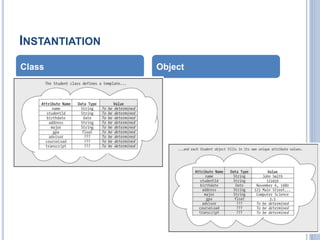
A class defines the features—attributes,
methods—that every object belonging to the
class must possess; a class can thus be
thought of as serving as an object template
An object, on the other hand, is a unique
instance of a filled-in template for which
attribute values have been provided, and
upon which methods may be performed
INSTANTIATION
Class Object
ENCAPSULATION
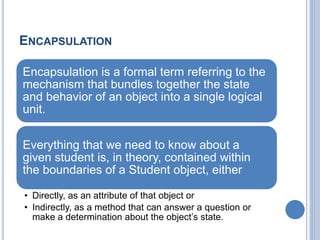
Encapsulation is a formal term referring to the
mechanism that bundles together the state
and behavior of an object into a single logical
unit.
Everything that we need to know about a
given student is, in theory, contained within
the boundaries of a Student object, either
• Directly, as an attribute of that object or
• Indirectly, as a method that can answer a question or
make a determination about the object’s state.
ENCAPSULATION
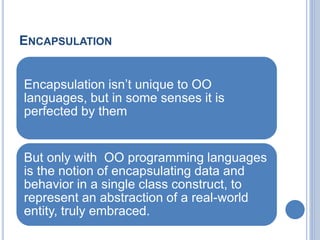
Encapsulation isn’t unique to OO
languages, but in some senses it is
perfected by them
But only with OO programming languages
is the notion of encapsulating data and
behavior in a single class construct, to
represent an abstraction of a real-world
entity, truly embraced.
ENCAPSULATION
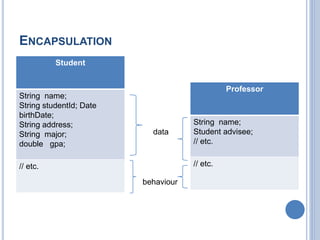
Student
String name;
String studentId; Date
birthDate;
String address;
String major;
double gpa;
// etc.
Professor
String name;
Student advisee;
// etc.
// etc.
data
behaviour
USER-DEFINED TYPES AND REFERENCE
VARIABLES
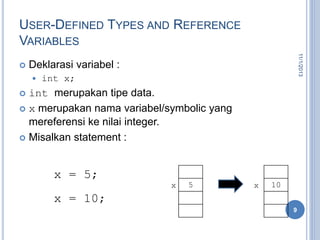
 Deklarasi variabel :
 int x;
 int merupakan tipe data.
 x merupakan nama variabel/symbolic yang
mereferensi ke nilai integer.
 Misalkan statement :
11/1/2013
9
5x
x = 5;
x = 10;
10x
TYPE DATA REFERENSI
Tidak seperti tipe data primitive, yang
variabelnya dapat menampung nilai.
Tipe data Referensi, variabelnya digunakan
untuk memegang referensi dari suatu objek.
Pengalokasian memori untuk variabel tipe
reference tidak dialokasikan pada saat deklarasi,
alokasi dilakukan eksplisit dengan operator new.
11/1/2013
10
INTANSIASI OBJEK PADA JAVA
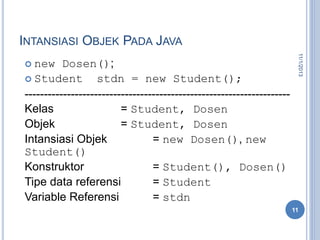
 new Dosen();
 Student stdn = new Student();
---------------------------------------------------------------------
Kelas = Student, Dosen
Objek = Student, Dosen
Intansiasi Objek = new Dosen(), new
Student()
Konstruktor = Student(), Dosen()
Tipe data referensi = Student
Variable Referensi = stdn
11/1/2013
11
INSTANTIATING OBJECTS: A CLOSER LOOK
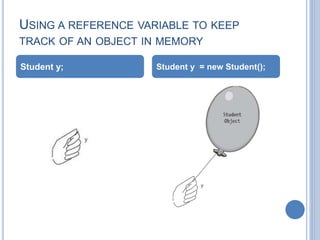
 In Java, when we declare a variable to be of a user-
defined type, as in
Student y;
 we haven’t actually created an object in memory yet.
 Rather, we’ve simply declared a reference variable of
type Student named y.
 This reference variable has the potential to refer to a
Student object, but it doesn’t refer to one just yet; rather,
as with variables of the various simple types, y’s value is
undefined as far as the compiler is concerned until we
explicitly assign it a value.
INSTANTIATING OBJECTS: A CLOSER LOOK
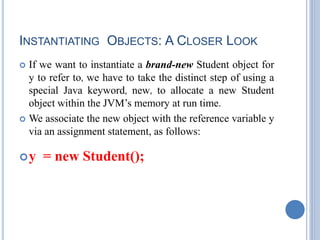
 If we want to instantiate a brand-new Student object for
y to refer to, we have to take the distinct step of using a
special Java keyword, new, to allocate a new Student
object within the JVM’s memory at run time.
 We associate the new object with the reference variable y
via an assignment statement, as follows:
y = new Student();
USING A REFERENCE VARIABLE TO KEEP
TRACK OF AN OBJECT IN MEMORY
Student y; Student y = new Student();
MAINTAINING MULTIPLE HANDLES ON THE
SAME OBJECT
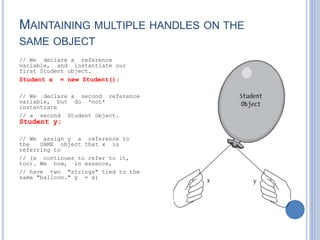
// We declare a reference
variable, and instantiate our
first Student object.
Student x = new Student();
// We declare a second reference
variable, but do *not*
instantiate
// a second Student object.
Student y;
// We assign y a reference to
the SAME object that x is
referring to
// (x continues to refer to it,
too). We now, in essence,
// have two "strings" tied to the
same "balloon." y = x;
A SECOND OBJECT COMES INTO EXISTENCE.
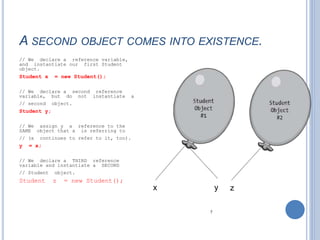
// We declare a reference variable,
and instantiate our first Student
object.
Student x = new Student();
// We declare a second reference
variable, but do not instantiate a
// second object.
Student y;
// We assign y a reference to the
SAME object that x is referring to
// (x continues to refer to it, too).
y = x;
// We declare a THIRD reference
variable and instantiate a SECOND
// Student object.
Student z = new Student();
x y z
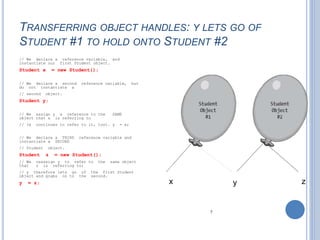
TRANSFERRING OBJECT HANDLES: Y LETS GO OF
STUDENT #1 TO HOLD ONTO STUDENT #2
// We declare a reference variable, and
instantiate our first Student object.
Student x = new Student();
// We declare a second reference variable, but
do not instantiate a
// second object.
Student y;
// We assign y a reference to the SAME
object that x is referring to
// (x continues to refer to it, too). y = x;
// We declare a THIRD reference variable and
instantiate a SECOND
// Student object.
Student z = new Student();
// We reassign y to refer to the same object
that z is referring to;
// y therefore lets go of the first Student
object and grabs on to the second.
y = z; x y z
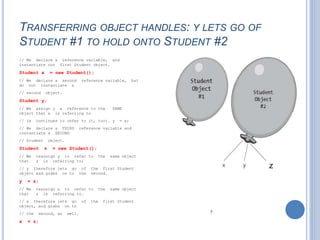
TRANSFERRING OBJECT HANDLES: Y LETS GO OF
STUDENT #1 TO HOLD ONTO STUDENT #2
// We declare a reference variable, and
instantiate our first Student object.
Student x = new Student();
// We declare a second reference variable, but
do not instantiate a
// second object.
Student y;
// We assign y a reference to the SAME
object that x is referring to
// (x continues to refer to it, too). y = x;
// We declare a THIRD reference variable and
instantiate a SECOND
// Student object.
Student z = new Student();
// We reassign y to refer to the same object
that z is referring to;
// y therefore lets go of the first Student
object and grabs on to the second.
y = z;
// We reassign x to refer to the same object
that z is referring to.
// x therefore lets go of the first Student
object, and grabs on to
// the second, as well.
x = z;
z
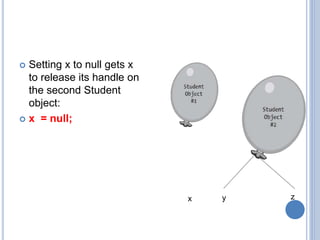
 Setting x to null gets x
to release its handle on
the second Student
object:
 x = null;
y zx
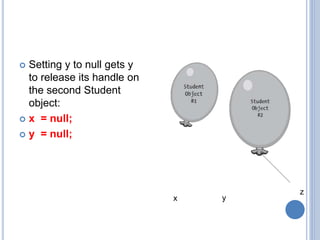
 Setting y to null gets y
to release its handle on
the second Student
object:
 x = null;
 y = null;
y
z
x
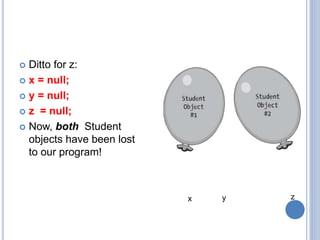
 Ditto for z:
 x = null;
 y = null;
 z = null;
 Now, both Student
objects have been lost
to our program!
y zx
GARBAGE COLLECTION
As it turns out, if all of an object’s handles are released, it might seem as though
the memory that the object occupies within the JVM would be permanently
wasted.
With Java, on the other hand, the JVM periodically performs garbage collection,
a process that automatically reclaims the memory of “lost” objects for us while an
application is executing. Here’s how the Java garbage collector works:
If there are no remaining active references to an object, it becomes a candidate
for garbage collection.
The garbage collector doesn’t immediately recycle the object, however; rather,
garbage collection occurs whenever the JVM determines that the application is
getting low on free memory, or when the JVM is otherwise idle.
So, for some period of time, the “orphaned” object will still exist in memory—we
simply won’t have any handles/reference variables with which to access it.
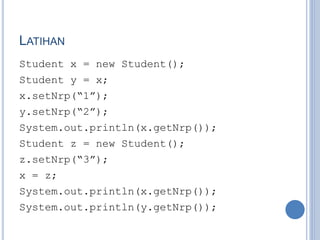
LATIHAN
Student x = new Student();
Student y = x;
x.setNrp(“1”);
y.setNrp(“2”);
System.out.println(x.getNrp());
Student z = new Student();
z.setNrp(“3”);
x = z;
System.out.println(x.getNrp());
System.out.println(y.getNrp());
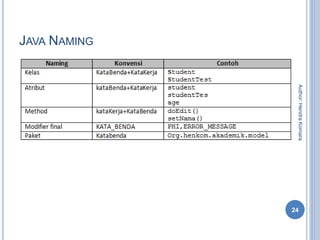
JAVA NAMING
24
Author:HendraKomara
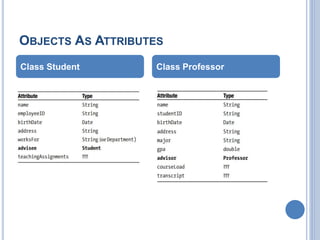
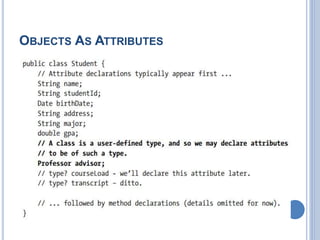
OBJECTS AS ATTRIBUTES
Class Student Class Professor
OBJECTS AS ATTRIBUTES
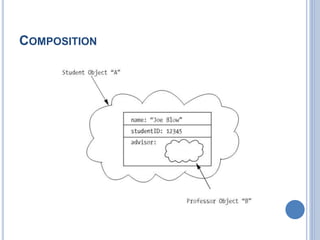
COMPOSITION
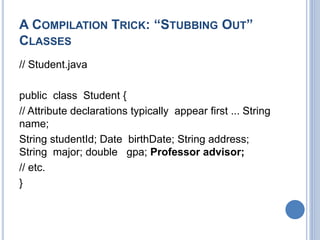
A COMPILATION TRICK: “STUBBING OUT”
CLASSES
// Student.java
public class Student {
// Attribute declarations typically appear first ... String
name;
String studentId; Date birthDate; String address;
String major; double gpa; Professor advisor;
// etc.
}
we can temporarily code a “bare-bones” Professor class
as follows:
// Professor.java
// A "stub" class: note that the body consists of a pair
of empty braces!
public class Professor { }
When we now attempt to compile our Student.java file,
the compiler will indeed deem “Professor” to be a valid
symbol—specifically, the name of a user-defined type—
and Student will compile properly, as well.
REFERENSI
 Beginning Java Object: From Concept to Code.
Author: JACQUIE BARKER
 SoftwareEngineering: A Practitioner Approach 7th
Edition. Author: Roger S Pressman
30
Author:HendraKomara
THANK YOU

It 405 materi 4 objek dan kelas ii

  • 1.
    IT 405: KPLBO MATERI4 KELAS DAN OBJEK Ayi Purbasari, ST., MT. If-Unpas, 2014
  • 2.
    OUTLINE  Instantiation  Encapsulation User-Defined Types and Reference Variables: Naming Conventions for Reference Variables  Instantiating Objects: A Closer Look  Objects As Attributes
  • 3.
    INSTANTIATION The term instantiationis used to refer to the process by which an object is created in mem- ory at run time based upon a class definition. From a single class definition—for example, Student— we can create many objects with identical data structures and behaviors, in the same way that we use a single cookie cutter to make many cookies all of the same shape. Another way to refer to an object, then, is as an instance of a particular class—for example, “A Student object is an instance of the Student class.”
  • 4.
    INSTANTIATION A class definesthe features—attributes, methods—that every object belonging to the class must possess; a class can thus be thought of as serving as an object template An object, on the other hand, is a unique instance of a filled-in template for which attribute values have been provided, and upon which methods may be performed
  • 5.
  • 6.
    ENCAPSULATION Encapsulation is aformal term referring to the mechanism that bundles together the state and behavior of an object into a single logical unit. Everything that we need to know about a given student is, in theory, contained within the boundaries of a Student object, either • Directly, as an attribute of that object or • Indirectly, as a method that can answer a question or make a determination about the object’s state.
  • 7.
    ENCAPSULATION Encapsulation isn’t uniqueto OO languages, but in some senses it is perfected by them But only with OO programming languages is the notion of encapsulating data and behavior in a single class construct, to represent an abstraction of a real-world entity, truly embraced.
  • 8.
    ENCAPSULATION Student String name; String studentId;Date birthDate; String address; String major; double gpa; // etc. Professor String name; Student advisee; // etc. // etc. data behaviour
  • 9.
    USER-DEFINED TYPES ANDREFERENCE VARIABLES  Deklarasi variabel :  int x;  int merupakan tipe data.  x merupakan nama variabel/symbolic yang mereferensi ke nilai integer.  Misalkan statement : 11/1/2013 9 5x x = 5; x = 10; 10x
  • 10.
    TYPE DATA REFERENSI Tidakseperti tipe data primitive, yang variabelnya dapat menampung nilai. Tipe data Referensi, variabelnya digunakan untuk memegang referensi dari suatu objek. Pengalokasian memori untuk variabel tipe reference tidak dialokasikan pada saat deklarasi, alokasi dilakukan eksplisit dengan operator new. 11/1/2013 10
  • 11.
    INTANSIASI OBJEK PADAJAVA  new Dosen();  Student stdn = new Student(); --------------------------------------------------------------------- Kelas = Student, Dosen Objek = Student, Dosen Intansiasi Objek = new Dosen(), new Student() Konstruktor = Student(), Dosen() Tipe data referensi = Student Variable Referensi = stdn 11/1/2013 11
  • 12.
    INSTANTIATING OBJECTS: ACLOSER LOOK  In Java, when we declare a variable to be of a user- defined type, as in Student y;  we haven’t actually created an object in memory yet.  Rather, we’ve simply declared a reference variable of type Student named y.  This reference variable has the potential to refer to a Student object, but it doesn’t refer to one just yet; rather, as with variables of the various simple types, y’s value is undefined as far as the compiler is concerned until we explicitly assign it a value.
  • 13.
    INSTANTIATING OBJECTS: ACLOSER LOOK  If we want to instantiate a brand-new Student object for y to refer to, we have to take the distinct step of using a special Java keyword, new, to allocate a new Student object within the JVM’s memory at run time.  We associate the new object with the reference variable y via an assignment statement, as follows: y = new Student();
  • 14.
    USING A REFERENCEVARIABLE TO KEEP TRACK OF AN OBJECT IN MEMORY Student y; Student y = new Student();
  • 15.
    MAINTAINING MULTIPLE HANDLESON THE SAME OBJECT // We declare a reference variable, and instantiate our first Student object. Student x = new Student(); // We declare a second reference variable, but do *not* instantiate // a second Student object. Student y; // We assign y a reference to the SAME object that x is referring to // (x continues to refer to it, too). We now, in essence, // have two "strings" tied to the same "balloon." y = x;
  • 16.
    A SECOND OBJECTCOMES INTO EXISTENCE. // We declare a reference variable, and instantiate our first Student object. Student x = new Student(); // We declare a second reference variable, but do not instantiate a // second object. Student y; // We assign y a reference to the SAME object that x is referring to // (x continues to refer to it, too). y = x; // We declare a THIRD reference variable and instantiate a SECOND // Student object. Student z = new Student(); x y z
  • 17.
    TRANSFERRING OBJECT HANDLES:Y LETS GO OF STUDENT #1 TO HOLD ONTO STUDENT #2 // We declare a reference variable, and instantiate our first Student object. Student x = new Student(); // We declare a second reference variable, but do not instantiate a // second object. Student y; // We assign y a reference to the SAME object that x is referring to // (x continues to refer to it, too). y = x; // We declare a THIRD reference variable and instantiate a SECOND // Student object. Student z = new Student(); // We reassign y to refer to the same object that z is referring to; // y therefore lets go of the first Student object and grabs on to the second. y = z; x y z
  • 18.
    TRANSFERRING OBJECT HANDLES:Y LETS GO OF STUDENT #1 TO HOLD ONTO STUDENT #2 // We declare a reference variable, and instantiate our first Student object. Student x = new Student(); // We declare a second reference variable, but do not instantiate a // second object. Student y; // We assign y a reference to the SAME object that x is referring to // (x continues to refer to it, too). y = x; // We declare a THIRD reference variable and instantiate a SECOND // Student object. Student z = new Student(); // We reassign y to refer to the same object that z is referring to; // y therefore lets go of the first Student object and grabs on to the second. y = z; // We reassign x to refer to the same object that z is referring to. // x therefore lets go of the first Student object, and grabs on to // the second, as well. x = z; z
  • 19.
     Setting xto null gets x to release its handle on the second Student object:  x = null; y zx
  • 20.
     Setting yto null gets y to release its handle on the second Student object:  x = null;  y = null; y z x
  • 21.
     Ditto forz:  x = null;  y = null;  z = null;  Now, both Student objects have been lost to our program! y zx
  • 22.
    GARBAGE COLLECTION As itturns out, if all of an object’s handles are released, it might seem as though the memory that the object occupies within the JVM would be permanently wasted. With Java, on the other hand, the JVM periodically performs garbage collection, a process that automatically reclaims the memory of “lost” objects for us while an application is executing. Here’s how the Java garbage collector works: If there are no remaining active references to an object, it becomes a candidate for garbage collection. The garbage collector doesn’t immediately recycle the object, however; rather, garbage collection occurs whenever the JVM determines that the application is getting low on free memory, or when the JVM is otherwise idle. So, for some period of time, the “orphaned” object will still exist in memory—we simply won’t have any handles/reference variables with which to access it.
  • 23.
    LATIHAN Student x =new Student(); Student y = x; x.setNrp(“1”); y.setNrp(“2”); System.out.println(x.getNrp()); Student z = new Student(); z.setNrp(“3”); x = z; System.out.println(x.getNrp()); System.out.println(y.getNrp());
  • 24.
  • 25.
    OBJECTS AS ATTRIBUTES ClassStudent Class Professor
  • 26.
  • 27.
  • 28.
    A COMPILATION TRICK:“STUBBING OUT” CLASSES // Student.java public class Student { // Attribute declarations typically appear first ... String name; String studentId; Date birthDate; String address; String major; double gpa; Professor advisor; // etc. }
  • 29.
    we can temporarilycode a “bare-bones” Professor class as follows: // Professor.java // A "stub" class: note that the body consists of a pair of empty braces! public class Professor { } When we now attempt to compile our Student.java file, the compiler will indeed deem “Professor” to be a valid symbol—specifically, the name of a user-defined type— and Student will compile properly, as well.
  • 30.
    REFERENSI  Beginning JavaObject: From Concept to Code. Author: JACQUIE BARKER  SoftwareEngineering: A Practitioner Approach 7th Edition. Author: Roger S Pressman 30 Author:HendraKomara
  • 31.