IronPython integration with Asp.net
CPSC 473 - Web Programming and Data Management
Lightning Talks, Round 2, May 22
George Ishak
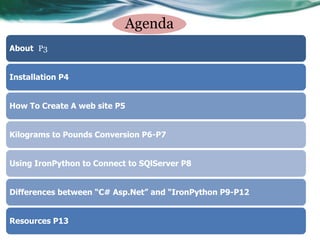
Agenda
About
Installation
Simplicity
How To Create A web site
Kilograms to Pounds Conversion
Using IronPython to Connect to SQlServer
Execution Time(in Seconds)
Debugging
Resources
About
• IronPython ( Python + .NET ) is an open-source .NET implementation.
• Written by the CLR team at Microsoft.
o The common language runtime (CLR) enables deep integration
among languages.
o This allows developers to choose the best language for the problems
they are trying to solve, rather than settling on one language.
• It provides full access to .NET libraries .
• It provides access to standard Python libraries.
• .NET languages(C#,VB.net) can use Python code.
• Great development environment of Visual Studio IDE
• The latest stable version of IronPython is IronPython2.7.3, which is
compatible with Python 2.7 and released on 2012-07-06
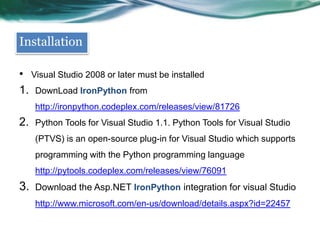
Installation
• Visual Studio 2008 or later must be installed
1. Download IronPython from
http://ironpython.codeplex.com/releases/view/81726
2. Python Tools for Visual Studio (PTVS) is an open-source plug-in for
Visual Studio which supports programming with the Python
programming language
http://pytools.codeplex.com/releases/view/76091
3. Download ASP.NET IronPython integration for Visual Studio
http://www.microsoft.com/en-us/download/details.aspx?id=22457
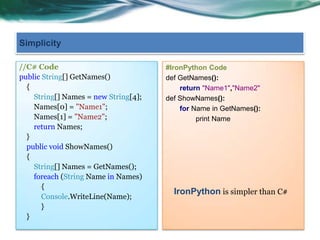
Simplicity (Multiple Return Values in C# and Python )
http://msdn.microsoft.com/en-us/magazine/cc300810.aspx
//C# Code
object[] GetValues() {
object[] results = new object[2];
object[0] = 42;
object[1] = "Hello";
return results;
}
object[] results = GetValues();
int x = (int)results[0];
string s = (string)results[1];
#IronPython Code
def get_values() :
return 42, "Hello"
x, s = get_values()
IronPython is simpler than C#
Simplicity (Swapping Two Variables in C# and Python )
http://msdn.microsoft.com/en-us/magazine/cc300810.aspx
//C# Code
void Swap(ref int x, ref int y) {
int temp = x;
x = y;
y = temp;
}
int x = 4, y = 2;
Swap(ref x, ref y);
#IronPython Code
• x, y = 4, 2
• x, y = y, x
IronPython is simpler than C#
How To Create A project
File->New->Web Site
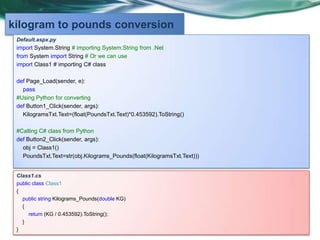
Default.aspx.py
import System.String # importing System.String from .Net
from System import String # Or we can use
import Class1 # importing C# class
def Button1_Click(sender, args):#Using Python for converting Pounds to Kilograms
KilogramsTxt.Text=(float(PoundsTxt.Text)*0.453592).ToString()
def Button2_Click(sender, args):#Calling C# class from Python
obj = Class1()
PoundsTxt.Text=str(obj.Kilograms_Pounds(float(KilogramsTxt.Text)))
//Class1.cs
public class Class1
{
public string Kilograms_Pounds(double KG)
{
return (KG / 0.453592).ToString();
}
}
Kilograms to Pounds conversion
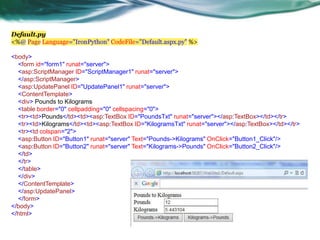
Default.py
<%@ Page Language="IronPython" CodeFile="Default.aspx.py" %>
<body>
<form id="form1" runat="server">
<table border="0" cellpadding="0" cellspacing="0">
<tr><td>Pounds</td><td><asp:TextBox ID="PoundsTxt"
runat="server"></asp:TextBox></td></tr>
<tr><td>Kilograms</td><td><asp:TextBox ID="KilogramsTxt"
runat="server"></asp:TextBox></td></tr>
<tr><td colspan="2">
<asp:Button ID="Button1" runat="server" Text="Pounds->Kilograms"
OnClick="Button1_Click"/>
<asp:Button ID="Button2" runat="server" Text="Kilograms->Pounds"
OnClick="Button2_Click"/>
</td>
</tr>
</table>
</div>
</form>
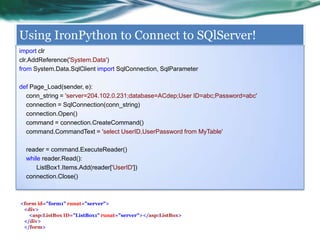
Using IronPython to Connect to SQlServer!
import clr #To utilize additional .NET libraries, the clr module must be imported and then specific
assemblies referenced.
clr.AddReference('System.Data')
from System.Data.SqlClient import SqlConnection, SqlParameter
def Page_Load(sender, e):
conn_string = 'server=0.0.0.0;database=Database;User ID=abc;Password=abc'
connection = SqlConnection(conn_string)
connection.Open()
command = connection.CreateCommand()
command.CommandText = 'select UserID,UserPassword from MyTable'
reader = command.ExecuteReader()
while reader.Read():
ListBox1.Items.Add(reader['UserID'])
connection.Close()
<asp:ListBox ID="ListBox1" runat="server"></asp:ListBox>
//C# is about 25 lines of code to compute Factorial
using System;
using System.Diagnostics;
public partial class _Default : System.Web.UI.Page
{
protected void Button1_Click(object sender, EventArgs e)
{
Stopwatch sw = new Stopwatch();
sw.Start();
Results.Text =
Factorial(Convert.ToDouble(Numbertxt.Text)).ToString();
sw.Stop();
Elapsed.Text = sw.Elapsed.TotalMilliseconds.ToString();
}
public double Factorial(double factor)
{
double factorial = 1;
for (int i = 1; i <= factor; i++)
{
factorial *= i;
}
return factorial;
}
}
#IronPython is about 16 lines of code to
#compute Factorial
import System.Diagnostics
import time
def Button1_Click(sender, args):
start_time = time.time()
Results.Text =
Factorial(int(Numbertxt.Text)).ToString()
end_time = time.time()
uptime = end_time - start_time
Elapsed.Text = uptime.ToString()
def Factorial(factor):
factorial = 1
for x in range(1, int(factor)):
factorial *= x
return factorial
Lines of code to compute 170!
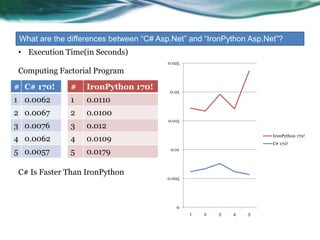
Execution Time(in Seconds) between “ASP.Net” and
“IronPython”?
# ASP.NET
1 0.0062
2 0.0067
3 0.0076
4 0.0062
5 0.0057
# IronPython
1 0.0110
2 0.0100
3 0.012
4 0.0109
5 0.0179
0
0.005
0.01
0.015
0.02
0.025
1 2 3 4 5
IronPython 170!
C# 170!
Computing Factorial Program 170!
ASP.NET Is Faster Than
IronPython
Debugging
• Python Tools for Visual
Studio includes an
interactive window for
debugging your code.
• When execution breaks
into the debugger, the
debug interactive window
is now ready to start
executing code
http://pytools.codeplex.com/wikipage?title=Features%20Debugging
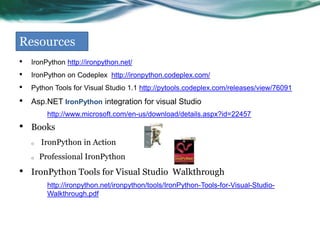
Resources
• IronPython http://ironpython.net/
• IronPython on Codeplex http://ironpython.codeplex.com/
• Python Tools for Visual Studio 1.1
http://pytools.codeplex.com/releases/view/76091
• Asp.NET IronPython integration for visual Studio
http://www.microsoft.com/en-us/download/details.aspx?id=22457
• http://msdn.microsoft.com/en-us/magazine/cc300810.aspx
• http://pytools.codeplex.com/wikipage?title=Features%20Debugging
• Books
o IronPython in Action
o Professional IronPython
• IronPython Tools for Visual Studio Walkthrough
http://ironpython.net/ironpython/tools/IronPython-Tools-for-Visual-Studio-
Walkthrough.pdf
Thank You

Iron python

  • 1.
    IronPython integration withAsp.net CPSC 473 - Web Programming and Data Management Lightning Talks, Round 2, May 22 George Ishak
  • 2.
    Agenda About Installation Simplicity How To CreateA web site Kilograms to Pounds Conversion Using IronPython to Connect to SQlServer Execution Time(in Seconds) Debugging Resources
  • 3.
    About • IronPython (Python + .NET ) is an open-source .NET implementation. • Written by the CLR team at Microsoft. o The common language runtime (CLR) enables deep integration among languages. o This allows developers to choose the best language for the problems they are trying to solve, rather than settling on one language. • It provides full access to .NET libraries . • It provides access to standard Python libraries. • .NET languages(C#,VB.net) can use Python code. • Great development environment of Visual Studio IDE • The latest stable version of IronPython is IronPython2.7.3, which is compatible with Python 2.7 and released on 2012-07-06
  • 4.
    Installation • Visual Studio2008 or later must be installed 1. Download IronPython from http://ironpython.codeplex.com/releases/view/81726 2. Python Tools for Visual Studio (PTVS) is an open-source plug-in for Visual Studio which supports programming with the Python programming language http://pytools.codeplex.com/releases/view/76091 3. Download ASP.NET IronPython integration for Visual Studio http://www.microsoft.com/en-us/download/details.aspx?id=22457
  • 5.
    Simplicity (Multiple ReturnValues in C# and Python ) http://msdn.microsoft.com/en-us/magazine/cc300810.aspx //C# Code object[] GetValues() { object[] results = new object[2]; object[0] = 42; object[1] = "Hello"; return results; } object[] results = GetValues(); int x = (int)results[0]; string s = (string)results[1]; #IronPython Code def get_values() : return 42, "Hello" x, s = get_values() IronPython is simpler than C#
  • 6.
    Simplicity (Swapping TwoVariables in C# and Python ) http://msdn.microsoft.com/en-us/magazine/cc300810.aspx //C# Code void Swap(ref int x, ref int y) { int temp = x; x = y; y = temp; } int x = 4, y = 2; Swap(ref x, ref y); #IronPython Code • x, y = 4, 2 • x, y = y, x IronPython is simpler than C#
  • 7.
    How To CreateA project File->New->Web Site
  • 8.
    Default.aspx.py import System.String #importing System.String from .Net from System import String # Or we can use import Class1 # importing C# class def Button1_Click(sender, args):#Using Python for converting Pounds to Kilograms KilogramsTxt.Text=(float(PoundsTxt.Text)*0.453592).ToString() def Button2_Click(sender, args):#Calling C# class from Python obj = Class1() PoundsTxt.Text=str(obj.Kilograms_Pounds(float(KilogramsTxt.Text))) //Class1.cs public class Class1 { public string Kilograms_Pounds(double KG) { return (KG / 0.453592).ToString(); } } Kilograms to Pounds conversion
  • 9.
    Default.py <%@ Page Language="IronPython"CodeFile="Default.aspx.py" %> <body> <form id="form1" runat="server"> <table border="0" cellpadding="0" cellspacing="0"> <tr><td>Pounds</td><td><asp:TextBox ID="PoundsTxt" runat="server"></asp:TextBox></td></tr> <tr><td>Kilograms</td><td><asp:TextBox ID="KilogramsTxt" runat="server"></asp:TextBox></td></tr> <tr><td colspan="2"> <asp:Button ID="Button1" runat="server" Text="Pounds->Kilograms" OnClick="Button1_Click"/> <asp:Button ID="Button2" runat="server" Text="Kilograms->Pounds" OnClick="Button2_Click"/> </td> </tr> </table> </div> </form>
  • 10.
    Using IronPython toConnect to SQlServer! import clr #To utilize additional .NET libraries, the clr module must be imported and then specific assemblies referenced. clr.AddReference('System.Data') from System.Data.SqlClient import SqlConnection, SqlParameter def Page_Load(sender, e): conn_string = 'server=0.0.0.0;database=Database;User ID=abc;Password=abc' connection = SqlConnection(conn_string) connection.Open() command = connection.CreateCommand() command.CommandText = 'select UserID,UserPassword from MyTable' reader = command.ExecuteReader() while reader.Read(): ListBox1.Items.Add(reader['UserID']) connection.Close() <asp:ListBox ID="ListBox1" runat="server"></asp:ListBox>
  • 11.
    //C# is about25 lines of code to compute Factorial using System; using System.Diagnostics; public partial class _Default : System.Web.UI.Page { protected void Button1_Click(object sender, EventArgs e) { Stopwatch sw = new Stopwatch(); sw.Start(); Results.Text = Factorial(Convert.ToDouble(Numbertxt.Text)).ToString(); sw.Stop(); Elapsed.Text = sw.Elapsed.TotalMilliseconds.ToString(); } public double Factorial(double factor) { double factorial = 1; for (int i = 1; i <= factor; i++) { factorial *= i; } return factorial; } } #IronPython is about 16 lines of code to #compute Factorial import System.Diagnostics import time def Button1_Click(sender, args): start_time = time.time() Results.Text = Factorial(int(Numbertxt.Text)).ToString() end_time = time.time() uptime = end_time - start_time Elapsed.Text = uptime.ToString() def Factorial(factor): factorial = 1 for x in range(1, int(factor)): factorial *= x return factorial Lines of code to compute 170!
  • 12.
    Execution Time(in Seconds)between “ASP.Net” and “IronPython”? # ASP.NET 1 0.0062 2 0.0067 3 0.0076 4 0.0062 5 0.0057 # IronPython 1 0.0110 2 0.0100 3 0.012 4 0.0109 5 0.0179 0 0.005 0.01 0.015 0.02 0.025 1 2 3 4 5 IronPython 170! C# 170! Computing Factorial Program 170! ASP.NET Is Faster Than IronPython
  • 13.
    Debugging • Python Toolsfor Visual Studio includes an interactive window for debugging your code. • When execution breaks into the debugger, the debug interactive window is now ready to start executing code http://pytools.codeplex.com/wikipage?title=Features%20Debugging
  • 14.
    Resources • IronPython http://ironpython.net/ •IronPython on Codeplex http://ironpython.codeplex.com/ • Python Tools for Visual Studio 1.1 http://pytools.codeplex.com/releases/view/76091 • Asp.NET IronPython integration for visual Studio http://www.microsoft.com/en-us/download/details.aspx?id=22457 • http://msdn.microsoft.com/en-us/magazine/cc300810.aspx • http://pytools.codeplex.com/wikipage?title=Features%20Debugging • Books o IronPython in Action o Professional IronPython • IronPython Tools for Visual Studio Walkthrough http://ironpython.net/ironpython/tools/IronPython-Tools-for-Visual-Studio- Walkthrough.pdf
  • 15.