S
The New Connected
World
Data Collection/Data Processing/Data Visualization
Devices/Cloud/Mobile/Websites
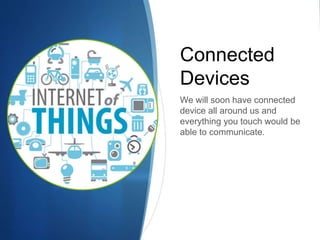
Connected
Devices
We will soon have connected
device all around us and
everything you touch would be
able to communicate.
IoT - Introduction
S This term “IoT” was first used by Kevin Ashton in 1999.
S Refers to the uniquely identifiable objects (things) and
their representations in the internet space.
S This can be understood in stages:
S To identify and track the data of things
S To collect and process the data on various events.
S To slowly learn to deduce results from the huge data sets.
S Help taking next actions across ecosystem.
Area of Application
S Management
S Waste Management
S Urban Management (Smart cities)
S Production Management (IIoT)
S Logistics
S Transportation and warehouse management.
S Retail
S Intelligent Shopping
S RFID – Electronic Tags, Bar code in retail
Challenges and Issues
S Society :
S Absence of legal structure with legislation
S Technological
S Governance and monitoring of standard interfaces
S Privacy
S Identity Security
S Energy sources for billions of sensors.
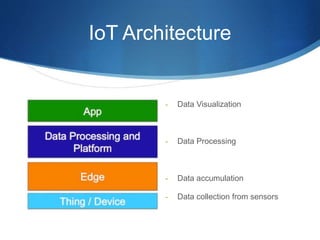
IoT Architecture
- Data Visualization
- Data Processing
- Data accumulation
- Data collection from sensors
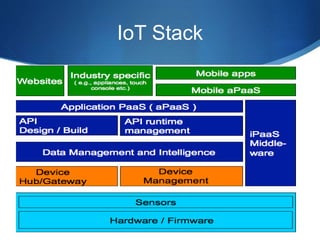
IoT Stack
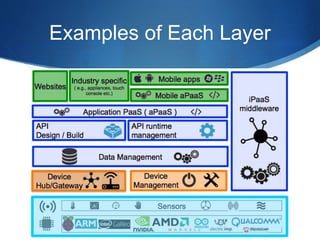
Examples of Each Layer
Few examples of IoT products
S MyVessyl Cup - https://www.myvessyl.com/
S Smart Home Security - https://canary.is/
S Philips Smart Lighting - http://meethue.com/
S Amazon alexa -
https://developer.amazon.com/public/solutions/alexa
S Smart Bikes - https://www.vanhawks.com/
Example – Apple Ecosystem
S Lets try and understand this whole IoT ecosystem with
the help of Apple’s Ecosystem:
S Apple Watch – Sensor/Data collection
S Apple iCloud – Cloud service and Data processing
S Apple iPhone – Data visualization
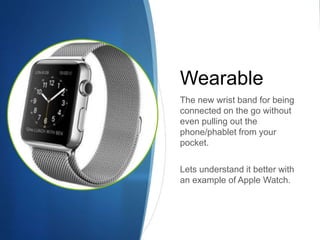
Wearable
The new wrist band for being
connected on the go without
even pulling out the
phone/phablet from your
pocket.
Lets understand it better with
an example of Apple Watch.
Apple Watch
S Apple Watch requires the presence of an iPhone to run
third-party apps.
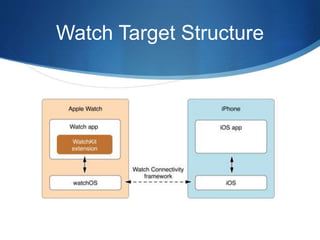
S A WatchKit app that runs on Apple Watch along with the
WatchKit extension, it communicates with the iPhone app
as and when required.
S Users can be shown 3 types of UI on Watch
S Navigational UI - Full interface with Multiple Screens
S Glances – Optional, read only interface
S Notifications – Optional, For Local/Remote Notifications
Fine Print For Apple Watch
S WatchKit app and WatchKit extension are bundled
together and packaged inside your iOS app bundle.
S System prompts the user to install the WatchKit app
when a paired Apple Watch is present
S You can use the Shared data by the help of App Groups
where we can put User Defaults and Other File Formats.
S You would be able to communicate with the parent app
for downloading/uploading or any other heavy operation.
Watch Target Structure
Apple Watch Architecture
S If the user views your app’s Scene.
S WatchKit tells the paired iPhone to launch your WatchKit
extension & create the objects needed to manage that
scene.
S The transfer of information between the WatchKit app
and WatchKit extension happens silently behind the
scenes.
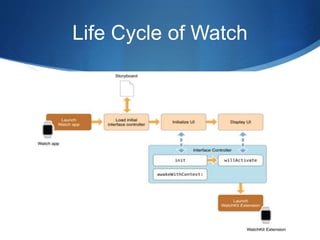
Life Cycle of Watch
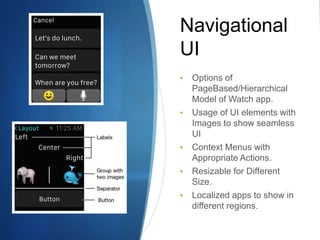
Navigational
UI
• Options of
PageBased/Hierarchical
Model of Watch app.
• Usage of UI elements with
Images to show seamless
UI
• Context Menus with
Appropriate Actions.
• Resizable for Different
Size.
• Localized apps to show in
different regions.
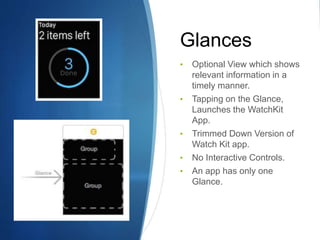
Glances
• Optional View which shows
relevant information in a
timely manner.
• Tapping on the Glance,
Launches the WatchKit
App.
• Trimmed Down Version of
Watch Kit app.
• No Interactive Controls.
• An app has only one
Glance.
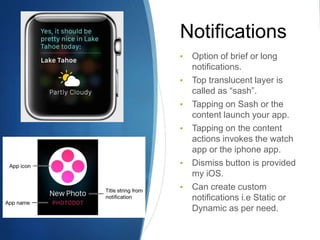
Notifications
• Option of brief or long
notifications.
• Top translucent layer is
called as “sash”.
• Tapping on Sash or the
content launch your app.
• Tapping on the content
actions invokes the watch
app or the iphone app.
• Dismiss button is provided
my iOS.
• Can create custom
notifications i.e Static or
Dynamic as per need.
Cloud
Yes with the advent of Cloud
we would not need huge
storage on our device weather
it may be laptop, mobiles or
any connected device.
Access the same information
all around you on all the
devices.
iCloud
S Free service to let users access data on all the
connected devices, wirelessly and automatically via
Apple ID
S Apple provides the server infrastructure, backup
functionality and user accounts.
S Types of iCloud Storage:
S Key Value Pairs
S iCloud Document Storage
S Core Data Storage
S CloudKit Storage
Ask user for local or cloud storage option.
iCloud Introduction
S iCloud services encrypt the data prior to transmit and
save them in an encrypted format on the iCloud servers.
S Apps place the data in the iCloud containers, primary
container or custom container.
S Limited storage per user, user with many apps can get
storage options extended.
S User should be given UI to delete all the data from the
Cloud and all other devices.
S Local caching is done by the system, which evicts the
files when not required.
CloudKit Framework
S Helps in saving/retrieving data from the cloud.
S Does not helps to maintain data locally.
S Concept of Containers to manage data on the cloud.
S Concept of 1 Public and n Private databases in each
container, data saved in form of Records.
S Requires active iCloud Account on the Device.
S Use references to co relate two objects in records.
S Usage of Assets for associated files and resources.
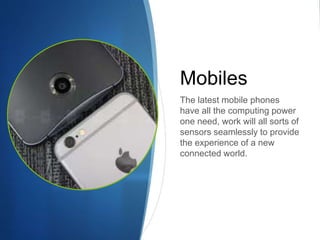
Mobiles
The latest mobile phones
have all the computing power
one need, work will all sorts of
sensors seamlessly to provide
the experience of a new
connected world.
Mobile/Web Applications
S This would be required to show the data in the visual
manner which is connected and processed by the
sensors and could.
S Many features have been added to the leading mobile
operating systems to address the issues being faced in
the new connected world.
S OS are becoming more widely available on other sets of
devices other than Mobiles only.
Thank You

IOT

  • 1.
    S The New Connected World DataCollection/Data Processing/Data Visualization Devices/Cloud/Mobile/Websites
  • 2.
    Connected Devices We will soonhave connected device all around us and everything you touch would be able to communicate.
  • 3.
    IoT - Introduction SThis term “IoT” was first used by Kevin Ashton in 1999. S Refers to the uniquely identifiable objects (things) and their representations in the internet space. S This can be understood in stages: S To identify and track the data of things S To collect and process the data on various events. S To slowly learn to deduce results from the huge data sets. S Help taking next actions across ecosystem.
  • 4.
    Area of Application SManagement S Waste Management S Urban Management (Smart cities) S Production Management (IIoT) S Logistics S Transportation and warehouse management. S Retail S Intelligent Shopping S RFID – Electronic Tags, Bar code in retail
  • 5.
    Challenges and Issues SSociety : S Absence of legal structure with legislation S Technological S Governance and monitoring of standard interfaces S Privacy S Identity Security S Energy sources for billions of sensors.
  • 6.
    IoT Architecture - DataVisualization - Data Processing - Data accumulation - Data collection from sensors
  • 7.
  • 8.
  • 9.
    Few examples ofIoT products S MyVessyl Cup - https://www.myvessyl.com/ S Smart Home Security - https://canary.is/ S Philips Smart Lighting - http://meethue.com/ S Amazon alexa - https://developer.amazon.com/public/solutions/alexa S Smart Bikes - https://www.vanhawks.com/
  • 10.
    Example – AppleEcosystem S Lets try and understand this whole IoT ecosystem with the help of Apple’s Ecosystem: S Apple Watch – Sensor/Data collection S Apple iCloud – Cloud service and Data processing S Apple iPhone – Data visualization
  • 11.
    Wearable The new wristband for being connected on the go without even pulling out the phone/phablet from your pocket. Lets understand it better with an example of Apple Watch.
  • 12.
    Apple Watch S AppleWatch requires the presence of an iPhone to run third-party apps. S A WatchKit app that runs on Apple Watch along with the WatchKit extension, it communicates with the iPhone app as and when required. S Users can be shown 3 types of UI on Watch S Navigational UI - Full interface with Multiple Screens S Glances – Optional, read only interface S Notifications – Optional, For Local/Remote Notifications
  • 13.
    Fine Print ForApple Watch S WatchKit app and WatchKit extension are bundled together and packaged inside your iOS app bundle. S System prompts the user to install the WatchKit app when a paired Apple Watch is present S You can use the Shared data by the help of App Groups where we can put User Defaults and Other File Formats. S You would be able to communicate with the parent app for downloading/uploading or any other heavy operation.
  • 14.
  • 15.
    Apple Watch Architecture SIf the user views your app’s Scene. S WatchKit tells the paired iPhone to launch your WatchKit extension & create the objects needed to manage that scene. S The transfer of information between the WatchKit app and WatchKit extension happens silently behind the scenes.
  • 16.
  • 17.
    Navigational UI • Options of PageBased/Hierarchical Modelof Watch app. • Usage of UI elements with Images to show seamless UI • Context Menus with Appropriate Actions. • Resizable for Different Size. • Localized apps to show in different regions.
  • 18.
    Glances • Optional Viewwhich shows relevant information in a timely manner. • Tapping on the Glance, Launches the WatchKit App. • Trimmed Down Version of Watch Kit app. • No Interactive Controls. • An app has only one Glance.
  • 19.
    Notifications • Option ofbrief or long notifications. • Top translucent layer is called as “sash”. • Tapping on Sash or the content launch your app. • Tapping on the content actions invokes the watch app or the iphone app. • Dismiss button is provided my iOS. • Can create custom notifications i.e Static or Dynamic as per need.
  • 20.
    Cloud Yes with theadvent of Cloud we would not need huge storage on our device weather it may be laptop, mobiles or any connected device. Access the same information all around you on all the devices.
  • 21.
    iCloud S Free serviceto let users access data on all the connected devices, wirelessly and automatically via Apple ID S Apple provides the server infrastructure, backup functionality and user accounts. S Types of iCloud Storage: S Key Value Pairs S iCloud Document Storage S Core Data Storage S CloudKit Storage Ask user for local or cloud storage option.
  • 22.
    iCloud Introduction S iCloudservices encrypt the data prior to transmit and save them in an encrypted format on the iCloud servers. S Apps place the data in the iCloud containers, primary container or custom container. S Limited storage per user, user with many apps can get storage options extended. S User should be given UI to delete all the data from the Cloud and all other devices. S Local caching is done by the system, which evicts the files when not required.
  • 23.
    CloudKit Framework S Helpsin saving/retrieving data from the cloud. S Does not helps to maintain data locally. S Concept of Containers to manage data on the cloud. S Concept of 1 Public and n Private databases in each container, data saved in form of Records. S Requires active iCloud Account on the Device. S Use references to co relate two objects in records. S Usage of Assets for associated files and resources.
  • 24.
    Mobiles The latest mobilephones have all the computing power one need, work will all sorts of sensors seamlessly to provide the experience of a new connected world.
  • 25.
    Mobile/Web Applications S Thiswould be required to show the data in the visual manner which is connected and processed by the sensors and could. S Many features have been added to the leading mobile operating systems to address the issues being faced in the new connected world. S OS are becoming more widely available on other sets of devices other than Mobiles only.
  • 26.