Do IoT Yourself 세미나의 세 번째 발표 자료 프리뷰입니다.
이번 세미나에서는 지난 세미나에서 개발한 아두이노 기반 온도 센서 정보를 RESTful Web API 형태의 Open API로 개발하는 과정을 다룹니다.
프리뷰 자료이기 때문에 이후 수정, 변경될 가능성이 있으니 양해 바랍니다.
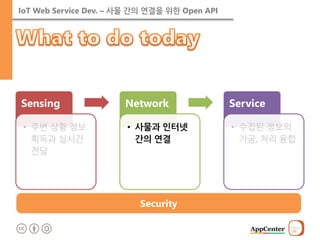
IoT Web ServiceDev. – 사물 간의 연결을 위한 Open API
Sensing
•주변 상황 정보획득과 실시간 전달
Network
•사물과 인터넷 간의 연결
Service
•수집된 정보의 가공, 처리, 융합
Security
4.
IoT Web ServiceDev. – 사물 간의 연결을 위한 Open API
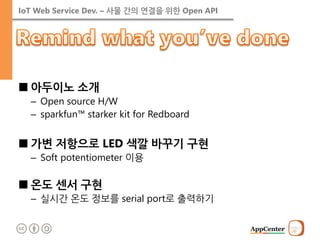
■아두이노 소개
–Open source H/W
–sparkfun™ starker kit for Redboard
■가변 저항으로 LED 색깔 바꾸기 구현
–Soft potentiometer 이용
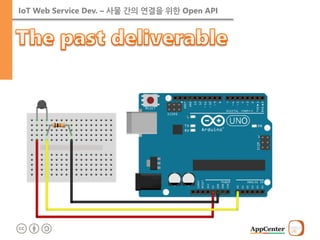
■온도 센서 구현
–실시간 온도 정보를 serial port로 출력하기
5.
IoT Web ServiceDev. – 사물 간의 연결을 위한 Open API
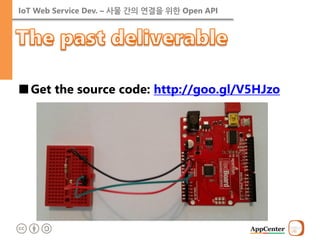
■Get the source code: http://goo.gl/V5HJzo
IoT Web ServiceDev. – 사물 간의 연결을 위한 Open API
Security
Sensing
•주변 상황 정보획득과 실시간 전달
Network
•사물과 인터넷 간의 연결
Service
•수집된 정보의 가공, 처리 융합
8.
IoT Web ServiceDev. – 사물 간의 연결을 위한 Open API
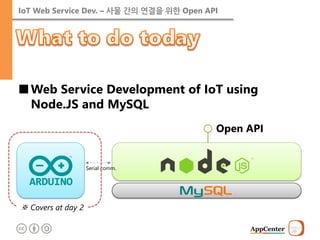
■Web Service Development of IoT using Node.JS and MySQL
Serial comm.
Open API
※ Covers at day 2
9.
IoT Web ServiceDev. – 사물 간의 연결을 위한 Open API
■Server-side application development platform with JavaScript
–Google’s chrome JavaScript engine (V8) 기반
–Event handling I/O Framework
•Non-blocking I/O
•단일 스레드 이벤트 루프를 통한 높은 처리성능
10.
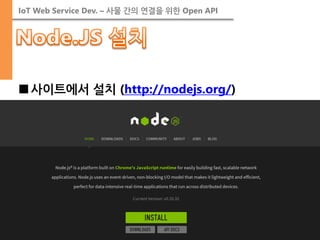
IoT Web ServiceDev. – 사물 간의 연결을 위한 Open API
■사이트에서 설치 (http://nodejs.org/)
11.
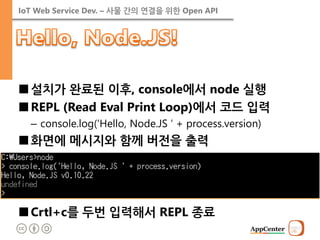
IoT Web ServiceDev. – 사물 간의 연결을 위한 Open API
■설치가 완료된 이후, console에서 node 실행
■REPL (Read Eval Print Loop)에서 코드 입력
–console.log(‘Hello, Node.JS ‘ + process.version)
■화면에 메시지와 함께 버전을 출력
■Crtl+c를 두번 입력해서 REPL 종료
12.
IoT Web ServiceDev. – 사물 간의 연결을 위한 Open API
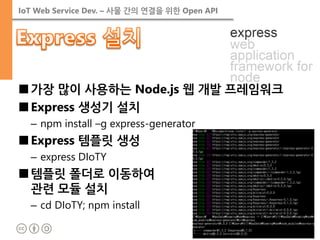
■가장 많이 사용하는 Node.js 웹 개발 프레임워크
■Express 생성기 설치
–npm install –g express-generator
■Express 템플릿 생성
–express DIoTY
■템플릿 폴더로 이동하여 관련 모듈 설치
–cd DIoTY; npm install
13.
IoT Web ServiceDev. – 사물 간의 연결을 위한 Open API
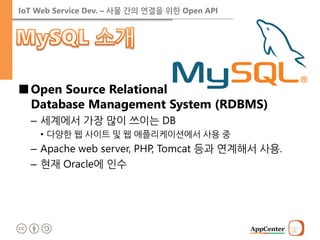
■Open Source Relational Database Management System (RDBMS)
–세계에서 가장 많이 쓰이는 DB
•다양한 웹 사이트 및 웹 애플리케이션에서 사용 중
–Apache web server, PHP, Tomcat 등과 연계해서 사용.
–현재 Oracle에 인수
14.
IoT Web ServiceDev. – 사물 간의 연결을 위한 Open API
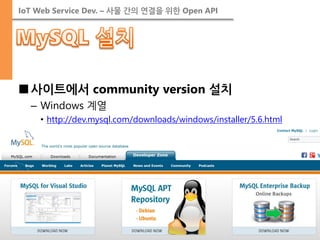
■사이트에서 community version 설치
–Windows 계열
•http://dev.mysql.com/downloads/windows/installer/5.6.html
15.
IoT Web ServiceDev. – 사물 간의 연결을 위한 Open API
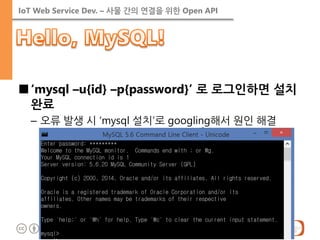
■‘mysql –u{id} –p{password}’ 로 로그인하면 설치 완료
–오류 발생 시 ‘mysql 설치’로 googling해서 원인 해결
17.
IoT Web ServiceDev. – 사물 간의 연결을 위한 Open API
■Reading or Writing or Both
18.
IoT Web ServiceDev. – 사물 간의 연결을 위한 Open API
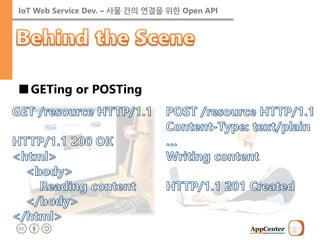
■GETing or POSTing
19.
IoT Web ServiceDev. – 사물 간의 연결을 위한 Open API
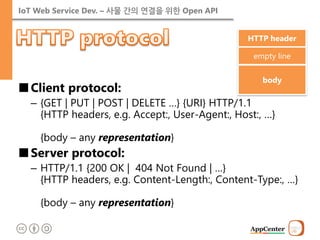
■Client protocol:
–{GET | PUT | POST | DELETE …} {URI} HTTP/1.1 {HTTP headers, e.g. Accept:, User-Agent:, Host:, …} {body – any representation}
■Server protocol:
–HTTP/1.1 {200 OK | 404 Not Found | …} {HTTP headers, e.g. Content-Length:, Content-Type:, …} {body – any representation}
HTTP header
empty line
body
20.
IoT Web ServiceDev. – 사물 간의 연결을 위한 Open API
■Representation
–Content-Type header describes media type of the body.
<?xml version="1.0" encoding="UTF-8"?>
<xml>
<Person firstName=“John” lastName=“Smith” alive>
<age>25</age>
<height scale=“cm”>167.6</height>
<address>
<streetAddress> 21 2nd Street</streetAddress>
<city>New York</city>
<state>NY</state>
<postalCode>10021-3100</postalCode>
</address>
<phoneNumbers> … <phoneNumbers>
<children></children>
<spouse></spouse>
</Person>
</xml>
<!doctype html> <html> <head> </head> <body> <header> John Smith </header> <div role=‘main’> <p>age: 25</p> <p>height: 167.cm</p> <p>address:<br/> 21 2nd Street, New York, NY 10021-3100 </p> </div> </body> </html>
[HTML]
[XML]
[JSON]
21.
IoT Web ServiceDev. – 사물 간의 연결을 위한 Open API
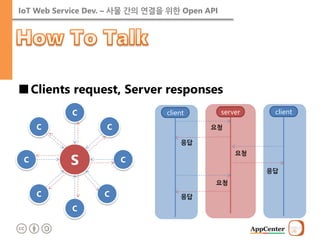
■Clients request, Server responses
client
요청
server
응답
client
요청
응답
응답
요청
C
S
C
C
C
C
C
C
C
22.
IoT Web ServiceDev. – 사물 간의 연결을 위한 Open API
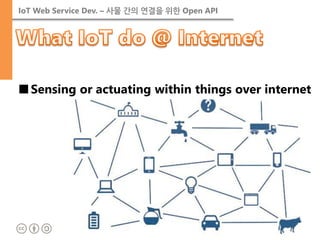
■Sensing or actuating within things over internet
23.
IoT Web ServiceDev. – 사물 간의 연결을 위한 Open API
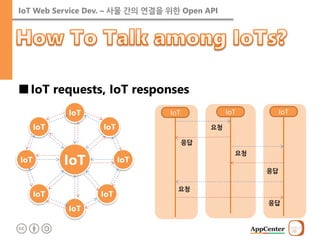
■IoT requests, IoT responses
IoT
요청
IoT
응답
IoT
요청
응답
응답
요청
IoT
IoT
IoT
IoT
IoT
IoT
IoT
IoT
IoT
IoT Web ServiceDev. – 사물 간의 연결을 위한 Open API
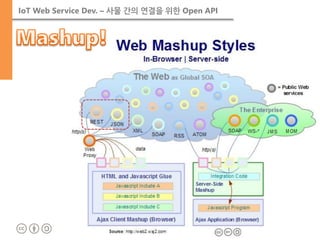
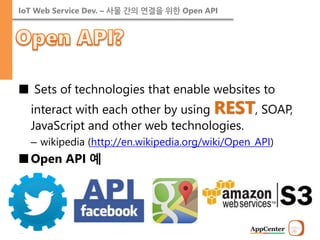
■ Sets of technologies that enable websites to interact with each other by using REST, SOAP, JavaScript and other web technologies.
–wikipedia (http://en.wikipedia.org/wiki/Open_API)
■Open API 예
26.
IoT Web ServiceDev. – 사물 간의 연결을 위한 Open API
■REST: REpresentational State Transfer
–from R. T. Fielding’s dissertation
•resources and their state transfer by HTTP standard protocol.
Resource
[client]
[server]
Resource
GET
update state
Resource
Resource
PUT, POST, DELETE
Resource
27.
IoT Web ServiceDev. – 사물 간의 연결을 위한 Open API
■Retrieving resources
–Request:
•GET /api/resources HTTP/1.1 Accept: application/json …
–Response:
•HTTP/1.1 200 OK Content-Type: application/json … { “resources” : [ {“id” : “…”, “name” : “…” }, … ] }
Operation
HTTP command
Retrieve
GET
Create
POST
Update
PUT
Delete
DELETE
28.
IoT Web ServiceDev. – 사물 간의 연결을 위한 Open API
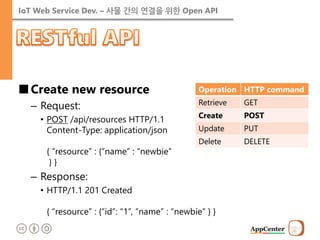
■Create new resource
–Request:
•POST /api/resources HTTP/1.1 Content-Type: application/json { “resource” : {“name” : “newbie” } }
–Response:
•HTTP/1.1 201 Created { “resource” : {“id”: “1”, “name” : “newbie” } }
Operation
HTTP command
Retrieve
GET
Create
POST
Update
PUT
Delete
DELETE
29.
IoT Web ServiceDev. – 사물 간의 연결을 위한 Open API
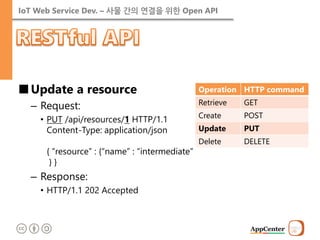
■Update a resource
–Request:
•PUT /api/resources/1 HTTP/1.1 Content-Type: application/json { “resource” : {“name” : “intermediate” } }
–Response:
•HTTP/1.1 202 Accepted
Operation
HTTP command
Retrieve
GET
Create
POST
Update
PUT
Delete
DELETE
30.
IoT Web ServiceDev. – 사물 간의 연결을 위한 Open API
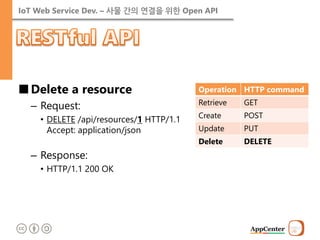
■Delete a resource
–Request:
•DELETE /api/resources/1 HTTP/1.1 Accept: application/json
–Response:
•HTTP/1.1 200 OK
Operation
HTTP command
Retrieve
GET
Create
POST
Update
PUT
Delete
DELETE
31.
IoT Web ServiceDev. – 사물 간의 연결을 위한 Open API
List information
API state diagram
Magic string elimination
Design media type & profile
API implement & billboard
URL
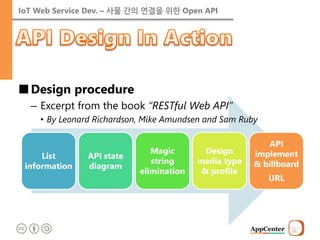
■Design procedure
–Excerpt from the book “RESTful Web API”
•By Leonard Richardson, Mike Amundsen and Sam Ruby
32.
IoT Web ServiceDev. – 사물 간의 연결을 위한 Open API
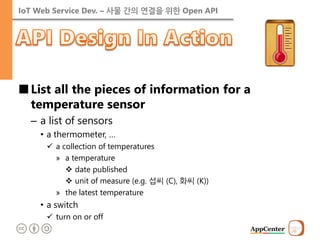
■List all the pieces of information for a temperature sensor
–a list of sensors
•a thermometer, …
a collection of temperatures
»a temperature
date published
unit of measure (e.g. 섭씨 (C), 화씨 (K))
»the latest temperature
•a switch
turn on or off
33.
IoT Web ServiceDev. – 사물 간의 연결을 위한 Open API
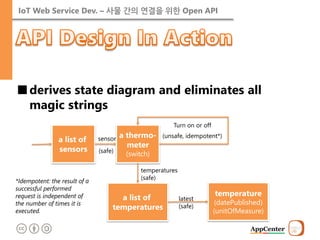
■derives state diagram and eliminates all magic strings
a list of sensors
a thermo- meter (switch)
sensor
(safe)
Turn on or off
(unsafe, idempotent*)
a list of temperatures
temperature (datePublished) (unitOfMeasure)
latest (safe)
temperatures
(safe)
*Idempotent: the result of a successful performed request is independent of the number of times it is executed.
34.
IoT Web ServiceDev. – 사물 간의 연결을 위한 Open API
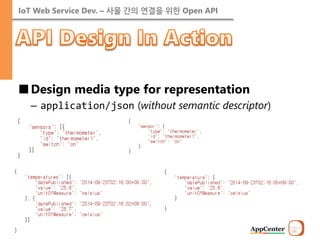
■Design media type for representation
–application/json (without semantic descriptor)
35.
IoT Web ServiceDev. – 사물 간의 연결을 위한 Open API
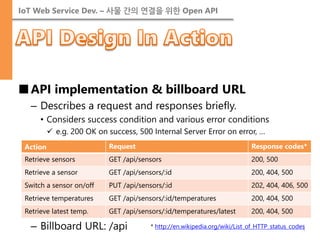
■API implementation & billboard URL
–Describes a request and responses briefly.
•Considers success condition and various error conditions
e.g. 200 OK on success, 500 Internal Server Error on error, …
–Billboard URL: /api
Action
Request
Response codes*
Retrieve sensors
GET /api/sensors
200, 500
Retrieve a sensor
GET /api/sensors/:id
200, 404, 500
Switch a sensor on/off
PUT /api/sensors/:id
202, 404, 406, 500
Retrieve temperatures
GET /api/sensors/:id/temperatures
200, 404, 500
Retrieve latest temp.
GET /api/sensors/:id/temperatures/latest
200, 404, 500
* http://en.wikipedia.org/wiki/List_of_HTTP_status_codes
37.
IoT Web ServiceDev. – 사물 간의 연결을 위한 Open API
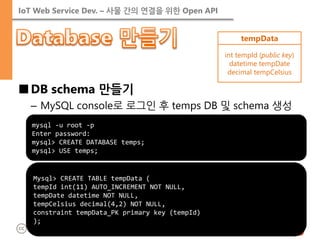
■DB schema 만들기
–MySQL console로 로그인 후 temps DB 및 schema 생성
mysql -u root -p
Enter password:
mysql> CREATE DATABASE temps;
mysql> USE temps;
Mysql> CREATE TABLE tempData ( tempId int(11) AUTO_INCREMENT NOT NULL, tempDate datetime NOT NULL, tempCelsius decimal(4,2) NOT NULL, constraint tempData_PK primary key (tempId) );
tempData
int tempId (public key)
datetime tempDate
decimal tempCelsius
38.
IoT Web ServiceDev. – 사물 간의 연결을 위한 Open API
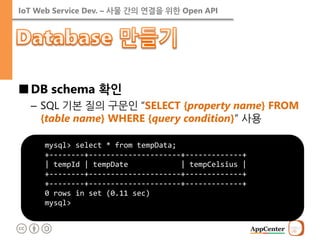
■DB schema 확인
–SQL 기본 질의 구문인 “SELECT {property name} FROM {table name} WHERE {query condition}” 사용
mysql> select * from tempData; +--------+---------------------+-------------+ | tempId | tempDate | tempCelsius | +--------+---------------------+-------------+ +--------+---------------------+-------------+ 0 rows in set (0.11 sec) mysql>
39.
IoT Web ServiceDev. – 사물 간의 연결을 위한 Open API
■mysql 모듈 설치 (npm install mysql)
■Node.JS에서 DB에 데이터 쓰기
var mysql = require('mysql'); var connection = mysql.createConnection({ host: 'localhost', user: 'root', password: ‘{password here}', database: 'temps' }); connection.connect(); connection.query('insert into tempData(tempDate, tempCelsius) values(?, ?)', [new Date(), 10.01], function(err, rows, cols) { if (err) throw err; console.log(rows); }); connection.end();
40.
IoT Web ServiceDev. – 사물 간의 연결을 위한 Open API
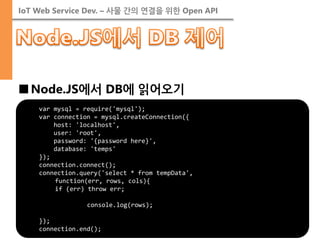
■Node.JS에서 DB에 읽어오기
var mysql = require('mysql'); var connection = mysql.createConnection({ host: 'localhost', user: 'root', password: '{password here}', database: 'temps' }); connection.connect(); connection.query('select * from tempData', function(err, rows, cols){ if (err) throw err; console.log(rows); }); connection.end();
41.
IoT Web ServiceDev. – 사물 간의 연결을 위한 Open API
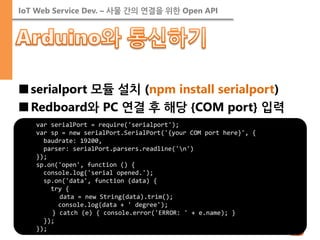
■serialport 모듈 설치 (npm install serialport)
■Redboard와 PC 연결 후 해당 {COM port} 입력
var serialPort = require('serialport'); var sp = new serialPort.SerialPort('{your COM port here}', { baudrate: 19200, parser: serialPort.parsers.readline('n') }); sp.on('open', function () { console.log('serial opened.'); sp.on('data', function (data) { try { data = new String(data).trim(); console.log(data + ' degree'); } catch (e) { console.error('ERROR: ' + e.name); } }); });
42.
IoT Web ServiceDev. – 사물 간의 연결을 위한 Open API
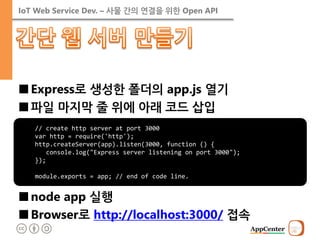
■Express로 생성한 폴더의 app.js 열기
■파일 마지막 줄 위에 아래 코드 삽입
■node app 실행
■Browser로 http://localhost:3000/ 접속
// create http server at port 3000 var http = require('http'); http.createServer(app).listen(3000, function () { console.log("Express server listening on port 3000"); }); module.exports = app; // end of code line.
43.
IoT Web ServiceDev. – 사물 간의 연결을 위한 Open API
■Retrieve sensors
var express = require('express'); var router = express.Router(); var sensorsObj = { "sensors": [{ "type": "thermometer", "id": "thermometer1", "switch": "off" }] }; /* GET api/sensors listing. */ router.get('/sensors', function (req, res) { res.writeHead(200, { "Content-Type": "application/json" }); res.end(JSON.stringify(sensorsObj)); }); module.exports = router;
44.
IoT Web ServiceDev. – 사물 간의 연결을 위한 Open API
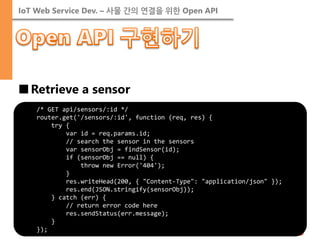
■Retrieve a sensor
/* GET api/sensors/:id */ router.get('/sensors/:id', function (req, res) { try { var id = req.params.id; // search the sensor in the sensors var sensorObj = findSensor(id); if (sensorObj == null) { throw new Error('404'); } res.writeHead(200, { "Content-Type": "application/json" }); res.end(JSON.stringify(sensorObj)); } catch (err) { // return error code here res.sendStatus(err.message); } });
45.
IoT Web ServiceDev. – 사물 간의 연결을 위한 Open API
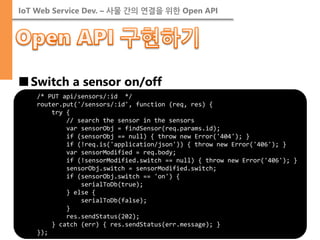
■Switch a sensor on/off
/* PUT api/sensors/:id */ router.put('/sensors/:id', function (req, res) { try { // search the sensor in the sensors var sensorObj = findSensor(req.params.id); if (sensorObj == null) { throw new Error('404'); } if (!req.is('application/json')) { throw new Error('406'); } var sensorModified = req.body; if (!sensorModified.switch == null) { throw new Error('406'); } sensorObj.switch = sensorModified.switch; if (sensorObj.switch == 'on') { serialToDb(true); } else { serialToDb(false); } res.sendStatus(202); } catch (err) { res.sendStatus(err.message); } });
46.
IoT Web ServiceDev. – 사물 간의 연결을 위한 Open API
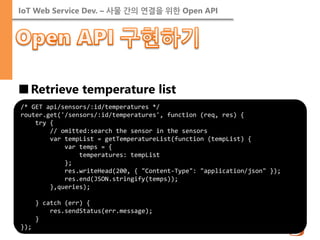
■Retrieve temperature list
/* GET api/sensors/:id/temperatures */ router.get('/sensors/:id/temperatures', function (req, res) { try { // omitted:search the sensor in the sensors var tempList = getTemperatureList(function (tempList) { var temps = { temperatures: tempList }; res.writeHead(200, { "Content-Type": "application/json" }); res.end(JSON.stringify(temps)); },queries); } catch (err) { res.sendStatus(err.message); } });
47.
IoT Web ServiceDev. – 사물 간의 연결을 위한 Open API
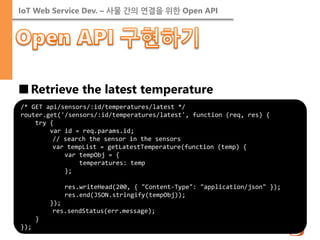
■Retrieve the latest temperature
/* GET api/sensors/:id/temperatures/latest */ router.get('/sensors/:id/temperatures/latest', function (req, res) { try { var id = req.params.id; // search the sensor in the sensors var tempList = getLatestTemperature(function (temp) { var tempObj = { temperatures: temp }; res.writeHead(200, { "Content-Type": "application/json" }); res.end(JSON.stringify(tempObj)); }); res.sendStatus(err.message); } });
48.
IoT Web ServiceDev. – 사물 간의 연결을 위한 Open API
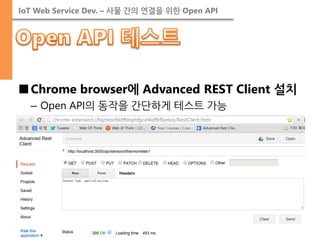
■Chrome browser에 Advanced REST Client 설치
–Open API의 동작을 간단하게 테스트 가능
49.
IoT Web ServiceDev. – 사물 간의 연결을 위한 Open API
■JavaScript API Development
–How to invoke open API with AJAX
■Web Application Development
–HTML5 basics
–Don’t reinvent the wheel! reuses the open source.
–Data visualization with google open API
■Postmortem
50.
IoT Web ServiceDev. – 사물 간의 연결을 위한 Open API
■HTTP 프로토콜 관련
–개요: http://ko.wikipedia.org/wiki/HTTP
–헤더 유형: http://en.wikipedia.org/wiki/List_of_HTTP_header_fields
–응답 코드: http://en.wikipedia.org/wiki/List_of_HTTP_status_codes
■REST API 관련
–개요: http://ko.wikipedia.org/wiki/REST
–설계 절차: http://webofthink.tistory.com/19
51.
IoT Web ServiceDev. – 사물 간의 연결을 위한 Open API
■Node.JS 관련
–Node.JS API: http://nodejs.org/documentation/api/
–Express API: http://expressjs.com/api.html
–mysql API: https://github.com/felixge/node-mysql/
–serialport API: https://github.com/voodootikigod/node- serialport
■MySQL 관련
–MySQL 설치: http://blog.daum.net/bang2001/91
–SQL 문법: http://ko.wikipedia.org/wiki/SQL





![IoT Web Service Dev. – 사물 간의 연결을 위한 Open API
■Representation
–Content-Type header describes media type of the body.
<?xml version="1.0" encoding="UTF-8"?>
<xml>
<Person firstName=“John” lastName=“Smith” alive>
<age>25</age>
<height scale=“cm”>167.6</height>
<address>
<streetAddress> 21 2nd Street</streetAddress>
<city>New York</city>
<state>NY</state>
<postalCode>10021-3100</postalCode>
</address>
<phoneNumbers> … <phoneNumbers>
<children></children>
<spouse></spouse>
</Person>
</xml>
<!doctype html> <html> <head> </head> <body> <header> John Smith </header> <div role=‘main’> <p>age: 25</p> <p>height: 167.cm</p> <p>address:<br/> 21 2nd Street, New York, NY 10021-3100 </p> </div> </body> </html>
[HTML]
[XML]
[JSON]](https://image.slidesharecdn.com/iotseminarday3-141014102749-conversion-gate01/85/Do-IoT-Yourself-Open-API-20-320.jpg)
![IoT Web Service Dev. – 사물 간의 연결을 위한 Open API
■REST: REpresentational State Transfer
–from R. T. Fielding’s dissertation
•resources and their state transfer by HTTP standard protocol.
Resource
[client]
[server]
Resource
GET
update state
Resource
Resource
PUT, POST, DELETE
Resource](https://image.slidesharecdn.com/iotseminarday3-141014102749-conversion-gate01/85/Do-IoT-Yourself-Open-API-26-320.jpg)
![IoT Web Service Dev. – 사물 간의 연결을 위한 Open API
■Retrieving resources
–Request:
•GET /api/resources HTTP/1.1 Accept: application/json …
–Response:
•HTTP/1.1 200 OK Content-Type: application/json … { “resources” : [ {“id” : “…”, “name” : “…” }, … ] }
Operation
HTTP command
Retrieve
GET
Create
POST
Update
PUT
Delete
DELETE](https://image.slidesharecdn.com/iotseminarday3-141014102749-conversion-gate01/85/Do-IoT-Yourself-Open-API-27-320.jpg)

![IoT Web Service Dev. – 사물 간의 연결을 위한 Open API
■mysql 모듈 설치 (npm install mysql)
■Node.JS에서 DB에 데이터 쓰기
var mysql = require('mysql'); var connection = mysql.createConnection({ host: 'localhost', user: 'root', password: ‘{password here}', database: 'temps' }); connection.connect(); connection.query('insert into tempData(tempDate, tempCelsius) values(?, ?)', [new Date(), 10.01], function(err, rows, cols) { if (err) throw err; console.log(rows); }); connection.end();](https://image.slidesharecdn.com/iotseminarday3-141014102749-conversion-gate01/85/Do-IoT-Yourself-Open-API-39-320.jpg)
![IoT Web Service Dev. – 사물 간의 연결을 위한 Open API
■Retrieve sensors
var express = require('express'); var router = express.Router(); var sensorsObj = { "sensors": [{ "type": "thermometer", "id": "thermometer1", "switch": "off" }] }; /* GET api/sensors listing. */ router.get('/sensors', function (req, res) { res.writeHead(200, { "Content-Type": "application/json" }); res.end(JSON.stringify(sensorsObj)); }); module.exports = router;](https://image.slidesharecdn.com/iotseminarday3-141014102749-conversion-gate01/85/Do-IoT-Yourself-Open-API-43-320.jpg)


![[1C6]오픈소스 하드웨어 플랫폼과 Node.js로 구현하는 IoT 플랫폼](https://cdn.slidesharecdn.com/ss_thumbnails/1c6node-140929015739-phpapp02-thumbnail.jpg?width=640&height=640&fit=bounds)


