IoT Web ServiceDev. – 사물 간의 연결을 위한 Open API
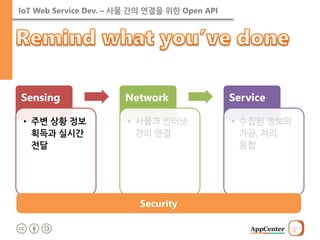
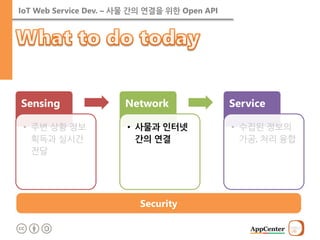
Sensing
•주변 상황 정보획득과 실시간 전달
Network
•사물과 인터넷 간의 연결
Service
•수집된 정보의 가공, 처리, 융합
Security
4.
IoT Web ServiceDev. – 사물 간의 연결을 위한 Open API
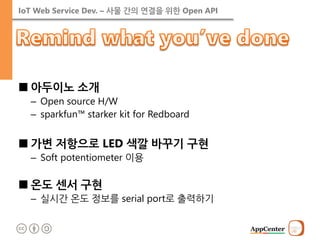
■아두이노 소개
–Open source H/W
–sparkfun™ starker kit for Redboard
■가변 저항으로 LED 색깔 바꾸기 구현
–Soft potentiometer 이용
■온도 센서 구현
–실시간 온도 정보를 serial port로 출력하기
5.
IoT Web ServiceDev. – 사물 간의 연결을 위한 Open API
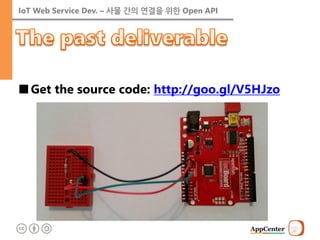
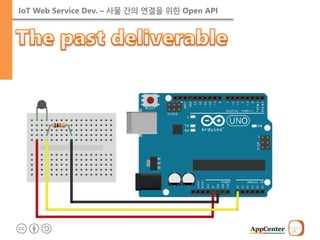
■Get the source code: http://goo.gl/V5HJzo
IoT Web ServiceDev. – 사물 간의 연결을 위한 Open API
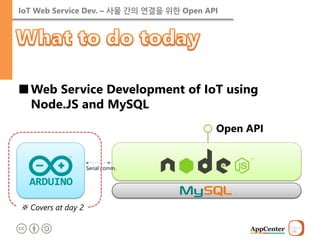
■Web Service Development of IoT using Node.JS and MySQL
Serial comm.
Open API
※ Covers at day 2
10.
IoT Web ServiceDev. – 사물 간의 연결을 위한 Open API
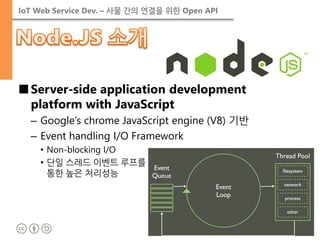
■Server-side application development platform with JavaScript
–Google’s chrome JavaScript engine (V8) 기반
–Event handling I/O Framework
•Non-blocking I/O
•단일 스레드 이벤트 루프를 통한 높은 처리성능
11.
IoT Web ServiceDev. – 사물 간의 연결을 위한 Open API
■사이트에서 설치 (http://nodejs.org/)
12.
IoT Web ServiceDev. – 사물 간의 연결을 위한 Open API
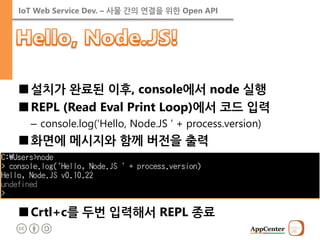
■설치가 완료된 이후, console에서 node 실행
■REPL (Read Eval Print Loop)에서 코드 입력
–console.log(‘Hello, Node.JS ‘ + process.version)
■화면에 메시지와 함께 버전을 출력
■Crtl+c를 두번 입력해서 REPL 종료
13.
IoT Web ServiceDev. – 사물 간의 연결을 위한 Open API
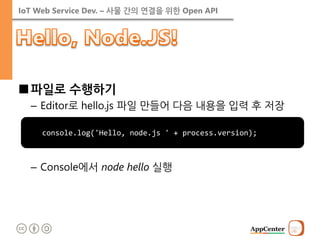
■파일로 수행하기
–Editor로 hello.js 파일 만들어 다음 내용을 입력 후 저장
–Console에서 node hello 실행
console.log('Hello, node.js ' + process.version);
14.
IoT Web ServiceDev. – 사물 간의 연결을 위한 Open API
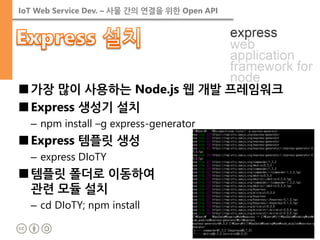
■가장 많이 사용하는 Node.js 웹 개발 프레임워크
■Express 생성기 설치
–npm install –g express-generator
■Express 템플릿 생성
–express DIoTY
■템플릿 폴더로 이동하여 관련 모듈 설치
–cd DIoTY; npm install
15.
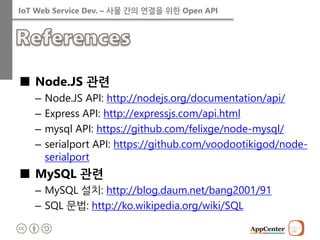
IoT Web ServiceDev. – 사물 간의 연결을 위한 Open API
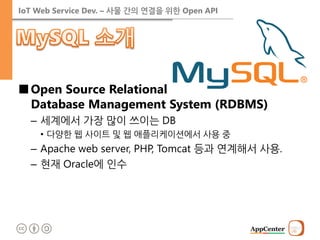
■Open Source Relational Database Management System (RDBMS)
–세계에서 가장 많이 쓰이는 DB
•다양한 웹 사이트 및 웹 애플리케이션에서 사용 중
–Apache web server, PHP, Tomcat 등과 연계해서 사용.
–현재 Oracle에 인수
16.
IoT Web ServiceDev. – 사물 간의 연결을 위한 Open API
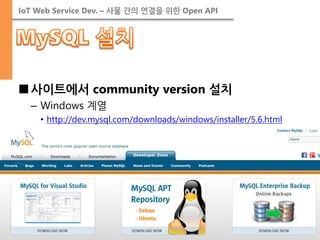
■사이트에서 community version 설치
–Windows 계열
•http://dev.mysql.com/downloads/windows/installer/5.6.html
17.
IoT Web ServiceDev. – 사물 간의 연결을 위한 Open API
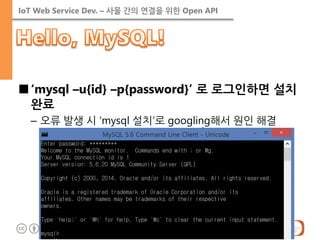
■‘mysql –u{id} –p{password}’ 로 로그인하면 설치 완료
–오류 발생 시 ‘mysql 설치’로 googling해서 원인 해결
18.
IoT Web ServiceDev. – 사물 간의 연결을 위한 Open API
■http://www.google.co.kr/intl/ko/chrome/
19.
IoT Web ServiceDev. – 사물 간의 연결을 위한 Open API
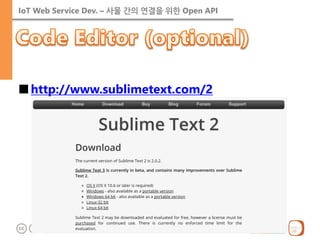
■http://www.sublimetext.com/2
21.
IoT Web ServiceDev. – 사물 간의 연결을 위한 Open API
■Reading or Writing
22.
IoT Web ServiceDev. – 사물 간의 연결을 위한 Open API
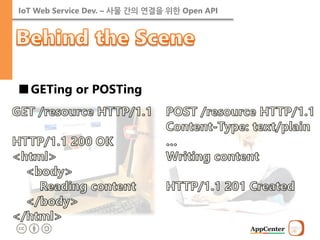
■GETing or POSTing
23.
IoT Web ServiceDev. – 사물 간의 연결을 위한 Open API
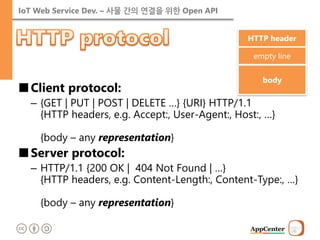
■Client protocol:
–{GET | PUT | POST | DELETE …} {URI} HTTP/1.1 {HTTP headers, e.g. Accept:, User-Agent:, Host:, …} {body – any representation}
■Server protocol:
–HTTP/1.1 {200 OK | 404 Not Found | …} {HTTP headers, e.g. Content-Length:, Content-Type:, …} {body – any representation}
HTTP header
empty line
body
24.
IoT Web ServiceDev. – 사물 간의 연결을 위한 Open API
■Representation
–Content-Type header describes media type of the body.
<?xml version="1.0" encoding="UTF-8"?>
<xml>
<Person firstName=“John” lastName=“Smith” alive>
<age>25</age>
<height scale=“cm”>167.6</height>
<address>
<streetAddress> 21 2nd Street</streetAddress>
<city>New York</city>
<state>NY</state>
<postalCode>10021-3100</postalCode>
</address>
<phoneNumbers> … <phoneNumbers>
<children></children>
<spouse></spouse>
</Person>
</xml>
<!doctype html> <html> <head> </head> <body> <header> John Smith </header> <div role=‘main’> <p>age: 25</p> <p>height: 167.cm</p> <p>address:<br/> 21 2nd Street, New York, NY 10021-3100 </p> </div> </body> </html>
[HTML]
[XML]
[JSON]
25.
IoT Web ServiceDev. – 사물 간의 연결을 위한 Open API
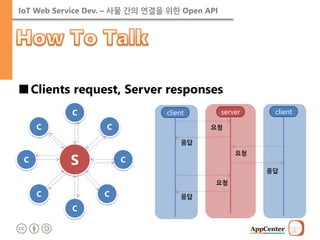
■Clients request, Server responses
client
요청
server
응답
client
요청
응답
응답
요청
C
S
C
C
C
C
C
C
C
26.
IoT Web ServiceDev. – 사물 간의 연결을 위한 Open API
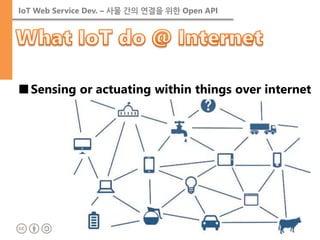
■Sensing or actuating within things over internet
27.
IoT Web ServiceDev. – 사물 간의 연결을 위한 Open API
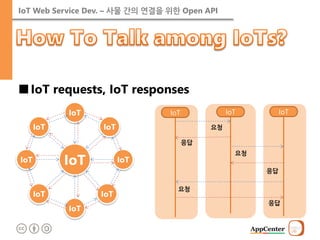
■IoT requests, IoT responses
IoT
요청
IoT
응답
IoT
요청
응답
응답
요청
IoT
IoT
IoT
IoT
IoT
IoT
IoT
IoT
IoT
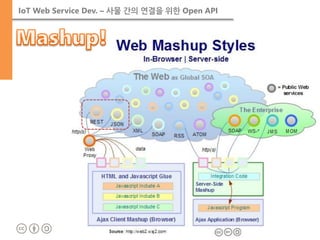
IoT Web ServiceDev. – 사물 간의 연결을 위한 Open API
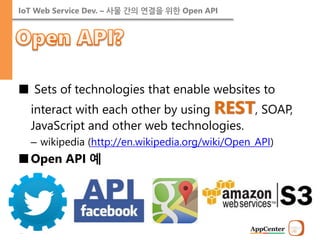
■ Sets of technologies that enable websites to interact with each other by using REST, SOAP, JavaScript and other web technologies.
–wikipedia (http://en.wikipedia.org/wiki/Open_API)
■Open API 예
30.
IoT Web ServiceDev. – 사물 간의 연결을 위한 Open API
■REST: REpresentational State Transfer
–from R. T. Fielding’s dissertation
•resources and their state transfer by HTTP standard protocol.
Resource
[client]
[server]
Resource
GET
update state
Resource
Resource
PUT, POST, DELETE
Resource
31.
IoT Web ServiceDev. – 사물 간의 연결을 위한 Open API
■Retrieving resources
–Request:
•GET /api/resources HTTP/1.1 Accept: application/json …
–Response:
•HTTP/1.1 200 OK Content-Type: application/json … { “resources” : [ {“id” : “…”, “name” : “…” }, … ] }
Operation
HTTP command
Retrieve
GET
Create
POST
Update
PUT
Delete
DELETE
32.
IoT Web ServiceDev. – 사물 간의 연결을 위한 Open API
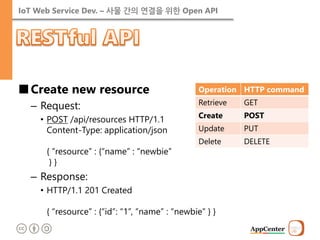
■Create new resource
–Request:
•POST /api/resources HTTP/1.1 Content-Type: application/json { “resource” : {“name” : “newbie” } }
–Response:
•HTTP/1.1 201 Created { “resource” : {“id”: “1”, “name” : “newbie” } }
Operation
HTTP command
Retrieve
GET
Create
POST
Update
PUT
Delete
DELETE
33.
IoT Web ServiceDev. – 사물 간의 연결을 위한 Open API
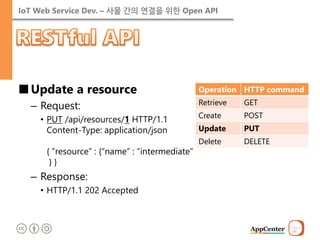
■Update a resource
–Request:
•PUT /api/resources/1 HTTP/1.1 Content-Type: application/json { “resource” : {“name” : “intermediate” } }
–Response:
•HTTP/1.1 202 Accepted
Operation
HTTP command
Retrieve
GET
Create
POST
Update
PUT
Delete
DELETE
34.
IoT Web ServiceDev. – 사물 간의 연결을 위한 Open API
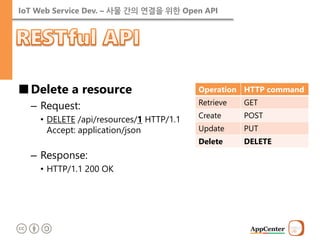
■Delete a resource
–Request:
•DELETE /api/resources/1 HTTP/1.1 Accept: application/json
–Response:
•HTTP/1.1 200 OK
Operation
HTTP command
Retrieve
GET
Create
POST
Update
PUT
Delete
DELETE
35.
IoT Web ServiceDev. – 사물 간의 연결을 위한 Open API
List information
API state diagram
Magic string elimination
Design media type & profile
API implement & billboard
URL
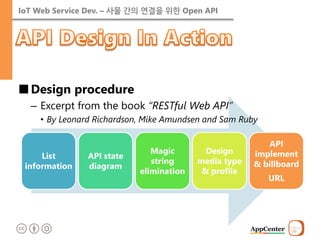
■Design procedure
–Excerpt from the book “RESTful Web API”
•By Leonard Richardson, Mike Amundsen and Sam Ruby
36.
IoT Web ServiceDev. – 사물 간의 연결을 위한 Open API
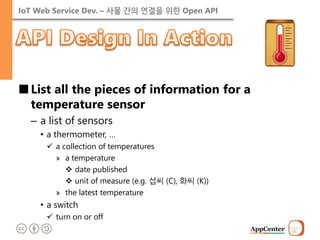
■List all the pieces of information for a temperature sensor
–a list of sensors
•a thermometer, …
a collection of temperatures
»a temperature
date published
unit of measure (e.g. 섭씨 (C), 화씨 (K))
»the latest temperature
•a switch
turn on or off
37.
IoT Web ServiceDev. – 사물 간의 연결을 위한 Open API
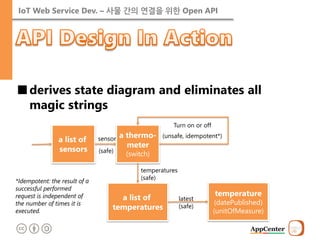
■derives state diagram and eliminates all magic strings
a list of sensors
a thermo- meter (switch)
sensor
(safe)
Turn on or off
(unsafe, idempotent*)
a list of temperatures
temperature (datePublished) (unitOfMeasure)
latest (safe)
temperatures
(safe)
*Idempotent: the result of a successful performed request is independent of the number of times it is executed.
38.
IoT Web ServiceDev. – 사물 간의 연결을 위한 Open API
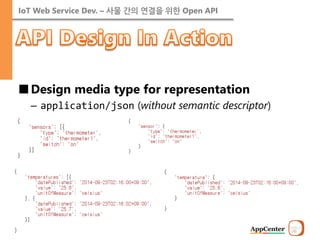
■Design media type for representation
–application/json (without semantic descriptor)
39.
IoT Web ServiceDev. – 사물 간의 연결을 위한 Open API
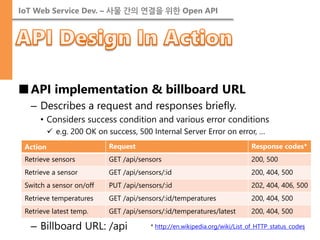
■API implementation & billboard URL
–Describes a request and responses briefly.
•Considers success condition and various error conditions
e.g. 200 OK on success, 500 Internal Server Error on error, …
–Billboard URL: /api
Action
Request
Response codes*
Retrieve sensors
GET /api/sensors
200, 500
Retrieve a sensor
GET /api/sensors/:id
200, 404, 500
Switch a sensor on/off
PUT /api/sensors/:id
202, 404, 406, 500
Retrieve temperatures
GET /api/sensors/:id/temperatures
200, 404, 500
Retrieve latest temp.
GET /api/sensors/:id/temperatures/latest
200, 404, 500
* http://en.wikipedia.org/wiki/List_of_HTTP_status_codes
41.
IoT Web ServiceDev. – 사물 간의 연결을 위한 Open API
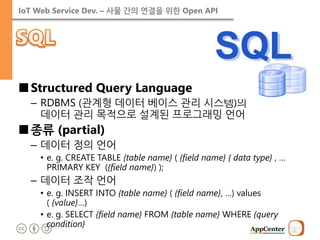
■Structured Query Language
–RDBMS (관계형 데이터 베이스 관리 시스템)의 데이터 관리 목적으로 설계된 프로그래밍 언어
■종류 (partial)
–데이터 정의 언어
•e. g. CREATE TABLE {table name} ( {field name} { data type} , … PRIMARY KEY ({field name}) );
–데이터 조작 언어
•e. g. INSERT INTO {table name} ( {field name}, …) values ( {value}…)
•e. g. SELECT {field name} FROM {table name} WHERE {query condition}
42.
IoT Web ServiceDev. – 사물 간의 연결을 위한 Open API
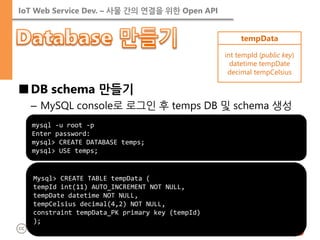
■DB schema 만들기
–MySQL console로 로그인 후 temps DB 및 schema 생성
mysql -u root -p Enter password: mysql> CREATE DATABASE temps; mysql> USE temps;
Mysql> CREATE TABLE tempData (
tempId int(11) AUTO_INCREMENT NOT NULL,
tempDate datetime NOT NULL,
tempCelsius decimal(4,2) NOT NULL,
constraint tempData_PK primary key (tempId)
);
tempData
int tempId (public key)
datetime tempDate
decimal tempCelsius
43.
IoT Web ServiceDev. – 사물 간의 연결을 위한 Open API
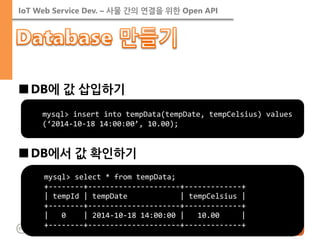
■DB에 값 삽입하기
■DB에서 값 확인하기
mysql> select * from tempData; +--------+---------------------+-------------+ | tempId | tempDate | tempCelsius | +--------+---------------------+-------------+ | 0 | 2014-10-18 14:00:00 | 10.00 | +--------+---------------------+-------------+
mysql> insert into tempData(tempDate, tempCelsius) values (‘2014-10-18 14:00:00’, 10.00);
44.
IoT Web ServiceDev. – 사물 간의 연결을 위한 Open API
■브렌던 아이크 (Brendan Eich)가 창시
–HTML, CSS와 함께 웹의 3대 언어 중 하나
■자바스크립트 기초 배우기
–생활 코딩
•http://opentutorials.org/course/49/17
–자바스크립트 배우기 (모질라)
•https://developer.mozilla.org/ko/ learn/javascript
45.
IoT Web ServiceDev. – 사물 간의 연결을 위한 Open API
■mysql 모듈 설치 (npm install mysql)
■Node.JS에서 DB에 데이터 쓰기 (write_db.js)
var mysql = require('mysql'); var connection = mysql.createConnection({ host: 'localhost', user: 'root', password: '{password here}', database: 'temps' }); connection.connect(); connection.query('insert into tempData(tempDate, tempCelsius) values(?, ?)', [new Date(), 10.01], function(err, rows, cols) { if (err) throw err; console.log(rows); }); connection.end();
DIoTY/tests 폴더에서 node write_db로 수행
DB 설치 시 입력한 password 기재
46.
IoT Web ServiceDev. – 사물 간의 연결을 위한 Open API
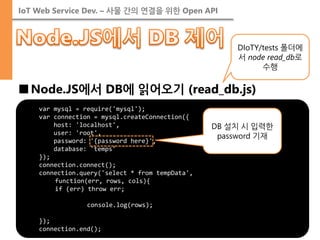
■Node.JS에서 DB에 읽어오기 (read_db.js)
var mysql = require('mysql');
var connection = mysql.createConnection({
host: 'localhost',
user: 'root',
password: '{password here}',
database: 'temps'
});
connection.connect();
connection.query('select * from tempData',
function(err, rows, cols){
if (err) throw err;
console.log(rows);
});
connection.end();
DIoTY/tests 폴더에서 node read_db로 수행
DB 설치 시 입력한 password 기재
47.
IoT Web ServiceDev. – 사물 간의 연결을 위한 Open API
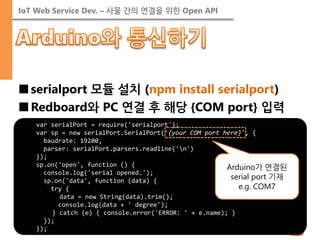
■serialport 모듈 설치 (npm install serialport)
■Redboard와 PC 연결 후 해당 {COM port} 입력
var serialPort = require('serialport');
var sp = new serialPort.SerialPort('{your COM port here}', {
baudrate: 19200,
parser: serialPort.parsers.readline('n')
});
sp.on('open', function () {
console.log('serial opened.');
sp.on('data', function (data) {
try {
data = new String(data).trim();
console.log(data + ' degree');
} catch (e) { console.error('ERROR: ' + e.name); }
});
});
Arduino가 연결된 serial port 기재 e.g. COM7
48.
IoT Web ServiceDev. – 사물 간의 연결을 위한 Open API
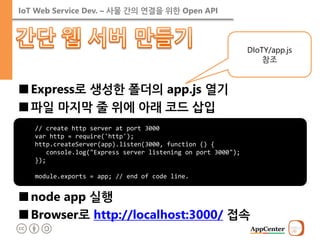
■Express로 생성한 폴더의 app.js 열기
■파일 마지막 줄 위에 아래 코드 삽입
■node app 실행
■Browser로 http://localhost:3000/ 접속
// create http server at port 3000 var http = require('http'); http.createServer(app).listen(3000, function () { console.log("Express server listening on port 3000"); }); module.exports = app; // end of code line.
DIoTY/app.js 참조
49.
IoT Web ServiceDev. – 사물 간의 연결을 위한 Open API
■Retrieve sensors
var express = require('express'); var router = express.Router(); var sensorsObj = { "sensors": [{ "type": "thermometer", "id": "thermometer1", "switch": "off" }] }; /* GET api/sensors listing. */ router.get('/sensors', function (req, res) { res.writeHead(200, { "Content-Type": "application/json" }); res.end(JSON.stringify(sensorsObj)); }); module.exports = router;
DIoTY/routes/api.js 참조
50.
IoT Web ServiceDev. – 사물 간의 연결을 위한 Open API
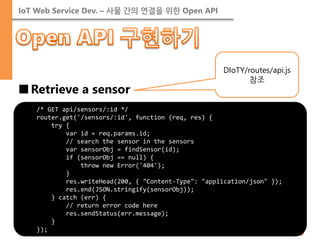
■Retrieve a sensor
/* GET api/sensors/:id */
router.get('/sensors/:id', function (req, res) {
try {
var id = req.params.id;
// search the sensor in the sensors
var sensorObj = findSensor(id);
if (sensorObj == null) {
throw new Error('404');
}
res.writeHead(200, { "Content-Type": "application/json" });
res.end(JSON.stringify(sensorObj));
} catch (err) {
// return error code here
res.sendStatus(err.message);
}
});
DIoTY/routes/api.js 참조
51.
IoT Web ServiceDev. – 사물 간의 연결을 위한 Open API
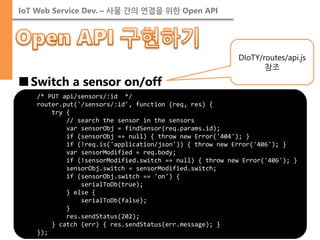
■Switch a sensor on/off
/* PUT api/sensors/:id */
router.put('/sensors/:id', function (req, res) {
try {
// search the sensor in the sensors
var sensorObj = findSensor(req.params.id);
if (sensorObj == null) { throw new Error('404'); }
if (!req.is('application/json')) { throw new Error('406'); }
var sensorModified = req.body;
if (!sensorModified.switch == null) { throw new Error('406'); }
sensorObj.switch = sensorModified.switch;
if (sensorObj.switch == 'on') {
serialToDb(true);
} else {
serialToDb(false);
}
res.sendStatus(202);
} catch (err) { res.sendStatus(err.message); }
});
DIoTY/routes/api.js 참조
52.
IoT Web ServiceDev. – 사물 간의 연결을 위한 Open API
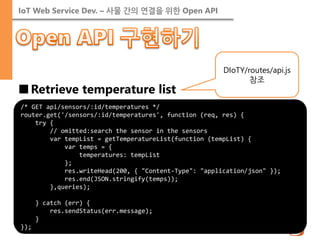
■Retrieve temperature list
/* GET api/sensors/:id/temperatures */
router.get('/sensors/:id/temperatures', function (req, res) {
try {
// omitted:search the sensor in the sensors
var tempList = getTemperatureList(function (tempList) {
var temps = {
temperatures: tempList
};
res.writeHead(200, { "Content-Type": "application/json" });
res.end(JSON.stringify(temps));
},queries);
} catch (err) {
res.sendStatus(err.message);
}
});
DIoTY/routes/api.js 참조
53.
IoT Web ServiceDev. – 사물 간의 연결을 위한 Open API
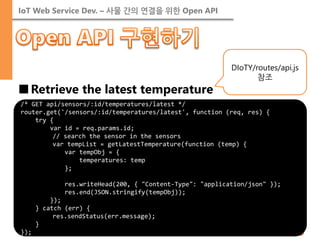
■Retrieve the latest temperature
/* GET api/sensors/:id/temperatures/latest */
router.get('/sensors/:id/temperatures/latest', function (req, res) {
try {
var id = req.params.id;
// search the sensor in the sensors
var tempList = getLatestTemperature(function (temp) {
var tempObj = {
temperatures: temp
};
res.writeHead(200, { "Content-Type": "application/json" });
res.end(JSON.stringify(tempObj));
});
} catch (err) {
res.sendStatus(err.message);
}
});
DIoTY/routes/api.js 참조
54.
IoT Web ServiceDev. – 사물 간의 연결을 위한 Open API
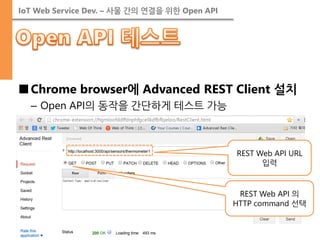
■Chrome browser에 Advanced REST Client 설치
–Open API의 동작을 간단하게 테스트 가능
REST Web API URL 입력
REST Web API 의 HTTP command 선택
55.
IoT Web ServiceDev. – 사물 간의 연결을 위한 Open API
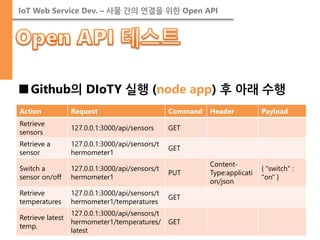
■Github의 DIoTY 실행 (node app) 후 아래 수행
Action
Request
Command
Header
Payload
Retrieve sensors
127.0.0.1:3000/api/sensors
GET
Retrieve a sensor
127.0.0.1:3000/api/sensors/thermometer1
GET
Switch a sensor on/off
127.0.0.1:3000/api/sensors/thermometer1
PUT
Content- Type:application/json
{ "switch" : "on" }
Retrieve temperatures
127.0.0.1:3000/api/sensors/thermometer1/temperatures
GET
Retrieve latest temp.
127.0.0.1:3000/api/sensors/thermometer1/temperatures/ latest
GET
56.
IoT Web ServiceDev. – 사물 간의 연결을 위한 Open API
■JavaScript API Development
–How to invoke open API with AJAX
■Web Application Development
–HTML5 basics
–Don’t reinvent the wheel! reuses the open source.
–Data visualization with google open API
■Postmortem
57.
IoT Web ServiceDev. – 사물 간의 연결을 위한 Open API
■HTTP 프로토콜 관련
–개요: http://ko.wikipedia.org/wiki/HTTP
–헤더 유형: http://en.wikipedia.org/wiki/List_of_HTTP_header_fields
–응답 코드: http://en.wikipedia.org/wiki/List_of_HTTP_status_codes
■REST API 관련
–개요: http://ko.wikipedia.org/wiki/REST
–설계 절차: http://webofthink.tistory.com/19
58.
IoT Web ServiceDev. – 사물 간의 연결을 위한 Open API
■Node.JS 관련
–Node.JS API: http://nodejs.org/documentation/api/
–Express API: http://expressjs.com/api.html
–mysql API: https://github.com/felixge/node-mysql/
–serialport API: https://github.com/voodootikigod/node- serialport
■MySQL 관련
–MySQL 설치: http://blog.daum.net/bang2001/91
–SQL 문법: http://ko.wikipedia.org/wiki/SQL





![IoT Web Service Dev. – 사물 간의 연결을 위한 Open API
■Representation
–Content-Type header describes media type of the body.
<?xml version="1.0" encoding="UTF-8"?>
<xml>
<Person firstName=“John” lastName=“Smith” alive>
<age>25</age>
<height scale=“cm”>167.6</height>
<address>
<streetAddress> 21 2nd Street</streetAddress>
<city>New York</city>
<state>NY</state>
<postalCode>10021-3100</postalCode>
</address>
<phoneNumbers> … <phoneNumbers>
<children></children>
<spouse></spouse>
</Person>
</xml>
<!doctype html> <html> <head> </head> <body> <header> John Smith </header> <div role=‘main’> <p>age: 25</p> <p>height: 167.cm</p> <p>address:<br/> 21 2nd Street, New York, NY 10021-3100 </p> </div> </body> </html>
[HTML]
[XML]
[JSON]](https://image.slidesharecdn.com/iotseminarday3-141024122116-conversion-gate02/85/Do-IoT-Yourself-3rd-Open-API-revision-3-24-320.jpg)
![IoT Web Service Dev. – 사물 간의 연결을 위한 Open API
■REST: REpresentational State Transfer
–from R. T. Fielding’s dissertation
•resources and their state transfer by HTTP standard protocol.
Resource
[client]
[server]
Resource
GET
update state
Resource
Resource
PUT, POST, DELETE
Resource](https://image.slidesharecdn.com/iotseminarday3-141024122116-conversion-gate02/85/Do-IoT-Yourself-3rd-Open-API-revision-3-30-320.jpg)
![IoT Web Service Dev. – 사물 간의 연결을 위한 Open API
■Retrieving resources
–Request:
•GET /api/resources HTTP/1.1 Accept: application/json …
–Response:
•HTTP/1.1 200 OK Content-Type: application/json … { “resources” : [ {“id” : “…”, “name” : “…” }, … ] }
Operation
HTTP command
Retrieve
GET
Create
POST
Update
PUT
Delete
DELETE](https://image.slidesharecdn.com/iotseminarday3-141024122116-conversion-gate02/85/Do-IoT-Yourself-3rd-Open-API-revision-3-31-320.jpg)


![IoT Web Service Dev. – 사물 간의 연결을 위한 Open API
■mysql 모듈 설치 (npm install mysql)
■Node.JS에서 DB에 데이터 쓰기 (write_db.js)
var mysql = require('mysql'); var connection = mysql.createConnection({ host: 'localhost', user: 'root', password: '{password here}', database: 'temps' }); connection.connect(); connection.query('insert into tempData(tempDate, tempCelsius) values(?, ?)', [new Date(), 10.01], function(err, rows, cols) { if (err) throw err; console.log(rows); }); connection.end();
DIoTY/tests 폴더에서 node write_db로 수행
DB 설치 시 입력한 password 기재](https://image.slidesharecdn.com/iotseminarday3-141024122116-conversion-gate02/85/Do-IoT-Yourself-3rd-Open-API-revision-3-45-320.jpg)
![IoT Web Service Dev. – 사물 간의 연결을 위한 Open API
■Retrieve sensors
var express = require('express'); var router = express.Router(); var sensorsObj = { "sensors": [{ "type": "thermometer", "id": "thermometer1", "switch": "off" }] }; /* GET api/sensors listing. */ router.get('/sensors', function (req, res) { res.writeHead(200, { "Content-Type": "application/json" }); res.end(JSON.stringify(sensorsObj)); }); module.exports = router;
DIoTY/routes/api.js 참조](https://image.slidesharecdn.com/iotseminarday3-141024122116-conversion-gate02/85/Do-IoT-Yourself-3rd-Open-API-revision-3-49-320.jpg)