
Nguyen Tuan Anh, Deputy Director of Digital Content Center
VIVAS , 06/2014.
Introduction to User Experience Design
• What is UX?
• UX # UI
• User – Centered Design
• Introduction to building Wireframes
• Tips for Wireframing.
• Q & A
What is User Experience
(UX)?
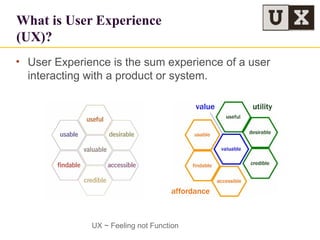
• User Experience is the sum experience of a user
interacting with a product or system.
UX ~ Feeling not Function
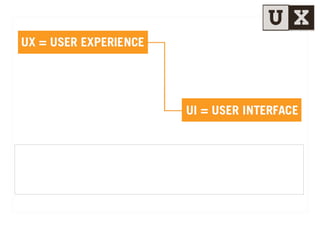
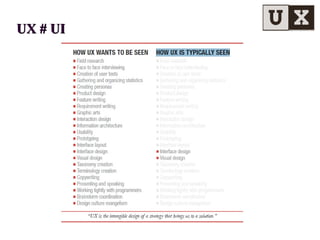
UX # UIUX # UI
UX # UIUX # UI
UX # UIUX # UI
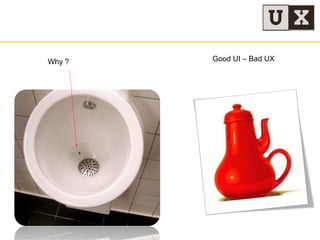
Why ? Good UI – Bad UX
What is User-Centered
Design (UCD)?
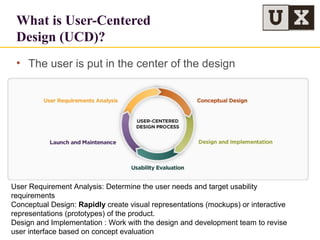
• The user is put in the center of the design
User Requirement Analysis: Determine the user needs and target usability
requirements
Conceptual Design: Rapidly create visual representations (mockups) or interactive
representations (prototypes) of the product.
Design and Implementation : Work with the design and development team to revise
user interface based on concept evaluation
UX Design Process
• Step 1: (PrM)
– Input :Customer Segment, User Behavior, Context
– Out Put: Fetures Ideas (1)
• Step 2: PrM/ UX Designer
– Input: (1) + Feedback
– Out put: Sketching/ Wireframe ( PrM)  Approve UX Designer ( 2)
• Step 3: UI Designer
– Input: (2)
– Out put: Visual Design ( UI Designer )  Approve PrM/UX Designer
Work Flow
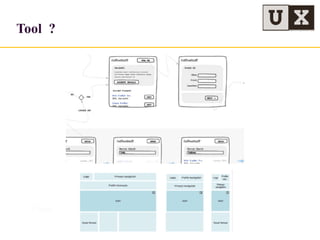
Tool ?
Paper + Pencil
Tool ?
Paper + Pencil
• OmniGraffle - For Mac, Ipad
http://www.omnigroup.com/omnigraffle/
• Balsamiq – For Windows – Intro
http://balsamiq.com/
Tool
Tool
• Gomockingbird
https://gomockingbird.com/mockingbird/
• Adobe Fireworks
• Power Mockup
http://www.powermockup
• Invision
http://www.invisionapp.com
• Suggest: Axure for Mac, PC
Trainning : http://www.axure.com/learn
Tips for Wireframing
• Have clear Objective
• Keep It Clean
• Don’t Make me think
• Repetition. Repetition.Repetition
Tips for Wireframing
• Have clear Objective
• Keep It Clean
• Don’t Make me think
• Repetition. Repetition.Repetition
Tips for Wireframing
• Have clear Objective
• Keep It Clean
• Don’t Make me think
• Repetition. Repetition.Repetition
Tips for Wireframing
• Have clear Objective
• Keep It Clean
• Don’t Make me think
• Repetition. Repetition.Repetition
Website
• UX Magazine : http://uxmag.com/
• UX Booth http://www.uxbooth.com/
• Stack Exchange http://ux.stackexchange.com/
• Stack Overflow
• UX Exchange : uxexchange.com
• Uxmatters : http://www.uxmatters.com/index.php
Introduction to User Experience Design

Introduction to User Experience Design

  • 1.
    Nguyen Tuan Anh,Deputy Director of Digital Content Center VIVAS , 06/2014. Introduction to User Experience Design
  • 2.
    • What isUX? • UX # UI • User – Centered Design • Introduction to building Wireframes • Tips for Wireframing. • Q & A
  • 3.
    What is UserExperience (UX)? • User Experience is the sum experience of a user interacting with a product or system. UX ~ Feeling not Function
  • 7.
  • 8.
  • 9.
  • 10.
    Why ? GoodUI – Bad UX
  • 12.
    What is User-Centered Design(UCD)? • The user is put in the center of the design User Requirement Analysis: Determine the user needs and target usability requirements Conceptual Design: Rapidly create visual representations (mockups) or interactive representations (prototypes) of the product. Design and Implementation : Work with the design and development team to revise user interface based on concept evaluation
  • 13.
  • 14.
    • Step 1:(PrM) – Input :Customer Segment, User Behavior, Context – Out Put: Fetures Ideas (1) • Step 2: PrM/ UX Designer – Input: (1) + Feedback – Out put: Sketching/ Wireframe ( PrM)  Approve UX Designer ( 2) • Step 3: UI Designer – Input: (2) – Out put: Visual Design ( UI Designer )  Approve PrM/UX Designer Work Flow
  • 15.
  • 16.
  • 17.
    • OmniGraffle -For Mac, Ipad http://www.omnigroup.com/omnigraffle/ • Balsamiq – For Windows – Intro http://balsamiq.com/ Tool
  • 18.
    Tool • Gomockingbird https://gomockingbird.com/mockingbird/ • AdobeFireworks • Power Mockup http://www.powermockup • Invision http://www.invisionapp.com • Suggest: Axure for Mac, PC Trainning : http://www.axure.com/learn
  • 19.
    Tips for Wireframing •Have clear Objective • Keep It Clean • Don’t Make me think • Repetition. Repetition.Repetition
  • 20.
    Tips for Wireframing •Have clear Objective • Keep It Clean • Don’t Make me think • Repetition. Repetition.Repetition
  • 21.
    Tips for Wireframing •Have clear Objective • Keep It Clean • Don’t Make me think • Repetition. Repetition.Repetition
  • 22.
    Tips for Wireframing •Have clear Objective • Keep It Clean • Don’t Make me think • Repetition. Repetition.Repetition
  • 23.
    Website • UX Magazine: http://uxmag.com/ • UX Booth http://www.uxbooth.com/ • Stack Exchange http://ux.stackexchange.com/ • Stack Overflow • UX Exchange : uxexchange.com • Uxmatters : http://www.uxmatters.com/index.php

Editor's Notes

  • #3 Gary
  • #4 The scope of the field is directed at affecting "all aspects of the user’s interaction with the product: how it is perceived, learned, and used Finable : Người dùng có thể tìm thấy những thứ cần thiết để phục vụ lợi ích/nhu cầu người dùng Usable: Tiện lợi, thích hợp cho việc sử dụng Useeful : Hữu ích cho người dùng cho một mục đích/nhu cầu của người dùng Credible: Tạo ra sự tin tưởng cho người sử dụng Desirable: Tạo ra cảm giác thèm muốn, ao ước được sử dụng Accessible: Sử dụng đơn giản  Valuable: Gía trị cho người sử dụng/khách hàng
  • #9 Taxonomy Creation: Sự phân loại element trong thiết kế Terminology: Thuật ngữ của chuyên ngành Ux is the intangible design of a strategy that brings us to solution: Thiết kế phi vật thể evangelism
  • #13 User-Centered Design (UCD) – Là một triết lý sản phẩm mà trong đó các nhu cầu, mong muốn, hạn chế, thói quen của người sử dụng được đặt lên hàng đầu và được quan tâm trong xuyên suốt quá trình thiết kế sản phẩm. User Research: Nghiên cứu hành vi, thói quen của người dùng ( Khách hàng mục tiêu trong một business case)  Xác định nhu cầu, mục tiêu của khách hàng Conceptual Design: Nhanh chóng tạo ra các bản Mockup cho sản phẩm  Tạo ra những phiên bản khác nhau, kiểm thử  Lặp lại quá trình để đưa ra một bản thiết kế đạt được mục tiêu và khả năng sử dụng được đạp ứng Design and Implementation : Làm việc với đội design và phát triển để đưa ra một UI phù hợp Usability Evaluation: Tiến hành phát triển khả năng tương tác, khả dụng của người dùng
  • #14 Crit: critique
  • #24 UX Tạp chí là một nguồn chất lượng cao đăng tải những cuộc thảo luận về các cách thức để nâng cao trải nghiệm người dùng.là một nguồn chất lượng cao đăng tải những cuộc thảo luận về các cách thức để nâng cao trải nghiệm người dùng. UX Booth là một blog của một nhóm tác giả phục vụ cho cộng đồng thiết kế trải nghiệm người dùng. Nó cũng có những bài viết về tính khả dụng và thiết kế tương tác UI Stack Exchange (một phần của mạng Stack Overflow) là một trang web hỏi đáp dành cho những nhà nghiên cứu các chuyên gia về giao diện người dùng Stack Overflow, một trang web hỏi đáp về lập trình phổ biến, với những chủ đề tuyệt vời được về UX và tính khả dụng. UX Exchange là một trang web cộng đồng nơi các thành viên có thể hỏi về trải nghiệm người sử dụng và các lĩnh vực liên quan như tính khả dụng, khả năng truy cập và thiết kế tương tác. UXmatters là một tạp chí web đăng tải nội dung về chiến lược phát triển trải nghiệm nghiệm người sử dụng, kiến thức UX và nhiều thứ khác nữa