Introduction to SE
Prof. Deeepak V Ulape. (Asst. Professor)
Module 1
Defination of Software Enginering:
• Software Engineering is the process of designing,
developing, testing, and maintaining software. It is a
systematic and disciplined approach to software
development that aims to create high-quality, reliable, and
maintainable software.
Need for SE:
• Handling Big Projects: A corporation must use a software engineering
methodology in order to handle large projects without any issues.
• To manage the cost: Software engineering programmers plan everything
and reduce all those things that are not required.
• To decrease time: It will save a lot of time if you are developing software
using a software engineering technique.
• Reliable software: It is the company’s responsibility to deliver software
products on schedule and to address any defects that may exist.
• Effectiveness: Effectiveness results from things being created in
accordance with the standards.
• Reduces complexity: Large challenges are broken down into smaller ones
and solved one at a time in software engineering. Individual solutions are
found for each of these issues.
• Productivity: Because it contains testing systems at every level, proper care
is done to maintain software productivity.
Mc Call’s Quality Factors:
• McCall’s Software Quality Model was introduced in 1977. This
model is incorporated with many attributes, termed software
factors, which influence software.
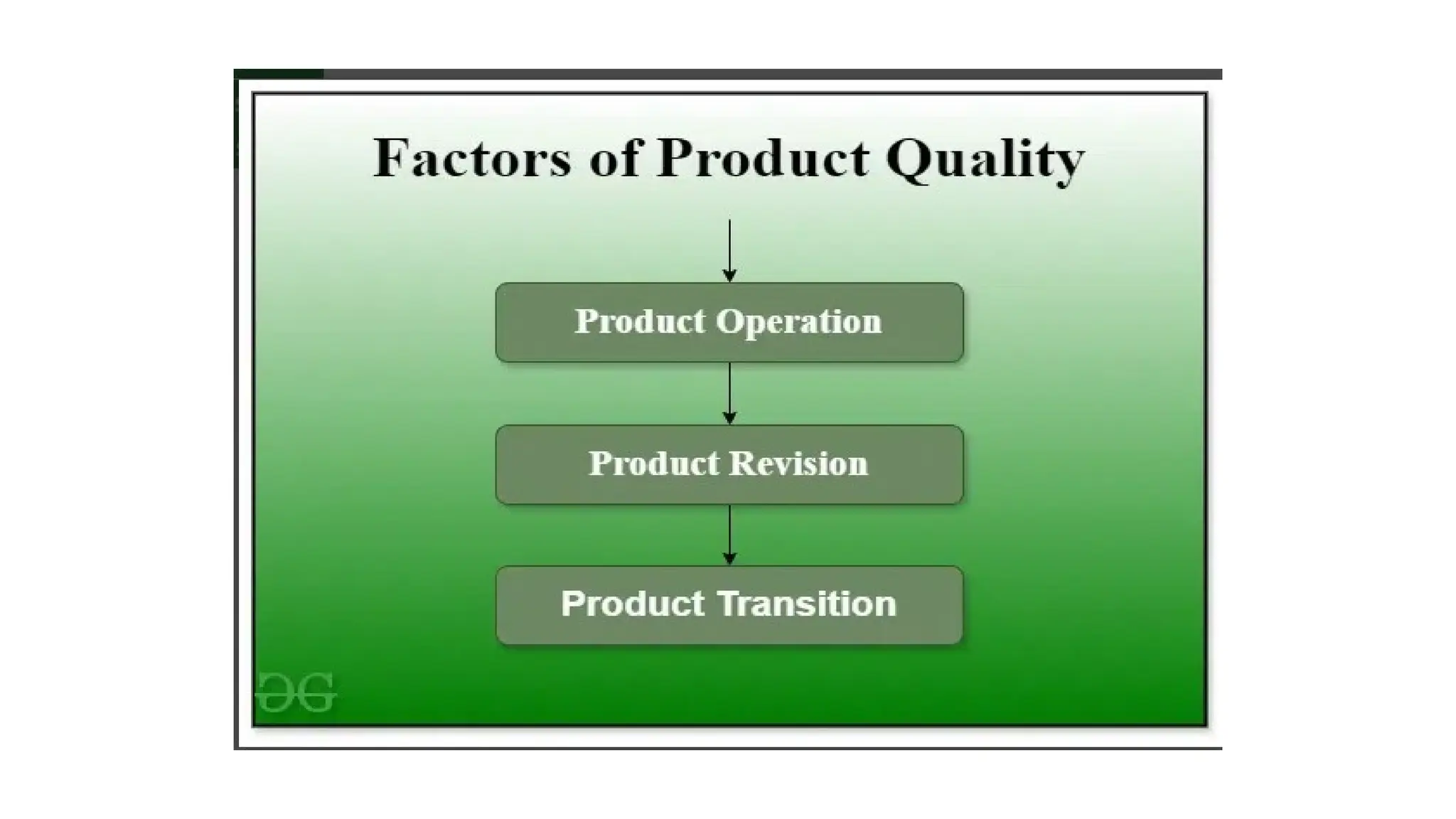
• Factors of Product Quality
• Below are the factors of Product Quality, that are discussed in
detail.
• Product Operation
• Product Revision
• Product Transition
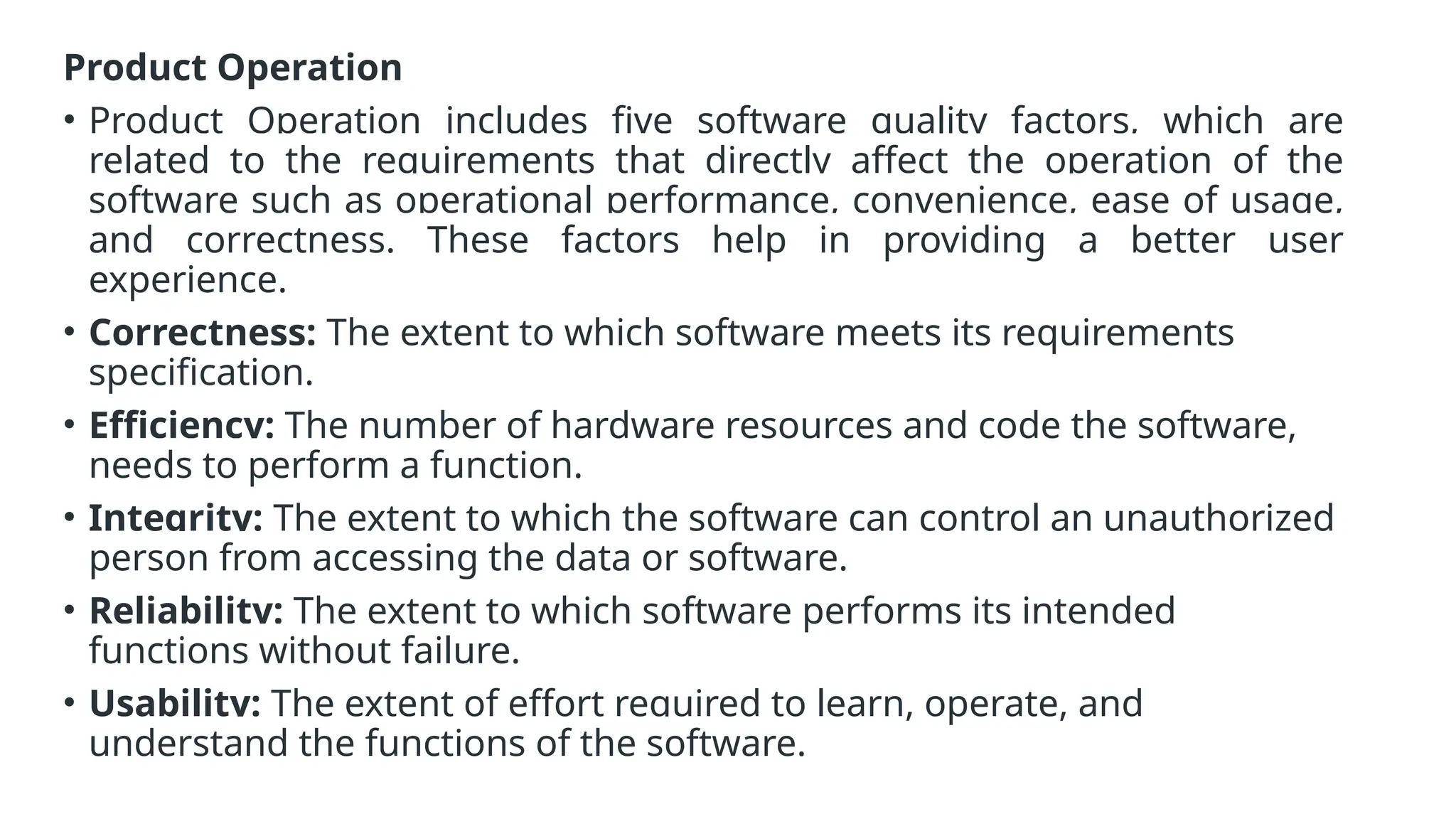
Product Operation
• Product Operation includes five software quality factors, which are
related to the requirements that directly affect the operation of the
software such as operational performance, convenience, ease of usage,
and correctness. These factors help in providing a better user
experience.
• Correctness: The extent to which software meets its requirements
specification.
• Efficiency: The number of hardware resources and code the software,
needs to perform a function.
• Integrity: The extent to which the software can control an unauthorized
person from accessing the data or software.
• Reliability: The extent to which software performs its intended
functions without failure.
• Usability: The extent of effort required to learn, operate, and
understand the functions of the software.
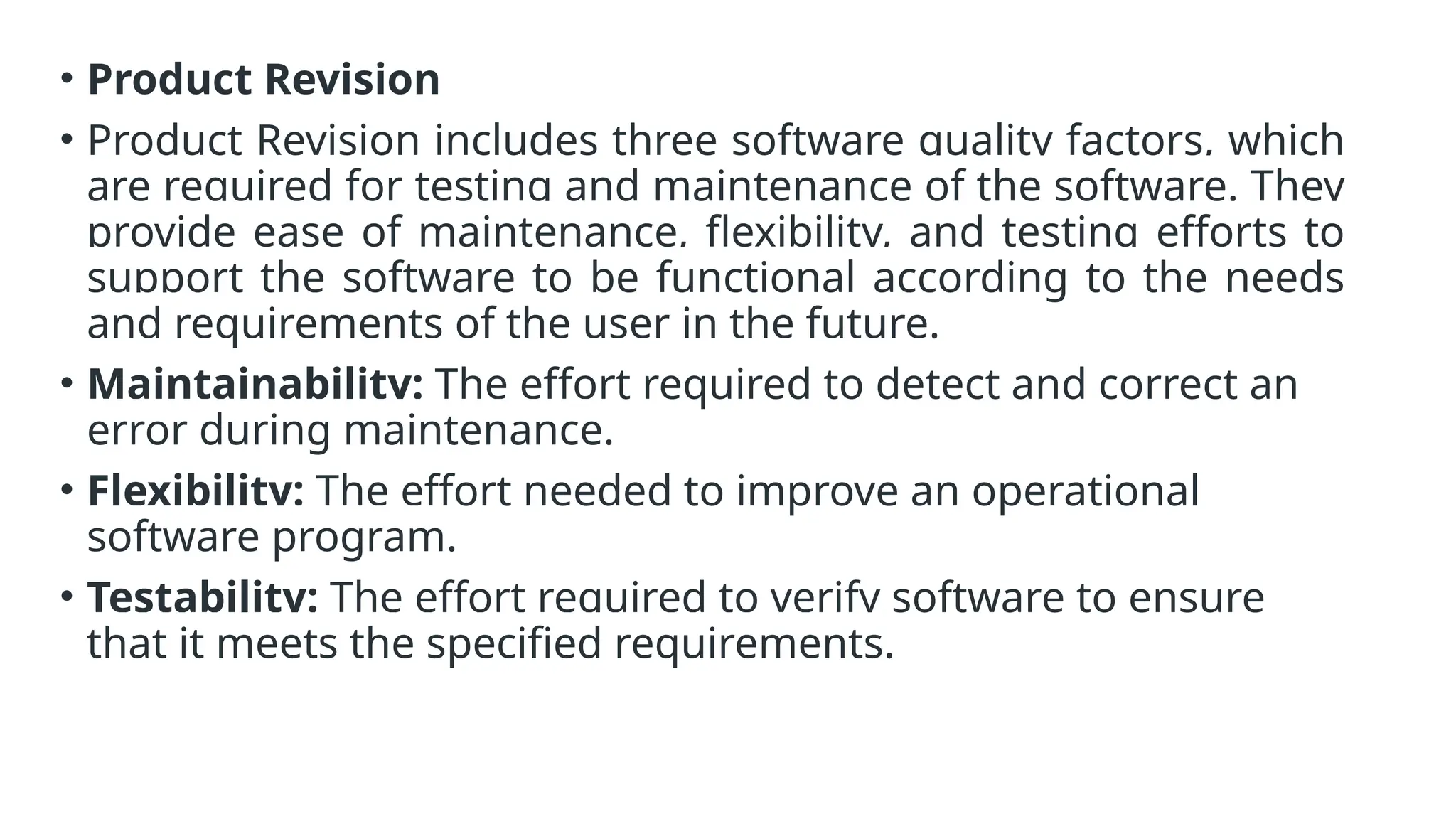
• Product Revision
• Product Revision includes three software quality factors, which
are required for testing and maintenance of the software. They
provide ease of maintenance, flexibility, and testing efforts to
support the software to be functional according to the needs
and requirements of the user in the future.
• Maintainability: The effort required to detect and correct an
error during maintenance.
• Flexibility: The effort needed to improve an operational
software program.
• Testability: The effort required to verify software to ensure
that it meets the specified requirements.
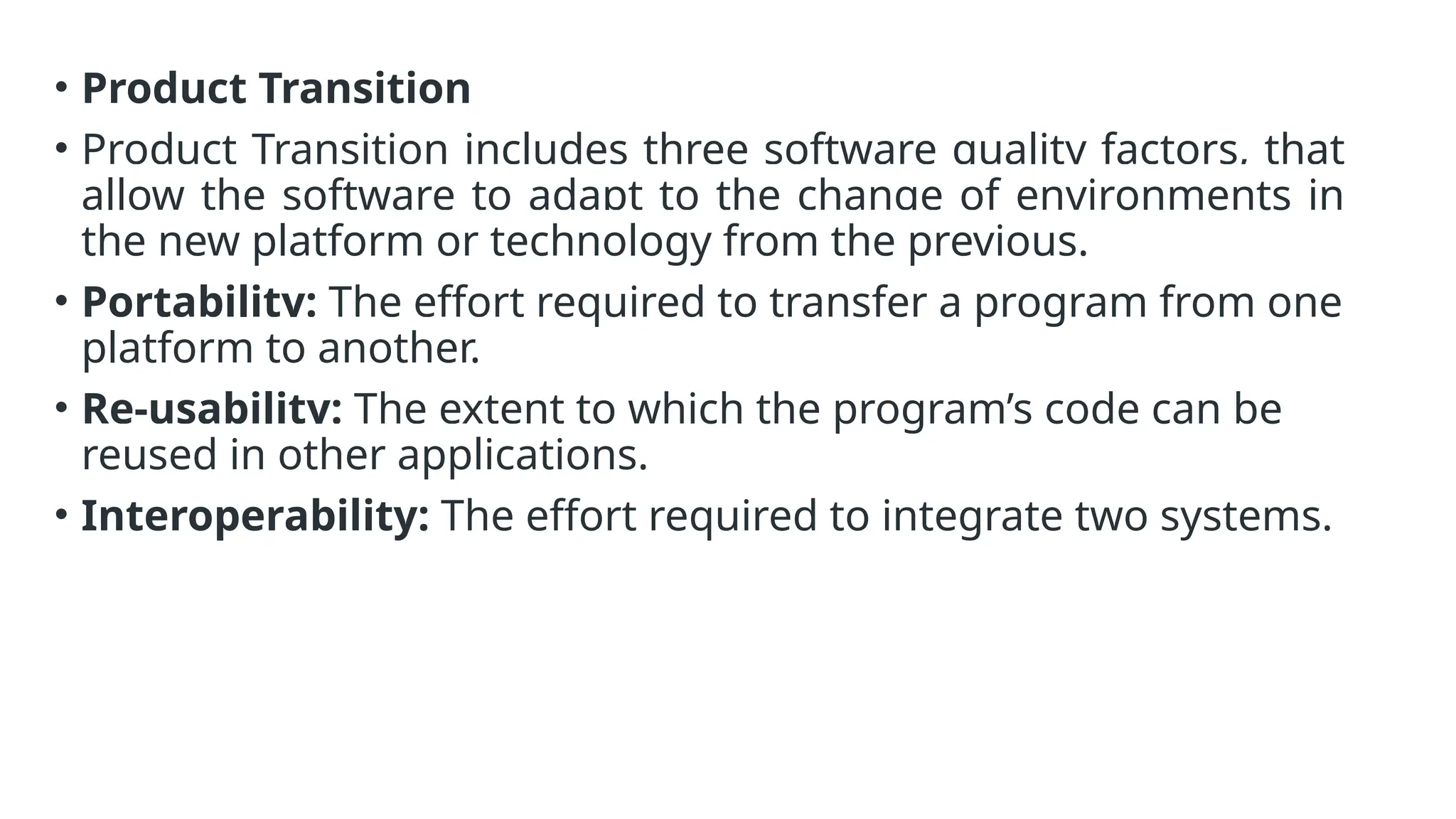
• Product Transition
• Product Transition includes three software quality factors, that
allow the software to adapt to the change of environments in
the new platform or technology from the previous.
• Portability: The effort required to transfer a program from one
platform to another.
• Re-usability: The extent to which the program’s code can be
reused in other applications.
• Interoperability: The effort required to integrate two systems.
Software Enginering Process and Practice:
• Software processes in software engineering refer to the methods and
techniques used to develop and maintain software. Some examples of
software processes include:
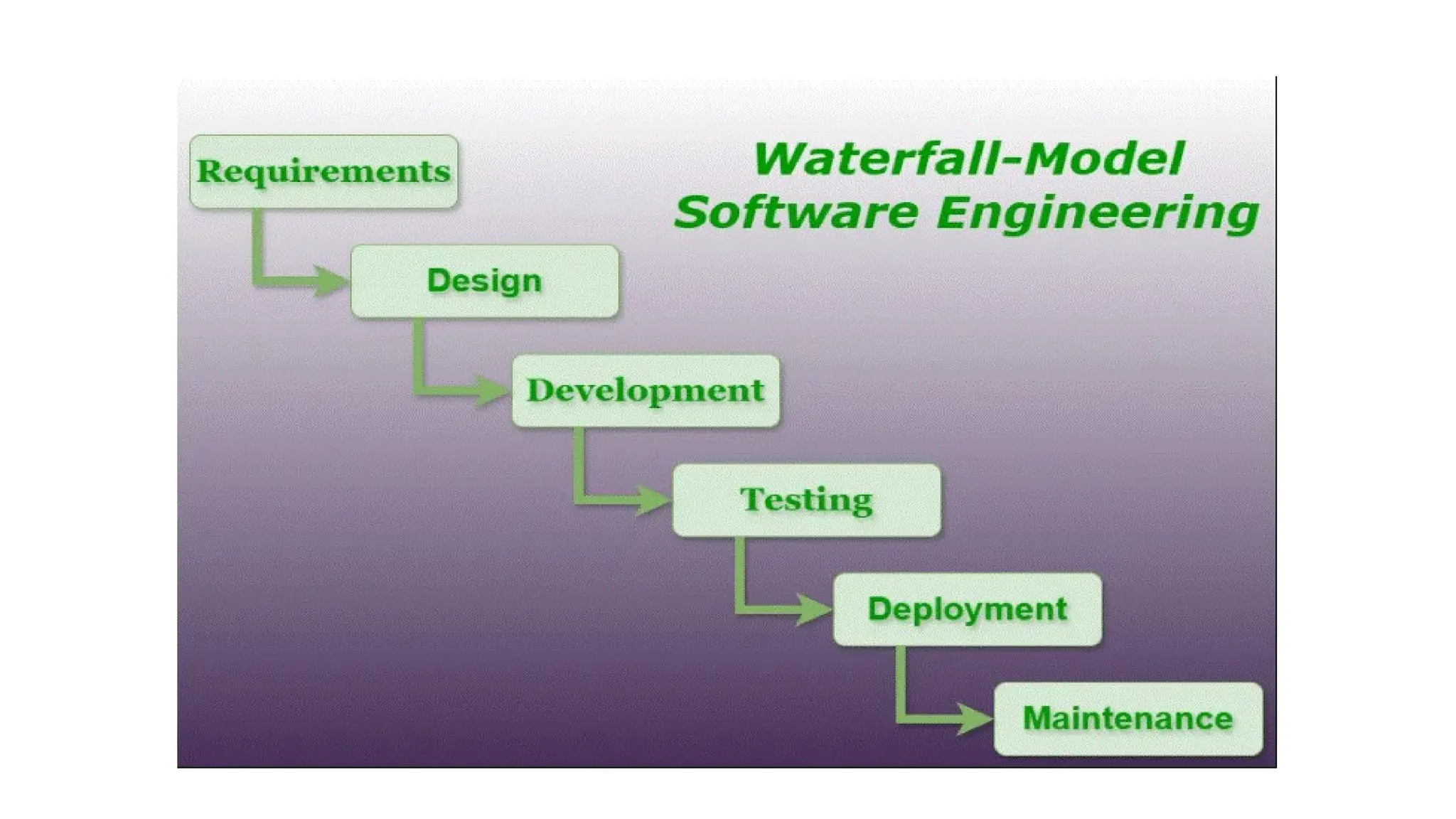
• Waterfall: a linear, sequential approach to software development, with distinct
phases such as requirements gathering, design, implementation, testing, and
maintenance.
• Agile: a flexible, iterative approach to software development, with an emphasis
on rapid prototyping and continuous delivery.
• Scrum: a popular Agile methodology that emphasizes teamwork, iterative
development, and a flexible, adaptive approach to planning and management.
• DevOps: a set of practices that aims to improve collaboration and
communication between development and operations teams, with an
emphasis on automating the software delivery process.
Key Process Activities
• There four basic key process activities are:
1.Software Specifications: In this process, detailed description of
a software system to be developed with its functional and non-
functional requirements.
2.Software Development: In this process, designing,
programming, documenting, testing, and bug fixing is done.
3.Software Validation: In this process, evaluation software
product is done to ensure that the software meets the business
requirements as well as the end users needs.
4.Software Evolution: It is a process of developing software
initially, then timely updating it for various reasons.
Introduction to SSAD and OOAD:
Structured Systems Analysis and Design (SSAD)
• Structured Systems Analysis and Design (SSAD) is a methodology used in
software engineering that focuses on breaking down a system into
smaller, manageable components through a structured, sequential
approach. It emphasizes a clear, step-by-step process for analyzing and
designing systems.
Object-Oriented Analysis and Design (OOAD)
• Object-Oriented Analysis and Design (OOAD) is a methodology that uses
object-oriented principles to model and design systems. It focuses on
representing and managing real-world entities through objects, which
combine data and behavior.
Introduction to SSAD
SSAD:
• SSAD is a traditional approach that emphasizes a structured, step-by-step
method for system development. It is particularly focused on breaking down a
system into smaller, manageable components and then designing each
component systematically.
Key Characteristics
1.Process-Oriented: SSAD is very process-focused, using a series of clearly
defined stages such as analysis, design, implementation, and testing.
2.Functional Decomposition: It breaks down the system based on the
functions or processes that the system needs to perform.
3.Top-Down Approach: The methodology follows a top-down approach where
the high-level system is broken down into more detailed components.
4.Data Flow Diagrams (DFDs): SSAD uses DFDs to represent the flow of data
within the system.
5.Structured Design: It often employs tools like flowcharts and structured
charts to represent the system's design.
6.Focus on Processes: The emphasis is on understanding and designing the
processes and data flows rather than the objects or entities involved.
Advantages
• Clear Structure: Provides a clear, step-by-step approach that can be
easier to manage for complex systems.
• Well-Defined Documentation: Emphasizes thorough documentation
and process clarity.
• Predictable: The structured approach can make project management
and resource allocation more predictable.
Disadvantages
• Less Flexibility: It can be rigid and less adaptable to changes once the
process is underway.
• Complexity in Large Systems: May become cumbersome for very large
or complex systems due to its focus on process decomposition.
Object-Oriented Analysis and Design (OOAD)
Overview
• OOAD, on the other hand, is a more modern approach that is based
on the concept of "objects" rather than processes. It is rooted in
object-oriented programming, which uses objects and classes to
represent real-world entities and their interactions.
Key Characteristics
1.Object-Centric: Focuses on modeling the system using objects, which are
instances of classes that encapsulate both data and behavior.
2.UML (Unified Modeling Language): OOAD often uses UML diagrams like class
diagrams, sequence diagrams, and use case diagrams to represent system
components and interactions.
3.Encapsulation, Inheritance, and Polymorphism: Emphasizes object-oriented
principles such as encapsulation (bundling data and methods), inheritance
(creating new classes based on existing ones), and polymorphism (ability to
process objects differently based on their data type).
4.Iterative Approach: Supports iterative development, where the system is
developed in incremental stages and can adapt to changes more easily.
5.Real-World Modeling: More naturally aligns with real-world entities and their
relationships, making it often easier to understand and design systems that closely
reflect real-world scenarios.
Advantages
• Modularity: Encourages the creation of modular systems where
components are more reusable and maintainable.
• Flexibility and Adaptability: Can be more easily adapted to changes
during the development process.
• Better Alignment with Real-World Problems: Often provides a more
intuitive way to model complex systems based on real-world entities.
Disadvantages
• Complexity in Learning Curve: May have a steeper learning curve for
those unfamiliar with object-oriented principles.
• Potential for Overhead: The use of objects and inheritance can introduce
some complexity and overhead in terms of performance and design.
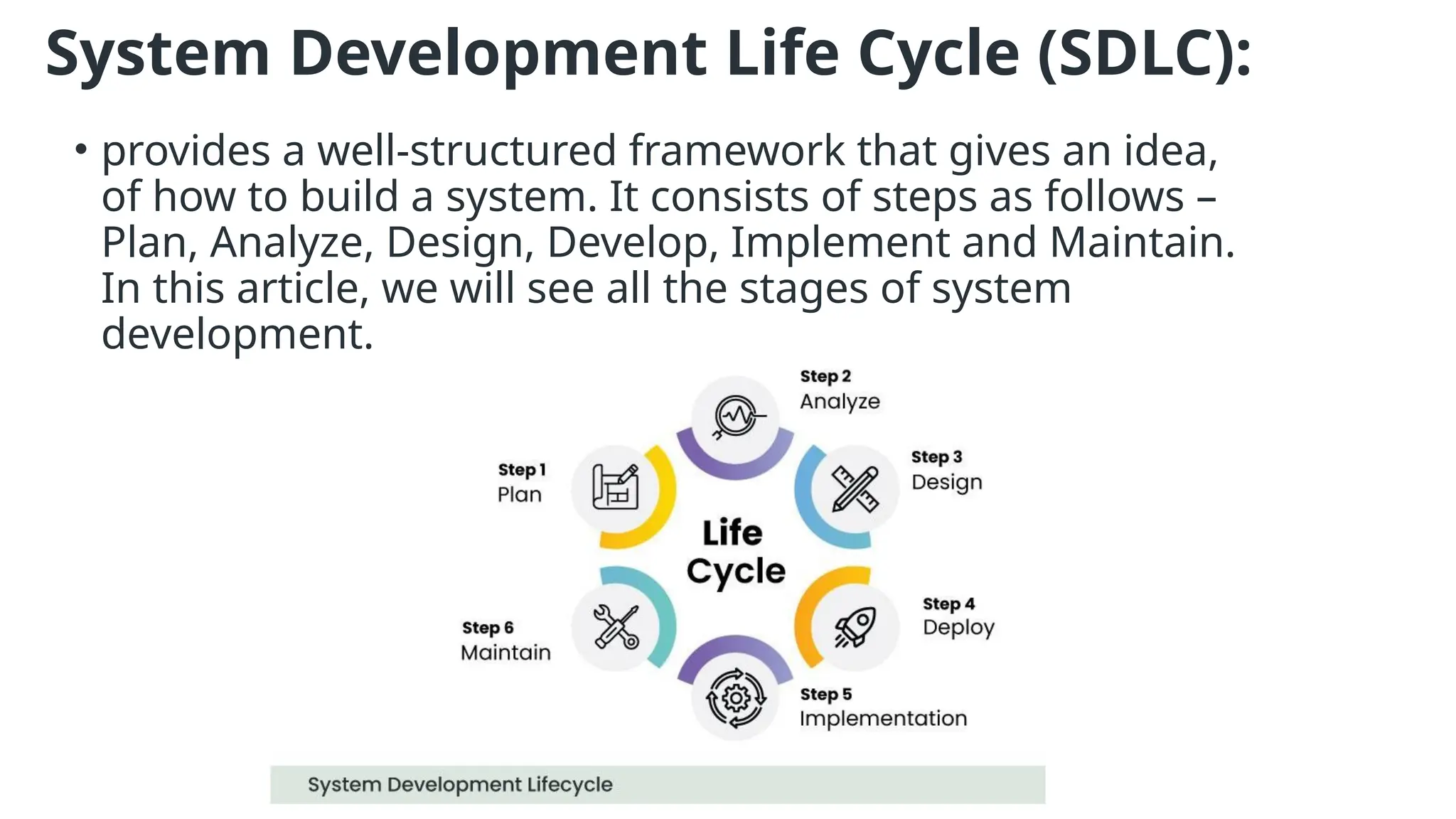
System Development Life Cycle (SDLC):
• provides a well-structured framework that gives an idea,
of how to build a system. It consists of steps as follows –
Plan, Analyze, Design, Develop, Implement and Maintain.
In this article, we will see all the stages of system
development.
Stages (Phases) of System Development Life Cycle
• The System Development Life Cycle encompasses a series of
interconnected stages that ensure a systematic approach to
system development. The stages include Planning, Analysis,
Design, Development, Implementation, and Maintenance. Each
stage contributes to the successful completion of the system,
with System Design serving as a crucial component.
Stage 1: Plan
• The Planning stage lays the groundwork for the entire SDLC. It involves
identifying the system’s goals, defining project scope, setting objectives,
establishing timelines, and determining available resources. Planning ensures
that the development process aligns with organizational needs and sets a
clear direction for subsequent stages.
Stage 2: Analyze
• During the Analysis stage, the focus is on gathering and understanding the
requirements of the system. This includes conducting interviews, studying
existing processes, and identifying stakeholders’ needs. The gathered
information serves as a basis for designing a system that meets users’
expectations and addresses organizational challenges.
Stage 3: Design
• System Design is a critical stage in the SDLC, where the requirements
gathered during the Analysis phase are translated into a detailed technical
plan. It involves designing the system’s architecture, database structure, and
user interface, and defining system components. The Design stage lays the
foundation for the subsequent development and implementation phases.
Stage 4: Develop
• The Development stage involves the actual coding and programming of the
system. Based on the design specifications, developers write code, create
database structures, and implement necessary functionalities. Rigorous testing
and quality assurance are performed to ensure the system’s accuracy,
performance, and adherence to the design requirements.
Stage 5: Implement
• This stage involves deploying the developed system into the production
environment. This includes activities such as system installation, data migration,
training end-users, and configuring necessary infrastructure. Implementation
requires careful planning and coordination to minimize disruptions and ensure a
smooth transition from the old system to the new one.
Stage 6: Maintain
• Maintenance is an ongoing stage that involves monitoring, managing, and
enhancing the system’s performance and functionality. It includes activities such
as bug fixes, updates, security patches, and addressing user feedback. Regular
maintenance ensures the system remains reliable, secure, and adaptable to
changing business needs.
Waterfall Model:
• It is characterized by a structured, sequential approach to
project management and software development.
• The waterfall model is useful in situations where the project
requirements are well-defined and the project goals are clear.
It is often used for large-scale projects with long timelines,
where there is little room for error and the project
stakeholders need to have a high level of confidence in the
outcome.
1. Feasibility Study:
• The main goal of this phase is to determine whether it would be financially and technically feasible to
develop the software.
The feasibility study involves understanding the problem and then determining the various possible
strategies to solve the problem.
2. Requirements Analysis and Specification:
• The requirement analysis and specification phase aims to understand the exact requirements of the
customer and document them properly. This phase consists of two different activities.
 Requirement gathering and analysis: Firstly all the requirements regarding the software are gathered
from the customer and then the gathered requirements are analyzed. The goal of the analysis part
is to remove incompleteness and inconsistencies
 Requirement specification: These analyzed requirements are documented in a software
requirement specification (SRS) document. SRS document serves as a contract between the
development team and customers. Any future dispute between the customers and the developers
can be settled by examining the SRS document.
3. Design:
• The goal of this phase is to convert the requirements acquired in the SRS
into a format that can be coded in a programming language. It includes
high-level and detailed design as well as the overall software
architecture. A Software Design Document is used to document all of
this effort (SDD).
4. Coding and Unit Testing:
• In the coding phase software design is translated into source code using
any suitable programming language. Thus each designed module is
coded. The unit testing phase aims to check whether each module is
working properly or not.
5. Integration and System testing:
• Integration of different modules is undertaken soon after they have been coded and unit
tested. Integration of various modules is carried out incrementally over several steps.
During each integration step, previously planned modules are added to the partially
integrated system and the resultant system is tested. Finally, after all the modules have
been successfully integrated and tested, the full working system is obtained and system
testing is carried out on this.
System testing consists of three different kinds of testing activities as described below.
 Alpha testing: Alpha testing is the system testing performed by the development team.
 Beta testing: Beta testing is the system testing performed by a friendly set of customers.
 Acceptance testing: After the software has been delivered, the customer performs
acceptance testing to determine whether to accept the delivered software or reject it.
6. Maintenance:
• Maintenance is the most important phase of a software life cycle. The effort spent on
maintenance is 60% of the total effort spent to develop a full software. There are
three types of maintenance.
 Corrective Maintenance: This type of maintenance is carried out to correct errors
that were not discovered during the product development phase.
 Perfective Maintenance: This type of maintenance is carried out to enhance the
functionalities of the system based on the customer’s request.
 Adaptive Maintenance: Adaptive maintenance is usually required for porting the
software to work in a new environment such as working on a new computer platform
or with a new operating system.
Advantages of the SDLC Waterfall Model
• The classical waterfall model is an idealistic model for software development. It is
very simple, so it can be considered the basis for other software development life
cycle models. Below are some of the major advantages of this SDLC model.
 Easy to Understand: The Classical Waterfall Model is very simple and easy to
understand.
 Individual Processing: Phases in the Classical Waterfall model are processed one at a
time.
 Properly Defined: In the classical waterfall model, each stage in the model is clearly
defined.
Disadvantages:
• No Feedback Path: In the classical waterfall model evolution of software from one
phase to another phase is like a waterfall. It assumes that no error is ever
committed by developers during any phase. Therefore, it does not incorporate any
mechanism for error correction.
• Difficult to accommodate Change Requests: This model assumes that all the
customer requirements can be completely and correctly defined at the beginning
of the project, but the customer’s requirements keep on changing with time. It is
difficult to accommodate any change requests after the requirements specification
phase is complete.
• No Overlapping of Phases: This model recommends that a new phase can start
only after the completion of the previous phase. But in real projects, this can’t be
maintained. To increase efficiency and reduce cost, phases may overlap.
• Limited Flexibility: The Waterfall Model is a rigid and linear approach to software
development, which means that it is not well-suited for projects with changing or
uncertain requirements. Once a phase has been completed, it is difficult to make
changes or go back to a previous phase.
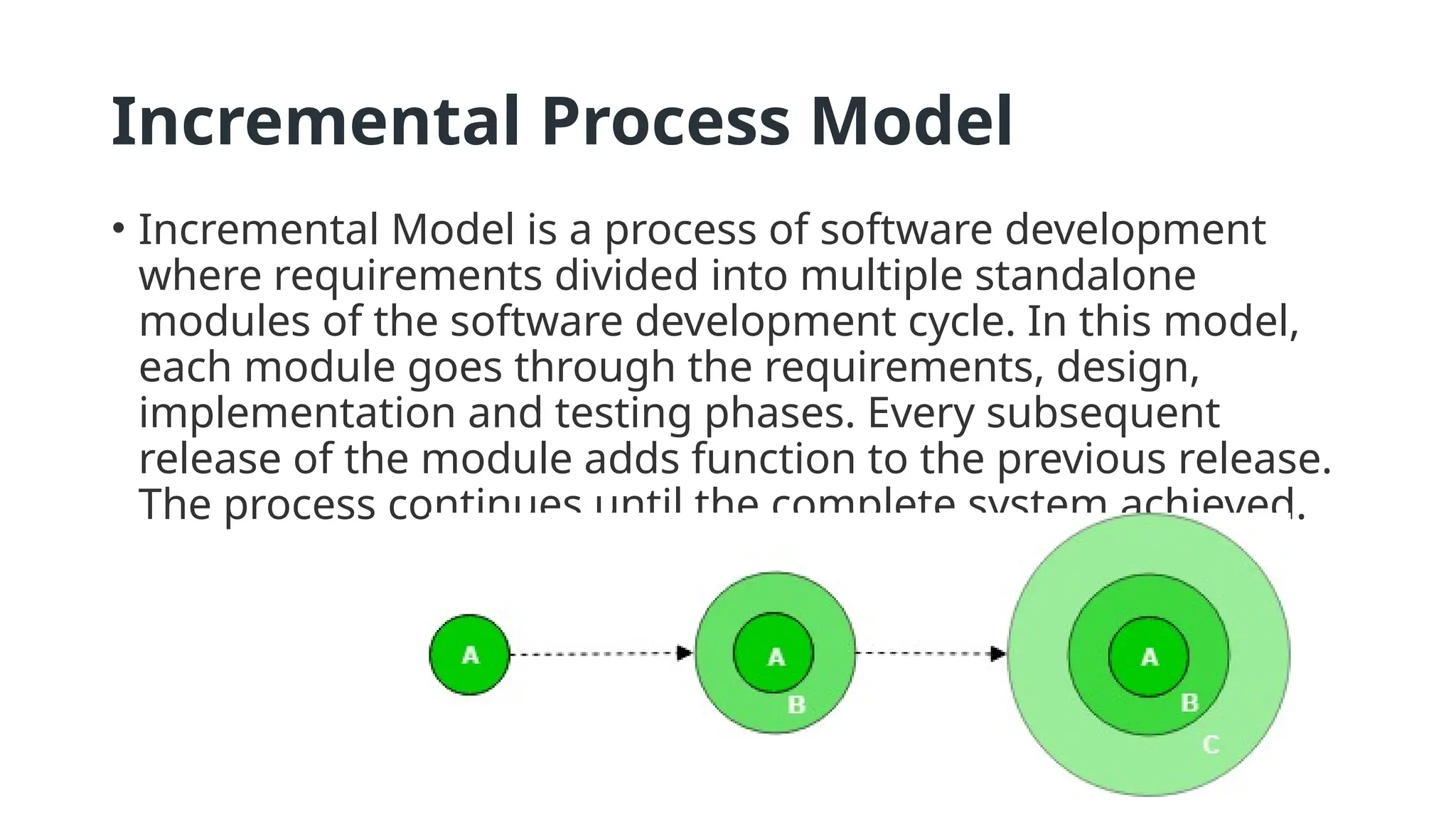
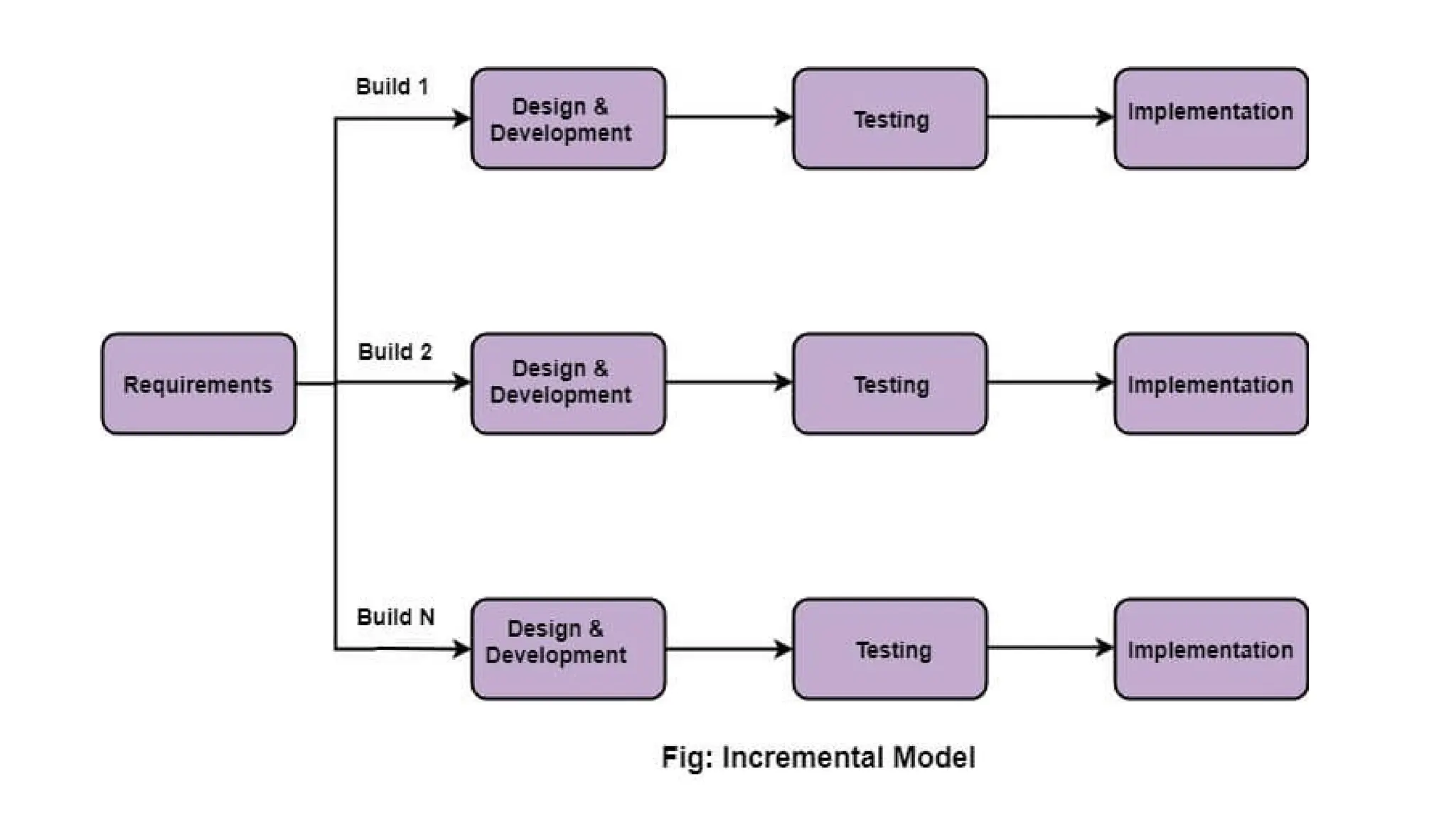
Incremental Process Model
• Incremental Model is a process of software development
where requirements divided into multiple standalone
modules of the software development cycle. In this model,
each module goes through the requirements, design,
implementation and testing phases. Every subsequent
release of the module adds function to the previous release.
The process continues until the complete system achieved.
• The various phases of incremental model are as follows:
• 1. Requirement analysis: In the first phase of the
incremental model, the product analysis expertise identifies
the requirements. And the system functional requirements
are understood by the requirement analysis team. To develop
the software under the incremental model, this phase
performs a crucial role.
• 2. Design & Development: In this phase of the Incremental
model of SDLC, the design of the system functionality and the
development method are finished with success. When
software develops new practicality, the incremental model
uses style and development phase.
• 3. Testing: In the incremental model, the testing phase checks
the performance of each existing function as well as
additional functionality. In the testing phase, the various
methods are used to test the behavior of each task.
• 4. Implementation: Implementation phase enables the
coding phase of the development system. It involves the final
coding that design in the designing and development phase
and tests the functionality in the testing phase. After
completion of this phase, the number of the product working
is enhanced and upgraded up to the final system product
When we use the Incremental Model?
• When the requirements are superior.
• A project has a lengthy development schedule.
• When Software team are not very well skilled or trained.
• When the customer demands a quick release of the product.
• You can develop prioritized requirements first.
Advantage of Incremental Model
• Errors are easy to be recognized.
• Easier to test and debug
• More flexible.
• Simple to manage risk because it handled during its iteration.
• The Client gets important functionality early.
Disadvantage of Incremental Model
• Need for good planning
• Total Cost is high.
• Well defined module interfaces are needed.
Spiral Model
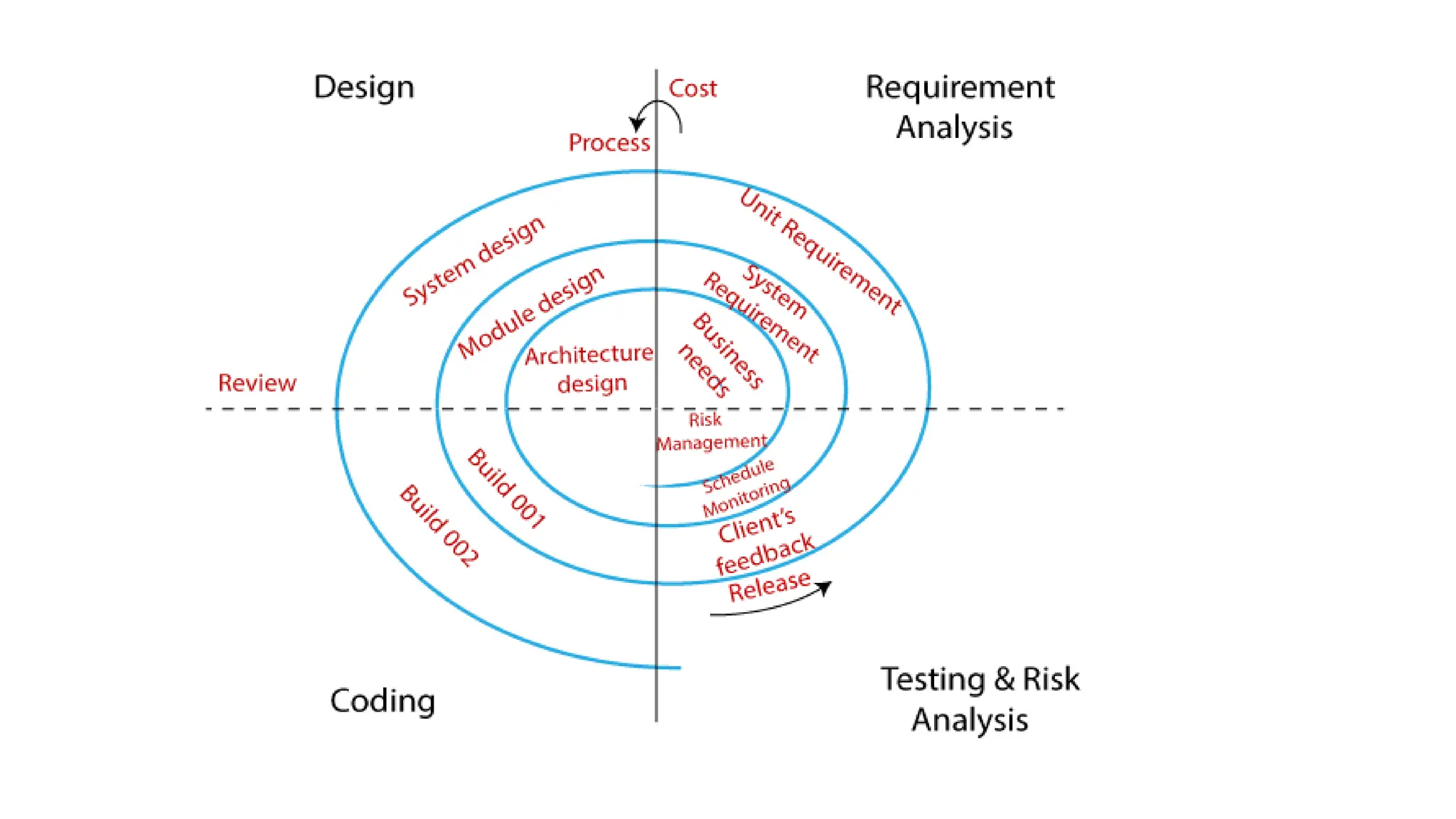
• The Spiral Model is a combination of the waterfall model and
the iterative model. It provides support for Risk Handling.
The Spiral Model was first proposed by Barry Boehm.
• The Spiral Model is a
Software Development Life Cycle (SDLC) model that
provides a systematic and iterative approach to software
development. In its diagrammatic representation, looks like a
spiral with many loops. The exact number of loops of the
spiral is unknown and can vary from project to project. Each
loop of the spiral is called a phase of the software
development process.
Requirement Analysis
• The spiral model process starts with collecting business needs. In
this, the following spirals will include the documentation of
system requirements, unit requirements, and the subsystem
needs. In this stage, we can easily understand the system
requirements because the business analyst and the client have
constant communication. And once the cycle is completed, the
application will be deployed in the market.
Design
• The second stage of the spiral model is designed, where we will
plan the logical design, architectural design, flow charts, decision
tree, and so on.
Coding
• After the compilation of the design stage, we will move to our next step,
which is the coding stage. In this, we will develop the product based on
the client's requirement and getting the client's feedback as well. This
stage refers to the construction of the real application in every cycle.
• And those spirals had an excellent clarity of the requirements, and the
design details of an application are known as the build with having
version numbers. After that, these builds are transferred to the client
for their responses.
Testing and Risk Analysis
• Once the development is completed successfully, we will test the build
at the end of the first cycle and also analyze the risk of the software on
the different aspects such as managing risks, detecting, and observing
the technical feasibility. And after that, the client will test the application
and give feedback.
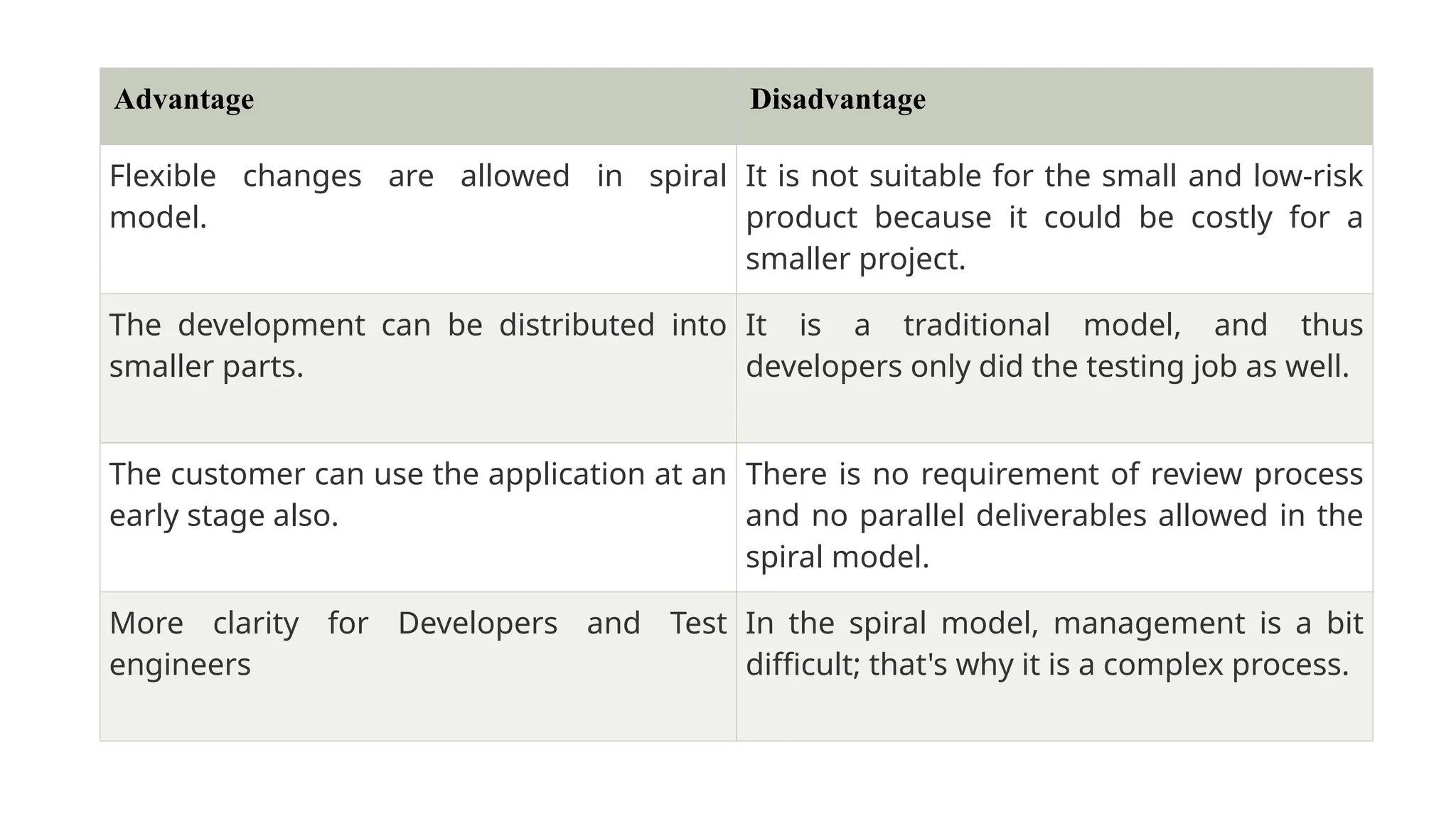
Advantage Disadvantage
Flexible changes are allowed in spiral
model.
It is not suitable for the small and low-risk
product because it could be costly for a
smaller project.
The development can be distributed into
smaller parts.
It is a traditional model, and thus
developers only did the testing job as well.
The customer can use the application at an
early stage also.
There is no requirement of review process
and no parallel deliverables allowed in the
spiral model.
More clarity for Developers and Test
engineers
In the spiral model, management is a bit
difficult; that's why it is a complex process.
Prototyping Model
• Prototyping is defined as the process of developing a
working replication of a product or system that has to be
engineered. It offers a small-scale facsimile of the end
product and is used for obtaining customer feedback.
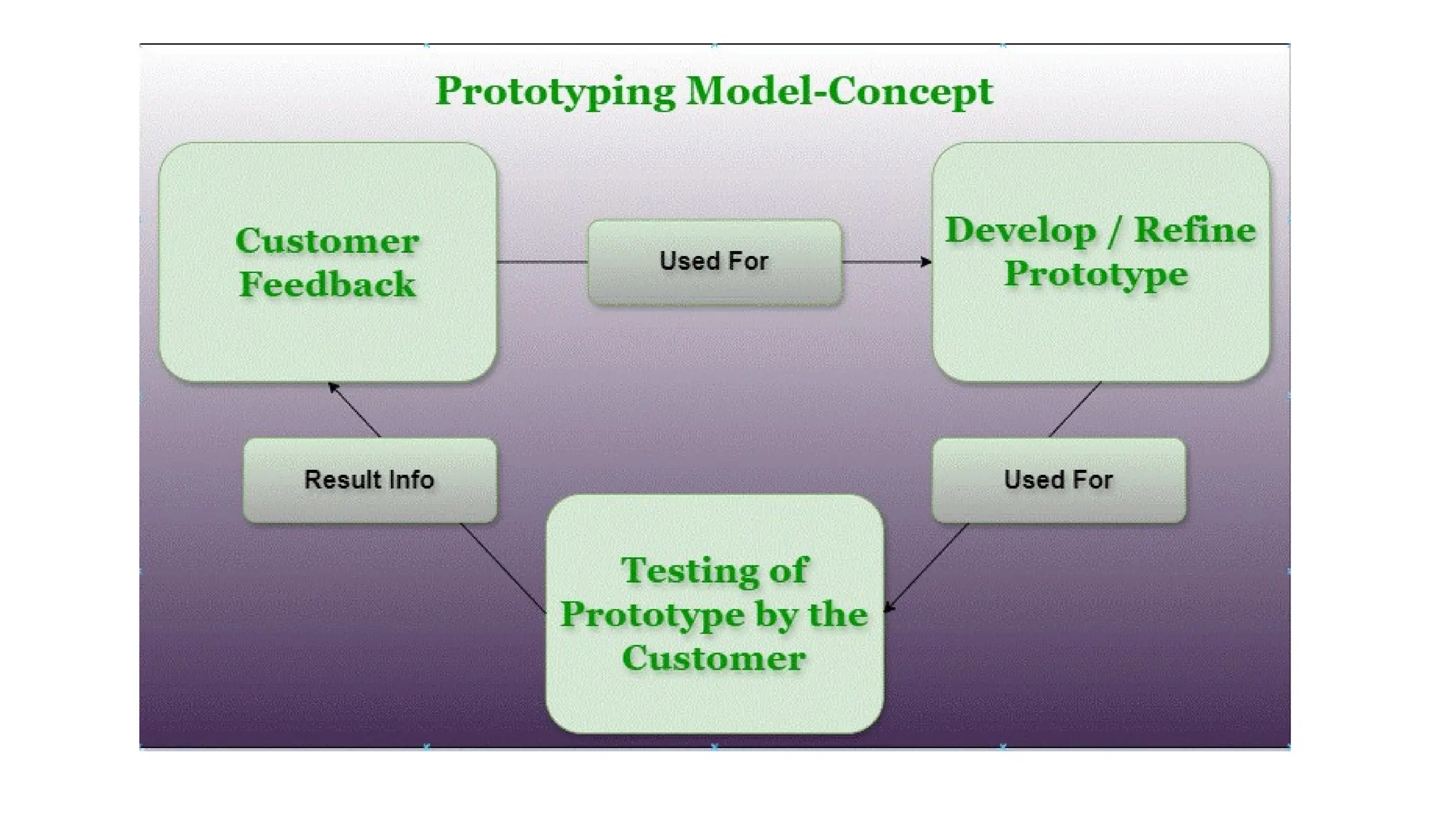
• This model is used when the customers do not know the
exact project requirements beforehand. In this model, a
prototype of the end product is first developed, tested, and
refined as per customer feedback repeatedly till a final
acceptable prototype is achieved which forms the basis for
developing the final product.
• In this process model, the system is partially implemented
before or during the analysis phase thereby allowing the
customers to see the product early in the life cycle. The
process starts by interviewing the customers and developing
the incomplete high-level paper model. This document is used
to build the initial prototype supporting only the basic
functionality as desired by the customer.
Steps of Prototyping Model
• Step 1: Requirement Gathering and Analysis: This is the
initial step in designing a prototype model. In this phase, users
are asked about what they expect or what they want from the
system.
• Step 2: Quick Design: This is the second step in the
Prototyping Model. This model covers the basic design of the
requirement through which a quick overview can be easily
described.
• Step 3: Build a Prototype: This step helps in building an
actual prototype from the knowledge gained from prototype
design.
• Step 4: Initial User Evaluation: This step describes the
preliminary testing where the investigation of the
performance model occurs, as the customer will tell the
strengths and weaknesses of the design, which was sent to
the developer.
• Step 5: Refining Prototype: If any feedback is given by the
user, then improving the client’s response to feedback and
suggestions, the final system is approved.
• Step 6: Implement Product and Maintain: This is the final
step in the phase of the Prototyping Model where the final
system is tested and distributed to production, here the
program is run regularly to prevent failures.
Advantages of Prototyping Model
• The customers get to see the partial product early in the life
cycle. This ensures a greater level of customer satisfaction and
comfort.
• New requirements can be easily accommodated as there is
scope for refinement.
• Missing functionalities can be easily figured out.
• Errors can be detected much earlier thereby saving a lot of
effort and cost, besides enhancing the quality of the software.
• The developed prototype can be reused by the developer for
more complicated projects in the future.
Disadvantages of the Prototyping Model
• Costly concerning time as well as money.
• There may be too much variation in requirements each time
the prototype is evaluated by the customer.
• Poor Documentation due to continuously changing customer
requirements.
• It is very difficult for developers to accommodate all the
changes demanded by the customer.
• There is uncertainty in determining the number of iterations
that would be required before the prototype is finally
accepted by the customer.
Rational Unified Process (RUP)
• Rational Unified Process (RUP) is a software development
process for object-oriented models. It is also known as the
Unified Process Model. It is created by Rational Corporation
and is designed and documented using UML (Unified
Modeling Language). This process is included in the IBM
Rational Method Composer (RMC) product.
Phases of RUP
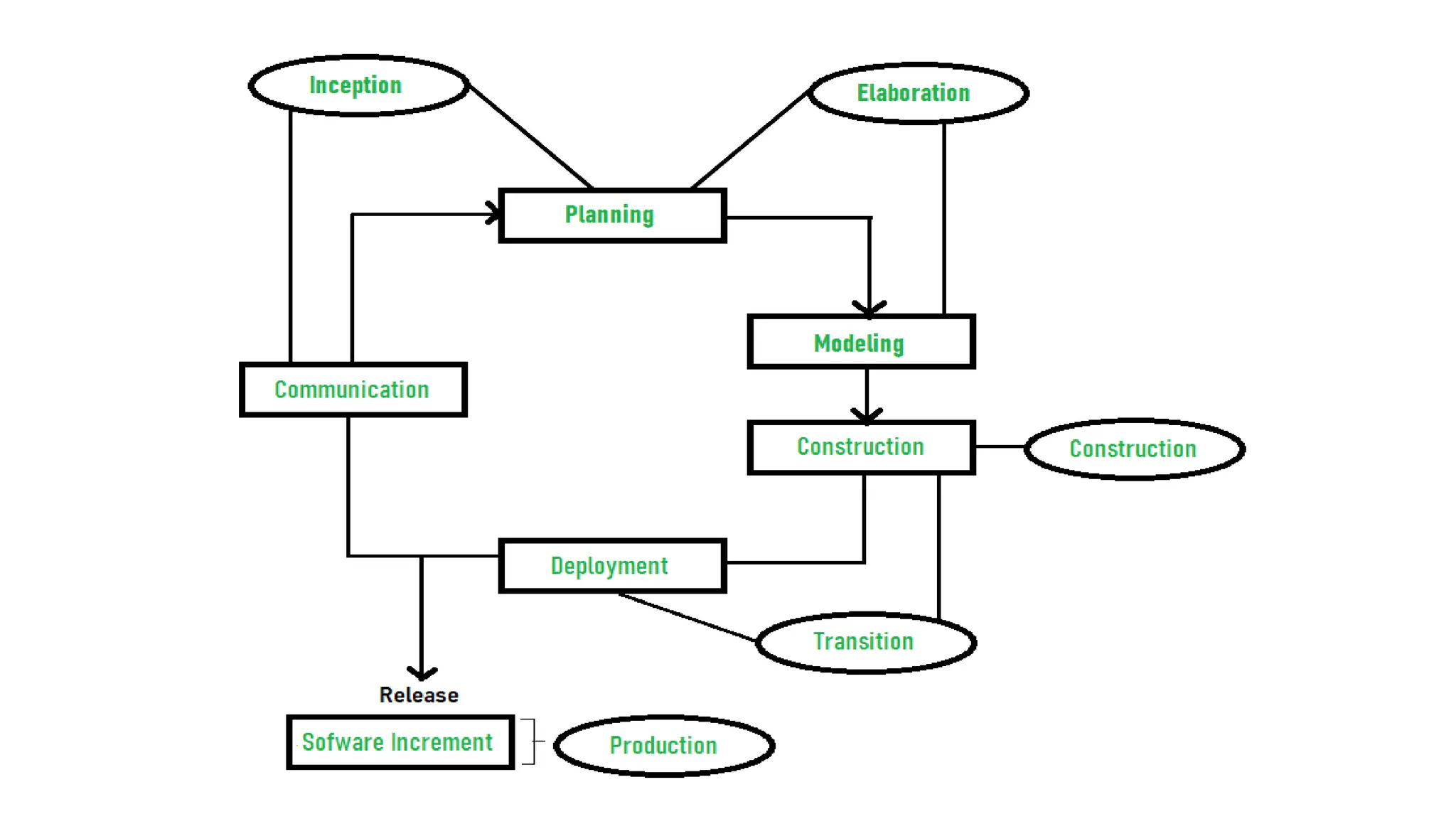
• There is a total of five phases of the life cycle of RUP:
1.Inception
2.Elaboration
3.Construction
4.Transition
5.Production
Inception –Communication and planning are the main ones.
• Identifies the scope of the project using a use-case model allowing
managers to estimate costs and time required.
• Customers’ requirements are identified and then it becomes easy to
make a plan for the project.
• The project plan, Project goal, risks, use-case model, and Project
description, are made.
Elaboration –Planning and modeling are the main ones.
• A detailed evaluation and development plan is carried out and
diminishes the risks.
• Revise or redefine the use-case model (approx. 80%), business case,
and risks.
• Again, checked against milestone criteria and if it couldn’t pass these
criteria then again project can be canceled or redesigned.
3.Construction –
3.The project is developed and completed.
4.System or source code is created and then testing is done.
5.Coding takes place.
4.Transition –
4.The final project is released to the public.
5.Transit the project from development into production.
6.Update project documentation.
7.Beta testing is conducted.
8.Defects are removed from the project based on feedback from the
public
5.Production –
5.The final phase of the model.
6.The project is maintained and updated accordingly.
Advantages of Rational Unified Process (RUP)
1.RUP provides good documentation, it completes the process in
itself.
2.RUP provides risk-management support.
3.RUP reuses the components, and hence total time duration is less.
4.Good online support is available in the form of tutorials and
training.
Disadvantages of Rational Unified Process (RUP)
5.Team of expert professional is required, as the process is complex.
2.Complex and not properly organized process.
3.More dependency on risk management.
4.Hard to integrate again and again.

Introduction to Software Engineering_Need_SDLC_types of SDLC

  • 1.
    Introduction to SE Prof.Deeepak V Ulape. (Asst. Professor) Module 1
  • 2.
    Defination of SoftwareEnginering: • Software Engineering is the process of designing, developing, testing, and maintaining software. It is a systematic and disciplined approach to software development that aims to create high-quality, reliable, and maintainable software.
  • 3.
    Need for SE: •Handling Big Projects: A corporation must use a software engineering methodology in order to handle large projects without any issues. • To manage the cost: Software engineering programmers plan everything and reduce all those things that are not required. • To decrease time: It will save a lot of time if you are developing software using a software engineering technique. • Reliable software: It is the company’s responsibility to deliver software products on schedule and to address any defects that may exist. • Effectiveness: Effectiveness results from things being created in accordance with the standards. • Reduces complexity: Large challenges are broken down into smaller ones and solved one at a time in software engineering. Individual solutions are found for each of these issues. • Productivity: Because it contains testing systems at every level, proper care is done to maintain software productivity.
  • 4.
    Mc Call’s QualityFactors: • McCall’s Software Quality Model was introduced in 1977. This model is incorporated with many attributes, termed software factors, which influence software. • Factors of Product Quality • Below are the factors of Product Quality, that are discussed in detail. • Product Operation • Product Revision • Product Transition
  • 6.
    Product Operation • ProductOperation includes five software quality factors, which are related to the requirements that directly affect the operation of the software such as operational performance, convenience, ease of usage, and correctness. These factors help in providing a better user experience. • Correctness: The extent to which software meets its requirements specification. • Efficiency: The number of hardware resources and code the software, needs to perform a function. • Integrity: The extent to which the software can control an unauthorized person from accessing the data or software. • Reliability: The extent to which software performs its intended functions without failure. • Usability: The extent of effort required to learn, operate, and understand the functions of the software.
  • 7.
    • Product Revision •Product Revision includes three software quality factors, which are required for testing and maintenance of the software. They provide ease of maintenance, flexibility, and testing efforts to support the software to be functional according to the needs and requirements of the user in the future. • Maintainability: The effort required to detect and correct an error during maintenance. • Flexibility: The effort needed to improve an operational software program. • Testability: The effort required to verify software to ensure that it meets the specified requirements.
  • 8.
    • Product Transition •Product Transition includes three software quality factors, that allow the software to adapt to the change of environments in the new platform or technology from the previous. • Portability: The effort required to transfer a program from one platform to another. • Re-usability: The extent to which the program’s code can be reused in other applications. • Interoperability: The effort required to integrate two systems.
  • 9.
    Software Enginering Processand Practice: • Software processes in software engineering refer to the methods and techniques used to develop and maintain software. Some examples of software processes include: • Waterfall: a linear, sequential approach to software development, with distinct phases such as requirements gathering, design, implementation, testing, and maintenance. • Agile: a flexible, iterative approach to software development, with an emphasis on rapid prototyping and continuous delivery. • Scrum: a popular Agile methodology that emphasizes teamwork, iterative development, and a flexible, adaptive approach to planning and management. • DevOps: a set of practices that aims to improve collaboration and communication between development and operations teams, with an emphasis on automating the software delivery process.
  • 10.
    Key Process Activities •There four basic key process activities are: 1.Software Specifications: In this process, detailed description of a software system to be developed with its functional and non- functional requirements. 2.Software Development: In this process, designing, programming, documenting, testing, and bug fixing is done. 3.Software Validation: In this process, evaluation software product is done to ensure that the software meets the business requirements as well as the end users needs. 4.Software Evolution: It is a process of developing software initially, then timely updating it for various reasons.
  • 11.
    Introduction to SSADand OOAD: Structured Systems Analysis and Design (SSAD) • Structured Systems Analysis and Design (SSAD) is a methodology used in software engineering that focuses on breaking down a system into smaller, manageable components through a structured, sequential approach. It emphasizes a clear, step-by-step process for analyzing and designing systems. Object-Oriented Analysis and Design (OOAD) • Object-Oriented Analysis and Design (OOAD) is a methodology that uses object-oriented principles to model and design systems. It focuses on representing and managing real-world entities through objects, which combine data and behavior.
  • 12.
    Introduction to SSAD SSAD: •SSAD is a traditional approach that emphasizes a structured, step-by-step method for system development. It is particularly focused on breaking down a system into smaller, manageable components and then designing each component systematically.
  • 13.
    Key Characteristics 1.Process-Oriented: SSADis very process-focused, using a series of clearly defined stages such as analysis, design, implementation, and testing. 2.Functional Decomposition: It breaks down the system based on the functions or processes that the system needs to perform. 3.Top-Down Approach: The methodology follows a top-down approach where the high-level system is broken down into more detailed components. 4.Data Flow Diagrams (DFDs): SSAD uses DFDs to represent the flow of data within the system. 5.Structured Design: It often employs tools like flowcharts and structured charts to represent the system's design. 6.Focus on Processes: The emphasis is on understanding and designing the processes and data flows rather than the objects or entities involved.
  • 14.
    Advantages • Clear Structure:Provides a clear, step-by-step approach that can be easier to manage for complex systems. • Well-Defined Documentation: Emphasizes thorough documentation and process clarity. • Predictable: The structured approach can make project management and resource allocation more predictable. Disadvantages • Less Flexibility: It can be rigid and less adaptable to changes once the process is underway. • Complexity in Large Systems: May become cumbersome for very large or complex systems due to its focus on process decomposition.
  • 15.
    Object-Oriented Analysis andDesign (OOAD) Overview • OOAD, on the other hand, is a more modern approach that is based on the concept of "objects" rather than processes. It is rooted in object-oriented programming, which uses objects and classes to represent real-world entities and their interactions.
  • 16.
    Key Characteristics 1.Object-Centric: Focuseson modeling the system using objects, which are instances of classes that encapsulate both data and behavior. 2.UML (Unified Modeling Language): OOAD often uses UML diagrams like class diagrams, sequence diagrams, and use case diagrams to represent system components and interactions. 3.Encapsulation, Inheritance, and Polymorphism: Emphasizes object-oriented principles such as encapsulation (bundling data and methods), inheritance (creating new classes based on existing ones), and polymorphism (ability to process objects differently based on their data type). 4.Iterative Approach: Supports iterative development, where the system is developed in incremental stages and can adapt to changes more easily. 5.Real-World Modeling: More naturally aligns with real-world entities and their relationships, making it often easier to understand and design systems that closely reflect real-world scenarios.
  • 17.
    Advantages • Modularity: Encouragesthe creation of modular systems where components are more reusable and maintainable. • Flexibility and Adaptability: Can be more easily adapted to changes during the development process. • Better Alignment with Real-World Problems: Often provides a more intuitive way to model complex systems based on real-world entities. Disadvantages • Complexity in Learning Curve: May have a steeper learning curve for those unfamiliar with object-oriented principles. • Potential for Overhead: The use of objects and inheritance can introduce some complexity and overhead in terms of performance and design.
  • 18.
    System Development LifeCycle (SDLC): • provides a well-structured framework that gives an idea, of how to build a system. It consists of steps as follows – Plan, Analyze, Design, Develop, Implement and Maintain. In this article, we will see all the stages of system development.
  • 19.
    Stages (Phases) ofSystem Development Life Cycle • The System Development Life Cycle encompasses a series of interconnected stages that ensure a systematic approach to system development. The stages include Planning, Analysis, Design, Development, Implementation, and Maintenance. Each stage contributes to the successful completion of the system, with System Design serving as a crucial component.
  • 20.
    Stage 1: Plan •The Planning stage lays the groundwork for the entire SDLC. It involves identifying the system’s goals, defining project scope, setting objectives, establishing timelines, and determining available resources. Planning ensures that the development process aligns with organizational needs and sets a clear direction for subsequent stages. Stage 2: Analyze • During the Analysis stage, the focus is on gathering and understanding the requirements of the system. This includes conducting interviews, studying existing processes, and identifying stakeholders’ needs. The gathered information serves as a basis for designing a system that meets users’ expectations and addresses organizational challenges. Stage 3: Design • System Design is a critical stage in the SDLC, where the requirements gathered during the Analysis phase are translated into a detailed technical plan. It involves designing the system’s architecture, database structure, and user interface, and defining system components. The Design stage lays the foundation for the subsequent development and implementation phases.
  • 21.
    Stage 4: Develop •The Development stage involves the actual coding and programming of the system. Based on the design specifications, developers write code, create database structures, and implement necessary functionalities. Rigorous testing and quality assurance are performed to ensure the system’s accuracy, performance, and adherence to the design requirements. Stage 5: Implement • This stage involves deploying the developed system into the production environment. This includes activities such as system installation, data migration, training end-users, and configuring necessary infrastructure. Implementation requires careful planning and coordination to minimize disruptions and ensure a smooth transition from the old system to the new one. Stage 6: Maintain • Maintenance is an ongoing stage that involves monitoring, managing, and enhancing the system’s performance and functionality. It includes activities such as bug fixes, updates, security patches, and addressing user feedback. Regular maintenance ensures the system remains reliable, secure, and adaptable to changing business needs.
  • 22.
    Waterfall Model: • Itis characterized by a structured, sequential approach to project management and software development. • The waterfall model is useful in situations where the project requirements are well-defined and the project goals are clear. It is often used for large-scale projects with long timelines, where there is little room for error and the project stakeholders need to have a high level of confidence in the outcome.
  • 24.
    1. Feasibility Study: •The main goal of this phase is to determine whether it would be financially and technically feasible to develop the software. The feasibility study involves understanding the problem and then determining the various possible strategies to solve the problem. 2. Requirements Analysis and Specification: • The requirement analysis and specification phase aims to understand the exact requirements of the customer and document them properly. This phase consists of two different activities.  Requirement gathering and analysis: Firstly all the requirements regarding the software are gathered from the customer and then the gathered requirements are analyzed. The goal of the analysis part is to remove incompleteness and inconsistencies  Requirement specification: These analyzed requirements are documented in a software requirement specification (SRS) document. SRS document serves as a contract between the development team and customers. Any future dispute between the customers and the developers can be settled by examining the SRS document.
  • 25.
    3. Design: • Thegoal of this phase is to convert the requirements acquired in the SRS into a format that can be coded in a programming language. It includes high-level and detailed design as well as the overall software architecture. A Software Design Document is used to document all of this effort (SDD). 4. Coding and Unit Testing: • In the coding phase software design is translated into source code using any suitable programming language. Thus each designed module is coded. The unit testing phase aims to check whether each module is working properly or not.
  • 26.
    5. Integration andSystem testing: • Integration of different modules is undertaken soon after they have been coded and unit tested. Integration of various modules is carried out incrementally over several steps. During each integration step, previously planned modules are added to the partially integrated system and the resultant system is tested. Finally, after all the modules have been successfully integrated and tested, the full working system is obtained and system testing is carried out on this. System testing consists of three different kinds of testing activities as described below.  Alpha testing: Alpha testing is the system testing performed by the development team.  Beta testing: Beta testing is the system testing performed by a friendly set of customers.  Acceptance testing: After the software has been delivered, the customer performs acceptance testing to determine whether to accept the delivered software or reject it.
  • 27.
    6. Maintenance: • Maintenanceis the most important phase of a software life cycle. The effort spent on maintenance is 60% of the total effort spent to develop a full software. There are three types of maintenance.  Corrective Maintenance: This type of maintenance is carried out to correct errors that were not discovered during the product development phase.  Perfective Maintenance: This type of maintenance is carried out to enhance the functionalities of the system based on the customer’s request.  Adaptive Maintenance: Adaptive maintenance is usually required for porting the software to work in a new environment such as working on a new computer platform or with a new operating system.
  • 28.
    Advantages of theSDLC Waterfall Model • The classical waterfall model is an idealistic model for software development. It is very simple, so it can be considered the basis for other software development life cycle models. Below are some of the major advantages of this SDLC model.  Easy to Understand: The Classical Waterfall Model is very simple and easy to understand.  Individual Processing: Phases in the Classical Waterfall model are processed one at a time.  Properly Defined: In the classical waterfall model, each stage in the model is clearly defined.
  • 29.
    Disadvantages: • No FeedbackPath: In the classical waterfall model evolution of software from one phase to another phase is like a waterfall. It assumes that no error is ever committed by developers during any phase. Therefore, it does not incorporate any mechanism for error correction. • Difficult to accommodate Change Requests: This model assumes that all the customer requirements can be completely and correctly defined at the beginning of the project, but the customer’s requirements keep on changing with time. It is difficult to accommodate any change requests after the requirements specification phase is complete. • No Overlapping of Phases: This model recommends that a new phase can start only after the completion of the previous phase. But in real projects, this can’t be maintained. To increase efficiency and reduce cost, phases may overlap. • Limited Flexibility: The Waterfall Model is a rigid and linear approach to software development, which means that it is not well-suited for projects with changing or uncertain requirements. Once a phase has been completed, it is difficult to make changes or go back to a previous phase.
  • 30.
    Incremental Process Model •Incremental Model is a process of software development where requirements divided into multiple standalone modules of the software development cycle. In this model, each module goes through the requirements, design, implementation and testing phases. Every subsequent release of the module adds function to the previous release. The process continues until the complete system achieved.
  • 32.
    • The variousphases of incremental model are as follows: • 1. Requirement analysis: In the first phase of the incremental model, the product analysis expertise identifies the requirements. And the system functional requirements are understood by the requirement analysis team. To develop the software under the incremental model, this phase performs a crucial role. • 2. Design & Development: In this phase of the Incremental model of SDLC, the design of the system functionality and the development method are finished with success. When software develops new practicality, the incremental model uses style and development phase.
  • 33.
    • 3. Testing:In the incremental model, the testing phase checks the performance of each existing function as well as additional functionality. In the testing phase, the various methods are used to test the behavior of each task. • 4. Implementation: Implementation phase enables the coding phase of the development system. It involves the final coding that design in the designing and development phase and tests the functionality in the testing phase. After completion of this phase, the number of the product working is enhanced and upgraded up to the final system product
  • 34.
    When we usethe Incremental Model? • When the requirements are superior. • A project has a lengthy development schedule. • When Software team are not very well skilled or trained. • When the customer demands a quick release of the product. • You can develop prioritized requirements first.
  • 35.
    Advantage of IncrementalModel • Errors are easy to be recognized. • Easier to test and debug • More flexible. • Simple to manage risk because it handled during its iteration. • The Client gets important functionality early.
  • 36.
    Disadvantage of IncrementalModel • Need for good planning • Total Cost is high. • Well defined module interfaces are needed.
  • 37.
    Spiral Model • TheSpiral Model is a combination of the waterfall model and the iterative model. It provides support for Risk Handling. The Spiral Model was first proposed by Barry Boehm. • The Spiral Model is a Software Development Life Cycle (SDLC) model that provides a systematic and iterative approach to software development. In its diagrammatic representation, looks like a spiral with many loops. The exact number of loops of the spiral is unknown and can vary from project to project. Each loop of the spiral is called a phase of the software development process.
  • 39.
    Requirement Analysis • Thespiral model process starts with collecting business needs. In this, the following spirals will include the documentation of system requirements, unit requirements, and the subsystem needs. In this stage, we can easily understand the system requirements because the business analyst and the client have constant communication. And once the cycle is completed, the application will be deployed in the market. Design • The second stage of the spiral model is designed, where we will plan the logical design, architectural design, flow charts, decision tree, and so on.
  • 40.
    Coding • After thecompilation of the design stage, we will move to our next step, which is the coding stage. In this, we will develop the product based on the client's requirement and getting the client's feedback as well. This stage refers to the construction of the real application in every cycle. • And those spirals had an excellent clarity of the requirements, and the design details of an application are known as the build with having version numbers. After that, these builds are transferred to the client for their responses. Testing and Risk Analysis • Once the development is completed successfully, we will test the build at the end of the first cycle and also analyze the risk of the software on the different aspects such as managing risks, detecting, and observing the technical feasibility. And after that, the client will test the application and give feedback.
  • 41.
    Advantage Disadvantage Flexible changesare allowed in spiral model. It is not suitable for the small and low-risk product because it could be costly for a smaller project. The development can be distributed into smaller parts. It is a traditional model, and thus developers only did the testing job as well. The customer can use the application at an early stage also. There is no requirement of review process and no parallel deliverables allowed in the spiral model. More clarity for Developers and Test engineers In the spiral model, management is a bit difficult; that's why it is a complex process.
  • 42.
    Prototyping Model • Prototypingis defined as the process of developing a working replication of a product or system that has to be engineered. It offers a small-scale facsimile of the end product and is used for obtaining customer feedback. • This model is used when the customers do not know the exact project requirements beforehand. In this model, a prototype of the end product is first developed, tested, and refined as per customer feedback repeatedly till a final acceptable prototype is achieved which forms the basis for developing the final product.
  • 44.
    • In thisprocess model, the system is partially implemented before or during the analysis phase thereby allowing the customers to see the product early in the life cycle. The process starts by interviewing the customers and developing the incomplete high-level paper model. This document is used to build the initial prototype supporting only the basic functionality as desired by the customer.
  • 45.
    Steps of PrototypingModel • Step 1: Requirement Gathering and Analysis: This is the initial step in designing a prototype model. In this phase, users are asked about what they expect or what they want from the system. • Step 2: Quick Design: This is the second step in the Prototyping Model. This model covers the basic design of the requirement through which a quick overview can be easily described. • Step 3: Build a Prototype: This step helps in building an actual prototype from the knowledge gained from prototype design.
  • 46.
    • Step 4:Initial User Evaluation: This step describes the preliminary testing where the investigation of the performance model occurs, as the customer will tell the strengths and weaknesses of the design, which was sent to the developer. • Step 5: Refining Prototype: If any feedback is given by the user, then improving the client’s response to feedback and suggestions, the final system is approved. • Step 6: Implement Product and Maintain: This is the final step in the phase of the Prototyping Model where the final system is tested and distributed to production, here the program is run regularly to prevent failures.
  • 47.
    Advantages of PrototypingModel • The customers get to see the partial product early in the life cycle. This ensures a greater level of customer satisfaction and comfort. • New requirements can be easily accommodated as there is scope for refinement. • Missing functionalities can be easily figured out. • Errors can be detected much earlier thereby saving a lot of effort and cost, besides enhancing the quality of the software. • The developed prototype can be reused by the developer for more complicated projects in the future.
  • 48.
    Disadvantages of thePrototyping Model • Costly concerning time as well as money. • There may be too much variation in requirements each time the prototype is evaluated by the customer. • Poor Documentation due to continuously changing customer requirements. • It is very difficult for developers to accommodate all the changes demanded by the customer. • There is uncertainty in determining the number of iterations that would be required before the prototype is finally accepted by the customer.
  • 49.
    Rational Unified Process(RUP) • Rational Unified Process (RUP) is a software development process for object-oriented models. It is also known as the Unified Process Model. It is created by Rational Corporation and is designed and documented using UML (Unified Modeling Language). This process is included in the IBM Rational Method Composer (RMC) product.
  • 50.
    Phases of RUP •There is a total of five phases of the life cycle of RUP: 1.Inception 2.Elaboration 3.Construction 4.Transition 5.Production
  • 52.
    Inception –Communication andplanning are the main ones. • Identifies the scope of the project using a use-case model allowing managers to estimate costs and time required. • Customers’ requirements are identified and then it becomes easy to make a plan for the project. • The project plan, Project goal, risks, use-case model, and Project description, are made. Elaboration –Planning and modeling are the main ones. • A detailed evaluation and development plan is carried out and diminishes the risks. • Revise or redefine the use-case model (approx. 80%), business case, and risks. • Again, checked against milestone criteria and if it couldn’t pass these criteria then again project can be canceled or redesigned.
  • 53.
    3.Construction – 3.The projectis developed and completed. 4.System or source code is created and then testing is done. 5.Coding takes place. 4.Transition – 4.The final project is released to the public. 5.Transit the project from development into production. 6.Update project documentation. 7.Beta testing is conducted. 8.Defects are removed from the project based on feedback from the public 5.Production – 5.The final phase of the model. 6.The project is maintained and updated accordingly.
  • 54.
    Advantages of RationalUnified Process (RUP) 1.RUP provides good documentation, it completes the process in itself. 2.RUP provides risk-management support. 3.RUP reuses the components, and hence total time duration is less. 4.Good online support is available in the form of tutorials and training. Disadvantages of Rational Unified Process (RUP) 5.Team of expert professional is required, as the process is complex. 2.Complex and not properly organized process. 3.More dependency on risk management. 4.Hard to integrate again and again.