

59610
Courses: Pepperdine’s
Learning Management System


         Dr. Stella Erbes
    Teacher Education, Seaver College

         Hong San Jose
        Technology & Learning
• selecting Sakai
• getting started
• favorite tools & tips
Questions We All Asked
•   Where did it come from?
•   What does Sakai mean?
•   How do you pronounce Sakai?
•   What does Sakai look like?
•   What makes Sakai better than what we have?

• What questions do you have?
Sakai ~ Where did it come from?
• Originally funded by a grant from the Mellon
  Foundation

• Feb 2004: Indiana, MIT, Stanford, Univ. of
  Michigan, uPortal & Open Knowledge

• University of Michigan’s “CHEF” course
  management system
        http://en.wikipedia.org/wiki/Sakai_Project
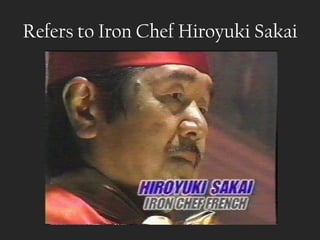
Refers to Iron Chef Hiroyuki Sakai
Selecting Sakai

•   community
•   ease of use
•   classroom management tools
•   cost
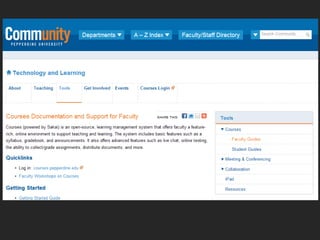
• What does Sakai look like?
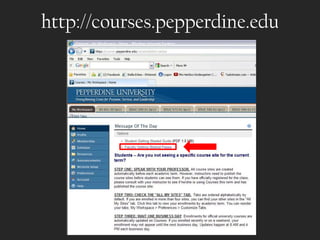
http://courses.pepperdine.edu
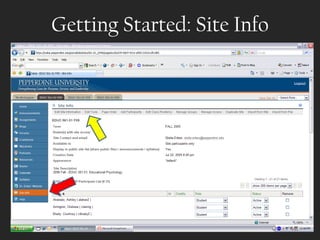
Getting Started: Site Info
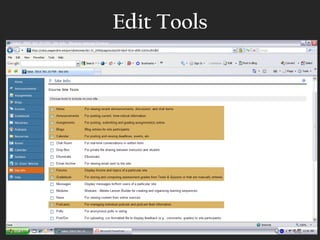
Edit Tools
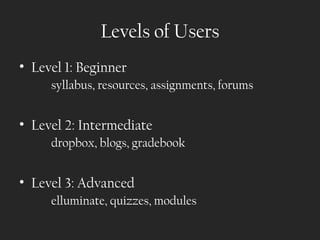
Levels of Users
• Level 1: Beginner
     syllabus, resources, assignments, forums


• Level 2: Intermediate
     dropbox, blogs, gradebook


• Level 3: Advanced
     elluminate, quizzes, modules
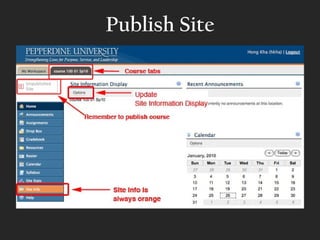
Publish Site
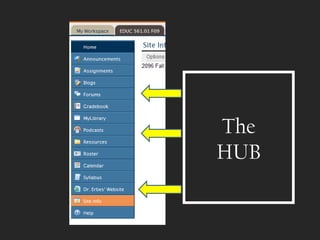
The
HUB
Favorite Tools & Tips


 • extensions of my regular course


   • project submission/drafts
•
Tips

•   backup when migrating
•   similar interface
•   brand your LMS early (“Courses”)
•   speak up if you want a new feature
•   tech & learning support
Next steps

•   conference attendance
•   faculty discussions
•   video tutorial
•   tech & learning support
•   collegial support
•   faculty pilot
• selecting Sakai
• getting started
• favorite tools & tips

Introduction to Sakai for Faculty

  • 1.
  • 2.
    Courses: Pepperdine’s Learning ManagementSystem Dr. Stella Erbes Teacher Education, Seaver College Hong San Jose Technology & Learning
  • 5.
    • selecting Sakai •getting started • favorite tools & tips
  • 6.
    Questions We AllAsked • Where did it come from? • What does Sakai mean? • How do you pronounce Sakai? • What does Sakai look like? • What makes Sakai better than what we have? • What questions do you have?
  • 7.
    Sakai ~ Wheredid it come from? • Originally funded by a grant from the Mellon Foundation • Feb 2004: Indiana, MIT, Stanford, Univ. of Michigan, uPortal & Open Knowledge • University of Michigan’s “CHEF” course management system http://en.wikipedia.org/wiki/Sakai_Project
  • 8.
    Refers to IronChef Hiroyuki Sakai
  • 9.
    Selecting Sakai • community • ease of use • classroom management tools • cost
  • 10.
    • What doesSakai look like?
  • 11.
  • 14.
  • 15.
  • 16.
    Levels of Users •Level 1: Beginner syllabus, resources, assignments, forums • Level 2: Intermediate dropbox, blogs, gradebook • Level 3: Advanced elluminate, quizzes, modules
  • 17.
  • 19.
  • 20.
    Favorite Tools &Tips • extensions of my regular course • project submission/drafts
  • 21.
  • 23.
    Tips • backup when migrating • similar interface • brand your LMS early (“Courses”) • speak up if you want a new feature • tech & learning support
  • 24.
    Next steps • conference attendance • faculty discussions • video tutorial • tech & learning support • collegial support • faculty pilot
  • 25.
    • selecting Sakai •getting started • favorite tools & tips

Editor's Notes

  • #3 STELLA: Introduction- From Pepperdine in Malibu. Seaver rep, residential learning, Sakai as an extension of my course, and Hong San Jose from Technology & Learning.
  • #5 Seaver is one of 5 schools. Differences in campuses.
  • #6 STELLA - Purpose: 1) Consider why your school should select Sakai/positive features of Sakai 2) Explain how to get started in Sakai, view the platform/interface. 3) Highlight favorite tools & tips
  • #7 STELLA
  • #8 STELLA
  • #9 STELLA
  • #10 HONG: What attracts you to Sakai? What attracted us?
  • #11 HONG
  • #12 HONG: BB – Sakai – Courses (our branding). Note website address. Also can be accessed through wavenet. Note free tutorials and LENGTH of tutorials. Share that support from IT is available.
  • #13 HONG
  • #14 HONG
  • #15 STELLA: Faculty- How to Get Started. Site Info is the new Control Panel. Edit tools allows you to view all the tools that can be turned on/off for your site.
  • #16 STELLA: Example of Edit Tools page.
  • #17 STELLA: UG vs. Grad; face to face vs. remote. Level 1 user: Syllabus, Resources, Assignments, Forums. Level 2 user: Dropbox, Blogs, Gradebook. Level 3: Elluminate, Quizzes, Modules (WHAT ARE THESE, HONG?).
  • #18 STELLA
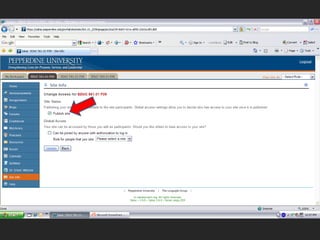
  • #19 STELLA: Click Publish site. (like cell phone)
  • #20 STELLA: After customizing the site, Sakai works as the hub for all my resources. This way podcasts, handouts, grade, quizzes can all be accessed in one place. I can even add my own website to this space.
  • #21 STELLA: Extensions and not substitutions of my regular course.
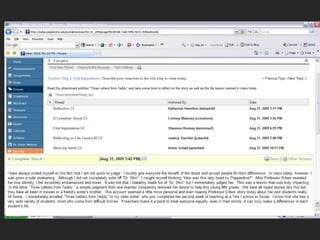
  • #22 STELLA: Example of a forum to get feedback from students after a class activity or exercise.
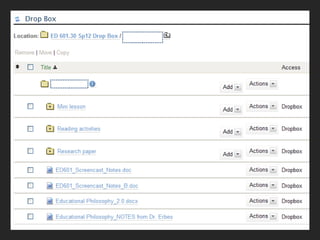
  • #23 STELLA: Dropbox
  • #24 HONG
  • #25 HONG
  • #26 Purpose: 1) explain how to get started in Sakai, view the platform/interface. 2) use of Sakai as a hub of resources for my courses. 3) highlight favorite tools