Introduction to Programming
What is programming?
Programming – deals with the study of computer language
What is a Visual Basic?
Visual Basic(Vb) – is a tool created by Microsoft to build a
computer applicationin a user-friendly environment the
supports GraphicalUser Interface
GUI –Graphical User Interface
Flowchart– A graphical representation of step by step
instructions to solve a problem.
Algorithm–A set of step-by-step instructions to solve a
problem.
Operator–An engine used to perform logicaland
mathematicaloperation.
Variable–A memory storage/container.
Loop–An actionthat repeatedly and continuously per form
until a certain condition is done.
Operators:
1.Arithmetic operators
 + : Addition
 - : Subtraction
 * : Multiplication
 / : Division
2.Relational Operator
 > :Greater than
 < : less than
 >= : Greater than or equal to
 <= : less than or equal to
 ===or==or= : equal to
 <>or!= : not equal to
3.Logical Operator
 || : OR
 && : AND
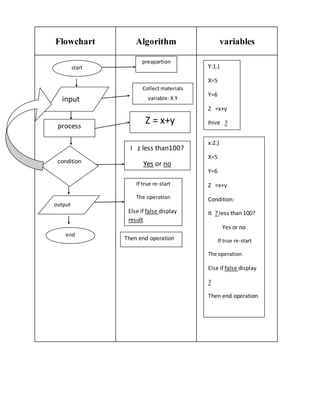
Flowchart Algorithm variables
start
process
input
output
condition
end
preapartion
Collect materials
variable: X,Y
Z = x+y
I z less than100?
Yes or no
If true re-start
The operation
Else if false display
result
Then end operation
Y:1.)
X=5
Y=6
Z =x+y
Print ?
x:2.)
X=5
Y=6
Z =x+y
Condition:
It ? less than 100?
Yes or no
If true re-start
The operation
Else if false display
?
Then end operation

Introduction to programming

  • 1.
    Introduction to Programming Whatis programming? Programming – deals with the study of computer language What is a Visual Basic? Visual Basic(Vb) – is a tool created by Microsoft to build a computer applicationin a user-friendly environment the supports GraphicalUser Interface GUI –Graphical User Interface Flowchart– A graphical representation of step by step instructions to solve a problem. Algorithm–A set of step-by-step instructions to solve a problem. Operator–An engine used to perform logicaland mathematicaloperation. Variable–A memory storage/container. Loop–An actionthat repeatedly and continuously per form until a certain condition is done. Operators: 1.Arithmetic operators  + : Addition  - : Subtraction
  • 2.
     * :Multiplication  / : Division 2.Relational Operator  > :Greater than  < : less than  >= : Greater than or equal to  <= : less than or equal to  ===or==or= : equal to  <>or!= : not equal to 3.Logical Operator  || : OR  && : AND
  • 3.
    Flowchart Algorithm variables start process input output condition end preapartion Collectmaterials variable: X,Y Z = x+y I z less than100? Yes or no If true re-start The operation Else if false display result Then end operation Y:1.) X=5 Y=6 Z =x+y Print ? x:2.) X=5 Y=6 Z =x+y Condition: It ? less than 100? Yes or no If true re-start The operation Else if false display ? Then end operation