Introduction to Parallelization
and performance optimization
Cristian Gomollon Escribano
13 / 12 / 2022
Why parallelize/optimize?
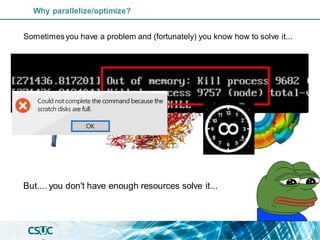
Sometimesyou have a problem and (fortunately) you know how to solve it...
Why parallelize/optimize?
Sometimesyou have a problem and (fortunately) you know how to solve it...
But.... you don't have enough resources solve it...
Why parallelize/optimize?
Initial situation: The typical computer consist in a CPU(~4 cores),a limited amount of
memory(~8Gb)and disc(1Tb),with a low efficiency...
Solution proposal: More and better CPUs, more memory,more and faster disc/network!
I have my own code and I want to
parallelize/optimize its execution, how?
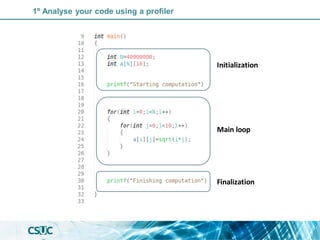
1º Analyse your code using a profiler
Initialization
Main loop
Finalization
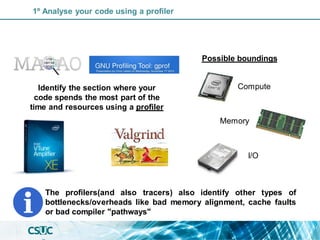
Identify the section where your
code spends the most part of the
time and resources using a profiler
1º Analyse your code using a profiler
Identify the section where your
code spends the most part of the
time and resources using a profiler
Possible boundings
Compute
Memory
I/O
The profilers(and also tracers) also identify other types of
bottlenecks/overheads like bad memory alignment, cache faults
or bad compiler "pathways"
1º Analyse your code using a profiler
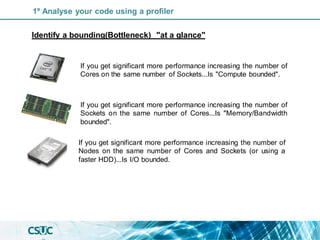
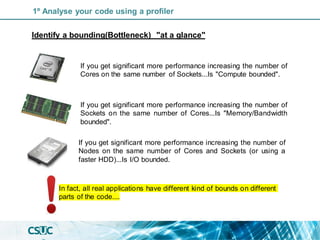
Identify a bounding(Bottleneck) "at a glance"
If you get significant more performance increasing the number of
Cores on the same number of Sockets...Is "Compute bounded".
If you get significant more performance increasing the number of
Sockets on the same number of Cores...Is "Memory/Bandwidth
bounded".
If you get significant more performance increasing the number of
Nodes on the same number of Cores and Sockets (or using a
faster HDD)...Is I/O bounded.
1º Analyse your code using a profiler
Identify a bounding(Bottleneck) "at a glance"
In fact, all real applications have different kind of bounds on different
parts of the code....
If you get significant more performance increasing the number of
Cores on the same number of Sockets...Is "Compute bounded".
If you get significant more performance increasing the number of
Sockets on the same number of Cores...Is "Memory/Bandwidth
bounded".
If you get significant more performance increasing the number of
Nodes on the same number of Cores and Sockets (or using a
faster HDD)...Is I/O bounded.
1º Analyse your code using a profiler
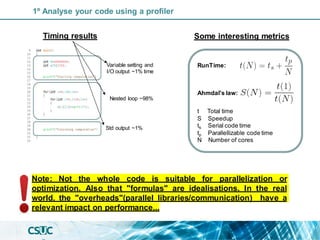
Note: Not the whole code is suitable for parallelization or
optimization. Also that "formulas" are idealisations. In the real
world, the "overheads"(parallel libraries/communication) have a
relevant impact on performance...
Variable setting and
I/O output ~1% time
Nested loop ~98%
Std output ~1%
t Total time
S Speedup
ts Serial code time
tp Parallellizable code time
N Number of cores
Ahmdal's law:
RunTime:
Timing results Some interesting metrics
1º Analyse your code using a profiler
2º Check if it is possible to parallelize/optimize that section
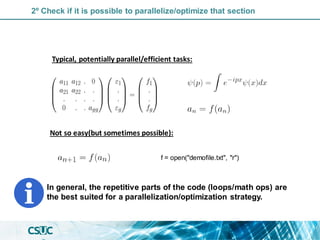
Typical, potentially parallel/efficient tasks:
Not so easy(but sometimes possible):
f = open("demofile.txt", "r")
Typical, potentially parallel/efficient tasks:
Not so easy(but sometimes possible):
f = open("demofile.txt", "r")
In general, the repetitive parts of the code (loops/math ops) are
the best suited for a parallelization/optimization strategy.
2º Check if it is possible to parallelize/optimize that section
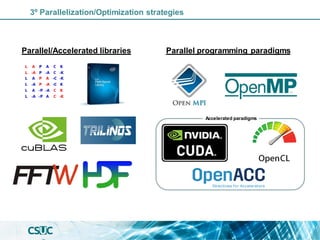
3º Parallelization/Optimization strategies
Parallel/Accelerated libraries Parallel programming paradigms
Accelerated paradigms
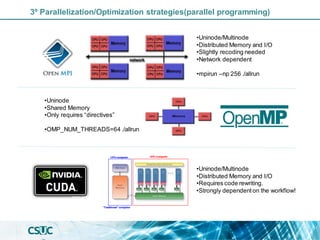
•Uninode/Multinode
•Distributed Memory and I/O
•Slightly recoding needed
•Network dependent
•mpirun –np 256 ./allrun
•Uninode
•Shared Memory
•Only requires “directives”
•OMP_NUM_THREADS=64 ./allrun
•Uninode/Multinode
•Distributed Memory and I/O
•Requires code rewriting.
•Strongly dependenton the workflow!
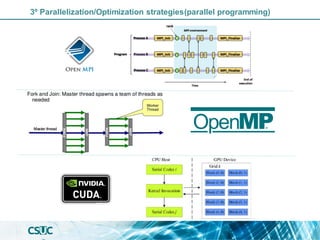
3º Parallelization/Optimization strategies(parallel programming)
Linear algebra solvers Fourier Transform
cuFFT
Parallel I/O
3º Parallelization/Optimization strategies(parallel libraries)
In summary
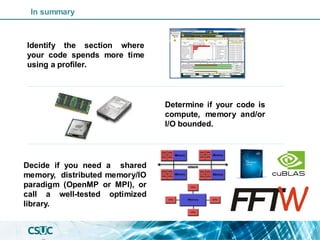
Identify the section where
your code spends more time
using a profiler.
Determine if your code is
compute, memory and/or
I/O bounded.
Decide if you need a shared
memory, distributed memory/IO
paradigm (OpenMP or MPI), or
call a well-tested optimized
library.
Some programming advices
//compute the sum of tw o arrays in parallel
#include < stdio.h >
#include < mpi.h >
#define N 1000000
int main(void) {
MPI_Init(NULL, NULL);
int w orld_size,w orld_rank;
MPI_Comm_size(MPI_COMM_WORLD, &w orld_size);
MPI_Comm_rank(MPI_COMM_WORLD, &w orld_rank);
int Ni=N/w orld_size; //Be carefull w ith the memory....
if (w orld_rank==0)
{float a[N], b[N], c[N];}
else{float a[Ni], b[Ni], c[Ni];}
int i;
/* Initialize arrays a and b */
for (i = 0; i < Ni; i++) {
a[i] = i * 2.0;
b[i] = i * 3.0;
}
/* Compute values of array c = a+b in parallel. */
for (i = 0; i < Ni; i++){
c[i] = a[i] + b[i]; }
MPI_Gather( a, Ni, MPI_Int, a, int recv_count, MPI_Int, 0,
MPI_COMM_WORLD);
MPI_Gather(b, Ni, MPI_Int, b, int recv_count, MPI_Int, 0,
MPI_COMM_WORLD);
MPI_Gather( c, Ni, MPI_Int,c, int recv_count, MPI_Int, 0,
MPI_COMM_WORLD);
MPI_Finalize();}
//compute the sum of tw o arrays in parallel
#include < stdio.h >
#include < omp.h >
#define N 1000000
int main(void) {
float a[N], b[N], c[N];
int i;
/* Initialize arrays a and b */
for (i = 0; i < N; i++) {
a[i] = i * 2.0;
b[i] = i * 3.0;
}
/* Compute values of array c = a+b in parallel. */
#pragma omp parallel shared(a, b, c) private(i)
{
#pragma omp for
for (i = 0; i < N; i++) {
c[i] = a[i] + b[i];
}
}
}
Tips & Tricks: Programming hints(memory optimizations)
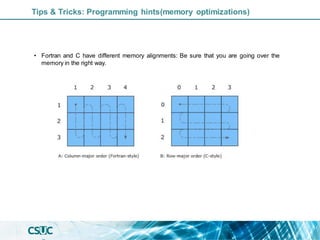
• Fortran and C have different memory alignments: Be sure that you are going over the
memory in the right way.
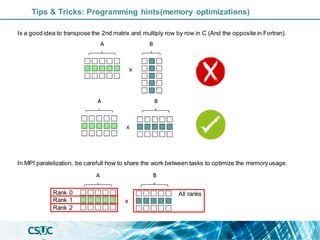
Is a good idea to transpose the 2nd matrix and multiply row by row in C (And the opposite in Fortran).
Tips & Tricks: Programming hints(memory optimizations)
In MPI paralelization, be carefull how to share the work between tasks to optimize the memoryusage.
Rank 0
Rank 1
Rank 2
All ranks
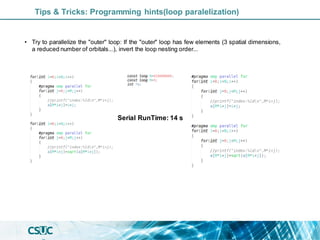
• Try to parallelize the "outer" loop: If the "outer" loop has few elements (3 spatial dimensions,
a reduced number of orbitals...), invert the loop nesting order...
Serial RunTime: 14 s
Tips & Tricks: Programming hints(loop paralelization)
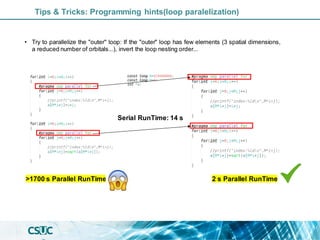
2 s Parallel RunTime
>1700 s Parallel RunTime
Serial RunTime: 14 s
Tips & Tricks: Programming hints(loop paralelization)
• Try to parallelize the "outer" loop: If the "outer" loop has few elements (3 spatial dimensions,
a reduced number of orbitals...), invert the loop nesting order...
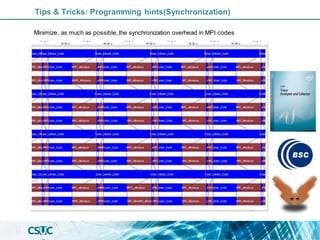
Tips & Tricks: Programming hints(Synchronization)
Minimize, as much as possible, the synchronization overhead in MPI codes
• Fortran and C have different memory alignments: Be sure that you are multiplying
matrices in the right way. Also is a good idea to transpose the 2nd matrix before
multiplying.
• Avoid loops accessing to "pointers": This could confuse the compiler and reduce
dramatically the performance.
• Try to parallelize the "outer" loop: If the "outer" loop has few elements (3 spatial
dimensions, a reduced number of orbitals...), invert the loop nesting order...
• Unroll loops to minimieze jumps: Is more efficent to have a big loop doing 3 line
operations(forexample a 3D spatial operation) than 2 nested loops doing the same op.
• Avoid correlated loops: This kind of loops are really difficult to parallelize by their
interdependences.
• In case of a I/O-Memory bounding:The beststrategy is an MPI multinode parallelization.
• A tested parallel/optimized library/algorithm could reduce coding time and other
issues.
Don't try to re-invent the wheel, "know the keywords" is not equal to "be a programmer"
Tips & Tricks: Programming hints
Script generation and Parallel job launch
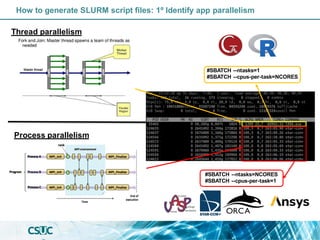
How to generate SLURM script files: 1º Identify app parallelism
Thread parallelism
Process parallelism
#SBATCH --ntasks=1
#SBATCH --cpus-per-task=NCORES
#SBATCH --ntasks=NCORES
#SBATCH --cpus-per-task=1
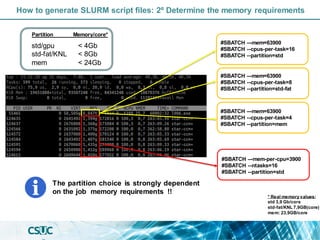
How to generate SLURM script files: 2º Determine the memory requirements
#SBATCH –-mem=63900
#SBATCH --cpus-per-task=8
#SBATCH --partition=std-fat
The partition choice is strongly dependent
on the job memory requirements !!
#SBATCH –-mem=63900
#SBATCH --cpus-per-task=16
#SBATCH --partition=std
#SBATCH –-mem=63900
#SBATCH --cpus-per-task=4
#SBATCH --partition=mem
#SBATCH –-mem-per-cpu=3900
#SBATCH --ntasks=16
#SBATCH --partition=std
Partition Memory/core*
std/gpu
std-fat/KNL
mem
< 4Gb
< 8Gb
< 24Gb
* Real memory values:
std 3,9 Gb/core
std-fat/KNL 7,9GB(core)
mem: 23,9GB/core
How to generate SLURM script files: 3º RunTime requirements
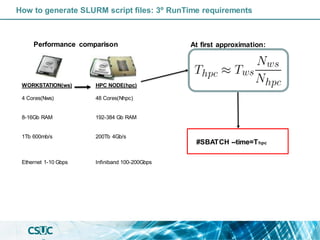
#SBATCH --time=Thpc
WORKSTATION(ws)
4 Cores(Nws)
8-16Gb RAM
1Tb 600mb/s
Ethernet 1-10 Gbps
HPC NODE(hpc)
48 Cores(Nhpc)
192-384 Gb RAM
200Tb 4Gb/s
Infiniband 100-200Gbps
Performance comparison At first approximation:
How to generate SLURM script files: 4º Disk/IO requirements
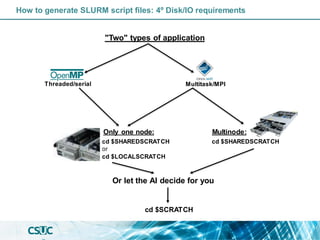
"Two" types of application
Threaded/serial Multitask/MPI
Only one node: Multinode:
cd $SHAREDSCRATCH
or
cd $LOCALSCRATCH
cd $SHAREDSCRATCH
Or let the AI decide for you
cd $SCRATCH
How to generate SLURM script files: Summary
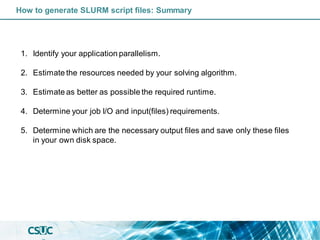
1. Identify your application parallelism.
2. Estimate the resources needed by your solving algorithm.
3. Estimate as better as possible the required runtime.
4. Determine your job I/O and input(files) requirements.
5. Determine which are the necessary output files and save only these files
in your own disk space.
Gaussian 16 (Threaded Example)
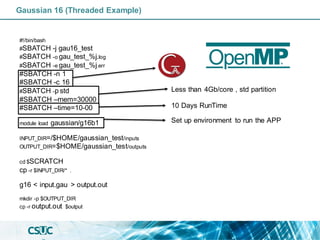
#!/bin/bash
#SBATCH -j gau16_test
#SBATCH -o gau_test_%j.log
#SBATCH -e gau_test_%j.err
#SBATCH -n 1
#SBATCH -c 16
#SBATCH -p std
#SBATCH –mem=30000
#SBATCH –time=10-00
module load gaussian/g16b1
INPUT_DIR=/$HOME/gaussian_test/inputs
OUTPUT_DIR=$HOME/gaussian_test/outputs
cd $SCRATCH
cp -r $INPUT_DIR/* .
g16 < input.gau > output.out
mkdir -p $OUTPUT_DIR
cp -r output.out $output
Less than 4Gb/core , std partition
10 Days RunTime
Set up environment to run the APP
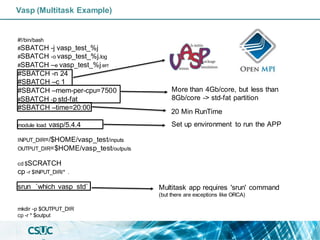
Vasp (Multitask Example)
#!/bin/bash
#SBATCH -j vasp_test_%j
#SBATCH -o vasp_test_%j.log
#SBATCH –e vasp_test_%j.err
#SBATCH -n 24
#SBATCH –c 1
#SBATCH –mem-per-cpu=7500
#SBATCH -p std-fat
#SBATCH –time=20:00
module load vasp/5.4.4
INPUT_DIR=/$HOME/vasp_test/inputs
OUTPUT_DIR=$HOME/vasp_test/outputs
cd $SCRATCH
cp -r $INPUT_DIR/* .
srun `which vasp_std`
mkdir -p $OUTPUT_DIR
cp -r * $output
More than 4Gb/core, but less than
8Gb/core -> std-fat partition
20 Min RunTime
Set up environment to run the APP
Multitask app requires 'srun' command
(but there are exceptions like ORCA)
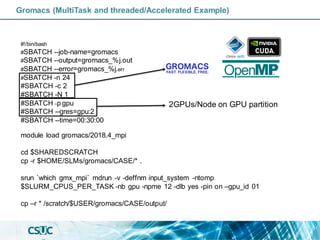
Gromacs (MultiTask and threaded/Accelerated Example)
#!/bin/bash
#SBATCH --job-name=gromacs
#SBATCH --output=gromacs_%j.out
#SBATCH --error=gromacs_%j.err
#SBATCH -n 24
#SBATCH -c 2
#SBATCH -N 1
#SBATCH -p gpu
#SBATCH --gres=gpu:2
#SBATCH --time=00:30:00
module load gromacs/2018.4_mpi
cd $SHAREDSCRATCH
cp -r $HOME/SLMs/gromacs/CASE/* .
srun `which gmx_mpi` mdrun -v -deffnm input_system -ntomp
$SLURM_CPUS_PER_TASK -nb gpu -npme 12 -dlb yes -pin on –gpu_id 01
cp –r * /scratch/$USER/gromacs/CASE/output/
2GPUs/Node on GPU partition
Thank you for your attention!
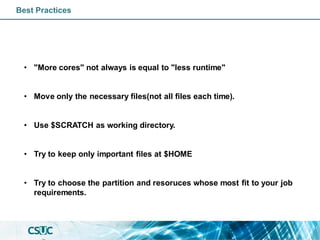
Best Practices
• "More cores" not always is equal to "less runtime"
• Move only the necessary files(not all files each time).
• Use $SCRATCH as working directory.
• Try to keep only important files at $HOME
• Try to choose the partition and resoruces whose most fit to your job
requirements.
Why parallelize/optimize?
Initial situation: The typical computer consistin a CPU(~4 cores),a limited amount of
memory(~8Gb)and disc(1Tb),with a low efficiency...
3º Parallelization/Optimization strategies(parallel programming)
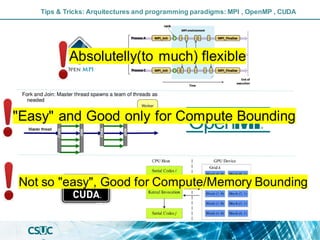
Tips & Tricks: Arquitectures and programming paradigms: MPI , OpenMP , CUDA
"Easy" and Good only for Compute Bounding
Not so "easy", Good for Compute/Memory Bounding
Absolutelly(to much) flexible
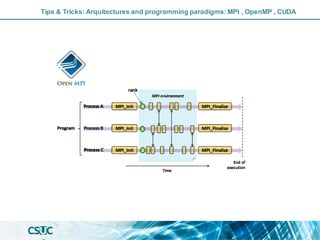
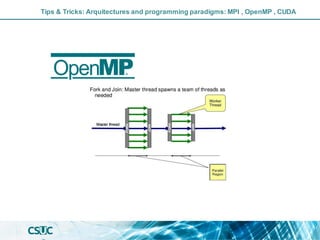
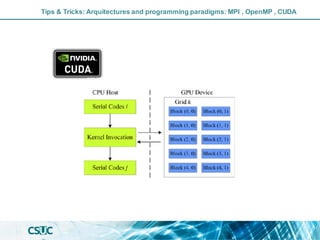
Tips & Tricks: Arquitectures and programming paradigms: MPI , OpenMP , CUDA
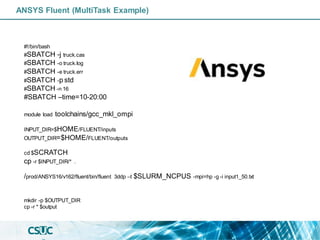
ANSYS Fluent (MultiTask Example)
#!/bin/bash
#SBATCH -j truck.cas
#SBATCH -o truck.log
#SBATCH -e truck.err
#SBATCH -p std
#SBATCH -n 16
#SBATCH –time=10-20:00
module load toolchains/gcc_mkl_ompi
INPUT_DIR=$HOME/FLUENT/inputs
OUTPUT_DIR=$HOME/FLUENT/outputs
cd $SCRATCH
cp -r $INPUT_DIR/* .
/prod/ANSYS16/v162/fluent/bin/fluent 3ddp –t $SLURM_NCPUS -mpi=hp -g -i input1_50.txt
mkdir -p $OUTPUT_DIR
cp -r * $output

Introduction to Parallelization and performance optimization

  • 1.
    Introduction to Parallelization andperformance optimization Cristian Gomollon Escribano 13 / 12 / 2022
  • 2.
    Why parallelize/optimize? Sometimesyou havea problem and (fortunately) you know how to solve it...
  • 3.
    Why parallelize/optimize? Sometimesyou havea problem and (fortunately) you know how to solve it... But.... you don't have enough resources solve it...
  • 4.
    Why parallelize/optimize? Initial situation:The typical computer consist in a CPU(~4 cores),a limited amount of memory(~8Gb)and disc(1Tb),with a low efficiency... Solution proposal: More and better CPUs, more memory,more and faster disc/network!
  • 5.
    I have myown code and I want to parallelize/optimize its execution, how?
  • 6.
    1º Analyse yourcode using a profiler Initialization Main loop Finalization
  • 7.
    Identify the sectionwhere your code spends the most part of the time and resources using a profiler 1º Analyse your code using a profiler
  • 8.
    Identify the sectionwhere your code spends the most part of the time and resources using a profiler Possible boundings Compute Memory I/O The profilers(and also tracers) also identify other types of bottlenecks/overheads like bad memory alignment, cache faults or bad compiler "pathways" 1º Analyse your code using a profiler
  • 9.
    Identify a bounding(Bottleneck)"at a glance" If you get significant more performance increasing the number of Cores on the same number of Sockets...Is "Compute bounded". If you get significant more performance increasing the number of Sockets on the same number of Cores...Is "Memory/Bandwidth bounded". If you get significant more performance increasing the number of Nodes on the same number of Cores and Sockets (or using a faster HDD)...Is I/O bounded. 1º Analyse your code using a profiler
  • 10.
    Identify a bounding(Bottleneck)"at a glance" In fact, all real applications have different kind of bounds on different parts of the code.... If you get significant more performance increasing the number of Cores on the same number of Sockets...Is "Compute bounded". If you get significant more performance increasing the number of Sockets on the same number of Cores...Is "Memory/Bandwidth bounded". If you get significant more performance increasing the number of Nodes on the same number of Cores and Sockets (or using a faster HDD)...Is I/O bounded. 1º Analyse your code using a profiler
  • 11.
    Note: Not thewhole code is suitable for parallelization or optimization. Also that "formulas" are idealisations. In the real world, the "overheads"(parallel libraries/communication) have a relevant impact on performance... Variable setting and I/O output ~1% time Nested loop ~98% Std output ~1% t Total time S Speedup ts Serial code time tp Parallellizable code time N Number of cores Ahmdal's law: RunTime: Timing results Some interesting metrics 1º Analyse your code using a profiler
  • 12.
    2º Check ifit is possible to parallelize/optimize that section Typical, potentially parallel/efficient tasks: Not so easy(but sometimes possible): f = open("demofile.txt", "r")
  • 13.
    Typical, potentially parallel/efficienttasks: Not so easy(but sometimes possible): f = open("demofile.txt", "r") In general, the repetitive parts of the code (loops/math ops) are the best suited for a parallelization/optimization strategy. 2º Check if it is possible to parallelize/optimize that section
  • 14.
    3º Parallelization/Optimization strategies Parallel/Acceleratedlibraries Parallel programming paradigms Accelerated paradigms
  • 15.
    •Uninode/Multinode •Distributed Memory andI/O •Slightly recoding needed •Network dependent •mpirun –np 256 ./allrun •Uninode •Shared Memory •Only requires “directives” •OMP_NUM_THREADS=64 ./allrun •Uninode/Multinode •Distributed Memory and I/O •Requires code rewriting. •Strongly dependenton the workflow! 3º Parallelization/Optimization strategies(parallel programming)
  • 16.
    Linear algebra solversFourier Transform cuFFT Parallel I/O 3º Parallelization/Optimization strategies(parallel libraries)
  • 17.
    In summary Identify thesection where your code spends more time using a profiler. Determine if your code is compute, memory and/or I/O bounded. Decide if you need a shared memory, distributed memory/IO paradigm (OpenMP or MPI), or call a well-tested optimized library.
  • 18.
  • 19.
    //compute the sumof tw o arrays in parallel #include < stdio.h > #include < mpi.h > #define N 1000000 int main(void) { MPI_Init(NULL, NULL); int w orld_size,w orld_rank; MPI_Comm_size(MPI_COMM_WORLD, &w orld_size); MPI_Comm_rank(MPI_COMM_WORLD, &w orld_rank); int Ni=N/w orld_size; //Be carefull w ith the memory.... if (w orld_rank==0) {float a[N], b[N], c[N];} else{float a[Ni], b[Ni], c[Ni];} int i; /* Initialize arrays a and b */ for (i = 0; i < Ni; i++) { a[i] = i * 2.0; b[i] = i * 3.0; } /* Compute values of array c = a+b in parallel. */ for (i = 0; i < Ni; i++){ c[i] = a[i] + b[i]; } MPI_Gather( a, Ni, MPI_Int, a, int recv_count, MPI_Int, 0, MPI_COMM_WORLD); MPI_Gather(b, Ni, MPI_Int, b, int recv_count, MPI_Int, 0, MPI_COMM_WORLD); MPI_Gather( c, Ni, MPI_Int,c, int recv_count, MPI_Int, 0, MPI_COMM_WORLD); MPI_Finalize();} //compute the sum of tw o arrays in parallel #include < stdio.h > #include < omp.h > #define N 1000000 int main(void) { float a[N], b[N], c[N]; int i; /* Initialize arrays a and b */ for (i = 0; i < N; i++) { a[i] = i * 2.0; b[i] = i * 3.0; } /* Compute values of array c = a+b in parallel. */ #pragma omp parallel shared(a, b, c) private(i) { #pragma omp for for (i = 0; i < N; i++) { c[i] = a[i] + b[i]; } } } Tips & Tricks: Programming hints(memory optimizations)
  • 20.
    Tips & Tricks:Programming hints(memory optimizations) • Fortran and C have different memory alignments: Be sure that you are going over the memory in the right way.
  • 21.
    Is a goodidea to transpose the 2nd matrix and multiply row by row in C (And the opposite in Fortran). Tips & Tricks: Programming hints(memory optimizations) In MPI paralelization, be carefull how to share the work between tasks to optimize the memoryusage. Rank 0 Rank 1 Rank 2 All ranks
  • 22.
    • Try toparallelize the "outer" loop: If the "outer" loop has few elements (3 spatial dimensions, a reduced number of orbitals...), invert the loop nesting order... Serial RunTime: 14 s Tips & Tricks: Programming hints(loop paralelization)
  • 23.
    2 s ParallelRunTime >1700 s Parallel RunTime Serial RunTime: 14 s Tips & Tricks: Programming hints(loop paralelization) • Try to parallelize the "outer" loop: If the "outer" loop has few elements (3 spatial dimensions, a reduced number of orbitals...), invert the loop nesting order...
  • 24.
    Tips & Tricks:Programming hints(Synchronization) Minimize, as much as possible, the synchronization overhead in MPI codes
  • 25.
    • Fortran andC have different memory alignments: Be sure that you are multiplying matrices in the right way. Also is a good idea to transpose the 2nd matrix before multiplying. • Avoid loops accessing to "pointers": This could confuse the compiler and reduce dramatically the performance. • Try to parallelize the "outer" loop: If the "outer" loop has few elements (3 spatial dimensions, a reduced number of orbitals...), invert the loop nesting order... • Unroll loops to minimieze jumps: Is more efficent to have a big loop doing 3 line operations(forexample a 3D spatial operation) than 2 nested loops doing the same op. • Avoid correlated loops: This kind of loops are really difficult to parallelize by their interdependences. • In case of a I/O-Memory bounding:The beststrategy is an MPI multinode parallelization. • A tested parallel/optimized library/algorithm could reduce coding time and other issues. Don't try to re-invent the wheel, "know the keywords" is not equal to "be a programmer" Tips & Tricks: Programming hints
  • 26.
    Script generation andParallel job launch
  • 27.
    How to generateSLURM script files: 1º Identify app parallelism Thread parallelism Process parallelism #SBATCH --ntasks=1 #SBATCH --cpus-per-task=NCORES #SBATCH --ntasks=NCORES #SBATCH --cpus-per-task=1
  • 28.
    How to generateSLURM script files: 2º Determine the memory requirements #SBATCH –-mem=63900 #SBATCH --cpus-per-task=8 #SBATCH --partition=std-fat The partition choice is strongly dependent on the job memory requirements !! #SBATCH –-mem=63900 #SBATCH --cpus-per-task=16 #SBATCH --partition=std #SBATCH –-mem=63900 #SBATCH --cpus-per-task=4 #SBATCH --partition=mem #SBATCH –-mem-per-cpu=3900 #SBATCH --ntasks=16 #SBATCH --partition=std Partition Memory/core* std/gpu std-fat/KNL mem < 4Gb < 8Gb < 24Gb * Real memory values: std 3,9 Gb/core std-fat/KNL 7,9GB(core) mem: 23,9GB/core
  • 29.
    How to generateSLURM script files: 3º RunTime requirements #SBATCH --time=Thpc WORKSTATION(ws) 4 Cores(Nws) 8-16Gb RAM 1Tb 600mb/s Ethernet 1-10 Gbps HPC NODE(hpc) 48 Cores(Nhpc) 192-384 Gb RAM 200Tb 4Gb/s Infiniband 100-200Gbps Performance comparison At first approximation:
  • 30.
    How to generateSLURM script files: 4º Disk/IO requirements "Two" types of application Threaded/serial Multitask/MPI Only one node: Multinode: cd $SHAREDSCRATCH or cd $LOCALSCRATCH cd $SHAREDSCRATCH Or let the AI decide for you cd $SCRATCH
  • 31.
    How to generateSLURM script files: Summary 1. Identify your application parallelism. 2. Estimate the resources needed by your solving algorithm. 3. Estimate as better as possible the required runtime. 4. Determine your job I/O and input(files) requirements. 5. Determine which are the necessary output files and save only these files in your own disk space.
  • 32.
    Gaussian 16 (ThreadedExample) #!/bin/bash #SBATCH -j gau16_test #SBATCH -o gau_test_%j.log #SBATCH -e gau_test_%j.err #SBATCH -n 1 #SBATCH -c 16 #SBATCH -p std #SBATCH –mem=30000 #SBATCH –time=10-00 module load gaussian/g16b1 INPUT_DIR=/$HOME/gaussian_test/inputs OUTPUT_DIR=$HOME/gaussian_test/outputs cd $SCRATCH cp -r $INPUT_DIR/* . g16 < input.gau > output.out mkdir -p $OUTPUT_DIR cp -r output.out $output Less than 4Gb/core , std partition 10 Days RunTime Set up environment to run the APP
  • 33.
    Vasp (Multitask Example) #!/bin/bash #SBATCH-j vasp_test_%j #SBATCH -o vasp_test_%j.log #SBATCH –e vasp_test_%j.err #SBATCH -n 24 #SBATCH –c 1 #SBATCH –mem-per-cpu=7500 #SBATCH -p std-fat #SBATCH –time=20:00 module load vasp/5.4.4 INPUT_DIR=/$HOME/vasp_test/inputs OUTPUT_DIR=$HOME/vasp_test/outputs cd $SCRATCH cp -r $INPUT_DIR/* . srun `which vasp_std` mkdir -p $OUTPUT_DIR cp -r * $output More than 4Gb/core, but less than 8Gb/core -> std-fat partition 20 Min RunTime Set up environment to run the APP Multitask app requires 'srun' command (but there are exceptions like ORCA)
  • 34.
    Gromacs (MultiTask andthreaded/Accelerated Example) #!/bin/bash #SBATCH --job-name=gromacs #SBATCH --output=gromacs_%j.out #SBATCH --error=gromacs_%j.err #SBATCH -n 24 #SBATCH -c 2 #SBATCH -N 1 #SBATCH -p gpu #SBATCH --gres=gpu:2 #SBATCH --time=00:30:00 module load gromacs/2018.4_mpi cd $SHAREDSCRATCH cp -r $HOME/SLMs/gromacs/CASE/* . srun `which gmx_mpi` mdrun -v -deffnm input_system -ntomp $SLURM_CPUS_PER_TASK -nb gpu -npme 12 -dlb yes -pin on –gpu_id 01 cp –r * /scratch/$USER/gromacs/CASE/output/ 2GPUs/Node on GPU partition
  • 35.
    Thank you foryour attention!
  • 36.
    Best Practices • "Morecores" not always is equal to "less runtime" • Move only the necessary files(not all files each time). • Use $SCRATCH as working directory. • Try to keep only important files at $HOME • Try to choose the partition and resoruces whose most fit to your job requirements.
  • 37.
    Why parallelize/optimize? Initial situation:The typical computer consistin a CPU(~4 cores),a limited amount of memory(~8Gb)and disc(1Tb),with a low efficiency...
  • 38.
  • 39.
    Tips & Tricks:Arquitectures and programming paradigms: MPI , OpenMP , CUDA "Easy" and Good only for Compute Bounding Not so "easy", Good for Compute/Memory Bounding Absolutelly(to much) flexible
  • 40.
    Tips & Tricks:Arquitectures and programming paradigms: MPI , OpenMP , CUDA
  • 41.
    Tips & Tricks:Arquitectures and programming paradigms: MPI , OpenMP , CUDA
  • 42.
    Tips & Tricks:Arquitectures and programming paradigms: MPI , OpenMP , CUDA
  • 43.
    ANSYS Fluent (MultiTaskExample) #!/bin/bash #SBATCH -j truck.cas #SBATCH -o truck.log #SBATCH -e truck.err #SBATCH -p std #SBATCH -n 16 #SBATCH –time=10-20:00 module load toolchains/gcc_mkl_ompi INPUT_DIR=$HOME/FLUENT/inputs OUTPUT_DIR=$HOME/FLUENT/outputs cd $SCRATCH cp -r $INPUT_DIR/* . /prod/ANSYS16/v162/fluent/bin/fluent 3ddp –t $SLURM_NCPUS -mpi=hp -g -i input1_50.txt mkdir -p $OUTPUT_DIR cp -r * $output