-Su Zin Kyaw
 Node.js is a very powerful JavaScript-based framework/platform
built on Google Chrome's JavaScript V8 Engine.
 It is used to develop I/O intensive web applications like video
streaming sites, single-page applications, and other web
applications.
 Node.js is open source, completely free, and used by thousands
of developers around the world.
 You can download Node.js installers from http://nodejs.org/download/
 Step 1 - Import Required Module
 We use the require directive to load the http
module and store the returned HTTP
 instance into an http variable as follows:
 var http = require("http");
 We use the created http instance and call
http.createServer() method to create
 a server instance and then we bind it at
port 8081 using the listen method
 associated with the server instance. Pass
it a function with parameters request
 and response. Write the sample
implementation to always return "Hello
World".
Step 3: Testing Request & Response
Let's put step 1 and 2 together in a file called main.js and start our HTTP
server
as shown below:
 REPL stands for Read Eval Print Loop and it represents
a computer environment
 like a Windows console or Unix/Linux shell where a
command is entered and the
 system responds with an output in an interactive
mode. Node.js or Node comes
 bundled with a REPL environment. It performs the
following tasks:
 ● Read - Reads user's input, parses the input into
JavaScript data-structure,
 and stores in memory.
 ● Eval - Takes and evaluates the data structure.
 ● Print - Prints the result.
 ● Loop - Loops the above command until the user
presses ctrl-c twice.
 ctrl + c - terminate the current command.
 ctrl + c twice - terminate the Node REPL.
 ctrl + d - terminate the Node REPL.
 Up/Down Keys - see command history and modify
previous commands.
 tab Keys - list of current commands.
 .help - list of all commands.
 .break - exit from multiline expression.
 .clear - exit from multiline expression.
 .save filename - save the current Node REPL session
to a file.
 .load filename - load file content in current Node
REPL session.
 You can create arrays quite easily in JavaScript
using []. Arrays have many useful functions, a few
functions.
 var foo = [];
 foo.push(1); // add at the end
 console.log(foo); // prints [1]
 foo.unshift(2); // add to the top
 console.log(foo); // prints [2,1]
 // Arrays are zero index based:
 console.log(foo[0]); // prints 2
 Callback is an asynchronous equivalent for a function.
 A callback function is called at the completion of a given task. Node makes heavy
use of callbacks.
 All the APIs of Node are written in such a way that they support callbacks.
 For example, a function to read a file may start reading a file and return the
control to the execution environment immediately so that the next
instruction can be executed.
 Once file I/O is complete, it will call the callback function while passing the
callback function, the content of the file as a parameter. So there is no blocking
or wait for File I/O. This makes Node.js highly scalable, as it can process a high
number of requests without waiting for any function to return results
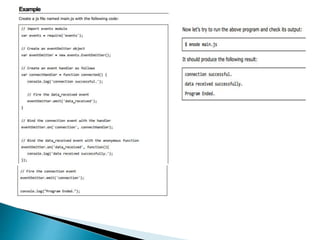
 Node.js uses events heavily and it is also one of the reasons why Node.js is pretty fast compared to
other similar technologies.
 As soon as Node starts its server, it simply initiates its variables, declares functions, and then
simply waits for the event to occur.
 In an event-driven application, there is generally a main loop that listens for events, and
then triggers a callback function when one of those events is detected
Introduction to node.js

Introduction to node.js

  • 1.
  • 2.
     Node.js isa very powerful JavaScript-based framework/platform built on Google Chrome's JavaScript V8 Engine.  It is used to develop I/O intensive web applications like video streaming sites, single-page applications, and other web applications.  Node.js is open source, completely free, and used by thousands of developers around the world.
  • 3.
     You candownload Node.js installers from http://nodejs.org/download/
  • 5.
     Step 1- Import Required Module  We use the require directive to load the http module and store the returned HTTP  instance into an http variable as follows:  var http = require("http");
  • 6.
     We usethe created http instance and call http.createServer() method to create  a server instance and then we bind it at port 8081 using the listen method  associated with the server instance. Pass it a function with parameters request  and response. Write the sample implementation to always return "Hello World".
  • 7.
    Step 3: TestingRequest & Response Let's put step 1 and 2 together in a file called main.js and start our HTTP server as shown below:
  • 9.
     REPL standsfor Read Eval Print Loop and it represents a computer environment  like a Windows console or Unix/Linux shell where a command is entered and the  system responds with an output in an interactive mode. Node.js or Node comes  bundled with a REPL environment. It performs the following tasks:  ● Read - Reads user's input, parses the input into JavaScript data-structure,  and stores in memory.  ● Eval - Takes and evaluates the data structure.  ● Print - Prints the result.  ● Loop - Loops the above command until the user presses ctrl-c twice.
  • 12.
     ctrl +c - terminate the current command.  ctrl + c twice - terminate the Node REPL.  ctrl + d - terminate the Node REPL.  Up/Down Keys - see command history and modify previous commands.  tab Keys - list of current commands.  .help - list of all commands.  .break - exit from multiline expression.  .clear - exit from multiline expression.  .save filename - save the current Node REPL session to a file.  .load filename - load file content in current Node REPL session.
  • 13.
     You cancreate arrays quite easily in JavaScript using []. Arrays have many useful functions, a few functions.  var foo = [];  foo.push(1); // add at the end  console.log(foo); // prints [1]  foo.unshift(2); // add to the top  console.log(foo); // prints [2,1]  // Arrays are zero index based:  console.log(foo[0]); // prints 2
  • 15.
     Callback isan asynchronous equivalent for a function.  A callback function is called at the completion of a given task. Node makes heavy use of callbacks.  All the APIs of Node are written in such a way that they support callbacks.  For example, a function to read a file may start reading a file and return the control to the execution environment immediately so that the next instruction can be executed.  Once file I/O is complete, it will call the callback function while passing the callback function, the content of the file as a parameter. So there is no blocking or wait for File I/O. This makes Node.js highly scalable, as it can process a high number of requests without waiting for any function to return results
  • 19.
     Node.js usesevents heavily and it is also one of the reasons why Node.js is pretty fast compared to other similar technologies.  As soon as Node starts its server, it simply initiates its variables, declares functions, and then simply waits for the event to occur.  In an event-driven application, there is generally a main loop that listens for events, and then triggers a callback function when one of those events is detected