Introduction to Neuron ESB
© Copyright 2014, Neudesic. All rights reserved.
Introduction to Neuron ESB – Overview
Goals of this session:
• Provide an understanding of Neuron ESB’s features, tools, operating
principles
• Review Neuron ESB’s core technology base and architecture
© Copyright 2014, Neudesic. All rights reserved.
Introduction to Neuron ESB – Objectives
• Understand the Neuron ESB Tools and Services
• Learn how to configure and create Neuron ESB solutions
• Learn how to host solutions using the Neuron ESB runtime
• The role of Pub/Sub messaging in Neuron ESB solutions
• How Neuron ESB uses WS-Discovery
• Install and Configure Neuron ESB runtime and database
© Copyright 2014, Neudesic. All rights reserved.
Introduction to Neuron ESB – Lesson Plan
• Neuron ESB Services and Tools
• Neuron ESB Solution
• Neuron ESB Runtime
• Neuron ESB Discovery
• Neuron ESB Runtime architecture
• Installing and Configuring Neuron ESB
© Copyright 2014, Neudesic. All rights reserved.
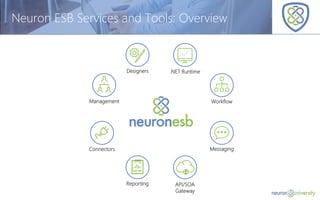
Neuron ESB Services and Tools: Overview
Management
Designers
Workflow
Messaging
API/SOA
Gateway
Reporting
Connectors
.NET Runtime
© Copyright 2014, Neudesic. All rights reserved.
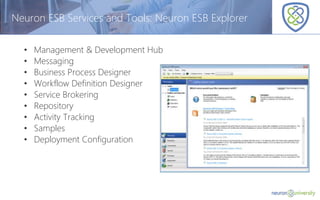
Neuron ESB Services and Tools: Neuron ESB Explorer
• Management & Development Hub
• Messaging
• Business Process Designer
• Workflow Definition Designer
• Service Brokering
• Repository
• Activity Tracking
• Samples
• Deployment Configuration
© Copyright 2014, Neudesic. All rights reserved.
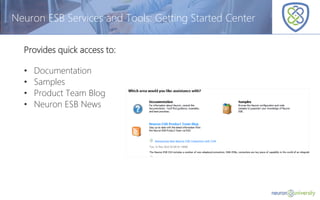
Neuron ESB Services and Tools: Getting Started Center
Provides quick access to:
• Documentation
• Samples
• Product Team Blog
• Neuron ESB News
© Copyright 2014, Neudesic. All rights reserved.
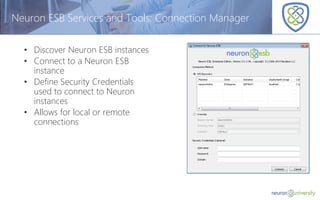
Neuron ESB Services and Tools: Connection Manager
• Discover Neuron ESB instances
• Connect to a Neuron ESB
instance
• Define Security Credentials
used to connect to Neuron
instances
• Allows for local or remote
connections
© Copyright 2014, Neudesic. All rights reserved.
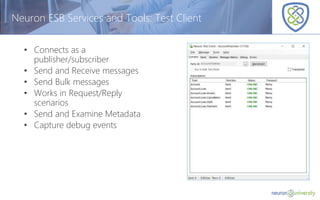
Neuron ESB Services and Tools: Test Client
• Connects as a
publisher/subscriber
• Send and Receive messages
• Send Bulk messages
• Works in Request/Reply
scenarios
• Send and Examine Metadata
• Capture debug events
© Copyright 2014, Neudesic. All rights reserved.
Neuron ESB Services and Tools: Messaging
• Utilizes a topic-based hierarchical Pub / Sub engine
• Supports sub-topics
• Centralized Configuration
• Configurable Quality of Service
• Event-based redistributable API
• Allows .NET applications to publish and receive messages to and from the bus
• Type agnostic
• Hostable Publishers and Subscribers
• Can be hosted in .NET applications
• Used by endpoints to control access to topics
• Automatically picks up changes on server
Purpose:
Familiarize users with the Neuron ESB Explorer and Connecting to the Neuron ESB
Server using the Test Client.
Objectives:
Acquaint users with the following aspects of the Neuron ESB Explorer:
• Neuron ESB Explorer
• Neuron ESB Test Client
• Sample Browser
• Connection Manager
• Getting Started Screen
Neuron ESB Services and Tools: Demo
© Copyright 2014, Neudesic. All rights reserved.
Neuron ESB Services and Tools: Business Process Designer
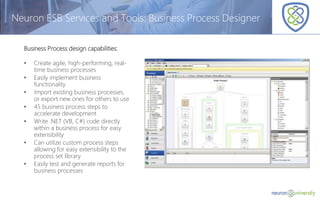
Business Process design capabilities:
• Create agile, high-performing, real-
time business processes
• Easily implement business
functionality
• Import existing business processes,
or export new ones for others to use
• 45 business process steps to
accelerate development
• Write .NET (VB, C#) code directly
within a business process for easy
extensibility
• Can utilize custom process steps
allowing for easy extensibility to the
process set library
• Easily test and generate reports for
business processes
© Copyright 2014, Neudesic. All rights reserved.
Neuron ESB Services and Tools: .NET and JavaScript Editors
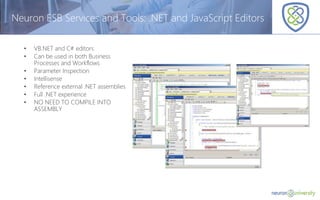
• VB.NET and C# editors
• Can be used in both Business
Processes and Workflows
• Parameter Inspection
• Intellisense
• Reference external .NET assemblies
• Full .NET experience
• NO NEED TO COMPILE INTO
ASSEMBLY
© Copyright 2014, Neudesic. All rights reserved.
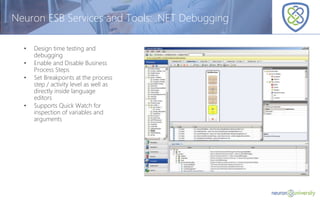
Neuron ESB Services and Tools: .NET Debugging
• Design time testing and
debugging
• Enable and Disable Business
Process Steps
• Set Breakpoints at the process
step / activity level as well as
directly inside language
editors
• Supports Quick Watch for
inspection of variables and
arguments
Purpose:
Familiarize users with the Neuron ESB Business Process Designer.
Objectives:
Acquaint users with the following aspects of the Neuron ESB Explorer:
• Neuron ESB Business Process Designer
• Process Steps
• Testing facilities
• Creating Business Processes
Neuron ESB Services and Tools - Demo
© Copyright 2014, Neudesic. All rights reserved.
Neuron ESB Services and Tools: Integration
• Built in Adapters for:
• Line of Business Systems
• e.g. SAP, Salesforce, NetSuite, Dynamics, SharePoint, Certainsafe, Marketo, Zuora
,etc.
• Protocols
• e.g. TCP, FTP/SFTP/FTPS, File, Active Directory, SMTP, Exchange, Dropbox, Apple
Push, Twillio, POP3 etc.
• Databases
• e.g. ODBC, etc.
• Queues
• e.g. Azure, Amazon, MqSeries, MSMQ, Sql Service Broker, Rabbit, ActiveMq, etc.
© Copyright 2014, Neudesic. All rights reserved.
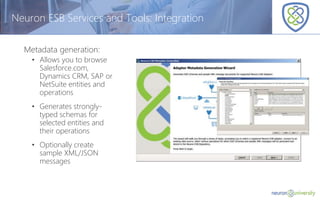
Neuron ESB Services and Tools: Integration
Metadata generation:
• Allows you to browse
Salesforce.com,
Dynamics CRM, SAP or
NetSuite entities and
operations
• Generates strongly-
typed schemas for
selected entities and
their operations
• Optionally create
sample XML/JSON
messages
Purpose:
Familiarize users with the Neuron ESB Adapters.
Objectives:
Acquaint users with the following:
• Adapter Registration
• Adapter Endpoints
• Adapter Metadata Generation Wizard
Neuron ESB Services and Tools - Demo
© Copyright 2014, Neudesic. All rights reserved.
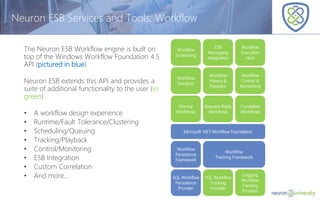
The Neuron ESB Workflow engine is built on
top of the Windows Workflow Foundation 4.5
API (pictured in blue)
Neuron ESB extends this API and provides a
suite of additional functionality to the user (in
green)
• A workflow design experience
• Runtime/Fault Tolerance/Clustering
• Scheduling/Queuing
• Tracking/Playback
• Control/Monitoring
• ESB Integration
• Custom Correlation
• And more…
Neuron ESB Services and Tools: Workflow
Workflow
Scheduling
ESB
Messaging
Integration
Workflow
Execution
Host
Workflow
Designer
Workflow
History &
Playback
Workflow
Control &
Monitoring
Normal
Workflows
Request-Reply
Workflows
Correlated
Workflows
Microsoft .NET Workflow Foundation
Workflow
Persistence
Framework
Workflow
Tracking Framework
SQL Workflow
Persistence
Provider
SQL Workflow
Tracking
Provider
Logging
Workflow
Tracking
Provider
© Copyright 2014, Neudesic. All rights reserved.
Neuron ESB Services and Tools: Workflow Designer
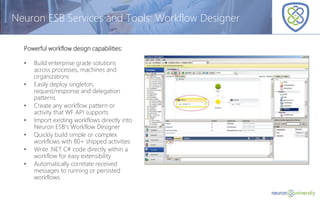
Powerful workflow design capabilities:
• Build enterprise grade solutions
across processes, machines and
organizations
• Easily deploy singleton,
request/response and delegation
patterns
• Create any workflow pattern or
activity that WF API supports
• Import existing workflows directly into
Neuron ESB’s Workflow Designer
• Quickly build simple or complex
workflows with 80+ shipped activities
• Write .NET C# code directly within a
workflow for easy extensibility
• Automatically correlate received
messages to running or persisted
workflows
© Copyright 2014, Neudesic. All rights reserved.
Neuron ESB Services and Tools: Workflow
Tracking & Management
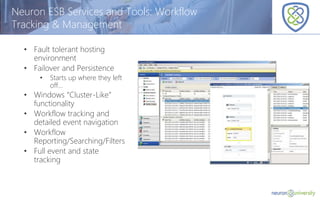
• Fault tolerant hosting
environment
• Failover and Persistence
• Starts up where they left
off…
• Windows “Cluster-Like”
functionality
• Workflow tracking and
detailed event navigation
• Workflow
Reporting/Searching/Filters
• Full event and state
tracking
Purpose
Familiarize users with the Neuron ESB Workflow Designer.
Objectives
Acquaint users with the following aspects of the Neuron ESB Explorer
• Neuron ESB Workflow Designer
• Workflow Activities
• Workflow Tracking
Neuron ESB Services and Tools - Demo
© Copyright 2014, Neudesic. All rights reserved.
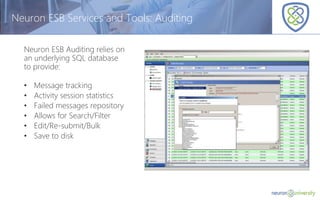
Neuron ESB Services and Tools: Auditing
Neuron ESB Auditing relies on
an underlying SQL database
to provide:
• Message tracking
• Activity session statistics
• Failed messages repository
• Allows for Search/Filter
• Edit/Re-submit/Bulk
• Save to disk
© Copyright 2014, Neudesic. All rights reserved.
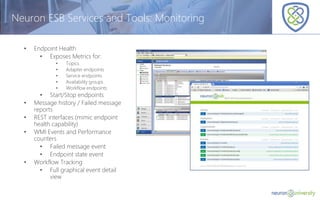
Neuron ESB Services and Tools: Monitoring
• Endpoint Health
• Exposes Metrics for:
• Topics
• Adapter endpoints
• Service endpoints
• Availability groups
• Workflow endpoints
• Start/Stop endpoints
• Message history / Failed message
reports
• REST interfaces (mimic endpoint
health capability)
• WMI Events and Performance
counters
• Failed message event
• Endpoint state event
• Workflow Tracking
• Full graphical event detail
view
© Copyright 2014, Neudesic. All rights reserved.
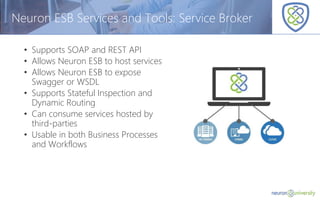
Neuron ESB Services and Tools: Service Broker
• Supports SOAP and REST API
• Allows Neuron ESB to host services
• Allows Neuron ESB to expose
Swagger or WSDL
• Supports Stateful Inspection and
Dynamic Routing
• Can consume services hosted by
third-parties
• Usable in both Business Processes
and Workflows
Purpose:
Familiarize users with the Neuron ESB Service Broker and Auditing.
Objectives:
Acquaint users with the following of the Neuron ESB Explorer:
• Service Endpoints
• Endpoint Health
• Message History Reports
Neuron ESB Services and Tools - Demo
© Copyright 2014, Neudesic. All rights reserved.
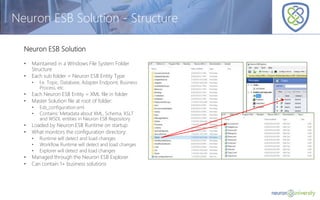
Neuron ESB Solution - Structure
Neuron ESB Solution
• Maintained in a Windows File System Folder
Structure
• Each sub folder = Neuron ESB Entity Type
• I.e. Topic, Database, Adapter Endpoint, Business
Process, etc.
• Each Neuron ESB Entity = XML file in folder
• Master Solution file at root of folder:
• Esb_configuration.xml
• Contains: Metadata about XML, Schema, XSLT
and WSDL entities in Neuron ESB Repository
• Loaded by Neuron ESB Runtime on startup
• What monitors the configuration directory:
• Runtime will detect and load changes
• Workflow Runtime will detect and load changes
• Explorer will detect and load changes
• Managed through the Neuron ESB Explorer
• Can contain 1+ business solutions
© Copyright 2014, Neudesic. All rights reserved.
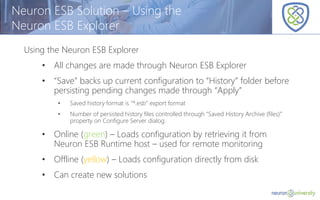
Neuron ESB Solution – Using the
Neuron ESB Explorer
Using the Neuron ESB Explorer
• All changes are made through Neuron ESB Explorer
• “Save” backs up current configuration to “History” folder before
persisting pending changes made through “Apply”
• Saved history format is “*.esb” export format
• Number of persisted history files controlled through “Saved History Archive (files)”
property on Configure Server dialog.
• Online (green) – Loads configuration by retrieving it from
Neuron ESB Runtime host – used for remote monitoring
• Offline (yellow) – Loads configuration directly from disk
• Can create new solutions
© Copyright 2014, Neudesic. All rights reserved.
Neuron ESB Solution - Benefits
• Source Control tools can be used
• Allows for multiple developers to work in independent
entities
• Allows for incremental deployment
• Allows for copy and paste deployment *
• Allows for manual editing of entities **
© Copyright 2014, Neudesic. All rights reserved.
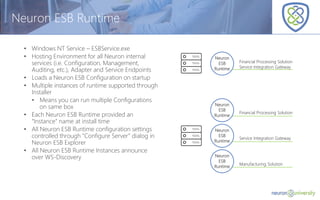
Neuron ESB Runtime
• Windows NT Service – ESBService.exe
• Hosting Environment for all Neuron internal
services (i.e. Configuration, Management,
Auditing, etc.), Adapter and Service Endpoints
• Loads a Neuron ESB Configuration on startup
• Multiple instances of runtime supported through
Installer
• Means you can run multiple Configurations
on same box
• Each Neuron ESB Runtime provided an
“Instance” name at install time
• All Neuron ESB Runtime configuration settings
controlled through “Configure Server” dialog in
Neuron ESB Explorer
• All Neuron ESB Runtime Instances announce
over WS-Discovery
Neuron
ESB
Runtime
Financial Processing Solution
Service Integration Gateway
Neuron
ESB
Runtime
Financial Processing Solution
Neuron
ESB
Runtime
Service Integration Gateway
Neuron
ESB
Runtime
Manufacturing Solution
© Copyright 2014, Neudesic. All rights reserved.
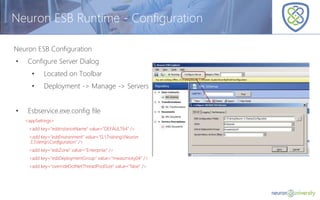
Neuron ESB Runtime - Configuration
Neuron ESB Configuration
• Configure Server Dialog
• Located on Toolbar
• Deployment -> Manage -> Servers
• Esbservice.exe.config file
<appSettings>
<add key="esbInstanceName" value="DEFAULT64" />
<add key="esbEnvironment" value="G:TrainingNeuron
3.5tempConfiguration" />
<add key="esbZone" value="Enterprise" />
<add key="esbDeploymentGroup" value="mwasznicky04" />
<add key="overrideDotNetThreadPoolSize" value="false" />
© Copyright 2014, Neudesic. All rights reserved.
Neuron ESB Discovery
• Windows NT Service – DiscoveryService.exe
• Different from “WS-Discovery”
• Neuron ESB Runtime can’t start without it
• Responsible for knowing all Runtime instances, and how are they are
configured
• Used by the Neuron ESB Explorer
• Allows for remote configuration of Neuron ESB Runtimes
• Always installed in x86 Program Files
• Hosts REST-based services for Monitoring and Management
© Copyright 2014, Neudesic. All rights reserved.
Neuron Workflow Host
Workflow Endpoint
Workflow Endpoint
Party Workflow
Workflow
Workflow
Machine B
Custom Application
Processes
Party (client api)
Machine A
Custom Application
Processes
Party (client api)
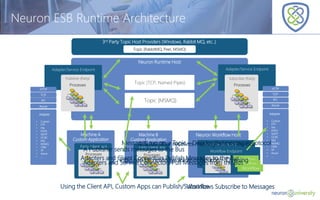
Adapters and Client Connectors Publish Messages to the Bus
Neuron ESB Runtime Architecture
Topic (TCP, Named Pipes)
Topic (MSMQ)
3rd Party Topic Host Providers (Windows, Rabbit MQ, etc..)
Topic (RabbitMQ, Peer, MSMQ)
Neuron Runtime Host
Adapter/Service Endpoint
Publisher (Party)
Processes
Adapter/Service Endpoint
Subscriber (Party)
Processes
HTTP
TCP
IPC
Azure
Adapter
• Custom
• FTP
• File
• POP3
• SMTP
• OCBC
• MQ
• MSMQ
• CRM
• SP
• Azure
• ...
HTTP
TCP
IPC
Azure
Adapter
• Custom
• FTP
• File
• POP3
• SMTP
• OCBC
• MQ
• MSMQ
• CRM
• SP
• Azure
• ...
Messages run on a Topic – Decides the message protocol
Topic can be hosted outside of Neuron - Queuing
A Publisher sends messages to the Bus
Adapters and Service Connectors Pull Messages from the Bus
Workflows Subscribe to MessagesUsing the Client API, Custom Apps can Publish/Subscribe
A Subscriber receives messages from the Bus
© Copyright 2014, Neudesic. All rights reserved.
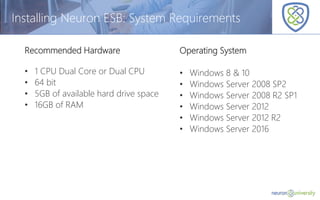
Installing Neuron ESB: System Requirements
Recommended Hardware
• 1 CPU Dual Core or Dual CPU
• 64 bit
• 5GB of available hard drive space
• 16GB of RAM
Operating System
• Windows 8 & 10
• Windows Server 2008 SP2
• Windows Server 2008 R2 SP1
• Windows Server 2012
• Windows Server 2012 R2
• Windows Server 2016
© Copyright 2014, Neudesic. All rights reserved.
Installing Neuron ESB: Software Requirements
Required
• Microsoft .NET 4.5.2 or higher
• Microsoft SQL Server 2008 or higher
• Any edition
• Can be remote to Neuron ESB
installation
• Can be Microsoft SQL Azure*
Optional
• MSMQ
• MSDTC (Required for MSMQ)
• Visual Studio 2013/2015 with
C# installed
• Rabbit MQ
© Copyright 2014, Neudesic. All rights reserved.
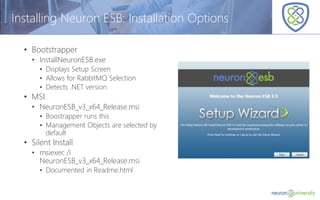
Installing Neuron ESB: Installation Options
• Bootstrapper
• InstallNeuronESB.exe
• Displays Setup Screen
• Allows for RabbitMQ Selection
• Detects .NET version
• MSI
• NeuronESB_v3_x64_Release.msi
• Boostrapper runs this
• Management Objects are selected by
default
• Silent Install
• msiexec /i
NeuronESB_v3_x64_Release.msi
• Documented in Readme.html
© Copyright 2014, Neudesic. All rights reserved.
Installing Neuron ESB: Installation Options
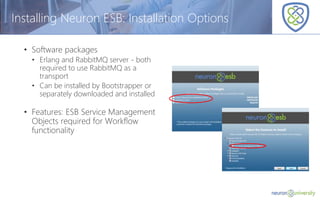
• Software packages
• Erlang and RabbitMQ server - both
required to use RabbitMQ as a
transport
• Can be installed by Bootstrapper or
separately downloaded and installed
• Features: ESB Service Management
Objects required for Workflow
functionality
Purpose:
Learn how to install a new copy of Neuron ESB, RabbitMQ and Erlang in your operating
environment, as well as create a new Neuron ESB Solution and configure the Neuron ESB
instance to run your new solution.
Objectives:
• Install a new instance of Neuron ESB
• Create a new Neuron ESB solution
• Create a new Neuron ESB database
• Configure the Neuron ESB Solution to use the Neuron ESB database
• Configure the Neuron instance to run the Neuron ESB solution
Introduction to Neuron ESB - Lab
© Copyright 2014, Neudesic. All rights reserved.
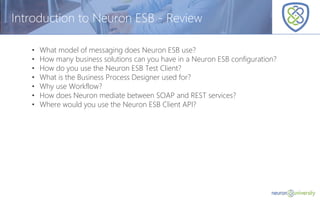
Introduction to Neuron ESB - Review
• What model of messaging does Neuron ESB use?
• How many business solutions can you have in a Neuron ESB configuration?
• How do you use the Neuron ESB Test Client?
• What is the Business Process Designer used for?
• Why use Workflow?
• How does Neuron mediate between SOAP and REST services?
• Where would you use the Neuron ESB Client API?

Introduction to neuron ESB

  • 1.
  • 2.
    © Copyright 2014,Neudesic. All rights reserved. Introduction to Neuron ESB – Overview Goals of this session: • Provide an understanding of Neuron ESB’s features, tools, operating principles • Review Neuron ESB’s core technology base and architecture
  • 3.
    © Copyright 2014,Neudesic. All rights reserved. Introduction to Neuron ESB – Objectives • Understand the Neuron ESB Tools and Services • Learn how to configure and create Neuron ESB solutions • Learn how to host solutions using the Neuron ESB runtime • The role of Pub/Sub messaging in Neuron ESB solutions • How Neuron ESB uses WS-Discovery • Install and Configure Neuron ESB runtime and database
  • 4.
    © Copyright 2014,Neudesic. All rights reserved. Introduction to Neuron ESB – Lesson Plan • Neuron ESB Services and Tools • Neuron ESB Solution • Neuron ESB Runtime • Neuron ESB Discovery • Neuron ESB Runtime architecture • Installing and Configuring Neuron ESB
  • 5.
    © Copyright 2014,Neudesic. All rights reserved. Neuron ESB Services and Tools: Overview Management Designers Workflow Messaging API/SOA Gateway Reporting Connectors .NET Runtime
  • 6.
    © Copyright 2014,Neudesic. All rights reserved. Neuron ESB Services and Tools: Neuron ESB Explorer • Management & Development Hub • Messaging • Business Process Designer • Workflow Definition Designer • Service Brokering • Repository • Activity Tracking • Samples • Deployment Configuration
  • 7.
    © Copyright 2014,Neudesic. All rights reserved. Neuron ESB Services and Tools: Getting Started Center Provides quick access to: • Documentation • Samples • Product Team Blog • Neuron ESB News
  • 8.
    © Copyright 2014,Neudesic. All rights reserved. Neuron ESB Services and Tools: Connection Manager • Discover Neuron ESB instances • Connect to a Neuron ESB instance • Define Security Credentials used to connect to Neuron instances • Allows for local or remote connections
  • 9.
    © Copyright 2014,Neudesic. All rights reserved. Neuron ESB Services and Tools: Test Client • Connects as a publisher/subscriber • Send and Receive messages • Send Bulk messages • Works in Request/Reply scenarios • Send and Examine Metadata • Capture debug events
  • 10.
    © Copyright 2014,Neudesic. All rights reserved. Neuron ESB Services and Tools: Messaging • Utilizes a topic-based hierarchical Pub / Sub engine • Supports sub-topics • Centralized Configuration • Configurable Quality of Service • Event-based redistributable API • Allows .NET applications to publish and receive messages to and from the bus • Type agnostic • Hostable Publishers and Subscribers • Can be hosted in .NET applications • Used by endpoints to control access to topics • Automatically picks up changes on server
  • 11.
    Purpose: Familiarize users withthe Neuron ESB Explorer and Connecting to the Neuron ESB Server using the Test Client. Objectives: Acquaint users with the following aspects of the Neuron ESB Explorer: • Neuron ESB Explorer • Neuron ESB Test Client • Sample Browser • Connection Manager • Getting Started Screen Neuron ESB Services and Tools: Demo
  • 12.
    © Copyright 2014,Neudesic. All rights reserved. Neuron ESB Services and Tools: Business Process Designer Business Process design capabilities: • Create agile, high-performing, real- time business processes • Easily implement business functionality • Import existing business processes, or export new ones for others to use • 45 business process steps to accelerate development • Write .NET (VB, C#) code directly within a business process for easy extensibility • Can utilize custom process steps allowing for easy extensibility to the process set library • Easily test and generate reports for business processes
  • 13.
    © Copyright 2014,Neudesic. All rights reserved. Neuron ESB Services and Tools: .NET and JavaScript Editors • VB.NET and C# editors • Can be used in both Business Processes and Workflows • Parameter Inspection • Intellisense • Reference external .NET assemblies • Full .NET experience • NO NEED TO COMPILE INTO ASSEMBLY
  • 14.
    © Copyright 2014,Neudesic. All rights reserved. Neuron ESB Services and Tools: .NET Debugging • Design time testing and debugging • Enable and Disable Business Process Steps • Set Breakpoints at the process step / activity level as well as directly inside language editors • Supports Quick Watch for inspection of variables and arguments
  • 15.
    Purpose: Familiarize users withthe Neuron ESB Business Process Designer. Objectives: Acquaint users with the following aspects of the Neuron ESB Explorer: • Neuron ESB Business Process Designer • Process Steps • Testing facilities • Creating Business Processes Neuron ESB Services and Tools - Demo
  • 16.
    © Copyright 2014,Neudesic. All rights reserved. Neuron ESB Services and Tools: Integration • Built in Adapters for: • Line of Business Systems • e.g. SAP, Salesforce, NetSuite, Dynamics, SharePoint, Certainsafe, Marketo, Zuora ,etc. • Protocols • e.g. TCP, FTP/SFTP/FTPS, File, Active Directory, SMTP, Exchange, Dropbox, Apple Push, Twillio, POP3 etc. • Databases • e.g. ODBC, etc. • Queues • e.g. Azure, Amazon, MqSeries, MSMQ, Sql Service Broker, Rabbit, ActiveMq, etc.
  • 17.
    © Copyright 2014,Neudesic. All rights reserved. Neuron ESB Services and Tools: Integration Metadata generation: • Allows you to browse Salesforce.com, Dynamics CRM, SAP or NetSuite entities and operations • Generates strongly- typed schemas for selected entities and their operations • Optionally create sample XML/JSON messages
  • 18.
    Purpose: Familiarize users withthe Neuron ESB Adapters. Objectives: Acquaint users with the following: • Adapter Registration • Adapter Endpoints • Adapter Metadata Generation Wizard Neuron ESB Services and Tools - Demo
  • 19.
    © Copyright 2014,Neudesic. All rights reserved. The Neuron ESB Workflow engine is built on top of the Windows Workflow Foundation 4.5 API (pictured in blue) Neuron ESB extends this API and provides a suite of additional functionality to the user (in green) • A workflow design experience • Runtime/Fault Tolerance/Clustering • Scheduling/Queuing • Tracking/Playback • Control/Monitoring • ESB Integration • Custom Correlation • And more… Neuron ESB Services and Tools: Workflow Workflow Scheduling ESB Messaging Integration Workflow Execution Host Workflow Designer Workflow History & Playback Workflow Control & Monitoring Normal Workflows Request-Reply Workflows Correlated Workflows Microsoft .NET Workflow Foundation Workflow Persistence Framework Workflow Tracking Framework SQL Workflow Persistence Provider SQL Workflow Tracking Provider Logging Workflow Tracking Provider
  • 20.
    © Copyright 2014,Neudesic. All rights reserved. Neuron ESB Services and Tools: Workflow Designer Powerful workflow design capabilities: • Build enterprise grade solutions across processes, machines and organizations • Easily deploy singleton, request/response and delegation patterns • Create any workflow pattern or activity that WF API supports • Import existing workflows directly into Neuron ESB’s Workflow Designer • Quickly build simple or complex workflows with 80+ shipped activities • Write .NET C# code directly within a workflow for easy extensibility • Automatically correlate received messages to running or persisted workflows
  • 21.
    © Copyright 2014,Neudesic. All rights reserved. Neuron ESB Services and Tools: Workflow Tracking & Management • Fault tolerant hosting environment • Failover and Persistence • Starts up where they left off… • Windows “Cluster-Like” functionality • Workflow tracking and detailed event navigation • Workflow Reporting/Searching/Filters • Full event and state tracking
  • 22.
    Purpose Familiarize users withthe Neuron ESB Workflow Designer. Objectives Acquaint users with the following aspects of the Neuron ESB Explorer • Neuron ESB Workflow Designer • Workflow Activities • Workflow Tracking Neuron ESB Services and Tools - Demo
  • 23.
    © Copyright 2014,Neudesic. All rights reserved. Neuron ESB Services and Tools: Auditing Neuron ESB Auditing relies on an underlying SQL database to provide: • Message tracking • Activity session statistics • Failed messages repository • Allows for Search/Filter • Edit/Re-submit/Bulk • Save to disk
  • 24.
    © Copyright 2014,Neudesic. All rights reserved. Neuron ESB Services and Tools: Monitoring • Endpoint Health • Exposes Metrics for: • Topics • Adapter endpoints • Service endpoints • Availability groups • Workflow endpoints • Start/Stop endpoints • Message history / Failed message reports • REST interfaces (mimic endpoint health capability) • WMI Events and Performance counters • Failed message event • Endpoint state event • Workflow Tracking • Full graphical event detail view
  • 25.
    © Copyright 2014,Neudesic. All rights reserved. Neuron ESB Services and Tools: Service Broker • Supports SOAP and REST API • Allows Neuron ESB to host services • Allows Neuron ESB to expose Swagger or WSDL • Supports Stateful Inspection and Dynamic Routing • Can consume services hosted by third-parties • Usable in both Business Processes and Workflows
  • 26.
    Purpose: Familiarize users withthe Neuron ESB Service Broker and Auditing. Objectives: Acquaint users with the following of the Neuron ESB Explorer: • Service Endpoints • Endpoint Health • Message History Reports Neuron ESB Services and Tools - Demo
  • 27.
    © Copyright 2014,Neudesic. All rights reserved. Neuron ESB Solution - Structure Neuron ESB Solution • Maintained in a Windows File System Folder Structure • Each sub folder = Neuron ESB Entity Type • I.e. Topic, Database, Adapter Endpoint, Business Process, etc. • Each Neuron ESB Entity = XML file in folder • Master Solution file at root of folder: • Esb_configuration.xml • Contains: Metadata about XML, Schema, XSLT and WSDL entities in Neuron ESB Repository • Loaded by Neuron ESB Runtime on startup • What monitors the configuration directory: • Runtime will detect and load changes • Workflow Runtime will detect and load changes • Explorer will detect and load changes • Managed through the Neuron ESB Explorer • Can contain 1+ business solutions
  • 28.
    © Copyright 2014,Neudesic. All rights reserved. Neuron ESB Solution – Using the Neuron ESB Explorer Using the Neuron ESB Explorer • All changes are made through Neuron ESB Explorer • “Save” backs up current configuration to “History” folder before persisting pending changes made through “Apply” • Saved history format is “*.esb” export format • Number of persisted history files controlled through “Saved History Archive (files)” property on Configure Server dialog. • Online (green) – Loads configuration by retrieving it from Neuron ESB Runtime host – used for remote monitoring • Offline (yellow) – Loads configuration directly from disk • Can create new solutions
  • 29.
    © Copyright 2014,Neudesic. All rights reserved. Neuron ESB Solution - Benefits • Source Control tools can be used • Allows for multiple developers to work in independent entities • Allows for incremental deployment • Allows for copy and paste deployment * • Allows for manual editing of entities **
  • 30.
    © Copyright 2014,Neudesic. All rights reserved. Neuron ESB Runtime • Windows NT Service – ESBService.exe • Hosting Environment for all Neuron internal services (i.e. Configuration, Management, Auditing, etc.), Adapter and Service Endpoints • Loads a Neuron ESB Configuration on startup • Multiple instances of runtime supported through Installer • Means you can run multiple Configurations on same box • Each Neuron ESB Runtime provided an “Instance” name at install time • All Neuron ESB Runtime configuration settings controlled through “Configure Server” dialog in Neuron ESB Explorer • All Neuron ESB Runtime Instances announce over WS-Discovery Neuron ESB Runtime Financial Processing Solution Service Integration Gateway Neuron ESB Runtime Financial Processing Solution Neuron ESB Runtime Service Integration Gateway Neuron ESB Runtime Manufacturing Solution
  • 31.
    © Copyright 2014,Neudesic. All rights reserved. Neuron ESB Runtime - Configuration Neuron ESB Configuration • Configure Server Dialog • Located on Toolbar • Deployment -> Manage -> Servers • Esbservice.exe.config file <appSettings> <add key="esbInstanceName" value="DEFAULT64" /> <add key="esbEnvironment" value="G:TrainingNeuron 3.5tempConfiguration" /> <add key="esbZone" value="Enterprise" /> <add key="esbDeploymentGroup" value="mwasznicky04" /> <add key="overrideDotNetThreadPoolSize" value="false" />
  • 32.
    © Copyright 2014,Neudesic. All rights reserved. Neuron ESB Discovery • Windows NT Service – DiscoveryService.exe • Different from “WS-Discovery” • Neuron ESB Runtime can’t start without it • Responsible for knowing all Runtime instances, and how are they are configured • Used by the Neuron ESB Explorer • Allows for remote configuration of Neuron ESB Runtimes • Always installed in x86 Program Files • Hosts REST-based services for Monitoring and Management
  • 33.
    © Copyright 2014,Neudesic. All rights reserved. Neuron Workflow Host Workflow Endpoint Workflow Endpoint Party Workflow Workflow Workflow Machine B Custom Application Processes Party (client api) Machine A Custom Application Processes Party (client api) Adapters and Client Connectors Publish Messages to the Bus Neuron ESB Runtime Architecture Topic (TCP, Named Pipes) Topic (MSMQ) 3rd Party Topic Host Providers (Windows, Rabbit MQ, etc..) Topic (RabbitMQ, Peer, MSMQ) Neuron Runtime Host Adapter/Service Endpoint Publisher (Party) Processes Adapter/Service Endpoint Subscriber (Party) Processes HTTP TCP IPC Azure Adapter • Custom • FTP • File • POP3 • SMTP • OCBC • MQ • MSMQ • CRM • SP • Azure • ... HTTP TCP IPC Azure Adapter • Custom • FTP • File • POP3 • SMTP • OCBC • MQ • MSMQ • CRM • SP • Azure • ... Messages run on a Topic – Decides the message protocol Topic can be hosted outside of Neuron - Queuing A Publisher sends messages to the Bus Adapters and Service Connectors Pull Messages from the Bus Workflows Subscribe to MessagesUsing the Client API, Custom Apps can Publish/Subscribe A Subscriber receives messages from the Bus
  • 34.
    © Copyright 2014,Neudesic. All rights reserved. Installing Neuron ESB: System Requirements Recommended Hardware • 1 CPU Dual Core or Dual CPU • 64 bit • 5GB of available hard drive space • 16GB of RAM Operating System • Windows 8 & 10 • Windows Server 2008 SP2 • Windows Server 2008 R2 SP1 • Windows Server 2012 • Windows Server 2012 R2 • Windows Server 2016
  • 35.
    © Copyright 2014,Neudesic. All rights reserved. Installing Neuron ESB: Software Requirements Required • Microsoft .NET 4.5.2 or higher • Microsoft SQL Server 2008 or higher • Any edition • Can be remote to Neuron ESB installation • Can be Microsoft SQL Azure* Optional • MSMQ • MSDTC (Required for MSMQ) • Visual Studio 2013/2015 with C# installed • Rabbit MQ
  • 36.
    © Copyright 2014,Neudesic. All rights reserved. Installing Neuron ESB: Installation Options • Bootstrapper • InstallNeuronESB.exe • Displays Setup Screen • Allows for RabbitMQ Selection • Detects .NET version • MSI • NeuronESB_v3_x64_Release.msi • Boostrapper runs this • Management Objects are selected by default • Silent Install • msiexec /i NeuronESB_v3_x64_Release.msi • Documented in Readme.html
  • 37.
    © Copyright 2014,Neudesic. All rights reserved. Installing Neuron ESB: Installation Options • Software packages • Erlang and RabbitMQ server - both required to use RabbitMQ as a transport • Can be installed by Bootstrapper or separately downloaded and installed • Features: ESB Service Management Objects required for Workflow functionality
  • 38.
    Purpose: Learn how toinstall a new copy of Neuron ESB, RabbitMQ and Erlang in your operating environment, as well as create a new Neuron ESB Solution and configure the Neuron ESB instance to run your new solution. Objectives: • Install a new instance of Neuron ESB • Create a new Neuron ESB solution • Create a new Neuron ESB database • Configure the Neuron ESB Solution to use the Neuron ESB database • Configure the Neuron instance to run the Neuron ESB solution Introduction to Neuron ESB - Lab
  • 39.
    © Copyright 2014,Neudesic. All rights reserved. Introduction to Neuron ESB - Review • What model of messaging does Neuron ESB use? • How many business solutions can you have in a Neuron ESB configuration? • How do you use the Neuron ESB Test Client? • What is the Business Process Designer used for? • Why use Workflow? • How does Neuron mediate between SOAP and REST services? • Where would you use the Neuron ESB Client API?

Editor's Notes

  • #2 Hello, my name is [Name] and I am the [Title, Position and Company].
  • #3 Today we are going to provide you with an introduction to Neuron ESB, it’s features, tools and operating principles. We will also take a look at the core technology and architecture of Neuron ESB, in order to provide you with a better understanding of the platform.
  • #4 To facilitate our goals we will take a look at the tools and services associated with Neuron ESB. We will also look at how to create, configure and host a Neuron ESB solution so that you can get started building your own Neuron ESB solution. In addition we will also look at the Neuron ESB runtime and how it uses the WS-Discovery service, so that you can better understand the architecture behind Neuron ESB.
  • #5 This session will be broken down into six sections, to help organize the information presented in this session. Neuron ESB Services and Tools Neuron ESB Solution Neuron ESB Runtime Neuron ESB Discovery Neuron ESB Runtime architecture Installing and Configuring Neuron ESB
  • #6 Neuron ESB is not simply just an ESB but a full Hybrid Integration Platform. Because of this it comes with a suite of tools and services that one may not find in other ESB platforms. Because Neuron ESB is built on the .NET platform, it exposes the .NET runtime for development purposes. To compliment the Business Process designer (which is for in-memory processes and covered in later sessions) Neuron ESB provides a long running workflow designer and host. As with all ESBs, Neuron ESB is a pub/sub based platform and thus provides you a messaging service to use in transmitting data between systems. Neuron ESB provides an API/SOA gateway for hosting and consuming services. Neuron ESB provides a reporting service which provides history on the messaging service Neuron ESB ships with a number of connectors (also called adapters) that help integrate commonly used applications. A suite of management features are provided with Neuron ESB to help with maintenance and monitoring To make solutions easier to build, Neuron ESB provides designers for both business processes and workflows.
  • #7 The Neuron ESB Explorer is the core Management and Development hub of the Product. This is where applications, as well as the ESB itself, are configured. It is where the Business Process and Workflow Designers are found. These along with Endpoint creation in the Explorer is how Service Brokering is done. All Messaging artifacts and Party definitions are created and stored in the Explorer. Finally management and activity tracking is also exposed in the Neuron ESB Explorer.
  • #8 Neuron ESB ships with over 50 samples that can be automatically configured through the Sample Browser. The documentation is shipped with the product via a CHM file. Documentation can also be accessed online at http://www.neuronesb.com/neuron/Help3/Neuron.htm.
  • #9 The Connection Manager can be used within the Neuron ESB Explorer or Neuron ESB Test Client to either declare or discover via WS-Discovery the Neuron ESB runtime hosts to connect to
  • #10 The Neuron ESB Test Client is used to send and receive messages to and from the bus without the need to create an application first. It is very useful in development and troubleshooting scenarios.
  • #11 Use of the Client API in .NET application delivers to developer’s fine grained code level control of messages sent and received to/from the Bus but still enables convenient centralized management, tracking and deployment of message Topics and Protocols.
  • #13 The Business Process Designer is used to create agile, high-performing real-time business processes. Its graphical interface includes more than 45 different business activities to significantly accelerate the development and deployment of low latency solutions, like request/response messaging and simple VETO processing, as well as more complex scatter-gather and service orchestration patterns
  • #14 The Neuron ESB Code Editors enable full in-line C#, VB .NET and JavaScript inclusion in Business Process and Workflows. The Editors support full parameter inspection, Intellisense, the ability to reference external .NET assemblies and an in-line .NET debugger.
  • #15 No need to compile and deploy business processes and workflows for testing. Neuron ESB Business Process and Workflow Designers support in-place testing, simulation and debugging, so you can run test messages through processes and workflows directly in the designer.  Neuron ESB’s built-in .NET debugger for the Business Process Designer means you can set breakpoints and enable easy step-by-step debugging through both activities and custom programming code. And because Neuron ESB compiles business processes and workflows at time of execution, you’ll save considerable development time compared to other integration products.
  • #17 An adapter is a "driver" program that enables Neuron ESB to interact with a new kind of endpoint, such as a legacy system, proprietary system, or line of business application. Neuron ships with various pre-built adapters as well as provides you with the ability to create your own adapters if the pre-built adapters do not meet all your organization’s needs. We cover adapters in detail in a later session and more information about connectivity can be found here: http://www.neuronesb.com/neuron/Help3/whgdata/whlstt27.htm#27
  • #18 The metadata generation wizard provides you with metadata for systems that require messages that are strongly typed. By allowing you to browse entities in systems such as Salesforce, Dynamics CRM, Sap and NetSuite, and create XSDs, XSLTs and even sample messages, the metadata generation wizard makes your integration to these systems fast and easy. http://www.neuronesb.com/article/introducing-new-neuron-esb-connector-metadata-generation-wizard/ http://www.neuronesb.com/article/12228/
  • #20 The Neuron ESB workflow engine provides a complete environment for building, hosting, monitoring and tracking workflows. Built on top of the Windows Workflow foundation 4.5 API, the Neuron ESB workflow engine extends the functionality and features of this Microsoft product to give you a more comprehensive environment in which to work with workflows. As show in the image, everything in blue was provided by the Windows workflow 4.5 API. All the items in green are pieces that Neuron ESB adds to the API in order to give you the best possible experience.
  • #21 Import existing WF workflows Workflow Simulation Print/Save/Copy/Paste Import/Export workflows 30+ New workflow activities Visual Code Editors Write code directly in workflow (C#, VB.NET and JavaScript) Custom Correlation Patterns Singleton, Request/Response, Long Running
  • #22 Advanced workflow tracking and historical reporting lets you see in real time exactly what workflow activities have executed, and determine the state of each workflow at the time of execution. Upon timeout, workflows automatically persist to the database until the system receives the next activity. Then Neuron ESB’s Scheduler reactivates the workflow to continue execution. You can also unload, abort, cancel or restart workflows individually or in groups directly from the tracking system.
  • #24 View messages that have succeeded in their transmission, as well as ones that have failed due to an error, allows you to constantly monitor the accuracy of your Neuron ESB solution. Auditing provides you with the ability to see both types of messages through two different reports, search and filter the results to find only what you are looking for and edit or re-submit one or multiple messages if the need should arise.
  • #25 Neuron ESB’s Endpoint Health interface lets you see current endpoint, topic and workflow execution activity, as well as message count, size and rate of your running environment. Activity tracking and message statistics can also be monitored for all remotely connected clients using Neuron ESB’s Activity Session reporting. Together, these features provide a complete, real-time view into Neuron ESB’s executing environment.
  • #26 With support for SOAP and REST APIs, you’ll be able to build and manage your integration and mobile platforms with ease. Service Broker is designed to expose your existing services, giving you complete visibility while shielding consumers from changes to your internal business processes.
  • #28 Each Neuron ESB solution is maintained in a Windows File System Folder, with sub folders that correspond to a Neuron ESB entity type. This makes looking at the solution in the file system comparable to looking at it in the Neuron Explorer so that you can easily and quickly understand the structure of your Neuron ESB solution. Each sub folder contains Neuron ESB entity files, in the form of XML files corresponding to the Neuron Entity you created. For example creating a topic named Orders in the Neuron Explore results in a Topics folder being created in the folder structure and an XML files named Orders being created in the Topics folder.
  • #29 The Neuron ESB Explorer is the UI environment where you will design, develop and manage your Neuron ESB Solution. All changes that are made to your solution should be made through the Neuron ESB Explorer as this will provide you with a running history of the changes and revisions. While you can connect to a Neuron ESB instance and view the solution running on it, changes to a solution should be made only when in offline mode, as offline loads the configuration directly from the disk while online loads the configuration from the Neuron ESB runtime host.
  • #30 ** Imagine scenario where you wanted to bulk enable/disable endpoints. You could use PowerShell to do this directly by modifying the xml files Never manually edit our namespace ID, IsSystemObject or Version elements ConfigurationReloadDelay setting in esbservice.exe.config determines how long it takes for us load new config changes. Default is 1 minute * Cannot copy/paste deploy entities in the repository section, such as XML, Schema, WSDL or XSLT docs
  • #31 The Neuron ESB runtime is a Windows NT Service (esbservice.exe) which is the hosting environment for all Neuron ESB’s internal services (configuration, auditing, management) as well as both adapter and services endpoints defined in your solution. Neuron ESB does support multiple instances of the runtime installed on the same machine, allowing you to have multiple Neuron ESB solutions running side by side on the same box.
  • #32 Toolbar only configures local service where explorer was launched. Deployment ->Manage ->Servers can be used to configure any server instance, local or remote
  • #33 The Neuron ESB discovery service (discoveryservice.exe) is responsible for knowing all the runtime instances on a machine and how they are configured. This service is used by the Neuron ESB explorer to connect to instances (online mode). This allows you to remotely configure instances in your network as well as local to your machine.
  • #34 The Neuron ESB runtime host provides the hosting environment for topics, whether they be TCP, Names Pipes or Queue based such as MSMMQ. It also provides the hosing environment for publishers and subscribers, adapter and service endpoints. The Neuron ESB Client Messaging API is hosted in your .NET applications and allows you to integrate them into Neuron ESB.
  • #37 For example, the following command line would perform a default silent installation of the Neuron ESB product on a server: msiexec /i NeuronESB_v3_x64_Release.msi LICENSEKEY=(key) MSINEWINSTANCE=1 MYINSTANCE=Instance1 TRANSFORMS=:Instance1 INSTALLFOLDER="C:\Program Files\Neudesic\Neuron ESB v3\" /qb /lvx* install.log http://www.neuronesb.com/neuron/Help3/Deployment/Installing_and_Configuring_Neuron/Installing/Silent_Installs_of_Neuron_ESB.htm