INTRODUCTION TO IONIC3
Nitin Arora
Software Consultant
Knoldus Inc
INTRODUCTION TO
Agenda
2
● What is Hybrid mobile application?
● Prerequisites
● What is Ionic framework?
● What’s new in ionic 3?
● Ionic 3 benefits
● Project Structure
● Ionic 3 LifeCycle hook
● Cordova plugin
● Key Components
● Navigation Stack
● UI/UX Experience
● Demo
Hybrid
Application
3
A hybrid application (hybrid app) is one that combines
elements of both native and Web applications. It built
with Javascript, HTML, and CSS and run in something
called Webview, a simplified browser within your app.
Benefits of using Hybrid application:
● One codebase to manage
● save time and money
● Easier to scale
● Provide Offline support
Hybrid Web
Application
Examples
4
Prerequisites
5
IONIC
Framework
6
The dev-friendly app platform for building cross-
platform apps with one codebase, for any device,
with the web.
What is Ionic?
Ionic makes it easy to build high-performance mobile and Progressive
Web Apps (or PWAs) that look and feel beautiful on any platform or
device. You can think of Ionic as the front-end UI framework that
handles all of the look and feel and UI interactions your app needs in
order to be compelling.
What’s New in
Ionic 3
7
● Angular 4.0.0
The upgraded Ionic framework is compatible with Angular 4. This
introduces new updated features, support the new version of
typescript, fast and small applications and many more.
● TypeScript 2.1 and 2.2 compatibility
Typescript acquires all the classes of javascript and therefore
known as the superset of javascript. Ionic works with the latest
version of Typescript same like Angular framework.
What’s New in
Ionic 3
8
● IonicPage Decorator
You can set up deep links into your application using IonicPage
Decorator. This allows an easy way to set up lazy loading in your
application and customize the configuration of each and every
individual page.
● Lazy loading
Ionic 3.0 includes support for lazy loading.The changes affect the
file structure and navigation of your application, but they will
ultimately speed the application up.
Benefits of
Ionic 3
9
● Platform Independent Framework
● Cross-Platform Mobile App Development
● Default User Interface
● Based on Angular
● Utilizes Cordova Plugins
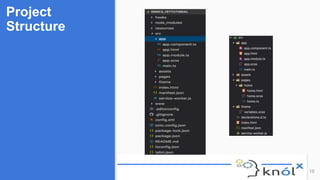
Project
Structure
10
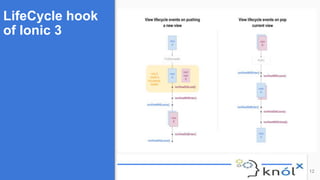
LifeCycle hook
of Ionic 3
11
● ionViewDidLoad
● ionViewWillEnter
● ionViewDidEnter
● ionViewWillLeave
● ionViewDidLeave
● ionViewWillUnload
LifeCycle hook
of Ionic 3
12
Building Blocks
of Ionic 3
13
● Modules
● Pages
● Templates
● Services
● External Resources
IONIC 3
Navigation
14
● It’s a simple stack
● PUSH new pages to go forward
● POP the top page off to go backward
● SETROOT to navigate back to the home page.
● Navigation using Lazy loading.
UI/UX :User
Experience
15
● Platform Specific styles
● Responsive Grids
● Sass Variables
● Theming your Ionic App
● IonIcons
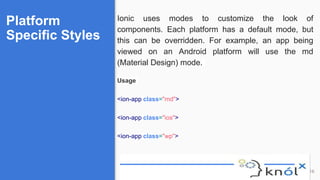
Platform
Specific Styles
16
Ionic uses modes to customize the look of
components. Each platform has a default mode, but
this can be overridden. For example, an app being
viewed on an Android platform will use the md
(Material Design) mode.
Usage
<ion-app class="md">
<ion-app class="ios">
<ion-app class="wp">
Responsive
Grids
17
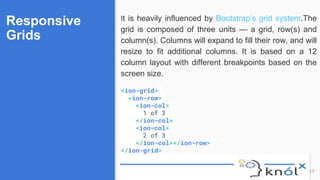
It is heavily influenced by Bootstrap’s grid system.The
grid is composed of three units — a grid, row(s) and
column(s). Columns will expand to fill their row, and will
resize to fit additional columns. It is based on a 12
column layout with different breakpoints based on the
screen size.
<ion-grid>
<ion-row>
<ion-col>
1 of 3
</ion-col>
<ion-col>
2 of 3
</ion-col></ion-row>
</ion-grid>
Sass Variables
18
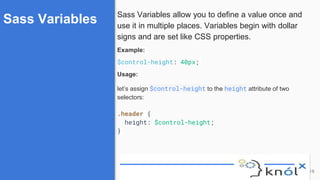
Sass Variables allow you to define a value once and
use it in multiple places. Variables begin with dollar
signs and are set like CSS properties.
Example:
$control-height: 40px;
Usage:
let’s assign $control-height to the height attribute of two
selectors:
.header {
height: $control-height;
}
Theming your
app
19
Theme support is baked right into Ionic apps. Changing
the theme is as easy as updating the $colors map in
your src/theme/variables.scss file:
$colors: (
primary: #488aff,
secondary: #32db64,
danger: #f53d3d,
light: #f4f4f4,
dark: #222
);
Cordova
plugins
20
Cordova is a project that provides web access to native plugins. They
allow your app to use native device capabilities beyond what is
available to pure web apps. Using Cordova plugins you app can have
access to Battery, Camera, Dialogs, Geolocation, and more…
It is very easy to manage cordova with ionic:
$ ionic cordova plugin
Synopsis
$ ionic cordova plugin [<action>] [<plugin>]
Cordova
plugins
Description
21
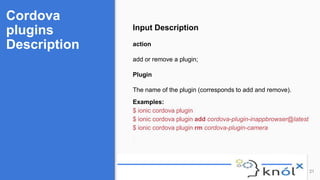
Input Description
action
add or remove a plugin;
Plugin
The name of the plugin (corresponds to add and remove).
Examples:
$ ionic cordova plugin
$ ionic cordova plugin add cordova-plugin-inappbrowser@latest
$ ionic cordova plugin rm cordova-plugin-camera
Quick Start
Commands
22
Make sure you have an up-to-date version of
Node.js installed on your system.
● Install ionic with cordova
npm install -g cordova ionic
● Generating a new Project
ionic start myapp blank
● Enter to your project directory and serve you
app
cd myapp
ionic serve
● Generate a new page
Ionic g page pagename
References
23
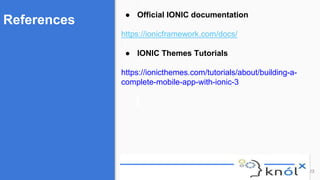
● Official IONIC documentation
https://ionicframework.com/docs/
● IONIC Themes Tutorials
https://ionicthemes.com/tutorials/about/building-a-
complete-mobile-app-with-ionic-3
Introduction To Ionic3

Introduction To Ionic3

  • 1.
    INTRODUCTION TO IONIC3 NitinArora Software Consultant Knoldus Inc INTRODUCTION TO
  • 2.
    Agenda 2 ● What isHybrid mobile application? ● Prerequisites ● What is Ionic framework? ● What’s new in ionic 3? ● Ionic 3 benefits ● Project Structure ● Ionic 3 LifeCycle hook ● Cordova plugin ● Key Components ● Navigation Stack ● UI/UX Experience ● Demo
  • 3.
    Hybrid Application 3 A hybrid application(hybrid app) is one that combines elements of both native and Web applications. It built with Javascript, HTML, and CSS and run in something called Webview, a simplified browser within your app. Benefits of using Hybrid application: ● One codebase to manage ● save time and money ● Easier to scale ● Provide Offline support
  • 4.
  • 5.
  • 6.
    IONIC Framework 6 The dev-friendly appplatform for building cross- platform apps with one codebase, for any device, with the web. What is Ionic? Ionic makes it easy to build high-performance mobile and Progressive Web Apps (or PWAs) that look and feel beautiful on any platform or device. You can think of Ionic as the front-end UI framework that handles all of the look and feel and UI interactions your app needs in order to be compelling.
  • 7.
    What’s New in Ionic3 7 ● Angular 4.0.0 The upgraded Ionic framework is compatible with Angular 4. This introduces new updated features, support the new version of typescript, fast and small applications and many more. ● TypeScript 2.1 and 2.2 compatibility Typescript acquires all the classes of javascript and therefore known as the superset of javascript. Ionic works with the latest version of Typescript same like Angular framework.
  • 8.
    What’s New in Ionic3 8 ● IonicPage Decorator You can set up deep links into your application using IonicPage Decorator. This allows an easy way to set up lazy loading in your application and customize the configuration of each and every individual page. ● Lazy loading Ionic 3.0 includes support for lazy loading.The changes affect the file structure and navigation of your application, but they will ultimately speed the application up.
  • 9.
    Benefits of Ionic 3 9 ●Platform Independent Framework ● Cross-Platform Mobile App Development ● Default User Interface ● Based on Angular ● Utilizes Cordova Plugins
  • 10.
  • 11.
    LifeCycle hook of Ionic3 11 ● ionViewDidLoad ● ionViewWillEnter ● ionViewDidEnter ● ionViewWillLeave ● ionViewDidLeave ● ionViewWillUnload
  • 12.
  • 13.
    Building Blocks of Ionic3 13 ● Modules ● Pages ● Templates ● Services ● External Resources
  • 14.
    IONIC 3 Navigation 14 ● It’sa simple stack ● PUSH new pages to go forward ● POP the top page off to go backward ● SETROOT to navigate back to the home page. ● Navigation using Lazy loading.
  • 15.
    UI/UX :User Experience 15 ● PlatformSpecific styles ● Responsive Grids ● Sass Variables ● Theming your Ionic App ● IonIcons
  • 16.
    Platform Specific Styles 16 Ionic usesmodes to customize the look of components. Each platform has a default mode, but this can be overridden. For example, an app being viewed on an Android platform will use the md (Material Design) mode. Usage <ion-app class="md"> <ion-app class="ios"> <ion-app class="wp">
  • 17.
    Responsive Grids 17 It is heavilyinfluenced by Bootstrap’s grid system.The grid is composed of three units — a grid, row(s) and column(s). Columns will expand to fill their row, and will resize to fit additional columns. It is based on a 12 column layout with different breakpoints based on the screen size. <ion-grid> <ion-row> <ion-col> 1 of 3 </ion-col> <ion-col> 2 of 3 </ion-col></ion-row> </ion-grid>
  • 18.
    Sass Variables 18 Sass Variablesallow you to define a value once and use it in multiple places. Variables begin with dollar signs and are set like CSS properties. Example: $control-height: 40px; Usage: let’s assign $control-height to the height attribute of two selectors: .header { height: $control-height; }
  • 19.
    Theming your app 19 Theme supportis baked right into Ionic apps. Changing the theme is as easy as updating the $colors map in your src/theme/variables.scss file: $colors: ( primary: #488aff, secondary: #32db64, danger: #f53d3d, light: #f4f4f4, dark: #222 );
  • 20.
    Cordova plugins 20 Cordova is aproject that provides web access to native plugins. They allow your app to use native device capabilities beyond what is available to pure web apps. Using Cordova plugins you app can have access to Battery, Camera, Dialogs, Geolocation, and more… It is very easy to manage cordova with ionic: $ ionic cordova plugin Synopsis $ ionic cordova plugin [<action>] [<plugin>]
  • 21.
    Cordova plugins Description 21 Input Description action add orremove a plugin; Plugin The name of the plugin (corresponds to add and remove). Examples: $ ionic cordova plugin $ ionic cordova plugin add cordova-plugin-inappbrowser@latest $ ionic cordova plugin rm cordova-plugin-camera
  • 22.
    Quick Start Commands 22 Make sureyou have an up-to-date version of Node.js installed on your system. ● Install ionic with cordova npm install -g cordova ionic ● Generating a new Project ionic start myapp blank ● Enter to your project directory and serve you app cd myapp ionic serve ● Generate a new page Ionic g page pagename
  • 23.
    References 23 ● Official IONICdocumentation https://ionicframework.com/docs/ ● IONIC Themes Tutorials https://ionicthemes.com/tutorials/about/building-a- complete-mobile-app-with-ionic-3