INTERNET AND INTRANETS
Introduction
to
JOHN BABATUNDE LEE
In this session our learning objectives are
Internet and Intranets
* Internet and Intranets
* Connection Methods
- Hardware
- Software
- Connections
* Browsers
* Information and opportunities Internet and Intranets offer
* Internet Security Risks
* Laws and Guidelines that affect the use of IT.
The Internet
Internet and Intranets
The Internet is ?
A worldwide interconnection of computers and networks that
use the protocol IP.
It allows for WWW, FTP, VoIP, Gaming, Filesharing, video,
email.
Uses for the internet
Internet and Intranets
- WWW or HTTP Hyper Text Transfer Protocol
- Email – Outlook, Yahoo, Googlemail
- FTP File Transfer Protocol
- Gaming
- Video On Demand
- Voice Over IP – Telephone Services
- File Sharing
INTRANETS
Internet and Intranets
What is an intranet ?
It is an internal website that is setup internally for companies and can
be accessed by employees for the purpose of standard documents or
information and many items of information and data.
INTERNAL WEBSITE WITHIN A COMPANY ACCESSED BY EMPLOYEES
Connection to the internet - Hardware
Internet and Intranets
What do we need to connect to the internet ?
• Computer or smart phone
• Network hub if part of a network
• A wireless enabled Router if using WiFi
• ADSL or cable modem
• An Internet Service Provider
MODEM
Internet and Intranets
MODulator-DEModulator
Converts digital 1’s and 0’s Into analogue waves.
Allows computers to talk over phone lines.
It connects directly to the communications line.
It is always the first device connected to the
communications line.
Internet and Intranets
MODEM
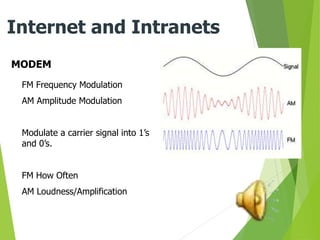
FM Frequency Modulation
AM Amplitude Modulation
Modulate a carrier signal into 1’s
and 0’s.
FM How Often
AM Loudness/Amplification
ROUTER
Internet and Intranets
A router is a device that has an IP address.
Computers can then connect to it using this
address. It then forward links onto another
communications device that can access the
internet.
SWITCH
Internet and Intranets
A switch is used to connect
different network segments.
A network segment is a set
of computers all connected
together.
Like an intelligent hub.
A Network HUB
Internet and Intranets
A device that connects computers together and
can link them all on to another device.
HARDWARE
Internet and Intranets
Order of devices
A modem is always first. It is the connection to the telephone or data
communications line.
Routers, hubs and switches can be plugged into each other in any
direction. But usually in the order of Router, Switch, Hub.
Telephone or Data Communications Lines
Internet and Intranets
To connect to the internet you need a link to it.
This link can be
BROADBAND
ADSL or DSL
DIAL UP
ISDN
Types of Line
Internet and Intranets
BROADBAND – Handles a broad band of frequencies (TV, Voice, Data)
DSL is Digital subscribers line (Voice and data)
DIAL-UP is maximum of 56k (Data)
ISDN is Integrated Services Digital Network (Voice, Data, Video)
Other ways to connect to the internet (HARDWARE)
Internet and Intranets
What is there ?
• Smart phone using 3G or 4g
• USB ADSL dongle that connects to a service provider network
ISP – Internet Service Providers
Internet and Intranets
What are they ?
Who are they ?
What do they do ?
An ISP sells Internet access to companies and
individuals.
It provides web servers which connect to the
Internet.
An ISP will provide it’s customers with a wide range
of services…
Cable Television/Telephone services
Bandwidth options.
Email service.
Web Hosting.
Online and Telephone assistance.
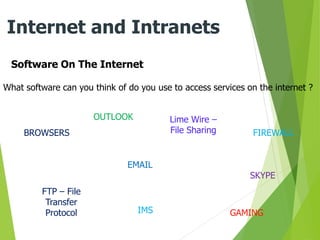
Software On The Internet
Internet and Intranets
What software can you think of do you use to access services on the internet ?
BROWSERS
EMAIL
Lime Wire –
File Sharing
SKYPE
GAMING
FTP – File
Transfer
Protocol IMS
OUTLOOK
FIREWALL
STOP
Complete questionnaire 1.1
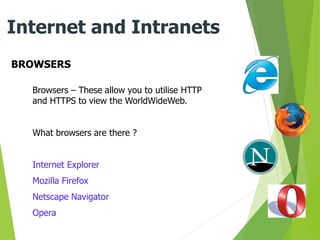
BROWSERS
Internet and Intranets
Browsers – These allow you to utilise HTTP
and HTTPS to view the WorldWideWeb.
What browsers are there ?
Internet Explorer
Mozilla Firefox
Netscape Navigator
Opera
FTP
Internet and Intranets
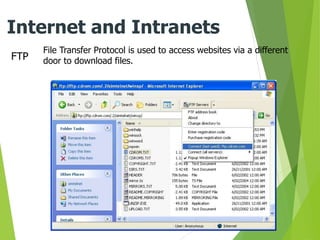
File Transfer Protocol is used to access websites via a different
door to download files.
EMAIL
Internet and Intranets
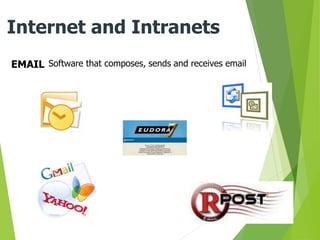
Software that composes, sends and receives email
SKYPE
Internet and Intranets
• Telephone calls can be made over the internet using
VOIP
• VOIP is ‘Voice Over Internet Protocol’
• A popular service that does this is SKYPE
• This also includes video calls if a web cam is available.
GAMING
Internet and Intranets
Accessing games
FILESHARING
Internet and Intranets
• It is possible to share files over the internet
• DropBox is a popular service where files can be uploaded
to let others download them
BROWSER FACILITIES OR FUNCTIONS
Internet and Intranets
What facilities do browsers have available to use ?
Types of Line
Internet and Intranets
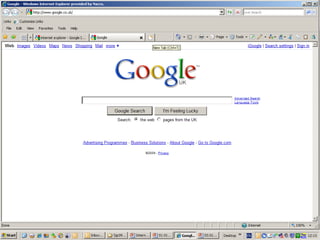
Browsers
BROWSER FACILITIES
Internet and Intranets
Navigation, forward and back.
Home
Tabbed browsing
Stop
Refresh
WWW Address bar
Print
Favourites
Windows Search
Access to Search Engines and
Webpages
HyperLinks – HyperText
Browser History
RECAP
Internet and Intranets
In this session we have learnt about
Internet and its uses
Intranets
Connection hardware – Modems Switches Routers Hubs
Connection Lines – ADSL DSL ISDN DIAL-UP
Other hardware methods of connecting Dongles PDAs
ISP – Internet Service Providers
Software used to access the services on the internet Email Browsers FTP
STOP
Complete questionnaire 1.2
Internet Security Risks ?
Internet and Intranets
What risks are there in using the internet
Downloading
Entering Personal Details
Online Banking
Buying Items Off The Internet
Sending Emails
Uploading Files
RISKS !!!
Internet and Intranets
Viruses, attack, hacking,
identity theft, fraud, getting
passwords, stealing bank
details, intercepting emails,
theft of data, posting
unwanted videos, posting
unwanted text………..
RISK PREVENTION
Internet and Intranets
What do you need to do to minimise some or all of the risk when
accessing the internet ?
FIREWALL
VIRUS SCANNER
INSTALL ADWARE AND MALWARE SCANNERS
BE AWARE OF EMAIL SCAMS
BE CAREFUL WHEN USING PAYMENT SITES
BE CAREFUL DOWNLOADING AND UPLOADING
USE COMPLEX PASSWORDS
RECAP
Internet and Intranets
In this session we have learnt about
Internet Security Risks
Attack, Viruses, Hacking, Fraud, Theft, Email scams
What Do These Risks Involve
Viruses can scan your machine and delete your data or your passwords.
Email scams can steal your personal details
Risk prevention
Firewalls Virus scanners Malware Adware Be aware of what sites you visit
and the files you download.
STOP
Complete questionnaire 1.4
LAWS AND GUIDELINES ON THE USE OF IT
Internet and Intranets
It is going to be your task to find out what laws and guidelines
there are to using IT.
You will need to produce worksheets outlining the main headings of
guidelines and laws that exist for the day to day use of computers
and IT.
http://www.bbc.co.uk/guidelines/editorialguidelines/onguide/thelaw/lawontheinterne.shtml
3 Major Headings For ICT and The Law
Internet and Intranets
Data Protection Act (1998)
Computer Misuse Act (1990)
Copyright, Design and Patents Act (1988)
Some Things To Be Aware Of
Internet and Intranets
Copyright
Protecion of Use of Information
Sharing Information
Obscene Publications
Internet Privacy
Data Privacy
CD’s DVD’s Films Filesharing
Fraud
Posting Unwanted files and
photos
CCTV
Fraudulent Use of Data
Access to your data
Hacking and Accessing
Information
Planting viruses and Malware
Deleting Files
Blackmail
STOP
Complete questionnaire 1.5
Laws and Guidelines
Health and Safety
When Using ICT
Internet and Intranets
There are rules and guidelines that govern
your health and safety when using ICT.
Internet and Intranets
STOP
Complete questionnaire 1.5
Health and Safety
Information and Opportunities Available Using the Internet.
Internet and Intranets
Email FTP HTTP HTML
Job Searches research MP3 Video Telephone
Downloads Software Games Images
STOP!
HOW CAN YOU USED INTERNET
AND INTRANETS TO ADVANCE
YOUR BUSINESS?
THANK YOU FOR YOUR KIND
ATTENTION !

Introduction to Internets and Intranets.ppt

  • 1.
  • 2.
    In this sessionour learning objectives are Internet and Intranets * Internet and Intranets * Connection Methods - Hardware - Software - Connections * Browsers * Information and opportunities Internet and Intranets offer * Internet Security Risks * Laws and Guidelines that affect the use of IT.
  • 3.
    The Internet Internet andIntranets The Internet is ? A worldwide interconnection of computers and networks that use the protocol IP. It allows for WWW, FTP, VoIP, Gaming, Filesharing, video, email.
  • 4.
    Uses for theinternet Internet and Intranets - WWW or HTTP Hyper Text Transfer Protocol - Email – Outlook, Yahoo, Googlemail - FTP File Transfer Protocol - Gaming - Video On Demand - Voice Over IP – Telephone Services - File Sharing
  • 5.
    INTRANETS Internet and Intranets Whatis an intranet ? It is an internal website that is setup internally for companies and can be accessed by employees for the purpose of standard documents or information and many items of information and data. INTERNAL WEBSITE WITHIN A COMPANY ACCESSED BY EMPLOYEES
  • 6.
    Connection to theinternet - Hardware Internet and Intranets What do we need to connect to the internet ? • Computer or smart phone • Network hub if part of a network • A wireless enabled Router if using WiFi • ADSL or cable modem • An Internet Service Provider
  • 7.
    MODEM Internet and Intranets MODulator-DEModulator Convertsdigital 1’s and 0’s Into analogue waves. Allows computers to talk over phone lines. It connects directly to the communications line. It is always the first device connected to the communications line.
  • 8.
    Internet and Intranets MODEM FMFrequency Modulation AM Amplitude Modulation Modulate a carrier signal into 1’s and 0’s. FM How Often AM Loudness/Amplification
  • 9.
    ROUTER Internet and Intranets Arouter is a device that has an IP address. Computers can then connect to it using this address. It then forward links onto another communications device that can access the internet.
  • 10.
    SWITCH Internet and Intranets Aswitch is used to connect different network segments. A network segment is a set of computers all connected together. Like an intelligent hub.
  • 11.
    A Network HUB Internetand Intranets A device that connects computers together and can link them all on to another device.
  • 12.
    HARDWARE Internet and Intranets Orderof devices A modem is always first. It is the connection to the telephone or data communications line. Routers, hubs and switches can be plugged into each other in any direction. But usually in the order of Router, Switch, Hub.
  • 13.
    Telephone or DataCommunications Lines Internet and Intranets To connect to the internet you need a link to it. This link can be BROADBAND ADSL or DSL DIAL UP ISDN
  • 14.
    Types of Line Internetand Intranets BROADBAND – Handles a broad band of frequencies (TV, Voice, Data) DSL is Digital subscribers line (Voice and data) DIAL-UP is maximum of 56k (Data) ISDN is Integrated Services Digital Network (Voice, Data, Video)
  • 15.
    Other ways toconnect to the internet (HARDWARE) Internet and Intranets What is there ? • Smart phone using 3G or 4g • USB ADSL dongle that connects to a service provider network
  • 16.
    ISP – InternetService Providers Internet and Intranets What are they ? Who are they ? What do they do ? An ISP sells Internet access to companies and individuals. It provides web servers which connect to the Internet. An ISP will provide it’s customers with a wide range of services… Cable Television/Telephone services Bandwidth options. Email service. Web Hosting. Online and Telephone assistance.
  • 17.
    Software On TheInternet Internet and Intranets What software can you think of do you use to access services on the internet ? BROWSERS EMAIL Lime Wire – File Sharing SKYPE GAMING FTP – File Transfer Protocol IMS OUTLOOK FIREWALL
  • 18.
  • 19.
    BROWSERS Internet and Intranets Browsers– These allow you to utilise HTTP and HTTPS to view the WorldWideWeb. What browsers are there ? Internet Explorer Mozilla Firefox Netscape Navigator Opera
  • 20.
    FTP Internet and Intranets FileTransfer Protocol is used to access websites via a different door to download files.
  • 21.
    EMAIL Internet and Intranets Softwarethat composes, sends and receives email
  • 22.
    SKYPE Internet and Intranets •Telephone calls can be made over the internet using VOIP • VOIP is ‘Voice Over Internet Protocol’ • A popular service that does this is SKYPE • This also includes video calls if a web cam is available.
  • 23.
  • 24.
    FILESHARING Internet and Intranets •It is possible to share files over the internet • DropBox is a popular service where files can be uploaded to let others download them
  • 25.
    BROWSER FACILITIES ORFUNCTIONS Internet and Intranets What facilities do browsers have available to use ?
  • 26.
    Types of Line Internetand Intranets Browsers
  • 27.
    BROWSER FACILITIES Internet andIntranets Navigation, forward and back. Home Tabbed browsing Stop Refresh WWW Address bar Print Favourites Windows Search Access to Search Engines and Webpages HyperLinks – HyperText Browser History
  • 28.
    RECAP Internet and Intranets Inthis session we have learnt about Internet and its uses Intranets Connection hardware – Modems Switches Routers Hubs Connection Lines – ADSL DSL ISDN DIAL-UP Other hardware methods of connecting Dongles PDAs ISP – Internet Service Providers Software used to access the services on the internet Email Browsers FTP
  • 29.
  • 30.
    Internet Security Risks? Internet and Intranets What risks are there in using the internet Downloading Entering Personal Details Online Banking Buying Items Off The Internet Sending Emails Uploading Files
  • 31.
    RISKS !!! Internet andIntranets Viruses, attack, hacking, identity theft, fraud, getting passwords, stealing bank details, intercepting emails, theft of data, posting unwanted videos, posting unwanted text………..
  • 32.
    RISK PREVENTION Internet andIntranets What do you need to do to minimise some or all of the risk when accessing the internet ? FIREWALL VIRUS SCANNER INSTALL ADWARE AND MALWARE SCANNERS BE AWARE OF EMAIL SCAMS BE CAREFUL WHEN USING PAYMENT SITES BE CAREFUL DOWNLOADING AND UPLOADING USE COMPLEX PASSWORDS
  • 33.
    RECAP Internet and Intranets Inthis session we have learnt about Internet Security Risks Attack, Viruses, Hacking, Fraud, Theft, Email scams What Do These Risks Involve Viruses can scan your machine and delete your data or your passwords. Email scams can steal your personal details Risk prevention Firewalls Virus scanners Malware Adware Be aware of what sites you visit and the files you download.
  • 34.
  • 35.
    LAWS AND GUIDELINESON THE USE OF IT Internet and Intranets It is going to be your task to find out what laws and guidelines there are to using IT. You will need to produce worksheets outlining the main headings of guidelines and laws that exist for the day to day use of computers and IT. http://www.bbc.co.uk/guidelines/editorialguidelines/onguide/thelaw/lawontheinterne.shtml
  • 36.
    3 Major HeadingsFor ICT and The Law Internet and Intranets Data Protection Act (1998) Computer Misuse Act (1990) Copyright, Design and Patents Act (1988)
  • 37.
    Some Things ToBe Aware Of Internet and Intranets Copyright Protecion of Use of Information Sharing Information Obscene Publications Internet Privacy Data Privacy CD’s DVD’s Films Filesharing Fraud Posting Unwanted files and photos CCTV Fraudulent Use of Data Access to your data Hacking and Accessing Information Planting viruses and Malware Deleting Files Blackmail
  • 38.
  • 39.
    Health and Safety WhenUsing ICT Internet and Intranets There are rules and guidelines that govern your health and safety when using ICT.
  • 40.
  • 41.
  • 42.
    Information and OpportunitiesAvailable Using the Internet. Internet and Intranets Email FTP HTTP HTML Job Searches research MP3 Video Telephone Downloads Software Games Images
  • 43.
    STOP! HOW CAN YOUUSED INTERNET AND INTRANETS TO ADVANCE YOUR BUSINESS?
  • 44.
    THANK YOU FORYOUR KIND ATTENTION !