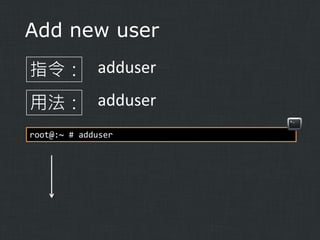
Username: egg
Full name:egg
Uid (Leave empty for default ):
Login group [egg]:
Login group is egg. Invite egg into other
groups? [ ]:
Login class [default]:
Shell (sh csh tcsh nologin) [sh]: csh
Home directory [/home/egg]:
Home directory permissions (Leave empty for
default):
Use password-based authentication? [yes]:
Use an empty password? (yes/no) [no]:
Use a random password? (yes/no) [no]:
Enter password:
Enter password again:
Lock out the accout after creation? [no]:
Username
: egg
Password
: *****
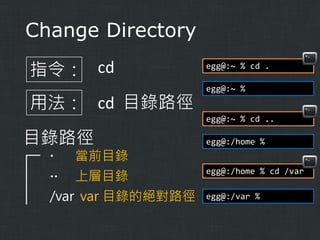
..
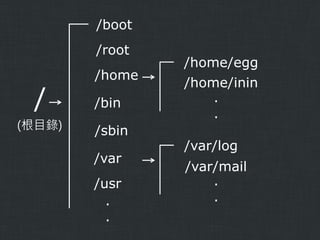
/
Home
Group
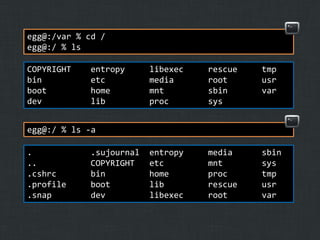
egg@:/var % cd/
egg@:/ % ls
COPYRIGHT
bin
boot
dev
entropy
etc
home
lib
libexec
media
mnt
proc
rescue
root
sbin
sys
tmp
usr
var
entropy
etc
home
lib
libexec
media
mnt
proc
rescue
root
sbin
sys
tmp
usr
var
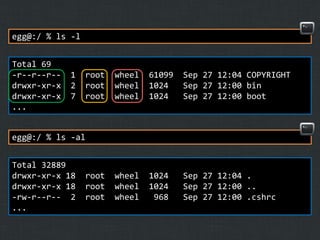
egg@:/ % ls -a
.
..
.cshrc
.profile
.snap
.sujournal
COPYRIGHT
bin
boot
dev
Change file owner
指令:chown
用法: chown (O) [: G] (filename)
root@:/tmp # chown egg about
root@:/tmp # ls -l
total 4
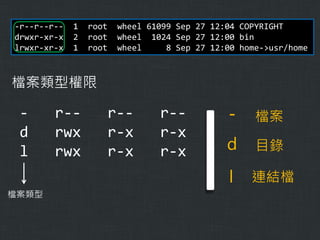
-rwxr--r--
1 egg
wheel
9 Oct 21 13:55 about
root@:/tmp # chown egg:egg about
root@:/tmp # ls -l
total 4
-rwxr--r--
1 egg
egg
9 Oct 21 13:55 about
51.
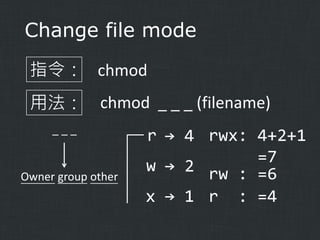
Change file mode
指令:chmod
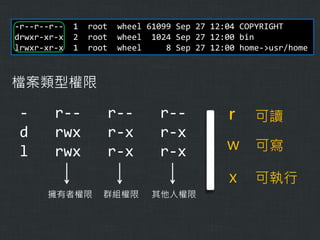
用法: chmod _ _ _ (filename)
___
Owner group other
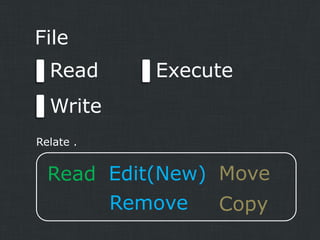
r → 4 rwx: 4+2+1
=7
w → 2 rw : =6
x → 1 r : =4
52.
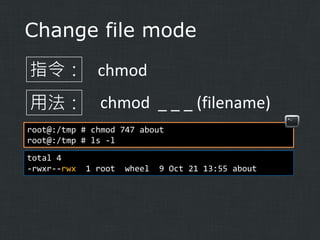
Change file mode
指令:chmod
用法: chmod _ _ _ (filename)
root@:/tmp # chmod 747 about
root@:/tmp # ls -l
total 4
-rwxr--rwx
1 root
wheel
9 Oct 21 13:55 about

![Change password
指令: passwd
用法: passwd [user]
root@:~ # passwd root
Changing local password for root
New Password:
Retype New Password:
root@:~ #](https://image.slidesharecdn.com/introductiontofreebsdcommands-131021103325-phpapp01/85/Introduction-to-FreeBSD-commands-17-320.jpg)
![Username: egg
Full name: egg
Uid (Leave empty for default ):
Login group [egg]:
Login group is egg. Invite egg into other
groups? [ ]:
Login class [default]:
Shell (sh csh tcsh nologin) [sh]: csh
Home directory [/home/egg]:
Home directory permissions (Leave empty for
default):
Use password-based authentication? [yes]:
Use an empty password? (yes/no) [no]:
Use a random password? (yes/no) [no]:
Enter password:
Enter password again:
Lock out the accout after creation? [no]:
Username
: egg
Password
: *****
..
/
Home
Group](https://image.slidesharecdn.com/introductiontofreebsdcommands-131021103325-phpapp01/85/Introduction-to-FreeBSD-commands-21-320.jpg)

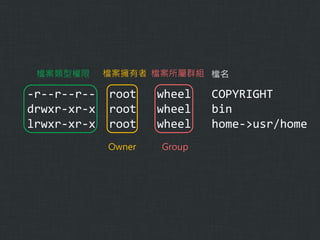
![List (directory contents)
指令: ls
用法: ls [ -al ]
選項與參數
-a
全部的檔案,連同隱藏檔 ( 開頭為 . 的檔案 )
-l
列出長資料串,包含檔案屬性與權限等](https://image.slidesharecdn.com/introductiontofreebsdcommands-131021103325-phpapp01/85/Introduction-to-FreeBSD-commands-29-320.jpg)

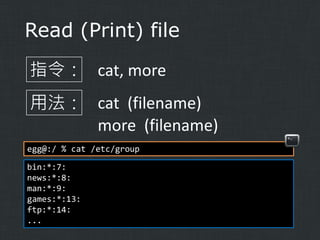
![Read (Print) file
more
可翻頁檢視
egg@:/ % more /etc/group
# $FreeBSD: (...)
#
wheel:*:0:root
daemon:*:1:
kmem:*:2:
sys:*:3:
tty:*:4:
...
--More--(74%)
[space] 向下翻一頁
/字串
向下搜尋
"字串"
這個關鍵字
q
離開](https://image.slidesharecdn.com/introductiontofreebsdcommands-131021103325-phpapp01/85/Introduction-to-FreeBSD-commands-39-320.jpg)
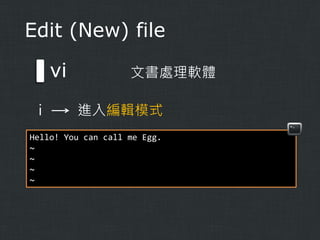
![Edit (New) file
指令: vi
用法: vi [filename]
egg@:/ % cd ~
egg@:~ % vi test
~
~
~
~](https://image.slidesharecdn.com/introductiontofreebsdcommands-131021103325-phpapp01/85/Introduction-to-FreeBSD-commands-40-320.jpg)
![Edit (New) file
vi
文書處理軟體
i
編輯模式
一般模式
[Esc]
:
指令列模式](https://image.slidesharecdn.com/introductiontofreebsdcommands-131021103325-phpapp01/85/Introduction-to-FreeBSD-commands-41-320.jpg)
![Edit (New) file
vi
文書處理軟體
[Esc]
進入一般模式
← ↓ ↑ →
h
j
k
l
d 刪除
d3l 向右刪除3個字元
dd 刪除一整列
yy 複製一列
p 貼上](https://image.slidesharecdn.com/introductiontofreebsdcommands-131021103325-phpapp01/85/Introduction-to-FreeBSD-commands-43-320.jpg)
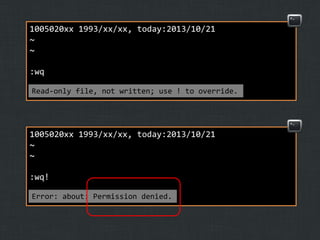
![Edit (New) file
vi
:
文書處理軟體
進入指令列模式
:w 將資料寫入檔案
:q
離開 vi
:q! 已修改檔案,但不想儲存,強制離開
:w [filename]
將資料儲存成另一個檔案,
檔名為 "filename"](https://image.slidesharecdn.com/introductiontofreebsdcommands-131021103325-phpapp01/85/Introduction-to-FreeBSD-commands-44-320.jpg)

![Change file owner
指令: chown
用法: chown (O) [: G] (filename)
root@:/tmp # chown egg about
root@:/tmp # ls -l
total 4
-rwxr--r--
1 egg
wheel
9 Oct 21 13:55 about
root@:/tmp # chown egg:egg about
root@:/tmp # ls -l
total 4
-rwxr--r--
1 egg
egg
9 Oct 21 13:55 about](https://image.slidesharecdn.com/introductiontofreebsdcommands-131021103325-phpapp01/85/Introduction-to-FreeBSD-commands-50-320.jpg)


![Display manual pages
指令: man
用法: man (command)
root@:/ # man ls
Name
ls -- list directory contents
SYNOPSIS
ls [-A...]
...](https://image.slidesharecdn.com/introductiontofreebsdcommands-131021103325-phpapp01/85/Introduction-to-FreeBSD-commands-57-320.jpg)

![Close down the system
指令: shutdown
用法: shutdown [-p] time
選項與參數
-p halt, power off
root@:/ # shutdown –p now](https://image.slidesharecdn.com/introductiontofreebsdcommands-131021103325-phpapp01/85/Introduction-to-FreeBSD-commands-59-320.jpg)