BUG处理方法
根据Oracle MOS文档内容[ID 880149.1]
1. Open a new shell and set the Application environment using command :
APPS<CONTEXT_NAME>.env
[oracle@ebsr12 ~]$ source /home/oracle/.app
2. Execute the following commands:
= To reload XML
adjava ‐ms128m ‐mx256m ‐nojit oracle.apps.xdo.oa.util.XDOLoader UPLOAD
‐DB_USERNAME <apps_un> ‐DB_PASSWORD <apps_pw> ‐JDBC_CONNECTION
"(DESCRIPTION=(ADDRESS_LIST=(LOAD_BALANCE=YES)(FAILOVER=YES)(ADDRESS=(PR
OTOCOL
=tcp)(HOST=<your hostname with domain>)(PORT=<your
port>)))(CONNECT_DATA=(SID=<your sid>)))"
‐LOB_TYPE DATA_TEMPLATE ‐APPS_SHORT_NAME OFA ‐LOB_CODE FADTXD ‐
LANGUAGE 00
‐XDO_FILE_TYPE XML‐DATA‐TEMPLATE ‐FILE_NAME
$FA_TOP/patch/115/publisher/defs/FADTXD.xml
http://www.ochef.net 37
38.
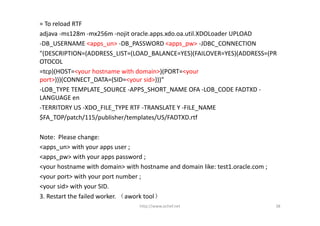
= To reload RTF
adjava ‐ms128m ‐mx256m ‐nojit oracle.apps.xdo.oa.util.XDOLoaderUPLOAD
‐DB_USERNAME <apps_un> ‐DB_PASSWORD <apps_pw> ‐JDBC_CONNECTION
"(DESCRIPTION=(ADDRESS_LIST=(LOAD_BALANCE=YES)(FAILOVER=YES)(ADDRESS=(PR
OTOCOL
=tcp)(HOST=<your hostname with domain>)(PORT=<your
port>)))(CONNECT_DATA=(SID=<your sid>)))"
‐LOB_TYPE TEMPLATE_SOURCE ‐APPS_SHORT_NAME OFA ‐LOB_CODE FADTXD ‐
LANGUAGE en
‐TERRITORY US ‐XDO_FILE_TYPE RTF ‐TRANSLATE Y ‐FILE_NAME
$FA_TOP/patch/115/publisher/templates/US/FADTXD.rtf
Note: Please change:
<apps_un> with your apps user ;
<apps_pw> with your apps password ;
<your hostname with domain> with hostname and domain like: test1.oracle.com ;
<your port> with your port number ;
<your sid> with your SID.
3. Restart the failed worker. (awork tool)
http://www.ochef.net 38

![My Environment:
Linux Version:
[root@ebsr12 ~]# cat /etc/issue
Oracle Linux Server release 5.6
[root@ebsr12 ~]# cat /etc/redhat‐release
Red Hat Enterprise Linux Server release 5.6 (Tikanga)
[root@ebsr12 ~]# cat /etc/oracle‐release
Oracle Linux Server release 5.6
Kernel Version:
[root@ebsr12 ~]# uname ‐r
2.6.18‐238.el5PAE
Hardware:
IBM X3650 M2:7GB Memory 、 7 CPU @2.27GHz
IBM DS4800 Storage:500GB Disk
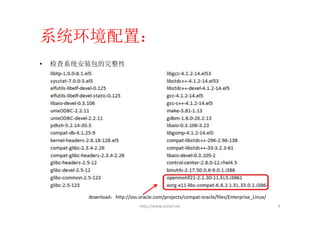
http://www.ochef.net 2](https://image.slidesharecdn.com/installoracleebsr12-1-1onoel5-6x86includedemo-110414075921-phpapp01/85/Install-oracle-ebs-r12-1-1-on-OEL5-6-x86-include-demo-2-320.jpg)
![Disk space:
[root@ebsr12 ~]# df ‐h
Filesystem Size Used Avail Use% Mounted on
/dev/mapper/EBSVG‐LV01 9.7G 2.1G 7.2G 23% /
/dev/mapper/EBSVG‐LV04 382G 227G 135G 63% /d01
/dev/mapper/EBSVG‐LV03 97G 52G 41G 57% /src
/dev/sda1 99M 13M 82M 14% /boot
tmpfs 3.5G 0 3.5G 0% /dev/shm
说明:/src用于存放安装文件、补丁和简体中文语言包。全部解压后52GB(包括补丁)。
/d01用于安装Oracle EBS R12。若要安装VIS Demo,需要227GB
强烈建议使用linux LVM来管理空间,在空间不够的情况下可以灵活增、减空间。
http://www.ochef.net 3](https://image.slidesharecdn.com/installoracleebsr12-1-1onoel5-6x86includedemo-110414075921-phpapp01/85/Install-oracle-ebs-r12-1-1-on-OEL5-6-x86-include-demo-3-320.jpg)
![• 系统主机名配置
[root@ebsr12 ~]# cat /etc/hosts
# Do not remove the following line, or various programs
# that require network functionality will fail.
127.0.0.1 localhost.localdomain localhost
192.168.0.212 ebsr12.kimo.com ebsr12
::1 localhost6.localdomain6 localhost6
[root@ebsr12 ~]# cat /etc/sysconfig/network
NETWORKING=yes
NETWORKING_IPV6=no
HOSTNAME=ebsr12.kimo.com
GATEWAY=192.168.0.1
ping测试网络。
http://www.ochef.net 5](https://image.slidesharecdn.com/installoracleebsr12-1-1onoel5-6x86includedemo-110414075921-phpapp01/85/Install-oracle-ebs-r12-1-1-on-OEL5-6-x86-include-demo-5-320.jpg)
![• 系统参数调整:
[root@ebsr12 ~]# vi /etc/sysctl.conf
kernel.msgmnb = 65536
kernel.msgmax = 8192
kernel.shmmax = 4294967296
kernel.shmall = 2097152
kernel.sem = 256 32000 100 142
kernel.shmmni = 4096
kernel.msgmni = 2878
fs.file‐max = 131072
net.ipv4.ip_local_port_range = 10000 65000
net.core.rmem_default = 262144
net.core.rmem_max = 4194304
net.core.wmem_default = 262144
net.core.wmem_max = 262144
修改立即生效
# sysctl ‐p
http://www.ochef.net 6](https://image.slidesharecdn.com/installoracleebsr12-1-1onoel5-6x86includedemo-110414075921-phpapp01/85/Install-oracle-ebs-r12-1-1-on-OEL5-6-x86-include-demo-6-320.jpg)
![[root@ebsr12 ~]# vi /etc/resolv.conf
append :
options attempts:5options timeout:15
[root@ebsr12 ~]# vi /etc/security/limits.conf
append:
hard nofile 65535
soft nofile 4096
hard nproc 16384
soft nproc 2047
OS Library Patch for Oracle HTTP Server (on Oracle Linux 5 and RHEL 5 only)
Download and apply the patch 6078836 from My Oracle Support to fix an issue with
the Oracle HTTP Server (missing libdb.so.2) bundled with the E‐Business Suite
technology stack.
http://www.ochef.net 7](https://image.slidesharecdn.com/installoracleebsr12-1-1onoel5-6x86includedemo-110414075921-phpapp01/85/Install-oracle-ebs-r12-1-1-on-OEL5-6-x86-include-demo-7-320.jpg)
![修改库文件链接:
[root@ebsr12 ~]# unlink /usr/lib/libXtst.so.6
[root@ebsr12 ~]# ln ‐s /usr/X11R6/lib/libXtst.so.6.1 /usr/lib/libXtst.so.6
创建用户、用户组:
[root@ebsr12 ~]# groupadd oinstall
[root@ebsr12 ~]# groupdd dba
[root@ebsr12 ~]# useradd ‐g oinstall ‐d /home/oracle ‐G dba oracle
[root@ebsr12 ~]# passwd oracle
[root@ebsr12 ~]# chown ‐R oracle.oinstall /src
[root@ebsr12 ~]# chown ‐R oracle.oinstall /d01
http://www.ochef.net 8](https://image.slidesharecdn.com/installoracleebsr12-1-1onoel5-6x86includedemo-110414075921-phpapp01/85/Install-oracle-ebs-r12-1-1-on-OEL5-6-x86-include-demo-8-320.jpg)
![修改oracle用户环境:
[oracle@ebsr12 ~]$ vi /home/oracle/.bash_profile
append:
LD_ASSUME_KERNEL=2.6.18‐238.el5
export LD_ASSUME_KERNEL
建立Oracle产品信息的Inventory目录:
[oracle@ebsr12 ~]$ mkdir /d01/oraInventory
[root@ebsr12 ~]# vi /etc/oraInst.loc
append:
inventory_loc=/d01/oraInventory
http://www.ochef.net 9](https://image.slidesharecdn.com/installoracleebsr12-1-1onoel5-6x86includedemo-110414075921-phpapp01/85/Install-oracle-ebs-r12-1-1-on-OEL5-6-x86-include-demo-9-320.jpg)
![[oracle@ebsr12 ~]$ mkdir ‐p /src/StageR12
[oracle@ebsr12 ~]$ unzip ‐d /src/StageR12/*.zip
(R12的安装文件:B53824‐01到V15574‐01)
全部解压后会自动生创建以下目录:
[oracle@ebsr12 StageR12]$ ls ‐l
drwxr‐xr‐x 70 oracle oinstall 4096 Apr 12 10:47 oraAppDB
drwxr‐xr‐x 14 oracle oinstall 4096 Apr 12 11:32 oraApps
drwxr‐xr‐x 5 oracle oinstall 4096 Apr 11 17:31 oraAS
drwxr‐xr‐x 9 oracle oinstall 4096 Apr 12 11:46 oraDB
drwxr‐xr‐x 6 oracle oinstall 4096 Apr 11 17:15 startCD
http://www.ochef.net 10](https://image.slidesharecdn.com/installoracleebsr12-1-1onoel5-6x86includedemo-110414075921-phpapp01/85/Install-oracle-ebs-r12-1-1-on-OEL5-6-x86-include-demo-10-320.jpg)
![Install EBS R12
• 安装startCD补丁
Download: p8639046_R12_GENERIC.zip TO /src/StageR12
解压缩覆盖原有startCD
[oracle@ebsr12 StageR12]$unzip ‐o p8639046_R12_GENERIC.zip
原有startCD的安装向导版本是12.1.1.9,补丁是12.1.1.11的
[oracle@ebsr12 rapidwiz]$ ./RapidWizVersion
Oracle Applications Rapid Install Wizard
Version 12.1.1.11
http://www.ochef.net 11](https://image.slidesharecdn.com/installoracleebsr12-1-1onoel5-6x86includedemo-110414075921-phpapp01/85/Install-oracle-ebs-r12-1-1-on-OEL5-6-x86-include-demo-11-320.jpg)
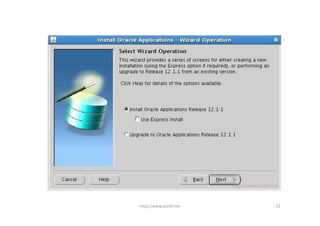
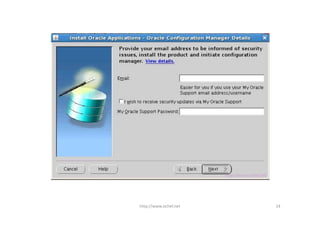
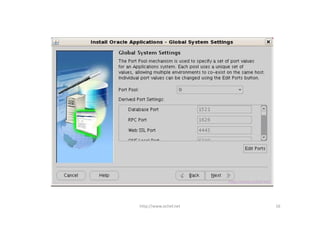
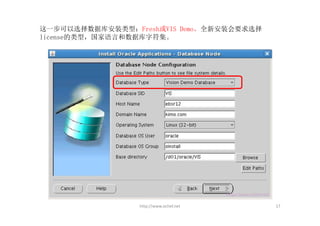
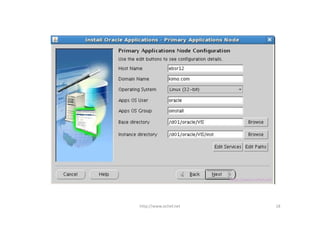
![• 开始安装
[oracle@ebsr12 rapidwiz]$ ./rapidwiz
http://www.ochef.net 12](https://image.slidesharecdn.com/installoracleebsr12-1-1onoel5-6x86includedemo-110414075921-phpapp01/85/Install-oracle-ebs-r12-1-1-on-OEL5-6-x86-include-demo-12-320.jpg)



![安装后环境设置:
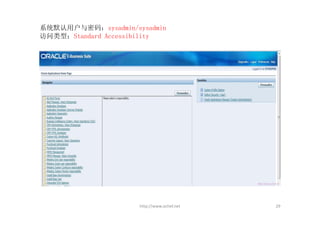
设置数据库用户的环境:
[oracle@ebsr12 ~]$ cp /home/oracle/.bash_profile /home/oracle/.ora
[oracle@ebsr12 ~]$ vi /hme/oracle/.ora
append:
. /d01/oracle/VIS/db/tech_st/11.1.0/VIS_ebsr12.env (注意. /之间的格)
设置应用服务器的环境:
[oracle@ebsr12 ~]$ cp /home/oracle/.bash_profile /home/oracle/.app
[oracle@ebsr12 ~]$ vi /hme/oracle/.app
append:
. /d01/oracle/VIS/apps/apps_st/appl/APPSVIS_ebsr12.env (注意. /之间的格)
http://www.ochef.net 30](https://image.slidesharecdn.com/installoracleebsr12-1-1onoel5-6x86includedemo-110414075921-phpapp01/85/Install-oracle-ebs-r12-1-1-on-OEL5-6-x86-include-demo-30-320.jpg)
![服务的启动与停止操作:
数据库服务 :
[oracle@ebsr12 ~]$ source /home/oracle/.ora
[oracle@ebsr12 ~]$ cd $ORACLE_HOME/appsutil/scripts/VIS_ebsr12/
Listener启动、停止命令语法:
[oracle@ebsr12 VIS_ebsr12]$ ./addlnctl.sh {start|stop|status} listener_name
数据库启动、停止命令语法:
[oracle@ebsr12 VIS_ebsr12]$ ./addbctl.sh [start|stop] {immediate|abort|normal}
Apps服务
[oracle@ebsr12 ~]$ source /home/oracle/.app
[oracle@ebsr12 ~]$ cd /d01/oracle/VIS/inst/apps/VIS_ebsr12/admin/scripts
Apps启动、停止命令语法:
[oracle@ebsr12 scripts]$ ./adstrtal.sh <appsuser_name/apps_password>
http://www.ochef.net 31](https://image.slidesharecdn.com/installoracleebsr12-1-1onoel5-6x86includedemo-110414075921-phpapp01/85/Install-oracle-ebs-r12-1-1-on-OEL5-6-x86-include-demo-31-320.jpg)
![安装简体中文语言包:V16181‐01
设定语言包和基本语言
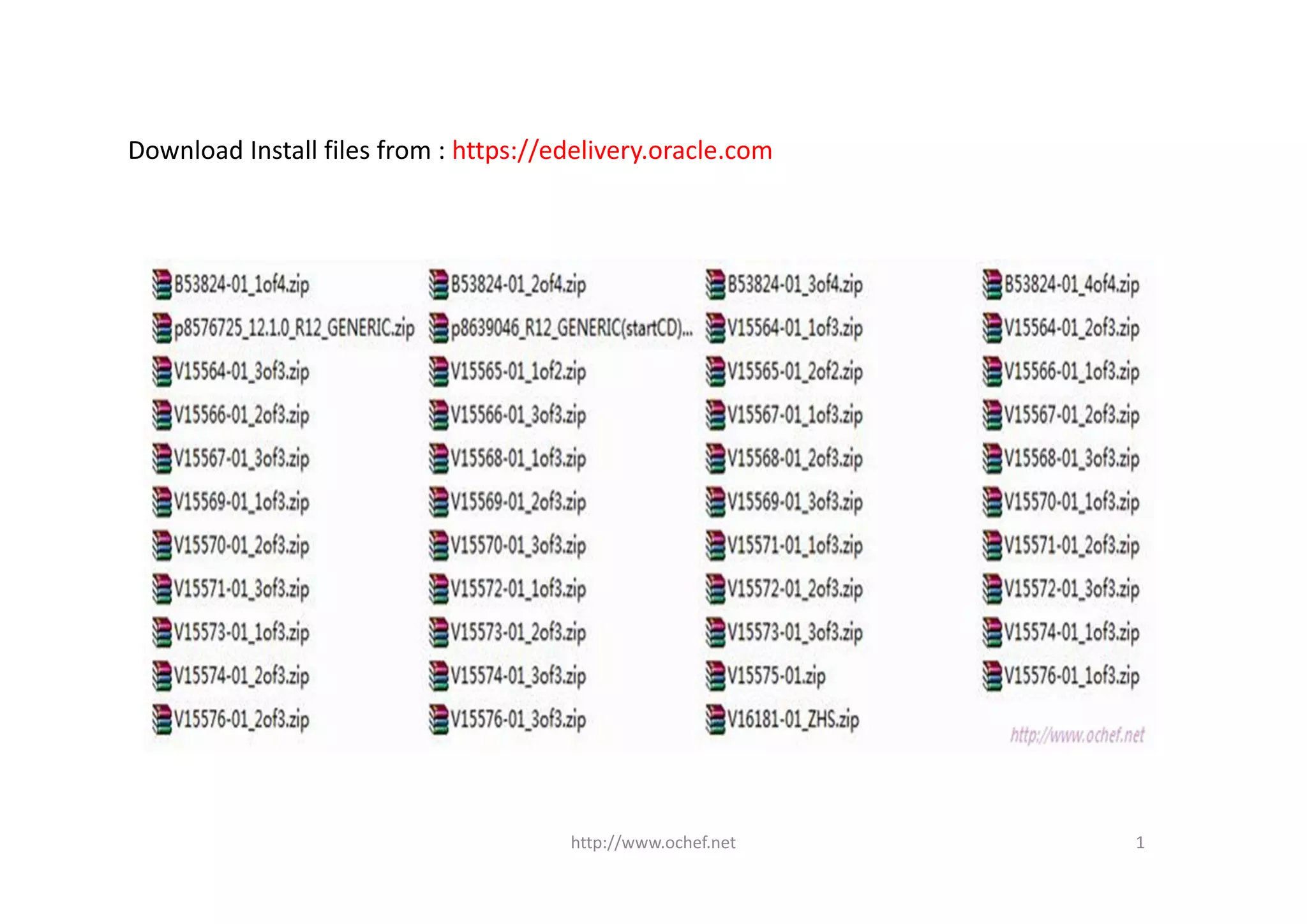
1) 登录EBS系统 http://ebsr12.kimo.com:8000
2) 在左边区域里选择[System Administration],在中间区域选择[License Manager],
然后选择[Languages],单击[EDIT]
3) 英文是默认选项,选择[Simplified Chinese],单击[Next]
4) 选择[Simplified Chinese]为基本语言,设置完成后Submit
http://www.ochef.net 32](https://image.slidesharecdn.com/installoracleebsr12-1-1onoel5-6x86includedemo-110414075921-phpapp01/85/Install-oracle-ebs-r12-1-1-on-OEL5-6-x86-include-demo-32-320.jpg)
![使用AD Utility开启维护模式及多语言表
操作之前停止apps服务
[oracle@ebsr12 ~]$ source /home/oracle/.app
[oracle@ebsr12 ~]$ adadmin
在这期间系统会要求输入一些参数, 除SYSTEM的密码manager, APPS密码apps
外,其它保持默认就可以了。若是全新数据库安装,需要根据实际情况确定。
接着会出现如下的界面:
http://www.ochef.net 33](https://image.slidesharecdn.com/installoracleebsr12-1-1onoel5-6x86includedemo-110414075921-phpapp01/85/Install-oracle-ebs-r12-1-1-on-OEL5-6-x86-include-demo-33-320.jpg)

![安装简体语言包补丁:p8576725_12.1.0_R12_GENERIC.ZIP
该补丁主要解决安装语言包速度过慢的问题。
[oracle@ebsr12 patch]$ unzip p8576725_12.1.0_R12_GENERIC.ZIP
[oracle@ebsr12 ~]$ source /home/oracle/.app
[oracle@ebsr12 ~]$ cd /src/patch/8576725
使用自动补丁工具应用补丁
[oracle@ebsr12 8576725]$ adpatch
在这期间同样会要求你输入一些参数,以上文相同。在要求输入patch文件时,
输入u8576725.drv。等待安装完成,如果报错停止安装了,请检查patch日志,处
理错误后再次应用补丁。
http://www.ochef.net 35](https://image.slidesharecdn.com/installoracleebsr12-1-1onoel5-6x86includedemo-110414075921-phpapp01/85/Install-oracle-ebs-r12-1-1-on-OEL5-6-x86-include-demo-35-320.jpg)
![安装简体语言包
[oracle@ebsr12 ~]$ cd /src/patch
[oracle@ebsr12 patch]$ unzip V16181‐01.ZIP
[oracle@ebsr12 patch]$ cd 6678700_ZHS
[oracle@ebsr12 6678700_ZHS]$ adpatch
在这期间同样会要求你输入一些参数,以上文相同,在要求输入patch文件时,
请输入u6678700.drv。
这一步执行中会遇到BUG,在AD自动补丁工具日志中显示以下内容:
Error in the patch log file :
...
ATTENTION: All workers either have failed or are waiting:
FAILED: file XLIFFLoader.class on worker ....
ATTENTION: Please fix the above failed worker(s) so the manager can continue.
...
http://www.ochef.net 36](https://image.slidesharecdn.com/installoracleebsr12-1-1onoel5-6x86includedemo-110414075921-phpapp01/85/Install-oracle-ebs-r12-1-1-on-OEL5-6-x86-include-demo-36-320.jpg)
![BUG处理方法
根据Oracle MOS文档内容[ID 880149.1]
1. Open a new shell and set the Application environment using command :
APPS<CONTEXT_NAME>.env
[oracle@ebsr12 ~]$ source /home/oracle/.app
2. Execute the following commands:
= To reload XML
adjava ‐ms128m ‐mx256m ‐nojit oracle.apps.xdo.oa.util.XDOLoader UPLOAD
‐DB_USERNAME <apps_un> ‐DB_PASSWORD <apps_pw> ‐JDBC_CONNECTION
"(DESCRIPTION=(ADDRESS_LIST=(LOAD_BALANCE=YES)(FAILOVER=YES)(ADDRESS=(PR
OTOCOL
=tcp)(HOST=<your hostname with domain>)(PORT=<your
port>)))(CONNECT_DATA=(SID=<your sid>)))"
‐LOB_TYPE DATA_TEMPLATE ‐APPS_SHORT_NAME OFA ‐LOB_CODE FADTXD ‐
LANGUAGE 00
‐XDO_FILE_TYPE XML‐DATA‐TEMPLATE ‐FILE_NAME
$FA_TOP/patch/115/publisher/defs/FADTXD.xml
http://www.ochef.net 37](https://image.slidesharecdn.com/installoracleebsr12-1-1onoel5-6x86includedemo-110414075921-phpapp01/85/Install-oracle-ebs-r12-1-1-on-OEL5-6-x86-include-demo-37-320.jpg)
![Awoker管理工具:
[oracle@ebsr12 ~]$ source /home/oracle/.app
[oracle@ebsr12 ~]$ adctrl
剩下的工作就是漫长的等待直到结束。
http://www.ochef.net 39](https://image.slidesharecdn.com/installoracleebsr12-1-1onoel5-6x86includedemo-110414075921-phpapp01/85/Install-oracle-ebs-r12-1-1-on-OEL5-6-x86-include-demo-39-320.jpg)