PRESENTED BY:-
MASTER LIYAKAT ALI
INTRODUCTIO
N TO
COMPUTER
COMPUTER
Computer is an electronic device which takes data as input,
process on it and give result as output.
IT HAS TWO PARTS-
1. HARDWARE
2. SOFTWARE
PARTS OF COMPUTER
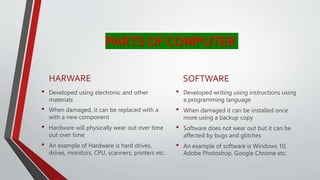
HARWARE
• Developed using electronic and other
materials
• When damaged, it can be replaced with a
with a new component
• Hardware will physically wear out over time
out over time
• An example of Hardware is hard drives,
drives, monitors, CPU, scanners, printers etc.
SOFTWARE
• Developed writing using instructions using
a programming language
• When damaged it can be installed once
more using a backup copy
• Software does not wear out but it can be
affected by bugs and glitches
• An example of software is Windows 10,
Adobe Photoshop, Google Chrome etc.
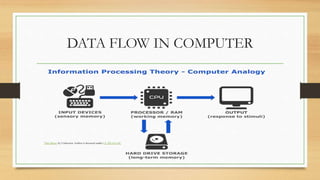
DATA FLOW IN COMPUTER
This Photo by Unknown Author is licensed under CC BY-SA-NC
INPUT DEVICES
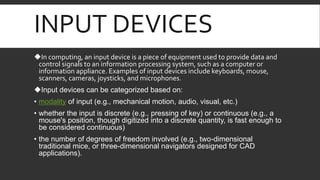
In computing, an input device is a piece of equipment used to provide data and
control signals to an information processing system, such as a computer or
information appliance. Examples of input devices include keyboards, mouse,
scanners, cameras, joysticks, and microphones.
Input devices can be categorized based on:
• modality of input (e.g., mechanical motion, audio, visual, etc.)
• whether the input is discrete (e.g., pressing of key) or continuous (e.g., a
mouse's position, though digitized into a discrete quantity, is fast enough to
be considered continuous)
• the number of degrees of freedom involved (e.g., two-dimensional
traditional mice, or three-dimensional navigators designed for CAD
applications).
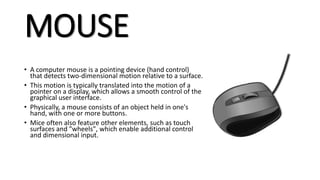
MOUSE
• A computer mouse is a pointing device (hand control)
that detects two-dimensional motion relative to a surface.
• This motion is typically translated into the motion of a
pointer on a display, which allows a smooth control of the
graphical user interface.
• Physically, a mouse consists of an object held in one's
hand, with one or more buttons.
• Mice often also feature other elements, such as touch
surfaces and "wheels", which enable additional control
and dimensional input.
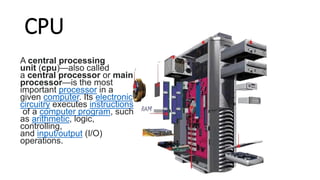
CPU
A central processing
unit (cpu)—also called
a central processor or main
processor—is the most
important processor in a
given computer. Its electronic
circuitry executes instructions
of a computer program, such
as arithmetic, logic,
controlling,
and input/output (I/O)
operations.
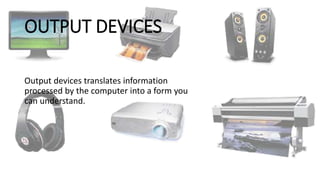
OUTPUT DEVICES
Output devices translates information
processed by the computer into a form you
can understand.
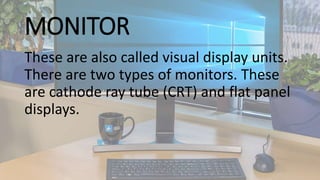
MONITOR
These are also called visual display units.
There are two types of monitors. These
are cathode ray tube (CRT) and flat panel
displays.
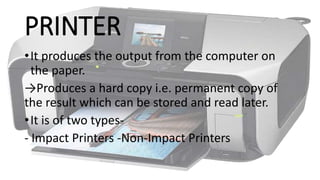
PRINTER
•It produces the output from the computer on
the paper.
→Produces a hard copy i.e. permanent copy of
the result which can be stored and read later.
•It is of two types-
- Impact Printers -Non-Impact Printers
THANK YOU

INTRODUCTION TO COMPUTER.pptx

  • 1.
    PRESENTED BY:- MASTER LIYAKATALI INTRODUCTIO N TO COMPUTER
  • 2.
    COMPUTER Computer is anelectronic device which takes data as input, process on it and give result as output. IT HAS TWO PARTS- 1. HARDWARE 2. SOFTWARE
  • 3.
    PARTS OF COMPUTER HARWARE •Developed using electronic and other materials • When damaged, it can be replaced with a with a new component • Hardware will physically wear out over time out over time • An example of Hardware is hard drives, drives, monitors, CPU, scanners, printers etc. SOFTWARE • Developed writing using instructions using a programming language • When damaged it can be installed once more using a backup copy • Software does not wear out but it can be affected by bugs and glitches • An example of software is Windows 10, Adobe Photoshop, Google Chrome etc.
  • 4.
    DATA FLOW INCOMPUTER This Photo by Unknown Author is licensed under CC BY-SA-NC
  • 5.
    INPUT DEVICES In computing,an input device is a piece of equipment used to provide data and control signals to an information processing system, such as a computer or information appliance. Examples of input devices include keyboards, mouse, scanners, cameras, joysticks, and microphones. Input devices can be categorized based on: • modality of input (e.g., mechanical motion, audio, visual, etc.) • whether the input is discrete (e.g., pressing of key) or continuous (e.g., a mouse's position, though digitized into a discrete quantity, is fast enough to be considered continuous) • the number of degrees of freedom involved (e.g., two-dimensional traditional mice, or three-dimensional navigators designed for CAD applications).
  • 7.
    MOUSE • A computermouse is a pointing device (hand control) that detects two-dimensional motion relative to a surface. • This motion is typically translated into the motion of a pointer on a display, which allows a smooth control of the graphical user interface. • Physically, a mouse consists of an object held in one's hand, with one or more buttons. • Mice often also feature other elements, such as touch surfaces and "wheels", which enable additional control and dimensional input.
  • 8.
    CPU A central processing unit(cpu)—also called a central processor or main processor—is the most important processor in a given computer. Its electronic circuitry executes instructions of a computer program, such as arithmetic, logic, controlling, and input/output (I/O) operations.
  • 9.
    OUTPUT DEVICES Output devicestranslates information processed by the computer into a form you can understand.
  • 10.
    MONITOR These are alsocalled visual display units. There are two types of monitors. These are cathode ray tube (CRT) and flat panel displays.
  • 11.
    PRINTER •It produces theoutput from the computer on the paper. →Produces a hard copy i.e. permanent copy of the result which can be stored and read later. •It is of two types- - Impact Printers -Non-Impact Printers
  • 12.