
BBIUG
BOSTON
Boston Business Intelligence User Group –
bostonbi.org
INTRODUCTION TO CIS:
Slava Kokaev
Boston Business Intelligence User Group
AZURE STREAM ANALYTICS
Welcome! Thank you for coming Today!
3
Boston Azure Cloud User Group
Let’s Begin Now!
a journey of a thousand miles begins with a single step
About Me
Slava Kokaev
Solution Architect at Slalom
Boston Business Intelligence User Group Leader
Slava Kokaev
I am a bit shy but passionate.
BI Architect Speaker Mentor
Business Intelligence Architect, Mentor and Speaker. I am specializing in Design and Development of the Enterprise Business Intelligence
Systems, Intelligent Applications, Real-Time and Big Data Analytic solutions.
For the past 8 years as Boston Business Intelligence User Group Leader
http://www.meetup.com/Boston-Business-Intelligence/
https://www.linkedin.com/groups/2405400
www.bostonbi.org/blog.aspx
@SlavaKokaev vkokaev@gmail.comhttps://www.linkedin.com/in/kokaev
1
2
3
4
5
6
Today’s
Agenda
Introduction Stream Analytics
What is Stream Analytics and why to use it
Time Management
Performing transformations and computations over streams of events
Key capabilities and benefits
Usage, Scalability, Reliability and Cost
Architecture
High level architecture and brief history
Base concepts
Brief introduction to event hubs
Development process
Configure, Develop and Deploy Streaming Solution
6
Key Takeaways
From todays presentation
7
1
INTRODUCTION
What is Azure Stream Analytics
Microsoft Azure
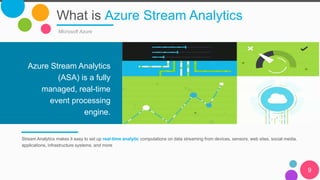
Stream Analytics makes it easy to set up real-time analytic computations on data streaming from devices, sensors, web sites, social media,
applications, infrastructure systems, and more
Azure Stream Analytics
(ASA) is a fully
managed, real-time
event processing
engine.
9
Azure Stream
Analytics
10
Why?
11
12
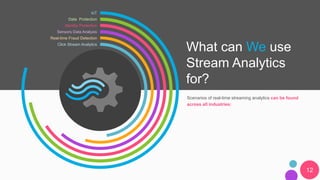
IoT
Identity Protection
Data Protection
Sensors Data Analysis
Real-time Fraud Detection
Click Stream Analytics
What can We use
Stream Analytics
for?
Scenarios of real-time streaming analytics can be found
across all industries:
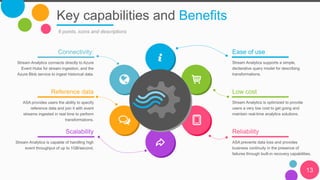
Key capabilities and Benefits
13
6 points, icons and descriptions
Ease of use
Stream Analytics supports a simple,
declarative query model for describing
transformations.
Low cost
Stream Analytics is optimized to provide
users a very low cost to get going and
maintain real-time analytics solutions.
Reliability
ASA prevents data loss and provides
business continuity in the presence of
failures through built-in recovery capabilities.
Connectivity:
Stream Analytics connects directly to Azure
Event Hubs for stream ingestion, and the
Azure Blob service to ingest historical data.
Reference data
ASA provides users the ability to specify
reference data and join it with event
streams ingested in real time to perform
transformations.
Scalability
Stream Analytics is capable of handling high
event throughput of up to 1GB/second.
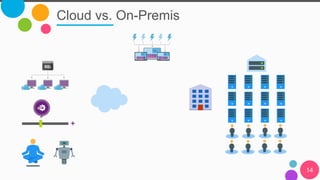
Cloud vs. On-Premis
14
2
ARCHITECTURE
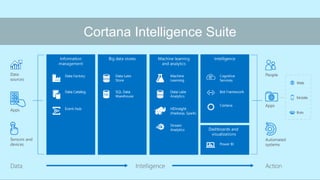
Cortana Intelligence Suite
17
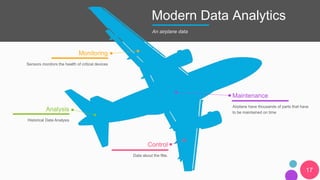
Modern Data Analytics
Monitoring
Sensors monitors the health of critical devices
Analysis
Historical Data Analysis
Maintenance
Airplane have thousands of parts that have
to be maintained on time
Control
Data about the flite.
An airplane data
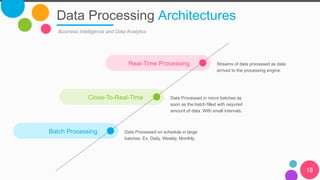
Close-To-Real-Time Data Processed in micro batches as
soon as the batch filled with required
amount of data. With small intervals.
Data Processing Architectures
18
Business Intelligence and Data Analytics
Batch Processing Data Processed on schedule in large
batches. Ex. Daily, Weekly, Monthly.
Real-Time Processing Streams of data processed as data
arrived to the processing engine.
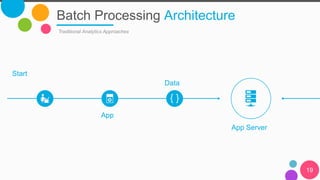
Batch Processing Architecture
Traditional Analytics Approaches
19
Start
App
Data
App Server
20
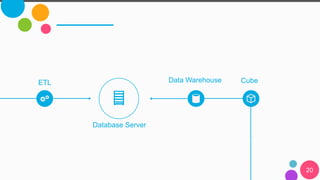
ETL Data Warehouse Cube
Database Server
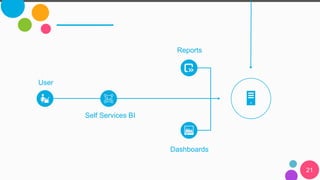
21
User
Reports
Dashboards
Self Services BI
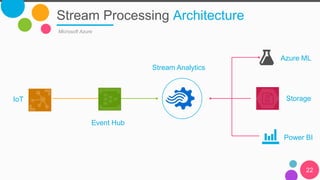
Stream Processing Architecture
Microsoft Azure
22
IoT
Event Hub
Stream Analytics
Storage
Azure ML
Power BI
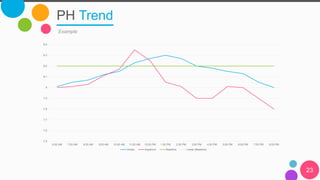
PH Trend
23
Example
7.5
7.6
7.7
7.8
7.9
8
8.1
8.2
8.3
8.4
6:00 AM 7:00 AM 8:00 AM 9:00 AM 10:00 AM 11:00 AM 12:00 PM 1:00 PM 2:00 PM 3:00 PM 4:00 PM 5:00 PM 6:00 PM 7:00 PM 8:00 PM
Ocean Aquarium Baseline Linear (Baseline)
BASE CONCEPTS
Stream Analytics Jobs
25
Components
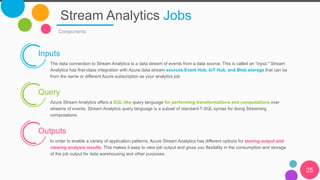
Inputs
The data connection to Stream Analytics is a data stream of events from a data source. This is called an "input." Stream
Analytics has first-class integration with Azure data stream sources Event Hub, IoT Hub, and Blob storage that can be
from the same or different Azure subscription as your analytics job.
Query
Azure Stream Analytics offers a SQL-like query language for performing transformations and computations over
streams of events. Stream Analytics query language is a subset of standard T-SQL syntax for doing Streaming
computations.
Outputs
In order to enable a variety of application patterns, Azure Stream Analytics has different options for storing output and
viewing analysis results. This makes it easy to view job output and gives you flexibility in the consumption and storage
of the job output for data warehousing and other purposes.
Stream Analytics Jobs
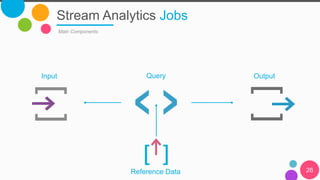
Main Components
26
QueryInput Output
Reference Data
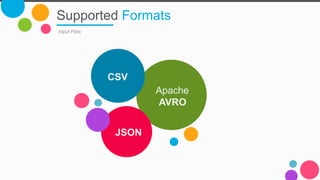
Supported Formats
Input Files
Apache
AVRO
CSV
JSON
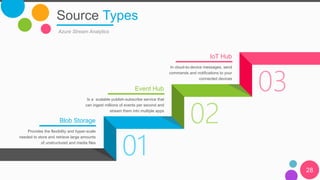
01
02
03
Source Types
28
Azure Stream Analytics
Blob Storage
Provides the flexibility and hyper-scale
needed to store and retrieve large amounts
of unstructured and media files
Event Hub
Is a scalable publish-subscribe service that
can ingest millions of events per second and
stream them into multiple apps
IoT Hub
In cloud-to-device messages, send
commands and notifications to your
connected devices
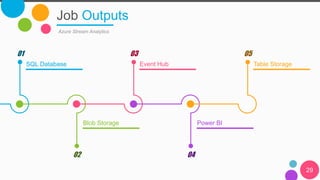
Job Outputs
Azure Stream Analytics
SQL Database
01
Event Hub
03
Table Storage
05
Blob Storage
02
Power BI
04
29
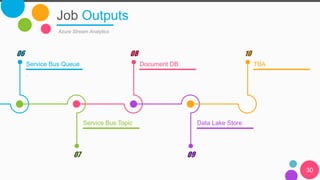
Job Outputs
Azure Stream Analytics
Service Bus Queue
.
06
Document DB
08
TBA
10
Service Bus Topic
07
Data Lake Store
09
30
Query
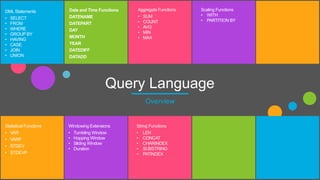
Language Azure Stream Analytics offers a SQL-like query language for
performing transformations and computations over streams of events.
SELECT *
INTO [YourOutputAlias]
FROM [YourInputAlias]
33
Query Language
Overview
DML Statements
• SELECT
• FROM
• WHERE
• GROUP BY
• HAVING
• CASE
• JOIN
• UNION
Date and Time Functions
DATENAME
DATEPART
DAY
MONTH
YEAR
DATEDIFF
DATADD
Aggregate Functions
• SUM
• COUNT
• AVG
• MIN
• MAX
Scaling Functions
• WITH
• PARTITION BY
Statistical Functions
• VAR
• VARP
• STDEV
• STDEVP
Windowing Extensions
• Tumbling Window
• Hopping Window
• Sliding Window
• Duration
String Functions
• LEN
• CONCAT
• CHARINDEX
• SUBSTRING
• PATINDEX
DEVELOPMENT
TIME MANAGEMENT
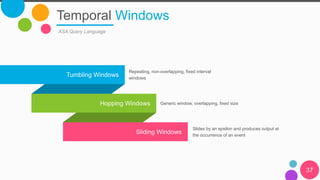
Temporal Windows
37
ASA Query Language
Tumbling Windows
Hopping Windows
Sliding Windows
Repeating, non-overlapping, fixed interval
windows
Generic window, overlapping, fixed size
Slides by an epsilon and produces output at
the occurrence of an event
Thank You!
Any Questions?

Introduction to Azure Stream Analytics

  • 1.
    BBIUG BOSTON Boston Business IntelligenceUser Group – bostonbi.org
  • 2.
    INTRODUCTION TO CIS: SlavaKokaev Boston Business Intelligence User Group AZURE STREAM ANALYTICS
  • 3.
    Welcome! Thank youfor coming Today! 3 Boston Azure Cloud User Group Let’s Begin Now! a journey of a thousand miles begins with a single step
  • 4.
    About Me Slava Kokaev SolutionArchitect at Slalom Boston Business Intelligence User Group Leader
  • 5.
    Slava Kokaev I ama bit shy but passionate. BI Architect Speaker Mentor Business Intelligence Architect, Mentor and Speaker. I am specializing in Design and Development of the Enterprise Business Intelligence Systems, Intelligent Applications, Real-Time and Big Data Analytic solutions. For the past 8 years as Boston Business Intelligence User Group Leader http://www.meetup.com/Boston-Business-Intelligence/ https://www.linkedin.com/groups/2405400 www.bostonbi.org/blog.aspx @SlavaKokaev vkokaev@gmail.comhttps://www.linkedin.com/in/kokaev
  • 6.
    1 2 3 4 5 6 Today’s Agenda Introduction Stream Analytics Whatis Stream Analytics and why to use it Time Management Performing transformations and computations over streams of events Key capabilities and benefits Usage, Scalability, Reliability and Cost Architecture High level architecture and brief history Base concepts Brief introduction to event hubs Development process Configure, Develop and Deploy Streaming Solution 6
  • 7.
  • 8.
  • 9.
    What is AzureStream Analytics Microsoft Azure Stream Analytics makes it easy to set up real-time analytic computations on data streaming from devices, sensors, web sites, social media, applications, infrastructure systems, and more Azure Stream Analytics (ASA) is a fully managed, real-time event processing engine. 9
  • 10.
  • 11.
  • 12.
    12 IoT Identity Protection Data Protection SensorsData Analysis Real-time Fraud Detection Click Stream Analytics What can We use Stream Analytics for? Scenarios of real-time streaming analytics can be found across all industries:
  • 13.
    Key capabilities andBenefits 13 6 points, icons and descriptions Ease of use Stream Analytics supports a simple, declarative query model for describing transformations. Low cost Stream Analytics is optimized to provide users a very low cost to get going and maintain real-time analytics solutions. Reliability ASA prevents data loss and provides business continuity in the presence of failures through built-in recovery capabilities. Connectivity: Stream Analytics connects directly to Azure Event Hubs for stream ingestion, and the Azure Blob service to ingest historical data. Reference data ASA provides users the ability to specify reference data and join it with event streams ingested in real time to perform transformations. Scalability Stream Analytics is capable of handling high event throughput of up to 1GB/second.
  • 14.
  • 15.
  • 16.
  • 17.
    17 Modern Data Analytics Monitoring Sensorsmonitors the health of critical devices Analysis Historical Data Analysis Maintenance Airplane have thousands of parts that have to be maintained on time Control Data about the flite. An airplane data
  • 18.
    Close-To-Real-Time Data Processedin micro batches as soon as the batch filled with required amount of data. With small intervals. Data Processing Architectures 18 Business Intelligence and Data Analytics Batch Processing Data Processed on schedule in large batches. Ex. Daily, Weekly, Monthly. Real-Time Processing Streams of data processed as data arrived to the processing engine.
  • 19.
    Batch Processing Architecture TraditionalAnalytics Approaches 19 Start App Data App Server
  • 20.
    20 ETL Data WarehouseCube Database Server
  • 21.
  • 22.
    Stream Processing Architecture MicrosoftAzure 22 IoT Event Hub Stream Analytics Storage Azure ML Power BI
  • 23.
    PH Trend 23 Example 7.5 7.6 7.7 7.8 7.9 8 8.1 8.2 8.3 8.4 6:00 AM7:00 AM 8:00 AM 9:00 AM 10:00 AM 11:00 AM 12:00 PM 1:00 PM 2:00 PM 3:00 PM 4:00 PM 5:00 PM 6:00 PM 7:00 PM 8:00 PM Ocean Aquarium Baseline Linear (Baseline)
  • 24.
  • 25.
    Stream Analytics Jobs 25 Components Inputs Thedata connection to Stream Analytics is a data stream of events from a data source. This is called an "input." Stream Analytics has first-class integration with Azure data stream sources Event Hub, IoT Hub, and Blob storage that can be from the same or different Azure subscription as your analytics job. Query Azure Stream Analytics offers a SQL-like query language for performing transformations and computations over streams of events. Stream Analytics query language is a subset of standard T-SQL syntax for doing Streaming computations. Outputs In order to enable a variety of application patterns, Azure Stream Analytics has different options for storing output and viewing analysis results. This makes it easy to view job output and gives you flexibility in the consumption and storage of the job output for data warehousing and other purposes.
  • 26.
    Stream Analytics Jobs MainComponents 26 QueryInput Output Reference Data
  • 27.
  • 28.
    01 02 03 Source Types 28 Azure StreamAnalytics Blob Storage Provides the flexibility and hyper-scale needed to store and retrieve large amounts of unstructured and media files Event Hub Is a scalable publish-subscribe service that can ingest millions of events per second and stream them into multiple apps IoT Hub In cloud-to-device messages, send commands and notifications to your connected devices
  • 29.
    Job Outputs Azure StreamAnalytics SQL Database 01 Event Hub 03 Table Storage 05 Blob Storage 02 Power BI 04 29
  • 30.
    Job Outputs Azure StreamAnalytics Service Bus Queue . 06 Document DB 08 TBA 10 Service Bus Topic 07 Data Lake Store 09 30
  • 31.
    Query Language Azure StreamAnalytics offers a SQL-like query language for performing transformations and computations over streams of events. SELECT * INTO [YourOutputAlias] FROM [YourInputAlias] 33
  • 32.
    Query Language Overview DML Statements •SELECT • FROM • WHERE • GROUP BY • HAVING • CASE • JOIN • UNION Date and Time Functions DATENAME DATEPART DAY MONTH YEAR DATEDIFF DATADD Aggregate Functions • SUM • COUNT • AVG • MIN • MAX Scaling Functions • WITH • PARTITION BY Statistical Functions • VAR • VARP • STDEV • STDEVP Windowing Extensions • Tumbling Window • Hopping Window • Sliding Window • Duration String Functions • LEN • CONCAT • CHARINDEX • SUBSTRING • PATINDEX
  • 33.
  • 34.
  • 35.
    Temporal Windows 37 ASA QueryLanguage Tumbling Windows Hopping Windows Sliding Windows Repeating, non-overlapping, fixed interval windows Generic window, overlapping, fixed size Slides by an epsilon and produces output at the occurrence of an event
  • 36.

Editor's Notes

  • #12 From business point of view: Vast amounts of data are flowing at high velocity over the wire today. Organizations that can process and act on this streaming data in real time can dramatically improve efficiencies and differentiate themselves in the market. From technology point of view it is a rapid application development, testability, on demand scalability, very little learning curve, easy maintenance, which ultimately means faster delivery to the market.
  • #13 There is many use cases when a Businesses needs to control, manage their environments and gather insights in real-time to make critical decisions faster and at the right time in response to changes in the business processes and operations.
  • #14 Ease of use: Stream Analytics supports a simple, declarative query model for describing transformations. In order to optimize for ease of use, Stream Analytics uses a SQL variant, and removes the need for customers to deal with the technical complexities of stream processing systems. Using the Stream Analytics query language in the in browser query editor, you get intelli-sense auto-complete to help you can quickly and easily implement time series queries, including temporal-based joins, windowed aggregates, temporal filters, and other common operations such as joins, aggregates, projections, and filters. In addition, in-browser query testing against a sample data file enables quick, iterative development. Scalability: Stream Analytics is capable of handling high event throughput of up to 1GB/second. Integration with Azure Event Hubs allows the solution to ingest millions of events per second coming from connected devices, clickstreams, and log files, to name a few. In order to achieve this, Stream Analytics leverages the partitioning capability of Event Hubs, which can yield 1MB/s per partition. Users are able to partition the computation into a number of logical steps within the query definition, each with the ability to be further partitioned to increase scalability. Reliability, repeatability and quick recovery: A managed service in the cloud, Stream Analytics helps prevent data loss and provides business continuity in the presence of failures through built-in recovery capabilities. With the ability to internally maintain state, the service provides repeatable results ensuring it is possible to archive events and reapply processing in the future, always getting the same results. This enables customers to go back in time and investigate computations when doing root-cause analysis, what-if analysis, etc. Low cost: As a cloud service, Stream Analytics is optimized to provide users a very low cost to get going and maintain real-time analytics solutions. The service is built for you to pay as you go based on Streaming Unit usage and the amount of data processed by the system. Usage is derived based on the volume of events processed and the amount of compute power provisioned within the cluster to handle the respective Stream Analytics jobs. Reference data: Stream Analytics provides users the ability to specify and use reference data. This could be historical data or simply non-streaming data that changes less frequently over time. The system simplifies the use of reference data to be treated like any other incoming event stream to join with other event streams ingested in real time to perform transformations. Connectivity: Stream Analytics connects directly to Azure Event Hubs for stream ingestion, and the Azure Blob service to ingest historical data. Results can be written from Stream Analytics to Azure Storage Blobs or Tables, Azure SQL DB, Event Hubs, Azure Service Bus Topics or Queues, and Power BI, where it can then be visualized, further processed by workflows, used in batch analytics via Azure HDInsight or processed again as a series of events. When using Event Hubs it is possible to compose multiple Stream Analytics together with other data sources and processing engines without losing the streaming nature of the computations.
  • #18 ASA plays major role in the what we call Modern Data Architecture. So you would probably say what is MDA and why should I care. And what is wrong with the old one. So lets try to understand.
  • #19 Traditionally the majority of business intelligence and analytics solutions have been designed around the concept of batch operations that move data between different persisted data stores, such as relational databases or analytics cubes. Users would then issue a query against the data at rest to support scenarios such as ad-hoc analysis, dashboards or scorecards.
  • #24 No Slide Master