JL-JALADHULAGORI (VIA ANDUL MOURI), SANKRAIL DISTRICT : HOWRAH (WEST BENGAL) PIN :
711302
INTRODUCTION
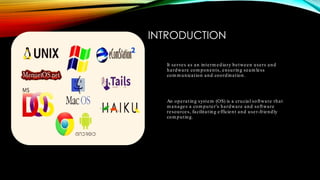
It serves as an interm ediary between users and
hardware com ponents, ensuring seam less
com m unication and coordination.
An operating system (OS) is a crucial software that
m anages a com puter's hardware and software
resources, facilitating efficient and user-friendly
com puting.
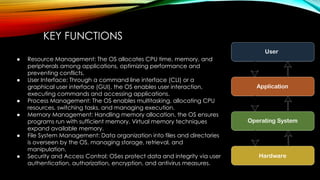
KEY FUNCTIONS
● Resource Management: The OS allocates CPU time, memory, and
peripherals among applications, optimizing performance and
preventing conflicts.
● User Interface: Through a command line interface (CLI) or a
graphical user interface (GUI), the OS enables user interaction,
executing commands and accessing applications.
● Process Management: The OS enables multitasking, allocating CPU
resources, switching tasks, and managing execution.
● Memory Management: Handling memory allocation, the OS ensures
programs run with sufficient memory. Virtual memory techniques
expand available memory.
● File System Management: Data organization into files and directories
is overseen by the OS, managing storage, retrieval, and
manipulation.
● Security and Access Control: OSes protect data and integrity via user
authentication, authorization, encryption, and antivirus measures.
SLIDE 3: TYPES OF OPERATING
SYSTEMS
● SingleUser OS: For personal use, supporting one user.
● MultiUser OS: Allows multiple users concurrently, common in businesses.
● RealTime OS: Responds instantly to critical events, vital for robotics and
aerospace.
● Network OS: Manages network resources, enabling communication and data
sharing.
● Mobile OS: Powers smartphones, featuring touch interfaces and app
ecosystems.
● Server OS: Optimized for servers, handling network and data center
operations.
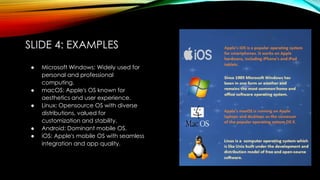
SLIDE 4: EXAMPLES
● Microsoft Windows: Widely used for
personal and professional
computing.
● macOS: Apple's OS known for
aesthetics and user experience.
● Linux: Opensource OS with diverse
distributions, valued for
customization and stability.
● Android: Dominant mobile OS.
● iOS: Apple's mobile OS with seamless
integration and app quality.
SLIDE 5: CONCLUSION
Understanding their functions is vital for confident
navigation of the digital world.
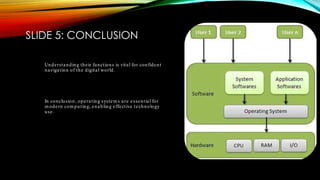
In conclusion, operating system s are essential for
m odern com puting, enabling effective technology
use.

INTRODUCTIO TO OPERATING SYSTEM.pdf

  • 2.
    JL-JALADHULAGORI (VIA ANDULMOURI), SANKRAIL DISTRICT : HOWRAH (WEST BENGAL) PIN : 711302
  • 3.
    INTRODUCTION It serves asan interm ediary between users and hardware com ponents, ensuring seam less com m unication and coordination. An operating system (OS) is a crucial software that m anages a com puter's hardware and software resources, facilitating efficient and user-friendly com puting.
  • 4.
    KEY FUNCTIONS ● ResourceManagement: The OS allocates CPU time, memory, and peripherals among applications, optimizing performance and preventing conflicts. ● User Interface: Through a command line interface (CLI) or a graphical user interface (GUI), the OS enables user interaction, executing commands and accessing applications. ● Process Management: The OS enables multitasking, allocating CPU resources, switching tasks, and managing execution. ● Memory Management: Handling memory allocation, the OS ensures programs run with sufficient memory. Virtual memory techniques expand available memory. ● File System Management: Data organization into files and directories is overseen by the OS, managing storage, retrieval, and manipulation. ● Security and Access Control: OSes protect data and integrity via user authentication, authorization, encryption, and antivirus measures.
  • 5.
    SLIDE 3: TYPESOF OPERATING SYSTEMS ● SingleUser OS: For personal use, supporting one user. ● MultiUser OS: Allows multiple users concurrently, common in businesses. ● RealTime OS: Responds instantly to critical events, vital for robotics and aerospace. ● Network OS: Manages network resources, enabling communication and data sharing. ● Mobile OS: Powers smartphones, featuring touch interfaces and app ecosystems. ● Server OS: Optimized for servers, handling network and data center operations.
  • 6.
    SLIDE 4: EXAMPLES ●Microsoft Windows: Widely used for personal and professional computing. ● macOS: Apple's OS known for aesthetics and user experience. ● Linux: Opensource OS with diverse distributions, valued for customization and stability. ● Android: Dominant mobile OS. ● iOS: Apple's mobile OS with seamless integration and app quality.
  • 7.
    SLIDE 5: CONCLUSION Understandingtheir functions is vital for confident navigation of the digital world. In conclusion, operating system s are essential for m odern com puting, enabling effective technology use.