Introducing coServ
The simple while extremely powerful
web platform
The 1.0 Release
With almost 4 years of development,
coServ has finally reached the 1.0
release.
The new release will be available soon.
The 1.0 Release
Below is a quick preview of this amazing
web platform.
Feature #1
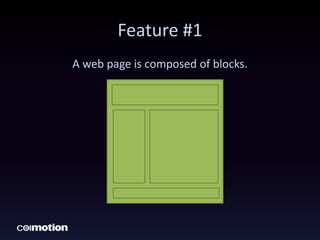
A web page is composed of blocks.
Feature #1
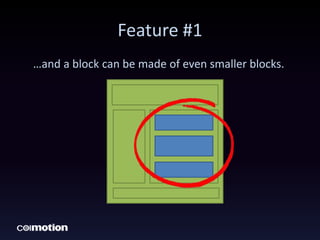
…and a block can be made of even smaller blocks.
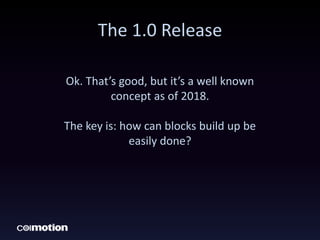
The 1.0 Release
Ok. That’s good, but it’s a well known
concept as of 2018.
The key is: how can blocks build up be
easily done?
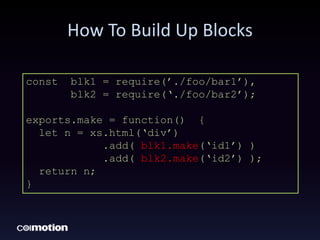
How To Build Up Blocks
const blk1 = require(’./foo/bar1’),
blk2 = require(‘./foo/bar2’);
exports.make = function() {
let n = xs.html(‘div’)
.add( blk1.make(‘id1’) )
.add( blk2.make(‘id2’) );
return n;
}
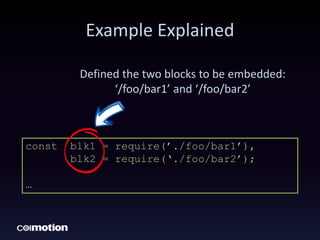
Example Explained
const blk1 = require(’./foo/bar1’),
blk2 = require(‘./foo/bar2’);
…
Defined the two blocks to be embedded:
‘/foo/bar1’ and ‘/foo/bar2’
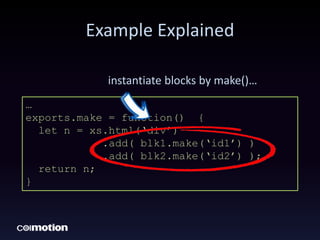
Example Explained
…
exports.make = function() {
let n = xs.html(‘div’)
.add( blk1.make(‘id1’) )
.add( blk2.make(‘id2’) );
return n;
}
instantiate blocks by make()…
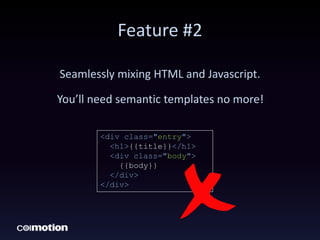
Feature #2
Seamlessly mixing HTML and Javascript.
You’ll need semantic templates no more!
<div class="entry">
<h1>{{title}}</h1>
<div class="body">
{{body}}
</div>
</div>
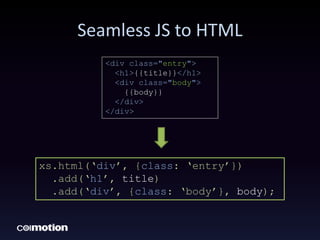
Seamless JS to HTML
<div class="entry">
<h1>{{title}}</h1>
<div class="body">
{{body}}
</div>
</div>
xs.html(‘div’, {class: ‘entry’})
.add(‘h1’, title)
.add(‘div’, {class: ‘body’}, body);
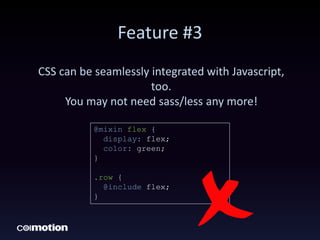
Feature #3
CSS can be seamlessly integrated with Javascript,
too.
You may not need sass/less any more!
@mixin flex {
display: flex;
color: green;
}
.row {
@include flex;
}
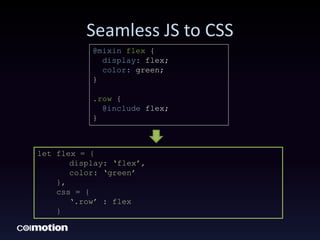
Seamless JS to CSS
let flex = {
display: ‘flex’,
color: ‘green’
},
css = {
‘.row’ : flex
}
@mixin flex {
display: flex;
color: green;
}
.row {
@include flex;
}
Feature #4
Componentizing & refactoring
HTML/CSS/JS, and reuse them again, again
and again…
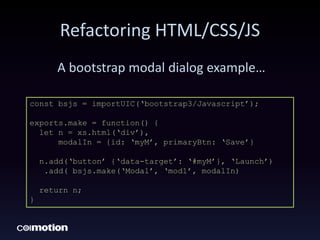
Refactoring HTML/CSS/JS
A bootstrap modal dialog example…
const bsjs = importUIC(‘bootstrap3/Javascript’);
exports.make = function() {
let n = xs.html(‘div’),
modalIn = {id: ‘myM’, primaryBtn: ‘Save’}
n.add(‘button’ {‘data-target’: ‘#myM’}, ‘Launch’)
.add( bsjs.make(‘Modal’, ‘mod1’, modalIn)
return n;
}
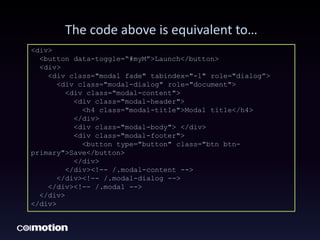
The code above is equivalent to…
<div>
<button data-toggle=“#myM”>Launch</button>
<div>
<div class="modal fade" tabindex="-1" role="dialog”>
<div class="modal-dialog" role="document">
<div class="modal-content">
<div class="modal-header">
<h4 class="modal-title">Modal title</h4>
</div>
<div class="modal-body"> </div>
<div class="modal-footer">
<button type="button" class="btn btn-
primary">Save</button>
</div>
</div><!-- /.modal-content -->
</div><!-- /.modal-dialog -->
</div><!-- /.modal -->
</div>
</div>
Wow!
You can easily see which one is more
readable and easier to program.
Life is short. We better save some key
strokes.
The Key Takeaway
1. Seamlessly blend CSS/HTML into Javascript.
2. Refactoring HTML/CSS into blocks or
components, and reuse them again and
again…
3. The syntax and semantics of creating blocks
is the same as writing a node module.
4. Besides HTML/CSS/JS, there is nothing to
learn. Be productive right away.

Introducing coServ

  • 1.
    Introducing coServ The simplewhile extremely powerful web platform
  • 2.
    The 1.0 Release Withalmost 4 years of development, coServ has finally reached the 1.0 release. The new release will be available soon.
  • 3.
    The 1.0 Release Belowis a quick preview of this amazing web platform.
  • 4.
    Feature #1 A webpage is composed of blocks.
  • 5.
    Feature #1 …and ablock can be made of even smaller blocks.
  • 6.
    The 1.0 Release Ok.That’s good, but it’s a well known concept as of 2018. The key is: how can blocks build up be easily done?
  • 7.
    How To BuildUp Blocks const blk1 = require(’./foo/bar1’), blk2 = require(‘./foo/bar2’); exports.make = function() { let n = xs.html(‘div’) .add( blk1.make(‘id1’) ) .add( blk2.make(‘id2’) ); return n; }
  • 8.
    Example Explained const blk1= require(’./foo/bar1’), blk2 = require(‘./foo/bar2’); … Defined the two blocks to be embedded: ‘/foo/bar1’ and ‘/foo/bar2’
  • 9.
    Example Explained … exports.make =function() { let n = xs.html(‘div’) .add( blk1.make(‘id1’) ) .add( blk2.make(‘id2’) ); return n; } instantiate blocks by make()…
  • 10.
    Feature #2 Seamlessly mixingHTML and Javascript. You’ll need semantic templates no more! <div class="entry"> <h1>{{title}}</h1> <div class="body"> {{body}} </div> </div>
  • 11.
    Seamless JS toHTML <div class="entry"> <h1>{{title}}</h1> <div class="body"> {{body}} </div> </div> xs.html(‘div’, {class: ‘entry’}) .add(‘h1’, title) .add(‘div’, {class: ‘body’}, body);
  • 12.
    Feature #3 CSS canbe seamlessly integrated with Javascript, too. You may not need sass/less any more! @mixin flex { display: flex; color: green; } .row { @include flex; }
  • 13.
    Seamless JS toCSS let flex = { display: ‘flex’, color: ‘green’ }, css = { ‘.row’ : flex } @mixin flex { display: flex; color: green; } .row { @include flex; }
  • 14.
    Feature #4 Componentizing &refactoring HTML/CSS/JS, and reuse them again, again and again…
  • 15.
    Refactoring HTML/CSS/JS A bootstrapmodal dialog example… const bsjs = importUIC(‘bootstrap3/Javascript’); exports.make = function() { let n = xs.html(‘div’), modalIn = {id: ‘myM’, primaryBtn: ‘Save’} n.add(‘button’ {‘data-target’: ‘#myM’}, ‘Launch’) .add( bsjs.make(‘Modal’, ‘mod1’, modalIn) return n; }
  • 16.
    The code aboveis equivalent to… <div> <button data-toggle=“#myM”>Launch</button> <div> <div class="modal fade" tabindex="-1" role="dialog”> <div class="modal-dialog" role="document"> <div class="modal-content"> <div class="modal-header"> <h4 class="modal-title">Modal title</h4> </div> <div class="modal-body"> </div> <div class="modal-footer"> <button type="button" class="btn btn- primary">Save</button> </div> </div><!-- /.modal-content --> </div><!-- /.modal-dialog --> </div><!-- /.modal --> </div> </div>
  • 17.
    Wow! You can easilysee which one is more readable and easier to program. Life is short. We better save some key strokes.
  • 18.
    The Key Takeaway 1.Seamlessly blend CSS/HTML into Javascript. 2. Refactoring HTML/CSS into blocks or components, and reuse them again and again… 3. The syntax and semantics of creating blocks is the same as writing a node module. 4. Besides HTML/CSS/JS, there is nothing to learn. Be productive right away.