Chapter 1
CS 1550:
Introduction to Operating Systems
Prof. Ahmed Amer
Chapter 1 2
CS 1550, cs.pitt.edu
(originaly modified by Ethan
Class outline
 Introduction, concepts, review & historical
perspective
 Processes
 Synchronization
 Scheduling
 Deadlock
 Memory management, address translation, and
virtual memory
 Operating system management of I/O
 File systems
 Security & protection
 Distributed systems (as time permits)
Chapter 1 3
CS 1550, cs.pitt.edu
(originaly modified by Ethan
Overview: Chapter 1
 What is an operating system, anyway?
 Operating systems history
 The zoo of modern operating systems
 Review of computer hardware
 Operating system concepts
 Operating system structure
 User interface to the operating system
 Anatomy of a system call
Chapter 1 4
CS 1550, cs.pitt.edu
(originaly modified by Ethan
What is an operating system?
 A program that runs on the “raw” hardware and supports
 Resource Abstraction
 Resource Sharing
 Abstracts and standardizes the interface to the user across
different types of hardware
 Virtual machine hides the messy details which must be performed
 Manages the hardware resources
 Each program gets time with the resource
 Each program gets space on the resource
 May have potentially conflicting goals:
 Use hardware efficiently
 Give maximum performance to each user
Chapter 1 5
CS 1550, cs.pitt.edu
(originaly modified by Ethan
Operating system timeline
 First generation: 1945 – 1955
 Vacuum tubes
 Plug boards
 Second generation: 1955 – 1965
 Transistors
 Batch systems
 Third generation: 1965 – 1980
 Integrated circuits
 Multiprogramming
 Fourth generation: 1980 – present
 Large scale integration
 Personal computers
 Next generation: ???
 Systems connected by high-speed networks?
 Wide area resource management?
Chapter 1 6
CS 1550, cs.pitt.edu
(originaly modified by Ethan
First generation: direct input
 Run one job at a time
 Enter it into the computer (might require rewiring!)
 Run it
 Record the results
 Problem: lots of wasted computer time!
 Computer was idle during first and last steps
 Computers were very expensive!
 Goal: make better use of an expensive commodity:
computer time
Chapter 1 7
CS 1550, cs.pitt.edu
(originaly modified by Ethan
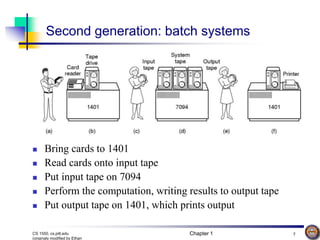
Second generation: batch systems
 Bring cards to 1401
 Read cards onto input tape
 Put input tape on 7094
 Perform the computation, writing results to output tape
 Put output tape on 1401, which prints output
Chapter 1 8
CS 1550, cs.pitt.edu
(originaly modified by Ethan
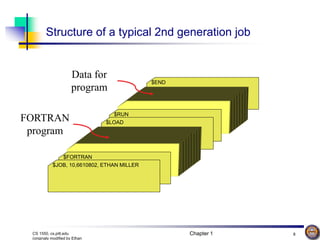
$END
$RUN
$LOAD
Structure of a typical 2nd generation job
$FORTRAN
$JOB, 10,6610802, ETHAN MILLER
FORTRAN
program
Data for
program
Chapter 1 9
CS 1550, cs.pitt.edu
(originaly modified by Ethan
Spooling
 Original batch systems used tape drives
 Later batch systems used disks for buffering
 Operator read cards onto disk attached to the computer
 Computer read jobs from disk
 Computer wrote job results to disk
 Operator directed that job results be printed from disk
 Disks enabled simultaneous peripheral operation on-
line (spooling)
 Computer overlapped I/O of one job with execution of
another
 Better utilization of the expensive CPU
 Still only one job active at any given time
Chapter 1 10
CS 1550, cs.pitt.edu
(originaly modified by Ethan
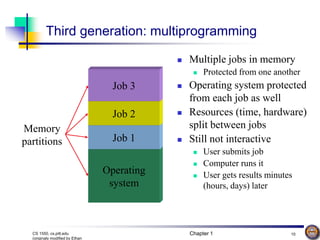
Operating
system
Third generation: multiprogramming
 Multiple jobs in memory
 Protected from one another
 Operating system protected
from each job as well
 Resources (time, hardware)
split between jobs
 Still not interactive
 User submits job
 Computer runs it
 User gets results minutes
(hours, days) later
Job 1
Job 2
Job 3
Memory
partitions
Chapter 1 11
CS 1550, cs.pitt.edu
(originaly modified by Ethan
Timesharing
 Multiprogramming allowed several jobs to be active
at one time
 Initially used for batch systems
 Cheaper hardware terminals -> interactive use
 Computer use got much cheaper and easier
 No more “priesthood”
 Quick turnaround meant quick fixes for problems
Chapter 1 12
CS 1550, cs.pitt.edu
(originaly modified by Ethan
Types of modern operating systems
 Mainframe operating systems: MVS
 Server operating systems: FreeBSD, Solaris
 Multiprocessor operating systems: Cellular IRIX
 Personal computer operating systems: Windows,
Unix
 Real-time operating systems: VxWorks
 Embedded operating systems
 Smart card operating systems
Some operating systems can fit into more than one
category
Chapter 1 13
CS 1550, cs.pitt.edu
(originaly modified by Ethan
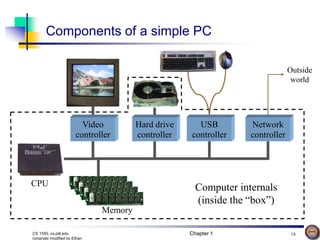
Components of a simple PC
Hard drive
controller
Video
controller
Memory
USB
controller
Network
controller
Outside
world
CPU Computer internals
(inside the “box”)
Chapter 1 14
CS 1550, cs.pitt.edu
(originaly modified by Ethan
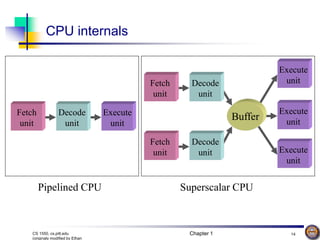
Execute
unit
Execute
unit
Execute
unit
Execute
unit
Buffer
Fetch
unit
Decode
unit
Fetch
unit
Decode
unit
Fetch
unit
Decode
unit
CPU internals
Pipelined CPU Superscalar CPU
Chapter 1 15
CS 1550, cs.pitt.edu
(originaly modified by Ethan
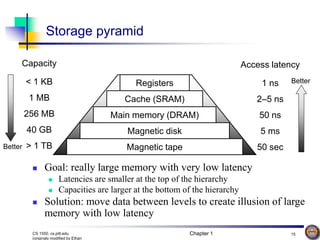
Access latency
1 ns
2–5 ns
50 ns
5 ms
50 sec
< 1 KB
1 MB
256 MB
40 GB
> 1 TB
Capacity
Storage pyramid
Registers
Cache (SRAM)
Main memory (DRAM)
Magnetic disk
Magnetic tape
 Goal: really large memory with very low latency
 Latencies are smaller at the top of the hierarchy
 Capacities are larger at the bottom of the hierarchy
 Solution: move data between levels to create illusion of large
memory with low latency
Better
Better
Chapter 1 16
CS 1550, cs.pitt.edu
(originaly modified by Ethan
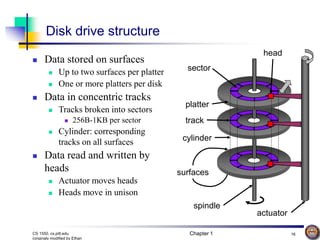
Disk drive structure
sector
cylinder
platter
spindle
track
head
actuator
surfaces
 Data stored on surfaces
 Up to two surfaces per platter
 One or more platters per disk
 Data in concentric tracks
 Tracks broken into sectors
 256B-1KB per sector
 Cylinder: corresponding
tracks on all surfaces
 Data read and written by
heads
 Actuator moves heads
 Heads move in unison
Chapter 1 17
CS 1550, cs.pitt.edu
(originaly modified by Ethan
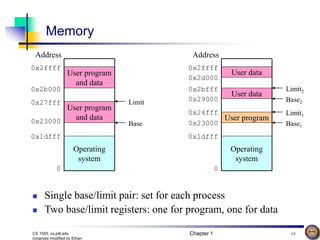
Memory
User program
and data
User program
and data
Operating
system
Address
0x1dfff
0x23000
0x27fff
0x2b000
0x2ffff
0
 Single base/limit pair: set for each process
 Two base/limit registers: one for program, one for data
Base
Limit
User data
User program
Operating
system
User data
Base1
Limit2
Limit1
Base2
Address
0x1dfff
0x23000
0x29000
0x2bfff
0x2ffff
0
0x2d000
0x24fff
Chapter 1 18
CS 1550, cs.pitt.edu
(originaly modified by Ethan
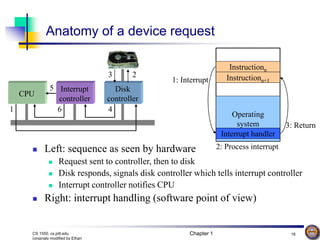
Anatomy of a device request
Interrupt
controller
CPU
5 Disk
controller
3 2
6
1 4
 Left: sequence as seen by hardware
 Request sent to controller, then to disk
 Disk responds, signals disk controller which tells interrupt controller
 Interrupt controller notifies CPU
 Right: interrupt handling (software point of view)
Instructionn
Operating
system
Instructionn+1
Interrupt handler
1: Interrupt
2: Process interrupt
3: Return
Chapter 1 19
CS 1550, cs.pitt.edu
(originaly modified by Ethan
Operating systems concepts
 Many of these should be familiar to Unix users…
 Processes (and trees of processes)
 Deadlock
 File systems & directory trees
 Pipes
 We’ll cover all of these in more depth later on, but
it’s useful to have some basic definitions now
Chapter 1 20
CS 1550, cs.pitt.edu
(originaly modified by Ethan
Processes
 Process: program in execution
 Address space (memory) the
program can use
 State (registers, including
program counter & stack
pointer)
 OS keeps track of all processes in
a process table
 Processes can create other
processes
 Process tree tracks these
relationships
 A is the root of the tree
 A created three child processes:
B, C, and D
 C created two child processes: E
and F
 D created one child process: G
A
B
E F
C D
G
Chapter 1 21
CS 1550, cs.pitt.edu
(originaly modified by Ethan
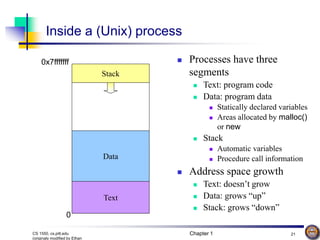
Inside a (Unix) process
 Processes have three
segments
 Text: program code
 Data: program data
 Statically declared variables
 Areas allocated by malloc()
or new
 Stack
 Automatic variables
 Procedure call information
 Address space growth
 Text: doesn’t grow
 Data: grows “up”
 Stack: grows “down”
Stack
Data
Text
0x7fffffff
0
Data
Chapter 1 22
CS 1550, cs.pitt.edu
(originaly modified by Ethan
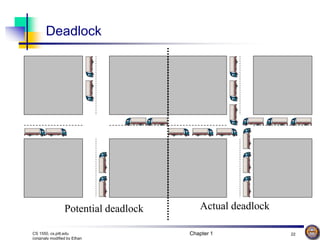
Deadlock
Potential deadlock Actual deadlock
Chapter 1 23
CS 1550, cs.pitt.edu
(originaly modified by Ethan
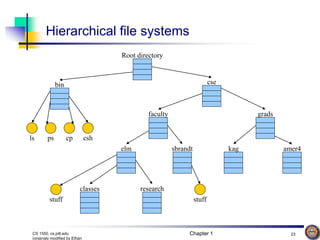
Root directory
bin cse
faculty grads
ls ps cp csh
Hierarchical file systems
elm sbrandt kag amer4
stuff
classes research
stuff
Chapter 1 24
CS 1550, cs.pitt.edu
(originaly modified by Ethan
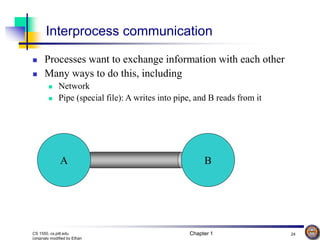
Interprocess communication
 Processes want to exchange information with each other
 Many ways to do this, including
 Network
 Pipe (special file): A writes into pipe, and B reads from it
A B
Chapter 1 25
CS 1550, cs.pitt.edu
(originaly modified by Ethan
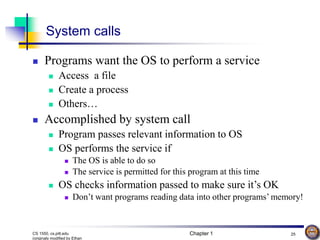
System calls
 Programs want the OS to perform a service
 Access a file
 Create a process
 Others…
 Accomplished by system call
 Program passes relevant information to OS
 OS performs the service if
 The OS is able to do so
 The service is permitted for this program at this time
 OS checks information passed to make sure it’s OK
 Don’t want programs reading data into other programs’ memory!
Chapter 1 26
CS 1550, cs.pitt.edu
(originaly modified by Ethan
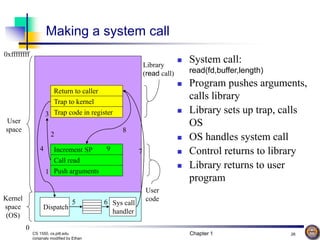
Making a system call
 System call:
read(fd,buffer,length)
 Program pushes arguments,
calls library
 Library sets up trap, calls
OS
 OS handles system call
 Control returns to library
 Library returns to user
program
Return to caller
Trap to kernel
Trap code in register
Increment SP
Call read
Push arguments
Dispatch
Sys call
handler
Kernel
space
(OS)
User
space
0
0xffffffff
1
2
3
4
5 6
7
8
9
Library
(read call)
User
code
Chapter 1 27
CS 1550, cs.pitt.edu
(originaly modified by Ethan
System calls for files & directories
Call Description
fd = open(name,how) Open a file for reading and/or writing
s = close(fd) Close an open file
n = read(fd,buffer,size) Read data from a file into a buffer
n = write(fd,buffer,size) Write data from a buffer into a file
s = lseek(fd,offset,whence) Move the “current” pointer for a file
s = stat(name,&buffer) Get a file’s status information (in buffer)
s = mkdir(name,mode) Create a new directory
s = rmdir(name) Remove a directory (must be empty)
s = link(name1,name2) Create a new entry (name2) that points to the
same object as name1
s = unlink(name) Remove name as a link to an object (deletes
the object if name was the only link to it)
Chapter 1 28
CS 1550, cs.pitt.edu
(originaly modified by Ethan
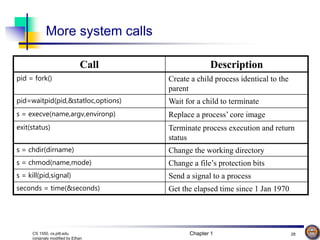
Call Description
pid = fork() Create a child process identical to the
parent
pid=waitpid(pid,&statloc,options) Wait for a child to terminate
s = execve(name,argv,environp) Replace a process’ core image
exit(status) Terminate process execution and return
status
s = chdir(dirname) Change the working directory
s = chmod(name,mode) Change a file’s protection bits
s = kill(pid,signal) Send a signal to a process
seconds = time(&seconds) Get the elapsed time since 1 Jan 1970
More system calls
Chapter 1 29
CS 1550, cs.pitt.edu
(originaly modified by Ethan
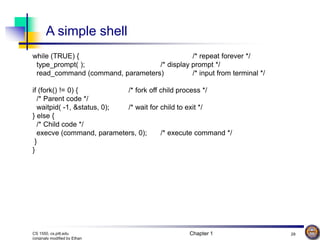
A simple shell
while (TRUE) { /* repeat forever */
type_prompt( ); /* display prompt */
read_command (command, parameters) /* input from terminal */
if (fork() != 0) { /* fork off child process */
/* Parent code */
waitpid( -1, &status, 0); /* wait for child to exit */
} else {
/* Child code */
execve (command, parameters, 0); /* execute command */
}
}
Chapter 1 30
CS 1550, cs.pitt.edu
(originaly modified by Ethan
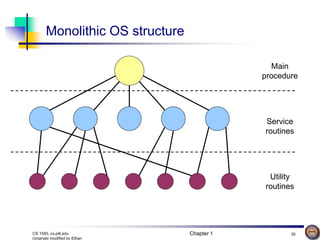
Monolithic OS structure
Main
procedure
Service
routines
Utility
routines
Chapter 1 31
CS 1550, cs.pitt.edu
(originaly modified by Ethan
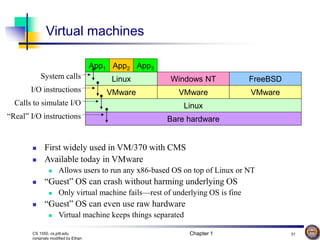
Virtual machines
 First widely used in VM/370 with CMS
 Available today in VMware
 Allows users to run any x86-based OS on top of Linux or NT
 “Guest” OS can crash without harming underlying OS
 Only virtual machine fails—rest of underlying OS is fine
 “Guest” OS can even use raw hardware
 Virtual machine keeps things separated
Bare hardware
Linux
VMware
Linux
App1 App2 App3
VMware VMware
Windows NT FreeBSD
I/O instructions
System calls
Calls to simulate I/O
“Real” I/O instructions
Chapter 1 32
CS 1550, cs.pitt.edu
(originaly modified by Ethan
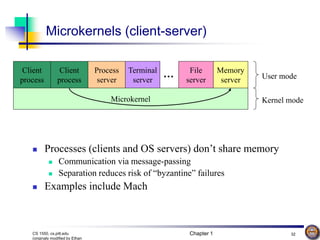
Microkernel
Client
process
Process
server
Terminal
server
Client
process
File
server
Memory
server
… User mode
Kernel mode
Microkernels (client-server)
 Processes (clients and OS servers) don’t share memory
 Communication via message-passing
 Separation reduces risk of “byzantine” failures
 Examples include Mach
Chapter 1 33
CS 1550, cs.pitt.edu
(originaly modified by Ethan
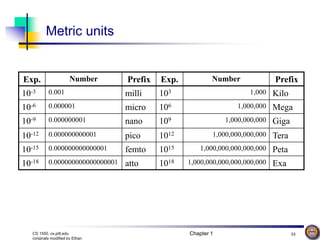
Metric units
Exp. Number Prefix Exp. Number Prefix
10-3 0.001 milli 103 1,000 Kilo
10-6 0.000001 micro 106 1,000,000 Mega
10-9 0.000000001 nano 109 1,000,000,000 Giga
10-12 0.000000000001 pico 1012 1,000,000,000,000 Tera
10-15 0.000000000000001 femto 1015 1,000,000,000,000,000 Peta
10-18 0.000000000000000001 atto 1018 1,000,000,000,000,000,000 Exa

Intriduction to Operating systems Windows

  • 1.
    Chapter 1 CS 1550: Introductionto Operating Systems Prof. Ahmed Amer
  • 2.
    Chapter 1 2 CS1550, cs.pitt.edu (originaly modified by Ethan Class outline  Introduction, concepts, review & historical perspective  Processes  Synchronization  Scheduling  Deadlock  Memory management, address translation, and virtual memory  Operating system management of I/O  File systems  Security & protection  Distributed systems (as time permits)
  • 3.
    Chapter 1 3 CS1550, cs.pitt.edu (originaly modified by Ethan Overview: Chapter 1  What is an operating system, anyway?  Operating systems history  The zoo of modern operating systems  Review of computer hardware  Operating system concepts  Operating system structure  User interface to the operating system  Anatomy of a system call
  • 4.
    Chapter 1 4 CS1550, cs.pitt.edu (originaly modified by Ethan What is an operating system?  A program that runs on the “raw” hardware and supports  Resource Abstraction  Resource Sharing  Abstracts and standardizes the interface to the user across different types of hardware  Virtual machine hides the messy details which must be performed  Manages the hardware resources  Each program gets time with the resource  Each program gets space on the resource  May have potentially conflicting goals:  Use hardware efficiently  Give maximum performance to each user
  • 5.
    Chapter 1 5 CS1550, cs.pitt.edu (originaly modified by Ethan Operating system timeline  First generation: 1945 – 1955  Vacuum tubes  Plug boards  Second generation: 1955 – 1965  Transistors  Batch systems  Third generation: 1965 – 1980  Integrated circuits  Multiprogramming  Fourth generation: 1980 – present  Large scale integration  Personal computers  Next generation: ???  Systems connected by high-speed networks?  Wide area resource management?
  • 6.
    Chapter 1 6 CS1550, cs.pitt.edu (originaly modified by Ethan First generation: direct input  Run one job at a time  Enter it into the computer (might require rewiring!)  Run it  Record the results  Problem: lots of wasted computer time!  Computer was idle during first and last steps  Computers were very expensive!  Goal: make better use of an expensive commodity: computer time
  • 7.
    Chapter 1 7 CS1550, cs.pitt.edu (originaly modified by Ethan Second generation: batch systems  Bring cards to 1401  Read cards onto input tape  Put input tape on 7094  Perform the computation, writing results to output tape  Put output tape on 1401, which prints output
  • 8.
    Chapter 1 8 CS1550, cs.pitt.edu (originaly modified by Ethan $END $RUN $LOAD Structure of a typical 2nd generation job $FORTRAN $JOB, 10,6610802, ETHAN MILLER FORTRAN program Data for program
  • 9.
    Chapter 1 9 CS1550, cs.pitt.edu (originaly modified by Ethan Spooling  Original batch systems used tape drives  Later batch systems used disks for buffering  Operator read cards onto disk attached to the computer  Computer read jobs from disk  Computer wrote job results to disk  Operator directed that job results be printed from disk  Disks enabled simultaneous peripheral operation on- line (spooling)  Computer overlapped I/O of one job with execution of another  Better utilization of the expensive CPU  Still only one job active at any given time
  • 10.
    Chapter 1 10 CS1550, cs.pitt.edu (originaly modified by Ethan Operating system Third generation: multiprogramming  Multiple jobs in memory  Protected from one another  Operating system protected from each job as well  Resources (time, hardware) split between jobs  Still not interactive  User submits job  Computer runs it  User gets results minutes (hours, days) later Job 1 Job 2 Job 3 Memory partitions
  • 11.
    Chapter 1 11 CS1550, cs.pitt.edu (originaly modified by Ethan Timesharing  Multiprogramming allowed several jobs to be active at one time  Initially used for batch systems  Cheaper hardware terminals -> interactive use  Computer use got much cheaper and easier  No more “priesthood”  Quick turnaround meant quick fixes for problems
  • 12.
    Chapter 1 12 CS1550, cs.pitt.edu (originaly modified by Ethan Types of modern operating systems  Mainframe operating systems: MVS  Server operating systems: FreeBSD, Solaris  Multiprocessor operating systems: Cellular IRIX  Personal computer operating systems: Windows, Unix  Real-time operating systems: VxWorks  Embedded operating systems  Smart card operating systems Some operating systems can fit into more than one category
  • 13.
    Chapter 1 13 CS1550, cs.pitt.edu (originaly modified by Ethan Components of a simple PC Hard drive controller Video controller Memory USB controller Network controller Outside world CPU Computer internals (inside the “box”)
  • 14.
    Chapter 1 14 CS1550, cs.pitt.edu (originaly modified by Ethan Execute unit Execute unit Execute unit Execute unit Buffer Fetch unit Decode unit Fetch unit Decode unit Fetch unit Decode unit CPU internals Pipelined CPU Superscalar CPU
  • 15.
    Chapter 1 15 CS1550, cs.pitt.edu (originaly modified by Ethan Access latency 1 ns 2–5 ns 50 ns 5 ms 50 sec < 1 KB 1 MB 256 MB 40 GB > 1 TB Capacity Storage pyramid Registers Cache (SRAM) Main memory (DRAM) Magnetic disk Magnetic tape  Goal: really large memory with very low latency  Latencies are smaller at the top of the hierarchy  Capacities are larger at the bottom of the hierarchy  Solution: move data between levels to create illusion of large memory with low latency Better Better
  • 16.
    Chapter 1 16 CS1550, cs.pitt.edu (originaly modified by Ethan Disk drive structure sector cylinder platter spindle track head actuator surfaces  Data stored on surfaces  Up to two surfaces per platter  One or more platters per disk  Data in concentric tracks  Tracks broken into sectors  256B-1KB per sector  Cylinder: corresponding tracks on all surfaces  Data read and written by heads  Actuator moves heads  Heads move in unison
  • 17.
    Chapter 1 17 CS1550, cs.pitt.edu (originaly modified by Ethan Memory User program and data User program and data Operating system Address 0x1dfff 0x23000 0x27fff 0x2b000 0x2ffff 0  Single base/limit pair: set for each process  Two base/limit registers: one for program, one for data Base Limit User data User program Operating system User data Base1 Limit2 Limit1 Base2 Address 0x1dfff 0x23000 0x29000 0x2bfff 0x2ffff 0 0x2d000 0x24fff
  • 18.
    Chapter 1 18 CS1550, cs.pitt.edu (originaly modified by Ethan Anatomy of a device request Interrupt controller CPU 5 Disk controller 3 2 6 1 4  Left: sequence as seen by hardware  Request sent to controller, then to disk  Disk responds, signals disk controller which tells interrupt controller  Interrupt controller notifies CPU  Right: interrupt handling (software point of view) Instructionn Operating system Instructionn+1 Interrupt handler 1: Interrupt 2: Process interrupt 3: Return
  • 19.
    Chapter 1 19 CS1550, cs.pitt.edu (originaly modified by Ethan Operating systems concepts  Many of these should be familiar to Unix users…  Processes (and trees of processes)  Deadlock  File systems & directory trees  Pipes  We’ll cover all of these in more depth later on, but it’s useful to have some basic definitions now
  • 20.
    Chapter 1 20 CS1550, cs.pitt.edu (originaly modified by Ethan Processes  Process: program in execution  Address space (memory) the program can use  State (registers, including program counter & stack pointer)  OS keeps track of all processes in a process table  Processes can create other processes  Process tree tracks these relationships  A is the root of the tree  A created three child processes: B, C, and D  C created two child processes: E and F  D created one child process: G A B E F C D G
  • 21.
    Chapter 1 21 CS1550, cs.pitt.edu (originaly modified by Ethan Inside a (Unix) process  Processes have three segments  Text: program code  Data: program data  Statically declared variables  Areas allocated by malloc() or new  Stack  Automatic variables  Procedure call information  Address space growth  Text: doesn’t grow  Data: grows “up”  Stack: grows “down” Stack Data Text 0x7fffffff 0 Data
  • 22.
    Chapter 1 22 CS1550, cs.pitt.edu (originaly modified by Ethan Deadlock Potential deadlock Actual deadlock
  • 23.
    Chapter 1 23 CS1550, cs.pitt.edu (originaly modified by Ethan Root directory bin cse faculty grads ls ps cp csh Hierarchical file systems elm sbrandt kag amer4 stuff classes research stuff
  • 24.
    Chapter 1 24 CS1550, cs.pitt.edu (originaly modified by Ethan Interprocess communication  Processes want to exchange information with each other  Many ways to do this, including  Network  Pipe (special file): A writes into pipe, and B reads from it A B
  • 25.
    Chapter 1 25 CS1550, cs.pitt.edu (originaly modified by Ethan System calls  Programs want the OS to perform a service  Access a file  Create a process  Others…  Accomplished by system call  Program passes relevant information to OS  OS performs the service if  The OS is able to do so  The service is permitted for this program at this time  OS checks information passed to make sure it’s OK  Don’t want programs reading data into other programs’ memory!
  • 26.
    Chapter 1 26 CS1550, cs.pitt.edu (originaly modified by Ethan Making a system call  System call: read(fd,buffer,length)  Program pushes arguments, calls library  Library sets up trap, calls OS  OS handles system call  Control returns to library  Library returns to user program Return to caller Trap to kernel Trap code in register Increment SP Call read Push arguments Dispatch Sys call handler Kernel space (OS) User space 0 0xffffffff 1 2 3 4 5 6 7 8 9 Library (read call) User code
  • 27.
    Chapter 1 27 CS1550, cs.pitt.edu (originaly modified by Ethan System calls for files & directories Call Description fd = open(name,how) Open a file for reading and/or writing s = close(fd) Close an open file n = read(fd,buffer,size) Read data from a file into a buffer n = write(fd,buffer,size) Write data from a buffer into a file s = lseek(fd,offset,whence) Move the “current” pointer for a file s = stat(name,&buffer) Get a file’s status information (in buffer) s = mkdir(name,mode) Create a new directory s = rmdir(name) Remove a directory (must be empty) s = link(name1,name2) Create a new entry (name2) that points to the same object as name1 s = unlink(name) Remove name as a link to an object (deletes the object if name was the only link to it)
  • 28.
    Chapter 1 28 CS1550, cs.pitt.edu (originaly modified by Ethan Call Description pid = fork() Create a child process identical to the parent pid=waitpid(pid,&statloc,options) Wait for a child to terminate s = execve(name,argv,environp) Replace a process’ core image exit(status) Terminate process execution and return status s = chdir(dirname) Change the working directory s = chmod(name,mode) Change a file’s protection bits s = kill(pid,signal) Send a signal to a process seconds = time(&seconds) Get the elapsed time since 1 Jan 1970 More system calls
  • 29.
    Chapter 1 29 CS1550, cs.pitt.edu (originaly modified by Ethan A simple shell while (TRUE) { /* repeat forever */ type_prompt( ); /* display prompt */ read_command (command, parameters) /* input from terminal */ if (fork() != 0) { /* fork off child process */ /* Parent code */ waitpid( -1, &status, 0); /* wait for child to exit */ } else { /* Child code */ execve (command, parameters, 0); /* execute command */ } }
  • 30.
    Chapter 1 30 CS1550, cs.pitt.edu (originaly modified by Ethan Monolithic OS structure Main procedure Service routines Utility routines
  • 31.
    Chapter 1 31 CS1550, cs.pitt.edu (originaly modified by Ethan Virtual machines  First widely used in VM/370 with CMS  Available today in VMware  Allows users to run any x86-based OS on top of Linux or NT  “Guest” OS can crash without harming underlying OS  Only virtual machine fails—rest of underlying OS is fine  “Guest” OS can even use raw hardware  Virtual machine keeps things separated Bare hardware Linux VMware Linux App1 App2 App3 VMware VMware Windows NT FreeBSD I/O instructions System calls Calls to simulate I/O “Real” I/O instructions
  • 32.
    Chapter 1 32 CS1550, cs.pitt.edu (originaly modified by Ethan Microkernel Client process Process server Terminal server Client process File server Memory server … User mode Kernel mode Microkernels (client-server)  Processes (clients and OS servers) don’t share memory  Communication via message-passing  Separation reduces risk of “byzantine” failures  Examples include Mach
  • 33.
    Chapter 1 33 CS1550, cs.pitt.edu (originaly modified by Ethan Metric units Exp. Number Prefix Exp. Number Prefix 10-3 0.001 milli 103 1,000 Kilo 10-6 0.000001 micro 106 1,000,000 Mega 10-9 0.000000001 nano 109 1,000,000,000 Giga 10-12 0.000000000001 pico 1012 1,000,000,000,000 Tera 10-15 0.000000000000001 femto 1015 1,000,000,000,000,000 Peta 10-18 0.000000000000000001 atto 1018 1,000,000,000,000,000,000 Exa