mashable.com
What is the Internet? 
a global computer network providing a 
variety of information and communication 
facilities, consisting of interconnected 
networks using standardized 
communication protocols. 
Oxford Dictionary Definition
Domain Name - the part of a network 
address which identifies it as belonging to 
a particular domain. 
Oxford Dictionary Definition 
IP Address - a unique string of numbers 
separated by full stops that identifies each 
computer using the Internet Protocol to 
communicate over a network. 
Oxford Dictionary Definition
The IP address identifies a particular 
device/network, which means that data 
can then be exchanged with it. However 
the IP address consists of number, and 
addresses like 198.546.0.32 are not easy for 
humans like us to remember. 
The majority of the internet, the world wide 
web, which we are all familiar with, is 
concerned with us users making use of such 
websites, with one of the most used being 
www.google.com . These are user-friendly 
labels known as domain names or a URL. A 
scheme has been developed that can convert 
this domain name into an underlying IP 
address. 
https://www.google.co.uk/url?sa=i&rct=j&q=&esrc=s&source=images&cd=&cad=rja&uact=8&ved=0CAYQjB0&url=http% 
3A%2F%2Fwww.clipartpanda.com%2Fcategories%2Fcomputer-clipart-for-kids& 
ei=7AaDVKLJFMf4UoPKgsgP&bvm=bv.80642063,d.d24&psig=AFQjCNGmlZRMAB1yKo6BymrOGbCmC5SOtg&ust=14 
17959531187397
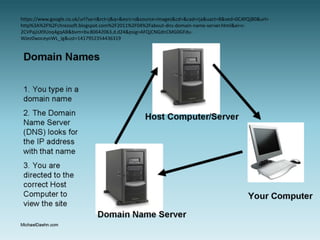
1.You enter a 
domain name 
into the browser
2. Your browser makes contact 
with the DNS server. This server 
contains a database that matches 
the domain name to its 
registered IP address. THE DNS 
sends this information back to 
the computer/device.
3. The computer 
attaches this IP 
address to the data 
packet to be sent
4. The data packet 
travels over the 
internet to its 
destination
5. The end server 
send back the 
requested data.
https://www.google.co.uk/url?sa=i&rct=j&q=&esrc=s&source=images&cd=&cad=rja&uact=8&ved=0CAYQjB0&url= 
http%3A%2F%2Fchrezsoft.blogspot.com%2F2011%2F04%2Fabout-dns-domain-name-server.html&ei=c- 
2CVPajJsX9Uoq4gqAB&bvm=bv.80642063,d.d24&psig=AFQjCNGdnCMG0GFdu- 
WJez0woceyoWL_Ig&ust=1417952354436319
• Imagine that you have an email you want to send 
to someone in another country and it is 2 Megabytes 
in size. 
• When you send the file, it isn’t sent as one whole 
document. Instead it is broken up into small data 
packets. 
• Our 2 Megabyte email would be sent in chunks of 
512 bytes in size. 
• Before each of these packets are sent, they are 
given a header, which has the IP address it is being 
sent to and the IIP address from which it was sent. 
• The header also gives each packet a number, and 
then records how many packets the data was split 
into.
How do Packets get through the 
Network? 
• The packets, after they leave your computer, are sent 
through the network knowing where they need to get 
to. The packets start to head off and take the fastest 
path. 
• A machine called a router finds out which is the next 
fastest connection and sends each packet on its way. 
Throughout the journey, the packets will pass through 
many different routers, possibly in many different 
countries. 
• This method is extremely efficient because if one of the 
paths get broken or becomes too busy., they are routed 
through another path instead.
What Happens when the Packets 
Arrive? 
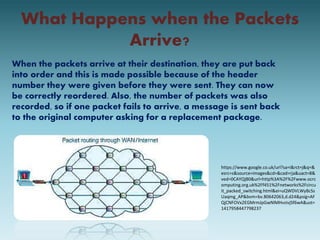
When the packets arrive at their destination, they are put back 
into order and this is made possible because of the header 
number they were given before they were sent. They can now 
be correctly reordered. Also, the number of packets was also 
recorded, so if one packet fails to arrive, a message is sent back 
to the original computer asking for a replacement package. 
https://www.google.co.uk/url?sa=i&rct=j&q=& 
esrc=s&source=images&cd=&cad=rja&uact=8& 
ved=0CAYQjB0&url=http%3A%2F%2Fwww.ocrc 
omputing.org.uk%2Ff451%2Fnetworks%2Fcircu 
it_packed_switching.html&ei=uQWDVLWyBcSs 
Uaqmg_AP&bvm=bv.80642063,d.d24&psig=AF 
QjCNFOVx2EGMrmJpGwNlMHvzivjSf6wA&ust= 
1417958447798237
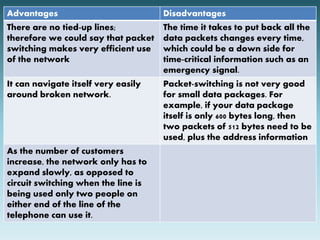
Advantages Disadvantages 
There are no tied-up lines; 
therefore we could say that packet 
switching makes very efficient use 
of the network 
The time it takes to put back all the 
data packets changes every time, 
which could be a down side for 
time-critical information such as an 
emergency signal. 
It can navigate itself very easily 
around broken network. 
Packet-switching is not very good 
for small data packages. For 
example, if your data package 
itself is only 600 bytes long, then 
two packets of 512 bytes need to be 
used, plus the address information 
As the number of customers 
increase, the network only has to 
expand slowly, as opposed to 
circuit switching when the line is 
being used only two people on 
either end of the line of the 
telephone can use it.
A router is a device that transfers 
data from one network to 
another. It has the task of 
forwarding data packets to their 
destination via the most efficient 
route.
A router has a micro-computer 
inside it. This holds a 
table in memory hat contains 
a list of all the networks its 
connected to, and with 
information on how busy each 
path is. This is known as the 
routing table.
Function of the Router 
When a data packet arrives, the 
router does the following; 
Reads the data packet's destination 
address. 
Looks up all the paths available to get to 
that address 
Checks how busy each path is at that 
moment 
Sends the Packet along the fastest path
Sources 
• http://www.teach-ict. 
com/gcse_computing/ocr/215_communicatio 
ns_networking/IP_and_DNS/miniweb/pg8.htm# 
• http://www.teach-ict. 
com/technology_explained/packet_switching/ 
packet_switching.html 
• http://www.teach-ict. 
com/gcse_new/networks/hardware/miniweb/ 
pg4.htm 
• https://www.google.com/imghp?gws_rd=ssl

The Internet

  • 1.
  • 2.
    What is theInternet? a global computer network providing a variety of information and communication facilities, consisting of interconnected networks using standardized communication protocols. Oxford Dictionary Definition
  • 4.
    Domain Name -the part of a network address which identifies it as belonging to a particular domain. Oxford Dictionary Definition IP Address - a unique string of numbers separated by full stops that identifies each computer using the Internet Protocol to communicate over a network. Oxford Dictionary Definition
  • 5.
    The IP addressidentifies a particular device/network, which means that data can then be exchanged with it. However the IP address consists of number, and addresses like 198.546.0.32 are not easy for humans like us to remember. The majority of the internet, the world wide web, which we are all familiar with, is concerned with us users making use of such websites, with one of the most used being www.google.com . These are user-friendly labels known as domain names or a URL. A scheme has been developed that can convert this domain name into an underlying IP address. https://www.google.co.uk/url?sa=i&rct=j&q=&esrc=s&source=images&cd=&cad=rja&uact=8&ved=0CAYQjB0&url=http% 3A%2F%2Fwww.clipartpanda.com%2Fcategories%2Fcomputer-clipart-for-kids& ei=7AaDVKLJFMf4UoPKgsgP&bvm=bv.80642063,d.d24&psig=AFQjCNGmlZRMAB1yKo6BymrOGbCmC5SOtg&ust=14 17959531187397
  • 7.
    1.You enter a domain name into the browser
  • 8.
    2. Your browsermakes contact with the DNS server. This server contains a database that matches the domain name to its registered IP address. THE DNS sends this information back to the computer/device.
  • 9.
    3. The computer attaches this IP address to the data packet to be sent
  • 10.
    4. The datapacket travels over the internet to its destination
  • 11.
    5. The endserver send back the requested data.
  • 12.
  • 14.
    • Imagine thatyou have an email you want to send to someone in another country and it is 2 Megabytes in size. • When you send the file, it isn’t sent as one whole document. Instead it is broken up into small data packets. • Our 2 Megabyte email would be sent in chunks of 512 bytes in size. • Before each of these packets are sent, they are given a header, which has the IP address it is being sent to and the IIP address from which it was sent. • The header also gives each packet a number, and then records how many packets the data was split into.
  • 15.
    How do Packetsget through the Network? • The packets, after they leave your computer, are sent through the network knowing where they need to get to. The packets start to head off and take the fastest path. • A machine called a router finds out which is the next fastest connection and sends each packet on its way. Throughout the journey, the packets will pass through many different routers, possibly in many different countries. • This method is extremely efficient because if one of the paths get broken or becomes too busy., they are routed through another path instead.
  • 16.
    What Happens whenthe Packets Arrive? When the packets arrive at their destination, they are put back into order and this is made possible because of the header number they were given before they were sent. They can now be correctly reordered. Also, the number of packets was also recorded, so if one packet fails to arrive, a message is sent back to the original computer asking for a replacement package. https://www.google.co.uk/url?sa=i&rct=j&q=& esrc=s&source=images&cd=&cad=rja&uact=8& ved=0CAYQjB0&url=http%3A%2F%2Fwww.ocrc omputing.org.uk%2Ff451%2Fnetworks%2Fcircu it_packed_switching.html&ei=uQWDVLWyBcSs Uaqmg_AP&bvm=bv.80642063,d.d24&psig=AF QjCNFOVx2EGMrmJpGwNlMHvzivjSf6wA&ust= 1417958447798237
  • 18.
    Advantages Disadvantages Thereare no tied-up lines; therefore we could say that packet switching makes very efficient use of the network The time it takes to put back all the data packets changes every time, which could be a down side for time-critical information such as an emergency signal. It can navigate itself very easily around broken network. Packet-switching is not very good for small data packages. For example, if your data package itself is only 600 bytes long, then two packets of 512 bytes need to be used, plus the address information As the number of customers increase, the network only has to expand slowly, as opposed to circuit switching when the line is being used only two people on either end of the line of the telephone can use it.
  • 20.
    A router isa device that transfers data from one network to another. It has the task of forwarding data packets to their destination via the most efficient route.
  • 21.
    A router hasa micro-computer inside it. This holds a table in memory hat contains a list of all the networks its connected to, and with information on how busy each path is. This is known as the routing table.
  • 22.
    Function of theRouter When a data packet arrives, the router does the following; Reads the data packet's destination address. Looks up all the paths available to get to that address Checks how busy each path is at that moment Sends the Packet along the fastest path
  • 23.
    Sources • http://www.teach-ict. com/gcse_computing/ocr/215_communicatio ns_networking/IP_and_DNS/miniweb/pg8.htm# • http://www.teach-ict. com/technology_explained/packet_switching/ packet_switching.html • http://www.teach-ict. com/gcse_new/networks/hardware/miniweb/ pg4.htm • https://www.google.com/imghp?gws_rd=ssl