Interactive Computations
• Matrices and Vectors
• A Matrix is entered row-wise, with consecutive elements of a row
separated by space or a comma and the rows separated by semi colons
or carriage returns. The entire matrix must be enclosed within square
brackets. Elements of the matrix may be real numbers, complex
numbers or valid MATLAB expression.
• matlab equivalent input A=[1 2 5;3 9 0]
• , matlab equivalent input
• B=[2*x log(x)+sin(y); 5i 3+2i]
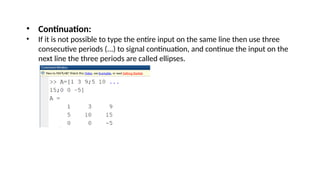
• Continuation:
• If it is not possible to type the entire input on the same line then use three
consecutive periods (...) to signal continuation, and continue the input on the
next line the three periods are called ellipses.
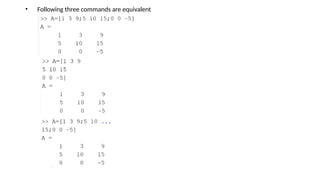
• Following three commands are equivalent
Indexing (or Subscripting)
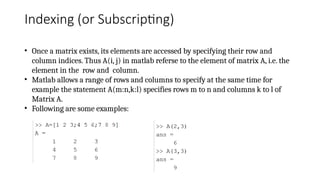
• Once a matrix exists, its elements are accessed by specifying their row and
column indices. Thus A(i, j) in matlab referse to the element of matrix A, i.e. the
element in the row and column.
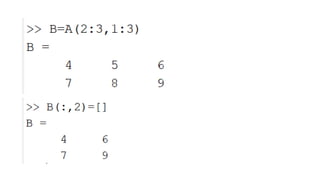
• Matlab allows a range of rows and columns to specify at the same time for
example the statement A(m:n,k:l) specifies rows m to n and columns k to l of
Matrix A.
• Following are some examples:
Dimension
• Metrics dimensions are determined automatically by MATLAB
i.e. no explicit dimension declaration is required.
• Dimensions of an existing matrix may be obtained by the command
size(A) or more explicitly [m, n]=size(A), which assigns the number
of rows and columns of A to the variable m and n, respectively.
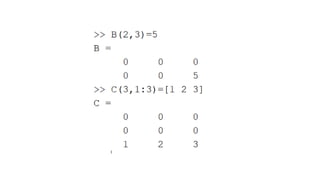
• When a matrix entered by specifying a single element or a few
elements of the matrix MATLAB creates a metrics just big enough to
accommodate the elements. Thus, if the matrix is B and C do not
exist already, then
Matrix Manipulation
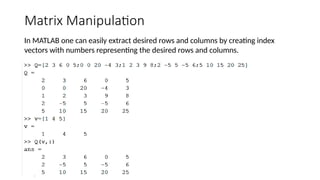
In MATLAB one can easily extract desired rows and columns by creating index
vectors with numbers representing the desired rows and columns.
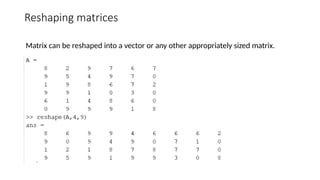
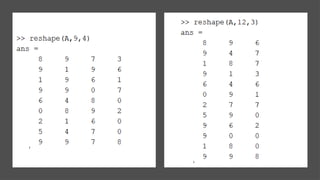
Reshaping matrices
Matrix can be reshaped into a vector or any other appropriately sized matrix.
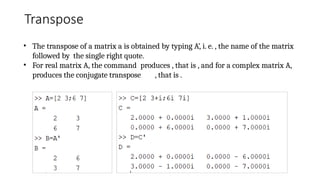
Transpose
• The transpose of a matrix a is obtained by typing A’, i. e. , the name of the matrix
followed by the single right quote.
• For real matrix A, the command produces , that is , and for a complex matrix A,
produces the conjugate transpose , that is .
Initialization
Initialization of a matrices is not necessary in MATLAB however it is advisable in
the following two cases :
1. Large matrices: If you are going to generate or manipulate a large matrix
initialize the matrix to a zero matrix of required dimension. An matrix can be
initialized by the command A=zeros(m,n). The initialization reserves
for the matrix a contagious block in the computer's memory. Matrix
operations performed on such matrices are generally more efficient .
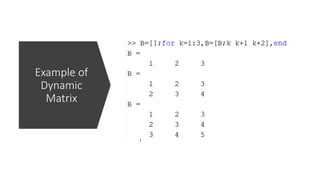
2. Dynamic matrices: If the rows or columns of a matrix are computed in a loop
(e.g. for or while loop) and appended to the matrix in each execution of the
loop, then you might want to initialize the matrix to a null matrix before the
loop starts. A null matrix A is created by the command A=[]
Example of
Dynamic
Matrix
‫مھرباني‬ ‫وڏي‬
‫امان‬ ‫جي‬ ‫الل‬
‫۾‬ ‫ہ‬

Interactive Computation With MATLAB.pptx

  • 3.
    Interactive Computations • Matricesand Vectors • A Matrix is entered row-wise, with consecutive elements of a row separated by space or a comma and the rows separated by semi colons or carriage returns. The entire matrix must be enclosed within square brackets. Elements of the matrix may be real numbers, complex numbers or valid MATLAB expression.
  • 4.
    • matlab equivalentinput A=[1 2 5;3 9 0] • , matlab equivalent input • B=[2*x log(x)+sin(y); 5i 3+2i]
  • 5.
    • Continuation: • Ifit is not possible to type the entire input on the same line then use three consecutive periods (...) to signal continuation, and continue the input on the next line the three periods are called ellipses.
  • 6.
    • Following threecommands are equivalent
  • 7.
    Indexing (or Subscripting) •Once a matrix exists, its elements are accessed by specifying their row and column indices. Thus A(i, j) in matlab referse to the element of matrix A, i.e. the element in the row and column. • Matlab allows a range of rows and columns to specify at the same time for example the statement A(m:n,k:l) specifies rows m to n and columns k to l of Matrix A. • Following are some examples:
  • 9.
    Dimension • Metrics dimensionsare determined automatically by MATLAB i.e. no explicit dimension declaration is required. • Dimensions of an existing matrix may be obtained by the command size(A) or more explicitly [m, n]=size(A), which assigns the number of rows and columns of A to the variable m and n, respectively. • When a matrix entered by specifying a single element or a few elements of the matrix MATLAB creates a metrics just big enough to accommodate the elements. Thus, if the matrix is B and C do not exist already, then
  • 11.
    Matrix Manipulation In MATLABone can easily extract desired rows and columns by creating index vectors with numbers representing the desired rows and columns.
  • 12.
    Reshaping matrices Matrix canbe reshaped into a vector or any other appropriately sized matrix.
  • 14.
    Transpose • The transposeof a matrix a is obtained by typing A’, i. e. , the name of the matrix followed by the single right quote. • For real matrix A, the command produces , that is , and for a complex matrix A, produces the conjugate transpose , that is .
  • 15.
    Initialization Initialization of amatrices is not necessary in MATLAB however it is advisable in the following two cases : 1. Large matrices: If you are going to generate or manipulate a large matrix initialize the matrix to a zero matrix of required dimension. An matrix can be initialized by the command A=zeros(m,n). The initialization reserves for the matrix a contagious block in the computer's memory. Matrix operations performed on such matrices are generally more efficient . 2. Dynamic matrices: If the rows or columns of a matrix are computed in a loop (e.g. for or while loop) and appended to the matrix in each execution of the loop, then you might want to initialize the matrix to a null matrix before the loop starts. A null matrix A is created by the command A=[]
  • 16.
  • 17.