© 2007 – 2010, Cisco Systems, Inc. All rights reserved. Cisco Public
TSHOOT v6 Chapter 9
1
Chapter 9:
Maintaining and
Troubleshooting
Network Security
Implementations
CCNP TSHOOT: Maintaining and Troubleshooting IP Networks
Chapter 9
2
© 2007 – 2010, Cisco Systems, Inc. All rights reserved. Cisco Public
 Troubleshoot Secure Networks
 Troubleshoot Management Plane Security
 Troubleshoot Control Plane Security
 Troubleshoot Data Plane Security
 Troubleshoot Branch Office and Remote Worker
Connectivity
Chapter 9 Objectives
Chapter 9
3
© 2007 – 2010, Cisco Systems, Inc. All rights reserved. Cisco Public
Troubleshooting
Secure Networks
Chapter 9
4
© 2007 – 2010, Cisco Systems, Inc. All rights reserved. Cisco Public
 The focus of this section is on the types of network security implemented and
their impact on the troubleshooting process.
 Security measures that affect troubleshooting can include:
• Limiting access to network infrastructure devices
• Control and management plane hardening
• Packet filtering on routers and switches
• Virtual private networks (VPN)
• Intrusion prevention system (IPS) features.
 It is important to understand which features are deployed and how they operate.
 Most security features operate at the transport layer and above.
 A generic troubleshooting process can help to determine if problems are related
to security features or caused by underlying Layer 1, 2, or 3 connectivity issues.
 Reported problems and possible solutions need to be validated against the
organization’s security policy.
 Depending on the organization, it may be necessary to escalate the issue to a
security specialist.
Section Overview
Chapter 9
5
© 2007 – 2010, Cisco Systems, Inc. All rights reserved. Cisco Public
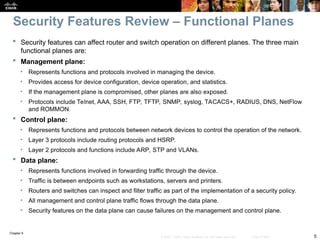
 Security features can affect router and switch operation on different planes. The three main
functional planes are:
 Management plane:
• Represents functions and protocols involved in managing the device.
• Provides access for device configuration, device operation, and statistics.
• If the management plane is compromised, other planes are also exposed.
• Protocols include Telnet, AAA, SSH, FTP, TFTP, SNMP, syslog, TACACS+, RADIUS, DNS, NetFlow
and ROMMON.
 Control plane:
• Represents functions and protocols between network devices to control the operation of the network.
• Layer 3 protocols include routing protocols and HSRP.
• Layer 2 protocols and functions include ARP, STP and VLANs.
 Data plane:
• Represents functions involved in forwarding traffic through the device.
• Traffic is between endpoints such as workstations, servers and printers.
• Routers and switches can inspect and filter traffic as part of the implementation of a security policy.
• All management and control plane traffic flows through the data plane.
• Security features on the data plane can cause failures on the management and control plane.
Security Features Review – Functional Planes
Chapter 9
6
© 2007 – 2010, Cisco Systems, Inc. All rights reserved. Cisco Public
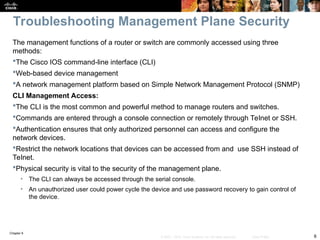
The management functions of a router or switch are commonly accessed using three
methods:
The Cisco IOS command-line interface (CLI)
Web-based device management
A network management platform based on Simple Network Management Protocol (SNMP)
CLI Management Access:
The CLI is the most common and powerful method to manage routers and switches.
Commands are entered through a console connection or remotely through Telnet or SSH.
Authentication ensures that only authorized personnel can access and configure the
network devices.
Restrict the network locations that devices can be accessed from and use SSH instead of
Telnet.
Physical security is vital to the security of the management plane.
• The CLI can always be accessed through the serial console.
• An unauthorized user could power cycle the device and use password recovery to gain control of
the device.
Troubleshooting Management Plane Security
Chapter 9
7
© 2007 – 2010, Cisco Systems, Inc. All rights reserved. Cisco Public
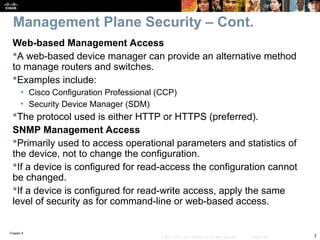
Web-based Management Access
A web-based device manager can provide an alternative method
to manage routers and switches.
Examples include:
• Cisco Configuration Professional (CCP)
• Security Device Manager (SDM)
The protocol used is either HTTP or HTTPS (preferred).
SNMP Management Access
Primarily used to access operational parameters and statistics of
the device, not to change the configuration.
If a device is configured for read-access the configuration cannot
be changed.
If a device is configured for read-write access, apply the same
level of security as for command-line or web-based access.
Management Plane Security – Cont.
Chapter 9
8
© 2007 – 2010, Cisco Systems, Inc. All rights reserved. Cisco Public
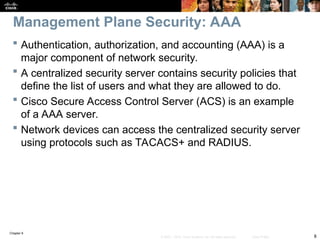
 Authentication, authorization, and accounting (AAA) is a
major component of network security.
 A centralized security server contains security policies that
define the list of users and what they are allowed to do.
 Cisco Secure Access Control Server (ACS) is an example
of a AAA server.
 Network devices can access the centralized security server
using protocols such as TACACS+ and RADIUS.
Management Plane Security: AAA
Chapter 9
9
© 2007 – 2010, Cisco Systems, Inc. All rights reserved. Cisco Public
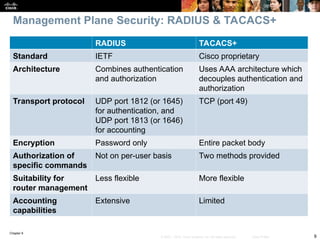
RADIUS TACACS+
Standard IETF Cisco proprietary
Architecture Combines authentication
and authorization
Uses AAA architecture which
decouples authentication and
authorization
Transport protocol UDP port 1812 (or 1645)
for authentication, and
UDP port 1813 (or 1646)
for accounting
TCP (port 49)
Encryption Password only Entire packet body
Authorization of
specific commands
Not on per-user basis Two methods provided
Suitability for
router management
Less flexible More flexible
Accounting
capabilities
Extensive Limited
Management Plane Security: RADIUS & TACACS+
Chapter 9
10
© 2007 – 2010, Cisco Systems, Inc. All rights reserved. Cisco Public
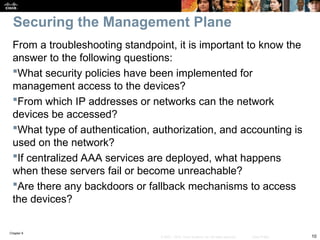
From a troubleshooting standpoint, it is important to know the
answer to the following questions:
What security policies have been implemented for
management access to the devices?
From which IP addresses or networks can the network
devices be accessed?
What type of authentication, authorization, and accounting is
used on the network?
If centralized AAA services are deployed, what happens
when these servers fail or become unreachable?
Are there any backdoors or fallback mechanisms to access
the devices?
Securing the Management Plane
Chapter 9
11
© 2007 – 2010, Cisco Systems, Inc. All rights reserved. Cisco Public
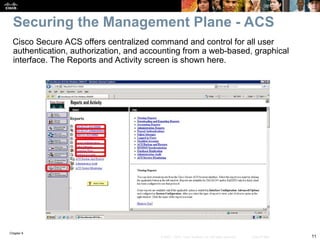
Cisco Secure ACS offers centralized command and control for all user
authentication, authorization, and accounting from a web-based, graphical
interface. The Reports and Activity screen is shown here.
Securing the Management Plane - ACS
Chapter 9
12
© 2007 – 2010, Cisco Systems, Inc. All rights reserved. Cisco Public
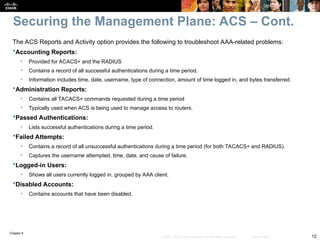
The ACS Reports and Activity option provides the following to troubleshoot AAA-related problems:
Accounting Reports:
• Provided for ACACS+ and the RADIUS
• Contains a record of all successful authentications during a time period.
• Information includes time, date, username, type of connection, amount of time logged in, and bytes transferred.
Administration Reports:
• Contains all TACACS+ commands requested during a time period
• Typically used when ACS is being used to manage access to routers.
Passed Authentications:
• Lists successful authentications during a time period.
Failed Attempts:
• Contains a record of all unsuccessful authentications during a time period (for both TACACS+ and RADIUS).
• Captures the username attempted, time, date, and cause of failure.
Logged-in Users:
• Shows all users currently logged in, grouped by AAA client.
Disabled Accounts:
• Contains accounts that have been disabled.
Securing the Management Plane: ACS – Cont.
Chapter 9
13
© 2007 – 2010, Cisco Systems, Inc. All rights reserved. Cisco Public
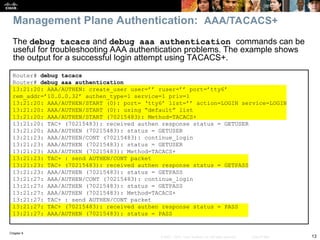
The debug tacacs and debug aaa authentication commands can be
useful for troubleshooting AAA authentication problems. The example shows
the output for a successful login attempt using TACACS+.
Management Plane Authentication: AAA/TACACS+
Router# debug tacacs
Router# debug aaa authentication
13:21:20: AAA/AUTHEN: create_user user=’’ ruser=’’ port=’tty6’
rem_addr=’10.0.0.32’ authen_type=1 service=1 priv=1
13:21:20: AAA/AUTHEN/START (0): port= ‘tty6’ list=’’ action=LOGIN service=LOGIN
13:21:20: AAA/AUTHEN/START (0): using “default” list
13:21:20: AAA/AUTHEN/START (70215483): Method=TACACS+
13:21:20: TAC+ (70215483): received authen response status = GETUSER
13:21:20: AAA/AUTHEN (70215483): status = GETUSER
13:21:23: AAA/AUTHEN/CONT (70215483): continue_login
13:21:23: AAA/AUTHEN (70215483): status = GETUSER
13:21:23: AAA/AUTHEN (70215483): Method=TACACS+
13:21:23: TAC+ : send AUTHEN/CONT packet
13:21:23: TAC+ (70215483): received authen response status = GETPASS
13:21:23: AAA/AUTHEN (70215483): status = GETPASS
13:21:27: AAA/AUTHEN/CONT (70215483): continue_login
13:21:27: AAA/AUTHEN (70215483): status = GETPASS
13:21:27: AAA/AUTHEN (70215483): Method=TACACS+
13:21:27: TAC+ : send AUTHEN/CONT packet
13:21:27: TAC+ (70215483): received authen response status = PASS
13:21:27: AAA/AUTHEN (70215483): status = PASS
Chapter 9
14
© 2007 – 2010, Cisco Systems, Inc. All rights reserved. Cisco Public
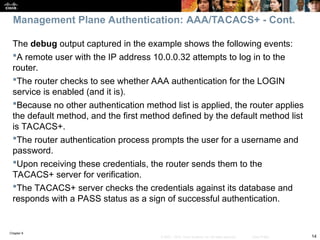
The debug output captured in the example shows the following events:
A remote user with the IP address 10.0.0.32 attempts to log in to the
router.
The router checks to see whether AAA authentication for the LOGIN
service is enabled (and it is).
Because no other authentication method list is applied, the router applies
the default method, and the first method defined by the default method list
is TACACS+.
The router authentication process prompts the user for a username and
password.
Upon receiving these credentials, the router sends them to the
TACACS+ server for verification.
The TACACS+ server checks the credentials against its database and
responds with a PASS status as a sign of successful authentication.
Management Plane Authentication: AAA/TACACS+ - Cont.
Chapter 9
15
© 2007 – 2010, Cisco Systems, Inc. All rights reserved. Cisco Public
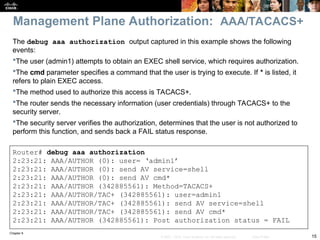
The debug aaa authorization output captured in this example shows the following
events:
The user (admin1) attempts to obtain an EXEC shell service, which requires authorization.
The cmd parameter specifies a command that the user is trying to execute. If * is listed, it
refers to plain EXEC access.
The method used to authorize this access is TACACS+.
The router sends the necessary information (user credentials) through TACACS+ to the
security server.
The security server verifies the authorization, determines that the user is not authorized to
perform this function, and sends back a FAIL status response.
Router# debug aaa authorization
2:23:21: AAA/AUTHOR (0): user= ‘admin1’
2:23:21: AAA/AUTHOR (0): send AV service=shell
2:23:21: AAA/AUTHOR (0): send AV cmd*
2:23:21: AAA/AUTHOR (342885561): Method=TACACS+
2:23:21: AAA/AUTHOR/TAC+ (342885561): user=admin1
2:23:21: AAA/AUTHOR/TAC+ (342885561): send AV service=shell
2:23:21: AAA/AUTHOR/TAC+ (342885561): send AV cmd*
2:23:21: AAA/AUTHOR (342885561): Post authorization status = FAIL
Management Plane Authorization: AAA/TACACS+
Chapter 9
16
© 2007 – 2010, Cisco Systems, Inc. All rights reserved. Cisco Public
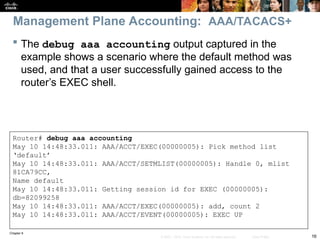
 The debug aaa accounting output captured in the
example shows a scenario where the default method was
used, and that a user successfully gained access to the
router’s EXEC shell.
Router# debug aaa accounting
May 10 14:48:33.011: AAA/ACCT/EXEC(00000005): Pick method list
‘default’
May 10 14:48:33.011: AAA/ACCT/SETMLIST(00000005): Handle 0, mlist
81CA79CC,
Name default
May 10 14:48:33.011: Getting session id for EXEC (00000005):
db=82099258
May 10 14:48:33.011: AAA/ACCT/EXEC(00000005): add, count 2
May 10 14:48:33.011: AAA/ACCT/EVENT(00000005): EXEC UP
Management Plane Accounting: AAA/TACACS+
Chapter 9
17
© 2007 – 2010, Cisco Systems, Inc. All rights reserved. Cisco Public
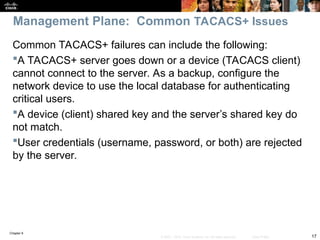
Common TACACS+ failures can include the following:
A TACACS+ server goes down or a device (TACACS client)
cannot connect to the server. As a backup, configure the
network device to use the local database for authenticating
critical users.
A device (client) shared key and the server’s shared key do
not match.
User credentials (username, password, or both) are rejected
by the server.
Management Plane: Common TACACS+ Issues
Chapter 9
18
© 2007 – 2010, Cisco Systems, Inc. All rights reserved. Cisco Public
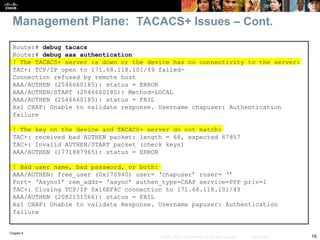
Management Plane: TACACS+ Issues – Cont.
Router# debug tacacs
Router# debug aaa authentication
! The TACACS+ server is down or the device has no connectivity to the server:
TAC+: TCP/IP open to 171.68.118.101/49 failed-
Connection refused by remote host
AAA/AUTHEN (2546660185): status = ERROR
AAA/AUTHEN/START (2546660185): Method=LOCAL
AAA/AUTHEN (2546660185): status = FAIL
As1 CHAP: Unable to validate response. Username chapuser: Authentication
failure
! The key on the device and TACACS+ server do not match:
TAC+: received bad AUTHEN packet: length = 68, expected 67857
TAC+: Invalid AUTHEN/START packet (check keys)
AAA/AUTHEN (1771887965): status = ERROR
! Bad user name, bad password, or both:
AAA/AUTHEN: free_user (0x170940) user= ‘chapuser’ ruser= ‘’
Port= ‘Async1’ rem_addr= ‘async’ authen_type=CHAP service=PPP priv=1
TAC+: Closing TCP/IP 0x16EF4C connection to 171.68.118.101/49
AAA/AUTHEN (2082151566): status = FAIL
As1 CHAP: Unable to validate Response. Username papuser: Authentication
failure
Chapter 9
19
© 2007 – 2010, Cisco Systems, Inc. All rights reserved. Cisco Public
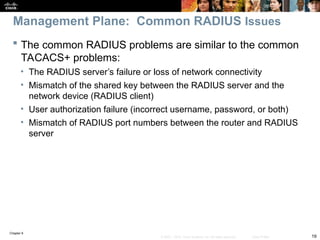
 The common RADIUS problems are similar to the common
TACACS+ problems:
• The RADIUS server’s failure or loss of network connectivity
• Mismatch of the shared key between the RADIUS server and the
network device (RADIUS client)
• User authorization failure (incorrect username, password, or both)
• Mismatch of RADIUS port numbers between the router and RADIUS
server
Management Plane: Common RADIUS Issues
Chapter 9
20
© 2007 – 2010, Cisco Systems, Inc. All rights reserved. Cisco Public
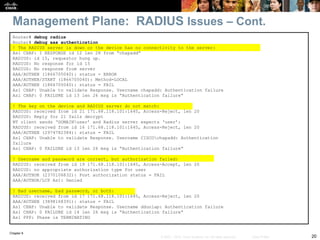
Management Plane: RADIUS Issues – Cont.
Router# debug radius
Router# debug aaa authentication
! The RADIUS server is down or the device has no connectivity to the server:
As1 CHAP: I RESPONSE id 12 len 28 from “chapadd”
RADIUS: id 15, requestor hung up.
RADIUS: No response for id 15
RADIUS: No response from server
AAA/AUTHEN (1866705040): status = ERROR
AAA/AUTHEN/START (1866705040): Method=LOCAL
AAA/AUTHEN (1866705040): status = FAIL
As1 CHAP: Unable to validate Response. Username chapadd: Authentication failure
As1 CHAP: 0 FAILURE id 13 len 26 msg is “Authentication failure”
! The key on the device and RADIUS server do not match:
RADIUS: received from id 21 171.68.118.101:1645, Access-Reject, len 20
RADIUS: Reply for 21 fails decrypt
NT client sends ‘DOMAINuser’ and Radius server expects ‘user’:
RADIUS: received from id 16 171.68.118.101:1645, Access-Reject, len 20
AAA/AUTHEN (2974782384): status = FAIL
As1 CHAP: Unable to validate Response. Username CISCOchapadd: Authentication
failure
As1 CHAP: 0 FAILURE id 13 len 26 msg is “Authentication failure”
! Username and password are correct, but authorization failed:
RADIUS: received from id 19 171.68.118.101:1645, Access-Accept, len 20
RADIUS: no appropriate authorization type for user
AAA/AUTHOR (2370106832): Post authorization status = FAIL
AAA/AUTHOR/LCP As1: Denied
! Bad username, bad password, or both:
RADIUS: received from id 17 171.68.118.101:1645, Access-Reject, len 20
AAA/AUTHEN (3898168391): status = FAIL
As1 CHAP: Unable to validate Response. Username ddunlap: Authentication failure
As1 CHAP: 0 FAILURE id 14 len 26 msg is “Authentication failure”
As1 PPP: Phase is TERMINATING
Chapter 9
21
© 2007 – 2010, Cisco Systems, Inc. All rights reserved. Cisco Public
 Control plane traffic is handled by the system’s route
processor.
 Packets that traverse the control plane are those destined
for that router’s CPU, as opposed to network endpoints.
 Examples include routing protocols, keepalives, first-hop
redundancy protocols (FHRP), DHCP, STP and ARP.
 All packets entering the control plane are redirected by the
data (forwarding) plane.
 Denial-of-service (DoS) attacks on the control plane can
overburdened router CPU.
 Unauthorized participation in any of these protocols should
be prevented to secure the network.
Troubleshooting Control Plane Security
Chapter 9
22
© 2007 – 2010, Cisco Systems, Inc. All rights reserved. Cisco Public
 Most routing protocols support neighbor authentication based on MD5
hashes.
 Authentication is also supported by first-hop redundancy protocols:
• Hot Standby Router Protocol (HSRP)
• Virtual Router Redundancy Protocol (VRRP)
• Gateway Load Balancing Protocol (GLBP)
 Using an authentication mechanism prevents unauthorized devices
from and misdirecting or black-holing application traffic.
 The IEEE 802.1D STP does not have an authentication mechanism.
 Cisco switches support features such as BPDU guard and Root Guard
to help prevent unauthorized interaction with Spanning Tree Protocol.
 The DHCP and ARP protocols can be secured by enabling the DHCP
snooping and dynamic ARP inspection (DAI) features.
 Control plane and control plane protection can use the Cisco Modular
QoS CLI (MQC) to protect the infrastructure from DoS attacks.
Securing the Control Plane: Overview
Chapter 9
23
© 2007 – 2010, Cisco Systems, Inc. All rights reserved. Cisco Public
 It is important to know which control plane security features
have been implemented in the network and on which
devices.
 Misconfiguration can cause the operation of a control plane
protocol between devices to fail.
 Ask the following questions to help troubleshoot control
plane security implementations:
• Are routing protocols or FHRPs set up for authentication properly?
• Are STP security features such as BPDU Guard, BDPU Filter, Loop
Guard, or Root Guard enabled correctly?
• Is DHCP snooping configured properly?
• Is the configuration of DAI correct?
• Are the configurations for control plane policing or control plane
protection done appropriately?
Securing the Control Plane: Overview – Cont.
Chapter 9
24
© 2007 – 2010, Cisco Systems, Inc. All rights reserved. Cisco Public
 Routers and switches process and forwarding network
traffic and can play an effective role in inspecting and
filtering traffic as it flows through the network.
 The Cisco IOS firewall software provides enhanced security
functions for the data plane.
 There are two types of Cisco IOS firewall:
• Classic Cisco IOS firewall (stateful packet inspection)
• Zone-based policy firewall
Troubleshooting Data Plane Security
Chapter 9
25
© 2007 – 2010, Cisco Systems, Inc. All rights reserved. Cisco Public
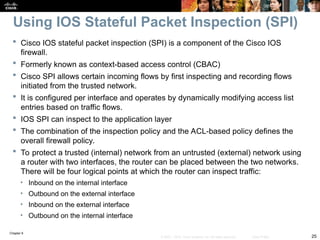
 Cisco IOS stateful packet inspection (SPI) is a component of the Cisco IOS
firewall.
 Formerly known as context-based access control (CBAC)
 Cisco SPI allows certain incoming flows by first inspecting and recording flows
initiated from the trusted network.
 It is configured per interface and operates by dynamically modifying access list
entries based on traffic flows.
 IOS SPI can inspect to the application layer
 The combination of the inspection policy and the ACL-based policy defines the
overall firewall policy.
 To protect a trusted (internal) network from an untrusted (external) network using
a router with two interfaces, the router can be placed between the two networks.
There will be four logical points at which the router can inspect traffic:
• Inbound on the internal interface
• Outbound on the external interface
• Inbound on the external interface
• Outbound on the internal interface
Using IOS Stateful Packet Inspection (SPI)
Chapter 9
26
© 2007 – 2010, Cisco Systems, Inc. All rights reserved. Cisco Public
IOS SPI Example
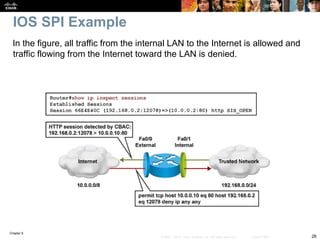
In the figure, all traffic from the internal LAN to the Internet is allowed and
traffic flowing from the Internet toward the LAN is denied.
Chapter 9
27
© 2007 – 2010, Cisco Systems, Inc. All rights reserved. Cisco Public
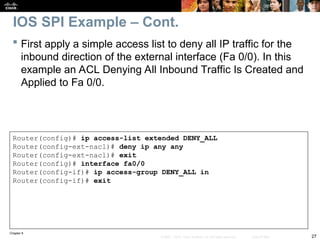
 First apply a simple access list to deny all IP traffic for the
inbound direction of the external interface (Fa 0/0). In this
example an ACL Denying All Inbound Traffic Is Created and
Applied to Fa 0/0.
Router(config)# ip access-list extended DENY_ALL
Router(config-ext-nacl)# deny ip any any
Router(config-ext-nacl)# exit
Router(config)# interface fa0/0
Router(config-if)# ip access-group DENY_ALL in
Router(config-if)# exit
IOS SPI Example – Cont.
Chapter 9
28
© 2007 – 2010, Cisco Systems, Inc. All rights reserved. Cisco Public
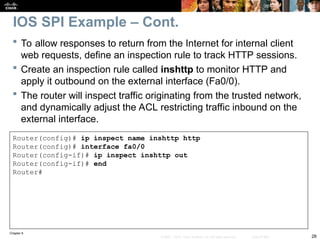
 To allow responses to return from the Internet for internal client
web requests, define an inspection rule to track HTTP sessions.
 Create an inspection rule called inshttp to monitor HTTP and
apply it outbound on the external interface (Fa0/0).
 The router will inspect traffic originating from the trusted network,
and dynamically adjust the ACL restricting traffic inbound on the
external interface.
Router(config)# ip inspect name inshttp http
Router(config)# interface fa0/0
Router(config-if)# ip inspect inshttp out
Router(config-if)# end
Router#
IOS SPI Example – Cont.
Chapter 9
29
© 2007 – 2010, Cisco Systems, Inc. All rights reserved. Cisco Public
IOS SPI Example – Cont.
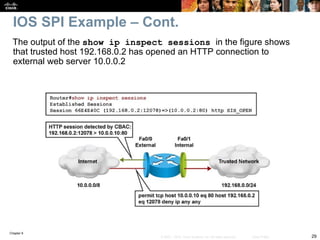
The output of the show ip inspect sessions in the figure shows
that trusted host 192.168.0.2 has opened an HTTP connection to
external web server 10.0.0.2
Chapter 9
30
© 2007 – 2010, Cisco Systems, Inc. All rights reserved. Cisco Public
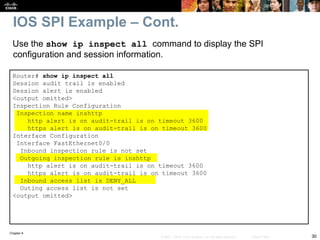
Use the show ip inspect all command to display the SPI
configuration and session information.
IOS SPI Example – Cont.
Router# show ip inspect all
Session audit trail is enabled
Session alert is enabled
<output omitted>
Inspection Rule Configuration
Inspection name inshttp
http alert is on audit-trail is on timeout 3600
https alert is on audit-trail is on timeout 3600
Interface Configuration
Interface FastEthernet0/0
Inbound inspection rule is not set
Outgoing inspection rule is inshttp
http alert is on audit-trail is on timeout 3600
https alert is on audit-trail is on timeout 3600
Inbound access list is DENY_ALL
Outing access list is not set
<output omitted>
Chapter 9
31
© 2007 – 2010, Cisco Systems, Inc. All rights reserved. Cisco Public
Router(config)# ip inspect audit-trail
Router(config)#
%FW-6-SESS_AUDIT_TRAIL_START: Start http session: initiator
(192.168.0.2:10032) –– responder (10.0.0.10:80)
Router# debug ip inspect
Object-creation INSPECT Object Creations debugging is on
Router#
CBAC* OBJ_CREATE: Pak 6621F7A0 sis 66E4E154 initiator_addr
(192.168.0.2:10032) responder_addr (10.0.0.10:80) initiator_alt_addr
(192.168.0.2:10032) responder_alt_addr (10.0.0.2:80)
CBAC OBJ-CREATE: sid 66E684B0 acl DENY_ALL Prot: tcp
Src 10.0.0.10 Port [80:80]
Dst 192.168.0.2 Port [10032:10032]
CBAC OBJ_CREATE: create host entry 66E568DC addr 10.0.0.10 bucket 8
(vrf 0:0) insp_cb 0x66B61C0C
An audit trail can be enabled to generate syslog messages for each SPI session
creation and deletion using the ip inspect audit-trail command. The output of
the debug ip inspect command provides greater detail.
IOS SPI Example – Cont.
Chapter 9
32
© 2007 – 2010, Cisco Systems, Inc. All rights reserved. Cisco Public
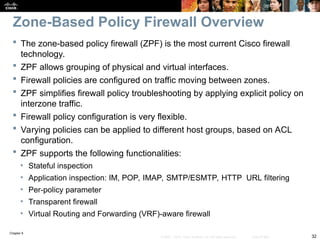
 The zone-based policy firewall (ZPF) is the most current Cisco firewall
technology.
 ZPF allows grouping of physical and virtual interfaces.
 Firewall policies are configured on traffic moving between zones.
 ZPF simplifies firewall policy troubleshooting by applying explicit policy on
interzone traffic.
 Firewall policy configuration is very flexible.
 Varying policies can be applied to different host groups, based on ACL
configuration.
 ZPF supports the following functionalities:
• Stateful inspection
• Application inspection: IM, POP, IMAP, SMTP/ESMTP, HTTP URL filtering
• Per-policy parameter
• Transparent firewall
• Virtual Routing and Forwarding (VRF)-aware firewall
Zone-Based Policy Firewall Overview
Chapter 9
33
© 2007 – 2010, Cisco Systems, Inc. All rights reserved. Cisco Public
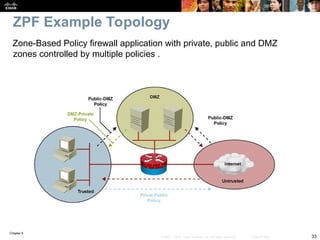
ZPF Example Topology
Zone-Based Policy firewall application with private, public and DMZ
zones controlled by multiple policies .
Chapter 9
34
© 2007 – 2010, Cisco Systems, Inc. All rights reserved. Cisco Public
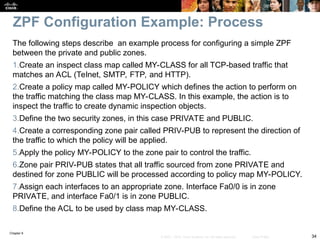
The following steps describe an example process for configuring a simple ZPF
between the private and public zones.
1.Create an inspect class map called MY-CLASS for all TCP-based traffic that
matches an ACL (Telnet, SMTP, FTP, and HTTP).
2.Create a policy map called MY-POLICY which defines the action to perform on
the traffic matching the class map MY-CLASS. In this example, the action is to
inspect the traffic to create dynamic inspection objects.
3.Define the two security zones, in this case PRIVATE and PUBLIC.
4.Create a corresponding zone pair called PRIV-PUB to represent the direction of
the traffic to which the policy will be applied.
5.Apply the policy MY-POLICY to the zone pair to control the traffic.
6.Zone pair PRIV-PUB states that all traffic sourced from zone PRIVATE and
destined for zone PUBLIC will be processed according to policy map MY-POLICY.
7.Assign each interfaces to an appropriate zone. Interface Fa0/0 is in zone
PRIVATE, and interface Fa0/1 is in zone PUBLIC.
8.Define the ACL to be used by class map MY-CLASS.
ZPF Configuration Example: Process
Chapter 9
35
© 2007 – 2010, Cisco Systems, Inc. All rights reserved. Cisco Public
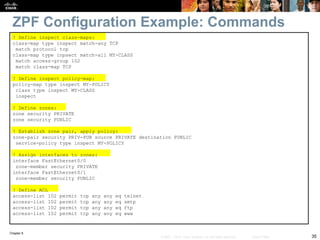
ZPF Configuration Example: Commands
! Define inspect class-maps:
class-map type inspect match-any TCP
match protocol tcp
class-map type inpsect match-all MY-CLASS
match access-group 102
match class-map TCP
! Define inspect policy-map:
policy-map type inspect MY-POLICY
class type inspect MY-CLASS
inspect
! Define zones:
zone security PRIVATE
zone security PUBLIC
! Establish zone pair, apply policy:
zone-pair security PRIV-PUB source PRIVATE destination PUBLIC
service-policy type inspect MY-POLICY
! Assign interfaces to zones:
interface FastEthernet0/0
zone-member security PRIVATE
interface FastEthernet0/1
zone-member security PUBLIC
! Define ACL
access-list 102 permit tcp any any eq telnet
access-list 102 permit tcp any any eq smtp
access-list 102 permit tcp any any eq ftp
access-list 102 permit tcp any any eq www
Chapter 9
36
© 2007 – 2010, Cisco Systems, Inc. All rights reserved. Cisco Public
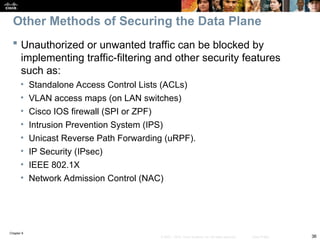
 Unauthorized or unwanted traffic can be blocked by
implementing traffic-filtering and other security features
such as:
• Standalone Access Control Lists (ACLs)
• VLAN access maps (on LAN switches)
• Cisco IOS firewall (SPI or ZPF)
• Intrusion Prevention System (IPS)
• Unicast Reverse Path Forwarding (uRPF).
• IP Security (IPsec)
• IEEE 802.1X
• Network Admission Control (NAC)
Other Methods of Securing the Data Plane
Chapter 9
37
© 2007 – 2010, Cisco Systems, Inc. All rights reserved. Cisco Public
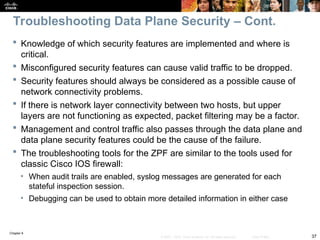
 Knowledge of which security features are implemented and where is
critical.
 Misconfigured security features can cause valid traffic to be dropped.
 Security features should always be considered as a possible cause of
network connectivity problems.
 If there is network layer connectivity between two hosts, but upper
layers are not functioning as expected, packet filtering may be a factor.
 Management and control traffic also passes through the data plane and
data plane security features could be the cause of the failure.
 The troubleshooting tools for the ZPF are similar to the tools used for
classic Cisco IOS firewall:
• When audit trails are enabled, syslog messages are generated for each
stateful inspection session.
• Debugging can be used to obtain more detailed information in either case
Troubleshooting Data Plane Security – Cont.
Chapter 9
38
© 2007 – 2010, Cisco Systems, Inc. All rights reserved. Cisco Public
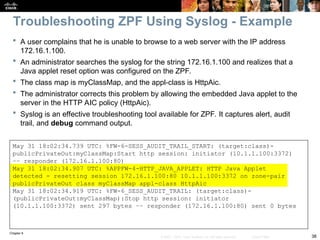
 A user complains that he is unable to browse to a web server with the IP address
172.16.1.100.
 An administrator searches the syslog for the string 172.16.1.100 and realizes that a
Java applet reset option was configured on the ZPF.
 The class map is myClassMap, and the appl-class is HttpAic.
 The administrator corrects this problem by allowing the embedded Java applet to the
server in the HTTP AIC policy (HttpAic).
 Syslog is an effective troubleshooting tool available for ZPF. It captures alert, audit
trail, and debug command output.
May 31 18:02:34.739 UTC: %FW-6-SESS_AUDIT_TRAIL_START: (target:class)-
publicPrivateOut:myClassMap:Start http session: initiator (10.1.1.100:3372)
–– responder (172.16.1.100:80)
May 31 18:02:34.907 UTC: %APPFW-4-HTTP_JAVA_APPLET: HTTP Java Applet
detected - resetting session 172.16.1.100:80 10.1.1.100:3372 on zone-pair
publicPrivateOut class myClassMap appl-class HttpAic
May 31 18:02:34.919 UTC: %FW-6_SESS_AUDIT_TRAIL: (target:class)-
(publicPrivateOut:myClassMap):Stop http session: initiator
(10.1.1.100:3372) sent 297 bytes –– responder (172.16.1.100:80) sent 0 bytes
Troubleshooting ZPF Using Syslog - Example
Chapter 9
39
© 2007 – 2010, Cisco Systems, Inc. All rights reserved. Cisco Public
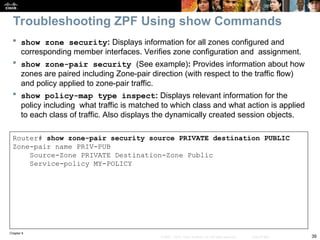
 show zone security: Displays information for all zones configured and
corresponding member interfaces. Verifies zone configuration and assignment.
 show zone-pair security (See example): Provides information about how
zones are paired including Zone-pair direction (with respect to the traffic flow)
and policy applied to zone-pair traffic.
 show policy-map type inspect: Displays relevant information for the
policy including what traffic is matched to which class and what action is applied
to each class of traffic. Also displays the dynamically created session objects.
Router# show zone-pair security source PRIVATE destination PUBLIC
Zone-pair name PRIV-PUB
Source-Zone PRIVATE Destination-Zone Public
Service-policy MY-POLICY
Troubleshooting ZPF Using show Commands
Chapter 9
40
© 2007 – 2010, Cisco Systems, Inc. All rights reserved. Cisco Public
Troubleshooting
Branch Office
and Remote
Worker
Connectivity
Chapter 9
41
© 2007 – 2010, Cisco Systems, Inc. All rights reserved. Cisco Public
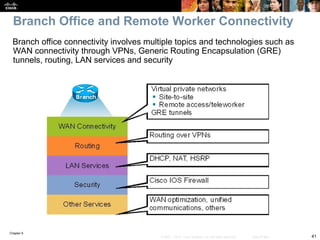
Branch office connectivity involves multiple topics and technologies such as
WAN connectivity through VPNs, Generic Routing Encapsulation (GRE)
tunnels, routing, LAN services and security
Branch Office and Remote Worker Connectivity
Chapter 9
42
© 2007 – 2010, Cisco Systems, Inc. All rights reserved. Cisco Public
 Site-to-site VPN connectivity
• Misconfigured parameters causing mismatches on the VPN-
termination routers.
• Overlapping IP subnets on the opposite sides of the tunnel which can
require the use of NAT
 Remote-access VPNs
• Host issues related to client configuration or antivirus software.
• User authentication and authorization is also a critical function
 GRE tunnels
• Misconfiguring tunnel source and destination can cause routing
issues preventing the tunnel from forming.
Branch Office & Remote Worker Connectivity Issues
Chapter 9
43
© 2007 – 2010, Cisco Systems, Inc. All rights reserved. Cisco Public
 GRE tunnels are typically used to transport routing protocols across IPsec VPNs.
 Maximum transmission unit (MTU) and fragmentation are a common issue.
 Problems related to GRE tunnel establishment are usually due to configurations of tunnel
sources and tunnel destinations, along with improper routing of loopbacks.
 Firewalls and traffic filters may block the IPsec traffic that carries the GRE tunnels.
 Multiple GRE point-to-point tunnels can saturate the physical link with routing information
if the bandwidth is not adequately provisioned or configured on the tunnel interface.
 The point-to-point nature of traditional GRE tunnels makes a full-mesh solution a
challenge because all routers have to terminate a high number of tunnels.
 Technologies that can alleviate the full-mesh requirement, making it dynamic, automatic,
and efficient can be deployed. Examples include:
• Virtual Tunnel Interface (VTI)
• Dynamic Multipoint VPN (DMVPN)
• Group-Encrypted Transport VPN (GET VPN).
Branch Office Connectivity Issues with GRE
Chapter 9
44
© 2007 – 2010, Cisco Systems, Inc. All rights reserved. Cisco Public
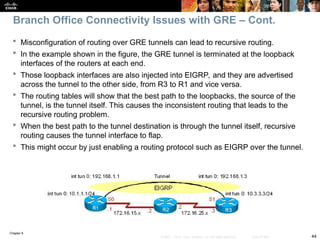
 Misconfiguration of routing over GRE tunnels can lead to recursive routing.
 In the example shown in the figure, the GRE tunnel is terminated at the loopback
interfaces of the routers at each end.
 Those loopback interfaces are also injected into EIGRP, and they are advertised
across the tunnel to the other side, from R3 to R1 and vice versa.
 The routing tables will show that the best path to the loopbacks, the source of the
tunnel, is the tunnel itself. This causes the inconsistent routing that leads to the
recursive routing problem.
 When the best path to the tunnel destination is through the tunnel itself, recursive
routing causes the tunnel interface to flap.
 This might occur by just enabling a routing protocol such as EIGRP over the tunnel.
Branch Office Connectivity Issues with GRE – Cont.
Chapter 9
45
© 2007 – 2010, Cisco Systems, Inc. All rights reserved. Cisco Public
 Other considerations with respect to troubleshooting branch
connectivity include:
• Are there firewalls or access lists blocking the VPN traffic?
• Are there overlapping subnets at the opposite ends of the tunnel?
• Is asymmetric routing causing VPN tunnels to fail?
• Do we have HSRP aligned with VPN high-availability functions?
 These issues deal with the routing, addressing, and high-
availability infrastructures present in the network.
 They are necessary for branch connectivity and require
additional troubleshooting when they fail.
 Because branch connectivity touches so many areas, the
tool box for troubleshooting its deployments include show
and debug commands in many areas.
Branch Office Connectivity Issues – Cont.
Chapter 9
46
© 2007 – 2010, Cisco Systems, Inc. All rights reserved. Cisco Public
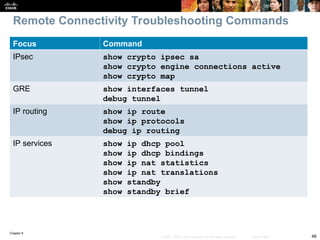
Focus Command
IPsec show crypto ipsec sa
show crypto engine connections active
show crypto map
GRE show interfaces tunnel
debug tunnel
IP routing show ip route
show ip protocols
debug ip routing
IP services show ip dhcp pool
show ip dhcp bindings
show ip nat statistics
show ip nat translations
show standby
show standby brief
Remote Connectivity Troubleshooting Commands
Chapter 9
47
© 2007 – 2010, Cisco Systems, Inc. All rights reserved. Cisco Public
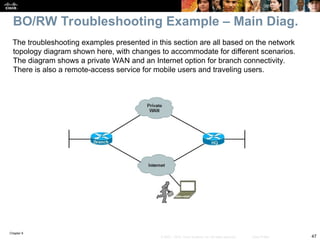
The troubleshooting examples presented in this section are all based on the network
topology diagram shown here, with changes to accommodate for different scenarios.
The diagram shows a private WAN and an Internet option for branch connectivity.
There is also a remote-access service for mobile users and traveling users.
BO/RW Troubleshooting Example – Main Diag.
Chapter 9
48
© 2007 – 2010, Cisco Systems, Inc. All rights reserved. Cisco Public
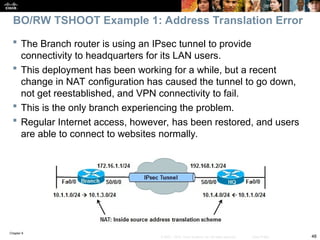
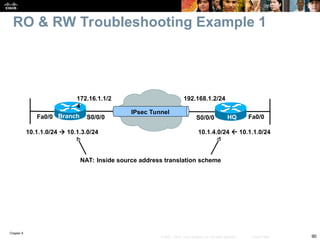
 The Branch router is using an IPsec tunnel to provide
connectivity to headquarters for its LAN users.
 This deployment has been working for a while, but a recent
change in NAT configuration has caused the tunnel to go down,
not get reestablished, and VPN connectivity to fail.
 This is the only branch experiencing the problem.
 Regular Internet access, however, has been restored, and users
are able to connect to websites normally.
BO/RW TSHOOT Example 1: Address Translation Error
Chapter 9
49
© 2007 – 2010, Cisco Systems, Inc. All rights reserved. Cisco Public
BRANCH# sh ip nat statistics
Total active translations: 1 (1 static, 0 dynamic, 0 extended)
Outside interfaces:
Serial0/0/0
Inside interfaces:
FastEthernet0/0
Hits: 0 Misses: 0
CEF Translated packets: 0, CEF Punted packets: 0
Expired translations: 0
Dynamic mappings:
–– Inside Source
[Id: 1] access-list 150 pool PUBLIC refcount 0
pool PUBLIC: netmask 255.255.255.0
start 172.16.1.100 end 172.16.1.200
type generic, total addresses 101, allocated 0 (0%), misses 0
[Id: 2] access-list VPN pool VPN_NAT refcount 0
start 10.1.10.10 end 10.1.10.200
type generic, total addresses 191, allocated 0 (0%), misses 0
Queued Packets: 0
On the Branch router, use the show ip nat statistics command to
display NAT information.
BO/RW TSHOOT Example 1 – Cont.
Chapter 9
50
© 2007 – 2010, Cisco Systems, Inc. All rights reserved. Cisco Public
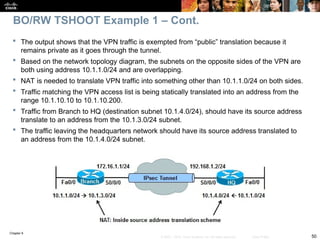
 The output shows that the VPN traffic is exempted from “public” translation because it
remains private as it goes through the tunnel.
 Based on the network topology diagram, the subnets on the opposite sides of the VPN are
both using address 10.1.1.0/24 and are overlapping.
 NAT is needed to translate VPN traffic into something other than 10.1.1.0/24 on both sides.
 Traffic matching the VPN access list is being statically translated into an address from the
range 10.1.10.10 to 10.1.10.200.
 Traffic from Branch to HQ (destination subnet 10.1.4.0/24), should have its source address
translate to an address from the 10.1.3.0/24 subnet.
 The traffic leaving the headquarters network should have its source address translated to
an address from the 10.1.4.0/24 subnet.
BO/RW TSHOOT Example 1 – Cont.
Chapter 9
51
© 2007 – 2010, Cisco Systems, Inc. All rights reserved. Cisco Public
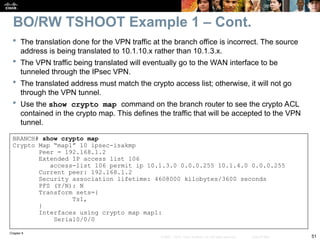
 The translation done for the VPN traffic at the branch office is incorrect. The source
address is being translated to 10.1.10.x rather than 10.1.3.x.
 The VPN traffic being translated will eventually go to the WAN interface to be
tunneled through the IPsec VPN.
 The translated address must match the crypto access list; otherwise, it will not go
through the VPN tunnel.
 Use the show crypto map command on the branch router to see the crypto ACL
contained in the crypto map. This defines the traffic that will be accepted to the VPN
tunnel.
BRANCH# show crypto map
Crypto Map “map1” 10 ipsec-isakmp
Peer = 192.168.1.2
Extended IP access list 106
access-list 106 permit ip 10.1.3.0 0.0.0.255 10.1.4.0 0.0.0.255
Current peer: 192.168.1.2
Security association lifetime: 4608000 kilobytes/3600 seconds
PFS (Y/N): N
Transform sets={
Ts1,
}
Interfaces using crypto map map1:
Serial0/0/0
BO/RW TSHOOT Example 1 – Cont.
Chapter 9
52
© 2007 – 2010, Cisco Systems, Inc. All rights reserved. Cisco Public
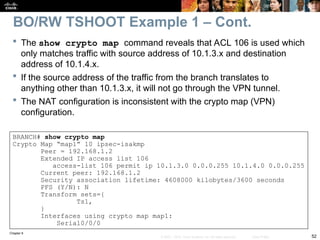
 The show crypto map command reveals that ACL 106 is used which
only matches traffic with source address of 10.1.3.x and destination
address of 10.1.4.x.
 If the source address of the traffic from the branch translates to
anything other than 10.1.3.x, it will not go through the VPN tunnel.
 The NAT configuration is inconsistent with the crypto map (VPN)
configuration.
BRANCH# show crypto map
Crypto Map “map1” 10 ipsec-isakmp
Peer = 192.168.1.2
Extended IP access list 106
access-list 106 permit ip 10.1.3.0 0.0.0.255 10.1.4.0 0.0.0.255
Current peer: 192.168.1.2
Security association lifetime: 4608000 kilobytes/3600 seconds
PFS (Y/N): N
Transform sets={
Ts1,
}
Interfaces using crypto map map1:
Serial0/0/0
BO/RW TSHOOT Example 1 – Cont.
Chapter 9
53
© 2007 – 2010, Cisco Systems, Inc. All rights reserved. Cisco Public
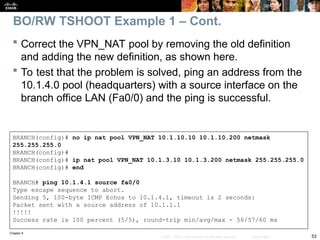
 Correct the VPN_NAT pool by removing the old definition
and adding the new definition, as shown here.
 To test that the problem is solved, ping an address from the
10.1.4.0 pool (headquarters) with a source interface on the
branch office LAN (Fa0/0) and the ping is successful.
BRANCH(config)# no ip nat pool VPN_NAT 10.1.10.10 10.1.10.200 netmask
255.255.255.0
BRANCH(config)#
BRANCH(config)# ip nat pool VPN_NAT 10.1.3.10 10.1.3.200 netmask 255.255.255.0
BRANCH(config)# end
BRANCH# ping 10.1.4.1 source fa0/0
Type escape sequence to abort.
Sending 5, 100-byte ICMP Echos to 10.1.4.1, timeout is 2 seconds:
Packet sent with a source address of 10.1.1.1
!!!!!
Success rate is 100 percent (5/5), round-trip min/avg/max - 56/57/60 ms
BO/RW TSHOOT Example 1 – Cont.
Chapter 9
54
© 2007 – 2010, Cisco Systems, Inc. All rights reserved. Cisco Public
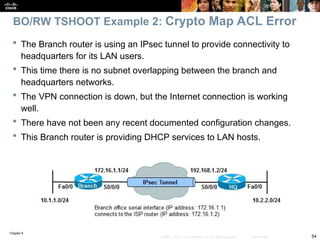
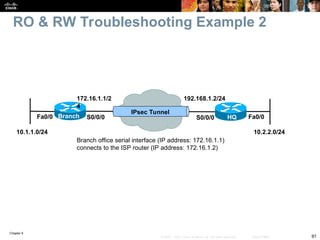
 The Branch router is using an IPsec tunnel to provide connectivity to
headquarters for its LAN users.
 This time there is no subnet overlapping between the branch and
headquarters networks.
 The VPN connection is down, but the Internet connection is working
well.
 There have not been any recent documented configuration changes.
 This Branch router is providing DHCP services to LAN hosts.
BO/RW TSHOOT Example 2: Crypto Map ACL Error
Chapter 9
55
© 2007 – 2010, Cisco Systems, Inc. All rights reserved. Cisco Public
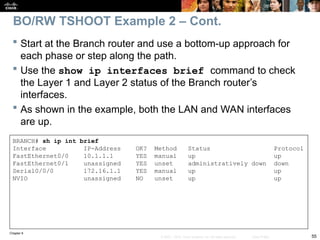
 Start at the Branch router and use a bottom-up approach for
each phase or step along the path.
 Use the show ip interfaces brief command to check
the Layer 1 and Layer 2 status of the Branch router’s
interfaces.
 As shown in the example, both the LAN and WAN interfaces
are up.
BRANCH# sh ip int brief
Interface IP-Address OK? Method Status Protocol
FastEthernet0/0 10.1.1.1 YES manual up up
FastEthernet0/1 unassigned YES unset administratively down down
Serial0/0/0 172.16.1.1 YES manual up up
NVIO unassigned NO unset up up
BO/RW TSHOOT Example 2 – Cont.
Chapter 9
56
© 2007 – 2010, Cisco Systems, Inc. All rights reserved. Cisco Public
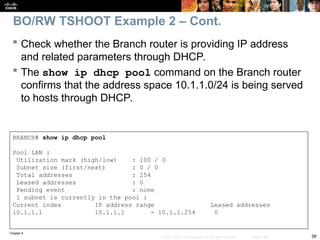
 Check whether the Branch router is providing IP address
and related parameters through DHCP.
 The show ip dhcp pool command on the Branch router
confirms that the address space 10.1.1.0/24 is being served
to hosts through DHCP.
BRANCH# show ip dhcp pool
Pool LAN :
Utilization mark (high/low) : 100 / 0
Subnet size (first/next) : 0 / 0
Total addresses : 254
Leased addresses : 0
Pending event : none
1 subnet is currently in the pool :
Current index IP address range Leased addresses
10.1.1.1 10.1.1.1 - 10.1.1.254 0
BO/RW TSHOOT Example 2 – Cont.
Chapter 9
57
© 2007 – 2010, Cisco Systems, Inc. All rights reserved. Cisco Public
 Check to see if there is a routing problem using the show
ip route command.
 The output show what is expected for a small branch office:
a static default pointing to a next hop on the WAN interface.
BRANCH# show ip route
<output omitted>
Gateway of last resort is 172.16.1.2 to network 0.0.0.0
172.16.0.0 255.255.255.0 is subnetted, 1 subnets
C 172.16.1.0 is directly connected, Serial0/0/0
10.0.0.0 255.255.255.0 is subnetted, 3 subnets
C 10.1.3.0 is directly connected, Loopback0
C 10.1.1.0 is directly connected, FastEthernet0/0
C 10.251.1.0 is directly connected, Loopback1
S* 0.0.0.0 0.0.0.0 [1/0] via 172.16.1.2
BO/RW TSHOOT Example 2 – Cont.
Chapter 9
58
© 2007 – 2010, Cisco Systems, Inc. All rights reserved. Cisco Public
BRANCH# show ip nat statistics
Total active translations: 1 (1 static, 0 dynamic, 0 extended)
Outside interfaces:
Serial0/0/0
Inside interfaces:
FastEthernet0/0
Hits: 60 Misses: 0
CEF Translated packets: 10, CEF Punted packets: 30
Expired translations: 7
Dynamic mappings:
–– Inside Source
[Id: 3] access-list 107 pool PUBLIC refcount 0
pool PUBLIC: netmask 255.255.255.0
start 172.16.1.100 end 172.16.1.200
type generic, total addresses 101, allocated 0 (0%), misses 0
Next, check NAT with the show ip nat statistics command.
The output reveals that traffic matching ACL 107 will be translated.
BO/RW TSHOOT Example 2 – Cont.
Chapter 9
59
© 2007 – 2010, Cisco Systems, Inc. All rights reserved. Cisco Public
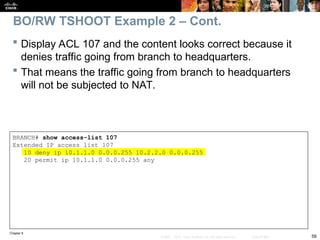
BRANCH# show access-list 107
Extended IP access list 107
10 deny ip 10.1.1.0 0.0.0.255 10.2.2.0 0.0.0.255
20 permit ip 10.1.1.0 0.0.0.255 any
 Display ACL 107 and the content looks correct because it
denies traffic going from branch to headquarters.
 That means the traffic going from branch to headquarters
will not be subjected to NAT.
BO/RW TSHOOT Example 2 – Cont.
Chapter 9
60
© 2007 – 2010, Cisco Systems, Inc. All rights reserved. Cisco Public
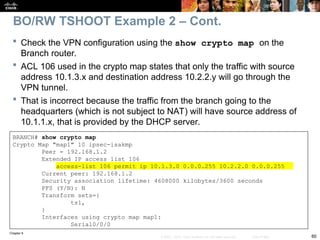
BRANCH# show crypto map
Crypto Map "map1" 10 ipsec-isakmp
Peer = 192.168.1.2
Extended IP access list 106
access-list 106 permit ip 10.1.3.0 0.0.0.255 10.2.2.0 0.0.0.255
Current peer: 192.168.1.2
Security association lifetime: 4608000 kilobytes/3600 seconds
PFS (Y/N): N
Transform sets={
ts1,
}
Interfaces using crypto map map1:
Serial0/0/0
 Check the VPN configuration using the show crypto map on the
Branch router.
 ACL 106 used in the crypto map states that only the traffic with source
address 10.1.3.x and destination address 10.2.2.y will go through the
VPN tunnel.
 That is incorrect because the traffic from the branch going to the
headquarters (which is not subject to NAT) will have source address of
10.1.1.x, that is provided by the DHCP server.
BO/RW TSHOOT Example 2 – Cont.
Chapter 9
61
© 2007 – 2010, Cisco Systems, Inc. All rights reserved. Cisco Public
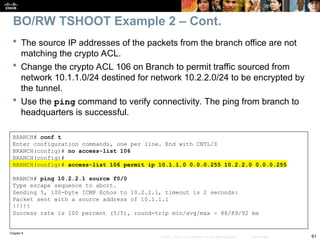
BRANCH# conf t
Enter configuration commands, one per line. End with CNTL/Z
BRANCH(config)# no access-list 106
BRANCH(config)#
BRANCH(config)# access-list 106 permit ip 10.1.1.0 0.0.0.255 10.2.2.0 0.0.0.255
BRANCH# ping 10.2.2.1 source f0/0
Type escape sequence to abort.
Sending 5, 100-byte ICMP Echos to 10.2.2.1, timeout is 2 seconds:
Packet sent with a source address of 10.1.1.1
!!!!!
Success rate is 100 percent (5/5), round-trip min/avg/max - 88/89/92 ms
 The source IP addresses of the packets from the branch office are not
matching the crypto ACL.
 Change the crypto ACL 106 on Branch to permit traffic sourced from
network 10.1.1.0/24 destined for network 10.2.2.0/24 to be encrypted by
the tunnel.
 Use the ping command to verify connectivity. The ping from branch to
headquarters is successful.
BO/RW TSHOOT Example 2 – Cont.
Chapter 9
62
© 2007 – 2010, Cisco Systems, Inc. All rights reserved. Cisco Public
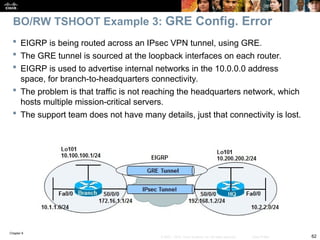
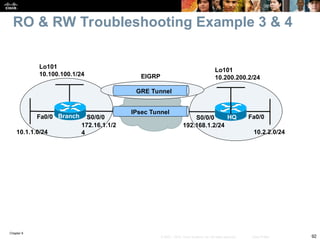
 EIGRP is being routed across an IPsec VPN tunnel, using GRE.
 The GRE tunnel is sourced at the loopback interfaces on each router.
 EIGRP is used to advertise internal networks in the 10.0.0.0 address
space, for branch-to-headquarters connectivity.
 The problem is that traffic is not reaching the headquarters network, which
hosts multiple mission-critical servers.
 The support team does not have many details, just that connectivity is lost.
BO/RW TSHOOT Example 3: GRE Config. Error
Chapter 9
63
© 2007 – 2010, Cisco Systems, Inc. All rights reserved. Cisco Public
HQ# show crypto isakmp sa
IPv4 Crypto ISAKMP SA
dst src state conn-id slot status
172.16.1.1 192.168.1.2 QM_IDLE 1002 0 ACTIVE
BRANCH# show crypto isakmp sa
IPv4 Crypto ISAKMP SA
dst src state conn-id slot status
192.168.1.2 172.16.1.1 QM_IDLE 1001 0 ACTIVE
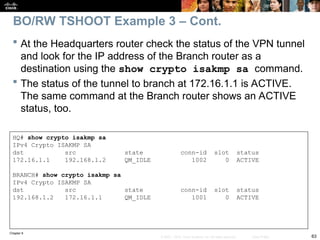
 At the Headquarters router check the status of the VPN tunnel
and look for the IP address of the Branch router as a
destination using the show crypto isakmp sa command.
 The status of the tunnel to branch at 172.16.1.1 is ACTIVE.
The same command at the Branch router shows an ACTIVE
status, too.
BO/RW TSHOOT Example 3 – Cont.
Chapter 9
64
© 2007 – 2010, Cisco Systems, Inc. All rights reserved. Cisco Public
BRANCH# show ip route 10.2.2.0
% Subnet not in table
BRANCH#
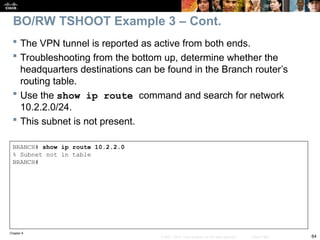
 The VPN tunnel is reported as active from both ends.
 Troubleshooting from the bottom up, determine whether the
headquarters destinations can be found in the Branch router’s
routing table.
 Use the show ip route command and search for network
10.2.2.0/24.
 This subnet is not present.
BO/RW TSHOOT Example 3 – Cont.
Chapter 9
65
© 2007 – 2010, Cisco Systems, Inc. All rights reserved. Cisco Public
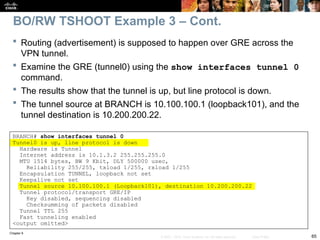
 Routing (advertisement) is supposed to happen over GRE across the
VPN tunnel.
 Examine the GRE (tunnel0) using the show interfaces tunnel 0
command.
 The results show that the tunnel is up, but line protocol is down.
 The tunnel source at BRANCH is 10.100.100.1 (loopback101), and the
tunnel destination is 10.200.200.22.
BO/RW TSHOOT Example 3 – Cont.
BRANCH# show interfaces tunnel 0
Tunnel0 is up, line protocol is down
Hardware is Tunnel
Internet address is 10.1.3.2 255.255.255.0
MTU 1514 bytes, BW 9 Kbit, DLY 500000 usec,
Reliability 255/255, txload 1/255, rxload 1/255
Encapsulation TUNNEL, loopback not set
Keepalive not set
Tunnel source 10.100.100.1 (Loopback101), destination 10.200.200.22
Tunnel protocol/transport GRE/IP
Key disabled, sequencing disabled
Checksumming of packets disabled
Tunnel TTL 255
Fast tunneling enabled
<output omitted>
Chapter 9
66
© 2007 – 2010, Cisco Systems, Inc. All rights reserved. Cisco Public
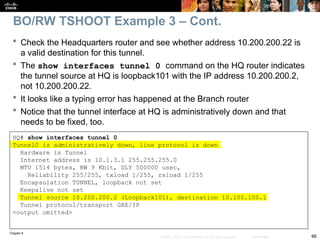
 Check the Headquarters router and see whether address 10.200.200.22 is
a valid destination for this tunnel.
 The show interfaces tunnel 0 command on the HQ router indicates
the tunnel source at HQ is loopback101 with the IP address 10.200.200.2,
not 10.200.200.22.
 It looks like a typing error has happened at the Branch router
 Notice that the tunnel interface at HQ is administratively down and that
needs to be fixed, too.
BO/RW TSHOOT Example 3 – Cont.
HQ# show interfaces tunnel 0
Tunnel0 is administratively down, line protocol is down
Hardware is Tunnel
Internet address is 10.1.3.1 255.255.255.0
MTU 1514 bytes, BW 9 Kbit, DLY 500000 usec,
Reliability 255/255, txload 1/255, rxload 1/255
Encapsulation TUNNEL, loopback not set
Keepalive not set
Tunnel source 10.200.200.2 (Loopback101), destination 10.100.100.1
Tunnel protocol/transport GRE/IP
<output omitted>
Chapter 9
67
© 2007 – 2010, Cisco Systems, Inc. All rights reserved. Cisco Public
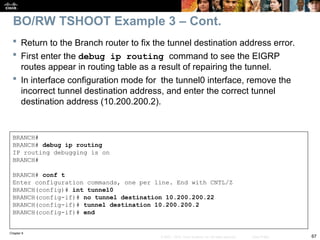
 Return to the Branch router to fix the tunnel destination address error.
 First enter the debug ip routing command to see the EIGRP
routes appear in routing table as a result of repairing the tunnel.
 In interface configuration mode for the tunnel0 interface, remove the
incorrect tunnel destination address, and enter the correct tunnel
destination address (10.200.200.2).
BO/RW TSHOOT Example 3 – Cont.
BRANCH#
BRANCH# debug ip routing
IP routing debugging is on
BRANCH#
BRANCH# conf t
Enter configuration commands, one per line. End with CNTL/Z
BRANCH(config)# int tunnel0
BRANCH(config-if)# no tunnel destination 10.200.200.22
BRANCH(config-if)# tunnel destination 10.200.200.2
BRANCH(config-if)# end
Chapter 9
68
© 2007 – 2010, Cisco Systems, Inc. All rights reserved. Cisco Public
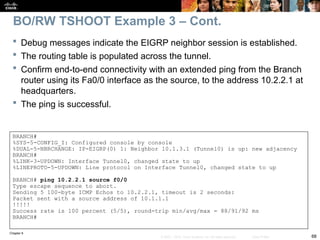
 Debug messages indicate the EIGRP neighbor session is established.
 The routing table is populated across the tunnel.
 Confirm end-to-end connectivity with an extended ping from the Branch
router using its Fa0/0 interface as the source, to the address 10.2.2.1 at
headquarters.
 The ping is successful.
BO/RW TSHOOT Example 3 – Cont.
BRANCH#
%SYS-5-CONFIG_I: Configured console by console
%DUAL-5-NBRCHANGE: IP-EIGRP(0) 1: Neighbor 10.1.3.1 (Tunnel0) is up: new adjacency
BRANCH#
%LINK-3-UPDOWN: Interface Tunnel0, changed state to up
%LINEPROTO-5-UPDOWN: Line protocol on Interface Tunnel0, changed state to up
BRANCH# ping 10.2.2.1 source f0/0
Type escape sequence to abort.
Sending 5 100-byte ICMP Echos to 10.2.2.1, timeout is 2 seconds:
Packet sent with a source address of 10.1.1.1
!!!!!
Success rate is 100 percent (5/5), round-trip min/avg/max = 88/91/92 ms
BRANCH#
Chapter 9
69
© 2007 – 2010, Cisco Systems, Inc. All rights reserved. Cisco Public
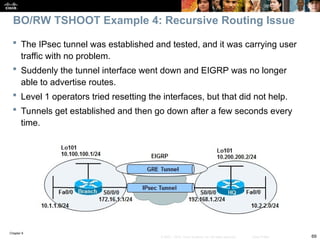
 The IPsec tunnel was established and tested, and it was carrying user
traffic with no problem.
 Suddenly the tunnel interface went down and EIGRP was no longer
able to advertise routes.
 Level 1 operators tried resetting the interfaces, but that did not help.
 Tunnels get established and then go down after a few seconds every
time.
BO/RW TSHOOT Example 4: Recursive Routing Issue
Chapter 9
70
© 2007 – 2010, Cisco Systems, Inc. All rights reserved. Cisco Public
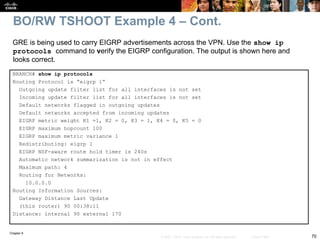
BRANCH# show ip protocols
Routing Protocol is “eigrp 1”
Outgoing update filter list for all interfaces is not set
Incoming update filter list for all interfaces is not set
Default networks flagged in outgoing updates
Default networks accepted from incoming updates
EIGRP metric weight K1 =1, K2 = 0, K3 = 1, K4 = 0, K5 = 0
EIGRP maximum hopcount 100
EIGRP maximum metric variance 1
Redistributing: eigrp 1
EIGRP NSF-aware route hold timer is 240s
Automatic network summarization is not in effect
Maximum path: 4
Routing for Networks:
10.0.0.0
Routing Information Sources:
Gateway Distance Last Update
(this router) 90 00:38:11
Distance: internal 90 external 170
GRE is being used to carry EIGRP advertisements across the VPN. Use the show ip
protocols command to verify the EIGRP configuration. The output is shown here and
looks correct.
BO/RW TSHOOT Example 4 – Cont.
Chapter 9
71
© 2007 – 2010, Cisco Systems, Inc. All rights reserved. Cisco Public
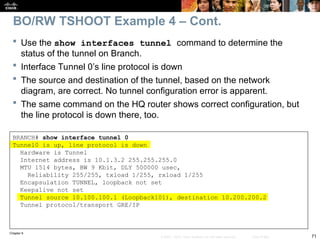
 Use the show interfaces tunnel command to determine the
status of the tunnel on Branch.
 Interface Tunnel 0’s line protocol is down
 The source and destination of the tunnel, based on the network
diagram, are correct. No tunnel configuration error is apparent.
 The same command on the HQ router shows correct configuration, but
the line protocol is down there, too.
BO/RW TSHOOT Example 4 – Cont.
BRANCH# show interface tunnel 0
Tunnel0 is up, line protocol is down
Hardware is Tunnel
Internet address is 10.1.3.2 255.255.255.0
MTU 1514 bytes, BW 9 Kbit, DLY 500000 usec,
Reliability 255/255, txload 1/255, rxload 1/255
Encapsulation TUNNEL, loopback not set
Keepalive not set
Tunnel source 10.100.100.1 (Loopback101), destination 10.200.200.2
Tunnel protocol/transport GRE/IP
Chapter 9
72
© 2007 – 2010, Cisco Systems, Inc. All rights reserved. Cisco Public
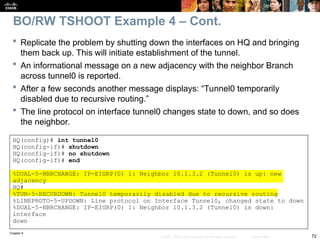
 Replicate the problem by shutting down the interfaces on HQ and bringing
them back up. This will initiate establishment of the tunnel.
 An informational message on a new adjacency with the neighbor Branch
across tunnel0 is reported.
 After a few seconds another message displays: “Tunnel0 temporarily
disabled due to recursive routing.”
 The line protocol on interface tunnel0 changes state to down, and so does
the neighbor.
BO/RW TSHOOT Example 4 – Cont.
HQ(config)# int tunnel0
HQ(config-if)# shutdown
HQ(config-if)# no shutdown
HQ(config-if)# end
%DUAL-5-NBRCHANGE: IP-EIGRP(0) 1: Neighbor 10.1.3.2 (Tunnel0) is up: new
adjacency
HQ#
%TUN-5-RECURDOWN: Tunnel0 temporarily disabled due to recursive routing
%LINEPROTO-5-UPDOWN: Line protocol on Interface Tunnel0, changed state to down
%DUAL-5-NBRCHANGE: IP-EIGRP(0) 1: Neighbor 10.1.3.2 (Tunnel0) is down:
interface
down
Chapter 9
73
© 2007 – 2010, Cisco Systems, Inc. All rights reserved. Cisco Public
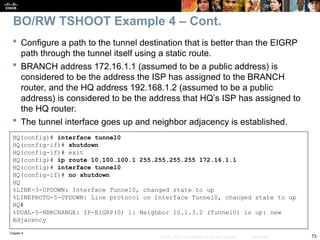
HQ(config)# interface tunnel0
HQ(config-if)# shutdown
HQ(config-if)# exit
HQ(config)# ip route 10.100.100.1 255.255.255.255 172.16.1.1
HQ(config)# interface tunnel0
HQ(config-if)# no shutdown
HQ
%LINK-3-UPDOWN: Interface Tunnel0, changed state to up
%LINEPROTO-5-UPDOWN: Line protocol on Interface Tunnel0, changed state to up
HQ#
%DUAL-5-NBRCHANGE: IP-EIGRP(0) 1: Neighbor 10.1.3.2 (Tunnel0) is up: new
Adjacency
 Configure a path to the tunnel destination that is better than the EIGRP
path through the tunnel itself using a static route.
 BRANCH address 172.16.1.1 (assumed to be a public address) is
considered to be the address the ISP has assigned to the BRANCH
router, and the HQ address 192.168.1.2 (assumed to be a public
address) is considered to be the address that HQ’s ISP has assigned to
the HQ router.
 The tunnel interface goes up and neighbor adjacency is established.
BO/RW TSHOOT Example 4 – Cont.
Chapter 9
74
© 2007 – 2010, Cisco Systems, Inc. All rights reserved. Cisco Public
HQ# show ip route
<output omitted>
Gateway of last resort is 192.168.1.1 to network 0.0.0.0
10.0.0.0 255.0.0.0 is variably subnetted, 8 subnets, 2 masks
C 10.1.3.0 255.255.255.0 is directly connected, Tunnel0
C 10.200.200.0 255.255.255.0 is directly connected, Loopback101
D 10.100.100.0 255.255.255.0
[90/297372416] via 10.1.3.2, 00:00:07, Tunnel0
C 10.2.2.0 255.255.255.0 is directly connected, FastEthernet0/0
D 10.1.1.0 255.255.255.0 [90/297372416] via 10.1.3.2, 00:00:07, Tunnel0
S 10.100.100.1 255.255.255.255 [1/0] via 172.16.1.1
C 192.168.1.0 255.255.255.0 is directly connected, serial0/0/0
S* 0.0.0.0 0.0.0.0 [1/0] via 192.168.1.1
 A display of the HQ routing table using the show ip route command
includes three paths to the tunnel0 destination (10.100.100.1):
 The gateway of last resort (0.0.0.0/0) through 192.168.1.1 (the ISP’s IP address
at HQ – not shown in the topology).
 The one is using the EIGRP route 10.100.100.0/24 through the tunnel0
interface.
 The one is using the static route entered to 10.100.100.1/32 through 172.16.1.1.
This is the most specific one and will be used to reach the tunnel end.
BO/RW TSHOOT Example 4 – Cont.
Chapter 9
75
© 2007 – 2010, Cisco Systems, Inc. All rights reserved. Cisco Public
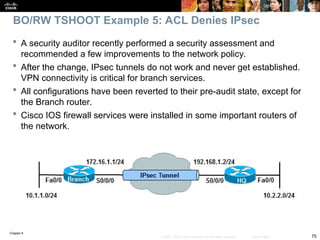
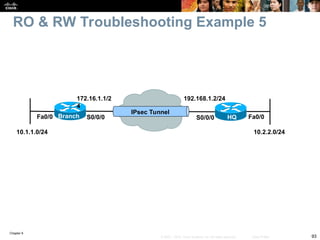
 A security auditor recently performed a security assessment and
recommended a few improvements to the network policy.
 After the change, IPsec tunnels do not work and never get established.
VPN connectivity is critical for branch services.
 All configurations have been reverted to their pre-audit state, except for
the Branch router.
 Cisco IOS firewall services were installed in some important routers of
the network.
BO/RW TSHOOT Example 5: ACL Denies IPsec
Chapter 9
76
© 2007 – 2010, Cisco Systems, Inc. All rights reserved. Cisco Public
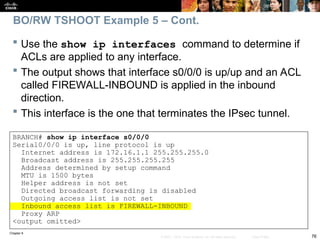
 Use the show ip interfaces command to determine if
ACLs are applied to any interface.
 The output shows that interface s0/0/0 is up/up and an ACL
called FIREWALL-INBOUND is applied in the inbound
direction.
 This interface is the one that terminates the IPsec tunnel.
BRANCH# show ip interface s0/0/0
Serial0/0/0 is up, line protocol is up
Internet address is 172.16.1.1 255.255.255.0
Broadcast address is 255.255.255.255
Address determined by setup command
MTU is 1500 bytes
Helper address is not set
Directed broadcast forwarding is disabled
Outgoing access list is not set
Inbound access list is FIREWALL-INBOUND
Proxy ARP
<output omitted>
BO/RW TSHOOT Example 5 – Cont.
Chapter 9
77
© 2007 – 2010, Cisco Systems, Inc. All rights reserved. Cisco Public
BRANCH# show access-list FIREWALL-INBOUND
Extended IP access list FIREWALL-INBOUND
10 permit tcp any 192.168.250.16 0.0.0.15 established
20 permit tcp any host 192.168.250.16 eq www
30 permit tcp any any eq 22
40 permit tcp any any eq telnet
50 permit tcp any host 192.168.250.16 eq ftp
60 permit icmp any any
70 permit eigrp any any (120 matches)
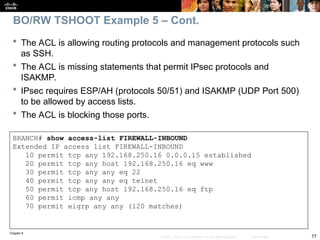
 The ACL is allowing routing protocols and management protocols such
as SSH.
 The ACL is missing statements that permit IPsec protocols and
ISAKMP.
 IPsec requires ESP/AH (protocols 50/51) and ISAKMP (UDP Port 500)
to be allowed by access lists.
 The ACL is blocking those ports.
BO/RW TSHOOT Example 5 – Cont.
Chapter 9
78
© 2007 – 2010, Cisco Systems, Inc. All rights reserved. Cisco Public
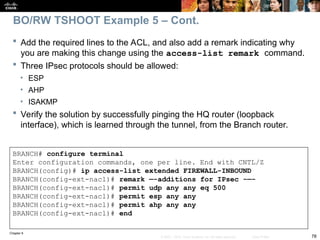
BRANCH# configure terminal
Enter configuration commands, one per line. End with CNTL/Z
BRANCH(config)# ip access-list extended FIREWALL-INBOUND
BRANCH(config-ext-nacl)# remark —-additions for IPsec -—-
BRANCH(config-ext-nacl)# permit udp any any eq 500
BRANCH(config-ext-nacl)# permit esp any any
BRANCH(config-ext-nacl)# permit ahp any any
BRANCH(config-ext-nacl)# end
 Add the required lines to the ACL, and also add a remark indicating why
you are making this change using the access-list remark command.
 Three IPsec protocols should be allowed:
• ESP
• AHP
• ISAKMP
 Verify the solution by successfully pinging the HQ router (loopback
interface), which is learned through the tunnel, from the Branch router.
BO/RW TSHOOT Example 5 – Cont.
Chapter 9
79
© 2007 – 2010, Cisco Systems, Inc. All rights reserved. Cisco Public
 Security measures that affect troubleshooting can include:
• Limiting access to network infrastructure devices
• Control and management plane hardening
• Packet filtering on routers and switches
• Virtual private networks (VPN)
• Intrusion prevention system (IPS) features.
 It is important to understand which features are deployed and how they
operate.
 Most security features operate at the transport layer and above.
 A generic troubleshooting process can help to determine if problems are
related to security features or caused by underlying Layer 1, 2, or 3
connectivity issues.
 Reported problems and possible solutions need to be validated
against the organization’s security policy.
 Depending on the organization, it may be necessary to escalate the issue
to a security specialist.
Chapter 9 Summary
Chapter 9
80
© 2007 – 2010, Cisco Systems, Inc. All rights reserved. Cisco Public
 Security features can affect router and switch operation on different planes. The three main
functional planes are:
 Management plane:
• Represents functions and protocols involved in managing the device.
• Provides access for device configuration, device operation, and statistics.
• If the management plane is compromised, other planes are also exposed.
• Protocols include Telnet, AAA, SSH, FTP, TFTP, SNMP, syslog, TACACS+, RADIUS, DNS, NetFlow
and ROMMON.
 Control plane:
• Represents functions and protocols between network devices to control the operation of the network.
• Layer 3 protocols include routing protocols and HSRP.
• Layer 2 protocols and functions include ARP, STP and VLANs.
 Data plane:
• Represents functions involved in forwarding traffic through the device. Traffic is between endpoints
such as workstations, servers and printers.
• Routers and switches can inspect and filter traffic as part of the implementation of a security policy.
• All management and control plane traffic flows through the data plane.
• Security features on the data plane can cause failures on the management and control plane.
Chapter 9 Summary – Cont.
Chapter 9
81
© 2007 – 2010, Cisco Systems, Inc. All rights reserved. Cisco Public
The management functions of a router or switch are commonly accessed using three
methods:
The Cisco IOS command-line interface (CLI)
Web-based device management
A network management platform based on Simple Network Management Protocol (SNMP)
CLI Management Access:
The CLI is the most common and powerful method to manage routers and switches.
Commands are entered through a console connection or remotely through Telnet or SSH.
Authentication ensures that only authorized personnel can access and configure the
network devices.
Restrict the network locations that devices can be accessed from and use SSH instead of
Telnet.
Physical security is vital to the security of the management plane.
• The CLI can always be accessed through the serial console.
• An unauthorized user could power cycle the device and use password recovery to gain control of
the device.
Chapter 9 Summary: Management Plane
Chapter 9
82
© 2007 – 2010, Cisco Systems, Inc. All rights reserved. Cisco Public
Web-based Management Access
A web-based device manager can provide an alternative method to
manage routers and switches. Examples include:
• Cisco Configuration Professional (CCP)
• Security Device Manager (SDM)
The protocol used is either HTTP or HTTPS (preferred).
SNMP Management Access
Primarily used to access operational parameters and statistics of the
device, not to change the configuration.
If a device is configured for read-access the configuration cannot be
changed.
If a device is configured for read-write access, apply the same level of
security as for command-line or web-based access.
Chapter 9 Summary: Management Plane - Cont.
Chapter 9
83
© 2007 – 2010, Cisco Systems, Inc. All rights reserved. Cisco Public
 Authentication, authorization, and accounting (AAA) is a major component
of network security.
 A centralized security server contains security policies that define the list of
users and what they are allowed to do.
 Cisco Secure Access Control Server (ACS) is an example of a AAA server.
 Network devices can access the centralized security server using protocols
such as TACACS+ and RADIUS.
 The debug aaa authentication command is useful for
troubleshooting AAA authentication problems.
 The debug aaa authorization command is useful for troubleshooting
AAA authorization problems.
 The debug aaa accounting command is useful to troubleshoot AAA
accounting problems.
 The most common problem occurring when centralized security servers are
used is the server going down or becoming unreachable.
Chapter 9 Summary: Management Plane - Cont.
Chapter 9
84
© 2007 – 2010, Cisco Systems, Inc. All rights reserved. Cisco Public
 When troubleshooting control plane issues, first discover
what protocols and features are enabled on the network
devices.
 Next, for those protocols and features, you must consider
possible configuration errors.
 Misconfiguration of any of the following can lead to control
plane failures:
• Routing protocol or FHRP authentication
• STP options such as BPDU Guard, BPDU Filter, Root Guard, and
Loop Guard
• DHCP snooping
• DAI
• Control plane policing and control plane protection
Chapter 9 Summary: Control Plane
Chapter 9
85
© 2007 – 2010, Cisco Systems, Inc. All rights reserved. Cisco Public
 There are two types of Cisco IOS firewall:
• Classic Cisco IOS firewall (AKA CBAC)
• ZPF
 Tools for troubleshooting IP firewall (CBAC) configurations include:
• The show ip inspect commands
• Audit trails to generate syslog messages (using ip inspect audit-trail
command)
• The debug ip inspect commands.
 Commands for troubleshooting ZPF troubleshooting and verification
include:
• show zone security
• show zone-pair security
• show policy-map type inspect
Chapter 9 Summary: Data Plane
Chapter 9
86
© 2007 – 2010, Cisco Systems, Inc. All rights reserved. Cisco Public
 Data plane security is accomplished using a variety of
router and switch options such as uRPF, IPsec, NAC and
802.1X port authentication.
 The main considerations with respect to troubleshooting
branch connectivity relate to network readiness and include
the following:
• Are firewalls or ACLs blocking crucial VPN traffic?
• Are there overlapping subnets at the opposite ends of the tunnel?
• Is asymmetric routing causing VPN tunnels to fail?
• Do we have HSRP aligned with VPN high-availability functions?
Chapter 9 Summary: Data Plane – Cont.
Chapter 9
87
© 2007 – 2010, Cisco Systems, Inc. All rights reserved. Cisco Public
 Lab 9-1 Management Plane Security
 Lab 9-2 Control Plane Security
 Lab 9-3 Data Plane Security
Chapter 9 Labs
Chapter 9
88
© 2007 – 2010, Cisco Systems, Inc. All rights reserved. Cisco Public
Chapter 9
89
© 2007 – 2010, Cisco Systems, Inc. All rights reserved. Cisco Public
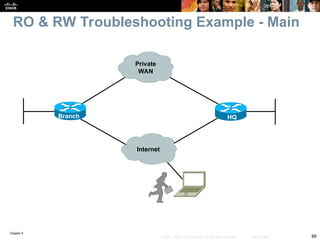
RO & RW Troubleshooting Example - Main
Branch HQ
Internet
Private
WAN
Chapter 9
90
© 2007 – 2010, Cisco Systems, Inc. All rights reserved. Cisco Public
RO & RW Troubleshooting Example 1
Branch HQ
Fa0/0 Fa0/0
S0/0/0
S0/0/0
IPsec Tunnel
172.16.1.1/2
4
192.168.1.2/24
10.1.1.0/24  10.1.3.0/24 10.1.4.0/24  10.1.1.0/24
NAT: Inside source address translation scheme
Chapter 9
91
© 2007 – 2010, Cisco Systems, Inc. All rights reserved. Cisco Public
RO & RW Troubleshooting Example 2
Branch HQ
Fa0/0 Fa0/0
S0/0/0
S0/0/0
IPsec Tunnel
172.16.1.1/2
4
192.168.1.2/24
Branch office serial interface (IP address: 172.16.1.1)
connects to the ISP router (IP address: 172.16.1.2)
10.1.1.0/24 10.2.2.0/24
Chapter 9
92
© 2007 – 2010, Cisco Systems, Inc. All rights reserved. Cisco Public
RO & RW Troubleshooting Example 3 & 4
Branch HQ
Fa0/0 Fa0/0
S0/0/0
S0/0/0
IPsec Tunnel
172.16.1.1/2
4
192.168.1.2/24
10.1.1.0/24 10.2.2.0/24
Lo101
10.100.100.1/24
Lo101
10.200.200.2/24
GRE Tunnel
EIGRP
Chapter 9
93
© 2007 – 2010, Cisco Systems, Inc. All rights reserved. Cisco Public
RO & RW Troubleshooting Example 5
Branch HQ
Fa0/0 Fa0/0
S0/0/0
S0/0/0
IPsec Tunnel
172.16.1.1/2
4
192.168.1.2/24
10.1.1.0/24 10.2.2.0/24

Installation et configuration de système

  • 1.
    © 2007 –2010, Cisco Systems, Inc. All rights reserved. Cisco Public TSHOOT v6 Chapter 9 1 Chapter 9: Maintaining and Troubleshooting Network Security Implementations CCNP TSHOOT: Maintaining and Troubleshooting IP Networks
  • 2.
    Chapter 9 2 © 2007– 2010, Cisco Systems, Inc. All rights reserved. Cisco Public  Troubleshoot Secure Networks  Troubleshoot Management Plane Security  Troubleshoot Control Plane Security  Troubleshoot Data Plane Security  Troubleshoot Branch Office and Remote Worker Connectivity Chapter 9 Objectives
  • 3.
    Chapter 9 3 © 2007– 2010, Cisco Systems, Inc. All rights reserved. Cisco Public Troubleshooting Secure Networks
  • 4.
    Chapter 9 4 © 2007– 2010, Cisco Systems, Inc. All rights reserved. Cisco Public  The focus of this section is on the types of network security implemented and their impact on the troubleshooting process.  Security measures that affect troubleshooting can include: • Limiting access to network infrastructure devices • Control and management plane hardening • Packet filtering on routers and switches • Virtual private networks (VPN) • Intrusion prevention system (IPS) features.  It is important to understand which features are deployed and how they operate.  Most security features operate at the transport layer and above.  A generic troubleshooting process can help to determine if problems are related to security features or caused by underlying Layer 1, 2, or 3 connectivity issues.  Reported problems and possible solutions need to be validated against the organization’s security policy.  Depending on the organization, it may be necessary to escalate the issue to a security specialist. Section Overview
  • 5.
    Chapter 9 5 © 2007– 2010, Cisco Systems, Inc. All rights reserved. Cisco Public  Security features can affect router and switch operation on different planes. The three main functional planes are:  Management plane: • Represents functions and protocols involved in managing the device. • Provides access for device configuration, device operation, and statistics. • If the management plane is compromised, other planes are also exposed. • Protocols include Telnet, AAA, SSH, FTP, TFTP, SNMP, syslog, TACACS+, RADIUS, DNS, NetFlow and ROMMON.  Control plane: • Represents functions and protocols between network devices to control the operation of the network. • Layer 3 protocols include routing protocols and HSRP. • Layer 2 protocols and functions include ARP, STP and VLANs.  Data plane: • Represents functions involved in forwarding traffic through the device. • Traffic is between endpoints such as workstations, servers and printers. • Routers and switches can inspect and filter traffic as part of the implementation of a security policy. • All management and control plane traffic flows through the data plane. • Security features on the data plane can cause failures on the management and control plane. Security Features Review – Functional Planes
  • 6.
    Chapter 9 6 © 2007– 2010, Cisco Systems, Inc. All rights reserved. Cisco Public The management functions of a router or switch are commonly accessed using three methods: The Cisco IOS command-line interface (CLI) Web-based device management A network management platform based on Simple Network Management Protocol (SNMP) CLI Management Access: The CLI is the most common and powerful method to manage routers and switches. Commands are entered through a console connection or remotely through Telnet or SSH. Authentication ensures that only authorized personnel can access and configure the network devices. Restrict the network locations that devices can be accessed from and use SSH instead of Telnet. Physical security is vital to the security of the management plane. • The CLI can always be accessed through the serial console. • An unauthorized user could power cycle the device and use password recovery to gain control of the device. Troubleshooting Management Plane Security
  • 7.
    Chapter 9 7 © 2007– 2010, Cisco Systems, Inc. All rights reserved. Cisco Public Web-based Management Access A web-based device manager can provide an alternative method to manage routers and switches. Examples include: • Cisco Configuration Professional (CCP) • Security Device Manager (SDM) The protocol used is either HTTP or HTTPS (preferred). SNMP Management Access Primarily used to access operational parameters and statistics of the device, not to change the configuration. If a device is configured for read-access the configuration cannot be changed. If a device is configured for read-write access, apply the same level of security as for command-line or web-based access. Management Plane Security – Cont.
  • 8.
    Chapter 9 8 © 2007– 2010, Cisco Systems, Inc. All rights reserved. Cisco Public  Authentication, authorization, and accounting (AAA) is a major component of network security.  A centralized security server contains security policies that define the list of users and what they are allowed to do.  Cisco Secure Access Control Server (ACS) is an example of a AAA server.  Network devices can access the centralized security server using protocols such as TACACS+ and RADIUS. Management Plane Security: AAA
  • 9.
    Chapter 9 9 © 2007– 2010, Cisco Systems, Inc. All rights reserved. Cisco Public RADIUS TACACS+ Standard IETF Cisco proprietary Architecture Combines authentication and authorization Uses AAA architecture which decouples authentication and authorization Transport protocol UDP port 1812 (or 1645) for authentication, and UDP port 1813 (or 1646) for accounting TCP (port 49) Encryption Password only Entire packet body Authorization of specific commands Not on per-user basis Two methods provided Suitability for router management Less flexible More flexible Accounting capabilities Extensive Limited Management Plane Security: RADIUS & TACACS+
  • 10.
    Chapter 9 10 © 2007– 2010, Cisco Systems, Inc. All rights reserved. Cisco Public From a troubleshooting standpoint, it is important to know the answer to the following questions: What security policies have been implemented for management access to the devices? From which IP addresses or networks can the network devices be accessed? What type of authentication, authorization, and accounting is used on the network? If centralized AAA services are deployed, what happens when these servers fail or become unreachable? Are there any backdoors or fallback mechanisms to access the devices? Securing the Management Plane
  • 11.
    Chapter 9 11 © 2007– 2010, Cisco Systems, Inc. All rights reserved. Cisco Public Cisco Secure ACS offers centralized command and control for all user authentication, authorization, and accounting from a web-based, graphical interface. The Reports and Activity screen is shown here. Securing the Management Plane - ACS
  • 12.
    Chapter 9 12 © 2007– 2010, Cisco Systems, Inc. All rights reserved. Cisco Public The ACS Reports and Activity option provides the following to troubleshoot AAA-related problems: Accounting Reports: • Provided for ACACS+ and the RADIUS • Contains a record of all successful authentications during a time period. • Information includes time, date, username, type of connection, amount of time logged in, and bytes transferred. Administration Reports: • Contains all TACACS+ commands requested during a time period • Typically used when ACS is being used to manage access to routers. Passed Authentications: • Lists successful authentications during a time period. Failed Attempts: • Contains a record of all unsuccessful authentications during a time period (for both TACACS+ and RADIUS). • Captures the username attempted, time, date, and cause of failure. Logged-in Users: • Shows all users currently logged in, grouped by AAA client. Disabled Accounts: • Contains accounts that have been disabled. Securing the Management Plane: ACS – Cont.
  • 13.
    Chapter 9 13 © 2007– 2010, Cisco Systems, Inc. All rights reserved. Cisco Public The debug tacacs and debug aaa authentication commands can be useful for troubleshooting AAA authentication problems. The example shows the output for a successful login attempt using TACACS+. Management Plane Authentication: AAA/TACACS+ Router# debug tacacs Router# debug aaa authentication 13:21:20: AAA/AUTHEN: create_user user=’’ ruser=’’ port=’tty6’ rem_addr=’10.0.0.32’ authen_type=1 service=1 priv=1 13:21:20: AAA/AUTHEN/START (0): port= ‘tty6’ list=’’ action=LOGIN service=LOGIN 13:21:20: AAA/AUTHEN/START (0): using “default” list 13:21:20: AAA/AUTHEN/START (70215483): Method=TACACS+ 13:21:20: TAC+ (70215483): received authen response status = GETUSER 13:21:20: AAA/AUTHEN (70215483): status = GETUSER 13:21:23: AAA/AUTHEN/CONT (70215483): continue_login 13:21:23: AAA/AUTHEN (70215483): status = GETUSER 13:21:23: AAA/AUTHEN (70215483): Method=TACACS+ 13:21:23: TAC+ : send AUTHEN/CONT packet 13:21:23: TAC+ (70215483): received authen response status = GETPASS 13:21:23: AAA/AUTHEN (70215483): status = GETPASS 13:21:27: AAA/AUTHEN/CONT (70215483): continue_login 13:21:27: AAA/AUTHEN (70215483): status = GETPASS 13:21:27: AAA/AUTHEN (70215483): Method=TACACS+ 13:21:27: TAC+ : send AUTHEN/CONT packet 13:21:27: TAC+ (70215483): received authen response status = PASS 13:21:27: AAA/AUTHEN (70215483): status = PASS
  • 14.
    Chapter 9 14 © 2007– 2010, Cisco Systems, Inc. All rights reserved. Cisco Public The debug output captured in the example shows the following events: A remote user with the IP address 10.0.0.32 attempts to log in to the router. The router checks to see whether AAA authentication for the LOGIN service is enabled (and it is). Because no other authentication method list is applied, the router applies the default method, and the first method defined by the default method list is TACACS+. The router authentication process prompts the user for a username and password. Upon receiving these credentials, the router sends them to the TACACS+ server for verification. The TACACS+ server checks the credentials against its database and responds with a PASS status as a sign of successful authentication. Management Plane Authentication: AAA/TACACS+ - Cont.
  • 15.
    Chapter 9 15 © 2007– 2010, Cisco Systems, Inc. All rights reserved. Cisco Public The debug aaa authorization output captured in this example shows the following events: The user (admin1) attempts to obtain an EXEC shell service, which requires authorization. The cmd parameter specifies a command that the user is trying to execute. If * is listed, it refers to plain EXEC access. The method used to authorize this access is TACACS+. The router sends the necessary information (user credentials) through TACACS+ to the security server. The security server verifies the authorization, determines that the user is not authorized to perform this function, and sends back a FAIL status response. Router# debug aaa authorization 2:23:21: AAA/AUTHOR (0): user= ‘admin1’ 2:23:21: AAA/AUTHOR (0): send AV service=shell 2:23:21: AAA/AUTHOR (0): send AV cmd* 2:23:21: AAA/AUTHOR (342885561): Method=TACACS+ 2:23:21: AAA/AUTHOR/TAC+ (342885561): user=admin1 2:23:21: AAA/AUTHOR/TAC+ (342885561): send AV service=shell 2:23:21: AAA/AUTHOR/TAC+ (342885561): send AV cmd* 2:23:21: AAA/AUTHOR (342885561): Post authorization status = FAIL Management Plane Authorization: AAA/TACACS+
  • 16.
    Chapter 9 16 © 2007– 2010, Cisco Systems, Inc. All rights reserved. Cisco Public  The debug aaa accounting output captured in the example shows a scenario where the default method was used, and that a user successfully gained access to the router’s EXEC shell. Router# debug aaa accounting May 10 14:48:33.011: AAA/ACCT/EXEC(00000005): Pick method list ‘default’ May 10 14:48:33.011: AAA/ACCT/SETMLIST(00000005): Handle 0, mlist 81CA79CC, Name default May 10 14:48:33.011: Getting session id for EXEC (00000005): db=82099258 May 10 14:48:33.011: AAA/ACCT/EXEC(00000005): add, count 2 May 10 14:48:33.011: AAA/ACCT/EVENT(00000005): EXEC UP Management Plane Accounting: AAA/TACACS+
  • 17.
    Chapter 9 17 © 2007– 2010, Cisco Systems, Inc. All rights reserved. Cisco Public Common TACACS+ failures can include the following: A TACACS+ server goes down or a device (TACACS client) cannot connect to the server. As a backup, configure the network device to use the local database for authenticating critical users. A device (client) shared key and the server’s shared key do not match. User credentials (username, password, or both) are rejected by the server. Management Plane: Common TACACS+ Issues
  • 18.
    Chapter 9 18 © 2007– 2010, Cisco Systems, Inc. All rights reserved. Cisco Public Management Plane: TACACS+ Issues – Cont. Router# debug tacacs Router# debug aaa authentication ! The TACACS+ server is down or the device has no connectivity to the server: TAC+: TCP/IP open to 171.68.118.101/49 failed- Connection refused by remote host AAA/AUTHEN (2546660185): status = ERROR AAA/AUTHEN/START (2546660185): Method=LOCAL AAA/AUTHEN (2546660185): status = FAIL As1 CHAP: Unable to validate response. Username chapuser: Authentication failure ! The key on the device and TACACS+ server do not match: TAC+: received bad AUTHEN packet: length = 68, expected 67857 TAC+: Invalid AUTHEN/START packet (check keys) AAA/AUTHEN (1771887965): status = ERROR ! Bad user name, bad password, or both: AAA/AUTHEN: free_user (0x170940) user= ‘chapuser’ ruser= ‘’ Port= ‘Async1’ rem_addr= ‘async’ authen_type=CHAP service=PPP priv=1 TAC+: Closing TCP/IP 0x16EF4C connection to 171.68.118.101/49 AAA/AUTHEN (2082151566): status = FAIL As1 CHAP: Unable to validate Response. Username papuser: Authentication failure
  • 19.
    Chapter 9 19 © 2007– 2010, Cisco Systems, Inc. All rights reserved. Cisco Public  The common RADIUS problems are similar to the common TACACS+ problems: • The RADIUS server’s failure or loss of network connectivity • Mismatch of the shared key between the RADIUS server and the network device (RADIUS client) • User authorization failure (incorrect username, password, or both) • Mismatch of RADIUS port numbers between the router and RADIUS server Management Plane: Common RADIUS Issues
  • 20.
    Chapter 9 20 © 2007– 2010, Cisco Systems, Inc. All rights reserved. Cisco Public Management Plane: RADIUS Issues – Cont. Router# debug radius Router# debug aaa authentication ! The RADIUS server is down or the device has no connectivity to the server: As1 CHAP: I RESPONSE id 12 len 28 from “chapadd” RADIUS: id 15, requestor hung up. RADIUS: No response for id 15 RADIUS: No response from server AAA/AUTHEN (1866705040): status = ERROR AAA/AUTHEN/START (1866705040): Method=LOCAL AAA/AUTHEN (1866705040): status = FAIL As1 CHAP: Unable to validate Response. Username chapadd: Authentication failure As1 CHAP: 0 FAILURE id 13 len 26 msg is “Authentication failure” ! The key on the device and RADIUS server do not match: RADIUS: received from id 21 171.68.118.101:1645, Access-Reject, len 20 RADIUS: Reply for 21 fails decrypt NT client sends ‘DOMAINuser’ and Radius server expects ‘user’: RADIUS: received from id 16 171.68.118.101:1645, Access-Reject, len 20 AAA/AUTHEN (2974782384): status = FAIL As1 CHAP: Unable to validate Response. Username CISCOchapadd: Authentication failure As1 CHAP: 0 FAILURE id 13 len 26 msg is “Authentication failure” ! Username and password are correct, but authorization failed: RADIUS: received from id 19 171.68.118.101:1645, Access-Accept, len 20 RADIUS: no appropriate authorization type for user AAA/AUTHOR (2370106832): Post authorization status = FAIL AAA/AUTHOR/LCP As1: Denied ! Bad username, bad password, or both: RADIUS: received from id 17 171.68.118.101:1645, Access-Reject, len 20 AAA/AUTHEN (3898168391): status = FAIL As1 CHAP: Unable to validate Response. Username ddunlap: Authentication failure As1 CHAP: 0 FAILURE id 14 len 26 msg is “Authentication failure” As1 PPP: Phase is TERMINATING
  • 21.
    Chapter 9 21 © 2007– 2010, Cisco Systems, Inc. All rights reserved. Cisco Public  Control plane traffic is handled by the system’s route processor.  Packets that traverse the control plane are those destined for that router’s CPU, as opposed to network endpoints.  Examples include routing protocols, keepalives, first-hop redundancy protocols (FHRP), DHCP, STP and ARP.  All packets entering the control plane are redirected by the data (forwarding) plane.  Denial-of-service (DoS) attacks on the control plane can overburdened router CPU.  Unauthorized participation in any of these protocols should be prevented to secure the network. Troubleshooting Control Plane Security
  • 22.
    Chapter 9 22 © 2007– 2010, Cisco Systems, Inc. All rights reserved. Cisco Public  Most routing protocols support neighbor authentication based on MD5 hashes.  Authentication is also supported by first-hop redundancy protocols: • Hot Standby Router Protocol (HSRP) • Virtual Router Redundancy Protocol (VRRP) • Gateway Load Balancing Protocol (GLBP)  Using an authentication mechanism prevents unauthorized devices from and misdirecting or black-holing application traffic.  The IEEE 802.1D STP does not have an authentication mechanism.  Cisco switches support features such as BPDU guard and Root Guard to help prevent unauthorized interaction with Spanning Tree Protocol.  The DHCP and ARP protocols can be secured by enabling the DHCP snooping and dynamic ARP inspection (DAI) features.  Control plane and control plane protection can use the Cisco Modular QoS CLI (MQC) to protect the infrastructure from DoS attacks. Securing the Control Plane: Overview
  • 23.
    Chapter 9 23 © 2007– 2010, Cisco Systems, Inc. All rights reserved. Cisco Public  It is important to know which control plane security features have been implemented in the network and on which devices.  Misconfiguration can cause the operation of a control plane protocol between devices to fail.  Ask the following questions to help troubleshoot control plane security implementations: • Are routing protocols or FHRPs set up for authentication properly? • Are STP security features such as BPDU Guard, BDPU Filter, Loop Guard, or Root Guard enabled correctly? • Is DHCP snooping configured properly? • Is the configuration of DAI correct? • Are the configurations for control plane policing or control plane protection done appropriately? Securing the Control Plane: Overview – Cont.
  • 24.
    Chapter 9 24 © 2007– 2010, Cisco Systems, Inc. All rights reserved. Cisco Public  Routers and switches process and forwarding network traffic and can play an effective role in inspecting and filtering traffic as it flows through the network.  The Cisco IOS firewall software provides enhanced security functions for the data plane.  There are two types of Cisco IOS firewall: • Classic Cisco IOS firewall (stateful packet inspection) • Zone-based policy firewall Troubleshooting Data Plane Security
  • 25.
    Chapter 9 25 © 2007– 2010, Cisco Systems, Inc. All rights reserved. Cisco Public  Cisco IOS stateful packet inspection (SPI) is a component of the Cisco IOS firewall.  Formerly known as context-based access control (CBAC)  Cisco SPI allows certain incoming flows by first inspecting and recording flows initiated from the trusted network.  It is configured per interface and operates by dynamically modifying access list entries based on traffic flows.  IOS SPI can inspect to the application layer  The combination of the inspection policy and the ACL-based policy defines the overall firewall policy.  To protect a trusted (internal) network from an untrusted (external) network using a router with two interfaces, the router can be placed between the two networks. There will be four logical points at which the router can inspect traffic: • Inbound on the internal interface • Outbound on the external interface • Inbound on the external interface • Outbound on the internal interface Using IOS Stateful Packet Inspection (SPI)
  • 26.
    Chapter 9 26 © 2007– 2010, Cisco Systems, Inc. All rights reserved. Cisco Public IOS SPI Example In the figure, all traffic from the internal LAN to the Internet is allowed and traffic flowing from the Internet toward the LAN is denied.
  • 27.
    Chapter 9 27 © 2007– 2010, Cisco Systems, Inc. All rights reserved. Cisco Public  First apply a simple access list to deny all IP traffic for the inbound direction of the external interface (Fa 0/0). In this example an ACL Denying All Inbound Traffic Is Created and Applied to Fa 0/0. Router(config)# ip access-list extended DENY_ALL Router(config-ext-nacl)# deny ip any any Router(config-ext-nacl)# exit Router(config)# interface fa0/0 Router(config-if)# ip access-group DENY_ALL in Router(config-if)# exit IOS SPI Example – Cont.
  • 28.
    Chapter 9 28 © 2007– 2010, Cisco Systems, Inc. All rights reserved. Cisco Public  To allow responses to return from the Internet for internal client web requests, define an inspection rule to track HTTP sessions.  Create an inspection rule called inshttp to monitor HTTP and apply it outbound on the external interface (Fa0/0).  The router will inspect traffic originating from the trusted network, and dynamically adjust the ACL restricting traffic inbound on the external interface. Router(config)# ip inspect name inshttp http Router(config)# interface fa0/0 Router(config-if)# ip inspect inshttp out Router(config-if)# end Router# IOS SPI Example – Cont.
  • 29.
    Chapter 9 29 © 2007– 2010, Cisco Systems, Inc. All rights reserved. Cisco Public IOS SPI Example – Cont. The output of the show ip inspect sessions in the figure shows that trusted host 192.168.0.2 has opened an HTTP connection to external web server 10.0.0.2
  • 30.
    Chapter 9 30 © 2007– 2010, Cisco Systems, Inc. All rights reserved. Cisco Public Use the show ip inspect all command to display the SPI configuration and session information. IOS SPI Example – Cont. Router# show ip inspect all Session audit trail is enabled Session alert is enabled <output omitted> Inspection Rule Configuration Inspection name inshttp http alert is on audit-trail is on timeout 3600 https alert is on audit-trail is on timeout 3600 Interface Configuration Interface FastEthernet0/0 Inbound inspection rule is not set Outgoing inspection rule is inshttp http alert is on audit-trail is on timeout 3600 https alert is on audit-trail is on timeout 3600 Inbound access list is DENY_ALL Outing access list is not set <output omitted>
  • 31.
    Chapter 9 31 © 2007– 2010, Cisco Systems, Inc. All rights reserved. Cisco Public Router(config)# ip inspect audit-trail Router(config)# %FW-6-SESS_AUDIT_TRAIL_START: Start http session: initiator (192.168.0.2:10032) –– responder (10.0.0.10:80) Router# debug ip inspect Object-creation INSPECT Object Creations debugging is on Router# CBAC* OBJ_CREATE: Pak 6621F7A0 sis 66E4E154 initiator_addr (192.168.0.2:10032) responder_addr (10.0.0.10:80) initiator_alt_addr (192.168.0.2:10032) responder_alt_addr (10.0.0.2:80) CBAC OBJ-CREATE: sid 66E684B0 acl DENY_ALL Prot: tcp Src 10.0.0.10 Port [80:80] Dst 192.168.0.2 Port [10032:10032] CBAC OBJ_CREATE: create host entry 66E568DC addr 10.0.0.10 bucket 8 (vrf 0:0) insp_cb 0x66B61C0C An audit trail can be enabled to generate syslog messages for each SPI session creation and deletion using the ip inspect audit-trail command. The output of the debug ip inspect command provides greater detail. IOS SPI Example – Cont.
  • 32.
    Chapter 9 32 © 2007– 2010, Cisco Systems, Inc. All rights reserved. Cisco Public  The zone-based policy firewall (ZPF) is the most current Cisco firewall technology.  ZPF allows grouping of physical and virtual interfaces.  Firewall policies are configured on traffic moving between zones.  ZPF simplifies firewall policy troubleshooting by applying explicit policy on interzone traffic.  Firewall policy configuration is very flexible.  Varying policies can be applied to different host groups, based on ACL configuration.  ZPF supports the following functionalities: • Stateful inspection • Application inspection: IM, POP, IMAP, SMTP/ESMTP, HTTP URL filtering • Per-policy parameter • Transparent firewall • Virtual Routing and Forwarding (VRF)-aware firewall Zone-Based Policy Firewall Overview
  • 33.
    Chapter 9 33 © 2007– 2010, Cisco Systems, Inc. All rights reserved. Cisco Public ZPF Example Topology Zone-Based Policy firewall application with private, public and DMZ zones controlled by multiple policies .
  • 34.
    Chapter 9 34 © 2007– 2010, Cisco Systems, Inc. All rights reserved. Cisco Public The following steps describe an example process for configuring a simple ZPF between the private and public zones. 1.Create an inspect class map called MY-CLASS for all TCP-based traffic that matches an ACL (Telnet, SMTP, FTP, and HTTP). 2.Create a policy map called MY-POLICY which defines the action to perform on the traffic matching the class map MY-CLASS. In this example, the action is to inspect the traffic to create dynamic inspection objects. 3.Define the two security zones, in this case PRIVATE and PUBLIC. 4.Create a corresponding zone pair called PRIV-PUB to represent the direction of the traffic to which the policy will be applied. 5.Apply the policy MY-POLICY to the zone pair to control the traffic. 6.Zone pair PRIV-PUB states that all traffic sourced from zone PRIVATE and destined for zone PUBLIC will be processed according to policy map MY-POLICY. 7.Assign each interfaces to an appropriate zone. Interface Fa0/0 is in zone PRIVATE, and interface Fa0/1 is in zone PUBLIC. 8.Define the ACL to be used by class map MY-CLASS. ZPF Configuration Example: Process
  • 35.
    Chapter 9 35 © 2007– 2010, Cisco Systems, Inc. All rights reserved. Cisco Public ZPF Configuration Example: Commands ! Define inspect class-maps: class-map type inspect match-any TCP match protocol tcp class-map type inpsect match-all MY-CLASS match access-group 102 match class-map TCP ! Define inspect policy-map: policy-map type inspect MY-POLICY class type inspect MY-CLASS inspect ! Define zones: zone security PRIVATE zone security PUBLIC ! Establish zone pair, apply policy: zone-pair security PRIV-PUB source PRIVATE destination PUBLIC service-policy type inspect MY-POLICY ! Assign interfaces to zones: interface FastEthernet0/0 zone-member security PRIVATE interface FastEthernet0/1 zone-member security PUBLIC ! Define ACL access-list 102 permit tcp any any eq telnet access-list 102 permit tcp any any eq smtp access-list 102 permit tcp any any eq ftp access-list 102 permit tcp any any eq www
  • 36.
    Chapter 9 36 © 2007– 2010, Cisco Systems, Inc. All rights reserved. Cisco Public  Unauthorized or unwanted traffic can be blocked by implementing traffic-filtering and other security features such as: • Standalone Access Control Lists (ACLs) • VLAN access maps (on LAN switches) • Cisco IOS firewall (SPI or ZPF) • Intrusion Prevention System (IPS) • Unicast Reverse Path Forwarding (uRPF). • IP Security (IPsec) • IEEE 802.1X • Network Admission Control (NAC) Other Methods of Securing the Data Plane
  • 37.
    Chapter 9 37 © 2007– 2010, Cisco Systems, Inc. All rights reserved. Cisco Public  Knowledge of which security features are implemented and where is critical.  Misconfigured security features can cause valid traffic to be dropped.  Security features should always be considered as a possible cause of network connectivity problems.  If there is network layer connectivity between two hosts, but upper layers are not functioning as expected, packet filtering may be a factor.  Management and control traffic also passes through the data plane and data plane security features could be the cause of the failure.  The troubleshooting tools for the ZPF are similar to the tools used for classic Cisco IOS firewall: • When audit trails are enabled, syslog messages are generated for each stateful inspection session. • Debugging can be used to obtain more detailed information in either case Troubleshooting Data Plane Security – Cont.
  • 38.
    Chapter 9 38 © 2007– 2010, Cisco Systems, Inc. All rights reserved. Cisco Public  A user complains that he is unable to browse to a web server with the IP address 172.16.1.100.  An administrator searches the syslog for the string 172.16.1.100 and realizes that a Java applet reset option was configured on the ZPF.  The class map is myClassMap, and the appl-class is HttpAic.  The administrator corrects this problem by allowing the embedded Java applet to the server in the HTTP AIC policy (HttpAic).  Syslog is an effective troubleshooting tool available for ZPF. It captures alert, audit trail, and debug command output. May 31 18:02:34.739 UTC: %FW-6-SESS_AUDIT_TRAIL_START: (target:class)- publicPrivateOut:myClassMap:Start http session: initiator (10.1.1.100:3372) –– responder (172.16.1.100:80) May 31 18:02:34.907 UTC: %APPFW-4-HTTP_JAVA_APPLET: HTTP Java Applet detected - resetting session 172.16.1.100:80 10.1.1.100:3372 on zone-pair publicPrivateOut class myClassMap appl-class HttpAic May 31 18:02:34.919 UTC: %FW-6_SESS_AUDIT_TRAIL: (target:class)- (publicPrivateOut:myClassMap):Stop http session: initiator (10.1.1.100:3372) sent 297 bytes –– responder (172.16.1.100:80) sent 0 bytes Troubleshooting ZPF Using Syslog - Example
  • 39.
    Chapter 9 39 © 2007– 2010, Cisco Systems, Inc. All rights reserved. Cisco Public  show zone security: Displays information for all zones configured and corresponding member interfaces. Verifies zone configuration and assignment.  show zone-pair security (See example): Provides information about how zones are paired including Zone-pair direction (with respect to the traffic flow) and policy applied to zone-pair traffic.  show policy-map type inspect: Displays relevant information for the policy including what traffic is matched to which class and what action is applied to each class of traffic. Also displays the dynamically created session objects. Router# show zone-pair security source PRIVATE destination PUBLIC Zone-pair name PRIV-PUB Source-Zone PRIVATE Destination-Zone Public Service-policy MY-POLICY Troubleshooting ZPF Using show Commands
  • 40.
    Chapter 9 40 © 2007– 2010, Cisco Systems, Inc. All rights reserved. Cisco Public Troubleshooting Branch Office and Remote Worker Connectivity
  • 41.
    Chapter 9 41 © 2007– 2010, Cisco Systems, Inc. All rights reserved. Cisco Public Branch office connectivity involves multiple topics and technologies such as WAN connectivity through VPNs, Generic Routing Encapsulation (GRE) tunnels, routing, LAN services and security Branch Office and Remote Worker Connectivity
  • 42.
    Chapter 9 42 © 2007– 2010, Cisco Systems, Inc. All rights reserved. Cisco Public  Site-to-site VPN connectivity • Misconfigured parameters causing mismatches on the VPN- termination routers. • Overlapping IP subnets on the opposite sides of the tunnel which can require the use of NAT  Remote-access VPNs • Host issues related to client configuration or antivirus software. • User authentication and authorization is also a critical function  GRE tunnels • Misconfiguring tunnel source and destination can cause routing issues preventing the tunnel from forming. Branch Office & Remote Worker Connectivity Issues
  • 43.
    Chapter 9 43 © 2007– 2010, Cisco Systems, Inc. All rights reserved. Cisco Public  GRE tunnels are typically used to transport routing protocols across IPsec VPNs.  Maximum transmission unit (MTU) and fragmentation are a common issue.  Problems related to GRE tunnel establishment are usually due to configurations of tunnel sources and tunnel destinations, along with improper routing of loopbacks.  Firewalls and traffic filters may block the IPsec traffic that carries the GRE tunnels.  Multiple GRE point-to-point tunnels can saturate the physical link with routing information if the bandwidth is not adequately provisioned or configured on the tunnel interface.  The point-to-point nature of traditional GRE tunnels makes a full-mesh solution a challenge because all routers have to terminate a high number of tunnels.  Technologies that can alleviate the full-mesh requirement, making it dynamic, automatic, and efficient can be deployed. Examples include: • Virtual Tunnel Interface (VTI) • Dynamic Multipoint VPN (DMVPN) • Group-Encrypted Transport VPN (GET VPN). Branch Office Connectivity Issues with GRE
  • 44.
    Chapter 9 44 © 2007– 2010, Cisco Systems, Inc. All rights reserved. Cisco Public  Misconfiguration of routing over GRE tunnels can lead to recursive routing.  In the example shown in the figure, the GRE tunnel is terminated at the loopback interfaces of the routers at each end.  Those loopback interfaces are also injected into EIGRP, and they are advertised across the tunnel to the other side, from R3 to R1 and vice versa.  The routing tables will show that the best path to the loopbacks, the source of the tunnel, is the tunnel itself. This causes the inconsistent routing that leads to the recursive routing problem.  When the best path to the tunnel destination is through the tunnel itself, recursive routing causes the tunnel interface to flap.  This might occur by just enabling a routing protocol such as EIGRP over the tunnel. Branch Office Connectivity Issues with GRE – Cont.
  • 45.
    Chapter 9 45 © 2007– 2010, Cisco Systems, Inc. All rights reserved. Cisco Public  Other considerations with respect to troubleshooting branch connectivity include: • Are there firewalls or access lists blocking the VPN traffic? • Are there overlapping subnets at the opposite ends of the tunnel? • Is asymmetric routing causing VPN tunnels to fail? • Do we have HSRP aligned with VPN high-availability functions?  These issues deal with the routing, addressing, and high- availability infrastructures present in the network.  They are necessary for branch connectivity and require additional troubleshooting when they fail.  Because branch connectivity touches so many areas, the tool box for troubleshooting its deployments include show and debug commands in many areas. Branch Office Connectivity Issues – Cont.
  • 46.
    Chapter 9 46 © 2007– 2010, Cisco Systems, Inc. All rights reserved. Cisco Public Focus Command IPsec show crypto ipsec sa show crypto engine connections active show crypto map GRE show interfaces tunnel debug tunnel IP routing show ip route show ip protocols debug ip routing IP services show ip dhcp pool show ip dhcp bindings show ip nat statistics show ip nat translations show standby show standby brief Remote Connectivity Troubleshooting Commands
  • 47.
    Chapter 9 47 © 2007– 2010, Cisco Systems, Inc. All rights reserved. Cisco Public The troubleshooting examples presented in this section are all based on the network topology diagram shown here, with changes to accommodate for different scenarios. The diagram shows a private WAN and an Internet option for branch connectivity. There is also a remote-access service for mobile users and traveling users. BO/RW Troubleshooting Example – Main Diag.
  • 48.
    Chapter 9 48 © 2007– 2010, Cisco Systems, Inc. All rights reserved. Cisco Public  The Branch router is using an IPsec tunnel to provide connectivity to headquarters for its LAN users.  This deployment has been working for a while, but a recent change in NAT configuration has caused the tunnel to go down, not get reestablished, and VPN connectivity to fail.  This is the only branch experiencing the problem.  Regular Internet access, however, has been restored, and users are able to connect to websites normally. BO/RW TSHOOT Example 1: Address Translation Error
  • 49.
    Chapter 9 49 © 2007– 2010, Cisco Systems, Inc. All rights reserved. Cisco Public BRANCH# sh ip nat statistics Total active translations: 1 (1 static, 0 dynamic, 0 extended) Outside interfaces: Serial0/0/0 Inside interfaces: FastEthernet0/0 Hits: 0 Misses: 0 CEF Translated packets: 0, CEF Punted packets: 0 Expired translations: 0 Dynamic mappings: –– Inside Source [Id: 1] access-list 150 pool PUBLIC refcount 0 pool PUBLIC: netmask 255.255.255.0 start 172.16.1.100 end 172.16.1.200 type generic, total addresses 101, allocated 0 (0%), misses 0 [Id: 2] access-list VPN pool VPN_NAT refcount 0 start 10.1.10.10 end 10.1.10.200 type generic, total addresses 191, allocated 0 (0%), misses 0 Queued Packets: 0 On the Branch router, use the show ip nat statistics command to display NAT information. BO/RW TSHOOT Example 1 – Cont.
  • 50.
    Chapter 9 50 © 2007– 2010, Cisco Systems, Inc. All rights reserved. Cisco Public  The output shows that the VPN traffic is exempted from “public” translation because it remains private as it goes through the tunnel.  Based on the network topology diagram, the subnets on the opposite sides of the VPN are both using address 10.1.1.0/24 and are overlapping.  NAT is needed to translate VPN traffic into something other than 10.1.1.0/24 on both sides.  Traffic matching the VPN access list is being statically translated into an address from the range 10.1.10.10 to 10.1.10.200.  Traffic from Branch to HQ (destination subnet 10.1.4.0/24), should have its source address translate to an address from the 10.1.3.0/24 subnet.  The traffic leaving the headquarters network should have its source address translated to an address from the 10.1.4.0/24 subnet. BO/RW TSHOOT Example 1 – Cont.
  • 51.
    Chapter 9 51 © 2007– 2010, Cisco Systems, Inc. All rights reserved. Cisco Public  The translation done for the VPN traffic at the branch office is incorrect. The source address is being translated to 10.1.10.x rather than 10.1.3.x.  The VPN traffic being translated will eventually go to the WAN interface to be tunneled through the IPsec VPN.  The translated address must match the crypto access list; otherwise, it will not go through the VPN tunnel.  Use the show crypto map command on the branch router to see the crypto ACL contained in the crypto map. This defines the traffic that will be accepted to the VPN tunnel. BRANCH# show crypto map Crypto Map “map1” 10 ipsec-isakmp Peer = 192.168.1.2 Extended IP access list 106 access-list 106 permit ip 10.1.3.0 0.0.0.255 10.1.4.0 0.0.0.255 Current peer: 192.168.1.2 Security association lifetime: 4608000 kilobytes/3600 seconds PFS (Y/N): N Transform sets={ Ts1, } Interfaces using crypto map map1: Serial0/0/0 BO/RW TSHOOT Example 1 – Cont.
  • 52.
    Chapter 9 52 © 2007– 2010, Cisco Systems, Inc. All rights reserved. Cisco Public  The show crypto map command reveals that ACL 106 is used which only matches traffic with source address of 10.1.3.x and destination address of 10.1.4.x.  If the source address of the traffic from the branch translates to anything other than 10.1.3.x, it will not go through the VPN tunnel.  The NAT configuration is inconsistent with the crypto map (VPN) configuration. BRANCH# show crypto map Crypto Map “map1” 10 ipsec-isakmp Peer = 192.168.1.2 Extended IP access list 106 access-list 106 permit ip 10.1.3.0 0.0.0.255 10.1.4.0 0.0.0.255 Current peer: 192.168.1.2 Security association lifetime: 4608000 kilobytes/3600 seconds PFS (Y/N): N Transform sets={ Ts1, } Interfaces using crypto map map1: Serial0/0/0 BO/RW TSHOOT Example 1 – Cont.
  • 53.
    Chapter 9 53 © 2007– 2010, Cisco Systems, Inc. All rights reserved. Cisco Public  Correct the VPN_NAT pool by removing the old definition and adding the new definition, as shown here.  To test that the problem is solved, ping an address from the 10.1.4.0 pool (headquarters) with a source interface on the branch office LAN (Fa0/0) and the ping is successful. BRANCH(config)# no ip nat pool VPN_NAT 10.1.10.10 10.1.10.200 netmask 255.255.255.0 BRANCH(config)# BRANCH(config)# ip nat pool VPN_NAT 10.1.3.10 10.1.3.200 netmask 255.255.255.0 BRANCH(config)# end BRANCH# ping 10.1.4.1 source fa0/0 Type escape sequence to abort. Sending 5, 100-byte ICMP Echos to 10.1.4.1, timeout is 2 seconds: Packet sent with a source address of 10.1.1.1 !!!!! Success rate is 100 percent (5/5), round-trip min/avg/max - 56/57/60 ms BO/RW TSHOOT Example 1 – Cont.
  • 54.
    Chapter 9 54 © 2007– 2010, Cisco Systems, Inc. All rights reserved. Cisco Public  The Branch router is using an IPsec tunnel to provide connectivity to headquarters for its LAN users.  This time there is no subnet overlapping between the branch and headquarters networks.  The VPN connection is down, but the Internet connection is working well.  There have not been any recent documented configuration changes.  This Branch router is providing DHCP services to LAN hosts. BO/RW TSHOOT Example 2: Crypto Map ACL Error
  • 55.
    Chapter 9 55 © 2007– 2010, Cisco Systems, Inc. All rights reserved. Cisco Public  Start at the Branch router and use a bottom-up approach for each phase or step along the path.  Use the show ip interfaces brief command to check the Layer 1 and Layer 2 status of the Branch router’s interfaces.  As shown in the example, both the LAN and WAN interfaces are up. BRANCH# sh ip int brief Interface IP-Address OK? Method Status Protocol FastEthernet0/0 10.1.1.1 YES manual up up FastEthernet0/1 unassigned YES unset administratively down down Serial0/0/0 172.16.1.1 YES manual up up NVIO unassigned NO unset up up BO/RW TSHOOT Example 2 – Cont.
  • 56.
    Chapter 9 56 © 2007– 2010, Cisco Systems, Inc. All rights reserved. Cisco Public  Check whether the Branch router is providing IP address and related parameters through DHCP.  The show ip dhcp pool command on the Branch router confirms that the address space 10.1.1.0/24 is being served to hosts through DHCP. BRANCH# show ip dhcp pool Pool LAN : Utilization mark (high/low) : 100 / 0 Subnet size (first/next) : 0 / 0 Total addresses : 254 Leased addresses : 0 Pending event : none 1 subnet is currently in the pool : Current index IP address range Leased addresses 10.1.1.1 10.1.1.1 - 10.1.1.254 0 BO/RW TSHOOT Example 2 – Cont.
  • 57.
    Chapter 9 57 © 2007– 2010, Cisco Systems, Inc. All rights reserved. Cisco Public  Check to see if there is a routing problem using the show ip route command.  The output show what is expected for a small branch office: a static default pointing to a next hop on the WAN interface. BRANCH# show ip route <output omitted> Gateway of last resort is 172.16.1.2 to network 0.0.0.0 172.16.0.0 255.255.255.0 is subnetted, 1 subnets C 172.16.1.0 is directly connected, Serial0/0/0 10.0.0.0 255.255.255.0 is subnetted, 3 subnets C 10.1.3.0 is directly connected, Loopback0 C 10.1.1.0 is directly connected, FastEthernet0/0 C 10.251.1.0 is directly connected, Loopback1 S* 0.0.0.0 0.0.0.0 [1/0] via 172.16.1.2 BO/RW TSHOOT Example 2 – Cont.
  • 58.
    Chapter 9 58 © 2007– 2010, Cisco Systems, Inc. All rights reserved. Cisco Public BRANCH# show ip nat statistics Total active translations: 1 (1 static, 0 dynamic, 0 extended) Outside interfaces: Serial0/0/0 Inside interfaces: FastEthernet0/0 Hits: 60 Misses: 0 CEF Translated packets: 10, CEF Punted packets: 30 Expired translations: 7 Dynamic mappings: –– Inside Source [Id: 3] access-list 107 pool PUBLIC refcount 0 pool PUBLIC: netmask 255.255.255.0 start 172.16.1.100 end 172.16.1.200 type generic, total addresses 101, allocated 0 (0%), misses 0 Next, check NAT with the show ip nat statistics command. The output reveals that traffic matching ACL 107 will be translated. BO/RW TSHOOT Example 2 – Cont.
  • 59.
    Chapter 9 59 © 2007– 2010, Cisco Systems, Inc. All rights reserved. Cisco Public BRANCH# show access-list 107 Extended IP access list 107 10 deny ip 10.1.1.0 0.0.0.255 10.2.2.0 0.0.0.255 20 permit ip 10.1.1.0 0.0.0.255 any  Display ACL 107 and the content looks correct because it denies traffic going from branch to headquarters.  That means the traffic going from branch to headquarters will not be subjected to NAT. BO/RW TSHOOT Example 2 – Cont.
  • 60.
    Chapter 9 60 © 2007– 2010, Cisco Systems, Inc. All rights reserved. Cisco Public BRANCH# show crypto map Crypto Map "map1" 10 ipsec-isakmp Peer = 192.168.1.2 Extended IP access list 106 access-list 106 permit ip 10.1.3.0 0.0.0.255 10.2.2.0 0.0.0.255 Current peer: 192.168.1.2 Security association lifetime: 4608000 kilobytes/3600 seconds PFS (Y/N): N Transform sets={ ts1, } Interfaces using crypto map map1: Serial0/0/0  Check the VPN configuration using the show crypto map on the Branch router.  ACL 106 used in the crypto map states that only the traffic with source address 10.1.3.x and destination address 10.2.2.y will go through the VPN tunnel.  That is incorrect because the traffic from the branch going to the headquarters (which is not subject to NAT) will have source address of 10.1.1.x, that is provided by the DHCP server. BO/RW TSHOOT Example 2 – Cont.
  • 61.
    Chapter 9 61 © 2007– 2010, Cisco Systems, Inc. All rights reserved. Cisco Public BRANCH# conf t Enter configuration commands, one per line. End with CNTL/Z BRANCH(config)# no access-list 106 BRANCH(config)# BRANCH(config)# access-list 106 permit ip 10.1.1.0 0.0.0.255 10.2.2.0 0.0.0.255 BRANCH# ping 10.2.2.1 source f0/0 Type escape sequence to abort. Sending 5, 100-byte ICMP Echos to 10.2.2.1, timeout is 2 seconds: Packet sent with a source address of 10.1.1.1 !!!!! Success rate is 100 percent (5/5), round-trip min/avg/max - 88/89/92 ms  The source IP addresses of the packets from the branch office are not matching the crypto ACL.  Change the crypto ACL 106 on Branch to permit traffic sourced from network 10.1.1.0/24 destined for network 10.2.2.0/24 to be encrypted by the tunnel.  Use the ping command to verify connectivity. The ping from branch to headquarters is successful. BO/RW TSHOOT Example 2 – Cont.
  • 62.
    Chapter 9 62 © 2007– 2010, Cisco Systems, Inc. All rights reserved. Cisco Public  EIGRP is being routed across an IPsec VPN tunnel, using GRE.  The GRE tunnel is sourced at the loopback interfaces on each router.  EIGRP is used to advertise internal networks in the 10.0.0.0 address space, for branch-to-headquarters connectivity.  The problem is that traffic is not reaching the headquarters network, which hosts multiple mission-critical servers.  The support team does not have many details, just that connectivity is lost. BO/RW TSHOOT Example 3: GRE Config. Error
  • 63.
    Chapter 9 63 © 2007– 2010, Cisco Systems, Inc. All rights reserved. Cisco Public HQ# show crypto isakmp sa IPv4 Crypto ISAKMP SA dst src state conn-id slot status 172.16.1.1 192.168.1.2 QM_IDLE 1002 0 ACTIVE BRANCH# show crypto isakmp sa IPv4 Crypto ISAKMP SA dst src state conn-id slot status 192.168.1.2 172.16.1.1 QM_IDLE 1001 0 ACTIVE  At the Headquarters router check the status of the VPN tunnel and look for the IP address of the Branch router as a destination using the show crypto isakmp sa command.  The status of the tunnel to branch at 172.16.1.1 is ACTIVE. The same command at the Branch router shows an ACTIVE status, too. BO/RW TSHOOT Example 3 – Cont.
  • 64.
    Chapter 9 64 © 2007– 2010, Cisco Systems, Inc. All rights reserved. Cisco Public BRANCH# show ip route 10.2.2.0 % Subnet not in table BRANCH#  The VPN tunnel is reported as active from both ends.  Troubleshooting from the bottom up, determine whether the headquarters destinations can be found in the Branch router’s routing table.  Use the show ip route command and search for network 10.2.2.0/24.  This subnet is not present. BO/RW TSHOOT Example 3 – Cont.
  • 65.
    Chapter 9 65 © 2007– 2010, Cisco Systems, Inc. All rights reserved. Cisco Public  Routing (advertisement) is supposed to happen over GRE across the VPN tunnel.  Examine the GRE (tunnel0) using the show interfaces tunnel 0 command.  The results show that the tunnel is up, but line protocol is down.  The tunnel source at BRANCH is 10.100.100.1 (loopback101), and the tunnel destination is 10.200.200.22. BO/RW TSHOOT Example 3 – Cont. BRANCH# show interfaces tunnel 0 Tunnel0 is up, line protocol is down Hardware is Tunnel Internet address is 10.1.3.2 255.255.255.0 MTU 1514 bytes, BW 9 Kbit, DLY 500000 usec, Reliability 255/255, txload 1/255, rxload 1/255 Encapsulation TUNNEL, loopback not set Keepalive not set Tunnel source 10.100.100.1 (Loopback101), destination 10.200.200.22 Tunnel protocol/transport GRE/IP Key disabled, sequencing disabled Checksumming of packets disabled Tunnel TTL 255 Fast tunneling enabled <output omitted>
  • 66.
    Chapter 9 66 © 2007– 2010, Cisco Systems, Inc. All rights reserved. Cisco Public  Check the Headquarters router and see whether address 10.200.200.22 is a valid destination for this tunnel.  The show interfaces tunnel 0 command on the HQ router indicates the tunnel source at HQ is loopback101 with the IP address 10.200.200.2, not 10.200.200.22.  It looks like a typing error has happened at the Branch router  Notice that the tunnel interface at HQ is administratively down and that needs to be fixed, too. BO/RW TSHOOT Example 3 – Cont. HQ# show interfaces tunnel 0 Tunnel0 is administratively down, line protocol is down Hardware is Tunnel Internet address is 10.1.3.1 255.255.255.0 MTU 1514 bytes, BW 9 Kbit, DLY 500000 usec, Reliability 255/255, txload 1/255, rxload 1/255 Encapsulation TUNNEL, loopback not set Keepalive not set Tunnel source 10.200.200.2 (Loopback101), destination 10.100.100.1 Tunnel protocol/transport GRE/IP <output omitted>
  • 67.
    Chapter 9 67 © 2007– 2010, Cisco Systems, Inc. All rights reserved. Cisco Public  Return to the Branch router to fix the tunnel destination address error.  First enter the debug ip routing command to see the EIGRP routes appear in routing table as a result of repairing the tunnel.  In interface configuration mode for the tunnel0 interface, remove the incorrect tunnel destination address, and enter the correct tunnel destination address (10.200.200.2). BO/RW TSHOOT Example 3 – Cont. BRANCH# BRANCH# debug ip routing IP routing debugging is on BRANCH# BRANCH# conf t Enter configuration commands, one per line. End with CNTL/Z BRANCH(config)# int tunnel0 BRANCH(config-if)# no tunnel destination 10.200.200.22 BRANCH(config-if)# tunnel destination 10.200.200.2 BRANCH(config-if)# end
  • 68.
    Chapter 9 68 © 2007– 2010, Cisco Systems, Inc. All rights reserved. Cisco Public  Debug messages indicate the EIGRP neighbor session is established.  The routing table is populated across the tunnel.  Confirm end-to-end connectivity with an extended ping from the Branch router using its Fa0/0 interface as the source, to the address 10.2.2.1 at headquarters.  The ping is successful. BO/RW TSHOOT Example 3 – Cont. BRANCH# %SYS-5-CONFIG_I: Configured console by console %DUAL-5-NBRCHANGE: IP-EIGRP(0) 1: Neighbor 10.1.3.1 (Tunnel0) is up: new adjacency BRANCH# %LINK-3-UPDOWN: Interface Tunnel0, changed state to up %LINEPROTO-5-UPDOWN: Line protocol on Interface Tunnel0, changed state to up BRANCH# ping 10.2.2.1 source f0/0 Type escape sequence to abort. Sending 5 100-byte ICMP Echos to 10.2.2.1, timeout is 2 seconds: Packet sent with a source address of 10.1.1.1 !!!!! Success rate is 100 percent (5/5), round-trip min/avg/max = 88/91/92 ms BRANCH#
  • 69.
    Chapter 9 69 © 2007– 2010, Cisco Systems, Inc. All rights reserved. Cisco Public  The IPsec tunnel was established and tested, and it was carrying user traffic with no problem.  Suddenly the tunnel interface went down and EIGRP was no longer able to advertise routes.  Level 1 operators tried resetting the interfaces, but that did not help.  Tunnels get established and then go down after a few seconds every time. BO/RW TSHOOT Example 4: Recursive Routing Issue
  • 70.
    Chapter 9 70 © 2007– 2010, Cisco Systems, Inc. All rights reserved. Cisco Public BRANCH# show ip protocols Routing Protocol is “eigrp 1” Outgoing update filter list for all interfaces is not set Incoming update filter list for all interfaces is not set Default networks flagged in outgoing updates Default networks accepted from incoming updates EIGRP metric weight K1 =1, K2 = 0, K3 = 1, K4 = 0, K5 = 0 EIGRP maximum hopcount 100 EIGRP maximum metric variance 1 Redistributing: eigrp 1 EIGRP NSF-aware route hold timer is 240s Automatic network summarization is not in effect Maximum path: 4 Routing for Networks: 10.0.0.0 Routing Information Sources: Gateway Distance Last Update (this router) 90 00:38:11 Distance: internal 90 external 170 GRE is being used to carry EIGRP advertisements across the VPN. Use the show ip protocols command to verify the EIGRP configuration. The output is shown here and looks correct. BO/RW TSHOOT Example 4 – Cont.
  • 71.
    Chapter 9 71 © 2007– 2010, Cisco Systems, Inc. All rights reserved. Cisco Public  Use the show interfaces tunnel command to determine the status of the tunnel on Branch.  Interface Tunnel 0’s line protocol is down  The source and destination of the tunnel, based on the network diagram, are correct. No tunnel configuration error is apparent.  The same command on the HQ router shows correct configuration, but the line protocol is down there, too. BO/RW TSHOOT Example 4 – Cont. BRANCH# show interface tunnel 0 Tunnel0 is up, line protocol is down Hardware is Tunnel Internet address is 10.1.3.2 255.255.255.0 MTU 1514 bytes, BW 9 Kbit, DLY 500000 usec, Reliability 255/255, txload 1/255, rxload 1/255 Encapsulation TUNNEL, loopback not set Keepalive not set Tunnel source 10.100.100.1 (Loopback101), destination 10.200.200.2 Tunnel protocol/transport GRE/IP
  • 72.
    Chapter 9 72 © 2007– 2010, Cisco Systems, Inc. All rights reserved. Cisco Public  Replicate the problem by shutting down the interfaces on HQ and bringing them back up. This will initiate establishment of the tunnel.  An informational message on a new adjacency with the neighbor Branch across tunnel0 is reported.  After a few seconds another message displays: “Tunnel0 temporarily disabled due to recursive routing.”  The line protocol on interface tunnel0 changes state to down, and so does the neighbor. BO/RW TSHOOT Example 4 – Cont. HQ(config)# int tunnel0 HQ(config-if)# shutdown HQ(config-if)# no shutdown HQ(config-if)# end %DUAL-5-NBRCHANGE: IP-EIGRP(0) 1: Neighbor 10.1.3.2 (Tunnel0) is up: new adjacency HQ# %TUN-5-RECURDOWN: Tunnel0 temporarily disabled due to recursive routing %LINEPROTO-5-UPDOWN: Line protocol on Interface Tunnel0, changed state to down %DUAL-5-NBRCHANGE: IP-EIGRP(0) 1: Neighbor 10.1.3.2 (Tunnel0) is down: interface down
  • 73.
    Chapter 9 73 © 2007– 2010, Cisco Systems, Inc. All rights reserved. Cisco Public HQ(config)# interface tunnel0 HQ(config-if)# shutdown HQ(config-if)# exit HQ(config)# ip route 10.100.100.1 255.255.255.255 172.16.1.1 HQ(config)# interface tunnel0 HQ(config-if)# no shutdown HQ %LINK-3-UPDOWN: Interface Tunnel0, changed state to up %LINEPROTO-5-UPDOWN: Line protocol on Interface Tunnel0, changed state to up HQ# %DUAL-5-NBRCHANGE: IP-EIGRP(0) 1: Neighbor 10.1.3.2 (Tunnel0) is up: new Adjacency  Configure a path to the tunnel destination that is better than the EIGRP path through the tunnel itself using a static route.  BRANCH address 172.16.1.1 (assumed to be a public address) is considered to be the address the ISP has assigned to the BRANCH router, and the HQ address 192.168.1.2 (assumed to be a public address) is considered to be the address that HQ’s ISP has assigned to the HQ router.  The tunnel interface goes up and neighbor adjacency is established. BO/RW TSHOOT Example 4 – Cont.
  • 74.
    Chapter 9 74 © 2007– 2010, Cisco Systems, Inc. All rights reserved. Cisco Public HQ# show ip route <output omitted> Gateway of last resort is 192.168.1.1 to network 0.0.0.0 10.0.0.0 255.0.0.0 is variably subnetted, 8 subnets, 2 masks C 10.1.3.0 255.255.255.0 is directly connected, Tunnel0 C 10.200.200.0 255.255.255.0 is directly connected, Loopback101 D 10.100.100.0 255.255.255.0 [90/297372416] via 10.1.3.2, 00:00:07, Tunnel0 C 10.2.2.0 255.255.255.0 is directly connected, FastEthernet0/0 D 10.1.1.0 255.255.255.0 [90/297372416] via 10.1.3.2, 00:00:07, Tunnel0 S 10.100.100.1 255.255.255.255 [1/0] via 172.16.1.1 C 192.168.1.0 255.255.255.0 is directly connected, serial0/0/0 S* 0.0.0.0 0.0.0.0 [1/0] via 192.168.1.1  A display of the HQ routing table using the show ip route command includes three paths to the tunnel0 destination (10.100.100.1):  The gateway of last resort (0.0.0.0/0) through 192.168.1.1 (the ISP’s IP address at HQ – not shown in the topology).  The one is using the EIGRP route 10.100.100.0/24 through the tunnel0 interface.  The one is using the static route entered to 10.100.100.1/32 through 172.16.1.1. This is the most specific one and will be used to reach the tunnel end. BO/RW TSHOOT Example 4 – Cont.
  • 75.
    Chapter 9 75 © 2007– 2010, Cisco Systems, Inc. All rights reserved. Cisco Public  A security auditor recently performed a security assessment and recommended a few improvements to the network policy.  After the change, IPsec tunnels do not work and never get established. VPN connectivity is critical for branch services.  All configurations have been reverted to their pre-audit state, except for the Branch router.  Cisco IOS firewall services were installed in some important routers of the network. BO/RW TSHOOT Example 5: ACL Denies IPsec
  • 76.
    Chapter 9 76 © 2007– 2010, Cisco Systems, Inc. All rights reserved. Cisco Public  Use the show ip interfaces command to determine if ACLs are applied to any interface.  The output shows that interface s0/0/0 is up/up and an ACL called FIREWALL-INBOUND is applied in the inbound direction.  This interface is the one that terminates the IPsec tunnel. BRANCH# show ip interface s0/0/0 Serial0/0/0 is up, line protocol is up Internet address is 172.16.1.1 255.255.255.0 Broadcast address is 255.255.255.255 Address determined by setup command MTU is 1500 bytes Helper address is not set Directed broadcast forwarding is disabled Outgoing access list is not set Inbound access list is FIREWALL-INBOUND Proxy ARP <output omitted> BO/RW TSHOOT Example 5 – Cont.
  • 77.
    Chapter 9 77 © 2007– 2010, Cisco Systems, Inc. All rights reserved. Cisco Public BRANCH# show access-list FIREWALL-INBOUND Extended IP access list FIREWALL-INBOUND 10 permit tcp any 192.168.250.16 0.0.0.15 established 20 permit tcp any host 192.168.250.16 eq www 30 permit tcp any any eq 22 40 permit tcp any any eq telnet 50 permit tcp any host 192.168.250.16 eq ftp 60 permit icmp any any 70 permit eigrp any any (120 matches)  The ACL is allowing routing protocols and management protocols such as SSH.  The ACL is missing statements that permit IPsec protocols and ISAKMP.  IPsec requires ESP/AH (protocols 50/51) and ISAKMP (UDP Port 500) to be allowed by access lists.  The ACL is blocking those ports. BO/RW TSHOOT Example 5 – Cont.
  • 78.
    Chapter 9 78 © 2007– 2010, Cisco Systems, Inc. All rights reserved. Cisco Public BRANCH# configure terminal Enter configuration commands, one per line. End with CNTL/Z BRANCH(config)# ip access-list extended FIREWALL-INBOUND BRANCH(config-ext-nacl)# remark —-additions for IPsec -—- BRANCH(config-ext-nacl)# permit udp any any eq 500 BRANCH(config-ext-nacl)# permit esp any any BRANCH(config-ext-nacl)# permit ahp any any BRANCH(config-ext-nacl)# end  Add the required lines to the ACL, and also add a remark indicating why you are making this change using the access-list remark command.  Three IPsec protocols should be allowed: • ESP • AHP • ISAKMP  Verify the solution by successfully pinging the HQ router (loopback interface), which is learned through the tunnel, from the Branch router. BO/RW TSHOOT Example 5 – Cont.
  • 79.
    Chapter 9 79 © 2007– 2010, Cisco Systems, Inc. All rights reserved. Cisco Public  Security measures that affect troubleshooting can include: • Limiting access to network infrastructure devices • Control and management plane hardening • Packet filtering on routers and switches • Virtual private networks (VPN) • Intrusion prevention system (IPS) features.  It is important to understand which features are deployed and how they operate.  Most security features operate at the transport layer and above.  A generic troubleshooting process can help to determine if problems are related to security features or caused by underlying Layer 1, 2, or 3 connectivity issues.  Reported problems and possible solutions need to be validated against the organization’s security policy.  Depending on the organization, it may be necessary to escalate the issue to a security specialist. Chapter 9 Summary
  • 80.
    Chapter 9 80 © 2007– 2010, Cisco Systems, Inc. All rights reserved. Cisco Public  Security features can affect router and switch operation on different planes. The three main functional planes are:  Management plane: • Represents functions and protocols involved in managing the device. • Provides access for device configuration, device operation, and statistics. • If the management plane is compromised, other planes are also exposed. • Protocols include Telnet, AAA, SSH, FTP, TFTP, SNMP, syslog, TACACS+, RADIUS, DNS, NetFlow and ROMMON.  Control plane: • Represents functions and protocols between network devices to control the operation of the network. • Layer 3 protocols include routing protocols and HSRP. • Layer 2 protocols and functions include ARP, STP and VLANs.  Data plane: • Represents functions involved in forwarding traffic through the device. Traffic is between endpoints such as workstations, servers and printers. • Routers and switches can inspect and filter traffic as part of the implementation of a security policy. • All management and control plane traffic flows through the data plane. • Security features on the data plane can cause failures on the management and control plane. Chapter 9 Summary – Cont.
  • 81.
    Chapter 9 81 © 2007– 2010, Cisco Systems, Inc. All rights reserved. Cisco Public The management functions of a router or switch are commonly accessed using three methods: The Cisco IOS command-line interface (CLI) Web-based device management A network management platform based on Simple Network Management Protocol (SNMP) CLI Management Access: The CLI is the most common and powerful method to manage routers and switches. Commands are entered through a console connection or remotely through Telnet or SSH. Authentication ensures that only authorized personnel can access and configure the network devices. Restrict the network locations that devices can be accessed from and use SSH instead of Telnet. Physical security is vital to the security of the management plane. • The CLI can always be accessed through the serial console. • An unauthorized user could power cycle the device and use password recovery to gain control of the device. Chapter 9 Summary: Management Plane
  • 82.
    Chapter 9 82 © 2007– 2010, Cisco Systems, Inc. All rights reserved. Cisco Public Web-based Management Access A web-based device manager can provide an alternative method to manage routers and switches. Examples include: • Cisco Configuration Professional (CCP) • Security Device Manager (SDM) The protocol used is either HTTP or HTTPS (preferred). SNMP Management Access Primarily used to access operational parameters and statistics of the device, not to change the configuration. If a device is configured for read-access the configuration cannot be changed. If a device is configured for read-write access, apply the same level of security as for command-line or web-based access. Chapter 9 Summary: Management Plane - Cont.
  • 83.
    Chapter 9 83 © 2007– 2010, Cisco Systems, Inc. All rights reserved. Cisco Public  Authentication, authorization, and accounting (AAA) is a major component of network security.  A centralized security server contains security policies that define the list of users and what they are allowed to do.  Cisco Secure Access Control Server (ACS) is an example of a AAA server.  Network devices can access the centralized security server using protocols such as TACACS+ and RADIUS.  The debug aaa authentication command is useful for troubleshooting AAA authentication problems.  The debug aaa authorization command is useful for troubleshooting AAA authorization problems.  The debug aaa accounting command is useful to troubleshoot AAA accounting problems.  The most common problem occurring when centralized security servers are used is the server going down or becoming unreachable. Chapter 9 Summary: Management Plane - Cont.
  • 84.
    Chapter 9 84 © 2007– 2010, Cisco Systems, Inc. All rights reserved. Cisco Public  When troubleshooting control plane issues, first discover what protocols and features are enabled on the network devices.  Next, for those protocols and features, you must consider possible configuration errors.  Misconfiguration of any of the following can lead to control plane failures: • Routing protocol or FHRP authentication • STP options such as BPDU Guard, BPDU Filter, Root Guard, and Loop Guard • DHCP snooping • DAI • Control plane policing and control plane protection Chapter 9 Summary: Control Plane
  • 85.
    Chapter 9 85 © 2007– 2010, Cisco Systems, Inc. All rights reserved. Cisco Public  There are two types of Cisco IOS firewall: • Classic Cisco IOS firewall (AKA CBAC) • ZPF  Tools for troubleshooting IP firewall (CBAC) configurations include: • The show ip inspect commands • Audit trails to generate syslog messages (using ip inspect audit-trail command) • The debug ip inspect commands.  Commands for troubleshooting ZPF troubleshooting and verification include: • show zone security • show zone-pair security • show policy-map type inspect Chapter 9 Summary: Data Plane
  • 86.
    Chapter 9 86 © 2007– 2010, Cisco Systems, Inc. All rights reserved. Cisco Public  Data plane security is accomplished using a variety of router and switch options such as uRPF, IPsec, NAC and 802.1X port authentication.  The main considerations with respect to troubleshooting branch connectivity relate to network readiness and include the following: • Are firewalls or ACLs blocking crucial VPN traffic? • Are there overlapping subnets at the opposite ends of the tunnel? • Is asymmetric routing causing VPN tunnels to fail? • Do we have HSRP aligned with VPN high-availability functions? Chapter 9 Summary: Data Plane – Cont.
  • 87.
    Chapter 9 87 © 2007– 2010, Cisco Systems, Inc. All rights reserved. Cisco Public  Lab 9-1 Management Plane Security  Lab 9-2 Control Plane Security  Lab 9-3 Data Plane Security Chapter 9 Labs
  • 88.
    Chapter 9 88 © 2007– 2010, Cisco Systems, Inc. All rights reserved. Cisco Public
  • 89.
    Chapter 9 89 © 2007– 2010, Cisco Systems, Inc. All rights reserved. Cisco Public RO & RW Troubleshooting Example - Main Branch HQ Internet Private WAN
  • 90.
    Chapter 9 90 © 2007– 2010, Cisco Systems, Inc. All rights reserved. Cisco Public RO & RW Troubleshooting Example 1 Branch HQ Fa0/0 Fa0/0 S0/0/0 S0/0/0 IPsec Tunnel 172.16.1.1/2 4 192.168.1.2/24 10.1.1.0/24  10.1.3.0/24 10.1.4.0/24  10.1.1.0/24 NAT: Inside source address translation scheme
  • 91.
    Chapter 9 91 © 2007– 2010, Cisco Systems, Inc. All rights reserved. Cisco Public RO & RW Troubleshooting Example 2 Branch HQ Fa0/0 Fa0/0 S0/0/0 S0/0/0 IPsec Tunnel 172.16.1.1/2 4 192.168.1.2/24 Branch office serial interface (IP address: 172.16.1.1) connects to the ISP router (IP address: 172.16.1.2) 10.1.1.0/24 10.2.2.0/24
  • 92.
    Chapter 9 92 © 2007– 2010, Cisco Systems, Inc. All rights reserved. Cisco Public RO & RW Troubleshooting Example 3 & 4 Branch HQ Fa0/0 Fa0/0 S0/0/0 S0/0/0 IPsec Tunnel 172.16.1.1/2 4 192.168.1.2/24 10.1.1.0/24 10.2.2.0/24 Lo101 10.100.100.1/24 Lo101 10.200.200.2/24 GRE Tunnel EIGRP
  • 93.
    Chapter 9 93 © 2007– 2010, Cisco Systems, Inc. All rights reserved. Cisco Public RO & RW Troubleshooting Example 5 Branch HQ Fa0/0 Fa0/0 S0/0/0 S0/0/0 IPsec Tunnel 172.16.1.1/2 4 192.168.1.2/24 10.1.1.0/24 10.2.2.0/24

Editor's Notes

  • #1 Cisco Networking Academy Program CCNP TSHOOT: Maintaining and Troubleshooting IP Networks Chapter 9: Maintaining and Troubleshooting Network Security Implementations
  • #5 The control plane is typically associated with packets generated by the network elements themselves. End users typically do not interact with the control plane. Examples of Layer 2 security-related functions and protocols include root guard, BPDU guard, DHCP snooping, Dynamic ARP Inspection, IP source guard, and the use of special VLANs for trunks and unused ports.
  • #6 On some devices, the impact of a successful password recovery procedure can be limited by use of the no service password-recovery command.
  • #9 TACACS+ provides two methods to control the authorization of router commands on a per-user or per-group basis: Assign privilege levels to commands and have the router verify with the TACACS+ server whether the user is authorized at the specified privilege level. Explicitly specify in the TACACS+ server, on a per-user or per-group basis, the commands that are allowed
  • #12 Disabled Accounts: Accounts might have been manually disabled or disabled automatically based on the aging information defined under User Setup.
  • #13 Note: In the example, the lines in the output that are preceded by AAA are generated by the debug aaa authentication command, while the lines preceded by TAC+ are originated by the debug tacacs command.
  • #17 See next slide for sample output from each issue listed above.
  • #18 In the example, both the debug tacacs and the debug aaa authentication commands have been enabled. The lines in the output that are preceded by AAA are generated by the debug aaa authentication command, while the lines preceded by TAC+ are originated by the debug tacacs command.
  • #19 See next slide for sample output from the first three issues listed. Note: The last issue is not shown in the output but can result in a connectivity problem. Cisco routers configured for RADIUS default to UDP 1645 for authentication and UDP port 1646 for accounting, unless specifically configured otherwise. Some RADIUS servers use the newer standard UDP port 1812 for authentication, and UDP port 1813 for accounting. The server may be reachable via IP but the wrong port numbers are being used.
  • #26 Note: Configuration of the firewall is done in subsequent slides.
  • #30 Note: Cisco has an added ACL bypass functionality so that a packet can avoid redundant ACL checks. This is done by allowing the firewall to permit the packet on the basis of existing inspection sessions rather than dynamic ACLs. Because input and output dynamic ACLs have been eliminated from the firewall configuration, the show ip inspect session detail command output no longer shows dynamic ACLs. Instead, the output displays the matching inspection session for each packet that is permitted through the firewall.
  • #33 Note: An explanation of the figure and configuration of the firewall is done in subsequent slides.
  • #34 Note: The actual configuration commands are on subsequent slides. The creation of the ACL could be done as the first step.
  • #36 Unicast Reverse Path Forwarding (uRPF) feature can be deployed as an antispoofing mechanism by filtering packets that enter a router or switch through an interface that is not on the best path back to the source IP address of the packet. IPsec encryption and authentication techniques guarantee the integrity and confidentially of traffic that needs to be tunneled across an unsecure network. 802.1X and NAC can be used to allow network access through a switch port only if certain criteria are met. In case of 802.1X, a device is allowed access to the network only after the user has been successfully authenticated. 802.1X authentication is performed using the RADIUS protocol by a server that references its own local database or an external database. In the case of NAC, the criteria for successful admission to the network can be more sophisticated. For example, a device is allowed access only if it has a specific patch level for its operating system or a minimum version of antivirus software.
  • #43 Routing protocol packets are first encapsulated in GRE packets and those GRE packets get encapsulated within IPsec tunnel packets. The remote end needs to do two decapsulations when terminating the tunnel.  This architecture can cause many performance issues such as extra work at the router level because of double encapsulation, packet sizes, MTU, and fragmentation.
  • #44 The tunnel interface status depends on IP reachability to the tunnel destination. When the router detects a recursive routing failure for the tunnel destination, it shuts the tunnel interface down for a few minutes so that the situation causing the problem can resolve itself as the routing protocol converges. If the problem is caused by misconfiguration, the link might flap indefinitely.
  • #45 HSRP aligned with VPN high-availability functions: When an HSRP failover happens, does the new HSRP active router have or set up a VPN connection to the remote site so that the operations can carry on?
  • #50 Note A complex problem with overlapping addresses not discussed here has to do with the destination address. As a device on either end attempts to initiate communication with the other party at the opposite end, it must refer to destination device’s translated address, not its real address. This implies that NAT must be static in this situation. While you study this example, assume that these issues (related to destination address) are taken care of.
  • #58 A basic rule of VPN connectivity is that VPN traffic should not use NAT, except for the overlapping network scenario, which is not the case here.
  • #74 The EIGRP recursive route is back, but among the three options, the static route is the most specific one (with a 32-bit match), and that is the one that will be used to reach the tunnel end. This explains why the tunnel is now staying up. The problem, which was caused by recursive routing, is solved. However, note that this problem could also be fixed by using a filter stopping EIGRP from advertising the tunnel end address through the tunnel interface.