1 GIM - INSPIRE data harmonisation and tools - welcome, 15-06-2016, Caroline Heylen
GeoTrends Seminar
INSPIRE data
harmonisation:
methodology and tools
2
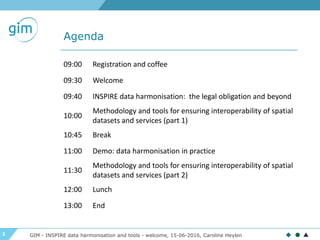
Agenda
GIM - INSPIRE data harmonisation and tools - welcome, 15-06-2016, Caroline Heylen
09:00 Registration and coffee
09:30 Welcome
09:40 INSPIRE data harmonisation: the legal obligation and beyond
10:00
Methodology and tools for ensuring interoperability of spatial
datasets and services (part 1)
10:45 Break
11:00 Demo: data harmonisation in practice
11:30
Methodology and tools for ensuring interoperability of spatial
datasets and services (part 2)
12:00 Lunch
13:00 End
3 GIM - INSPIRE data harmonisation and tools - welcome, 15-06-2016, Caroline Heylen
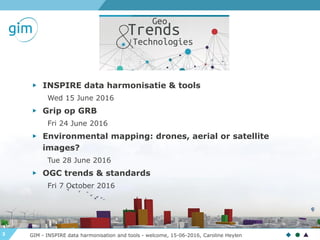
▶ INSPIRE data harmonisatie & tools
Wed 15 June 2016
▶ Grip op GRB
Fri 24 June 2016
▶ Environmental mapping: drones, aerial or satellite
images?
Tue 28 June 2016
▶ OGC trends & standards
Fri 7 October 2016
4
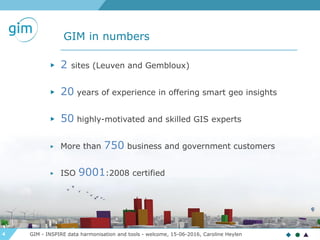
GIM in numbers
▶ 2 sites (Leuven and Gembloux)
▶ 20 years of experience in offering smart geo insights
▶ 50 highly-motivated and skilled GIS experts
▶ More than 750 business and government customers
▶ ISO 9001:2008 certified

GIM - INSPIRE data harmonisation and tools - welcome, 15-06-2016, Caroline Heylen
5
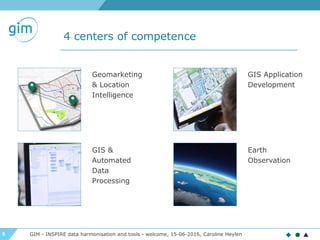
4 centers of competence
Geomarketing
& Location
Intelligence
GIS &
Automated
Data
Processing
GIS Application
Development
Earth
Observation
GIM - INSPIRE data harmonisation and tools - welcome, 15-06-2016, Caroline Heylen
6
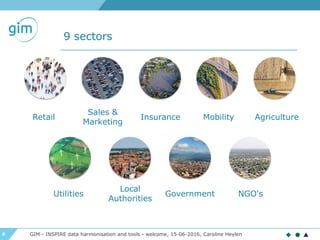
9 sectors
Retail
Government
Local
Authorities
Agriculture
Sales &
Marketing
MobilityInsurance
Utilities NGO's
GIM - INSPIRE data harmonisation and tools - welcome, 15-06-2016, Caroline Heylen
7
INSPIRE : legislation
GeoTrends seminar INSPIRE - Legislation, 15-06-2016, An Heirman
GeoTrends Seminar INSPIRE data
harmonisation and tools
8
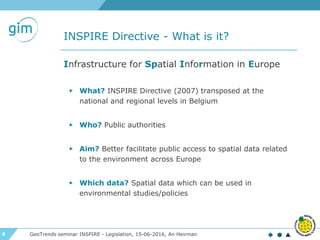
INSPIRE Directive - What is it?
GeoTrends seminar INSPIRE - Legislation, 15-06-2016, An Heirman
Infrastructure for Spatial Information in Europe
▶ What? INSPIRE Directive (2007) transposed at the
national and regional levels in Belgium
▶ Who? Public authorities
▶ Aim? Better facilitate public access to spatial data related
to the environment across Europe
▶ Which data? Spatial data which can be used in
environmental studies/policies
9
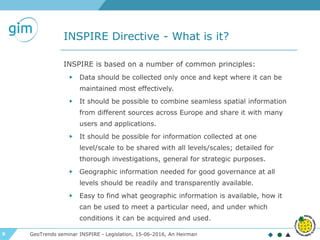
INSPIRE Directive - What is it?
GeoTrends seminar INSPIRE - Legislation, 15-06-2016, An Heirman
INSPIRE is based on a number of common principles:
▶ Data should be collected only once and kept where it can be
maintained most effectively.
▶ It should be possible to combine seamless spatial information
from different sources across Europe and share it with many
users and applications.
▶ It should be possible for information collected at one
level/scale to be shared with all levels/scales; detailed for
thorough investigations, general for strategic purposes.
▶ Geographic information needed for good governance at all
levels should be readily and transparently available.
▶ Easy to find what geographic information is available, how it
can be used to meet a particular need, and under which
conditions it can be acquired and used.
10
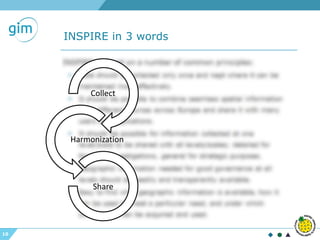
INSPIRE in 3 words
Collect
Harmonization
Share
11
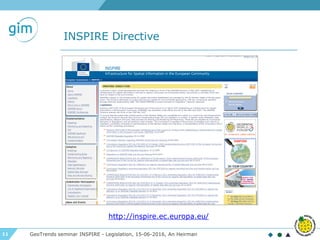
INSPIRE Directive
GeoTrends seminar INSPIRE - Legislation, 15-06-2016, An Heirman
http://inspire.ec.europa.eu/
12
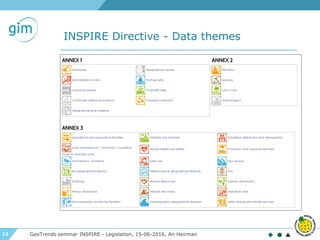
INSPIRE Directive - Data themes
GeoTrends seminar INSPIRE - Legislation, 15-06-2016, An Heirman
13 GeoTrends seminar INSPIRE - Legislation, 15-06-2016, An Heirman
14
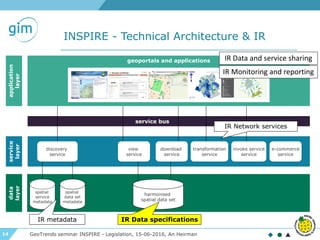
INSPIRE - Technical Architecture & IR
GeoTrends seminar INSPIRE - Legislation, 15-06-2016, An Heirman
harmonised
spatial data set
spatial
data set
metadata
spatial
service
metadata
view
service
download
service
transformation
service
invoke service
service
discovery
service
service bus
geoportals and applications
data
layer
service
layer
application
layer
e-commerce
service
IR metadata IR Data specifications
IR Network services
IR Data and service sharing
IR Monitoring and reporting
15
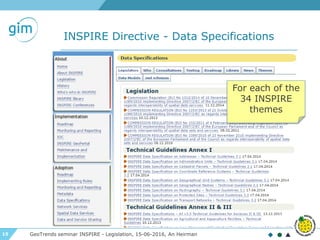
INSPIRE Directive - Data Specifications
GeoTrends seminar INSPIRE - Legislation, 15-06-2016, An Heirman
For each of the
34 INSPIRE
themes
16
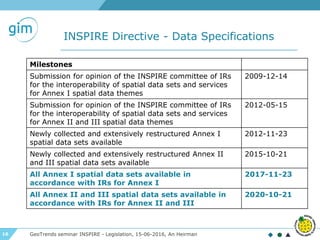
INSPIRE Directive - Data Specifications
GeoTrends seminar INSPIRE - Legislation, 15-06-2016, An Heirman
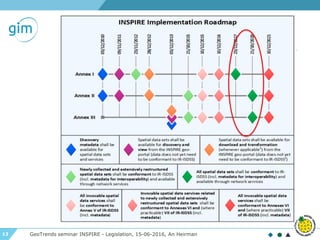
Milestones
Submission for opinion of the INSPIRE committee of IRs
for the interoperability of spatial data sets and services
for Annex I spatial data themes
2009-12-14
Submission for opinion of the INSPIRE committee of IRs
for the interoperability of spatial data sets and services
for Annex II and III spatial data themes
2012-05-15
Newly collected and extensively restructured Annex I
spatial data sets available
2012-11-23
Newly collected and extensively restructured Annex II
and III spatial data sets available
2015-10-21
All Annex I spatial data sets available in
accordance with IRs for Annex I
2017-11-23
All Annex II and III spatial data sets available in
accordance with IRs for Annex II and III
2020-10-21
17
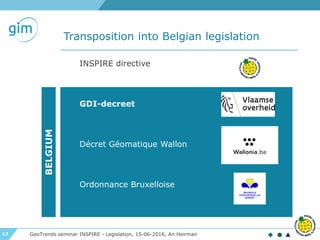
Transposition into Belgian legislation
GeoTrends seminar INSPIRE - Legislation, 15-06-2016, An Heirman
INSPIRE directive
GDI-decreet
Décret Géomatique Wallon
Ordonnance Bruxelloise
BELGIUM
18
INSPIRE: Methodology and tools
for ensuring interoperability of
spatial datasets and services
Part I
GeoTrends seminar INSPIRE - Methodology, 15-06-2016, Stijn Goedertier, Steven Smolders
GeoTrends seminar, Leuven, 15 June 2016
19
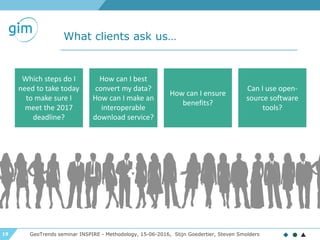
What clients ask us…
GeoTrends seminar INSPIRE - Methodology, 15-06-2016, Stijn Goedertier, Steven Smolders
Which steps do I
need to take today
to make sure I
meet the 2017
deadline?
How can I best
convert my data?
How can I make an
interoperable
download service?
Can I use open-
source software
tools?
How can I ensure
benefits?
20
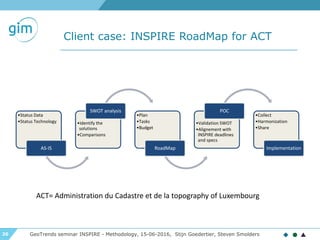
Client case: INSPIRE RoadMap for ACT
GeoTrends seminar INSPIRE - Methodology, 15-06-2016, Stijn Goedertier, Steven Smolders
•Status Data
•Status Technology
AS-IS
•Identify the
solutions
•Comparisons
SWOT analysis
•Plan
•Tasks
•Budget
RoadMap
•Validation SWOT
•Alignement with
INSPIRE deadlines
and specs
POC
•Collect
•Harmonization
•Share
Implementation
ACT= Administration du Cadastre et de la topography of Luxembourg
21
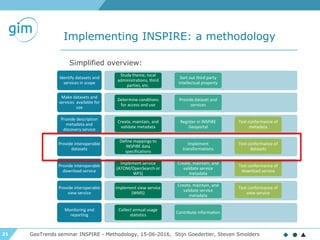
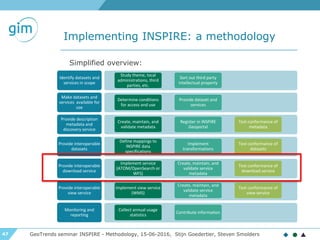
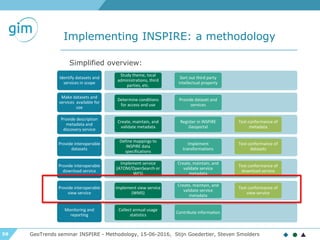
Implementing INSPIRE: a methodology
GeoTrends seminar INSPIRE - Methodology, 15-06-2016, Stijn Goedertier, Steven Smolders
Identify datasets and
services in scope
Study theme, local
administrations, third
parties, etc.
Sort out third party
intellectual property
Make datasets and
services available for
use
Determine conditions
for access and use
Provide dataset and
services
Provide description
metadata and
discovery service
Create, maintain, and
validate metadata
Register in INSPIRE
Geoportal
Test conformance of
metadata
Provide interoperable
datasets
Define mappings to
INSPIRE data
specifications
Implement
transformations
Test conformance of
datasets
Provide interoperable
download service
Implement service
(ATOM/OpenSearch or
WFS)
Create, maintain, and
validate service
metadata
Test conformance of
download service
Provide interoperable
view service
Implement view service
(WMS)
Create, maintain, and
validate service
metadata
Test conformance of
view service
Monitoring and
reporting
Collect annual usage
statistics
Contribute information
Simplified overview:
22
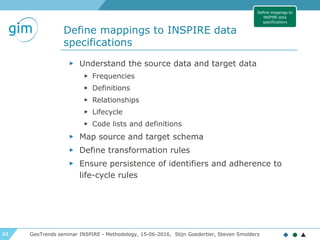
Define mappings to INSPIRE data
specifications
GeoTrends seminar INSPIRE - Methodology, 15-06-2016, Stijn Goedertier, Steven Smolders
▶ Understand the source data and target data
▶ Frequencies
▶ Definitions
▶ Relationships
▶ Lifecycle
▶ Code lists and definitions
▶ Map source and target schema
▶ Define transformation rules
▶ Ensure persistence of identifiers and adherence to
life-cycle rules
Define mappings to
INSPIRE data
specifications
23
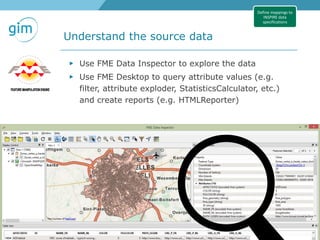
Understand the source data
GeoTrends seminar INSPIRE - Methodology, 15-06-2016, Stijn Goedertier, Steven Smolders
Define mappings to
INSPIRE data
specifications
▶ Use FME Data Inspector to explore the data
▶ Use FME Desktop to query attribute values (e.g.
filter, attribute exploder, StatisticsCalculator, etc.)
and create reports (e.g. HTMLReporter)
24
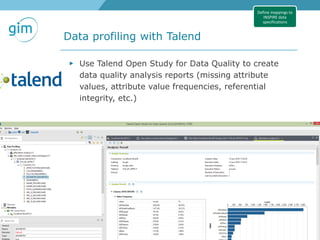
Data profiling with Talend
GeoTrends seminar INSPIRE - Methodology, 15-06-2016, Stijn Goedertier, Steven Smolders
Define mappings to
INSPIRE data
specifications
▶ Use Talend Open Study for Data Quality to create
data quality analysis reports (missing attribute
values, attribute value frequencies, referential
integrity, etc.)
25
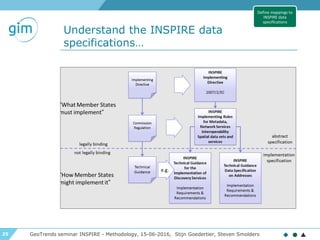
Understand the INSPIRE data
specifications…
GeoTrends seminar INSPIRE - Methodology, 15-06-2016, Stijn Goedertier, Steven Smolders
Define mappings to
INSPIRE data
specifications
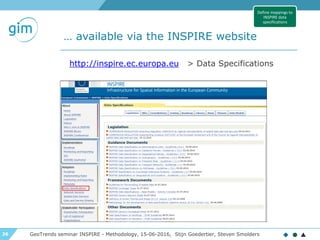
26
… available via the INSPIRE website
GeoTrends seminar INSPIRE - Methodology, 15-06-2016, Stijn Goedertier, Steven Smolders
http://inspire.ec.europa.eu > Data Specifications
Define mappings to
INSPIRE data
specifications
27
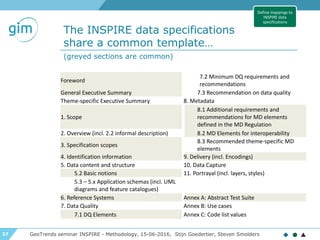
The INSPIRE data specifications
share a common template…
GeoTrends seminar INSPIRE - Methodology, 15-06-2016, Stijn Goedertier, Steven Smolders
Define mappings to
INSPIRE data
specifications
Foreword
7.2 Minimum DQ requirements and
recommendations
General Executive Summary 7.3 Recommendation on data quality
Theme-specific Executive Summary 8. Metadata
1. Scope
8.1 Additional requirements and
recommendations for MD elements
defined in the MD Regulation
2. Overview (incl. 2.2 informal description) 8.2 MD Elements for interoperability
3. Specification scopes
8.3 Recommended theme-specific MD
elements
4. Identification information 9. Delivery (incl. Encodings)
5. Data content and structure 10. Data Capture
5.2 Basic notions 11. Portrayal (incl. layers, styles)
5.3 – 5.x Application schemas (incl. UML
diagrams and feature catalogues)
6. Reference Systems Annex A: Abstract Test Suite
7. Data Quality Annex B: Use cases
7.1 DQ Elements Annex C: Code list values
(greyed sections are common)
28
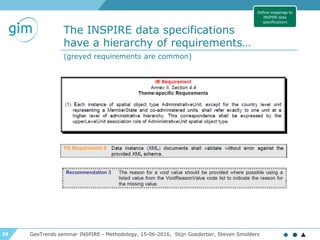
The INSPIRE data specifications
have a hierarchy of requirements…
GeoTrends seminar INSPIRE - Methodology, 15-06-2016, Stijn Goedertier, Steven Smolders
Define mappings to
INSPIRE data
specifications
(greyed requirements are common)
29
The INSPIRE data specifications are
expressed as a UML data model
GeoTrends seminar INSPIRE - Methodology, 15-06-2016, Stijn Goedertier, Steven Smolders
Define mappings to
INSPIRE data
specifications
class AdministrativeUnit
«featureType»
AdministrativeUnit
+ country: CountryCode
+ geometry: GM_MultiSurface
+ inspireId: Identifier
+ name: GeographicalName [1..*]
+ nationalCode: CharacterString
+ nationalLevel: AdministrativeHierarchyLevel
«voidable, lifeCycleInfo»
+ beginLifespanVersion: DateTime
+ endLifespanVersion: DateTime [0..1]
«voidable»
+ nationalLevelName: LocalisedCharacterString [1..*]
+ residenceOfAuthority: ResidenceOfAuthority [1..*]
constraints
{CondominiumsAtCountryLevel}
{AdmininstrativeUnitHighestLevel}
{AdministrativeUnitLowestLevel}
«codeList»
AdministrativeHierarchyLevel
+ 1stOrder
+ 2ndOrder
+ 3rdOrder
+ 4thOrder
+ 5thOrder
+ 6thOrder
«dataType»
Geographical Names::GeographicalName
+ spelling: SpellingOfName [1..*]
«voidable»
+ grammaticalGender: GrammaticalGenderValue [0..1]
+ grammaticalNumber: GrammaticalNumberValue [0..1]
+ language: CharacterString
+ nameStatus: NameStatusValue
+ nativeness: NativenessValue
+ pronunciation: PronunciationOfName
+ sourceOfName: CharacterString
«dataType»
ResidenceOfAuthority
+ name: GeographicalName
«voidable»
+ geometry: GM_Point
+lowerLevelUnit
«voidable» 0..*
+upperLevelUnit
«voidable» 0..1
+/administeredBy
«voidable» 0..*
+coAdminister
«voidable» 0..*
http://inspire.ec.europa.eu/data-model/approved/r4618-ir/html
30
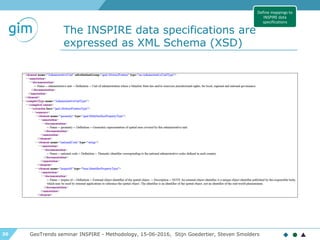
The INSPIRE data specifications are
expressed as XML Schema (XSD)
GeoTrends seminar INSPIRE - Methodology, 15-06-2016, Stijn Goedertier, Steven Smolders
Define mappings to
INSPIRE data
specifications
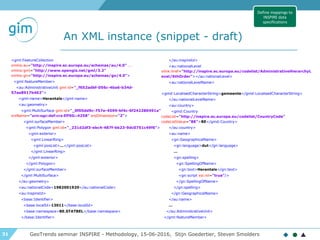
31
An XML instance (snippet - draft)
GeoTrends seminar INSPIRE - Methodology, 15-06-2016, Stijn Goedertier, Steven Smolders
<gml:FeatureCollection
xmlns:au="http://inspire.ec.europa.eu/schemas/au/4.0" ...
xmlns:gml="http://www.opengis.net/gml/3.2"
xmlns:gn="http://inspire.ec.europa.eu/schemas/gn/4.0">
<gml:featureMember>
<au:AdministrativeUnit gml:id="_f652adbf-056c-4ba6-b34d-
57ae8917b462">
<gml:name>Herentals</gml:name>
<au:geometry>
<gml:MultiSurface gml:id="_0f05dd9c-757e-4599-bf4c-6f242280491a"
srsName="urn:ogc:def:crs:EPSG::4258" srsDimension="2">
<gml:surfaceMember>
<gml:Polygon gml:id="_231d2df3-ebc4-487f-bb23-9dc0751c49f6">
<gml:exterior>
<gml:LinearRing>
<gml:posList>...</gml:posList>
</gml:LinearRing>
</gml:exterior>
</gml:Polygon>
</gml:surfaceMember>
</gml:MultiSurface>
</au:geometry>
<au:nationalCode>1982001920</au:nationalCode>
<au:inspireId>
<base:Identifier>
<base:localId>13011</base:localId>
<base:namespace>BE.STATBEL</base:namespace>
</base:Identifier>
</au:inspireId>
<au:nationalLevel
xlink:href="http://inspire.ec.europa.eu/codelist/AdministrativeHierarchyL
evel/6thOrder"></au:nationalLevel>
<au:nationalLevelName>
<gmd:LocalisedCharacterString>gemeente</gmd:LocalisedCharacterString>
</au:nationalLevelName>
<au:country>
<gmd:Country
codeList="http://inspire.ec.europa.eu/codelist/CountryCode"
codeListValue="BE">BE</gmd:Country>
</au:country>
<au:name>
<gn:GeographicalName>
<gn:language>dut</gn:language>
...
<gn:spelling>
<gn:SpellingOfName>
<gn:text>Herentals</gn:text>
<gn:script xsi:nil="true"/>
</gn:SpellingOfName>
</gn:spelling>
</gn:GeographicalName>
</au:name>
...
</au:AdministrativeUnit>
</gml:featureMember>
Define mappings to
INSPIRE data
specifications
32
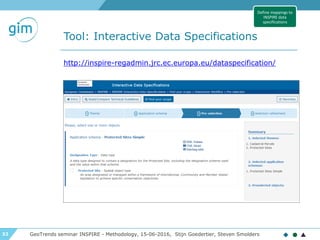
Tool: Interactive Data Specifications
GeoTrends seminar INSPIRE - Methodology, 15-06-2016, Stijn Goedertier, Steven Smolders
http://inspire-regadmin.jrc.ec.europa.eu/dataspecification/
Define mappings to
INSPIRE data
specifications
33
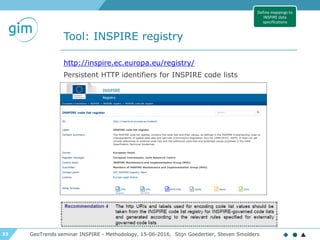
Tool: INSPIRE registry
GeoTrends seminar INSPIRE - Methodology, 15-06-2016, Stijn Goedertier, Steven Smolders
http://inspire.ec.europa.eu/registry/
Persistent HTTP identifiers for INSPIRE code lists
Define mappings to
INSPIRE data
specifications
34
Map source and target schema
GeoTrends seminar INSPIRE - Methodology, 15-06-2016, Stijn Goedertier, Steven Smolders
▶ Map feature types
▶ Map attributes
▶ Map attribute values
Define mappings to
INSPIRE data
specifications
35
Define transformations
GeoTrends seminar INSPIRE - Methodology, 15-06-2016, Stijn Goedertier, Steven Smolders
▶ Join up datasets
▶ Filter by attribute values and feature types
▶ Attribute value transformations
▶ Geometry: coordinate transformation, edge
matching, etc.
▶ Geocoding
Define mappings to
INSPIRE data
specifications
36
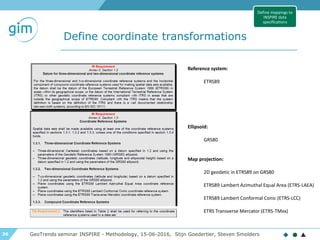
Define coordinate transformations
GeoTrends seminar INSPIRE - Methodology, 15-06-2016, Stijn Goedertier, Steven Smolders
Define mappings to
INSPIRE data
specifications
Reference system:
ETRS89
Map projection:
2D geodetic in ETRS89 on GRS80
ETRS89 Lambert Azimuthal Equal Area (ETRS-LAEA)
ETRS89 Lambert Conformal Conic (ETRS-LCC)
ETRS Transverse Mercator (ETRS-TMxx)
Ellipsoid:
GRS80
37
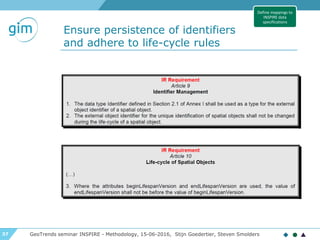
Ensure persistence of identifiers
and adhere to life-cycle rules
GeoTrends seminar INSPIRE - Methodology, 15-06-2016, Stijn Goedertier, Steven Smolders
Define mappings to
INSPIRE data
specifications
38
Ensure persistence of identifiers
and adhere to life-cycle rules
GeoTrends seminar INSPIRE - Methodology, 15-06-2016, Stijn Goedertier, Steven Smolders
▶ INSPIRE Identifier (inspireID): exactly 1
▶ localId: external identifier
▶ namespace: unique ID of data
source
▶ versionID: id of version (2007-02-
12T12:12:12+05:30)
▶ Thematic identifier: 0, 1 or more used for data
linking
▶ Which namespace to use?
▶ Namespace register?
▶ GCM Annex H on HTTP URIs
class Base Types
«dataType»
Identifier
+ localId: CharacterString
+ namespace: CharacterString
«lifeCycleInfo, voidable»
+ versionId: CharacterString [0..1]
class Base Types
«dataType»
Base Types 2::ThematicIdentifier
+ identifier: CharacterString
+ identifierScheme: CharacterString
Define mappings to
INSPIRE data
specifications
39
Ensure persistence of identifiers
and adhere to life-cycle rules
GeoTrends seminar INSPIRE - Methodology, 15-06-2016, Stijn Goedertier, Steven Smolders
Life-cycle: From start to end of spatial object
▶ Version-cycle: Part of spatial object’s life-cycle
Validity: real-world phenomenon.
Example:
▶ t1 = building is built
▶ t3 = building is demolished
▶ t2 = building function changed (office -> residential)
class Base Types
«featureType»
CadastralParcels::CadastralParcel
+ geometry: GM_Object
+ inspireId: Identifier
+ label: CharacterString
+ nationalCadastralReference: CharacterString
«voidable»
+ areaValue: Area [0..1]
+ referencePoint: GM_Point [0..1]
+ validFrom: DateTime [0..1]
+ validTo: DateTime [0..1]
«lifeCycleInfo, voidable»
+ beginLifespanVersion: DateTime
+ endLifespanVersion: DateTime [0..1]
A
Define mappings to
INSPIRE data
specifications
40
Implement transformations
GeoTrends seminar INSPIRE - Methodology, 15-06-2016, Stijn Goedertier, Steven Smolders
▶ Consider type of download service
▶ Pre-defined dataset download service: offline
transformation
▶ Direct access download service: “online”
transformation
▶ Choose ETL tool
▶ Implement transformation
▶ Generate data or deploy transformation
Implement
transformations
41
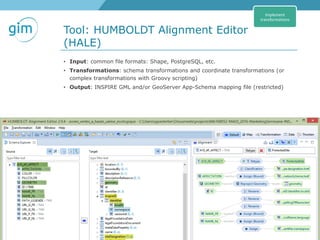
Tool: HUMBOLDT Alignment Editor
(HALE)
GeoTrends seminar INSPIRE - Methodology, 15-06-2016, Stijn Goedertier, Steven Smolders
• Input: common file formats: Shape, PostgreSQL, etc.
• Transformations: schema transformations and coordinate transformations (or
complex transformations with Groovy scripting)
• Output: INSPIRE GML and/or GeoServer App-Schema mapping file (restricted)
Implement
transformations
42
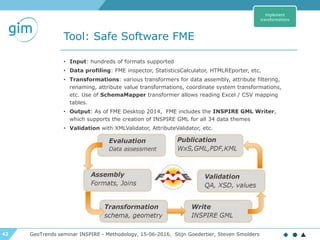
Tool: Safe Software FME
GeoTrends seminar INSPIRE - Methodology, 15-06-2016, Stijn Goedertier, Steven Smolders
• Input: hundreds of formats supported
• Data profiling: FME inspector, StatisticsCalculator, HTMLREporter, etc.
• Transformations: various transformers for data assembly, attribute filtering,
renaming, attribute value transformations, coordinate system transformations,
etc. Use of SchemaMapper transformer allows reading Excel / CSV mapping
tables.
• Output: As of FME Desktop 2014, FME includes the INSPIRE GML Writer,
which supports the creation of INSPIRE GML for all 34 data themes
• Validation with XMLValidator, AttributeValidator, etc.
Implement
transformations
43
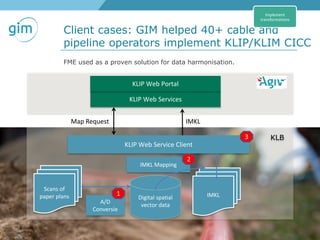
Client cases: GIM helped 40+ cable and
pipeline operators implement KLIP/KLIM CICC
GeoTrends seminar INSPIRE - Methodology, 15-06-2016, Stijn Goedertier, Steven Smolders
Digital spatial
vector data
A/D
Conversie
KLIP Web Service Client
KLIP Web Services
KLIP Web Portal
KLB
Map Request IMKL
Scans of
paper plans
IMKL Mapping
1
2
3
IMKL
Implement
transformations
FME used as a proven solution for data harmonisation.
44
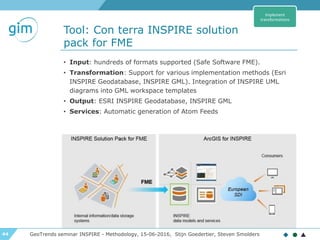
Tool: Con terra INSPIRE solution
pack for FME
GeoTrends seminar INSPIRE - Methodology, 15-06-2016, Stijn Goedertier, Steven Smolders
• Input: hundreds of formats supported (Safe Software FME).
• Transformation: Support for various implementation methods (Esri
INSPIRE Geodatabase, INSPIRE GML). Integration of INSPIRE UML
diagrams into GML workspace templates
• Output: ESRI INSPIRE Geodatabase, INSPIRE GML
• Services: Automatic generation of Atom Feeds
Implement
transformations
45
Test conformance of datasets
GeoTrends seminar INSPIRE - Methodology, 15-06-2016, Stijn Goedertier, Steven Smolders
▶ Concepts based on ISO19105 conformance testing
standard
▶ Abstract Tests Suites (ATSs)
▶ Set of test cases corresponding to requirements in the technical guidance
specifications
▶ Validated by MIG-T, MIWP-5: see GitHub inspire-eu-validation
▶ Executable Test Suites (ETSs):
▶ Set of executable test cases
▶ Available ETSs
• OGC CITE (focus on GML certification)
• JRC INSPIRE Validator (focus on metadata only for the moment)
• eENVplus Validation Services: verifies the conformance of GML datasets with
respect to INSPIRE application schemas and also with respect to ISO 19136:2007
(GML 3.2.1)
More and authoritative test tools are needed.
Test conformance of
datasets
46
INSPIRE: Methodology and tools
for ensuring interoperability of
spatial datasets and services
Part II
GeoTrends seminar INSPIRE - Methodology, 15-06-2016, Stijn Goedertier, Steven Smolders
GeoTrends seminar, Leuven, 15 June 2016
47
Implementing INSPIRE: a methodology
GeoTrends seminar INSPIRE - Methodology, 15-06-2016, Stijn Goedertier, Steven Smolders
Identify datasets and
services in scope
Study theme, local
administrations, third
parties, etc.
Sort out third party
intellectual property
Make datasets and
services available for
use
Determine conditions
for access and use
Provide dataset and
services
Provide description
metadata and
discovery service
Create, maintain, and
validate metadata
Register in INSPIRE
Geoportal
Test conformance of
metadata
Provide interoperable
datasets
Define mappings to
INSPIRE data
specifications
Implement
transformations
Test conformance of
datasets
Provide interoperable
download service
Implement service
(ATOM/OpenSearch or
WFS)
Create, maintain, and
validate service
metadata
Test conformance of
download service
Provide interoperable
view service
Implement view service
(WMS)
Create, maintain, and
validate service
metadata
Test conformance of
view service
Monitoring and
reporting
Collect annual usage
statistics
Contribute information
Simplified overview:
48
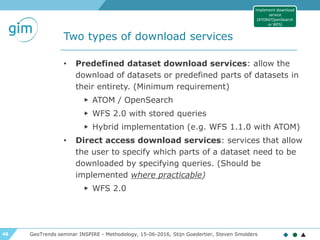
Two types of download services
• Predefined dataset download services: allow the
download of datasets or predefined parts of datasets in
their entirety. (Minimum requirement)
▶ ATOM / OpenSearch
▶ WFS 2.0 with stored queries
▶ Hybrid implementation (e.g. WFS 1.1.0 with ATOM)
• Direct access download services: services that allow
the user to specify which parts of a dataset need to be
downloaded by specifying queries. (Should be
implemented where practicable)
▶ WFS 2.0
GeoTrends seminar INSPIRE - Methodology, 15-06-2016, Stijn Goedertier, Steven Smolders
Implement download
service
(ATOM/OpenSearch
or WFS)
49
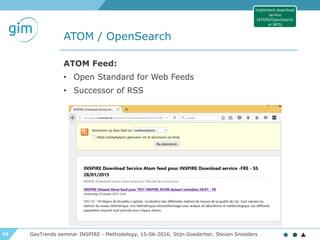
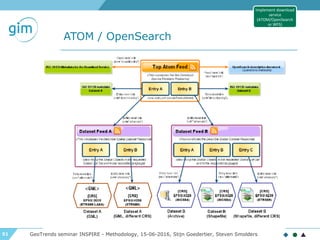
ATOM / OpenSearch
GeoTrends seminar INSPIRE - Methodology, 15-06-2016, Stijn Goedertier, Steven Smolders
ATOM Feed:
• Open Standard for Web Feeds
• Successor of RSS
Implement download
service
(ATOM/OpenSearch
or WFS)
50
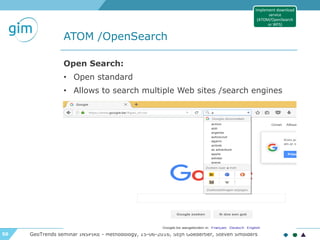
ATOM /OpenSearch
GeoTrends seminar INSPIRE - Methodology, 15-06-2016, Stijn Goedertier, Steven Smolders
Open Search:
• Open standard
• Allows to search multiple Web sites /search engines
Implement download
service
(ATOM/OpenSearch
or WFS)
51
ATOM / OpenSearch
GeoTrends seminar INSPIRE - Methodology, 15-06-2016, Stijn Goedertier, Steven Smolders
Implement download
service
(ATOM/OpenSearch
or WFS)
52
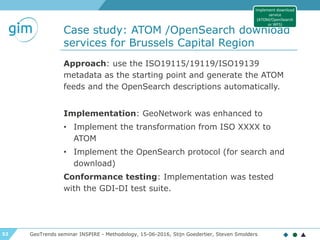
Case study: ATOM /OpenSearch download
services for Brussels Capital Region
GeoTrends seminar INSPIRE - Methodology, 15-06-2016, Stijn Goedertier, Steven Smolders
Approach: use the ISO19115/19119/ISO19139
metadata as the starting point and generate the ATOM
feeds and the OpenSearch descriptions automatically.
Implementation: GeoNetwork was enhanced to
• Implement the transformation from ISO XXXX to
ATOM
• Implement the OpenSearch protocol (for search and
download)
Conformance testing: Implementation was tested
with the GDI-DI test suite.
Implement download
service
(ATOM/OpenSearch
or WFS)
53
Case study: ATOM download services
for Brussels Capital Region
GeoTrends seminar INSPIRE - Methodology, 15-06-2016, Stijn Goedertier, Steven Smolders
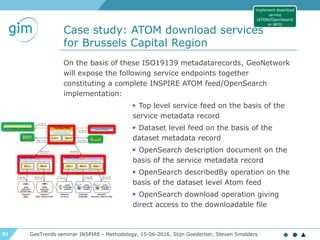
On the basis of these ISO19139 metadatarecords, GeoNetwork
will expose the following service endpoints together
constituting a complete INSPIRE ATOM feed/OpenSearch
implementation:
▶ Top level service feed on the basis of the
service metadata record
▶ Dataset level feed on the basis of the
dataset metadata record
▶ OpenSearch description document on the
basis of the service metadata record
▶ OpenSearch describedBy operation on the
basis of the dataset level Atom feed
▶ OpenSearch download operation giving
direct access to the downloadable file
Implement download
service
(ATOM/OpenSearch
or WFS)
54
Web Feature Service (WFS)
GeoTrends seminar INSPIRE - Methodology, 15-06-2016, Stijn Goedertier, Steven Smolders
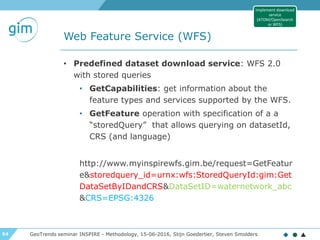
• Predefined dataset download service: WFS 2.0
with stored queries
• GetCapabilities: get information about the
feature types and services supported by the WFS.
• GetFeature operation with specification of a a
“storedQuery” that allows querying on datasetId,
CRS (and language)
http://www.myinspirewfs.gim.be/request=GetFeatur
e&storedquery_id=urnx:wfs:StoredQueryId:gim:Get
DataSetByIDandCRS&DataSetID=waternetwork_abc
&CRS=EPSG:4326
Implement download
service
(ATOM/OpenSearch
or WFS)
55
Web Feature Service (WFS)
GeoTrends seminar INSPIRE - Methodology, 15-06-2016, Stijn Goedertier, Steven Smolders
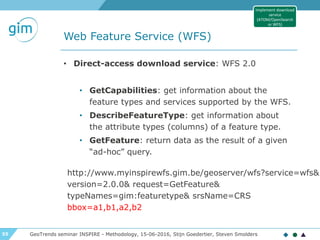
• Direct-access download service: WFS 2.0
• GetCapabilities: get information about the
feature types and services supported by the WFS.
• DescribeFeatureType: get information about
the attribute types (columns) of a feature type.
• GetFeature: return data as the result of a given
“ad-hoc” query.
Implement download
service
(ATOM/OpenSearch
or WFS)
http://www.myinspirewfs.gim.be/geoserver/wfs?service=wfs&
version=2.0.0& request=GetFeature&
typeNames=gim:featuretype& srsName=CRS
bbox=a1,b1,a2,b2
56
Tool: GeoServer WFS
(Application Schema extension)
GeoTrends seminar INSPIRE - Methodology, 15-06-2016, Stijn Goedertier, Steven Smolders
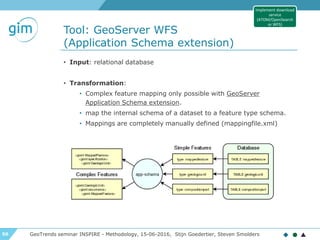
• Input: relational database
• Transformation:
• Complex feature mapping only possible with GeoServer
Application Schema extension.
• map the internal schema of a dataset to a feature type schema.
• Mappings are completely manually defined (mappingfile.xml)
Implement download
service
(ATOM/OpenSearch
or WFS)
57
Create, maintain, and validate
download service metadata
GeoTrends seminar INSPIRE - Methodology, 15-06-2016, Stijn Goedertier, Steven Smolders
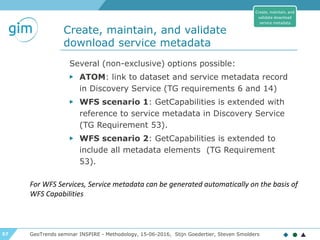
Several (non-exclusive) options possible:
▶ ATOM: link to dataset and service metadata record
in Discovery Service (TG requirements 6 and 14)
▶ WFS scenario 1: GetCapabilities is extended with
reference to service metadata in Discovery Service
(TG Requirement 53).
▶ WFS scenario 2: GetCapabilities is extended to
include all metadata elements (TG Requirement
53).
Create, maintain, and
validate download
service metadata
For WFS Services, Service metadata can be generated automatically on the basis of
WFS Capabilities
58
Test conformance of download service
GeoTrends seminar INSPIRE - Methodology, 15-06-2016, Stijn Goedertier, Steven Smolders
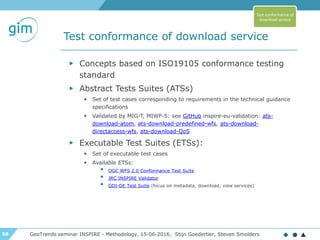
▶ Concepts based on ISO19105 conformance testing
standard
▶ Abstract Tests Suites (ATSs)
▶ Set of test cases corresponding to requirements in the technical guidance
specifications
▶ Validated by MIG-T, MIWP-5: see GitHub inspire-eu-validation: ats-
download-atom, ats-download-predefined-wfs, ats-download-
directaccess-wfs, ats-download-QoS
▶ Executable Test Suites (ETSs):
▶ Set of executable test cases
▶ Available ETSs:
• OGC WFS 2.0 Conformance Test Suite
• JRC INSPIRE Validator
• GDI-DE Test Suite (focus on metadata, download, view services)
Test conformance of
download service
59
Implementing INSPIRE: a methodology
GeoTrends seminar INSPIRE - Methodology, 15-06-2016, Stijn Goedertier, Steven Smolders
Identify datasets and
services in scope
Study theme, local
administrations, third
parties, etc.
Sort out third party
intellectual property
Make datasets and
services available for
use
Determine conditions
for access and use
Provide dataset and
services
Provide description
metadata and
discovery service
Create, maintain, and
validate metadata
Register in INSPIRE
Geoportal
Test conformance of
metadata
Provide interoperable
datasets
Define mappings to
INSPIRE data
specifications
Implement
transformations
Test conformance of
datasets
Provide interoperable
download service
Implement service
(ATOM/OpenSearch or
WFS)
Create, maintain, and
validate service
metadata
Test conformance of
download service
Provide interoperable
view service
Implement view service
(WMS)
Create, maintain, and
validate service
metadata
Test conformance of
view service
Monitoring and
reporting
Collect annual usage
statistics
Contribute information
Simplified overview:
60
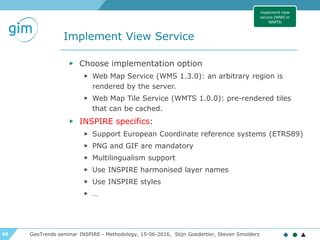
Implement View Service
GeoTrends seminar INSPIRE - Methodology, 15-06-2016, Stijn Goedertier, Steven Smolders
▶ Choose implementation option
▶ Web Map Service (WMS 1.3.0): an arbitrary region is
rendered by the server.
▶ Web Map Tile Service (WMTS 1.0.0): pre-rendered tiles
that can be cached.
▶ INSPIRE specifics:
▶ Support European Coordinate reference systems (ETRS89)
▶ PNG and GIF are mandatory
▶ Multilingualism support
▶ Use INSPIRE harmonised layer names
▶ Use INSPIRE styles
▶ …
Implement view
service (WMS or
WMTS)
61
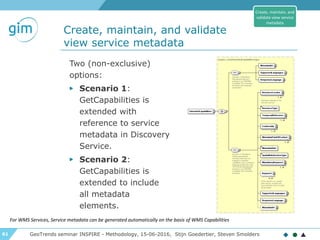
Create, maintain, and validate
view service metadata
GeoTrends seminar INSPIRE - Methodology, 15-06-2016, Stijn Goedertier, Steven Smolders
Two (non-exclusive)
options:
▶ Scenario 1:
GetCapabilities is
extended with
reference to service
metadata in Discovery
Service.
▶ Scenario 2:
GetCapabilities is
extended to include
all metadata
elements.
Create, maintain, and
validate view service
metadata
For WMS Services, Service metadata can be generated automatically on the basis of WMS Capabilities
62
Test conformance of view service
GeoTrends seminar INSPIRE - Methodology, 15-06-2016, Stijn Goedertier, Steven Smolders
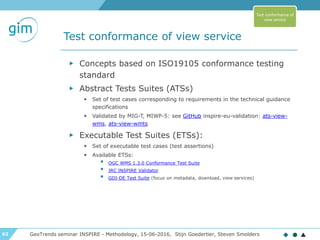
▶ Concepts based on ISO19105 conformance testing
standard
▶ Abstract Tests Suites (ATSs)
▶ Set of test cases corresponding to requirements in the technical guidance
specifications
▶ Validated by MIG-T, MIWP-5: see GitHub inspire-eu-validation: ats-view-
wms, ats-view-wmts
▶ Executable Test Suites (ETSs):
▶ Set of executable test cases (test assertions)
▶ Available ETSs:
• OGC WMS 1.3.0 Conformance Test Suite
• JRC INSPIRE Validator
• GDI-DE Test Suite (focus on metadata, download, view services)
Test conformance of
view service
63
Conclusion
GeoTrends seminar INSPIRE - Methodology, 15-06-2016, Stijn Goedertier, Steven Smolders
• Ensuring INSPIRE interoperability can be a lot of hard
work due to 6 legal acts and 40+ technical guidelines
• Careful planning and coordination needed - 2017 is
nearby
• Proven methodologies and tools are available to help
64
Contact us
www.gim.be
GIM - INSPIRE data harmonisatie en tools - welcome, 15-06-2016, Caroline Heylen

INSPIRE Data harmonisation : methodology and tools

  • 1.
    1 GIM -INSPIRE data harmonisation and tools - welcome, 15-06-2016, Caroline Heylen GeoTrends Seminar INSPIRE data harmonisation: methodology and tools
  • 2.
    2 Agenda GIM - INSPIREdata harmonisation and tools - welcome, 15-06-2016, Caroline Heylen 09:00 Registration and coffee 09:30 Welcome 09:40 INSPIRE data harmonisation: the legal obligation and beyond 10:00 Methodology and tools for ensuring interoperability of spatial datasets and services (part 1) 10:45 Break 11:00 Demo: data harmonisation in practice 11:30 Methodology and tools for ensuring interoperability of spatial datasets and services (part 2) 12:00 Lunch 13:00 End
  • 3.
    3 GIM -INSPIRE data harmonisation and tools - welcome, 15-06-2016, Caroline Heylen ▶ INSPIRE data harmonisatie & tools Wed 15 June 2016 ▶ Grip op GRB Fri 24 June 2016 ▶ Environmental mapping: drones, aerial or satellite images? Tue 28 June 2016 ▶ OGC trends & standards Fri 7 October 2016
  • 4.
    4 GIM in numbers ▶2 sites (Leuven and Gembloux) ▶ 20 years of experience in offering smart geo insights ▶ 50 highly-motivated and skilled GIS experts ▶ More than 750 business and government customers ▶ ISO 9001:2008 certified
 GIM - INSPIRE data harmonisation and tools - welcome, 15-06-2016, Caroline Heylen
  • 5.
    5 4 centers ofcompetence Geomarketing & Location Intelligence GIS & Automated Data Processing GIS Application Development Earth Observation GIM - INSPIRE data harmonisation and tools - welcome, 15-06-2016, Caroline Heylen
  • 6.
    6 9 sectors Retail Government Local Authorities Agriculture Sales & Marketing MobilityInsurance UtilitiesNGO's GIM - INSPIRE data harmonisation and tools - welcome, 15-06-2016, Caroline Heylen
  • 7.
    7 INSPIRE : legislation GeoTrendsseminar INSPIRE - Legislation, 15-06-2016, An Heirman GeoTrends Seminar INSPIRE data harmonisation and tools
  • 8.
    8 INSPIRE Directive -What is it? GeoTrends seminar INSPIRE - Legislation, 15-06-2016, An Heirman Infrastructure for Spatial Information in Europe ▶ What? INSPIRE Directive (2007) transposed at the national and regional levels in Belgium ▶ Who? Public authorities ▶ Aim? Better facilitate public access to spatial data related to the environment across Europe ▶ Which data? Spatial data which can be used in environmental studies/policies
  • 9.
    9 INSPIRE Directive -What is it? GeoTrends seminar INSPIRE - Legislation, 15-06-2016, An Heirman INSPIRE is based on a number of common principles: ▶ Data should be collected only once and kept where it can be maintained most effectively. ▶ It should be possible to combine seamless spatial information from different sources across Europe and share it with many users and applications. ▶ It should be possible for information collected at one level/scale to be shared with all levels/scales; detailed for thorough investigations, general for strategic purposes. ▶ Geographic information needed for good governance at all levels should be readily and transparently available. ▶ Easy to find what geographic information is available, how it can be used to meet a particular need, and under which conditions it can be acquired and used.
  • 10.
    10 INSPIRE in 3words Collect Harmonization Share
  • 11.
    11 INSPIRE Directive GeoTrends seminarINSPIRE - Legislation, 15-06-2016, An Heirman http://inspire.ec.europa.eu/
  • 12.
    12 INSPIRE Directive -Data themes GeoTrends seminar INSPIRE - Legislation, 15-06-2016, An Heirman
  • 13.
    13 GeoTrends seminarINSPIRE - Legislation, 15-06-2016, An Heirman
  • 14.
    14 INSPIRE - TechnicalArchitecture & IR GeoTrends seminar INSPIRE - Legislation, 15-06-2016, An Heirman harmonised spatial data set spatial data set metadata spatial service metadata view service download service transformation service invoke service service discovery service service bus geoportals and applications data layer service layer application layer e-commerce service IR metadata IR Data specifications IR Network services IR Data and service sharing IR Monitoring and reporting
  • 15.
    15 INSPIRE Directive -Data Specifications GeoTrends seminar INSPIRE - Legislation, 15-06-2016, An Heirman For each of the 34 INSPIRE themes
  • 16.
    16 INSPIRE Directive -Data Specifications GeoTrends seminar INSPIRE - Legislation, 15-06-2016, An Heirman Milestones Submission for opinion of the INSPIRE committee of IRs for the interoperability of spatial data sets and services for Annex I spatial data themes 2009-12-14 Submission for opinion of the INSPIRE committee of IRs for the interoperability of spatial data sets and services for Annex II and III spatial data themes 2012-05-15 Newly collected and extensively restructured Annex I spatial data sets available 2012-11-23 Newly collected and extensively restructured Annex II and III spatial data sets available 2015-10-21 All Annex I spatial data sets available in accordance with IRs for Annex I 2017-11-23 All Annex II and III spatial data sets available in accordance with IRs for Annex II and III 2020-10-21
  • 17.
    17 Transposition into Belgianlegislation GeoTrends seminar INSPIRE - Legislation, 15-06-2016, An Heirman INSPIRE directive GDI-decreet Décret Géomatique Wallon Ordonnance Bruxelloise BELGIUM
  • 18.
    18 INSPIRE: Methodology andtools for ensuring interoperability of spatial datasets and services Part I GeoTrends seminar INSPIRE - Methodology, 15-06-2016, Stijn Goedertier, Steven Smolders GeoTrends seminar, Leuven, 15 June 2016
  • 19.
    19 What clients askus… GeoTrends seminar INSPIRE - Methodology, 15-06-2016, Stijn Goedertier, Steven Smolders Which steps do I need to take today to make sure I meet the 2017 deadline? How can I best convert my data? How can I make an interoperable download service? Can I use open- source software tools? How can I ensure benefits?
  • 20.
    20 Client case: INSPIRERoadMap for ACT GeoTrends seminar INSPIRE - Methodology, 15-06-2016, Stijn Goedertier, Steven Smolders •Status Data •Status Technology AS-IS •Identify the solutions •Comparisons SWOT analysis •Plan •Tasks •Budget RoadMap •Validation SWOT •Alignement with INSPIRE deadlines and specs POC •Collect •Harmonization •Share Implementation ACT= Administration du Cadastre et de la topography of Luxembourg
  • 21.
    21 Implementing INSPIRE: amethodology GeoTrends seminar INSPIRE - Methodology, 15-06-2016, Stijn Goedertier, Steven Smolders Identify datasets and services in scope Study theme, local administrations, third parties, etc. Sort out third party intellectual property Make datasets and services available for use Determine conditions for access and use Provide dataset and services Provide description metadata and discovery service Create, maintain, and validate metadata Register in INSPIRE Geoportal Test conformance of metadata Provide interoperable datasets Define mappings to INSPIRE data specifications Implement transformations Test conformance of datasets Provide interoperable download service Implement service (ATOM/OpenSearch or WFS) Create, maintain, and validate service metadata Test conformance of download service Provide interoperable view service Implement view service (WMS) Create, maintain, and validate service metadata Test conformance of view service Monitoring and reporting Collect annual usage statistics Contribute information Simplified overview:
  • 22.
    22 Define mappings toINSPIRE data specifications GeoTrends seminar INSPIRE - Methodology, 15-06-2016, Stijn Goedertier, Steven Smolders ▶ Understand the source data and target data ▶ Frequencies ▶ Definitions ▶ Relationships ▶ Lifecycle ▶ Code lists and definitions ▶ Map source and target schema ▶ Define transformation rules ▶ Ensure persistence of identifiers and adherence to life-cycle rules Define mappings to INSPIRE data specifications
  • 23.
    23 Understand the sourcedata GeoTrends seminar INSPIRE - Methodology, 15-06-2016, Stijn Goedertier, Steven Smolders Define mappings to INSPIRE data specifications ▶ Use FME Data Inspector to explore the data ▶ Use FME Desktop to query attribute values (e.g. filter, attribute exploder, StatisticsCalculator, etc.) and create reports (e.g. HTMLReporter)
  • 24.
    24 Data profiling withTalend GeoTrends seminar INSPIRE - Methodology, 15-06-2016, Stijn Goedertier, Steven Smolders Define mappings to INSPIRE data specifications ▶ Use Talend Open Study for Data Quality to create data quality analysis reports (missing attribute values, attribute value frequencies, referential integrity, etc.)
  • 25.
    25 Understand the INSPIREdata specifications… GeoTrends seminar INSPIRE - Methodology, 15-06-2016, Stijn Goedertier, Steven Smolders Define mappings to INSPIRE data specifications
  • 26.
    26 … available viathe INSPIRE website GeoTrends seminar INSPIRE - Methodology, 15-06-2016, Stijn Goedertier, Steven Smolders http://inspire.ec.europa.eu > Data Specifications Define mappings to INSPIRE data specifications
  • 27.
    27 The INSPIRE dataspecifications share a common template… GeoTrends seminar INSPIRE - Methodology, 15-06-2016, Stijn Goedertier, Steven Smolders Define mappings to INSPIRE data specifications Foreword 7.2 Minimum DQ requirements and recommendations General Executive Summary 7.3 Recommendation on data quality Theme-specific Executive Summary 8. Metadata 1. Scope 8.1 Additional requirements and recommendations for MD elements defined in the MD Regulation 2. Overview (incl. 2.2 informal description) 8.2 MD Elements for interoperability 3. Specification scopes 8.3 Recommended theme-specific MD elements 4. Identification information 9. Delivery (incl. Encodings) 5. Data content and structure 10. Data Capture 5.2 Basic notions 11. Portrayal (incl. layers, styles) 5.3 – 5.x Application schemas (incl. UML diagrams and feature catalogues) 6. Reference Systems Annex A: Abstract Test Suite 7. Data Quality Annex B: Use cases 7.1 DQ Elements Annex C: Code list values (greyed sections are common)
  • 28.
    28 The INSPIRE dataspecifications have a hierarchy of requirements… GeoTrends seminar INSPIRE - Methodology, 15-06-2016, Stijn Goedertier, Steven Smolders Define mappings to INSPIRE data specifications (greyed requirements are common)
  • 29.
    29 The INSPIRE dataspecifications are expressed as a UML data model GeoTrends seminar INSPIRE - Methodology, 15-06-2016, Stijn Goedertier, Steven Smolders Define mappings to INSPIRE data specifications class AdministrativeUnit «featureType» AdministrativeUnit + country: CountryCode + geometry: GM_MultiSurface + inspireId: Identifier + name: GeographicalName [1..*] + nationalCode: CharacterString + nationalLevel: AdministrativeHierarchyLevel «voidable, lifeCycleInfo» + beginLifespanVersion: DateTime + endLifespanVersion: DateTime [0..1] «voidable» + nationalLevelName: LocalisedCharacterString [1..*] + residenceOfAuthority: ResidenceOfAuthority [1..*] constraints {CondominiumsAtCountryLevel} {AdmininstrativeUnitHighestLevel} {AdministrativeUnitLowestLevel} «codeList» AdministrativeHierarchyLevel + 1stOrder + 2ndOrder + 3rdOrder + 4thOrder + 5thOrder + 6thOrder «dataType» Geographical Names::GeographicalName + spelling: SpellingOfName [1..*] «voidable» + grammaticalGender: GrammaticalGenderValue [0..1] + grammaticalNumber: GrammaticalNumberValue [0..1] + language: CharacterString + nameStatus: NameStatusValue + nativeness: NativenessValue + pronunciation: PronunciationOfName + sourceOfName: CharacterString «dataType» ResidenceOfAuthority + name: GeographicalName «voidable» + geometry: GM_Point +lowerLevelUnit «voidable» 0..* +upperLevelUnit «voidable» 0..1 +/administeredBy «voidable» 0..* +coAdminister «voidable» 0..* http://inspire.ec.europa.eu/data-model/approved/r4618-ir/html
  • 30.
    30 The INSPIRE dataspecifications are expressed as XML Schema (XSD) GeoTrends seminar INSPIRE - Methodology, 15-06-2016, Stijn Goedertier, Steven Smolders Define mappings to INSPIRE data specifications
  • 31.
    31 An XML instance(snippet - draft) GeoTrends seminar INSPIRE - Methodology, 15-06-2016, Stijn Goedertier, Steven Smolders <gml:FeatureCollection xmlns:au="http://inspire.ec.europa.eu/schemas/au/4.0" ... xmlns:gml="http://www.opengis.net/gml/3.2" xmlns:gn="http://inspire.ec.europa.eu/schemas/gn/4.0"> <gml:featureMember> <au:AdministrativeUnit gml:id="_f652adbf-056c-4ba6-b34d- 57ae8917b462"> <gml:name>Herentals</gml:name> <au:geometry> <gml:MultiSurface gml:id="_0f05dd9c-757e-4599-bf4c-6f242280491a" srsName="urn:ogc:def:crs:EPSG::4258" srsDimension="2"> <gml:surfaceMember> <gml:Polygon gml:id="_231d2df3-ebc4-487f-bb23-9dc0751c49f6"> <gml:exterior> <gml:LinearRing> <gml:posList>...</gml:posList> </gml:LinearRing> </gml:exterior> </gml:Polygon> </gml:surfaceMember> </gml:MultiSurface> </au:geometry> <au:nationalCode>1982001920</au:nationalCode> <au:inspireId> <base:Identifier> <base:localId>13011</base:localId> <base:namespace>BE.STATBEL</base:namespace> </base:Identifier> </au:inspireId> <au:nationalLevel xlink:href="http://inspire.ec.europa.eu/codelist/AdministrativeHierarchyL evel/6thOrder"></au:nationalLevel> <au:nationalLevelName> <gmd:LocalisedCharacterString>gemeente</gmd:LocalisedCharacterString> </au:nationalLevelName> <au:country> <gmd:Country codeList="http://inspire.ec.europa.eu/codelist/CountryCode" codeListValue="BE">BE</gmd:Country> </au:country> <au:name> <gn:GeographicalName> <gn:language>dut</gn:language> ... <gn:spelling> <gn:SpellingOfName> <gn:text>Herentals</gn:text> <gn:script xsi:nil="true"/> </gn:SpellingOfName> </gn:spelling> </gn:GeographicalName> </au:name> ... </au:AdministrativeUnit> </gml:featureMember> Define mappings to INSPIRE data specifications
  • 32.
    32 Tool: Interactive DataSpecifications GeoTrends seminar INSPIRE - Methodology, 15-06-2016, Stijn Goedertier, Steven Smolders http://inspire-regadmin.jrc.ec.europa.eu/dataspecification/ Define mappings to INSPIRE data specifications
  • 33.
    33 Tool: INSPIRE registry GeoTrendsseminar INSPIRE - Methodology, 15-06-2016, Stijn Goedertier, Steven Smolders http://inspire.ec.europa.eu/registry/ Persistent HTTP identifiers for INSPIRE code lists Define mappings to INSPIRE data specifications
  • 34.
    34 Map source andtarget schema GeoTrends seminar INSPIRE - Methodology, 15-06-2016, Stijn Goedertier, Steven Smolders ▶ Map feature types ▶ Map attributes ▶ Map attribute values Define mappings to INSPIRE data specifications
  • 35.
    35 Define transformations GeoTrends seminarINSPIRE - Methodology, 15-06-2016, Stijn Goedertier, Steven Smolders ▶ Join up datasets ▶ Filter by attribute values and feature types ▶ Attribute value transformations ▶ Geometry: coordinate transformation, edge matching, etc. ▶ Geocoding Define mappings to INSPIRE data specifications
  • 36.
    36 Define coordinate transformations GeoTrendsseminar INSPIRE - Methodology, 15-06-2016, Stijn Goedertier, Steven Smolders Define mappings to INSPIRE data specifications Reference system: ETRS89 Map projection: 2D geodetic in ETRS89 on GRS80 ETRS89 Lambert Azimuthal Equal Area (ETRS-LAEA) ETRS89 Lambert Conformal Conic (ETRS-LCC) ETRS Transverse Mercator (ETRS-TMxx) Ellipsoid: GRS80
  • 37.
    37 Ensure persistence ofidentifiers and adhere to life-cycle rules GeoTrends seminar INSPIRE - Methodology, 15-06-2016, Stijn Goedertier, Steven Smolders Define mappings to INSPIRE data specifications
  • 38.
    38 Ensure persistence ofidentifiers and adhere to life-cycle rules GeoTrends seminar INSPIRE - Methodology, 15-06-2016, Stijn Goedertier, Steven Smolders ▶ INSPIRE Identifier (inspireID): exactly 1 ▶ localId: external identifier ▶ namespace: unique ID of data source ▶ versionID: id of version (2007-02- 12T12:12:12+05:30) ▶ Thematic identifier: 0, 1 or more used for data linking ▶ Which namespace to use? ▶ Namespace register? ▶ GCM Annex H on HTTP URIs class Base Types «dataType» Identifier + localId: CharacterString + namespace: CharacterString «lifeCycleInfo, voidable» + versionId: CharacterString [0..1] class Base Types «dataType» Base Types 2::ThematicIdentifier + identifier: CharacterString + identifierScheme: CharacterString Define mappings to INSPIRE data specifications
  • 39.
    39 Ensure persistence ofidentifiers and adhere to life-cycle rules GeoTrends seminar INSPIRE - Methodology, 15-06-2016, Stijn Goedertier, Steven Smolders Life-cycle: From start to end of spatial object ▶ Version-cycle: Part of spatial object’s life-cycle Validity: real-world phenomenon. Example: ▶ t1 = building is built ▶ t3 = building is demolished ▶ t2 = building function changed (office -> residential) class Base Types «featureType» CadastralParcels::CadastralParcel + geometry: GM_Object + inspireId: Identifier + label: CharacterString + nationalCadastralReference: CharacterString «voidable» + areaValue: Area [0..1] + referencePoint: GM_Point [0..1] + validFrom: DateTime [0..1] + validTo: DateTime [0..1] «lifeCycleInfo, voidable» + beginLifespanVersion: DateTime + endLifespanVersion: DateTime [0..1] A Define mappings to INSPIRE data specifications
  • 40.
    40 Implement transformations GeoTrends seminarINSPIRE - Methodology, 15-06-2016, Stijn Goedertier, Steven Smolders ▶ Consider type of download service ▶ Pre-defined dataset download service: offline transformation ▶ Direct access download service: “online” transformation ▶ Choose ETL tool ▶ Implement transformation ▶ Generate data or deploy transformation Implement transformations
  • 41.
    41 Tool: HUMBOLDT AlignmentEditor (HALE) GeoTrends seminar INSPIRE - Methodology, 15-06-2016, Stijn Goedertier, Steven Smolders • Input: common file formats: Shape, PostgreSQL, etc. • Transformations: schema transformations and coordinate transformations (or complex transformations with Groovy scripting) • Output: INSPIRE GML and/or GeoServer App-Schema mapping file (restricted) Implement transformations
  • 42.
    42 Tool: Safe SoftwareFME GeoTrends seminar INSPIRE - Methodology, 15-06-2016, Stijn Goedertier, Steven Smolders • Input: hundreds of formats supported • Data profiling: FME inspector, StatisticsCalculator, HTMLREporter, etc. • Transformations: various transformers for data assembly, attribute filtering, renaming, attribute value transformations, coordinate system transformations, etc. Use of SchemaMapper transformer allows reading Excel / CSV mapping tables. • Output: As of FME Desktop 2014, FME includes the INSPIRE GML Writer, which supports the creation of INSPIRE GML for all 34 data themes • Validation with XMLValidator, AttributeValidator, etc. Implement transformations
  • 43.
    43 Client cases: GIMhelped 40+ cable and pipeline operators implement KLIP/KLIM CICC GeoTrends seminar INSPIRE - Methodology, 15-06-2016, Stijn Goedertier, Steven Smolders Digital spatial vector data A/D Conversie KLIP Web Service Client KLIP Web Services KLIP Web Portal KLB Map Request IMKL Scans of paper plans IMKL Mapping 1 2 3 IMKL Implement transformations FME used as a proven solution for data harmonisation.
  • 44.
    44 Tool: Con terraINSPIRE solution pack for FME GeoTrends seminar INSPIRE - Methodology, 15-06-2016, Stijn Goedertier, Steven Smolders • Input: hundreds of formats supported (Safe Software FME). • Transformation: Support for various implementation methods (Esri INSPIRE Geodatabase, INSPIRE GML). Integration of INSPIRE UML diagrams into GML workspace templates • Output: ESRI INSPIRE Geodatabase, INSPIRE GML • Services: Automatic generation of Atom Feeds Implement transformations
  • 45.
    45 Test conformance ofdatasets GeoTrends seminar INSPIRE - Methodology, 15-06-2016, Stijn Goedertier, Steven Smolders ▶ Concepts based on ISO19105 conformance testing standard ▶ Abstract Tests Suites (ATSs) ▶ Set of test cases corresponding to requirements in the technical guidance specifications ▶ Validated by MIG-T, MIWP-5: see GitHub inspire-eu-validation ▶ Executable Test Suites (ETSs): ▶ Set of executable test cases ▶ Available ETSs • OGC CITE (focus on GML certification) • JRC INSPIRE Validator (focus on metadata only for the moment) • eENVplus Validation Services: verifies the conformance of GML datasets with respect to INSPIRE application schemas and also with respect to ISO 19136:2007 (GML 3.2.1) More and authoritative test tools are needed. Test conformance of datasets
  • 46.
    46 INSPIRE: Methodology andtools for ensuring interoperability of spatial datasets and services Part II GeoTrends seminar INSPIRE - Methodology, 15-06-2016, Stijn Goedertier, Steven Smolders GeoTrends seminar, Leuven, 15 June 2016
  • 47.
    47 Implementing INSPIRE: amethodology GeoTrends seminar INSPIRE - Methodology, 15-06-2016, Stijn Goedertier, Steven Smolders Identify datasets and services in scope Study theme, local administrations, third parties, etc. Sort out third party intellectual property Make datasets and services available for use Determine conditions for access and use Provide dataset and services Provide description metadata and discovery service Create, maintain, and validate metadata Register in INSPIRE Geoportal Test conformance of metadata Provide interoperable datasets Define mappings to INSPIRE data specifications Implement transformations Test conformance of datasets Provide interoperable download service Implement service (ATOM/OpenSearch or WFS) Create, maintain, and validate service metadata Test conformance of download service Provide interoperable view service Implement view service (WMS) Create, maintain, and validate service metadata Test conformance of view service Monitoring and reporting Collect annual usage statistics Contribute information Simplified overview:
  • 48.
    48 Two types ofdownload services • Predefined dataset download services: allow the download of datasets or predefined parts of datasets in their entirety. (Minimum requirement) ▶ ATOM / OpenSearch ▶ WFS 2.0 with stored queries ▶ Hybrid implementation (e.g. WFS 1.1.0 with ATOM) • Direct access download services: services that allow the user to specify which parts of a dataset need to be downloaded by specifying queries. (Should be implemented where practicable) ▶ WFS 2.0 GeoTrends seminar INSPIRE - Methodology, 15-06-2016, Stijn Goedertier, Steven Smolders Implement download service (ATOM/OpenSearch or WFS)
  • 49.
    49 ATOM / OpenSearch GeoTrendsseminar INSPIRE - Methodology, 15-06-2016, Stijn Goedertier, Steven Smolders ATOM Feed: • Open Standard for Web Feeds • Successor of RSS Implement download service (ATOM/OpenSearch or WFS)
  • 50.
    50 ATOM /OpenSearch GeoTrends seminarINSPIRE - Methodology, 15-06-2016, Stijn Goedertier, Steven Smolders Open Search: • Open standard • Allows to search multiple Web sites /search engines Implement download service (ATOM/OpenSearch or WFS)
  • 51.
    51 ATOM / OpenSearch GeoTrendsseminar INSPIRE - Methodology, 15-06-2016, Stijn Goedertier, Steven Smolders Implement download service (ATOM/OpenSearch or WFS)
  • 52.
    52 Case study: ATOM/OpenSearch download services for Brussels Capital Region GeoTrends seminar INSPIRE - Methodology, 15-06-2016, Stijn Goedertier, Steven Smolders Approach: use the ISO19115/19119/ISO19139 metadata as the starting point and generate the ATOM feeds and the OpenSearch descriptions automatically. Implementation: GeoNetwork was enhanced to • Implement the transformation from ISO XXXX to ATOM • Implement the OpenSearch protocol (for search and download) Conformance testing: Implementation was tested with the GDI-DI test suite. Implement download service (ATOM/OpenSearch or WFS)
  • 53.
    53 Case study: ATOMdownload services for Brussels Capital Region GeoTrends seminar INSPIRE - Methodology, 15-06-2016, Stijn Goedertier, Steven Smolders On the basis of these ISO19139 metadatarecords, GeoNetwork will expose the following service endpoints together constituting a complete INSPIRE ATOM feed/OpenSearch implementation: ▶ Top level service feed on the basis of the service metadata record ▶ Dataset level feed on the basis of the dataset metadata record ▶ OpenSearch description document on the basis of the service metadata record ▶ OpenSearch describedBy operation on the basis of the dataset level Atom feed ▶ OpenSearch download operation giving direct access to the downloadable file Implement download service (ATOM/OpenSearch or WFS)
  • 54.
    54 Web Feature Service(WFS) GeoTrends seminar INSPIRE - Methodology, 15-06-2016, Stijn Goedertier, Steven Smolders • Predefined dataset download service: WFS 2.0 with stored queries • GetCapabilities: get information about the feature types and services supported by the WFS. • GetFeature operation with specification of a a “storedQuery” that allows querying on datasetId, CRS (and language) http://www.myinspirewfs.gim.be/request=GetFeatur e&storedquery_id=urnx:wfs:StoredQueryId:gim:Get DataSetByIDandCRS&DataSetID=waternetwork_abc &CRS=EPSG:4326 Implement download service (ATOM/OpenSearch or WFS)
  • 55.
    55 Web Feature Service(WFS) GeoTrends seminar INSPIRE - Methodology, 15-06-2016, Stijn Goedertier, Steven Smolders • Direct-access download service: WFS 2.0 • GetCapabilities: get information about the feature types and services supported by the WFS. • DescribeFeatureType: get information about the attribute types (columns) of a feature type. • GetFeature: return data as the result of a given “ad-hoc” query. Implement download service (ATOM/OpenSearch or WFS) http://www.myinspirewfs.gim.be/geoserver/wfs?service=wfs& version=2.0.0& request=GetFeature& typeNames=gim:featuretype& srsName=CRS bbox=a1,b1,a2,b2
  • 56.
    56 Tool: GeoServer WFS (ApplicationSchema extension) GeoTrends seminar INSPIRE - Methodology, 15-06-2016, Stijn Goedertier, Steven Smolders • Input: relational database • Transformation: • Complex feature mapping only possible with GeoServer Application Schema extension. • map the internal schema of a dataset to a feature type schema. • Mappings are completely manually defined (mappingfile.xml) Implement download service (ATOM/OpenSearch or WFS)
  • 57.
    57 Create, maintain, andvalidate download service metadata GeoTrends seminar INSPIRE - Methodology, 15-06-2016, Stijn Goedertier, Steven Smolders Several (non-exclusive) options possible: ▶ ATOM: link to dataset and service metadata record in Discovery Service (TG requirements 6 and 14) ▶ WFS scenario 1: GetCapabilities is extended with reference to service metadata in Discovery Service (TG Requirement 53). ▶ WFS scenario 2: GetCapabilities is extended to include all metadata elements (TG Requirement 53). Create, maintain, and validate download service metadata For WFS Services, Service metadata can be generated automatically on the basis of WFS Capabilities
  • 58.
    58 Test conformance ofdownload service GeoTrends seminar INSPIRE - Methodology, 15-06-2016, Stijn Goedertier, Steven Smolders ▶ Concepts based on ISO19105 conformance testing standard ▶ Abstract Tests Suites (ATSs) ▶ Set of test cases corresponding to requirements in the technical guidance specifications ▶ Validated by MIG-T, MIWP-5: see GitHub inspire-eu-validation: ats- download-atom, ats-download-predefined-wfs, ats-download- directaccess-wfs, ats-download-QoS ▶ Executable Test Suites (ETSs): ▶ Set of executable test cases ▶ Available ETSs: • OGC WFS 2.0 Conformance Test Suite • JRC INSPIRE Validator • GDI-DE Test Suite (focus on metadata, download, view services) Test conformance of download service
  • 59.
    59 Implementing INSPIRE: amethodology GeoTrends seminar INSPIRE - Methodology, 15-06-2016, Stijn Goedertier, Steven Smolders Identify datasets and services in scope Study theme, local administrations, third parties, etc. Sort out third party intellectual property Make datasets and services available for use Determine conditions for access and use Provide dataset and services Provide description metadata and discovery service Create, maintain, and validate metadata Register in INSPIRE Geoportal Test conformance of metadata Provide interoperable datasets Define mappings to INSPIRE data specifications Implement transformations Test conformance of datasets Provide interoperable download service Implement service (ATOM/OpenSearch or WFS) Create, maintain, and validate service metadata Test conformance of download service Provide interoperable view service Implement view service (WMS) Create, maintain, and validate service metadata Test conformance of view service Monitoring and reporting Collect annual usage statistics Contribute information Simplified overview:
  • 60.
    60 Implement View Service GeoTrendsseminar INSPIRE - Methodology, 15-06-2016, Stijn Goedertier, Steven Smolders ▶ Choose implementation option ▶ Web Map Service (WMS 1.3.0): an arbitrary region is rendered by the server. ▶ Web Map Tile Service (WMTS 1.0.0): pre-rendered tiles that can be cached. ▶ INSPIRE specifics: ▶ Support European Coordinate reference systems (ETRS89) ▶ PNG and GIF are mandatory ▶ Multilingualism support ▶ Use INSPIRE harmonised layer names ▶ Use INSPIRE styles ▶ … Implement view service (WMS or WMTS)
  • 61.
    61 Create, maintain, andvalidate view service metadata GeoTrends seminar INSPIRE - Methodology, 15-06-2016, Stijn Goedertier, Steven Smolders Two (non-exclusive) options: ▶ Scenario 1: GetCapabilities is extended with reference to service metadata in Discovery Service. ▶ Scenario 2: GetCapabilities is extended to include all metadata elements. Create, maintain, and validate view service metadata For WMS Services, Service metadata can be generated automatically on the basis of WMS Capabilities
  • 62.
    62 Test conformance ofview service GeoTrends seminar INSPIRE - Methodology, 15-06-2016, Stijn Goedertier, Steven Smolders ▶ Concepts based on ISO19105 conformance testing standard ▶ Abstract Tests Suites (ATSs) ▶ Set of test cases corresponding to requirements in the technical guidance specifications ▶ Validated by MIG-T, MIWP-5: see GitHub inspire-eu-validation: ats-view- wms, ats-view-wmts ▶ Executable Test Suites (ETSs): ▶ Set of executable test cases (test assertions) ▶ Available ETSs: • OGC WMS 1.3.0 Conformance Test Suite • JRC INSPIRE Validator • GDI-DE Test Suite (focus on metadata, download, view services) Test conformance of view service
  • 63.
    63 Conclusion GeoTrends seminar INSPIRE- Methodology, 15-06-2016, Stijn Goedertier, Steven Smolders • Ensuring INSPIRE interoperability can be a lot of hard work due to 6 legal acts and 40+ technical guidelines • Careful planning and coordination needed - 2017 is nearby • Proven methodologies and tools are available to help
  • 64.
    64 Contact us www.gim.be GIM -INSPIRE data harmonisatie en tools - welcome, 15-06-2016, Caroline Heylen