Network Security II
Domain Name System
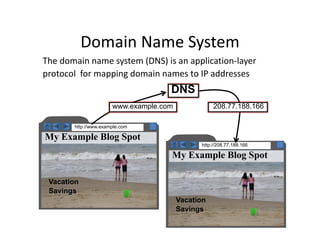
• The domain name system (DNS) is an application‐layer
protocol for mapping domain names to IP addresses
Vacation
Savings
DNS
http://208.77.188.166
My Example Blog Spot
http://www.example.com
My Example Blog Spot
Vacation
Savings
www.example.com 208.77.188.166
DNS
• Domain names
– are arrange in hierarchy
– Read from right to left
– www.example.com has
• com is Top Level Domain (TLD)
• example.com is subdomain of com
• www.example.com is subdomain of example.com
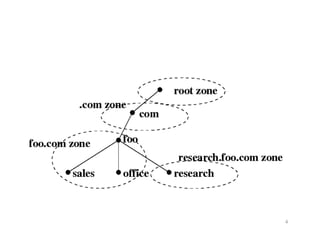
• Domain names form a rooted tree
– Each node is a domain
– Children of each node is subdomain
• Root is empty domain name
– Children of root are TLD
3
(root)
|
.com (TLD)
|
example (Second-Level
Domain)
|
www (Subdomain)
4
Domain Name Registration
• Two primary domains in use today
– Generic TLD (.com, .net, .edu, .org)
– Country code TLD (.pk, .au, .de, .it)
• Domain name registrars
– Responsible for domain name registration
– Accredited by Internet Corporation for Assigned Names
and Number (ICANN)
• Responsible for allocation IP address space
– Web site owner contact domain name registrar to reserve
name on their behalf
• Registration process
– Simple
– Small fee and providing contact information 5
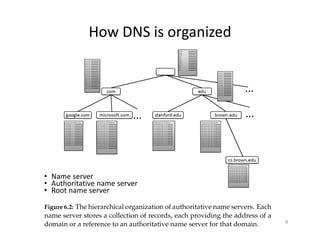
How DNS is organized
6
• Name server
• Authoritative name server
• Root name server
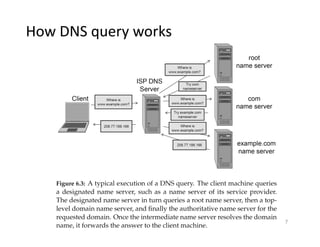
7
How DNS query works
DNS cache
• DNS is centralized service utilized by billion of
machine connected with Internet
• To reduce DNS traffic and resolve domain names
efficiently
– DNS cache is used that Allows both clients and lower level
DNS servers to keep DNS cache
• It is a table of recently received DNS record
– Name server uses this cache to resolve queries for domain
names it has answered recently
8
Cont.
• How DNS resolution works
– First designated server checks its cache, return the IP
address if a record is found
– If not, designated name server queries root name server
and resolve the domain name as discussed
– Designated name server return the result as it is returned
to client
9
DNS infinite loop
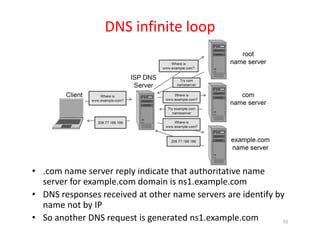
• .com name server reply indicate that authoritative name
server for example.com domain is ns1.example.com
• DNS responses received at other name servers are identify by
name not by IP
• So another DNS request is generated ns1.example.com 10
DNS attacks
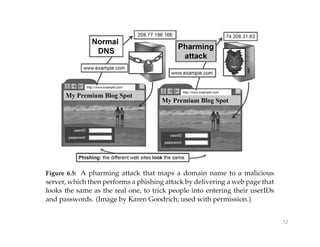
• Pharming
– DNS request can be subverted so that an attacker could
control how DNS requests resolve
– Attacker could cause request for websites to resolve to
false IP addresses
• IP addresses of his own malicious server causes the victim to view
or download undesired content, malware
• Phishing
– Pharming resolve a domain name to a website that appear
to be identical to requested website
11
12
Other Pharming Attacks
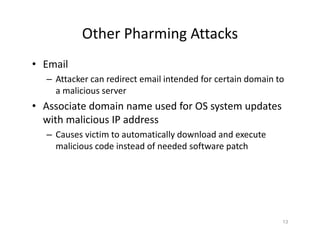
• Email
– Attacker can redirect email intended for certain domain to
a malicious server
• Associate domain name used for OS system updates
with malicious IP address
– Causes victim to automatically download and execute
malicious code instead of needed software patch
13
DNS cache Poisoning
• Attacker attempts to trick a DNS server into cache a
false DNS record
• It causes all downstream clients issuing DNS request
to that server to resolve domains to attacker
supplied IP
14
DNS cache Poisoning ‐ Scenario
• Eve launch DNS cache poisoning attack against ISP
DNS server
– She rapidly transmit DNS queries to this ISP DNS server,
• ISP DNS send queries to authoritative name server
– Eve send DNS response to her own query
• Eve spoofing source IP address as that of authoritative name server
and
• destination IP set to ISP DNS server
– ISP DNS server accept Eve’s forge response and cache DNS
entry
• Associating the domain that Eve requested with malicious IP
address that Eve provided in her forged response.
15
16
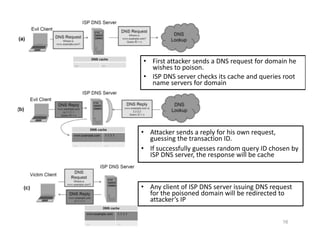
• First attacker sends a DNS request for domain he
wishes to poison.
• ISP DNS server checks its cache and queries root
name servers for domain
• Attacker sends a reply for his own request,
guessing the transaction ID.
• If successfully guesses random query ID chosen by
ISP DNS server, the response will be cache
• Any client of ISP DNS server issuing DNS request
for the poisoned domain will be redirected to
attacker’s IP
DNS cache poisoning
• Obstacles for attacker
– First Attacker must issue a response to her own query before
authoritative name server
• Easily overcome
– Second, each DNS request is given 16 bit query ID, if response
is not marked with same ID as in request, it will be ignored
• Previously DNS software simply use sequential no
• Now DNS software implements randomization of query ID
17
Birthday paradox
• The probability of two or more people in a group of
23 sharing same birthday is greater than 50%
• In a group of 23 people
– There are actually 22+21+. . . +1 = 253 pairs of birthday
– Only one matching pair is required for birthday paradox
18
19
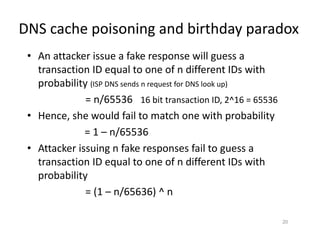
DNS cache poisoning and birthday paradox
• An attacker issue a fake response will guess a
transaction ID equal to one of n different IDs with
probability (ISP DNS sends n request for DNS look up)
= n/65536 16 bit transaction ID, 2^16 = 65536
• Hence, she would fail to match one with probability
= 1 – n/65536
• Attacker issuing n fake responses fail to guess a
transaction ID equal to one of n different IDs with
probability
= (1 – n/65636) ^ n
20
1/65536 chance for wrong guess
Using birthday paradox
n = number of guesses
(1-n/65546)^n Chance of correct guess
Means the eve has to make n requests and guess
to achieve this percentage of success
Cont.
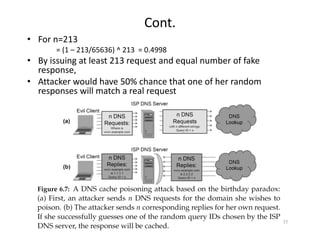
• For n=213
= (1 – 213/65636) ^ 213 = 0.4998
• By issuing at least 213 request and equal number of fake
response,
• Attacker would have 50% chance that one of her random
responses will match a real request
21
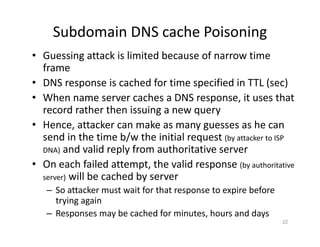
Subdomain DNS cache Poisoning
• Guessing attack is limited because of narrow time
frame
• DNS response is cached for time specified in TTL (sec)
• When name server caches a DNS response, it uses that
record rather then issuing a new query
• Hence, attacker can make as many guesses as he can
send in the time b/w the initial request (by attacker to ISP
DNA) and valid reply from authoritative server
• On each failed attempt, the valid response (by authoritative
server) will be cached by server
– So attacker must wait for that response to expire before
trying again
– Responses may be cached for minutes, hours and days
22
Cont.
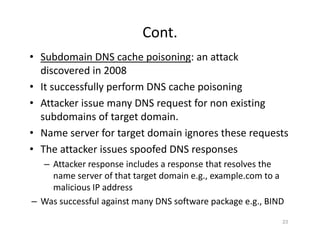
• Subdomain DNS cache poisoning: an attack
discovered in 2008
• It successfully perform DNS cache poisoning
• Attacker issue many DNS request for non existing
subdomains of target domain.
• Name server for target domain ignores these requests
• The attacker issues spoofed DNS responses
– Attacker response includes a response that resolves the
name server of that target domain e.g., example.com to a
malicious IP address
– Was successful against many DNS software package e.g., BIND
23
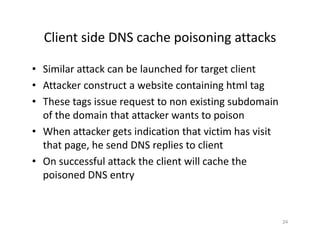
Client side DNS cache poisoning attacks
• Similar attack can be launched for target client
• Attacker construct a website containing html tag
• These tags issue request to non existing subdomain
of the domain that attacker wants to poison
• When attacker gets indication that victim has visit
that page, he send DNS replies to client
• On successful attack the client will cache the
poisoned DNS entry
24
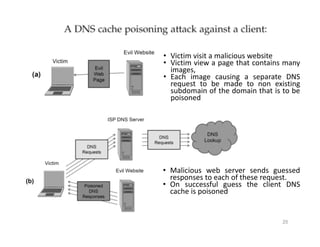
25
• Victim visit a malicious website
• Victim view a page that contains many
images,
• Each image causing a separate DNS
request to be made to non existing
subdomain of the domain that is to be
poisoned
• Malicious web server sends guessed
responses to each of these request.
• On successful guess the client DNS
cache is poisoned
Identifying risk of subdomain DNS cache
poisoning
• Major weakness in DNS protocol
– Relying on a 16 bit number as only mechanism for
verifying authenticity of DNS response
26
Some defenses
• Most DNS cache poisoning attacks target ISP DNS
server local DNS (LDNS) rather than authoritative
name servers
• Before 2008, LDSN are accessible to outside world
• Since 2008, LDNS servers are configure to accept
request from within their internal network
• This prevents all cache poisoning attempt originating
from outside of ISP network
27
Cont.
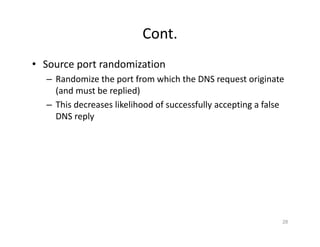
• Source port randomization
– Randomize the port from which the DNS request originate
(and must be replied)
– This decreases likelihood of successfully accepting a false
DNS reply
28
DNSSEC
• It is set of security extension to DNS protocol
• It prevent attacks by digitally signing all DNS replies
using public key cryptography
• It make infeasible for attacker to spoof a DNS reply
and poison DNS cache
29
Cont.
• DNS request packet also indicate DNSSEC is
supported
• If server also support DNSSEC, then a Resource
Record Signature RRSIG, DNSKEY is returned along
with resolved query
– RRSIG: contains digital sig. (hash of return record is
encrypted by authoritative server with its private key
– DNSKEY: contains the authoritative server public key
• Client can verify the authenticity of return record
(response from server) by
– Decrypting digital Sig. using public key of authoritative
server and comparing that hash to locally computing hash
30
Cont.
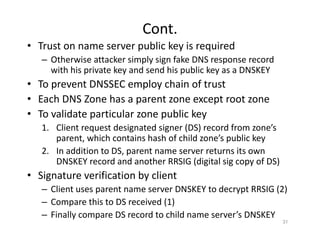
• Trust on name server public key is required
– Otherwise attacker simply sign fake DNS response record
with his private key and send his public key as a DNSKEY
• To prevent DNSSEC employ chain of trust
• Each DNS Zone has a parent zone except root zone
• To validate particular zone public key
1. Client request designated signer (DS) record from zone’s
parent, which contains hash of child zone’s public key
2. In addition to DS, parent name server returns its own
DNSKEY record and another RRSIG (digital sig copy of DS)
• Signature verification by client
– Client uses parent name server DNSKEY to decrypt RRSIG (2)
– Compare this to DS received (1)
– Finally compare DS record to child name server’s DNSKEY
31
32
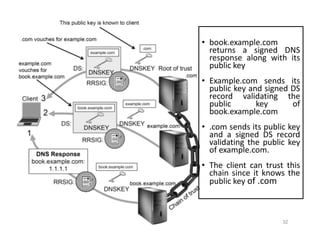
• book.example.com
returns a signed DNS
response along with its
public key
• Example.com sends its
public key and signed DS
record validating the
public key of
book.example.com
• .com sends its public key
and a signed DS record
validating the public key
of example.com.
• The client can trust this
chain since it knows the
public key of .com
2. Firewall
33
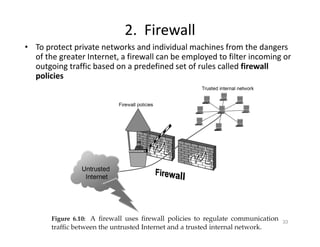
• To protect private networks and individual machines from the dangers
of the greater Internet, a firewall can be employed to filter incoming or
outgoing traffic based on a predefined set of rules called firewall
policies
Firewall Policies
• Packets flowing through a firewall can have one of three
outcomes:
– Accepted: permitted through the firewall
– Dropped: not allowed through with no indication of failure
– Rejected: not allowed through, accompanied by an attempt
to inform the source that the packet was rejected
• Policies used by the firewall to handle packets are based on
several properties of the packets being inspected, including the
protocol used, such as:
– TCP or UDP
– the source and destination IP addresses
– the source and destination ports
– the application‐level payload of the packet (e.g., whether it
contains a virus) 34
Blacklists and White Lists
• There are two fundamental approaches to creating firewall
policies (or rule sets) to effectively minimize vulnerability
• Blacklist approach
– All packets are allowed through except those that fit the rules
defined specifically in a blacklist.
– This type of configuration is more flexible in ensuring that service
to the internal network is not disrupted by the firewall, but is naïve
from a security perspective in that it assumes the network
administrator can enumerate all of the properties of malicious
traffic.
• Whitelist approach
– A safer approach to defining a firewall rule set is the default‐deny
policy, in which packets are dropped or rejected unless they are
specifically allowed by the firewall.
35
Firewall Types
• packet filters (stateless)
– If a packet matches the packet filter's set of rules, the
packet filter will drop or accept it
• "stateful" filters
– it maintains records of all connections passing through it
– it determine if a packet is either the start of a new
connection, a part of an existing connection.
• application layer
– Some times it is desirable to filter packets based upon
actual content rather than considering origin and
destination address
36
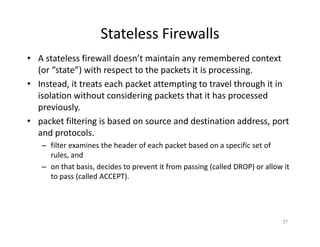
Stateless Firewalls
• A stateless firewall doesn’t maintain any remembered context
(or “state”) with respect to the packets it is processing.
• Instead, it treats each packet attempting to travel through it in
isolation without considering packets that it has processed
previously.
• packet filtering is based on source and destination address, port
and protocols.
– filter examines the header of each packet based on a specific set of
rules, and
– on that basis, decides to prevent it from passing (called DROP) or allow it
to pass (called ACCEPT).
37
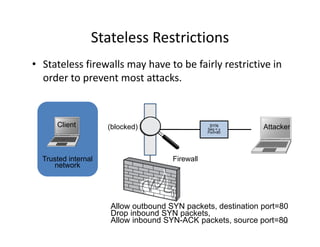
Stateless Restrictions
• Stateless firewalls may have to be fairly restrictive in
order to prevent most attacks.
38
Trusted internal
network
SYN
Seq = y
Port=80
Allow outbound SYN packets, destination port=80
Drop inbound SYN packets,
Allow inbound SYN-ACK packets, source port=80
Client Attacker
(blocked)
Firewall
Statefull Firewalls
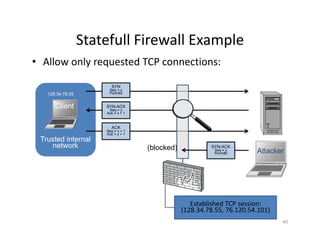
• Stateful firewalls can tell when packets are part of
legitimate sessions originating within a trusted
network.
• Stateful firewalls maintain tables containing
information on each active connection, including the
IP addresses, ports, and sequence numbers of
packets.
• Using these tables, stateful firewalls can allow only
inbound TCP packets that are in response to a
connection initiated from within the internal
network.
39
Statefull Firewall Example
• Allow only requested TCP connections:
40
Trusted internal
network
SYN
Seq = x
Port=80
SYN-ACK
Seq = y
Ack = x + 1
ACK
Seq = x + 1
Ack = y + 1
Allow outbound TCP sessions,
destination port=80
Client
SYN-ACK
Seq = y
Port=80 Attacker
(blocked)
Established TCP session:
(128.34.78.55, 76.120.54.101)
128.34.78.55
76.120.54.101
Firewall state table
Server
Firewall
3. Tunnels
• The contents of TCP packets are not normally
encrypted, so if someone is eavesdropping on a TCP
connection, he can often see the complete contents
of the payloads in this session.
• One way to prevent such eavesdropping without
changing the software performing the
communication is to use a tunneling protocol.
• In such a protocol, the communication between a
client and server is automatically encrypted, so that
useful eavesdropping is infeasible.
41
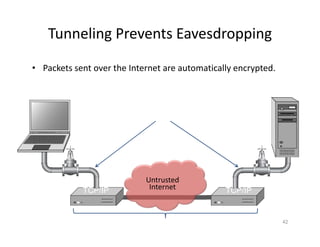
Tunneling Prevents Eavesdropping
• Packets sent over the Internet are automatically encrypted.
42
Server
Client
Tunneling protocol
(does end-to-end encryption and decryption)
Payloads are encrypted here
TCP/IP
TCP/IP
Untrusted
Internet
Tuneling Examples
-> VPN
-> SSL / TLS (Secure
Socket Layer /
Transport Layer
Security)
-> SSH (Secure
Shell)
-> IPSec (Internet
Protocol Security)
Secure Shell (SSH)
• A secure interactive command session:
1. Client connects to the server via a TCP session.
2. Client and server exchange information on
administrative details
such as supported encryption methods and their protocol version,
each choosing a set of protocols that the other supports.
3. Client and server initiate a secret‐key exchange to
establish a shared secret session key, which is used
to encrypt their communication (but not for
authentication).
This session key is used in conjunction with a chosen block cipher
(typically AES, 3DES) to encrypt all further communications.
43
Cont.
4. The server sends the client a list of acceptable forms of
authentication, which the client will try in sequence. The
most common mechanism is to use a password or the
following public‐key authentication method:
a) If public‐key authentication is the selected mechanism, the client
sends the server its public key.
b) The server then checks if this key is stored in its list of authorized
keys. If so, the server encrypts a challenge using the client’s public
key and sends it to the client.
c) The client decrypts the challenge with its private key and responds to
the server, proving its identity.
5. Once authentication has been successfully completed, the
server lets the client access appropriate resources, such as a
command prompt.
44
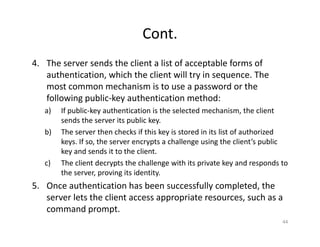
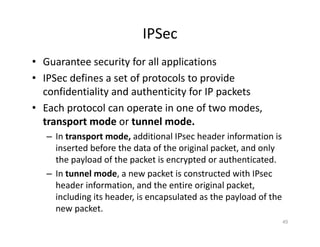
IPSec
• Guarantee security for all applications
• IPSec defines a set of protocols to provide
confidentiality and authenticity for IP packets
• Each protocol can operate in one of two modes,
transport mode or tunnel mode.
– In transport mode, additional IPsec header information is
inserted before the data of the original packet, and only
the payload of the packet is encrypted or authenticated.
– In tunnel mode, a new packet is constructed with IPsec
header information, and the entire original packet,
including its header, is encapsulated as the payload of the
new packet.
45
-> Encrypts only the
payload.
-> Original IP header is
exposed.
-> Used for host-to-host
communication.
-> Lower overhead.
-> Encrypts the entire IP
packet.
-> Encapsulates the packet
within a new IP header.
-> Used for
network-to-network
(site-to-site) communication.
-> Higher overhead but
offers better security.
Using IPSec
• Two parties must first set up security association (SA)
– How secure communication are to be conducted between
two parties
– i.e. SAs contains
• encryption keys
• Algorithm to be used
• Other parameter related to communication
• SAs are unidirectional
– Separate SAs for inbound and outbound traffic
• Packets are verified or decrypted using security
parameter index (SPI) field store in IPSec header
46
Virtual Private Networking (VPN)
• Virtual private networking (VPN) is a technology
that allows private networks to be safely extended
over long physical distances by making use of a
public network, such as the Internet, as a means of
transport.
• VPN provides guarantees of data confidentiality,
integrity, and authentication, despite the use of an
untrusted network for transmission.
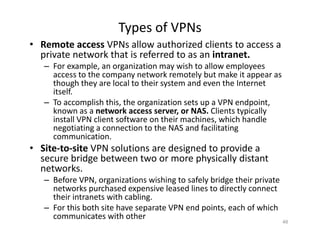
• There are two primary types of VPNs, remote access
VPN and site‐to‐site VPN
47
Types of VPNs
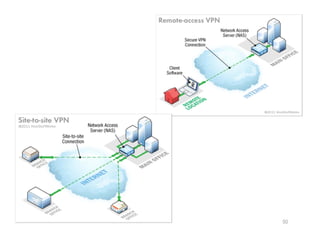
• Remote access VPNs allow authorized clients to access a
private network that is referred to as an intranet.
– For example, an organization may wish to allow employees
access to the company network remotely but make it appear as
though they are local to their system and even the Internet
itself.
– To accomplish this, the organization sets up a VPN endpoint,
known as a network access server, or NAS. Clients typically
install VPN client software on their machines, which handle
negotiating a connection to the NAS and facilitating
communication.
• Site‐to‐site VPN solutions are designed to provide a
secure bridge between two or more physically distant
networks.
– Before VPN, organizations wishing to safely bridge their private
networks purchased expensive leased lines to directly connect
their intranets with cabling.
– For this both site have separate VPN end points, each of which
communicates with other
48
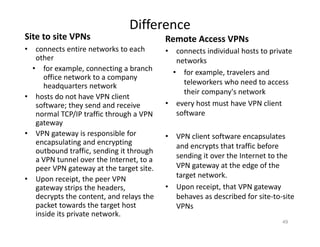
Difference
Site to site VPNs
• connects entire networks to each
other
• for example, connecting a branch
office network to a company
headquarters network
• hosts do not have VPN client
software; they send and receive
normal TCP/IP traffic through a VPN
gateway
• VPN gateway is responsible for
encapsulating and encrypting
outbound traffic, sending it through
a VPN tunnel over the Internet, to a
peer VPN gateway at the target site.
• Upon receipt, the peer VPN
gateway strips the headers,
decrypts the content, and relays the
packet towards the target host
inside its private network.
Remote Access VPNs
• connects individual hosts to private
networks
• for example, travelers and
teleworkers who need to access
their company's network
• every host must have VPN client
software
• VPN client software encapsulates
and encrypts that traffic before
sending it over the Internet to the
VPN gateway at the edge of the
target network.
• Upon receipt, that VPN gateway
behaves as described for site‐to‐site
VPNs
49
50
4. Intrusion Detection Systems
• Intrusion
– Actions aimed at compromising the security of the target
(confidentiality, integrity, availability of
computing/networking resources)
• Intrusion detection
– The identification through intrusion signatures and report
of intrusion activities
• Intrusion prevention
– The process of both detecting intrusion activities and
managing automatic responsive actions throughout the
network
51
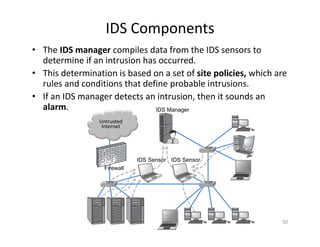
IDS Components
• The IDS manager compiles data from the IDS sensors to
determine if an intrusion has occurred.
• This determination is based on a set of site policies, which are
rules and conditions that define probable intrusions.
• If an IDS manager detects an intrusion, then it sounds an
alarm.
52
Untrusted
Internet
IDS Manager
IDS Sensor
router router
router
IDS Sensor
Firewall
Intrusions
• An IDS is designed to detect a number of threats,
including the following:
– masquerader: an attacker who is falsely using the identity
and/or credentials of a legitimate user to gain access to a
computer system or network
– Misfeasor: a legitimate user who performs actions he is
not authorized to do
– Clan‐destine user: a user who tries to block or cover up
his actions by deleting system logs
53
Cont.
• In addition, an IDS is designed to detect automated
attacks and threats, including the following:
– port scans: information gathering intended to determine
which ports on a host are open for TCP connections
– Denial‐of‐service attacks: network attacks meant to
overwhelm a host and shut out legitimate accesses
– Malware attacks: replicating malicious software attacks,
such as Trojan horses, computer worms, viruses, etc.
– ARP spoofing: an attempt to redirect IP traffic
– DNS cache poisoning: a pharming attack directed at
changing a host’s DNS cache to create a falsified domain‐
name/IP‐address association
54
Intrusion Detection Techniques
• Network Intrusion detection system (NIDS)
– Deployed at perimeter of a network
– Detects malicious behaviors based on traffic patterns and
contents
– Deep packet inspection on incoming and outgoing traffic
• Apply set of attack signatures or heuristics to determine
whether traffic pattern indicates malicious behavior
• Database of attack signatures that must be updated
• Or rely on statistical analysis to established a “baseline”
of performance on network. And signal an alert when
network traffic deviates from this baseline
55
Cont.
• Protocol‐based Intrusion Detection System(PIDS)
– Tailored towards detecting malicious behavior in specific
protocol
– Deployed on particular host
– E.g. web server might run PIDS to analyze incoming HTTP
traffic and drop request that may potentially malicious or
contains error
– PIDS may monitor application traffic between two hosts
• E.g. traffic b/w web server and database inspected for malformed
query
56
Cont.
• Host‐based Intrusion Detection System (HIDS)
– Resides on a single system
– monitors activity including system calls, interprocess
communication etc.
• Basically monitors audit logs and system logs to detect
masquerading and misfeasant users (who attempt unauthorized
actions) and clandestine user (who try to delete or modify system
monitoring)
– Uses heuristic rules or statistical analysis to detect when a
user is deviating from “normal” behavior, which could
indicate that this user is masquerading user
– Misfeasant users can be detect by system by defining rules
for authorized and unauthorized actions for each user
– Clandestine user can be detected by monitoring and
logging how changes are made in log files
57
Passive IDSs
• Logs malicious event and alert network administrator
for action
• They do not take any preemptive action
• Intrusion Prevention Systems IPS
– Works in conjunction with firewall and other network
devices to mitigate malicious activity
– E.g IPS detects patterns suggesting DoS attacks and
automatically update firewall rule set to drop all traffic
from malicious IP
– Open source most commonly used solution: Snort
58
An IDS attack
• To evade detection : launch a DoS attack on IDS itself
• An attacker may overwhelm IDS to a point that it
cannot log every event
59
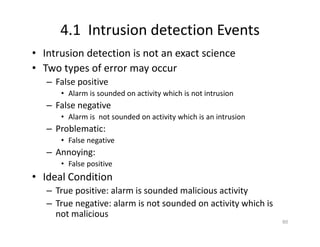
4.1 Intrusion detection Events
• Intrusion detection is not an exact science
• Two types of error may occur
– False positive
• Alarm is sounded on activity which is not intrusion
– False negative
• Alarm is not sounded on activity which is an intrusion
– Problematic:
• False negative
– Annoying:
• False positive
• Ideal Condition
– True positive: alarm is sounded malicious activity
– True negative: alarm is not sounded on activity which is
not malicious
60
Possible Alarm Outcomes
• Alarms can be sounded (positive) or not (negative)
61
Intrusion Attack No Intrusion Attack
Alarm
Sounded
No
Alarm
Sounded
True Positive False Positive
True Negative
False Negative
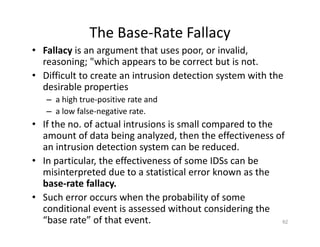
The Base‐Rate Fallacy
• Fallacy is an argument that uses poor, or invalid,
reasoning; "which appears to be correct but is not.
• Difficult to create an intrusion detection system with the
desirable properties
– a high true‐positive rate and
– a low false‐negative rate.
• If the no. of actual intrusions is small compared to the
amount of data being analyzed, then the effectiveness of
an intrusion detection system can be reduced.
• In particular, the effectiveness of some IDSs can be
misinterpreted due to a statistical error known as the
base‐rate fallacy.
• Such error occurs when the probability of some
conditional event is assessed without considering the
“base rate” of that event. 62
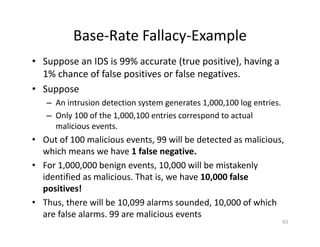
Base‐Rate Fallacy‐Example
• Suppose an IDS is 99% accurate (true positive), having a
1% chance of false positives or false negatives.
• Suppose
– An intrusion detection system generates 1,000,100 log entries.
– Only 100 of the 1,000,100 entries correspond to actual
malicious events.
• Out of 100 malicious events, 99 will be detected as malicious,
which means we have 1 false negative.
• For 1,000,000 benign events, 10,000 will be mistakenly
identified as malicious. That is, we have 10,000 false
positives!
• Thus, there will be 10,099 alarms sounded, 10,000 of which
are false alarms. 99 are malicious events
63
Cont.
• Thus false positive rate need to be low, depending on
number of benign events
64
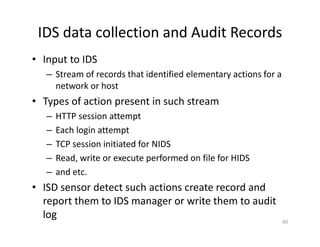
IDS data collection and Audit Records
• Input to IDS
– Stream of records that identified elementary actions for a
network or host
• Types of action present in such stream
– HTTP session attempt
– Each login attempt
– TCP session initiated for NIDS
– Read, write or execute performed on file for HIDS
– and etc.
• ISD sensor detect such actions create record and
report them to IDS manager or write them to audit
log 65
IDS Data
• In 1987 paper, Dorothy Denning identified several fields that
should be included in IDS event records:
– Subject: the initiator of an action on the target
– Object: the resource being targeted, such as a file,
command, device, or network protocol
– Action: the operation being performed by the subject
towards the object
– Exception‐condition: any error message or exception
condition that was raised by this action
– Resource‐usage: quantitative items that were expended by
the system performing or responding to this action
– Time‐stamp: a unique identifier for the moment in time
when this action was initiated
66
IDS Data ‐ Examples
• If Alice write 104 Kilobyte of data to file dog.exe
[Alice, dog.exe, write, “no error”, 104KB,
20100304113451]
• If a client 128.72.201.120 attempts to initiate an
HTTP session with a server 201.33.42.108
[128.72.201.120, 201.33.42.108, HTTP, 0.02 CPU
sec, 20100304114022]
• However exact format would be determine by IDS
designer
67
4.2 & 4.3 Types of Intrusion Detection
Systems
• Rule‐Based Intrusion Detection
– IDS rules can be encoded as
– Signatures, which
• Rules identify the types of actions that match certain
known profiles for an intrusion attack, in such case the rule
would encode a signature for such an attack.
• If the IDS manager sees an event that matches the
signature for such a rule, it sounds an alarm
– Policies
• If such rules is triggered then by policy that user is
behaving in malicious way
• Examples
» Desktop computers may not be used a HTTTP server
68
Cont.
– HTTP server may not accept unencrypted telnet or FTP
sessions
– User should not read personal directory of other users
– User may not write files own by other users
– User may use licensed software
– User may use authorized VPN software to access their
desktop computers remotely
• Policy maker thought of rules become policy
• False positive rate is low
• Signature based require that IDS has sig for each kind
of attack
69
Statistical Intrusion Detection
• Steps
– Gather audit data about a user or host
– Determine baseline numerical values about certain action
that user or host performs
– Actions are group by object
• i.e. all action having same object field
– Actions are measure over time ranges, or percentage of
resource usage.
• That makes a profile for a user or host
– which is a statistical representation of the typical ways that
a user acts or a host is used;
– hence, it can be used to determine when a user or host is
acting in highly unusual, anomalous ways.
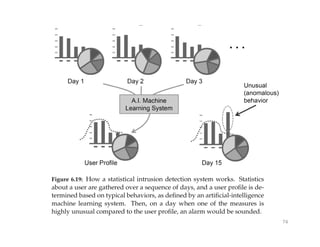
70
Cont.
– Using profile IDS manager can
• determine thresholds for anomalous behaviors and
• then sound an alarm any time a user or host deviates
significantly from the stored profile for that person or machine.
– Numerical values derived includes
– Count: number of occurrence of certain type of action in a
given time range
– Average: average number of occurrence of a certain type of
action in a given time range
– Percentage: Percent of resource that a certain type of action
takes over given time range
– Metering: Aggregate or average of averages accumulated over a
relatively long period of time
– Time‐interval length: amount of time that passes b/w
instances of an action of a certain type
71
Cont.
– E.g.
• How many times a user uses a login program each day
• How often user initiate HTTP sessions
– Typical time interval b/w times when a user checks his or her
email account for new email
• Such information is feed into AI machine learning system to
determine a profile for a user or host that IDS is monitoring
• Such IDS does not require prior knowledge of established
intrusion attack
• It analyze traffic pattern so difficult for attack to hide his
behavior
– E.g. Statistical IDS could learn that a certain user do not user
his computer on Friday
– If a login attempt is made on her computer on Friday it
could indicate it intrusion 72
Cont.
• Weakness of statistical method
– A non malicious behavior can generate a significant
anomaly and leads to false positive
– E.g. if a user has upcoming deadline and suddenly decided
to use a certain program a large number of times then it
will trigger an alarm
• A stealthy attacker might go un notice
– Does not generate lot of traffic
– Encapsulate malicious content in benign network protocol
e.g. HTTP
– Such traffic is ignored as normal behavior
• Thus, most IDS in cooperate both rules based and
statistical methods
73
74
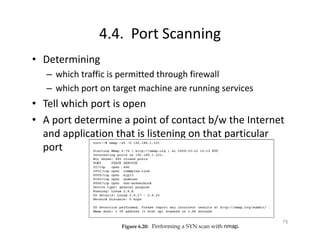
4.4. Port Scanning
• Determining
– which traffic is permitted through firewall
– which port on target machine are running services
• Tell which port is open
• A port determine a point of contact b/w the Internet
and application that is listening on that particular
port
75
TCP scans
• Simplest method
• Performing scan attempts to initiate a TCP
connection on each port on target machine
• Done using standard OS call for opening TCP
connection at specific port
• Open ports completes the connection while close or
blocked do not
76
SYN Scan
• Send only a SYN packet to victim at particular port
• If port is open it respond with SYN‐ACK packet
• If not no response issued
77
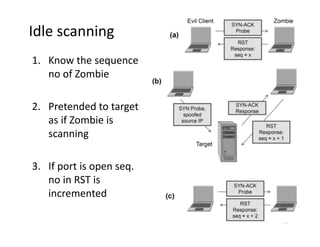
Idle scanning
• Attacker find a third party machine called zombie
• Attacker uses zombie weak TCP implementation to
perform port scanning of separate target without
leaving his evidence on target network
• Scenario
1. Attacker sends a SYN‐ACK tcp packet to zombie. Zombie
reply with RST packet with sequence no x as zombie does
not initiate the connection
2. Attacker sends a SYN packet to target with spoof source
IP address (zombie IP address)
• If port at target is open, it reply to zombie with SYN‐ACK packet
and Zombie reply with RST with increment sequence counter
3. Attacker send a SYN‐ACK packet to Zombie again, zombie
reply with a RST and sequence no
• If sequence no is increment then port is open at target otherwise
not 78
Idle scanning
1. Know the sequence
no of Zombie
2. Pretended to target
as if Zombie is
scanning
3. If port is open seq.
no in RST is
incremented
79
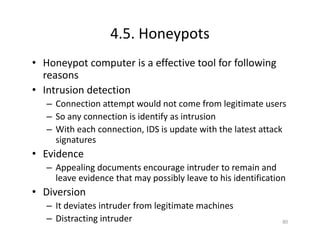
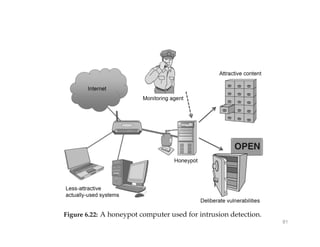
4.5. Honeypots
• Honeypot computer is a effective tool for following
reasons
• Intrusion detection
– Connection attempt would not come from legitimate users
– So any connection is identify as intrusion
– With each connection, IDS is update with the latest attack
signatures
• Evidence
– Appealing documents encourage intruder to remain and
leave evidence that may possibly leave to his identification
• Diversion
– It deviates intruder from legitimate machines
– Distracting intruder 80
81
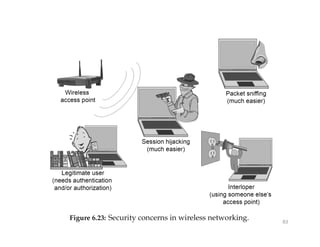
5. Wireless Networking
• Challenges for wireless communication
• Packet sniffing
– Easier to perform
• Session hijacking
– Easier to perform, since computer with wireless NIC can
sniff packets and mimic a wireless access point
• Interloping
– Unauthorized user who is connecting to the Internet
through someone else wireless access point
• Legitimate user
Authenticating a legitimate user
82
83
5.2 Wired Equivalent Privacy
• It is incorporated in 802.11 standard to provide
confidentiality, integrity and access control
• WEP encryption
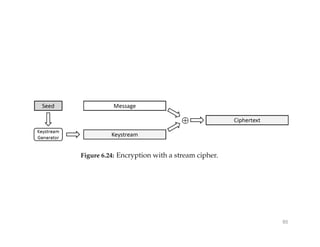
– Encrypt data frame using stream ciphers RC4
– C = M EOR M
– Seed is 256 bits
– Seed is obtained by concatenating Initialization vector with
WEP key
– For decryption, IV is transmitted together with cipher text
– IV is used only one time (however access point would not
check for and reject reuse IV)
• WEP integrity
– Uses CRC‐32 checksum, but its not cryptographically
secure 84
85
Cont.
• WEP authentication
– Two methods
• Open system
– No need for client to provides credentials
– Associate with access point immediately
– Then client can only send and receive information from the
access point using correct encryption key
– If key is wrong then access point ignore the client’s request
• Shared key
– Client need to prove the possession of correct key to access point
– Access point sends a plaintext challenge to client, who encrypt it
and send the cipher text to client
– If received cipher text decrypts correctly to the challenge then
client is allowed to associate with access point
86
Attacks on WEP
• Share key authentication:
– AP Æ client: Challenge in plaintext
– Client Æ AP: encrypted plaintext with IV
– Encryption is XOR with key stream
– Attacker:
• intercept both i.e. plaintext and cipher text with IV
• XOR plaintext with cipher text to recover the key stream
• Later can be used to authenticating the attacker
• Open system mode
– RC4 key stream: first few bytes of key stream are non
random
– 50% probability to recover WEP key using 40,000 data
packets 87
Cont.
• ARP reinjection
– Attacker can authenticate and associate to AP (Open system)
– Attacker captures a single ARP packet from another client
on the network Attacker can repeatedly transmit this
packet to AP, causing it to reply with a retransmission of
this ARP packet along with new IV.
– It allow attacker to quickly capture enough IVs to recover
WEP key
– On idle network with infrequent connection capturing ARP
packet is difficult
– To speed up process, attacker sends a de‐authentication
packet to client, posing as AP
– Client would re‐authenticate and send ARP packet that can
be capture by attacker and retransmit it 88
Cont.
• Coffee latte attack:
– It could be used to attack client in coffee shops with
wireless access
– OS connects automatically with the previously connected
wireless network
– Attacker set up a honey pot or soft access point,
• a fake wireless access point with same SSID as AP (the client
is attempting to connect to)
– Client authentication but no AP authentication
• So victim is authenticated with honeypot AP
– To retrieve WEP key, attacker must have high no of
encrypted packets
– Attacker receive encrypted ARP request from client
89
WiFi Protected Access – WAP
• Authentication
– Pre‐shared key (PSK) : a share secret is established by
entering manually a key into AP and client. WAP personal
– RADUIS (or WAP enterprise ‐ 802.1x) ideal for large
network
– TTP is responsible for key generation and client
authentication
– Extensible Authentication Protocol EAP: a framework with
several authentication mechanisms
• Selected mechanism is invoked by AP and used to negotiate a
session key
• This session key is used in next stage
– 802.1x also uses certificate and public key cryptography
90
Cont.
• Encryption
– Client and AP uses new session key for encryption
– Temporal Key Integrity Protocol (TKIP)
• Uses RC‐4
• Attempt to address the weakness of WEP’s RC‐4
implementation, i.e. concatenating IV with the key to
generate RC‐4 seed
• TKIP remedies: Increasing IV length to 48 bits and then uses
key mixing algorithm that combine IV with key in a
sophisticated way
• TKIP replace CRC‐32 checksum with 64 bit MIC (message
integrity code) using algorithm MICHAEL
• MICHEAL is cryptographically insecure but attack against it
are much more difficult than attack on CRC
91

Information Security, Network Security, Cache Poisoning

  • 1.
  • 2.
    Domain Name System •The domain name system (DNS) is an application‐layer protocol for mapping domain names to IP addresses Vacation Savings DNS http://208.77.188.166 My Example Blog Spot http://www.example.com My Example Blog Spot Vacation Savings www.example.com 208.77.188.166
  • 3.
    DNS • Domain names –are arrange in hierarchy – Read from right to left – www.example.com has • com is Top Level Domain (TLD) • example.com is subdomain of com • www.example.com is subdomain of example.com • Domain names form a rooted tree – Each node is a domain – Children of each node is subdomain • Root is empty domain name – Children of root are TLD 3 (root) | .com (TLD) | example (Second-Level Domain) | www (Subdomain)
  • 4.
  • 5.
    Domain Name Registration •Two primary domains in use today – Generic TLD (.com, .net, .edu, .org) – Country code TLD (.pk, .au, .de, .it) • Domain name registrars – Responsible for domain name registration – Accredited by Internet Corporation for Assigned Names and Number (ICANN) • Responsible for allocation IP address space – Web site owner contact domain name registrar to reserve name on their behalf • Registration process – Simple – Small fee and providing contact information 5
  • 6.
    How DNS isorganized 6 • Name server • Authoritative name server • Root name server
  • 7.
  • 8.
    DNS cache • DNSis centralized service utilized by billion of machine connected with Internet • To reduce DNS traffic and resolve domain names efficiently – DNS cache is used that Allows both clients and lower level DNS servers to keep DNS cache • It is a table of recently received DNS record – Name server uses this cache to resolve queries for domain names it has answered recently 8
  • 9.
    Cont. • How DNSresolution works – First designated server checks its cache, return the IP address if a record is found – If not, designated name server queries root name server and resolve the domain name as discussed – Designated name server return the result as it is returned to client 9
  • 10.
    DNS infinite loop •.com name server reply indicate that authoritative name server for example.com domain is ns1.example.com • DNS responses received at other name servers are identify by name not by IP • So another DNS request is generated ns1.example.com 10
  • 11.
    DNS attacks • Pharming –DNS request can be subverted so that an attacker could control how DNS requests resolve – Attacker could cause request for websites to resolve to false IP addresses • IP addresses of his own malicious server causes the victim to view or download undesired content, malware • Phishing – Pharming resolve a domain name to a website that appear to be identical to requested website 11
  • 12.
  • 13.
    Other Pharming Attacks •Email – Attacker can redirect email intended for certain domain to a malicious server • Associate domain name used for OS system updates with malicious IP address – Causes victim to automatically download and execute malicious code instead of needed software patch 13
  • 14.
    DNS cache Poisoning •Attacker attempts to trick a DNS server into cache a false DNS record • It causes all downstream clients issuing DNS request to that server to resolve domains to attacker supplied IP 14
  • 15.
    DNS cache Poisoning‐ Scenario • Eve launch DNS cache poisoning attack against ISP DNS server – She rapidly transmit DNS queries to this ISP DNS server, • ISP DNS send queries to authoritative name server – Eve send DNS response to her own query • Eve spoofing source IP address as that of authoritative name server and • destination IP set to ISP DNS server – ISP DNS server accept Eve’s forge response and cache DNS entry • Associating the domain that Eve requested with malicious IP address that Eve provided in her forged response. 15
  • 16.
    16 • First attackersends a DNS request for domain he wishes to poison. • ISP DNS server checks its cache and queries root name servers for domain • Attacker sends a reply for his own request, guessing the transaction ID. • If successfully guesses random query ID chosen by ISP DNS server, the response will be cache • Any client of ISP DNS server issuing DNS request for the poisoned domain will be redirected to attacker’s IP
  • 17.
    DNS cache poisoning •Obstacles for attacker – First Attacker must issue a response to her own query before authoritative name server • Easily overcome – Second, each DNS request is given 16 bit query ID, if response is not marked with same ID as in request, it will be ignored • Previously DNS software simply use sequential no • Now DNS software implements randomization of query ID 17
  • 18.
    Birthday paradox • Theprobability of two or more people in a group of 23 sharing same birthday is greater than 50% • In a group of 23 people – There are actually 22+21+. . . +1 = 253 pairs of birthday – Only one matching pair is required for birthday paradox 18
  • 19.
  • 20.
    DNS cache poisoningand birthday paradox • An attacker issue a fake response will guess a transaction ID equal to one of n different IDs with probability (ISP DNS sends n request for DNS look up) = n/65536 16 bit transaction ID, 2^16 = 65536 • Hence, she would fail to match one with probability = 1 – n/65536 • Attacker issuing n fake responses fail to guess a transaction ID equal to one of n different IDs with probability = (1 – n/65636) ^ n 20 1/65536 chance for wrong guess Using birthday paradox n = number of guesses (1-n/65546)^n Chance of correct guess Means the eve has to make n requests and guess to achieve this percentage of success
  • 21.
    Cont. • For n=213 =(1 – 213/65636) ^ 213 = 0.4998 • By issuing at least 213 request and equal number of fake response, • Attacker would have 50% chance that one of her random responses will match a real request 21
  • 22.
    Subdomain DNS cachePoisoning • Guessing attack is limited because of narrow time frame • DNS response is cached for time specified in TTL (sec) • When name server caches a DNS response, it uses that record rather then issuing a new query • Hence, attacker can make as many guesses as he can send in the time b/w the initial request (by attacker to ISP DNA) and valid reply from authoritative server • On each failed attempt, the valid response (by authoritative server) will be cached by server – So attacker must wait for that response to expire before trying again – Responses may be cached for minutes, hours and days 22
  • 23.
    Cont. • Subdomain DNScache poisoning: an attack discovered in 2008 • It successfully perform DNS cache poisoning • Attacker issue many DNS request for non existing subdomains of target domain. • Name server for target domain ignores these requests • The attacker issues spoofed DNS responses – Attacker response includes a response that resolves the name server of that target domain e.g., example.com to a malicious IP address – Was successful against many DNS software package e.g., BIND 23
  • 24.
    Client side DNScache poisoning attacks • Similar attack can be launched for target client • Attacker construct a website containing html tag • These tags issue request to non existing subdomain of the domain that attacker wants to poison • When attacker gets indication that victim has visit that page, he send DNS replies to client • On successful attack the client will cache the poisoned DNS entry 24
  • 25.
    25 • Victim visita malicious website • Victim view a page that contains many images, • Each image causing a separate DNS request to be made to non existing subdomain of the domain that is to be poisoned • Malicious web server sends guessed responses to each of these request. • On successful guess the client DNS cache is poisoned
  • 26.
    Identifying risk ofsubdomain DNS cache poisoning • Major weakness in DNS protocol – Relying on a 16 bit number as only mechanism for verifying authenticity of DNS response 26
  • 27.
    Some defenses • MostDNS cache poisoning attacks target ISP DNS server local DNS (LDNS) rather than authoritative name servers • Before 2008, LDSN are accessible to outside world • Since 2008, LDNS servers are configure to accept request from within their internal network • This prevents all cache poisoning attempt originating from outside of ISP network 27
  • 28.
    Cont. • Source portrandomization – Randomize the port from which the DNS request originate (and must be replied) – This decreases likelihood of successfully accepting a false DNS reply 28
  • 29.
    DNSSEC • It isset of security extension to DNS protocol • It prevent attacks by digitally signing all DNS replies using public key cryptography • It make infeasible for attacker to spoof a DNS reply and poison DNS cache 29
  • 30.
    Cont. • DNS requestpacket also indicate DNSSEC is supported • If server also support DNSSEC, then a Resource Record Signature RRSIG, DNSKEY is returned along with resolved query – RRSIG: contains digital sig. (hash of return record is encrypted by authoritative server with its private key – DNSKEY: contains the authoritative server public key • Client can verify the authenticity of return record (response from server) by – Decrypting digital Sig. using public key of authoritative server and comparing that hash to locally computing hash 30
  • 31.
    Cont. • Trust onname server public key is required – Otherwise attacker simply sign fake DNS response record with his private key and send his public key as a DNSKEY • To prevent DNSSEC employ chain of trust • Each DNS Zone has a parent zone except root zone • To validate particular zone public key 1. Client request designated signer (DS) record from zone’s parent, which contains hash of child zone’s public key 2. In addition to DS, parent name server returns its own DNSKEY record and another RRSIG (digital sig copy of DS) • Signature verification by client – Client uses parent name server DNSKEY to decrypt RRSIG (2) – Compare this to DS received (1) – Finally compare DS record to child name server’s DNSKEY 31
  • 32.
    32 • book.example.com returns asigned DNS response along with its public key • Example.com sends its public key and signed DS record validating the public key of book.example.com • .com sends its public key and a signed DS record validating the public key of example.com. • The client can trust this chain since it knows the public key of .com
  • 33.
    2. Firewall 33 • Toprotect private networks and individual machines from the dangers of the greater Internet, a firewall can be employed to filter incoming or outgoing traffic based on a predefined set of rules called firewall policies
  • 34.
    Firewall Policies • Packetsflowing through a firewall can have one of three outcomes: – Accepted: permitted through the firewall – Dropped: not allowed through with no indication of failure – Rejected: not allowed through, accompanied by an attempt to inform the source that the packet was rejected • Policies used by the firewall to handle packets are based on several properties of the packets being inspected, including the protocol used, such as: – TCP or UDP – the source and destination IP addresses – the source and destination ports – the application‐level payload of the packet (e.g., whether it contains a virus) 34
  • 35.
    Blacklists and WhiteLists • There are two fundamental approaches to creating firewall policies (or rule sets) to effectively minimize vulnerability • Blacklist approach – All packets are allowed through except those that fit the rules defined specifically in a blacklist. – This type of configuration is more flexible in ensuring that service to the internal network is not disrupted by the firewall, but is naïve from a security perspective in that it assumes the network administrator can enumerate all of the properties of malicious traffic. • Whitelist approach – A safer approach to defining a firewall rule set is the default‐deny policy, in which packets are dropped or rejected unless they are specifically allowed by the firewall. 35
  • 36.
    Firewall Types • packetfilters (stateless) – If a packet matches the packet filter's set of rules, the packet filter will drop or accept it • "stateful" filters – it maintains records of all connections passing through it – it determine if a packet is either the start of a new connection, a part of an existing connection. • application layer – Some times it is desirable to filter packets based upon actual content rather than considering origin and destination address 36
  • 37.
    Stateless Firewalls • Astateless firewall doesn’t maintain any remembered context (or “state”) with respect to the packets it is processing. • Instead, it treats each packet attempting to travel through it in isolation without considering packets that it has processed previously. • packet filtering is based on source and destination address, port and protocols. – filter examines the header of each packet based on a specific set of rules, and – on that basis, decides to prevent it from passing (called DROP) or allow it to pass (called ACCEPT). 37
  • 38.
    Stateless Restrictions • Statelessfirewalls may have to be fairly restrictive in order to prevent most attacks. 38 Trusted internal network SYN Seq = y Port=80 Allow outbound SYN packets, destination port=80 Drop inbound SYN packets, Allow inbound SYN-ACK packets, source port=80 Client Attacker (blocked) Firewall
  • 39.
    Statefull Firewalls • Statefulfirewalls can tell when packets are part of legitimate sessions originating within a trusted network. • Stateful firewalls maintain tables containing information on each active connection, including the IP addresses, ports, and sequence numbers of packets. • Using these tables, stateful firewalls can allow only inbound TCP packets that are in response to a connection initiated from within the internal network. 39
  • 40.
    Statefull Firewall Example •Allow only requested TCP connections: 40 Trusted internal network SYN Seq = x Port=80 SYN-ACK Seq = y Ack = x + 1 ACK Seq = x + 1 Ack = y + 1 Allow outbound TCP sessions, destination port=80 Client SYN-ACK Seq = y Port=80 Attacker (blocked) Established TCP session: (128.34.78.55, 76.120.54.101) 128.34.78.55 76.120.54.101 Firewall state table Server Firewall
  • 41.
    3. Tunnels • Thecontents of TCP packets are not normally encrypted, so if someone is eavesdropping on a TCP connection, he can often see the complete contents of the payloads in this session. • One way to prevent such eavesdropping without changing the software performing the communication is to use a tunneling protocol. • In such a protocol, the communication between a client and server is automatically encrypted, so that useful eavesdropping is infeasible. 41
  • 42.
    Tunneling Prevents Eavesdropping •Packets sent over the Internet are automatically encrypted. 42 Server Client Tunneling protocol (does end-to-end encryption and decryption) Payloads are encrypted here TCP/IP TCP/IP Untrusted Internet Tuneling Examples -> VPN -> SSL / TLS (Secure Socket Layer / Transport Layer Security) -> SSH (Secure Shell) -> IPSec (Internet Protocol Security)
  • 43.
    Secure Shell (SSH) •A secure interactive command session: 1. Client connects to the server via a TCP session. 2. Client and server exchange information on administrative details such as supported encryption methods and their protocol version, each choosing a set of protocols that the other supports. 3. Client and server initiate a secret‐key exchange to establish a shared secret session key, which is used to encrypt their communication (but not for authentication). This session key is used in conjunction with a chosen block cipher (typically AES, 3DES) to encrypt all further communications. 43
  • 44.
    Cont. 4. The serversends the client a list of acceptable forms of authentication, which the client will try in sequence. The most common mechanism is to use a password or the following public‐key authentication method: a) If public‐key authentication is the selected mechanism, the client sends the server its public key. b) The server then checks if this key is stored in its list of authorized keys. If so, the server encrypts a challenge using the client’s public key and sends it to the client. c) The client decrypts the challenge with its private key and responds to the server, proving its identity. 5. Once authentication has been successfully completed, the server lets the client access appropriate resources, such as a command prompt. 44
  • 45.
    IPSec • Guarantee securityfor all applications • IPSec defines a set of protocols to provide confidentiality and authenticity for IP packets • Each protocol can operate in one of two modes, transport mode or tunnel mode. – In transport mode, additional IPsec header information is inserted before the data of the original packet, and only the payload of the packet is encrypted or authenticated. – In tunnel mode, a new packet is constructed with IPsec header information, and the entire original packet, including its header, is encapsulated as the payload of the new packet. 45 -> Encrypts only the payload. -> Original IP header is exposed. -> Used for host-to-host communication. -> Lower overhead. -> Encrypts the entire IP packet. -> Encapsulates the packet within a new IP header. -> Used for network-to-network (site-to-site) communication. -> Higher overhead but offers better security.
  • 46.
    Using IPSec • Twoparties must first set up security association (SA) – How secure communication are to be conducted between two parties – i.e. SAs contains • encryption keys • Algorithm to be used • Other parameter related to communication • SAs are unidirectional – Separate SAs for inbound and outbound traffic • Packets are verified or decrypted using security parameter index (SPI) field store in IPSec header 46
  • 47.
    Virtual Private Networking(VPN) • Virtual private networking (VPN) is a technology that allows private networks to be safely extended over long physical distances by making use of a public network, such as the Internet, as a means of transport. • VPN provides guarantees of data confidentiality, integrity, and authentication, despite the use of an untrusted network for transmission. • There are two primary types of VPNs, remote access VPN and site‐to‐site VPN 47
  • 48.
    Types of VPNs •Remote access VPNs allow authorized clients to access a private network that is referred to as an intranet. – For example, an organization may wish to allow employees access to the company network remotely but make it appear as though they are local to their system and even the Internet itself. – To accomplish this, the organization sets up a VPN endpoint, known as a network access server, or NAS. Clients typically install VPN client software on their machines, which handle negotiating a connection to the NAS and facilitating communication. • Site‐to‐site VPN solutions are designed to provide a secure bridge between two or more physically distant networks. – Before VPN, organizations wishing to safely bridge their private networks purchased expensive leased lines to directly connect their intranets with cabling. – For this both site have separate VPN end points, each of which communicates with other 48
  • 49.
    Difference Site to siteVPNs • connects entire networks to each other • for example, connecting a branch office network to a company headquarters network • hosts do not have VPN client software; they send and receive normal TCP/IP traffic through a VPN gateway • VPN gateway is responsible for encapsulating and encrypting outbound traffic, sending it through a VPN tunnel over the Internet, to a peer VPN gateway at the target site. • Upon receipt, the peer VPN gateway strips the headers, decrypts the content, and relays the packet towards the target host inside its private network. Remote Access VPNs • connects individual hosts to private networks • for example, travelers and teleworkers who need to access their company's network • every host must have VPN client software • VPN client software encapsulates and encrypts that traffic before sending it over the Internet to the VPN gateway at the edge of the target network. • Upon receipt, that VPN gateway behaves as described for site‐to‐site VPNs 49
  • 50.
  • 51.
    4. Intrusion DetectionSystems • Intrusion – Actions aimed at compromising the security of the target (confidentiality, integrity, availability of computing/networking resources) • Intrusion detection – The identification through intrusion signatures and report of intrusion activities • Intrusion prevention – The process of both detecting intrusion activities and managing automatic responsive actions throughout the network 51
  • 52.
    IDS Components • TheIDS manager compiles data from the IDS sensors to determine if an intrusion has occurred. • This determination is based on a set of site policies, which are rules and conditions that define probable intrusions. • If an IDS manager detects an intrusion, then it sounds an alarm. 52 Untrusted Internet IDS Manager IDS Sensor router router router IDS Sensor Firewall
  • 53.
    Intrusions • An IDSis designed to detect a number of threats, including the following: – masquerader: an attacker who is falsely using the identity and/or credentials of a legitimate user to gain access to a computer system or network – Misfeasor: a legitimate user who performs actions he is not authorized to do – Clan‐destine user: a user who tries to block or cover up his actions by deleting system logs 53
  • 54.
    Cont. • In addition,an IDS is designed to detect automated attacks and threats, including the following: – port scans: information gathering intended to determine which ports on a host are open for TCP connections – Denial‐of‐service attacks: network attacks meant to overwhelm a host and shut out legitimate accesses – Malware attacks: replicating malicious software attacks, such as Trojan horses, computer worms, viruses, etc. – ARP spoofing: an attempt to redirect IP traffic – DNS cache poisoning: a pharming attack directed at changing a host’s DNS cache to create a falsified domain‐ name/IP‐address association 54
  • 55.
    Intrusion Detection Techniques •Network Intrusion detection system (NIDS) – Deployed at perimeter of a network – Detects malicious behaviors based on traffic patterns and contents – Deep packet inspection on incoming and outgoing traffic • Apply set of attack signatures or heuristics to determine whether traffic pattern indicates malicious behavior • Database of attack signatures that must be updated • Or rely on statistical analysis to established a “baseline” of performance on network. And signal an alert when network traffic deviates from this baseline 55
  • 56.
    Cont. • Protocol‐based IntrusionDetection System(PIDS) – Tailored towards detecting malicious behavior in specific protocol – Deployed on particular host – E.g. web server might run PIDS to analyze incoming HTTP traffic and drop request that may potentially malicious or contains error – PIDS may monitor application traffic between two hosts • E.g. traffic b/w web server and database inspected for malformed query 56
  • 57.
    Cont. • Host‐based IntrusionDetection System (HIDS) – Resides on a single system – monitors activity including system calls, interprocess communication etc. • Basically monitors audit logs and system logs to detect masquerading and misfeasant users (who attempt unauthorized actions) and clandestine user (who try to delete or modify system monitoring) – Uses heuristic rules or statistical analysis to detect when a user is deviating from “normal” behavior, which could indicate that this user is masquerading user – Misfeasant users can be detect by system by defining rules for authorized and unauthorized actions for each user – Clandestine user can be detected by monitoring and logging how changes are made in log files 57
  • 58.
    Passive IDSs • Logsmalicious event and alert network administrator for action • They do not take any preemptive action • Intrusion Prevention Systems IPS – Works in conjunction with firewall and other network devices to mitigate malicious activity – E.g IPS detects patterns suggesting DoS attacks and automatically update firewall rule set to drop all traffic from malicious IP – Open source most commonly used solution: Snort 58
  • 59.
    An IDS attack •To evade detection : launch a DoS attack on IDS itself • An attacker may overwhelm IDS to a point that it cannot log every event 59
  • 60.
    4.1 Intrusion detectionEvents • Intrusion detection is not an exact science • Two types of error may occur – False positive • Alarm is sounded on activity which is not intrusion – False negative • Alarm is not sounded on activity which is an intrusion – Problematic: • False negative – Annoying: • False positive • Ideal Condition – True positive: alarm is sounded malicious activity – True negative: alarm is not sounded on activity which is not malicious 60
  • 61.
    Possible Alarm Outcomes •Alarms can be sounded (positive) or not (negative) 61 Intrusion Attack No Intrusion Attack Alarm Sounded No Alarm Sounded True Positive False Positive True Negative False Negative
  • 62.
    The Base‐Rate Fallacy •Fallacy is an argument that uses poor, or invalid, reasoning; "which appears to be correct but is not. • Difficult to create an intrusion detection system with the desirable properties – a high true‐positive rate and – a low false‐negative rate. • If the no. of actual intrusions is small compared to the amount of data being analyzed, then the effectiveness of an intrusion detection system can be reduced. • In particular, the effectiveness of some IDSs can be misinterpreted due to a statistical error known as the base‐rate fallacy. • Such error occurs when the probability of some conditional event is assessed without considering the “base rate” of that event. 62
  • 63.
    Base‐Rate Fallacy‐Example • Supposean IDS is 99% accurate (true positive), having a 1% chance of false positives or false negatives. • Suppose – An intrusion detection system generates 1,000,100 log entries. – Only 100 of the 1,000,100 entries correspond to actual malicious events. • Out of 100 malicious events, 99 will be detected as malicious, which means we have 1 false negative. • For 1,000,000 benign events, 10,000 will be mistakenly identified as malicious. That is, we have 10,000 false positives! • Thus, there will be 10,099 alarms sounded, 10,000 of which are false alarms. 99 are malicious events 63
  • 64.
    Cont. • Thus falsepositive rate need to be low, depending on number of benign events 64
  • 65.
    IDS data collectionand Audit Records • Input to IDS – Stream of records that identified elementary actions for a network or host • Types of action present in such stream – HTTP session attempt – Each login attempt – TCP session initiated for NIDS – Read, write or execute performed on file for HIDS – and etc. • ISD sensor detect such actions create record and report them to IDS manager or write them to audit log 65
  • 66.
    IDS Data • In1987 paper, Dorothy Denning identified several fields that should be included in IDS event records: – Subject: the initiator of an action on the target – Object: the resource being targeted, such as a file, command, device, or network protocol – Action: the operation being performed by the subject towards the object – Exception‐condition: any error message or exception condition that was raised by this action – Resource‐usage: quantitative items that were expended by the system performing or responding to this action – Time‐stamp: a unique identifier for the moment in time when this action was initiated 66
  • 67.
    IDS Data ‐Examples • If Alice write 104 Kilobyte of data to file dog.exe [Alice, dog.exe, write, “no error”, 104KB, 20100304113451] • If a client 128.72.201.120 attempts to initiate an HTTP session with a server 201.33.42.108 [128.72.201.120, 201.33.42.108, HTTP, 0.02 CPU sec, 20100304114022] • However exact format would be determine by IDS designer 67
  • 68.
    4.2 & 4.3Types of Intrusion Detection Systems • Rule‐Based Intrusion Detection – IDS rules can be encoded as – Signatures, which • Rules identify the types of actions that match certain known profiles for an intrusion attack, in such case the rule would encode a signature for such an attack. • If the IDS manager sees an event that matches the signature for such a rule, it sounds an alarm – Policies • If such rules is triggered then by policy that user is behaving in malicious way • Examples » Desktop computers may not be used a HTTTP server 68
  • 69.
    Cont. – HTTP servermay not accept unencrypted telnet or FTP sessions – User should not read personal directory of other users – User may not write files own by other users – User may use licensed software – User may use authorized VPN software to access their desktop computers remotely • Policy maker thought of rules become policy • False positive rate is low • Signature based require that IDS has sig for each kind of attack 69
  • 70.
    Statistical Intrusion Detection •Steps – Gather audit data about a user or host – Determine baseline numerical values about certain action that user or host performs – Actions are group by object • i.e. all action having same object field – Actions are measure over time ranges, or percentage of resource usage. • That makes a profile for a user or host – which is a statistical representation of the typical ways that a user acts or a host is used; – hence, it can be used to determine when a user or host is acting in highly unusual, anomalous ways. 70
  • 71.
    Cont. – Using profileIDS manager can • determine thresholds for anomalous behaviors and • then sound an alarm any time a user or host deviates significantly from the stored profile for that person or machine. – Numerical values derived includes – Count: number of occurrence of certain type of action in a given time range – Average: average number of occurrence of a certain type of action in a given time range – Percentage: Percent of resource that a certain type of action takes over given time range – Metering: Aggregate or average of averages accumulated over a relatively long period of time – Time‐interval length: amount of time that passes b/w instances of an action of a certain type 71
  • 72.
    Cont. – E.g. • Howmany times a user uses a login program each day • How often user initiate HTTP sessions – Typical time interval b/w times when a user checks his or her email account for new email • Such information is feed into AI machine learning system to determine a profile for a user or host that IDS is monitoring • Such IDS does not require prior knowledge of established intrusion attack • It analyze traffic pattern so difficult for attack to hide his behavior – E.g. Statistical IDS could learn that a certain user do not user his computer on Friday – If a login attempt is made on her computer on Friday it could indicate it intrusion 72
  • 73.
    Cont. • Weakness ofstatistical method – A non malicious behavior can generate a significant anomaly and leads to false positive – E.g. if a user has upcoming deadline and suddenly decided to use a certain program a large number of times then it will trigger an alarm • A stealthy attacker might go un notice – Does not generate lot of traffic – Encapsulate malicious content in benign network protocol e.g. HTTP – Such traffic is ignored as normal behavior • Thus, most IDS in cooperate both rules based and statistical methods 73
  • 74.
  • 75.
    4.4. Port Scanning •Determining – which traffic is permitted through firewall – which port on target machine are running services • Tell which port is open • A port determine a point of contact b/w the Internet and application that is listening on that particular port 75
  • 76.
    TCP scans • Simplestmethod • Performing scan attempts to initiate a TCP connection on each port on target machine • Done using standard OS call for opening TCP connection at specific port • Open ports completes the connection while close or blocked do not 76
  • 77.
    SYN Scan • Sendonly a SYN packet to victim at particular port • If port is open it respond with SYN‐ACK packet • If not no response issued 77
  • 78.
    Idle scanning • Attackerfind a third party machine called zombie • Attacker uses zombie weak TCP implementation to perform port scanning of separate target without leaving his evidence on target network • Scenario 1. Attacker sends a SYN‐ACK tcp packet to zombie. Zombie reply with RST packet with sequence no x as zombie does not initiate the connection 2. Attacker sends a SYN packet to target with spoof source IP address (zombie IP address) • If port at target is open, it reply to zombie with SYN‐ACK packet and Zombie reply with RST with increment sequence counter 3. Attacker send a SYN‐ACK packet to Zombie again, zombie reply with a RST and sequence no • If sequence no is increment then port is open at target otherwise not 78
  • 79.
    Idle scanning 1. Knowthe sequence no of Zombie 2. Pretended to target as if Zombie is scanning 3. If port is open seq. no in RST is incremented 79
  • 80.
    4.5. Honeypots • Honeypotcomputer is a effective tool for following reasons • Intrusion detection – Connection attempt would not come from legitimate users – So any connection is identify as intrusion – With each connection, IDS is update with the latest attack signatures • Evidence – Appealing documents encourage intruder to remain and leave evidence that may possibly leave to his identification • Diversion – It deviates intruder from legitimate machines – Distracting intruder 80
  • 81.
  • 82.
    5. Wireless Networking •Challenges for wireless communication • Packet sniffing – Easier to perform • Session hijacking – Easier to perform, since computer with wireless NIC can sniff packets and mimic a wireless access point • Interloping – Unauthorized user who is connecting to the Internet through someone else wireless access point • Legitimate user Authenticating a legitimate user 82
  • 83.
  • 84.
    5.2 Wired EquivalentPrivacy • It is incorporated in 802.11 standard to provide confidentiality, integrity and access control • WEP encryption – Encrypt data frame using stream ciphers RC4 – C = M EOR M – Seed is 256 bits – Seed is obtained by concatenating Initialization vector with WEP key – For decryption, IV is transmitted together with cipher text – IV is used only one time (however access point would not check for and reject reuse IV) • WEP integrity – Uses CRC‐32 checksum, but its not cryptographically secure 84
  • 85.
  • 86.
    Cont. • WEP authentication –Two methods • Open system – No need for client to provides credentials – Associate with access point immediately – Then client can only send and receive information from the access point using correct encryption key – If key is wrong then access point ignore the client’s request • Shared key – Client need to prove the possession of correct key to access point – Access point sends a plaintext challenge to client, who encrypt it and send the cipher text to client – If received cipher text decrypts correctly to the challenge then client is allowed to associate with access point 86
  • 87.
    Attacks on WEP •Share key authentication: – AP Æ client: Challenge in plaintext – Client Æ AP: encrypted plaintext with IV – Encryption is XOR with key stream – Attacker: • intercept both i.e. plaintext and cipher text with IV • XOR plaintext with cipher text to recover the key stream • Later can be used to authenticating the attacker • Open system mode – RC4 key stream: first few bytes of key stream are non random – 50% probability to recover WEP key using 40,000 data packets 87
  • 88.
    Cont. • ARP reinjection –Attacker can authenticate and associate to AP (Open system) – Attacker captures a single ARP packet from another client on the network Attacker can repeatedly transmit this packet to AP, causing it to reply with a retransmission of this ARP packet along with new IV. – It allow attacker to quickly capture enough IVs to recover WEP key – On idle network with infrequent connection capturing ARP packet is difficult – To speed up process, attacker sends a de‐authentication packet to client, posing as AP – Client would re‐authenticate and send ARP packet that can be capture by attacker and retransmit it 88
  • 89.
    Cont. • Coffee latteattack: – It could be used to attack client in coffee shops with wireless access – OS connects automatically with the previously connected wireless network – Attacker set up a honey pot or soft access point, • a fake wireless access point with same SSID as AP (the client is attempting to connect to) – Client authentication but no AP authentication • So victim is authenticated with honeypot AP – To retrieve WEP key, attacker must have high no of encrypted packets – Attacker receive encrypted ARP request from client 89
  • 90.
    WiFi Protected Access– WAP • Authentication – Pre‐shared key (PSK) : a share secret is established by entering manually a key into AP and client. WAP personal – RADUIS (or WAP enterprise ‐ 802.1x) ideal for large network – TTP is responsible for key generation and client authentication – Extensible Authentication Protocol EAP: a framework with several authentication mechanisms • Selected mechanism is invoked by AP and used to negotiate a session key • This session key is used in next stage – 802.1x also uses certificate and public key cryptography 90
  • 91.
    Cont. • Encryption – Clientand AP uses new session key for encryption – Temporal Key Integrity Protocol (TKIP) • Uses RC‐4 • Attempt to address the weakness of WEP’s RC‐4 implementation, i.e. concatenating IV with the key to generate RC‐4 seed • TKIP remedies: Increasing IV length to 48 bits and then uses key mixing algorithm that combine IV with key in a sophisticated way • TKIP replace CRC‐32 checksum with 64 bit MIC (message integrity code) using algorithm MICHAEL • MICHEAL is cryptographically insecure but attack against it are much more difficult than attack on CRC 91