Information Security Protecting Electronic Information is Everyone’s Responsibility
The HIPAA Security Rule Designed to protect Electronic Protected Health Information (EPHI) .  Three principles for protection of EPHI: Confidentiality (keeping it secret) Integrity (keeping it from being improperly altered or destroyed) Availability (making sure it is readily available to those who need it to perform their jobs) Administrative, technical and physical safeguards Federal Law Penalties (fines & imprisonment)
Plans & Policies to Protect EPHI Electronic Information Protection Plan Technology Usage Policy E-mail Usage Policy HIPAA Information Security Policies and Procedures Progressive Discipline Policy Required Annual Training
Your Role in Protecting Information Confidential logins/passwords Your Confidential Password is the First Line of Defense in Protecting Electronic Information! Choosing a STRONG password. at least 6 characters at least one number and one special character (non-alphabetic symbol) at least one capital letter
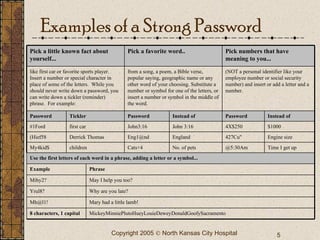
Examples of a Strong Password MickeyMinniePlutoHueyLouieDeweyDonaldGoofySacramento 8 characters, 1 capital Mary had a little lamb! Why are you late? May I help you too? Phrase Mh@l1!   Mihy2?   Yrul8?  Example Time I get up Engine size $1000 Instead   of No. of pets England John 3:16  Instead   of @5:30Am  Cats+4  427Cu"  Eng1@nd  4X$250  John3:16  children My4kid$  first car #1Ford  Derrick Thomas (Hief58  Tickler Use the first letters of each word in a phrase, adding a letter or a symbol...  Password Password Password (NOT a personal identifier like your employee number or social security number) and insert or add a letter and a number.  from a song, a poem, a Bible verse, popular saying, geographic name or any other word of your choosing. Substitute a number or symbol for one of the letters, or insert a number or symbol in the middle of the word.  like first car or favorite sports player.  Insert a number or special character in place of some of the letters.  While you should never write down a password, you can write down a tickler (reminder) phrase.  For example:  Pick numbers that have meaning to you...   Pick a favorite word..  Pick a little known fact about yourself...
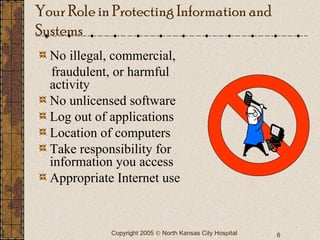
No illegal, commercial,  fraudulent, or harmful activity No unlicensed software Log out of applications Location of computers Take responsibility for information you access Appropriate Internet use Your Role in Protecting Information and Systems
Specific Email Guidelines Primarily for business and appropriate personal use Chain email and excessive FW: prohibited by policy Abuse of hospital email address affects all of NKCH Keep it clean and professional All inbound email is scanned for malware and content Encrypt outbound  confidential  information (EPHI) All email is property of NKCH Be wary of e-mail from unknown or strange address Never open attachment unless expected and from known source (virus possibility) Shark Infested Waters!
Running a Tight Ship Computer System User Responsibilities Use information appropriately and only for job duties Comply with all policies Do not disclose EPHI or any information unless authorized Keep logon/password confidential Report computer problems and security concerns to Help Desk ext. 4357 “HELP”

Information security

  • 1.
    Information Security ProtectingElectronic Information is Everyone’s Responsibility
  • 2.
    The HIPAA SecurityRule Designed to protect Electronic Protected Health Information (EPHI) . Three principles for protection of EPHI: Confidentiality (keeping it secret) Integrity (keeping it from being improperly altered or destroyed) Availability (making sure it is readily available to those who need it to perform their jobs) Administrative, technical and physical safeguards Federal Law Penalties (fines & imprisonment)
  • 3.
    Plans & Policiesto Protect EPHI Electronic Information Protection Plan Technology Usage Policy E-mail Usage Policy HIPAA Information Security Policies and Procedures Progressive Discipline Policy Required Annual Training
  • 4.
    Your Role inProtecting Information Confidential logins/passwords Your Confidential Password is the First Line of Defense in Protecting Electronic Information! Choosing a STRONG password. at least 6 characters at least one number and one special character (non-alphabetic symbol) at least one capital letter
  • 5.
    Examples of aStrong Password MickeyMinniePlutoHueyLouieDeweyDonaldGoofySacramento 8 characters, 1 capital Mary had a little lamb! Why are you late? May I help you too? Phrase Mh@l1! Mihy2? Yrul8? Example Time I get up Engine size $1000 Instead of No. of pets England John 3:16 Instead of @5:30Am Cats+4 427Cu" Eng1@nd 4X$250 John3:16 children My4kid$ first car #1Ford Derrick Thomas (Hief58 Tickler Use the first letters of each word in a phrase, adding a letter or a symbol... Password Password Password (NOT a personal identifier like your employee number or social security number) and insert or add a letter and a number. from a song, a poem, a Bible verse, popular saying, geographic name or any other word of your choosing. Substitute a number or symbol for one of the letters, or insert a number or symbol in the middle of the word. like first car or favorite sports player.  Insert a number or special character in place of some of the letters.  While you should never write down a password, you can write down a tickler (reminder) phrase.  For example: Pick numbers that have meaning to you... Pick a favorite word.. Pick a little known fact about yourself...
  • 6.
    No illegal, commercial, fraudulent, or harmful activity No unlicensed software Log out of applications Location of computers Take responsibility for information you access Appropriate Internet use Your Role in Protecting Information and Systems
  • 7.
    Specific Email GuidelinesPrimarily for business and appropriate personal use Chain email and excessive FW: prohibited by policy Abuse of hospital email address affects all of NKCH Keep it clean and professional All inbound email is scanned for malware and content Encrypt outbound confidential information (EPHI) All email is property of NKCH Be wary of e-mail from unknown or strange address Never open attachment unless expected and from known source (virus possibility) Shark Infested Waters!
  • 8.
    Running a TightShip Computer System User Responsibilities Use information appropriately and only for job duties Comply with all policies Do not disclose EPHI or any information unless authorized Keep logon/password confidential Report computer problems and security concerns to Help Desk ext. 4357 “HELP”