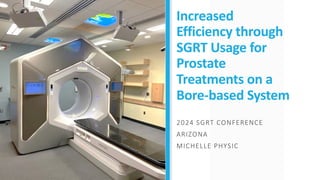
Increased
Efficiency through
SGRT Usage for
Prostate
Treatments on a
Bore-based System
2024 SGRT CONFERENCE
ARIZONA
MICHELLE PHYSIC
Agenda
About our Department
Hospitals
Sims/Linacs
Ethos install
Why Prostate
Genitourinary growth (GU)
AlignRT Equipment
Cameras
Inbore Ring System
Real Time Coach
Workflows
Sim
Backup setup workflow
Plan Preparation
Setup/Treatment – Prostate
Setup/Treatment - LIBH
Capturing SGRT surfaces
Our department
Boston, MA
DFCI
DFCI
BW
H
Treatment Machine & SIMS
Truebeam
Blue
Truebeam
Yellow
Ethos
Silver
TX
Red
Sim 1
Siemens
Sim 2
GE
MR Sim
Siemens 3T
MR Linac
Viewray 0.35T
HDR/BRACHY
GE
Cobalt 60
BEST
iX
Purple
Truebeam
Pink
Truebeam
Green
BWH
DFCI
Tattoo and
Mark Free
Award
Primary Disease Sites:
• Breast
• Lung
• H&N
• Some Prostate/Bladder/Palliative
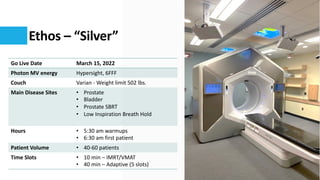
Ethos – “Silver”
Go Live Date March 15, 2022
Photon MV energy Hypersight, 6FFF
Couch Varian - Weight limit 502 lbs.
Main Disease Sites • Prostate
• Bladder
• Prostate SBRT
• Low Inspiration Breath Hold
Hours • 5:30 am warmups
• 6:30 am first patient
Patient Volume • 40-60 patients
Time Slots • 10 min – IMRT/VMAT
• 40 min – Adaptive (5 slots)
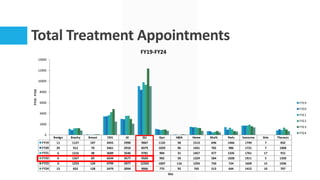
Total Treatment Appointments
Benign Brachy Breast CNS GI GU Gyn H&N Heme Multi Peds Sarcoma Skin Thoracic
FY19 11 1127 107 3455 2990 9067 1132 58 1513 696 1466 1749 7 832
FY20 29 912 70 3461 2910 8379 1029 96 1431 702 986 1721 7 1068
FY21 6 1216 48 3689 3546 9781 904 31 1457 477 1335 1761 17 915
FY22 6 1267 83 4244 3577 9320 992 59 1329 584 1028 1911 5 1350
FY23 6 1253 124 4799 2977 12343 1007 116 1293 750 724 1609 15 1036
FY24 13 832 128 2479 2094 9066 775 92 765 513 644 1415 10 707
0
2000
4000
6000
8000
10000
12000
14000
FY19
-
FY24
Site
FY19-FY24
FY19
FY20
FY21
FY22
FY23
FY24
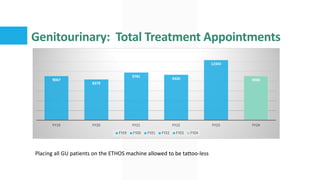
Genitourinary: Total Treatment Appointments
9067
8379
9781
9320
12343
9066
FY19 FY20 FY21 FY22 FY23 FY24
Placing all GU patients on the ETHOS machine allowed to be tattoo-less
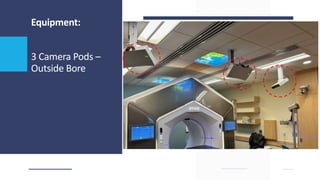
Equipment:
3 Camera Pods –
Outside Bore
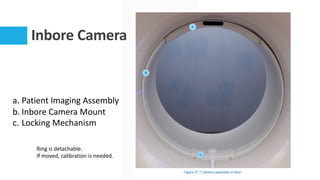
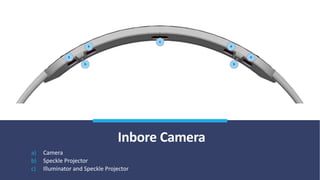
Inbore Camera
a. Patient Imaging Assembly
b. Inbore Camera Mount
c. Locking Mechanism
Ring is detachable.
If moved, calibration is needed.
Inbore Camera
a) Camera
b) Speckle Projector
c) Illuminator and Speckle Projector
Real Time Coach
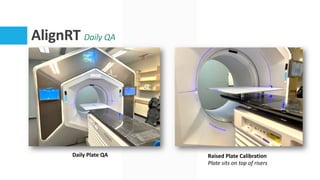
AlignRT Daily QA
Daily Plate QA Raised Plate Calibration
Plate sits on top of risers
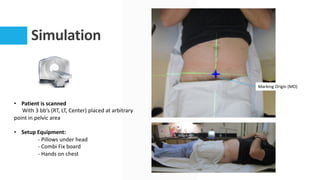
Simulation
• Patient is scanned
With 3 bb’s (RT, LT, Center) placed at arbitrary
point in pelvic area
• Setup Equipment:
- Pillows under head
- Combi Fix board
- Hands on chest
Marking Origin (MO)
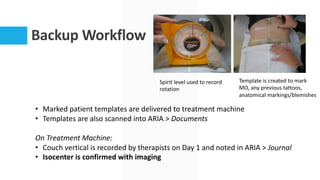
Backup Workflow
• Marked patient templates are delivered to treatment machine
• Templates are also scanned into ARIA > Documents
On Treatment Machine:
• Couch vertical is recorded by therapists on Day 1 and noted in ARIA > Journal
• Isocenter is confirmed with imaging
Spirit level used to record
rotation
Template is created to mark
MO, any previous tattoos,
anatomical markings/blemishes
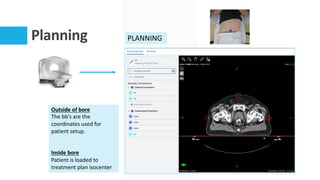
Planning PLANNING
Outside of bore
The bb’s are the
coordinates used for
patient setup.
Inside bore
Patient is loaded to
treatment plan isocenter
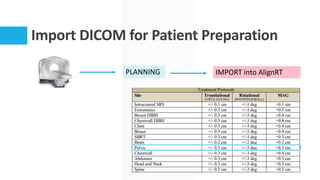
Import DICOM for Patient Preparation
PLANNING IMPORT into AlignRT
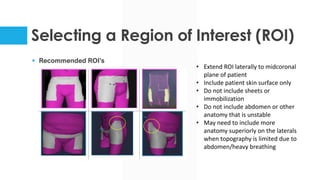
Selecting a Region of Interest (ROI)
§ Recommended ROI’s
• Extend ROI laterally to midcoronal
plane of patient
• Include patient skin surface only
• Do not include sheets or
immobilization
• Do not include abdomen or other
anatomy that is unstable
• May need to include more
anatomy superiorly on the laterals
when topography is limited due to
abdomen/heavy breathing
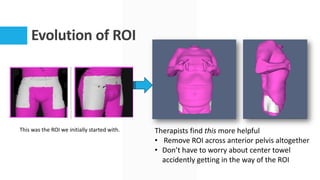
Evolution of ROI
This was the ROI we initially started with. Therapists find this more helpful
• Remove ROI across anterior pelvis altogether
• Don’t have to worry about center towel
accidently getting in the way of the ROI
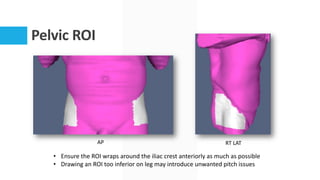
Pelvic ROI
AP RT LAT
• Ensure the ROI wraps around the iliac crest anteriorly as much as possible
• Drawing an ROI too inferior on leg may introduce unwanted pitch issues
Setting Up the Patient
TREATMENT WORKFLOW
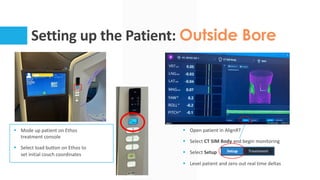
Setting up the Patient: Outside Bore
§ Mode up patient on Ethos
treatment console
§ Select load button on Ethos to
set initial couch coordinates
§ Open patient in AlignRT
§ Select CT SIM Body and begin monitoring
§ Select Setup
§ Level patient and zero out real time deltas
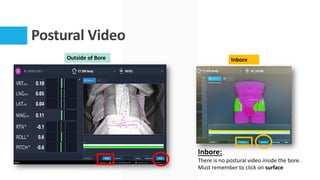
Postural Video
Inbore:
There is no postural video inside the bore.
Must remember to click on surface
Outside of Bore Inbore
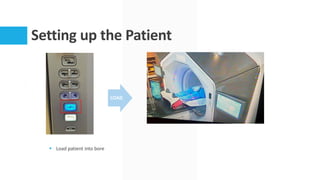
Setting up the Patient
§ Load patient into bore
LOAD
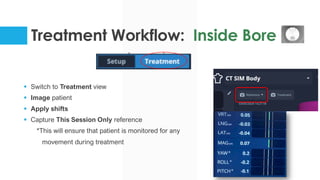
Treatment Workflow: Inside Bore
§ Switch to Treatment view
§ Image patient
§ Apply shifts
§ Capture This Session Only reference
*This will ensure that patient is monitored for any
movement during treatment
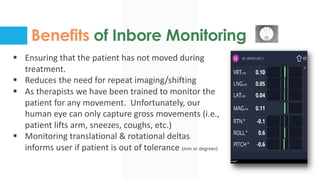
Benefits of Inbore Monitoring
§ Ensuring that the patient has not moved during
treatment.
§ Reduces the need for repeat imaging/shifting
§ As therapists we have been trained to monitor the
patient for any movement. Unfortunately, our
human eye can only capture gross movements (i.e.,
patient lifts arm, sneezes, coughs, etc.)
§ Monitoring translational & rotational deltas
informs user if patient is out of tolerance (mm or degrees)
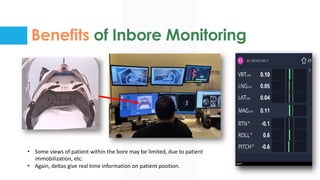
Benefits of Inbore Monitoring
• Some views of patient within the bore may be limited, due to patient
immobilization, etc.
• Again, deltas give real time information on patient position.
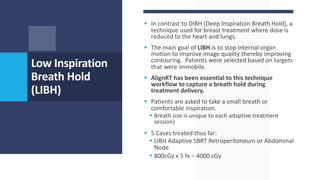
§ In contrast to DIBH (Deep Inspiration Breath Hold), a
technique used for breast treatment where dose is
reduced to the heart and lungs.
§ The main goal of LIBH is to stop internal organ
motion to improve image quality thereby improving
contouring. Patients were selected based on targets
that were immobile.
§ AlignRT has been essential to this technique
workflow to capture a breath hold during
treatment delivery.
§ Patients are asked to take a small breath or
comfortable inspiration.
§ Breath size is unique to each adaptive treatment
session)
§ 5 Cases treated thus far:
§ LIBH Adaptive SBRT Retroperitoneum or Abdominal
Node
§ 800cGy x 5 fx – 4000 cGy
Low Inspiration
Breath Hold
(LIBH)
LIBH Setup & Treament
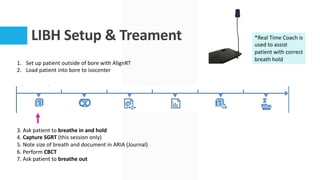
1. Set up patient outside of bore with AlignRT
2. Load patient into bore to isocenter
3. Ask patient to breathe in and hold
4. Capture SGRT (this session only)
5. Note size of breath and document in ARIA (Journal)
6. Perform CBCT
7. Ask patient to breathe out
*Real Time Coach is
used to assist
patient with correct
breath hold
LIBH Setup & Treament
8. RTT begins contouring
9. Physics creates plan
10. MD approves
LIBH Adaptive SBRT Abdominal Node
LIBH Setup & Treament
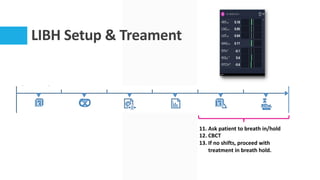
11. Ask patient to breath in/hold
12. CBCT
13. If no shifts, proceed with
treatment in breath hold.
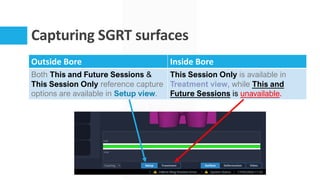
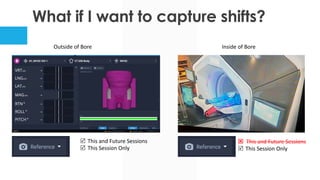
Capturing SGRT surfaces
Outside Bore Inside Bore
Both This and Future Sessions &
This Session Only reference capture
options are available in Setup view.
This Session Only is available in
Treatment view, while This and
Future Sessions is unavailable.
What if I want to capture shifts?
Outside of Bore Inside of Bore
R This and Future Sessions
R This Session Only
Q This and Future Sessions
R This Session Only
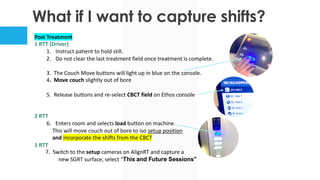
What if I want to capture shifts?
Post Treatment
1 RTT (Driver)
1. Instruct patient to hold still.
2. Do not clear the last treatment field once treatment is complete.
3. The Couch Move buttons will light up in blue on the console.
4. Move couch slightly out of bore
5. Release buttons and re-select CBCT field on Ethos console
2 RTT
6. Enters room and selects load button on machine.
This will move couch out of bore to iso setup position
and incorporate the shifts from the CBCT
1 RTT
7. Switch to the setup cameras on AlignRT and capture a
new SGRT surface, select “This and Future Sessions”
Thank you
QUESTIONS?

Increased Efficiency through SGRT Usage for Prostate Treatments on a Bore-based System

  • 2.
    Increased Efficiency through SGRT Usagefor Prostate Treatments on a Bore-based System 2024 SGRT CONFERENCE ARIZONA MICHELLE PHYSIC
  • 3.
    Agenda About our Department Hospitals Sims/Linacs Ethosinstall Why Prostate Genitourinary growth (GU) AlignRT Equipment Cameras Inbore Ring System Real Time Coach Workflows Sim Backup setup workflow Plan Preparation Setup/Treatment – Prostate Setup/Treatment - LIBH Capturing SGRT surfaces
  • 4.
  • 5.
    Treatment Machine &SIMS Truebeam Blue Truebeam Yellow Ethos Silver TX Red Sim 1 Siemens Sim 2 GE MR Sim Siemens 3T MR Linac Viewray 0.35T HDR/BRACHY GE Cobalt 60 BEST iX Purple Truebeam Pink Truebeam Green BWH DFCI
  • 6.
    Tattoo and Mark Free Award PrimaryDisease Sites: • Breast • Lung • H&N • Some Prostate/Bladder/Palliative
  • 7.
    Ethos – “Silver” GoLive Date March 15, 2022 Photon MV energy Hypersight, 6FFF Couch Varian - Weight limit 502 lbs. Main Disease Sites • Prostate • Bladder • Prostate SBRT • Low Inspiration Breath Hold Hours • 5:30 am warmups • 6:30 am first patient Patient Volume • 40-60 patients Time Slots • 10 min – IMRT/VMAT • 40 min – Adaptive (5 slots)
  • 8.
    Total Treatment Appointments BenignBrachy Breast CNS GI GU Gyn H&N Heme Multi Peds Sarcoma Skin Thoracic FY19 11 1127 107 3455 2990 9067 1132 58 1513 696 1466 1749 7 832 FY20 29 912 70 3461 2910 8379 1029 96 1431 702 986 1721 7 1068 FY21 6 1216 48 3689 3546 9781 904 31 1457 477 1335 1761 17 915 FY22 6 1267 83 4244 3577 9320 992 59 1329 584 1028 1911 5 1350 FY23 6 1253 124 4799 2977 12343 1007 116 1293 750 724 1609 15 1036 FY24 13 832 128 2479 2094 9066 775 92 765 513 644 1415 10 707 0 2000 4000 6000 8000 10000 12000 14000 FY19 - FY24 Site FY19-FY24 FY19 FY20 FY21 FY22 FY23 FY24
  • 9.
    Genitourinary: Total TreatmentAppointments 9067 8379 9781 9320 12343 9066 FY19 FY20 FY21 FY22 FY23 FY24 FY19 FY20 FY21 FY22 FY23 FY24 Placing all GU patients on the ETHOS machine allowed to be tattoo-less
  • 10.
    Equipment: 3 Camera Pods– Outside Bore
  • 11.
    Inbore Camera a. PatientImaging Assembly b. Inbore Camera Mount c. Locking Mechanism Ring is detachable. If moved, calibration is needed.
  • 12.
    Inbore Camera a) Camera b)Speckle Projector c) Illuminator and Speckle Projector
  • 13.
  • 14.
    AlignRT Daily QA DailyPlate QA Raised Plate Calibration Plate sits on top of risers
  • 15.
    Simulation • Patient isscanned With 3 bb’s (RT, LT, Center) placed at arbitrary point in pelvic area • Setup Equipment: - Pillows under head - Combi Fix board - Hands on chest Marking Origin (MO)
  • 16.
    Backup Workflow • Markedpatient templates are delivered to treatment machine • Templates are also scanned into ARIA > Documents On Treatment Machine: • Couch vertical is recorded by therapists on Day 1 and noted in ARIA > Journal • Isocenter is confirmed with imaging Spirit level used to record rotation Template is created to mark MO, any previous tattoos, anatomical markings/blemishes
  • 17.
    Planning PLANNING Outside ofbore The bb’s are the coordinates used for patient setup. Inside bore Patient is loaded to treatment plan isocenter
  • 18.
    Import DICOM forPatient Preparation PLANNING IMPORT into AlignRT
  • 19.
    Selecting a Regionof Interest (ROI) § Recommended ROI’s • Extend ROI laterally to midcoronal plane of patient • Include patient skin surface only • Do not include sheets or immobilization • Do not include abdomen or other anatomy that is unstable • May need to include more anatomy superiorly on the laterals when topography is limited due to abdomen/heavy breathing
  • 20.
    Evolution of ROI Thiswas the ROI we initially started with. Therapists find this more helpful • Remove ROI across anterior pelvis altogether • Don’t have to worry about center towel accidently getting in the way of the ROI
  • 21.
    Pelvic ROI AP RTLAT • Ensure the ROI wraps around the iliac crest anteriorly as much as possible • Drawing an ROI too inferior on leg may introduce unwanted pitch issues
  • 22.
    Setting Up thePatient TREATMENT WORKFLOW
  • 23.
    Setting up thePatient: Outside Bore § Mode up patient on Ethos treatment console § Select load button on Ethos to set initial couch coordinates § Open patient in AlignRT § Select CT SIM Body and begin monitoring § Select Setup § Level patient and zero out real time deltas
  • 24.
    Postural Video Inbore: There isno postural video inside the bore. Must remember to click on surface Outside of Bore Inbore
  • 25.
    Setting up thePatient § Load patient into bore LOAD
  • 26.
    Treatment Workflow: InsideBore § Switch to Treatment view § Image patient § Apply shifts § Capture This Session Only reference *This will ensure that patient is monitored for any movement during treatment
  • 27.
    Benefits of InboreMonitoring § Ensuring that the patient has not moved during treatment. § Reduces the need for repeat imaging/shifting § As therapists we have been trained to monitor the patient for any movement. Unfortunately, our human eye can only capture gross movements (i.e., patient lifts arm, sneezes, coughs, etc.) § Monitoring translational & rotational deltas informs user if patient is out of tolerance (mm or degrees)
  • 28.
    Benefits of InboreMonitoring • Some views of patient within the bore may be limited, due to patient immobilization, etc. • Again, deltas give real time information on patient position.
  • 29.
    § In contrastto DIBH (Deep Inspiration Breath Hold), a technique used for breast treatment where dose is reduced to the heart and lungs. § The main goal of LIBH is to stop internal organ motion to improve image quality thereby improving contouring. Patients were selected based on targets that were immobile. § AlignRT has been essential to this technique workflow to capture a breath hold during treatment delivery. § Patients are asked to take a small breath or comfortable inspiration. § Breath size is unique to each adaptive treatment session) § 5 Cases treated thus far: § LIBH Adaptive SBRT Retroperitoneum or Abdominal Node § 800cGy x 5 fx – 4000 cGy Low Inspiration Breath Hold (LIBH)
  • 30.
    LIBH Setup &Treament 1. Set up patient outside of bore with AlignRT 2. Load patient into bore to isocenter 3. Ask patient to breathe in and hold 4. Capture SGRT (this session only) 5. Note size of breath and document in ARIA (Journal) 6. Perform CBCT 7. Ask patient to breathe out *Real Time Coach is used to assist patient with correct breath hold
  • 31.
    LIBH Setup &Treament 8. RTT begins contouring 9. Physics creates plan 10. MD approves LIBH Adaptive SBRT Abdominal Node
  • 32.
    LIBH Setup &Treament 11. Ask patient to breath in/hold 12. CBCT 13. If no shifts, proceed with treatment in breath hold.
  • 33.
    Capturing SGRT surfaces OutsideBore Inside Bore Both This and Future Sessions & This Session Only reference capture options are available in Setup view. This Session Only is available in Treatment view, while This and Future Sessions is unavailable.
  • 34.
    What if Iwant to capture shifts? Outside of Bore Inside of Bore R This and Future Sessions R This Session Only Q This and Future Sessions R This Session Only
  • 35.
    What if Iwant to capture shifts? Post Treatment 1 RTT (Driver) 1. Instruct patient to hold still. 2. Do not clear the last treatment field once treatment is complete. 3. The Couch Move buttons will light up in blue on the console. 4. Move couch slightly out of bore 5. Release buttons and re-select CBCT field on Ethos console 2 RTT 6. Enters room and selects load button on machine. This will move couch out of bore to iso setup position and incorporate the shifts from the CBCT 1 RTT 7. Switch to the setup cameras on AlignRT and capture a new SGRT surface, select “This and Future Sessions”
  • 36.