Increase Website Page Speed in 4 simple steps
Yes, page speed is significant and you should pay attention
to it. Find out how you can increase page speed in 4
simple steps.
Brought to you by Splashsys Webtech.
http://splashsys.com/ | sales@splashsys.com
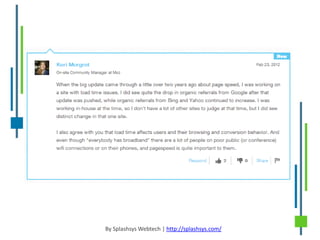
Faster websites are loved by search engines!
Google Says – ‘High performance web sites lead to higher
visitor engagement, retention and conversions’.
By Splashsys Webtech | http://splashsys.com/
Source: GTmetrix
Speed matters.
Studies show that users leave a site if it hasn't loaded in 4 seconds; keep
your users happy and engaged by providing a fast performing website!
Source: Raventools
By Splashsys Webtech | http://splashsys.com/
How to increase page speed
in easy steps?
By Splashsys Webtech | http://splashsys.com/
Step One
Leverage browser caching: Yes, this is the first thing that needs to be fixed.
It actually is done through server configuration. But, it’s not that difficult.
You can do it yourself in simple steps.
Check your hosting platform. If it is on Linux server, move ahead to open
FTP and log into to your website’s server. Open a file called .htaccess. You
can open it with Notepad or any other text editor. Modify it to leverage
browser caching. How? Read all easy to do steps here at our official blog.
By Splashsys Webtech | http://splashsys.com/
Step Two
Specify image dimensions: Specifying image dimensions is the second
most important thing you should do to make the most of website page
speed.
Again, it’s not difficult. Read this blog and follow the easy steps.
By Splashsys Webtech | http://splashsys.com/
Step Three
Enable gZip compression: Yes, compressing the file size on your website’s
server will improve the page speed to a greater extent. It reduces the size
of the files like – HTML, CSS, Javascripts.
Read our official blog on how to enable gZip compression on the website.
Step Four
Minify CSS and JS: Minify Stylesheet files and the Javascript files
dramatically affect the page speed of a website. Minification remove extra
spaces, comments, and unnecessary line breaks from the file.
There are various tools online which can do this for you absolutely free.
Wondering which are those tools? Read this blog here to find a list of CSS
minification tools online.
A few additional things!
1. Remove CSS imports. It means do use many Stylesheet files on your
website. Try to minimize it the least you can. When you use
multiple CSS files, you may tend to Imports (@impot /filename.css)
2. Combine CSS into sprites: Using sprites are very much advisable
when you are using multiple small images on your website. To know
more about CSS Sprites refer to this blog by Chris Coyier.
3. Avoid bad request: Remove broken links from your web pages.
When you have broken links on your pages, it delays the load time
as it follows the path of the link to download it.
4. Avoid bad characters in the Meta: Do not tend to user bad
characters, mostly the special characters in the Meta Tags.
10 tools to check page speed!
Here are few most useful tools on internet which will help you
analyze your website page speed:
1. http://gtmetrix.com/
2. https://developers.google.com/speed/pagespeed/insights
3. http://tools.pingdom.com/fpt/
4. http://www.webpagetest.org/
5. http://www.iwebtool.com/speed_test
6. http://www.neustar.biz/enterprise/resources/web-performance/free-website-
performance-test#.UbsVW1wtQTk
7. http://www.websiteoptimization.com/services/analyze/
8. http://www.showslow.com/
9. http://loadimpact.com/
10. http://www.octagate.com/service/SiteTimer/
SPLASHSYS WEBTECH
+91-11-41527823, +91-0-9990015244, sales@splashsys.com, http://splashsys.com
Add : 3640, 3rd Floor, Netaji Subhash Marg, Darya Ganj, New Delhi – 110002, India
Thank You!

Increase website page speed in 4 simple steps

  • 1.
    Increase Website PageSpeed in 4 simple steps Yes, page speed is significant and you should pay attention to it. Find out how you can increase page speed in 4 simple steps. Brought to you by Splashsys Webtech. http://splashsys.com/ | sales@splashsys.com
  • 2.
    Faster websites areloved by search engines! Google Says – ‘High performance web sites lead to higher visitor engagement, retention and conversions’. By Splashsys Webtech | http://splashsys.com/
  • 3.
    Source: GTmetrix Speed matters. Studiesshow that users leave a site if it hasn't loaded in 4 seconds; keep your users happy and engaged by providing a fast performing website! Source: Raventools By Splashsys Webtech | http://splashsys.com/
  • 4.
    By Splashsys Webtech| http://splashsys.com/
  • 5.
    How to increasepage speed in easy steps? By Splashsys Webtech | http://splashsys.com/
  • 6.
    Step One Leverage browsercaching: Yes, this is the first thing that needs to be fixed. It actually is done through server configuration. But, it’s not that difficult. You can do it yourself in simple steps. Check your hosting platform. If it is on Linux server, move ahead to open FTP and log into to your website’s server. Open a file called .htaccess. You can open it with Notepad or any other text editor. Modify it to leverage browser caching. How? Read all easy to do steps here at our official blog. By Splashsys Webtech | http://splashsys.com/
  • 7.
    Step Two Specify imagedimensions: Specifying image dimensions is the second most important thing you should do to make the most of website page speed. Again, it’s not difficult. Read this blog and follow the easy steps. By Splashsys Webtech | http://splashsys.com/
  • 8.
    Step Three Enable gZipcompression: Yes, compressing the file size on your website’s server will improve the page speed to a greater extent. It reduces the size of the files like – HTML, CSS, Javascripts. Read our official blog on how to enable gZip compression on the website.
  • 9.
    Step Four Minify CSSand JS: Minify Stylesheet files and the Javascript files dramatically affect the page speed of a website. Minification remove extra spaces, comments, and unnecessary line breaks from the file. There are various tools online which can do this for you absolutely free. Wondering which are those tools? Read this blog here to find a list of CSS minification tools online.
  • 10.
    A few additionalthings! 1. Remove CSS imports. It means do use many Stylesheet files on your website. Try to minimize it the least you can. When you use multiple CSS files, you may tend to Imports (@impot /filename.css) 2. Combine CSS into sprites: Using sprites are very much advisable when you are using multiple small images on your website. To know more about CSS Sprites refer to this blog by Chris Coyier. 3. Avoid bad request: Remove broken links from your web pages. When you have broken links on your pages, it delays the load time as it follows the path of the link to download it. 4. Avoid bad characters in the Meta: Do not tend to user bad characters, mostly the special characters in the Meta Tags.
  • 11.
    10 tools tocheck page speed! Here are few most useful tools on internet which will help you analyze your website page speed: 1. http://gtmetrix.com/ 2. https://developers.google.com/speed/pagespeed/insights 3. http://tools.pingdom.com/fpt/ 4. http://www.webpagetest.org/ 5. http://www.iwebtool.com/speed_test 6. http://www.neustar.biz/enterprise/resources/web-performance/free-website- performance-test#.UbsVW1wtQTk 7. http://www.websiteoptimization.com/services/analyze/ 8. http://www.showslow.com/ 9. http://loadimpact.com/ 10. http://www.octagate.com/service/SiteTimer/
  • 12.
    SPLASHSYS WEBTECH +91-11-41527823, +91-0-9990015244,sales@splashsys.com, http://splashsys.com Add : 3640, 3rd Floor, Netaji Subhash Marg, Darya Ganj, New Delhi – 110002, India Thank You!