by Mohamad Agus Sya’ban
@font-face  is a CSS rule which allows you to show a font on a Web page even if that font is not installed on the users' computer.
Rely on native browser rendering, the same as with web safe fonts Lightweight Cufon/sIFR can be a little buggy It’s like taking a candy from a baby :p Print stylesheet work with  @font-face
CSS2 introduced @font-face.  CSS2.1 killed it.  CSS3 is reintroducing it.
Why do you need to know the history?  Because, it means there is actually a feature of CSS3 that internet explorer supports, albeit, differently than all other supporting browsers.
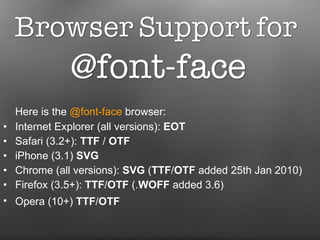
Here is the  @font-face  browser:  Internet Explorer (all versions):  EOT Safari (3.2+):  TTF  /  OTF   iPhone (3.1)  SVG   Chrome (all versions):  SVG  ( TTF / OTF  added 25th Jan 2010)  Firefox (3.5+):  TTF / OTF  (. WOFF  added 3.6)  Opera (10+)  TTF / OTF
Did I mention it before  that using  @font-face  is easy?  Well, you simply include a rule in your style sheet, and reference to the font files
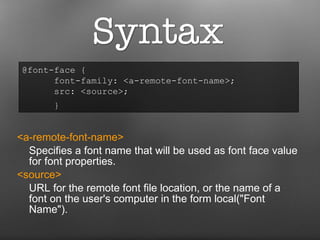
<a-remote-font-name>   Specifies a font name that will be used as font face value for font properties. <source>  URL for the remote font file location, or the name of a font on the user's computer in the form local(&quot;Font Name&quot;). @font-face {  font-family: <a-remote-font-name>;  src: <source>;    }
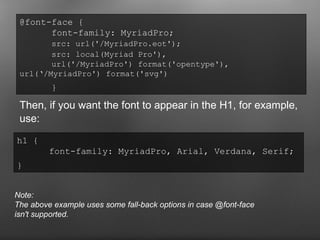
Then, if you want the font to appear in the H1, for example, use: @font-face {  font-family: MyriadPro;  src: url('/MyriadPro.eot');   src: local(Myriad Pro'),  url('/MyriadPro') format('opentype'),  url(‘/MyriadPro') format('svg')   }   h1 {  font-family: MyriadPro, Arial, Verdana, Serif;  }   Note: The above example uses some fall-back options in case @font-face isn't supported.
http://177designs.com/  http://jigowatt.co.uk/  http://speaktheweb.org/  http://forabeautifulweb.com/
The only thing that matters now is  we need font-kit to implement  @font-face .
There are a lot of online generators e.g. http://www.fontsquirrel.com/fontface/generator Or you can grab some free kits here: http://www.fontsquirrel.com/fontface
Fonts must have a Web-font licence!  Check the Web site you are downloading or purchasing the font from, or the documentation that comes with the font.
Sources: http://www.aban.web.id/mengimplementasikan-font-face/ http://www.miltonbayer.com/font-face/ http://www.unmatchedstyle.com/news/practical-steps-for-using-font-face-in-your-websites-now.php

Implementing @font-face

  • 1.
    by Mohamad AgusSya’ban
  • 2.
    @font-face isa CSS rule which allows you to show a font on a Web page even if that font is not installed on the users' computer.
  • 3.
    Rely on nativebrowser rendering, the same as with web safe fonts Lightweight Cufon/sIFR can be a little buggy It’s like taking a candy from a baby :p Print stylesheet work with @font-face
  • 4.
    CSS2 introduced @font-face. CSS2.1 killed it. CSS3 is reintroducing it.
  • 5.
    Why do youneed to know the history? Because, it means there is actually a feature of CSS3 that internet explorer supports, albeit, differently than all other supporting browsers.
  • 6.
    Here is the @font-face browser: Internet Explorer (all versions): EOT Safari (3.2+): TTF / OTF iPhone (3.1) SVG Chrome (all versions): SVG ( TTF / OTF added 25th Jan 2010) Firefox (3.5+): TTF / OTF (. WOFF added 3.6) Opera (10+) TTF / OTF
  • 7.
    Did I mentionit before that using @font-face is easy? Well, you simply include a rule in your style sheet, and reference to the font files
  • 8.
    <a-remote-font-name>   Specifiesa font name that will be used as font face value for font properties. <source>  URL for the remote font file location, or the name of a font on the user's computer in the form local(&quot;Font Name&quot;). @font-face { font-family: <a-remote-font-name>; src: <source>;   }
  • 9.
    Then, if youwant the font to appear in the H1, for example, use: @font-face { font-family: MyriadPro; src: url('/MyriadPro.eot'); src: local(Myriad Pro'), url('/MyriadPro') format('opentype'), url(‘/MyriadPro') format('svg') } h1 { font-family: MyriadPro, Arial, Verdana, Serif; } Note: The above example uses some fall-back options in case @font-face isn't supported.
  • 10.
    http://177designs.com/ http://jigowatt.co.uk/ http://speaktheweb.org/ http://forabeautifulweb.com/
  • 11.
    The only thingthat matters now is we need font-kit to implement @font-face .
  • 12.
    There are alot of online generators e.g. http://www.fontsquirrel.com/fontface/generator Or you can grab some free kits here: http://www.fontsquirrel.com/fontface
  • 13.
    Fonts must havea Web-font licence! Check the Web site you are downloading or purchasing the font from, or the documentation that comes with the font.
  • 14.
    Sources: http://www.aban.web.id/mengimplementasikan-font-face/ http://www.miltonbayer.com/font-face/http://www.unmatchedstyle.com/news/practical-steps-for-using-font-face-in-your-websites-now.php