Digital Image Processing
Lecture 1
Lecture 1
Introduction & Fundamentals
Weeks 1 & 2 2
Introduction to the course
► Textbooks:
f
► Slides: available
►Lab: using Matlab
Weeks 1 & 2 3
Introduction to the course
► Grading
 Attendance: 10%
 Assignments: 10%
 Midterm: 20%
 Project: 20%
 Final: 40%
 Total: 100%
Weeks 1 & 2 4
Introduction to the course
► Project
 Medical image analysis (MRI/PET/CT/X-ray tumor
detection/classification)
 Face, fingerprint, and other object recognition
 Image and/or video compression
 Image segmentation and/or denoising
 Digital image/video watermarking/steganography
and detection
Weeks 1 & 2 5
Introduction to the course
► Evaluation of project
 Report
 Project
— Submit an article including introduction, methods,
experiments, results, and conclusions
— Submit the project code, the readme document, and some
testing samples (images, videos, etc.) for validation
 Presentation
Weeks 1 & 2 6
Journals & Conferences
in Image Processing
in Image Processing
► Journals:
— IEEE T IMAGE PROCESSING
— IEEE T MEDICAL IMAGING
— INTL J COMP. VISION
— IEEE T PATTERN ANALYSIS MACHINE INTELLIGENCE
— PATTERN RECOGNITION
— COMP. VISION AND IMAGE UNDERSTANDING
— IMAGE AND VISION COMPUTING
… …
► Conferences:
— CVPR: Comp. Vision and Pattern Recognition
— ICCV: Intl Conf on Computer Vision
— ACM Multimedia
— ICIP
— SPIE
— ECCV: European Conf on Computer Vision
— CAIP: Intl Conf on Comp. Analysis of Images and Patterns
… …
Weeks 1 & 2 7
Introduction
Introduction
► What is Digital Image Processing?
Digital Image
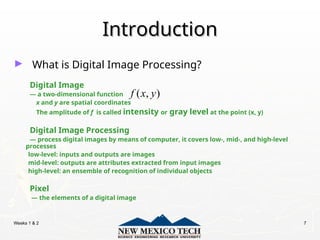
— a two-dimensional function
x and y are spatial coordinates
The amplitude of f is called intensity or gray level at the point (x, y)
Digital Image Processing
— process digital images by means of computer, it covers low-, mid-, and high-level
processes
low-level: inputs and outputs are images
mid-level: outputs are attributes extracted from input images
high-level: an ensemble of recognition of individual objects
Pixel
— the elements of a digital image
( , )
f x y
Weeks 1 & 2 8
Origins of Digital Image
Processing
Processing
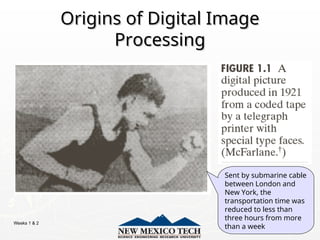
Sent by submarine cable
between London and
New York, the
transportation time was
reduced to less than
three hours from more
than a week
Weeks 1 & 2 9
Origins of Digital Image
Processing
Processing
Weeks 1 & 2 10
Sources for Images
Sources for Images
► Electromagnetic (EM) energy spectrum
Electromagnetic (EM) energy spectrum
► Acoustic
Acoustic
► Ultrasonic
Ultrasonic
► Electronic
Electronic
► Synthetic images produced by computer
Synthetic images produced by computer
Weeks 1 & 2 11
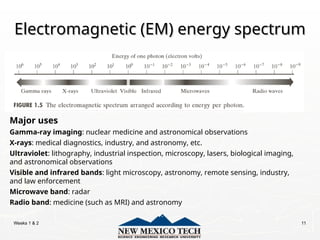
Electromagnetic (EM) energy spectrum
Major uses
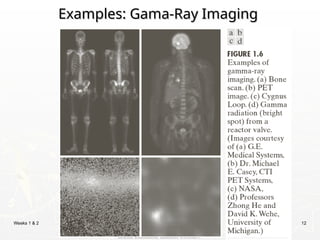
Gamma-ray imaging: nuclear medicine and astronomical observations
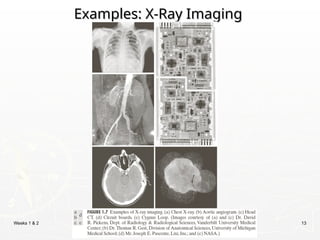
X-rays: medical diagnostics, industry, and astronomy, etc.
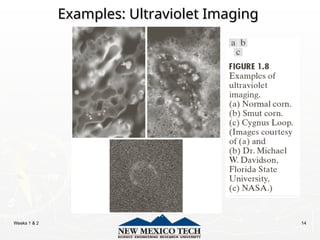
Ultraviolet: lithography, industrial inspection, microscopy, lasers, biological imaging,
and astronomical observations
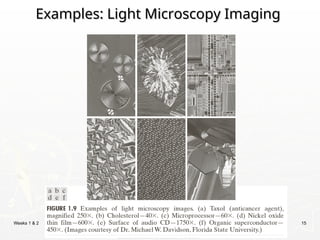
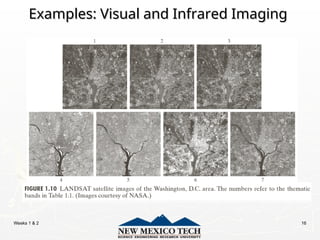
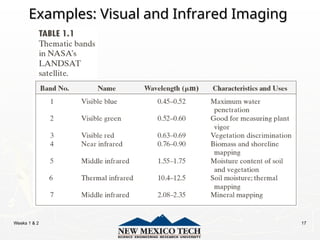
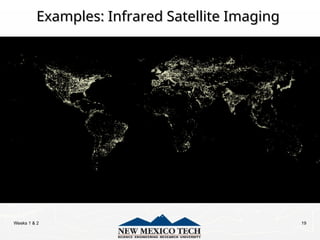
Visible and infrared bands: light microscopy, astronomy, remote sensing, industry,
and law enforcement
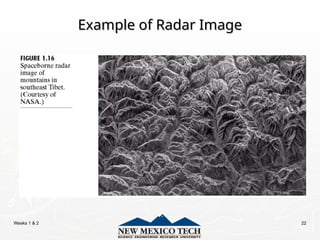
Microwave band: radar
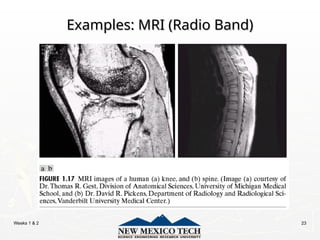
Radio band: medicine (such as MRI) and astronomy
Weeks 1 & 2 12
Examples: Gama-Ray Imaging
Weeks 1 & 2 13
Examples: X-Ray Imaging
Weeks 1 & 2 14
Examples: Ultraviolet Imaging
Weeks 1 & 2 15
Examples: Light Microscopy Imaging
Weeks 1 & 2 16
Examples: Visual and Infrared Imaging
Weeks 1 & 2 17
Examples: Visual and Infrared Imaging
Weeks 1 & 2 18
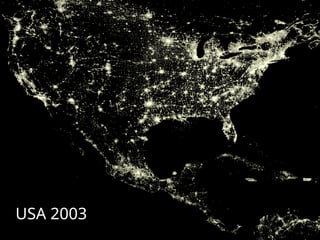
Examples: Infrared Satellite Imaging
USA 1993
USA 2003
Weeks 1 & 2 19
Examples: Infrared Satellite Imaging
Weeks 1 & 2 20
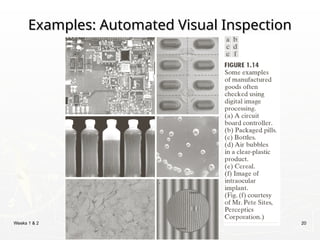
Examples: Automated Visual Inspection
Weeks 1 & 2 21
Examples: Automated Visual Inspection
The area in
which the
imaging system
detected the
plate
Results of
automated
reading of the
plate content
by the system
Weeks 1 & 2 22
Example of Radar Image
Weeks 1 & 2 23
Examples: MRI (Radio Band)
Weeks 1 & 2 24
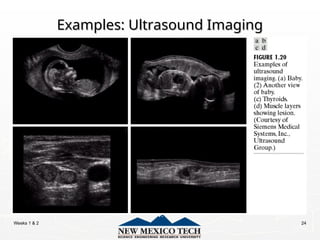
Examples: Ultrasound Imaging
Weeks 1 & 2 25
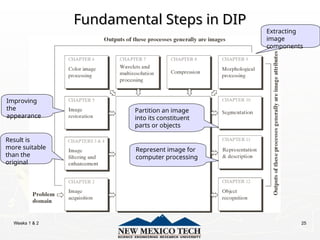
Fundamental Steps in DIP
Result is
more suitable
than the
original
Improving
the
appearance
Extracting
image
components
Partition an image
into its constituent
parts or objects
Represent image for
computer processing
Weeks 1 & 2 26
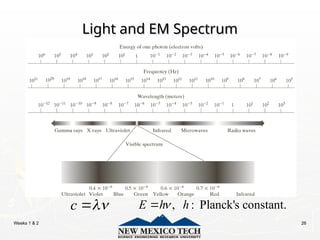
Light and EM Spectrum
c 
 , : Planck's constant.
E h h


Weeks 1 & 2 27
Light and EM Spectrum
► The colors that humans perceive in an object
The colors that humans perceive in an object
are determined by the nature of the light
reflected from the object.
e.g. green objects reflect light with wavelengths
primarily in the 500 to 570 nm range while absorbing
most of the energy at other wavelength
Weeks 1 & 2 28
Light and EM Spectrum
► Monochromatic light: void of color
Intensity is the only attribute, from black to white
Monochromatic images are referred to as gray-scale
images
► Chromatic light bands: 0.43 to 0.79 um
The quality of a chromatic light source:
Radiance: total amount of energy
Luminance (lm): the amount of energy an observer perceives
from a light source
Brightness: a subjective descriptor of light perception that is
impossible to measure. It embodies the achromatic notion of
intensity and one of the key factors in describing color sensation.
Weeks 1 & 2 29
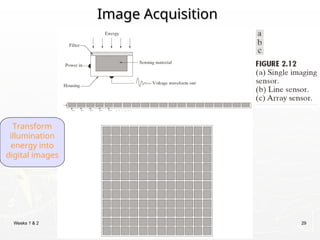
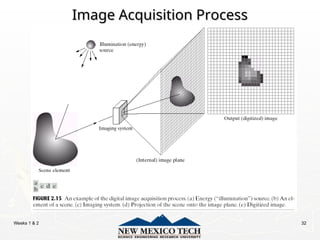
Image Acquisition
Image Acquisition
Transform
illumination
energy into
digital images
Weeks 1 & 2 30
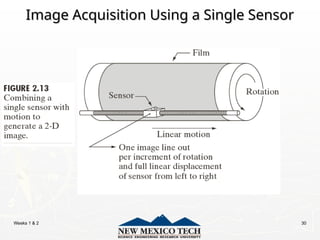
Image Acquisition Using a Single Sensor
Weeks 1 & 2 31
Image Acquisition Using Sensor Strips
Weeks 1 & 2 32
Image Acquisition Process
Weeks 1 & 2 33
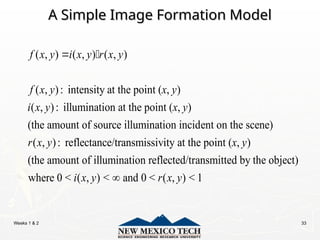
A Simple Image Formation Model
( , ) ( , ) ( , )
( , ): intensity at the point ( , )
( , ): illumination at the point ( , )
(the amount of source illumination incident on the scene)
( , ): reflectance/transmissivity
f x y i x y r x y
f x y x y
i x y x y
r x y
 
at the point ( , )
(the amount of illumination reflected/transmitted by the object)
where 0 < ( , ) < and 0 < ( , ) < 1
x y
i x y r x y

Weeks 1 & 2 34
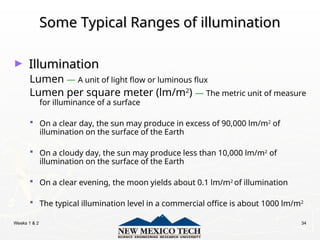
Some Typical Ranges of illumination
► Illumination
Illumination
Lumen — A unit of light flow or luminous flux
Lumen per square meter (lm/m2
) — The metric unit of measure
for illuminance of a surface
 On a clear day, the sun may produce in excess of 90,000 lm/m2
of
illumination on the surface of the Earth
 On a cloudy day, the sun may produce less than 10,000 lm/m2
of
illumination on the surface of the Earth
 On a clear evening, the moon yields about 0.1 lm/m2
of illumination
 The typical illumination level in a commercial office is about 1000 lm/m2
Weeks 1 & 2 35
Some Typical Ranges of Reflectance
► Reflectance
Reflectance
 0.01 for black velvet
 0.65 for stainless steel
 0.80 for flat-white wall paint
 0.90 for silver-plated metal
 0.93 for snow
Weeks 1 & 2 36
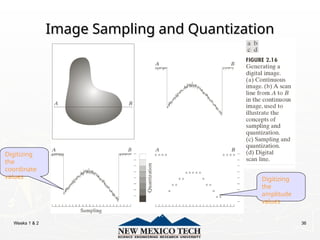
Image Sampling and Quantization
Digitizing
the
coordinate
values Digitizing
the
amplitude
values
Weeks 1 & 2 37
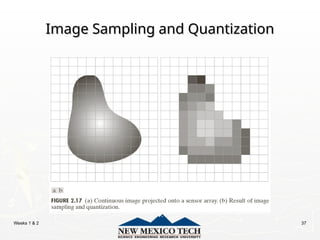
Image Sampling and Quantization
Weeks 1 & 2 38
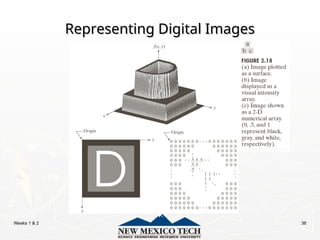
Representing Digital Images
Weeks 1 & 2 39
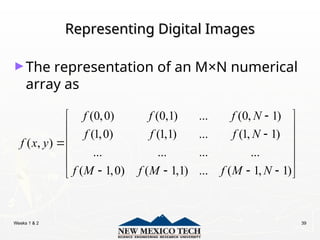
Representing Digital Images
►The representation of an M×N numerical
array as
(0,0) (0,1) ... (0, 1)
(1,0) (1,1) ... (1, 1)
( , )
... ... ... ...
( 1,0) ( 1,1) ... ( 1, 1)
f f f N
f f f N
f x y
f M f M f M N

 
 

 

 
 
   
 
Weeks 1 & 2 40
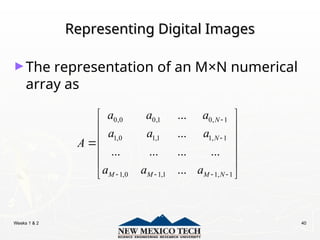
Representing Digital Images
►The representation of an M×N numerical
array as
0,0 0,1 0, 1
1,0 1,1 1, 1
1,0 1,1 1, 1
...
...
... ... ... ...
...
N
N
M M M N
a a a
a a a
A
a a a


   
 
 
 

 
 
 
Weeks 1 & 2 41
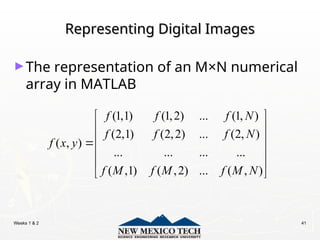
Representing Digital Images
►The representation of an M×N numerical
array in MATLAB
(1,1) (1,2) ... (1, )
(2,1) (2,2) ... (2, )
( , )
... ... ... ...
( ,1) ( ,2) ... ( , )
f f f N
f f f N
f x y
f M f M f M N
 
 
 

 
 
 
Weeks 1 & 2 42
Representing Digital Images
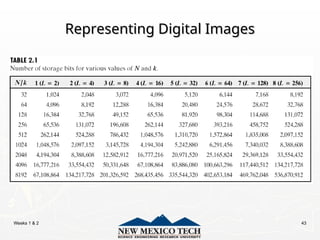
► Discrete intensity interval [0, L-1], L=2k
► The number b of bits required to store a M × N
digitized image
b = M × N × k
Weeks 1 & 2 43
Representing Digital Images
Weeks 1 & 2 44
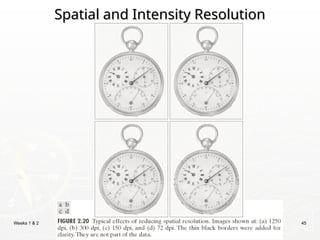
Spatial and Intensity Resolution
►Spatial resolution
— A measure of the smallest discernible detail in an
image
— stated with line pairs per unit distance, dots (pixels) per
unit distance, dots per inch (dpi)
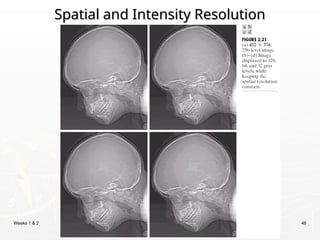
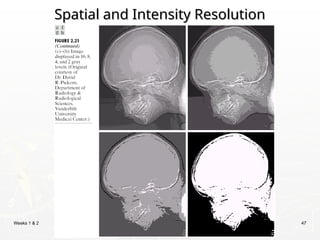
►Intensity resolution
— The smallest discernible change in intensity level
— stated with 8 bits, 12 bits, 16 bits, etc.
Weeks 1 & 2 45
Spatial and Intensity Resolution
Weeks 1 & 2 46
Spatial and Intensity Resolution
Weeks 1 & 2 47
Spatial and Intensity Resolution
Weeks 1 & 2 48
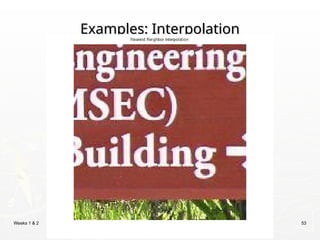
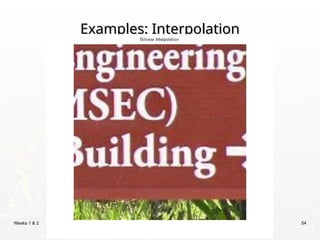
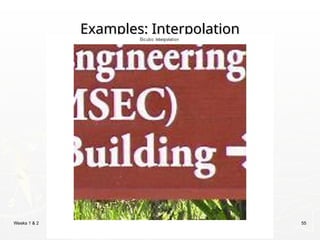
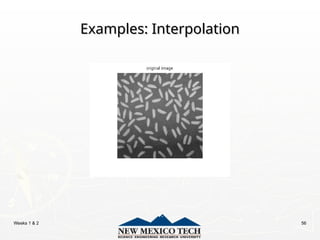
Image Interpolation
Image Interpolation
► Interpolation — Process of using known data
to estimate unknown values
e.g., zooming, shrinking, rotating, and geometric correction
► Interpolation (sometimes called resampling)
— an imaging method to increase (or decrease) the
number of pixels in a digital image.
Some digital cameras use interpolation to produce a larger image
than the sensor captured or to create digital zoom
http://www.dpreview.com/learn/?/key=interpolation
Weeks 1 & 2 49
Image Interpolation:
Nearest Neighbor Interpolation
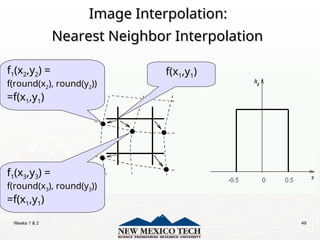
f1(x2,y2) =
f(round(x2), round(y2))
=f(x1,y1)
f(x1,y1)
f1(x3,y3) =
f(round(x3), round(y3))
=f(x1,y1)
Weeks 1 & 2 50
Image Interpolation:
Bilinear Interpolation
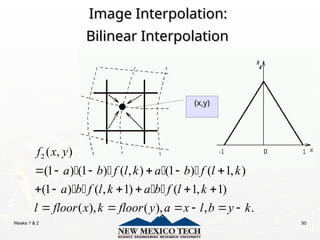
2 ( , )
(1 ) (1 ) ( , ) (1 ) ( 1, )
(1 ) ( , 1) ( 1, 1)
( ), ( ), , .
f x y
a b f l k a b f l k
a b f l k a b f l k
l floor x k floor y a x l b y k
     
     
     
   
   
(x,y)
Weeks 1 & 2 51
Image Interpolation:
Bicubic Interpolation
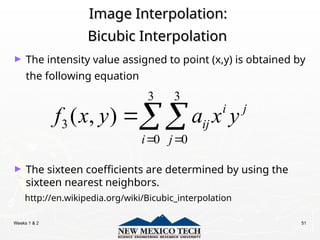
3 3
3
0 0
( , ) i j
ij
i j
f x y a x y
 

► The intensity value assigned to point (x,y) is obtained by
the following equation
► The sixteen coefficients are determined by using the
sixteen nearest neighbors.
http://en.wikipedia.org/wiki/Bicubic_interpolation
Weeks 1 & 2 52
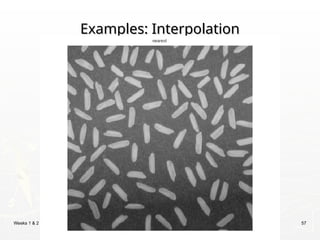
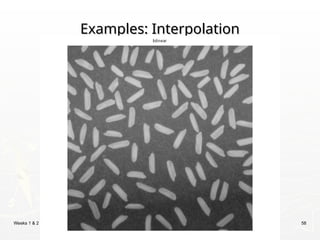
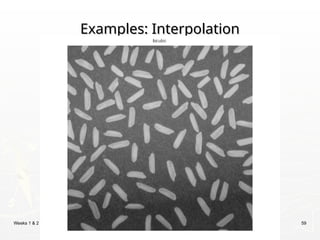
Examples: Interpolation
Weeks 1 & 2 53
Examples: Interpolation
Weeks 1 & 2 54
Examples: Interpolation
Weeks 1 & 2 55
Examples: Interpolation
Weeks 1 & 2 56
Examples: Interpolation
Weeks 1 & 2 57
Examples: Interpolation
Weeks 1 & 2 58
Examples: Interpolation
Weeks 1 & 2 59
Examples: Interpolation
Weeks 1 & 2 60
Basic Relationships Between Pixels
► Neighborhood
► Adjacency
► Connectivity
► Paths
► Regions and boundaries
Weeks 1 & 2 61
Basic Relationships Between Pixels
► Neighbors of a pixel p at coordinates (x,y)
 4-neighbors of p, denoted by N4(p):
(x-1, y), (x+1, y), (x,y-1), and (x, y+1).
 4 diagonal neighbors of p, denoted by ND(p):
(x-1, y-1), (x+1, y+1), (x+1,y-1), and (x-1, y+1).
 8 neighbors of p, denoted N8(p)
N8(p) = N4(p) U ND(p)
Weeks 1 & 2 62
Basic Relationships Between Pixels
► Adjacency
Let V be the set of intensity values
 4-adjacency: Two pixels p and q with values from V are
4-adjacent if q is in the set N4(p).
 8-adjacency: Two pixels p and q with values from V are
8-adjacent if q is in the set N8(p).
Weeks 1 & 2 63
Basic Relationships Between Pixels
► Adjacency
Let V be the set of intensity values
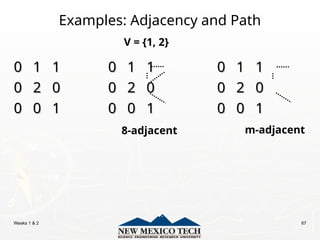
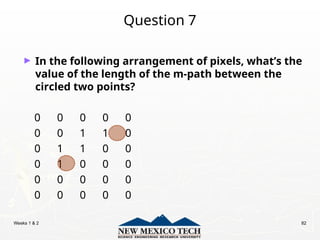
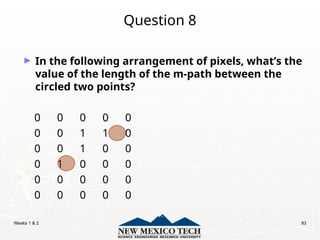
 m-adjacency: Two pixels p and q with values from V
are m-adjacent if
(i) q is in the set N4(p), or
(ii) q is in the set ND(p) and the set N4(p) ∊ N4(p) has no pixels whose
values are from V.
Weeks 1 & 2 64
Basic Relationships Between Pixels
► Path
 A (digital) path (or curve) from pixel p with coordinates (x0, y0) to pixel
q with coordinates (xn, yn) is a sequence of distinct pixels with
coordinates
(x0, y0), (x1, y1), …, (xn, yn)
Where (xi, yi) and (xi-1, yi-1) are adjacent for 1 i n.
≤ ≤
 Here n is the length of the path.
 If (x0, y0) = (xn, yn), the path is closed path.
 We can define 4-, 8-, and m-paths based on the type of adjacency
used.
Weeks 1 & 2 65
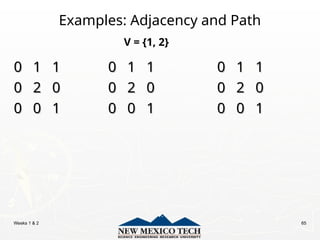
Examples: Adjacency and Path
0 1 1 0 1 1 0 1 1
0 1 1 0 1 1 0 1 1
0 2 0 0 2 0 0 2 0
0 2 0 0 2 0 0 2 0
0 0 1 0 0 1 0 0 1
0 0 1 0 0 1 0 0 1
V = {1, 2}
Weeks 1 & 2 66
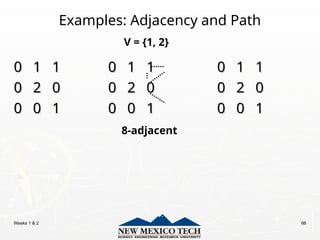
Examples: Adjacency and Path
0 1 1 0 1 1 0 1 1
0 1 1 0 1 1 0 1 1
0 2 0 0 2 0 0 2 0
0 2 0 0 2 0 0 2 0
0 0 1 0 0 1 0 0 1
0 0 1 0 0 1 0 0 1
V = {1, 2}
8-adjacent
Weeks 1 & 2 67
Examples: Adjacency and Path
0 1 1 0 1 1 0 1 1
0 1 1 0 1 1 0 1 1
0 2 0 0 2 0 0 2 0
0 2 0 0 2 0 0 2 0
0 0 1 0 0 1 0 0 1
0 0 1 0 0 1 0 0 1
V = {1, 2}
8-adjacent m-adjacent
Weeks 1 & 2 68
Examples: Adjacency and Path
0
01,1
1,1 1
11,2
1,2 1
11,3
1,3 0 1 1 0 1 1
0 1 1 0 1 1
0
02,1
2,1 2
22,2
2,2 0
02,3
2,3 0 2 0 0 2 0
0 2 0 0 2 0
0
03,1
3,1 0
03,2
3,2 1
13,3
3,3 0 0 1 0 0 1
0 0 1 0 0 1
V = {1, 2}
8-adjacent m-adjacent
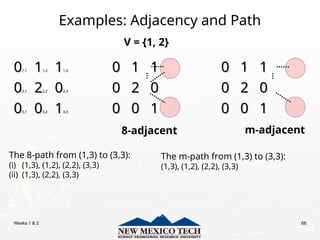
The 8-path from (1,3) to (3,3):
(i) (1,3), (1,2), (2,2), (3,3)
(ii) (1,3), (2,2), (3,3)
The m-path from (1,3) to (3,3):
(1,3), (1,2), (2,2), (3,3)
Weeks 1 & 2 69
Basic Relationships Between Pixels
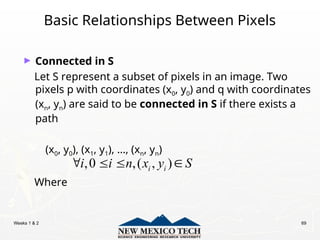
► Connected in S
Let S represent a subset of pixels in an image. Two
pixels p with coordinates (x0, y0) and q with coordinates
(xn, yn) are said to be connected in S if there exists a
path
(x0, y0), (x1, y1), …, (xn, yn)
Where
,0 ,( , )
i i
i i n x y S
   
Weeks 1 & 2 70
Basic Relationships Between Pixels
Let S represent a subset of pixels in an image
► For every pixel p in S, the set of pixels in S that are connected to p
is called a connected component of S.
► If S has only one connected component, then S is called Connected
Set.
► We call R a region of the image if R is a connected set
► Two regions, Ri and Rj are said to be adjacent if their union forms a
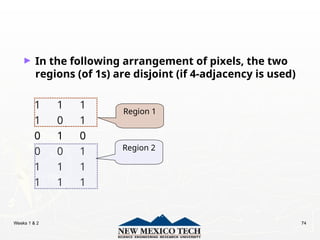
connected set.
► Regions that are not to be adjacent are said to be disjoint.
Weeks 1 & 2 71
Basic Relationships Between Pixels
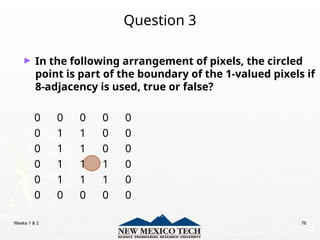
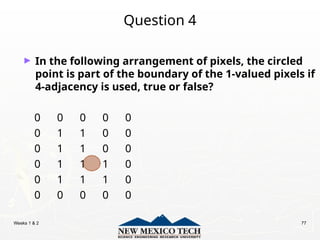
► Boundary (or border)
 The boundary of the region R is the set of pixels in the region that
have one or more neighbors that are not in R.
 If R happens to be an entire image, then its boundary is defined as
the set of pixels in the first and last rows and columns of the image.
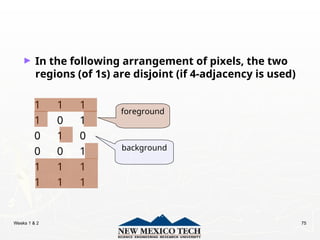
► Foreground and background
 An image contains K disjoint regions, Rk, k = 1, 2, …, K. Let Ru denote
the union of all the K regions, and let (Ru)c
denote its complement.
All the points in Ru is called foreground;
All the points in (Ru)c
is called background.
Weeks 1 & 2 72
Question 1
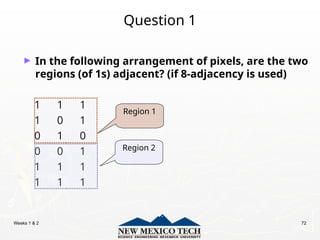
► In the following arrangement of pixels, are the two
regions (of 1s) adjacent? (if 8-adjacency is used)
1 1 1
1 0 1
0 1 0
0 0 1
1 1 1
1 1 1
Region 1
Region 2
Weeks 1 & 2 73
Question 2
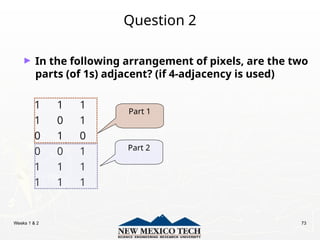
► In the following arrangement of pixels, are the two
parts (of 1s) adjacent? (if 4-adjacency is used)
1 1 1
1 0 1
0 1 0
0 0 1
1 1 1
1 1 1
Part 1
Part 2
Weeks 1 & 2 74
► In the following arrangement of pixels, the two
regions (of 1s) are disjoint (if 4-adjacency is used)
1 1 1
1 0 1
0 1 0
0 0 1
1 1 1
1 1 1
Region 1
Region 2
Weeks 1 & 2 75
► In the following arrangement of pixels, the two
regions (of 1s) are disjoint (if 4-adjacency is used)
1 1 1
1 0 1
0 1 0
0 0 1
1 1 1
1 1 1
foreground
background
Weeks 1 & 2 76
Question 3
► In the following arrangement of pixels, the circled
point is part of the boundary of the 1-valued pixels if
8-adjacency is used, true or false?
0 0 0 0 0
0 1 1 0 0
0 1 1 0 0
0 1 1 1 0
0 1 1 1 0
0 0 0 0 0
Weeks 1 & 2 77
Question 4
► In the following arrangement of pixels, the circled
point is part of the boundary of the 1-valued pixels if
4-adjacency is used, true or false?
0 0 0 0 0
0 1 1 0 0
0 1 1 0 0
0 1 1 1 0
0 1 1 1 0
0 0 0 0 0
Weeks 1 & 2 78
Distance Measures
► Given pixels p, q and z with coordinates (x, y), (s, t),
(u, v) respectively, the distance function D has
following properties:
a. D(p, q) ≥ 0 [D(p, q) = 0, iff p = q]
b. D(p, q) = D(q, p)
c. D(p, z) ≤ D(p, q) + D(q, z)
Weeks 1 & 2 79
Distance Measures
The following are the different Distance measures:
a. Euclidean Distance :
De(p, q) = [(x-s)2
+ (y-t)2
]1/2
b. City Block Distance:
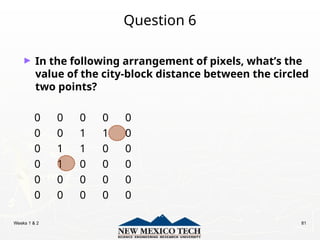
D4(p, q) = |x-s| + |y-t|
c. Chess Board Distance:
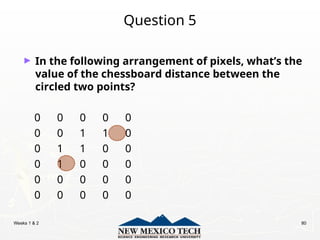
D8(p, q) = max(|x-s|, |y-t|)
Weeks 1 & 2 80
Question 5
► In the following arrangement of pixels, what’s the
value of the chessboard distance between the
circled two points?
0 0 0 0 0
0 0 1 1 0
0 1 1 0 0
0 1 0 0 0
0 0 0 0 0
0 0 0 0 0
Weeks 1 & 2 81
Question 6
► In the following arrangement of pixels, what’s the
value of the city-block distance between the circled
two points?
0 0 0 0 0
0 0 1 1 0
0 1 1 0 0
0 1 0 0 0
0 0 0 0 0
0 0 0 0 0
Weeks 1 & 2 82
Question 7
► In the following arrangement of pixels, what’s the
value of the length of the m-path between the
circled two points?
0 0 0 0 0
0 0 1 1 0
0 1 1 0 0
0 1 0 0 0
0 0 0 0 0
0 0 0 0 0
Weeks 1 & 2 83
Question 8
► In the following arrangement of pixels, what’s the
value of the length of the m-path between the
circled two points?
0 0 0 0 0
0 0 1 1 0
0 0 1 0 0
0 1 0 0 0
0 0 0 0 0
0 0 0 0 0
Weeks 1 & 2 84
Introduction to Mathematical Operations in
DIP
DIP
► Array vs. Matrix Operation
11 12
21 22
b b
B
b b
 
 
 
11 12
21 22
a a
A
a a
 
 
 
11 11 12 21 11 12 12 22
21 11 22 21 21 12 22 22
*
a b a b a b a b
A B
a b a b a b a b
 
 
 
 
 
11 11 12 12
21 21 22 22
.*
a b a b
A B
a b a b
 
 
 
Array product
Matrix
product
Array
product
operator
Matrix
product
operator
Weeks 1 & 2 85
Introduction to Mathematical Operations in
DIP
DIP
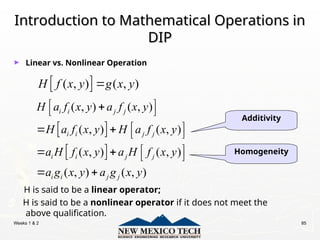
► Linear vs. Nonlinear Operation
H is said to be a linear operator;
H is said to be a nonlinear operator if it does not meet the
above qualification.
 
( , ) ( , )
H f x y g x y

Additivity
Homogeneity
 
 
( , ) ( , )
( , ) ( , )
( , ) ( , )
( , ) ( , )
i i j j
i i j j
i i j j
i i j j
H a f x y a f x y
H a f x y H a f x y
a H f x y a H f x y
a g x y a g x y
 

 
 
   
 
   
 
Weeks 1 & 2 86
Arithmetic Operations
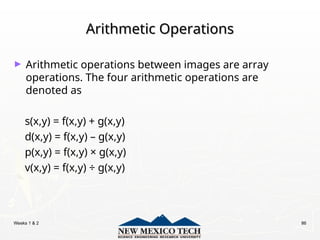
► Arithmetic operations between images are array
operations. The four arithmetic operations are
denoted as
s(x,y) = f(x,y) + g(x,y)
d(x,y) = f(x,y) – g(x,y)
p(x,y) = f(x,y) × g(x,y)
v(x,y) = f(x,y) á g(x,y)
Weeks 1 & 2 87
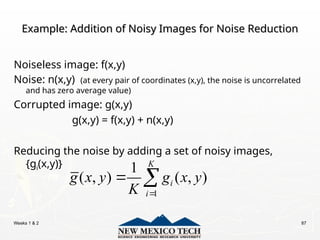
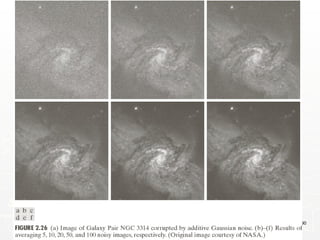
Example: Addition of Noisy Images for Noise Reduction
Noiseless image: f(x,y)
Noise: n(x,y) (at every pair of coordinates (x,y), the noise is uncorrelated
and has zero average value)
Corrupted image: g(x,y)
g(x,y) = f(x,y) + n(x,y)
Reducing the noise by adding a set of noisy images,
{gi(x,y)}
1
1
( , ) ( , )
K
i
i
g x y g x y
K 
 
Weeks 1 & 2 88
Example: Addition of Noisy Images for Noise Reduction
 
 
1
1
1
1
( , ) ( , )
1
( , ) ( , )
1
( , ) ( , )
( , )
K
i
i
K
i
i
K
i
i
E g x y E g x y
K
E f x y n x y
K
f x y E n x y
K
f x y



 
  
 
 
 
 
 
 
   
 




1
1
( , ) ( , )
K
i
i
g x y g x y
K 
 
2
( , ) 1
( , )
1
1
( , )
1
2
2 2
( , )
1
g x y K
g x y
i
K i
K
n x y
i
K i
n x y
K
 
 





 
Weeks 1 & 2 89
Example: Addition of Noisy Images for Noise Reduction
► In astronomy, imaging under very low light levels
frequently causes sensor noise to render single
images virtually useless for analysis.
► In astronomical observations, similar sensors for
noise reduction by observing the same scene over
long periods of time. Image averaging is then used
to reduce the noise.
Weeks 1 & 2 90
Weeks 1 & 2 91
An Example of Image Subtraction: Mask Mode
Radiography
Radiography
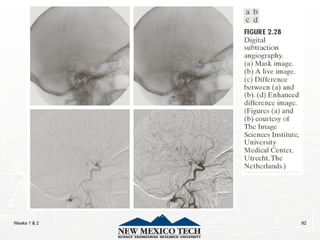
Mask h(x,y): an X-ray image of a region of a patient’s body
Live images f(x,y): X-ray images captured at TV rates after injection
of the contrast medium
Enhanced detail g(x,y)
g(x,y) = f(x,y) - h(x,y)
The procedure gives a movie showing how the contrast medium
propagates through the various arteries in the area being
observed.
Weeks 1 & 2 92
Weeks 1 & 2 93
An Example of Image Multiplication
Weeks 1 & 2 94
Set and Logical Operations
Weeks 1 & 2 95
Set and Logical Operations
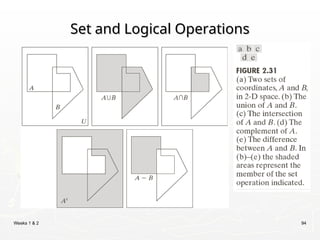
► Let A be the elements of a gray-scale image
The elements of A are triplets of the form (x, y, z),
where x and y are spatial coordinates and z denotes the
intensity at the point (x, y).
► The complement of A is denoted Ac
{( , , ) | ( , , ) }
2 1; is the number of intensity bits used to represent
c
k
A x y K z x y z A
K k z
  
 
{( , , ) | ( , )}
A x y z z f x y
 
Weeks 1 & 2 96
Set and Logical Operations
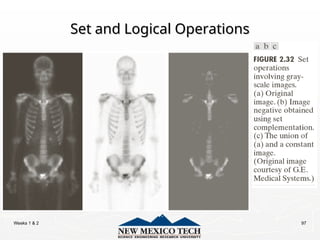
► The union of two gray-scale images (sets) A and B is
defined as the set
{max( , ) | , }
z
A B a b a A b B
   
Weeks 1 & 2 97
Set and Logical Operations
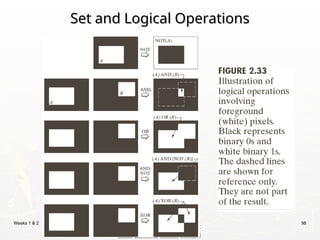
Weeks 1 & 2 98
Set and Logical Operations
Weeks 1 & 2 99
Spatial Operations
Spatial Operations
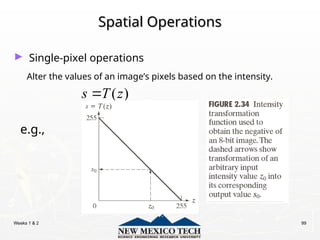
► Single-pixel operations
Alter the values of an image’s pixels based on the intensity.
e.g.,
( )
s T z

Weeks 1 & 2 100
Spatial Operations
Spatial Operations
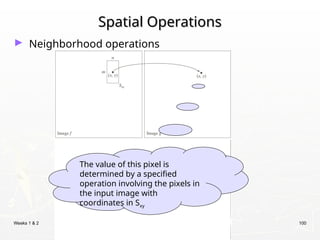
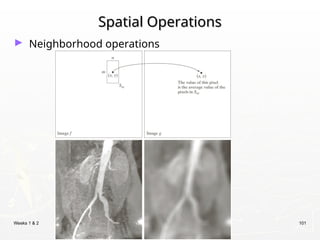
► Neighborhood operations
The value of this pixel is
determined by a specified
operation involving the pixels in
the input image with
coordinates in Sxy
Weeks 1 & 2 101
Spatial Operations
Spatial Operations
► Neighborhood operations
Weeks 1 & 2 102
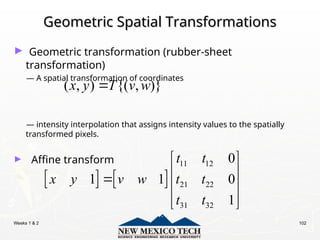
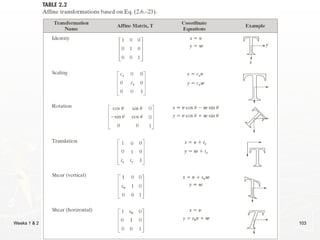
Geometric Spatial Transformations
► Geometric transformation (rubber-sheet
transformation)
— A spatial transformation of coordinates
— intensity interpolation that assigns intensity values to the spatially
transformed pixels.
► Affine transform
( , ) {( , )}
x y T v w

   
11 12
21 22
31 32
0
1 1 0
1
t t
x y v w t t
t t
 
 
  
 
 
Weeks 1 & 2 103
Weeks 1 & 2 104
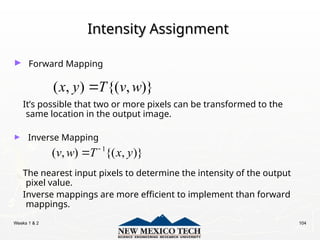
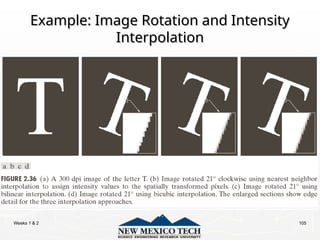
Intensity Assignment
► Forward Mapping
It’s possible that two or more pixels can be transformed to the
same location in the output image.
► Inverse Mapping
The nearest input pixels to determine the intensity of the output
pixel value.
Inverse mappings are more efficient to implement than forward
mappings.
( , ) {( , )}
x y T v w

1
( , ) {( , )}
v w T x y


Weeks 1 & 2 105
Example: Image Rotation and Intensity
Interpolation
Interpolation
Weeks 1 & 2 106
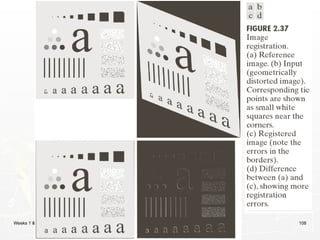
Image Registration
Image Registration
► Input and output images are available but the
transformation function is unknown.
Goal: estimate the transformation function and use it to
register the two images.
► One of the principal approaches for image registration
is to use tie points (also called control points)
 The corresponding points are known precisely in the
input and output (reference) images.
Weeks 1 & 2 107
Image Registration
Image Registration
► A simple model based on bilinear approximation:
1 2 3 4
5 6 7 8
Where ( , ) and ( , ) are the coordinates of
tie points in the input and reference images.
x c v c w c vw c
y c v c w c vw c
v w x y
   


   

Weeks 1 & 2 108
Image Registration
Image Registration
Weeks 1 & 2 109
Image Transform
Image Transform
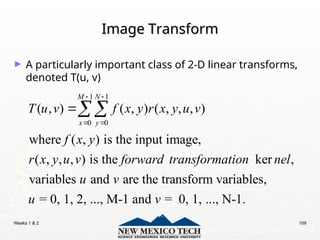
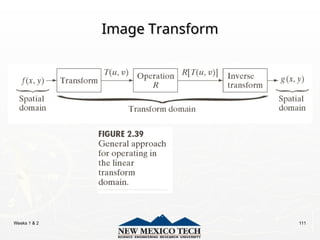
► A particularly important class of 2-D linear transforms,
denoted T(u, v)
1 1
0 0
( , ) ( , ) ( , , , )
where ( , ) is the input image,
( , , , ) is the ker ,
variables and are the transform variables,
= 0, 1, 2, ..., M-1 and = 0, 1,
M N
x y
T u v f x y r x y u v
f x y
r x y u v forward transformation nel
u v
u v
 
 

..., N-1.
Weeks 1 & 2 110
Image Transform
Image Transform
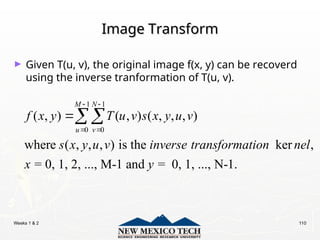
► Given T(u, v), the original image f(x, y) can be recoverd
using the inverse tranformation of T(u, v).
1 1
0 0
( , ) ( , ) ( , , , )
where ( , , , ) is the ker ,
= 0, 1, 2, ..., M-1 and = 0, 1, ..., N-1.
M N
u v
f x y T u v s x y u v
s x y u v inverse transformation nel
x y
 
 

Weeks 1 & 2 111
Image Transform
Image Transform
Weeks 1 & 2 112
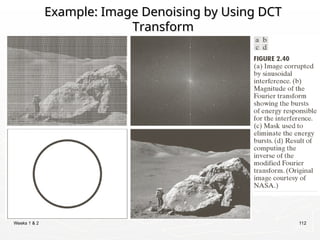
Example: Image Denoising by Using DCT
Transform
Transform
Weeks 1 & 2 113
Forward Transform Kernel
1 1
0 0
1 2
1 2
( , ) ( , ) ( , , , )
The kernel ( , , , ) is said to be SEPERABLE if
( , , , ) ( , ) ( , )
In addition, the kernel is said to be SYMMETRIC if
( , ) is functionally equal to ( ,
M N
x y
T u v f x y r x y u v
r x y u v
r x y u v r x u r y v
r x u r y v
 
 



1 1
), so that
( , , , ) ( , ) ( , )
r x y u v r x u r y u

Weeks 1 & 2 114
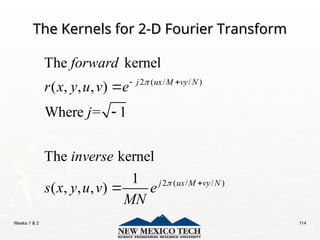
The Kernels for 2-D Fourier Transform
2 ( / / )
2 ( / / )
The kernel
( , , , )
Where = 1
The kernel
1
( , , , )
j ux M vy N
j ux M vy N
forward
r x y u v e
j
inverse
s x y u v e
MN


 




Weeks 1 & 2 115
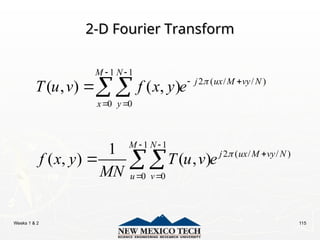
2-D Fourier Transform
1 1
2 ( / / )
0 0
1 1
2 ( / / )
0 0
( , ) ( , )
1
( , ) ( , )
M N
j ux M vy N
x y
M N
j ux M vy N
u v
T u v f x y e
f x y T u v e
MN


 
 
 
 

 




Weeks 1 & 2 116
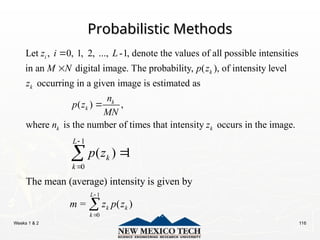
Probabilistic Methods
Let , 0, 1, 2, ..., -1, denote the values of all possible intensities
in an digital image. The probability, ( ), of intensity level
occurring in a given image is estimated as
i
k
k
z i L
M N p z
z


( ) ,
where is the number of times that intensity occurs in the image.
k
k
k k
n
p z
MN
n z

1
0
( ) 1
L
k
k
p z




1
0
The mean (average) intensity is given by
= ( )
L
k k
k
m z p z



Weeks 1 & 2 117
Probabilistic Methods
1
2 2
0
The variance of the intensities is given by
= ( ) ( )
L
k k
k
z m p z





th
1
0
The moment of the intensity variable is
( ) = ( ) ( )
L
n
n k k
k
n z
u z z m p z




Weeks 1 & 2 118
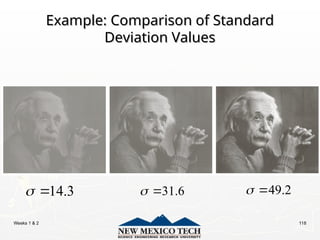
Example: Comparison of Standard
Deviation Values
Deviation Values
31.6
 
14.3
  49.2
 
Weeks 1 & 2 119
Homework
Homework
http://cramer.cs.nmt.edu/~ip/assignments.html

Image processing and pattern recognition 2.ppt

  • 1.
    Digital Image Processing DigitalImage Processing Lecture 1 Lecture 1 Introduction & Fundamentals Introduction & Fundamentals
  • 2.
    Weeks 1 &2 2 Introduction to the course Introduction to the course ► Textbooks: f ► Slides: available ►Lab: using Matlab
  • 3.
    Weeks 1 &2 3 Introduction to the course Introduction to the course ► Grading  Attendance: 10%  Assignments: 10%  Midterm: 20%  Project: 20%  Final: 40%  Total: 100%
  • 4.
    Weeks 1 &2 4 Introduction to the course Introduction to the course ► Project  Medical image analysis (MRI/PET/CT/X-ray tumor detection/classification)  Face, fingerprint, and other object recognition  Image and/or video compression  Image segmentation and/or denoising  Digital image/video watermarking/steganography and detection
  • 5.
    Weeks 1 &2 5 Introduction to the course Introduction to the course ► Evaluation of project  Report  Project — Submit an article including introduction, methods, experiments, results, and conclusions — Submit the project code, the readme document, and some testing samples (images, videos, etc.) for validation  Presentation
  • 6.
    Weeks 1 &2 6 Journals & Conferences Journals & Conferences in Image Processing in Image Processing ► Journals: — IEEE T IMAGE PROCESSING — IEEE T MEDICAL IMAGING — INTL J COMP. VISION — IEEE T PATTERN ANALYSIS MACHINE INTELLIGENCE — PATTERN RECOGNITION — COMP. VISION AND IMAGE UNDERSTANDING — IMAGE AND VISION COMPUTING … … ► Conferences: — CVPR: Comp. Vision and Pattern Recognition — ICCV: Intl Conf on Computer Vision — ACM Multimedia — ICIP — SPIE — ECCV: European Conf on Computer Vision — CAIP: Intl Conf on Comp. Analysis of Images and Patterns … …
  • 7.
    Weeks 1 &2 7 Introduction Introduction ► What is Digital Image Processing? Digital Image — a two-dimensional function x and y are spatial coordinates The amplitude of f is called intensity or gray level at the point (x, y) Digital Image Processing — process digital images by means of computer, it covers low-, mid-, and high-level processes low-level: inputs and outputs are images mid-level: outputs are attributes extracted from input images high-level: an ensemble of recognition of individual objects Pixel — the elements of a digital image ( , ) f x y
  • 8.
    Weeks 1 &2 8 Origins of Digital Image Origins of Digital Image Processing Processing Sent by submarine cable between London and New York, the transportation time was reduced to less than three hours from more than a week
  • 9.
    Weeks 1 &2 9 Origins of Digital Image Origins of Digital Image Processing Processing
  • 10.
    Weeks 1 &2 10 Sources for Images Sources for Images ► Electromagnetic (EM) energy spectrum Electromagnetic (EM) energy spectrum ► Acoustic Acoustic ► Ultrasonic Ultrasonic ► Electronic Electronic ► Synthetic images produced by computer Synthetic images produced by computer
  • 11.
    Weeks 1 &2 11 Electromagnetic (EM) energy spectrum Electromagnetic (EM) energy spectrum Major uses Gamma-ray imaging: nuclear medicine and astronomical observations X-rays: medical diagnostics, industry, and astronomy, etc. Ultraviolet: lithography, industrial inspection, microscopy, lasers, biological imaging, and astronomical observations Visible and infrared bands: light microscopy, astronomy, remote sensing, industry, and law enforcement Microwave band: radar Radio band: medicine (such as MRI) and astronomy
  • 12.
    Weeks 1 &2 12 Examples: Gama-Ray Imaging Examples: Gama-Ray Imaging
  • 13.
    Weeks 1 &2 13 Examples: X-Ray Imaging Examples: X-Ray Imaging
  • 14.
    Weeks 1 &2 14 Examples: Ultraviolet Imaging Examples: Ultraviolet Imaging
  • 15.
    Weeks 1 &2 15 Examples: Light Microscopy Imaging Examples: Light Microscopy Imaging
  • 16.
    Weeks 1 &2 16 Examples: Visual and Infrared Imaging Examples: Visual and Infrared Imaging
  • 17.
    Weeks 1 &2 17 Examples: Visual and Infrared Imaging Examples: Visual and Infrared Imaging
  • 18.
    Weeks 1 &2 18 Examples: Infrared Satellite Imaging Examples: Infrared Satellite Imaging USA 1993 USA 2003
  • 19.
    Weeks 1 &2 19 Examples: Infrared Satellite Imaging Examples: Infrared Satellite Imaging
  • 20.
    Weeks 1 &2 20 Examples: Automated Visual Inspection Examples: Automated Visual Inspection
  • 21.
    Weeks 1 &2 21 Examples: Automated Visual Inspection Examples: Automated Visual Inspection The area in which the imaging system detected the plate Results of automated reading of the plate content by the system
  • 22.
    Weeks 1 &2 22 Example of Radar Image Example of Radar Image
  • 23.
    Weeks 1 &2 23 Examples: MRI (Radio Band) Examples: MRI (Radio Band)
  • 24.
    Weeks 1 &2 24 Examples: Ultrasound Imaging Examples: Ultrasound Imaging
  • 25.
    Weeks 1 &2 25 Fundamental Steps in DIP Fundamental Steps in DIP Result is more suitable than the original Improving the appearance Extracting image components Partition an image into its constituent parts or objects Represent image for computer processing
  • 26.
    Weeks 1 &2 26 Light and EM Spectrum Light and EM Spectrum c   , : Planck's constant. E h h  
  • 27.
    Weeks 1 &2 27 Light and EM Spectrum Light and EM Spectrum ► The colors that humans perceive in an object The colors that humans perceive in an object are determined by the nature of the light are determined by the nature of the light reflected from the object. reflected from the object. e.g. green objects reflect light with wavelengths primarily in the 500 to 570 nm range while absorbing most of the energy at other wavelength
  • 28.
    Weeks 1 &2 28 Light and EM Spectrum Light and EM Spectrum ► Monochromatic light: void of color Intensity is the only attribute, from black to white Monochromatic images are referred to as gray-scale images ► Chromatic light bands: 0.43 to 0.79 um The quality of a chromatic light source: Radiance: total amount of energy Luminance (lm): the amount of energy an observer perceives from a light source Brightness: a subjective descriptor of light perception that is impossible to measure. It embodies the achromatic notion of intensity and one of the key factors in describing color sensation.
  • 29.
    Weeks 1 &2 29 Image Acquisition Image Acquisition Transform illumination energy into digital images
  • 30.
    Weeks 1 &2 30 Image Acquisition Using a Single Sensor Image Acquisition Using a Single Sensor
  • 31.
    Weeks 1 &2 31 Image Acquisition Using Sensor Strips Image Acquisition Using Sensor Strips
  • 32.
    Weeks 1 &2 32 Image Acquisition Process Image Acquisition Process
  • 33.
    Weeks 1 &2 33 A Simple Image Formation Model A Simple Image Formation Model ( , ) ( , ) ( , ) ( , ): intensity at the point ( , ) ( , ): illumination at the point ( , ) (the amount of source illumination incident on the scene) ( , ): reflectance/transmissivity f x y i x y r x y f x y x y i x y x y r x y   at the point ( , ) (the amount of illumination reflected/transmitted by the object) where 0 < ( , ) < and 0 < ( , ) < 1 x y i x y r x y 
  • 34.
    Weeks 1 &2 34 Some Typical Ranges of illumination Some Typical Ranges of illumination ► Illumination Illumination Lumen — A unit of light flow or luminous flux Lumen per square meter (lm/m2 ) — The metric unit of measure for illuminance of a surface  On a clear day, the sun may produce in excess of 90,000 lm/m2 of illumination on the surface of the Earth  On a cloudy day, the sun may produce less than 10,000 lm/m2 of illumination on the surface of the Earth  On a clear evening, the moon yields about 0.1 lm/m2 of illumination  The typical illumination level in a commercial office is about 1000 lm/m2
  • 35.
    Weeks 1 &2 35 Some Typical Ranges of Reflectance Some Typical Ranges of Reflectance ► Reflectance Reflectance  0.01 for black velvet  0.65 for stainless steel  0.80 for flat-white wall paint  0.90 for silver-plated metal  0.93 for snow
  • 36.
    Weeks 1 &2 36 Image Sampling and Quantization Image Sampling and Quantization Digitizing the coordinate values Digitizing the amplitude values
  • 37.
    Weeks 1 &2 37 Image Sampling and Quantization Image Sampling and Quantization
  • 38.
    Weeks 1 &2 38 Representing Digital Images Representing Digital Images
  • 39.
    Weeks 1 &2 39 Representing Digital Images Representing Digital Images ►The representation of an M×N numerical array as (0,0) (0,1) ... (0, 1) (1,0) (1,1) ... (1, 1) ( , ) ... ... ... ... ( 1,0) ( 1,1) ... ( 1, 1) f f f N f f f N f x y f M f M f M N                   
  • 40.
    Weeks 1 &2 40 Representing Digital Images Representing Digital Images ►The representation of an M×N numerical array as 0,0 0,1 0, 1 1,0 1,1 1, 1 1,0 1,1 1, 1 ... ... ... ... ... ... ... N N M M M N a a a a a a A a a a                   
  • 41.
    Weeks 1 &2 41 Representing Digital Images Representing Digital Images ►The representation of an M×N numerical array in MATLAB (1,1) (1,2) ... (1, ) (2,1) (2,2) ... (2, ) ( , ) ... ... ... ... ( ,1) ( ,2) ... ( , ) f f f N f f f N f x y f M f M f M N             
  • 42.
    Weeks 1 &2 42 Representing Digital Images Representing Digital Images ► Discrete intensity interval [0, L-1], L=2k ► The number b of bits required to store a M × N digitized image b = M × N × k
  • 43.
    Weeks 1 &2 43 Representing Digital Images Representing Digital Images
  • 44.
    Weeks 1 &2 44 Spatial and Intensity Resolution Spatial and Intensity Resolution ►Spatial resolution — A measure of the smallest discernible detail in an image — stated with line pairs per unit distance, dots (pixels) per unit distance, dots per inch (dpi) ►Intensity resolution — The smallest discernible change in intensity level — stated with 8 bits, 12 bits, 16 bits, etc.
  • 45.
    Weeks 1 &2 45 Spatial and Intensity Resolution Spatial and Intensity Resolution
  • 46.
    Weeks 1 &2 46 Spatial and Intensity Resolution Spatial and Intensity Resolution
  • 47.
    Weeks 1 &2 47 Spatial and Intensity Resolution Spatial and Intensity Resolution
  • 48.
    Weeks 1 &2 48 Image Interpolation Image Interpolation ► Interpolation — Process of using known data to estimate unknown values e.g., zooming, shrinking, rotating, and geometric correction ► Interpolation (sometimes called resampling) — an imaging method to increase (or decrease) the number of pixels in a digital image. Some digital cameras use interpolation to produce a larger image than the sensor captured or to create digital zoom http://www.dpreview.com/learn/?/key=interpolation
  • 49.
    Weeks 1 &2 49 Image Interpolation: Image Interpolation: Nearest Neighbor Interpolation Nearest Neighbor Interpolation f1(x2,y2) = f(round(x2), round(y2)) =f(x1,y1) f(x1,y1) f1(x3,y3) = f(round(x3), round(y3)) =f(x1,y1)
  • 50.
    Weeks 1 &2 50 Image Interpolation: Image Interpolation: Bilinear Interpolation Bilinear Interpolation 2 ( , ) (1 ) (1 ) ( , ) (1 ) ( 1, ) (1 ) ( , 1) ( 1, 1) ( ), ( ), , . f x y a b f l k a b f l k a b f l k a b f l k l floor x k floor y a x l b y k                           (x,y)
  • 51.
    Weeks 1 &2 51 Image Interpolation: Image Interpolation: Bicubic Interpolation Bicubic Interpolation 3 3 3 0 0 ( , ) i j ij i j f x y a x y    ► The intensity value assigned to point (x,y) is obtained by the following equation ► The sixteen coefficients are determined by using the sixteen nearest neighbors. http://en.wikipedia.org/wiki/Bicubic_interpolation
  • 52.
    Weeks 1 &2 52 Examples: Interpolation Examples: Interpolation
  • 53.
    Weeks 1 &2 53 Examples: Interpolation Examples: Interpolation
  • 54.
    Weeks 1 &2 54 Examples: Interpolation Examples: Interpolation
  • 55.
    Weeks 1 &2 55 Examples: Interpolation Examples: Interpolation
  • 56.
    Weeks 1 &2 56 Examples: Interpolation Examples: Interpolation
  • 57.
    Weeks 1 &2 57 Examples: Interpolation Examples: Interpolation
  • 58.
    Weeks 1 &2 58 Examples: Interpolation Examples: Interpolation
  • 59.
    Weeks 1 &2 59 Examples: Interpolation Examples: Interpolation
  • 60.
    Weeks 1 &2 60 Basic Relationships Between Pixels ► Neighborhood ► Adjacency ► Connectivity ► Paths ► Regions and boundaries
  • 61.
    Weeks 1 &2 61 Basic Relationships Between Pixels ► Neighbors of a pixel p at coordinates (x,y)  4-neighbors of p, denoted by N4(p): (x-1, y), (x+1, y), (x,y-1), and (x, y+1).  4 diagonal neighbors of p, denoted by ND(p): (x-1, y-1), (x+1, y+1), (x+1,y-1), and (x-1, y+1).  8 neighbors of p, denoted N8(p) N8(p) = N4(p) U ND(p)
  • 62.
    Weeks 1 &2 62 Basic Relationships Between Pixels ► Adjacency Let V be the set of intensity values  4-adjacency: Two pixels p and q with values from V are 4-adjacent if q is in the set N4(p).  8-adjacency: Two pixels p and q with values from V are 8-adjacent if q is in the set N8(p).
  • 63.
    Weeks 1 &2 63 Basic Relationships Between Pixels ► Adjacency Let V be the set of intensity values  m-adjacency: Two pixels p and q with values from V are m-adjacent if (i) q is in the set N4(p), or (ii) q is in the set ND(p) and the set N4(p) ∩ N4(p) has no pixels whose values are from V.
  • 64.
    Weeks 1 &2 64 Basic Relationships Between Pixels ► Path  A (digital) path (or curve) from pixel p with coordinates (x0, y0) to pixel q with coordinates (xn, yn) is a sequence of distinct pixels with coordinates (x0, y0), (x1, y1), …, (xn, yn) Where (xi, yi) and (xi-1, yi-1) are adjacent for 1 i n. ≤ ≤  Here n is the length of the path.  If (x0, y0) = (xn, yn), the path is closed path.  We can define 4-, 8-, and m-paths based on the type of adjacency used.
  • 65.
    Weeks 1 &2 65 Examples: Adjacency and Path 0 1 1 0 1 1 0 1 1 0 1 1 0 1 1 0 1 1 0 2 0 0 2 0 0 2 0 0 2 0 0 2 0 0 2 0 0 0 1 0 0 1 0 0 1 0 0 1 0 0 1 0 0 1 V = {1, 2}
  • 66.
    Weeks 1 &2 66 Examples: Adjacency and Path 0 1 1 0 1 1 0 1 1 0 1 1 0 1 1 0 1 1 0 2 0 0 2 0 0 2 0 0 2 0 0 2 0 0 2 0 0 0 1 0 0 1 0 0 1 0 0 1 0 0 1 0 0 1 V = {1, 2} 8-adjacent
  • 67.
    Weeks 1 &2 67 Examples: Adjacency and Path 0 1 1 0 1 1 0 1 1 0 1 1 0 1 1 0 1 1 0 2 0 0 2 0 0 2 0 0 2 0 0 2 0 0 2 0 0 0 1 0 0 1 0 0 1 0 0 1 0 0 1 0 0 1 V = {1, 2} 8-adjacent m-adjacent
  • 68.
    Weeks 1 &2 68 Examples: Adjacency and Path 0 01,1 1,1 1 11,2 1,2 1 11,3 1,3 0 1 1 0 1 1 0 1 1 0 1 1 0 02,1 2,1 2 22,2 2,2 0 02,3 2,3 0 2 0 0 2 0 0 2 0 0 2 0 0 03,1 3,1 0 03,2 3,2 1 13,3 3,3 0 0 1 0 0 1 0 0 1 0 0 1 V = {1, 2} 8-adjacent m-adjacent The 8-path from (1,3) to (3,3): (i) (1,3), (1,2), (2,2), (3,3) (ii) (1,3), (2,2), (3,3) The m-path from (1,3) to (3,3): (1,3), (1,2), (2,2), (3,3)
  • 69.
    Weeks 1 &2 69 Basic Relationships Between Pixels ► Connected in S Let S represent a subset of pixels in an image. Two pixels p with coordinates (x0, y0) and q with coordinates (xn, yn) are said to be connected in S if there exists a path (x0, y0), (x1, y1), …, (xn, yn) Where ,0 ,( , ) i i i i n x y S    
  • 70.
    Weeks 1 &2 70 Basic Relationships Between Pixels Let S represent a subset of pixels in an image ► For every pixel p in S, the set of pixels in S that are connected to p is called a connected component of S. ► If S has only one connected component, then S is called Connected Set. ► We call R a region of the image if R is a connected set ► Two regions, Ri and Rj are said to be adjacent if their union forms a connected set. ► Regions that are not to be adjacent are said to be disjoint.
  • 71.
    Weeks 1 &2 71 Basic Relationships Between Pixels ► Boundary (or border)  The boundary of the region R is the set of pixels in the region that have one or more neighbors that are not in R.  If R happens to be an entire image, then its boundary is defined as the set of pixels in the first and last rows and columns of the image. ► Foreground and background  An image contains K disjoint regions, Rk, k = 1, 2, …, K. Let Ru denote the union of all the K regions, and let (Ru)c denote its complement. All the points in Ru is called foreground; All the points in (Ru)c is called background.
  • 72.
    Weeks 1 &2 72 Question 1 ► In the following arrangement of pixels, are the two regions (of 1s) adjacent? (if 8-adjacency is used) 1 1 1 1 0 1 0 1 0 0 0 1 1 1 1 1 1 1 Region 1 Region 2
  • 73.
    Weeks 1 &2 73 Question 2 ► In the following arrangement of pixels, are the two parts (of 1s) adjacent? (if 4-adjacency is used) 1 1 1 1 0 1 0 1 0 0 0 1 1 1 1 1 1 1 Part 1 Part 2
  • 74.
    Weeks 1 &2 74 ► In the following arrangement of pixels, the two regions (of 1s) are disjoint (if 4-adjacency is used) 1 1 1 1 0 1 0 1 0 0 0 1 1 1 1 1 1 1 Region 1 Region 2
  • 75.
    Weeks 1 &2 75 ► In the following arrangement of pixels, the two regions (of 1s) are disjoint (if 4-adjacency is used) 1 1 1 1 0 1 0 1 0 0 0 1 1 1 1 1 1 1 foreground background
  • 76.
    Weeks 1 &2 76 Question 3 ► In the following arrangement of pixels, the circled point is part of the boundary of the 1-valued pixels if 8-adjacency is used, true or false? 0 0 0 0 0 0 1 1 0 0 0 1 1 0 0 0 1 1 1 0 0 1 1 1 0 0 0 0 0 0
  • 77.
    Weeks 1 &2 77 Question 4 ► In the following arrangement of pixels, the circled point is part of the boundary of the 1-valued pixels if 4-adjacency is used, true or false? 0 0 0 0 0 0 1 1 0 0 0 1 1 0 0 0 1 1 1 0 0 1 1 1 0 0 0 0 0 0
  • 78.
    Weeks 1 &2 78 Distance Measures ► Given pixels p, q and z with coordinates (x, y), (s, t), (u, v) respectively, the distance function D has following properties: a. D(p, q) ≥ 0 [D(p, q) = 0, iff p = q] b. D(p, q) = D(q, p) c. D(p, z) ≤ D(p, q) + D(q, z)
  • 79.
    Weeks 1 &2 79 Distance Measures The following are the different Distance measures: a. Euclidean Distance : De(p, q) = [(x-s)2 + (y-t)2 ]1/2 b. City Block Distance: D4(p, q) = |x-s| + |y-t| c. Chess Board Distance: D8(p, q) = max(|x-s|, |y-t|)
  • 80.
    Weeks 1 &2 80 Question 5 ► In the following arrangement of pixels, what’s the value of the chessboard distance between the circled two points? 0 0 0 0 0 0 0 1 1 0 0 1 1 0 0 0 1 0 0 0 0 0 0 0 0 0 0 0 0 0
  • 81.
    Weeks 1 &2 81 Question 6 ► In the following arrangement of pixels, what’s the value of the city-block distance between the circled two points? 0 0 0 0 0 0 0 1 1 0 0 1 1 0 0 0 1 0 0 0 0 0 0 0 0 0 0 0 0 0
  • 82.
    Weeks 1 &2 82 Question 7 ► In the following arrangement of pixels, what’s the value of the length of the m-path between the circled two points? 0 0 0 0 0 0 0 1 1 0 0 1 1 0 0 0 1 0 0 0 0 0 0 0 0 0 0 0 0 0
  • 83.
    Weeks 1 &2 83 Question 8 ► In the following arrangement of pixels, what’s the value of the length of the m-path between the circled two points? 0 0 0 0 0 0 0 1 1 0 0 0 1 0 0 0 1 0 0 0 0 0 0 0 0 0 0 0 0 0
  • 84.
    Weeks 1 &2 84 Introduction to Mathematical Operations in Introduction to Mathematical Operations in DIP DIP ► Array vs. Matrix Operation 11 12 21 22 b b B b b       11 12 21 22 a a A a a       11 11 12 21 11 12 12 22 21 11 22 21 21 12 22 22 * a b a b a b a b A B a b a b a b a b           11 11 12 12 21 21 22 22 .* a b a b A B a b a b       Array product Matrix product Array product operator Matrix product operator
  • 85.
    Weeks 1 &2 85 Introduction to Mathematical Operations in Introduction to Mathematical Operations in DIP DIP ► Linear vs. Nonlinear Operation H is said to be a linear operator; H is said to be a nonlinear operator if it does not meet the above qualification.   ( , ) ( , ) H f x y g x y  Additivity Homogeneity     ( , ) ( , ) ( , ) ( , ) ( , ) ( , ) ( , ) ( , ) i i j j i i j j i i j j i i j j H a f x y a f x y H a f x y H a f x y a H f x y a H f x y a g x y a g x y                   
  • 86.
    Weeks 1 &2 86 Arithmetic Operations Arithmetic Operations ► Arithmetic operations between images are array operations. The four arithmetic operations are denoted as s(x,y) = f(x,y) + g(x,y) d(x,y) = f(x,y) – g(x,y) p(x,y) = f(x,y) × g(x,y) v(x,y) = f(x,y) ÷ g(x,y)
  • 87.
    Weeks 1 &2 87 Example: Addition of Noisy Images for Noise Reduction Example: Addition of Noisy Images for Noise Reduction Noiseless image: f(x,y) Noise: n(x,y) (at every pair of coordinates (x,y), the noise is uncorrelated and has zero average value) Corrupted image: g(x,y) g(x,y) = f(x,y) + n(x,y) Reducing the noise by adding a set of noisy images, {gi(x,y)} 1 1 ( , ) ( , ) K i i g x y g x y K   
  • 88.
    Weeks 1 &2 88 Example: Addition of Noisy Images for Noise Reduction Example: Addition of Noisy Images for Noise Reduction     1 1 1 1 ( , ) ( , ) 1 ( , ) ( , ) 1 ( , ) ( , ) ( , ) K i i K i i K i i E g x y E g x y K E f x y n x y K f x y E n x y K f x y                               1 1 ( , ) ( , ) K i i g x y g x y K    2 ( , ) 1 ( , ) 1 1 ( , ) 1 2 2 2 ( , ) 1 g x y K g x y i K i K n x y i K i n x y K           
  • 89.
    Weeks 1 &2 89 Example: Addition of Noisy Images for Noise Reduction Example: Addition of Noisy Images for Noise Reduction ► In astronomy, imaging under very low light levels frequently causes sensor noise to render single images virtually useless for analysis. ► In astronomical observations, similar sensors for noise reduction by observing the same scene over long periods of time. Image averaging is then used to reduce the noise.
  • 90.
  • 91.
    Weeks 1 &2 91 An Example of Image Subtraction: Mask Mode An Example of Image Subtraction: Mask Mode Radiography Radiography Mask h(x,y): an X-ray image of a region of a patient’s body Live images f(x,y): X-ray images captured at TV rates after injection of the contrast medium Enhanced detail g(x,y) g(x,y) = f(x,y) - h(x,y) The procedure gives a movie showing how the contrast medium propagates through the various arteries in the area being observed.
  • 92.
  • 93.
    Weeks 1 &2 93 An Example of Image Multiplication An Example of Image Multiplication
  • 94.
    Weeks 1 &2 94 Set and Logical Operations Set and Logical Operations
  • 95.
    Weeks 1 &2 95 Set and Logical Operations Set and Logical Operations ► Let A be the elements of a gray-scale image The elements of A are triplets of the form (x, y, z), where x and y are spatial coordinates and z denotes the intensity at the point (x, y). ► The complement of A is denoted Ac {( , , ) | ( , , ) } 2 1; is the number of intensity bits used to represent c k A x y K z x y z A K k z      {( , , ) | ( , )} A x y z z f x y  
  • 96.
    Weeks 1 &2 96 Set and Logical Operations Set and Logical Operations ► The union of two gray-scale images (sets) A and B is defined as the set {max( , ) | , } z A B a b a A b B    
  • 97.
    Weeks 1 &2 97 Set and Logical Operations Set and Logical Operations
  • 98.
    Weeks 1 &2 98 Set and Logical Operations Set and Logical Operations
  • 99.
    Weeks 1 &2 99 Spatial Operations Spatial Operations ► Single-pixel operations Alter the values of an image’s pixels based on the intensity. e.g., ( ) s T z 
  • 100.
    Weeks 1 &2 100 Spatial Operations Spatial Operations ► Neighborhood operations The value of this pixel is determined by a specified operation involving the pixels in the input image with coordinates in Sxy
  • 101.
    Weeks 1 &2 101 Spatial Operations Spatial Operations ► Neighborhood operations
  • 102.
    Weeks 1 &2 102 Geometric Spatial Transformations Geometric Spatial Transformations ► Geometric transformation (rubber-sheet transformation) — A spatial transformation of coordinates — intensity interpolation that assigns intensity values to the spatially transformed pixels. ► Affine transform ( , ) {( , )} x y T v w      11 12 21 22 31 32 0 1 1 0 1 t t x y v w t t t t           
  • 103.
    Weeks 1 &2 103
  • 104.
    Weeks 1 &2 104 Intensity Assignment Intensity Assignment ► Forward Mapping It’s possible that two or more pixels can be transformed to the same location in the output image. ► Inverse Mapping The nearest input pixels to determine the intensity of the output pixel value. Inverse mappings are more efficient to implement than forward mappings. ( , ) {( , )} x y T v w  1 ( , ) {( , )} v w T x y  
  • 105.
    Weeks 1 &2 105 Example: Image Rotation and Intensity Example: Image Rotation and Intensity Interpolation Interpolation
  • 106.
    Weeks 1 &2 106 Image Registration Image Registration ► Input and output images are available but the transformation function is unknown. Goal: estimate the transformation function and use it to register the two images. ► One of the principal approaches for image registration is to use tie points (also called control points)  The corresponding points are known precisely in the input and output (reference) images.
  • 107.
    Weeks 1 &2 107 Image Registration Image Registration ► A simple model based on bilinear approximation: 1 2 3 4 5 6 7 8 Where ( , ) and ( , ) are the coordinates of tie points in the input and reference images. x c v c w c vw c y c v c w c vw c v w x y           
  • 108.
    Weeks 1 &2 108 Image Registration Image Registration
  • 109.
    Weeks 1 &2 109 Image Transform Image Transform ► A particularly important class of 2-D linear transforms, denoted T(u, v) 1 1 0 0 ( , ) ( , ) ( , , , ) where ( , ) is the input image, ( , , , ) is the ker , variables and are the transform variables, = 0, 1, 2, ..., M-1 and = 0, 1, M N x y T u v f x y r x y u v f x y r x y u v forward transformation nel u v u v      ..., N-1.
  • 110.
    Weeks 1 &2 110 Image Transform Image Transform ► Given T(u, v), the original image f(x, y) can be recoverd using the inverse tranformation of T(u, v). 1 1 0 0 ( , ) ( , ) ( , , , ) where ( , , , ) is the ker , = 0, 1, 2, ..., M-1 and = 0, 1, ..., N-1. M N u v f x y T u v s x y u v s x y u v inverse transformation nel x y     
  • 111.
    Weeks 1 &2 111 Image Transform Image Transform
  • 112.
    Weeks 1 &2 112 Example: Image Denoising by Using DCT Example: Image Denoising by Using DCT Transform Transform
  • 113.
    Weeks 1 &2 113 Forward Transform Kernel Forward Transform Kernel 1 1 0 0 1 2 1 2 ( , ) ( , ) ( , , , ) The kernel ( , , , ) is said to be SEPERABLE if ( , , , ) ( , ) ( , ) In addition, the kernel is said to be SYMMETRIC if ( , ) is functionally equal to ( , M N x y T u v f x y r x y u v r x y u v r x y u v r x u r y v r x u r y v        1 1 ), so that ( , , , ) ( , ) ( , ) r x y u v r x u r y u 
  • 114.
    Weeks 1 &2 114 The Kernels for 2-D Fourier Transform The Kernels for 2-D Fourier Transform 2 ( / / ) 2 ( / / ) The kernel ( , , , ) Where = 1 The kernel 1 ( , , , ) j ux M vy N j ux M vy N forward r x y u v e j inverse s x y u v e MN        
  • 115.
    Weeks 1 &2 115 2-D Fourier Transform 2-D Fourier Transform 1 1 2 ( / / ) 0 0 1 1 2 ( / / ) 0 0 ( , ) ( , ) 1 ( , ) ( , ) M N j ux M vy N x y M N j ux M vy N u v T u v f x y e f x y T u v e MN                 
  • 116.
    Weeks 1 &2 116 Probabilistic Methods Probabilistic Methods Let , 0, 1, 2, ..., -1, denote the values of all possible intensities in an digital image. The probability, ( ), of intensity level occurring in a given image is estimated as i k k z i L M N p z z   ( ) , where is the number of times that intensity occurs in the image. k k k k n p z MN n z  1 0 ( ) 1 L k k p z     1 0 The mean (average) intensity is given by = ( ) L k k k m z p z   
  • 117.
    Weeks 1 &2 117 Probabilistic Methods Probabilistic Methods 1 2 2 0 The variance of the intensities is given by = ( ) ( ) L k k k z m p z      th 1 0 The moment of the intensity variable is ( ) = ( ) ( ) L n n k k k n z u z z m p z    
  • 118.
    Weeks 1 &2 118 Example: Comparison of Standard Example: Comparison of Standard Deviation Values Deviation Values 31.6   14.3   49.2  

  • 119.
    Weeks 1 &2 119 Homework Homework http://cramer.cs.nmt.edu/~ip/assignments.html
Editor's Notes