“Best Poster Ever”
Poster Creation in Adobe Illustrator
Disclaimer
S M T W R F S
15 16 17 18 19 20
21 22 23 24 25 26 27
28 29 30 31 1 2 3
4 5 6 7 8 9 10
Gist
• What is Illustrator	

• SfN Poster requirements	

• Common elements	

• How to add them
Disclaimer
• Not the magic recipe!	

• Conglomeration from different sources	

• Implement your own style	

• Instruction limited today, but...
Adobe Illustrator
• Vector-based drawing program	

• Industry standard	

• Vector vs. Raster	

• Advantages include:	

• Minimal info = minimal file size	

• Indefinite zoom	

• Modification
Vector
Raster
.ai	

.eps	

.svg	

.pdf
.jpg	

.gif	

.bmp	

.tif
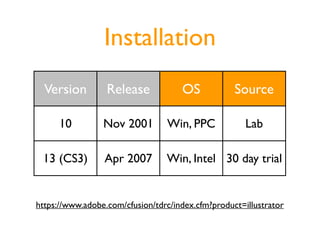
Installation
Version Release OS Source
10 Nov 2001 Win, PPC Lab
13 (CS3) Apr 2007 Win, Intel 30 day trial
https://www.adobe.com/cfusion/tdrc/index.cfm?product=illustrator
Tool Palate
Page Tool
Selection Tool (V) Direct Selection Tool (A)
Pen Tool (P) Type Tool (T)
Line Tool () Rectangle Tool (M)
Rotate Tool (R)
Zoom Tool (Z)
Tool Panels
SfN Specifications
• Planning and layout	

• Title	

• Illustrations	

• Text	

• At the meeting
http://apu.sfn.org/am2007/index.cfm?pagename=resources_presentation
Planning and Layout
“An effective poster balances
figures and text.”
78”
44”
35”
54.4”
Poster Board
Planning and Layout
Mike’s 2006 SfN Poster
Title
• Abstract title (88 pt)	

• Authors (62 pt)	

• Affiliations (62 pt)	

• Session number (66 pt)	

• Logos
Illustrations
• Clear and visible graphics	

• Use color when appropriate	

• Color Guide Demo	

• Online tools	

• Main points clear, details for experts	

• Numbered (SfN discourages Fig. or Figure)
Line Drawings - Experimental Setup
Photograph
FlexiForce
Vectorized
Original
Em
0
Rest
EPSP
Action
potential
threshold
Small-diameter
motor neuron
Interneuron
Large-diameter
motor neuron
EPSP threshold
Rest
0
Em
Rhigh Rlow
∆V
 

=
 

IR
∆V ∆V
Vectorized
Line Drawings - Figures
SPI
FDI
APB
Ulnar Nerve
Homonymous
Heteronymous
Ia
Ia
Median Nerve
APB
αMN
SPI
αMN
FDI
αMN
-+
↑ Descending
Drive
↑ Discharge
RateVariability
↑ Synaptic
Noise
↓ Force
Production
↑ No of
Inputs
↑ Fluctuations in
AHP Trajectory
Spike2 Data
• Important to show raw data in methods	

• Adjust data in Spike2 to match figure	

• File, Print, to Adobe PDF	

• Open PDF in Ai, Copy, Paste into poster	

• Adjust line thickness, color, add axis labels
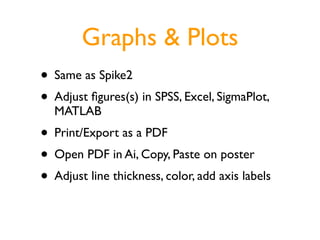
Graphs & Plots
• Same as Spike2	

• Adjust figures(s) in SPSS, Excel, SigmaPlot,
MATLAB	

• Print/Export as a PDF	

• Open PDF in Ai, Copy, Paste on poster	

• Adjust line thickness, color, add axis labels
Text
• Headings or “Take-home” message figures	

• Legends (16 pt)	

• Bulleted/Numbered lists	

• Tables (example included)	

• Introduction in upper left	

• Conclusion lower right
Introduction
Nulla metus. Nam dictum arcu at
tortor. Sed convallis. Praesent
commodo metus sit amet sem.
Curabitur condimentum lobortis
velit. Integer fermentum elit eu leo.
Integer nibh. Nunc aliquet, purus at
commodo pharetra, orci leo
rhoncus libero, nec placerat quam
risus eu sem. Quisque at erat. Nunc
quis tellus sit amet sapien rutrum
pharetra. Quisque tristique, orci vel
iaculis ornare, dui libero
consectetuer diam, non lobortis elit
nibh in tellus. Nullam hendrerit
mattis pede. Donec risus tellus,
consequat et, nonummy eget,
pretium eu, lacus. Praesent tellus.
Aenean molestie urna id est. Nulla
Nulla metus. Nam dictum arcu at
tortor. Sed convallis. Praesent
commodo metus sit amet sem.
Curabitur condimentum lobortis
velit. Integer fermentum elit eu leo.
Integer nibh. Nunc aliquet, purus at
commodo pharetra, orci leo rhoncus
libero, nec placerat quam risus eu
sem. Quisque at erat. Nunc quis
tellus sit amet sapien rutrum
pharetra. Quisque tristique, orci vel
iaculis ornare, dui libero consectetuer
diam, non lobortis elit nibh in tellus.
References
• J Neurophysiol style
• Author AR, Author SD, Author WS. Title of the
journal article. J Abbrev 276: 23-34, 1999.	

• PubMed can help you determine abbreviations	

• http://www.ncbi.nlm.nih.gov/sites/entrez?db=Journals
• Alphabetize
Results
• Tables to summarize results	

• Make a table in Word	

• Print as PDF	

• Open PDF in Ai, Copy, Paste into poster
Acknowledg(e)ments
• “The authors thank ___ for assisting with
data analysis.”	

• “Supported by NINDS R01 NS43275 to Roger
M. Enoka.”
Printing
• Install drivers	

• Which computer?	

• Document setup	

• Printer setup	

• Page tool
Sharing
• Handouts at the meeting	

• Shrink to legal size, export as PDF	

• Send to color printer (30 copies)	

• Links on your online CV	

• Scribd.com?

Best Poster Ever: Poster Creation in Adobe Illustrator