A MAJOR PROJECTREPORT
ON
“QR CODE BASED SMART PARKING SYSTEM”
Submitted to
SRI INDU COLLEGE OF ENGINEERING AND TECHNOLOGY
In partial fulfillment of the requirements for the award of degree of
BACHELOR OF TECHNOLOGY
In
COMPUTER SCIENCE AND ENGINEERING
By
M. MANISHA (20D41A05D2)
P. NAVYA (20D41A05G0)
MD. YASIN (20D41A05D4) O.
SRIKANTH (20D41A05F0)
Under the esteemed guidance of
Mrs. B. GOWTHAMI
(Assistant. Professor)
DEPARTMENT OF COMPUTER SCIENCE & ENGINEERING
SRI INDU COLLEGE OF ENGINEERING AND TECHNOLOGY
(An Autonomous Institution under UGC, accredited by NBA, Affiliated to JNTUH)
Sheriguda(V), Ibrahimpatnam(M), Ranga Reddy(D)-501510
(2023-2024)
2.
SRI INDU COLLEGEOF ENGINEERING AND TECHNOLOGY
(An Autonomous Institution under UGC, accredited by NBA, Affiliated to JNTUH)
DEPARTMENT OF COMPUTER SCIENCE & ENGINEERING
CERTIFICATE
Certified that the Major project entitled “QR CODE BASED SMART PARKING SYSTEM” is a
bonafide work carried out by M.MANISHA [20D41A05D2], P.NAVYA [20D41A05GO], MD.YASIN
[20D41A05D4], O.SRIKANTH [20D41A05F0] in partial fulfillment for the award of degree of
Bachelor of Technology in Computer Science and Engineering of SICET, Hyderabad for the academic
year 2023-2024.The project has been approved as it satisfies academic requirements in respect of the
work prescribed for IV Year, II-Semester of B. Tech course.
INTERNAL GUIDE HEAD OF THE DEPARTMENT
(Mrs. B. Gowthami) (Prof.Ch.GVN.Prasad)
(Assistant Professor)
EXTERNAL EXAMINER
3.
ACKNOWLEDGEMENT
The satisfaction thataccompanies the successful completion of the task would be put incomplete without
the mention of the people who made it possible, whose constant guidance and encouragement crown all
the efforts with success. We are thankful to Principal Dr. G. SURESH for giving us thepermission
to carry out this project. We are highly indebted to Prof. Ch.GVN.Prasad, Head of the Department of
Computer Science Engineering, for providing necessary infrastructure and labs and also valuable
guidance at every stage of this project. We are grateful to our internal project guide Mrs. B. Gowthami,
Assistant Professor for her constant motivation and guidance given by her during the execution of this
project work. We would like to thank the Teaching & Non-Teaching staff of Departmentof Computer
Science and engineering for sharing their knowledge with us, last but not least we express our sincere
thanks to everyone who helped directly or indirectly for the completion of this project.
M. MANISHA [20D41A05D2]
P. NAVYA [20D41A05G0]
MD. YASIN [20D41A05D4]
O. SRIKANTH [20D41A05F0]
4.
INDEX
SL.NO NAME PAGE.NO
1.INTRODUCTION
1.1 Introduction About Project
1.2 Literature Survey
1.3 Modules
1-3
2. SYSTEM ANALYSIS
2.1 Existing System
2.1.1 Disadvantages
2.2 Proposed System
2.2.1 Advantages
2.3 System requirements
4-6
3. SYSTEM STUDY
3.1 Technical Feasibility
3.2 Operational Feasibility
3.3 Economic Feasibility
7-10
4. SYSTEM DESIGN
4.1 Architecture
4.2 Data Flow Diagram
4.3 Uml Diagrams
4.3.1 Use Case Diagram
4.3.2 Class Diagram
4.3.3 Sequence Diagram
4.3.4 Activity Diagram
4.3.5 Deployment Diagram
11-19
5. TECHNOLOGIES USED
5.1 What is Python?
5.1.1 Advantages Of Python
5.1.2 Disadvantages Of Python
5.1.3 History
5.2 What is Machine Learning?
5.2.1 Categories Of Ml
5.2.2 Need For Ml
5.2.3 Challenges In Ml
20-38
5.
5.2.4 Applications
5.2.5 HowTo Start Learning Ml?
5.2.6 Advantages Of Ml
5.2.7 Disadvantages of Ml
5.3 Python Development Steps
5.4 Modules Used In Python
5.5 Install Python Step By Step In Windows &
Mac
6.
IMPLEMENTATION
6.1 Software Environment
6.1.1 Python
6.1.2 Sample Code
39-46
7.
SYSTEM TESTING
7.1 Introduction To Testing
7.2 Testing Strategies
47-52
8.
SCREENSHOTS
53-59
9.
CONCLUSION
60
10.
REFERENCES
61
6.
LIST OF FIGURES
FigNo Name Page No
1. Architectural Diagram 11
2. Data Flow Diagram 12
3. Use case Diagram 14
4. Class Diagram 15
5. Sequence Diagram 16
6. Activity Diagram 17
7. Deployment Diagram 19
7.
LIST OF SCREENSHOTS
FigNo Name Page No
1. Home Page 53
2. Admin Login Page 53
3. Admin Page 54
4. Add slots in parking 54
5. Managing Slots 54
6. Updating slots 55
7. Feedback Page 55
8. User Login Page 56
9. My Bookings 58
10. Payment Method 58
11. Profile Page 58
8.
ABSTRACT
In the modernera of rapid growth and development, the demand for cars has increased gradually. With
the demand, the problem of finding the appropriate parking space is now a key challenge. To remember
the place where one has parked the car in the crowd of 500-600 cars is a troublesome situation for
anyone. Unwanted use of parking space because of the lack of feasibility and payment method leads to a
huge loss for the vendors of parking space. Finding an appropriate parking space needs a lot of time. The
advanced developed parking ecosystem can solve much of the problem mentioned above. A hassle-free
system will help both vendor and user to overcome most of the problem as well as it eases the payment
method and saves time. The use of QR(Quick Response) code and a dedicated app can overcome the
problems of the existing parking system. In the modern era, it's very difficult to build a new infrastructure
for parking. Along with the exponential growth in the automobile industry, parking problems increase at
the same pace. Most of the existing parking system includes various sensors like the ultrasonic sensor,
GPS (Global positioning system). The installation cost of these types of sensors needs huge investments
along with daily maintenance charges. These types of sensors can't be operated in an open parking space.
Most of the sensors are easily affected by rain or sun rays. These types of systems can't solve most of the
problems prevailing in the parking industry. The use of hydraulics in modern automated parking systems
needs a huge capital as well as electric power investment. The new parking system needs much change in
existing infrastructure and is not feasible for a small vendor. The cost of building a new parking space
along with sensors is the reason behind the non popularity of the hardware-based parking system. The
use of manpower to operate a modern parking system can also be overcome by the new prescribed
system. The paper is organized as follows: Section II and Section III describe the architecture and related
work of the system respectively. The Section IV discusses the evaluation results. At last, section V
concludes the paper.
9.
1
1. INTRODUCTION
1.1 INTRODUCTIONABOUT PROJECT
In the modern era, it's very difficult to build a new infrastructure for parking. Along with the exponential
growth in the automobile industry, parking problems increase at the same pace. Most of the existing
parking system includes various sensors like the ultrasonic sensor, GPS (Global positioning system). The
installation cost of these types of sensors needs huge investments along with daily maintenance charges.
These types of sensors can't be operated in an open parking space. Most of the sensors are easily affected
by rain or sun rays. These types of systems can't solve most of the problems prevailing in the parking
industry. The use of hydraulics in modern automated parking systems needs a huge capital as well as
electric power investment. The new parking system needs much change in existing infrastructure and is
not feasible for a small vendor. The cost of building a new parking space along with sensors is the reason
behind the non popularity of the hardware-based parking system. The use of manpower to operate a
modern parking system can also be overcome by the new prescribed system. The paper is organized as
follows: Section II and Section III describe the architecture and related work of the system respectively.
The Section IV discusses the evaluation results. At last, section V concludes the paper.
1.2 LITERATURE SURVEY
1."QR code-based smart parking system using mobile applications" by Dharmendra Singh et al.
(2019):
This study proposes a QR code-based smart parking system that enables users to find and
book parking spots using a mobile application.
The system utilizes QR codes placed at parking spots, which users scan to check
availability and make reservations.
The paper discusses the implementation details and evaluates the system's effectiveness in
terms of user convenience and parking management.
10.
2
2."Smart parking systemusing QR code" by Rakesh R. Patil et al. (2018):
This paper presents a smart parking system that employs QR codes for parking spot
identification and management.
QR codes are used as virtual tokens for reserving parking spaces, and users can make
reservations through a mobile application.
The study evaluates the system's performance in terms of user satisfaction, ease of use,
and parking space utilization.
3."QR code-based smart parking management system" by K. A. Vinoth Kumar et al. (2017):
The research proposes a QR code-based smart parking management system designed to
optimize parking space utilization and reduce congestion.
QR codes are used for authentication and identification of parking spaces, and a central
system manages parking reservations and allocations.
The paper discusses the system architecture, implementation challenges, and potential
benefits for urban parking management.
4."Design and implementation of QR code-based parking management system" by Akshay B.
Jadhav et al. (2020):
This study presents the design and implementation of a QR code-based parking
management system aimed at improving parking space utilization.
QR codes are deployed at parking lots, and users can scan them to check availability,
make reservations, and pay for parking.
The paper discusses the system's features, such as real-time parking updates and payment
integration, and evaluates its performance.
5."Smart parking system using QR code and IoT" by Ashutosh D. Patil et al. (2019):
This research proposes a smart parking system that combines QR codes with Internet of
Things (IoT) technology for efficient parking management.
11.
3
QR codes areused for parking spot identification, while IoT devices monitor occupancy
and relay real-time data to a centralized system.
The study discusses the system architecture, integration of QR codes and IoT, and
potential enhancements for future implementations.
1.3 MODULES
1. User app
Secure user login page where user need to fill up some basic information and its QR code will be
generated.
Then parking mode will be displayed- online or offline.
Payments and space allotted history can also be accessible from user app.
Current bills and related information is also shown in app.
Demonstrates two options given to user for booking- Book online and Onsite Booking.
2. Admin app
This app will monitor online and offline parking space allotment.
It has access to edit parking allotted space and increase or decrease or shut down the parking
space allotment.
It has access to the payment history of any customer and also enforce penalty customers(if
applicable).
Shows GUI options given to admin.3. Scanner app
Scanner app will scan the QR code of the user and allot the nearest available parking space.
12.
4
2. SYSTEM ANALYSIS
2.1EXISTING SYSTEM
The advanced developed parking ecosystem can solve much of the problem mentioned above. A hassle-
free system will help both vendor and user to overcome most of the problem as well as it eases the
payment method and saves time. The use of QR(Quick Response) code and a dedicated app can
overcome the problems of the existing parking system.
Most of the existing parking system includes various sensors like the ultrasonic sensor, GPS (Global
positioning system). The installation cost of these types of sensors needs huge investments along with
daily maintenance charges. These types of sensors can't be operated in an open parking space.
By adopting the new software-based system most of the problems related to the existing parking systems
like proper space management, time management, and traffic problems(due to random movement of cars
in search of parking space) can be solved easily. Indeed our parking system is also cost effective as
compared to the existing parking system. This system can easily be adopted by various small and large
parking vendors without much change in the existing parking infrastructure. On further advancement, the
system can also be used for two-wheeler parking and provide much more flexibility.
2.1.1 DISADVANTAGES OF EXISTING SYSTEM
Dependency on Mobile Technology:
As the system relies heavily on mobile applications and QR code scanning, individuals without
smartphones or those facing technical issues with their devices may encounter difficulties in using the
system.
Limited Accessibility for Elderly Users:
Elderly users who are not familiar with mobile technology or face challenges in using smartphone
applications may find it challenging to adapt to the system, potentially limits its accessibility.
13.
5
Vulnerability to TechnicalGlitches:
Technical issues such as app malfunctions, QR code reading errors, or server downtimes could disrupt
the seamless operation of the system, leading to user frustration and potential inconvenience.
Susceptibility to Fraud:
QR codes, if not implemented securely, might be susceptible to duplication or manipulation, leading to
potential instances of fraud or unauthorized access to parking spaces. Ensuring the integrity of the QR
code generation and authentication process is crucial.
Dependency on Stable Internet Connection:
The system heavily relies on a stable internet connection for real-time updates, reservations, and payment
processing. In areas with poor connectivity, users may experience delays or may be unable to utilize
certain features, impacting the system's reliability.
2.2 PROPOSED SYSTEM
The proposed QR Code based Smart Parking System aims to overcome the limitations of the existing
parking infrastructure by introducing a comprehensive and user-friendly solution. In this envisioned
system, a user-friendly mobile application, seamlessly integrated with Quick Response (QR) code
technology, becomes the focal point. The proposed system offers a more inclusive approach,
accommodating users without smartphones by providing alternative methods for accessing and paying
for parking spaces. To address concerns about technical glitches, robust error-handling mechanisms and
regular maintenance schedules will be implemented to ensure the system's reliability. Security measures,
such as encrypted QR codes and authentication protocols, will be reinforced to mitigate the risk of fraud.
Furthermore, the proposed system will incorporate user-friendly interfaces, ensuring accessibility for all
age groups, including the elderly.
To tackle dependency on a stable internet connection, the system will feature offline functionalities,
allowing users to perform essential tasks even in areas with intermittent connectivity. This holistic
approach aims to create an advanced, user-centric parking ecosystem that is not only technologically
adept but also addresses the diverse needs and challenges faced by users and parking space vendors alike.
14.
6
2.2.1 ADVANTAGES OFPROPOSED SYSTEM
Efficient Space Utilization:
The system facilitates optimized use of parking spaces by providing real-time information on availability.
Users can quickly locate and reserve parking spots, reducing unnecessary congestion and ensuring
efficient space utilization.
Time-Saving for Users:
With the ability to reserve parking spaces in advance and streamlined entry and exit processes facilitated
by QR codes, users experience significant time savings. This contributes to a more convenient and
hassle-free parking experience.
Enhanced Payment Convenience:
The integration of a secure payment gateway within the mobile application simplifies the payment
process. Users can seamlessly pay for their parking without the need for physical cash, enhancing
convenience and reducing transaction times.
Improved User Experience:
The user-friendly mobile application and QR code scanning process contribute to an overall enhanced
user experience. The system's intuitive design and accessibility features cater to a wide range of users,
including those less familiar with advanced technology.
15.
7
2.3 SYSTEM REQUIREMENTS
2.3.1HARDWARE REQUIREMENTS
Processor i5 processor 10th Gen
Harddisk
512 SSD
RAM
8GB
2.3.2 SOFTWARE REQUIREMENTS
Operating System Windows 11
IDE Visual Studio Code
Development Software Python
Programming Language Python
Domain Image Processing
Front end Technologies HTML5,CSS3,JAVASCRIPT
Framework Django
Database SQL
16.
8
3. SYSTEM STUDY
3.1TECHNICAL FEASIBILITY
3.2 OPERATIONAL FEASIBILITY
3.3 ECONOMIC FEASIBILITY
A feasibility study assesses the operational, technical and economic merits of the proposed project. The
feasibility study is intended to be a preliminary review of the facts to see if it is worthy of proceeding to
the analysis phase. From the systems analyst perspective, the feasibility analysis is the primary tool for
recommending whether to proceed to the next phase or to discontinue the project.
The feasibility study is a management-oriented activity. The objective of a feasibility study is to find out
if an information system project can be done and to suggest possible alternative solutions.
Projects are initiated for two broad reasons:
1. Problems that lend themselves to systems solutions
2. Opportunities for improving through:
(a) upgrading systems
(b) altering systems
(c) installing new systems
A feasibility study should provide management with enough information to decide:
· Whether the project can be done
· Whether the final product will benefit its intended users and organization
· What are the alternatives among which a solution will be chosen
17.
9
3.1 TECHNICAL FEASIBILITY
Alarge part of determining resources has to do with assessing technical feasibility. It considers the
technical requirements of the proposed project. The technical requirements are then compared to the
technical capability of the organization. The systems project is considered technically feasible if the
internal technical capability is sufficient to support the project requirements.
The analyst must find out whether current technical resources can be upgraded or added to in a manner
that fulfils the request under consideration. This is where the expertise of system analysts is beneficial,
since using their own experience and their contact with vendors they will be able to answer the question
of technical feasibility.
The essential questions that help in testing the operational feasibility of a system include the following:
· Is the project feasible within the limits of current technology?
· Does the technology exist at all?
· Is it available within given resource constraints?
· Is it a practical proposition?
· Manpower- programmers, testers & debuggers
· Software and hardware
· Are the current technical resources sufficient for the new system?
· Can they be upgraded to provide to provide the level of technology necessary for the new
system?
· Do we possess the necessary technical expertise, and is the schedule reasonable?
· Can the technology be easily applied to current problems?
· Does the technology have the capacity to handle the solution?
18.
10
3.2 OPERATIONAL FEASIBILITY
Operationalfeasibility is dependent on human resources available for the project and involves projecting
whether the system will be used if it is developed and implemented.
Operational feasibility is a measure of how well a proposed system solves the problems, and takes
advantage of the opportunities identified during scope definition and how it satisfies the requirements
identified in the requirements analysis phase of system development.
Operational feasibility reviews the willingness of the organization to support the proposed system. This is
probably the most difficult of the feasibilities to gauge. In order to determine this feasibility, it is
important to understand the management commitment to the proposed project. If the request was initiated
by management, it is likely that there is management support and the system will be accepted and used.
However, it is also important that the employee base will be accepting of the change.
The essential questions that help in testing the operational feasibility of a system include the following:
· Does current mode of operation provide adequate throughput and response time?
· Does current mode provide end users and managers with timely, pertinent, accurate and useful
formatted information?
· Does current mode of operation provide cost-effective information services to the business?
· Could there be a reduction in cost and or an increase in benefits?
· Does current mode of operation offer effective controls to protect against fraud and to guarantee
accuracy and security of data and information?
· Does current mode of operation make maximum use of available resources, including people,
time, and flow of forms?
· Does current mode of operation provide reliable services
3.3 ECONOMIC FEASIBILITY
Economic analysis could also be referred to as cost/benefit analysis. It is the most frequently used
method for evaluating the effectiveness of a new system. In economic analysis the procedure is to
19.
11
determine the benefitsand savings that are expected from a candidate system and compare them with
costs. If benefits outweigh costs, then the decision is made to design and implement the system. An
entrepreneur must accurately weigh the cost versus benefits before taking an action.
Possible questions raised in economic analysis are:
· Is the system cost effective?
· Do benefits outweigh costs?
· The cost of doing full system study
· The cost of business employee time
· Estimated cost of hardware
· Estimated cost of software/software development
· Is the project possible, given the resource constraints?
· What are the savings that will result from the system?
· Cost of employees' time for study
· Cost of packaged software/software development
· Selection among alternative financing arrangements (rent/lease/purchase)
The concerned business must be able to see the value of the investment it is pondering before committing
to an entire system study. If short-term costs are not overshadowed by long-term gains or produce no
immediate reduction in operating costs, then the system is not economically feasible, and the project
should not proceed any further. If the expected benefits equal or exceed costs, the system can be judged
to be economically feasible.
20.
12
4. SYSTEM DESIGN
4.1ARCHITECTURE
A simple yet modern system based on QR code can easily be adopted by small vendors with less capital
investment. Three different apps have been created with android studio and ui is designed with the help
of the figma app. On the successful installation of an app, a user gets its unique QR code which contains
basic information like name, car number, etc. A user has two different options to book parking spaces.
One can book parking spaces from home or visit a parking lot to book parking spaces. User needs to pay
advance charges for booking online via different online payment platforms like Paytm, Google pay, Bhim
upi, etc. On successful payment, a parking space is allotted to the user for a particular time. For onsite
booking, when a user enters the parking lot he needs to scan his code in the scanner app. The scanner app
scans the code and allots the parking space to the user. The entry time of scanning is being recorded by
the system. After completion of the work, the user has to follow the same steps to pay the bill. At exit site
user again scans his code and based on the time of utility bill is being generated. The list of slot booked
and revenue generated is being displayed in the admin app. The whole process described above is
illustrated in Figure.
21.
13
4.2 DATA FLOWDIAGRAM:
1. The DFD is also called as bubble chart. It is a simple graphical formalism that can be used to
represent a system in terms of input data to the system, various processing carried out on this
data, and the output data is generated by this system.
2. The data flow diagram (DFD) is one of the most important modeling tools. It is used to model
the system components. These components are the system process, the data used by the
process, an external entity that interacts with the system and the information flows in the
system.
3. DFD shows how the information moves through the system and how it is modified by a series
of transformations. It is a graphical technique that depicts information flow and the
transformations that are applied as data moves from input to output.
4. DFD is also known as bubble chart. A DFD may be used to represent a system at any level of
abstraction. DFD may be partitioned into levels that represent increasing information flow and
functional detail.
4.3 UML DIAGRAMS
UML stands for Unified Modeling Language. UML is a standardized general-purpose modeling
language in the field of object-oriented software engineering. The standard is managed, and was created
by, the Object Management Group.
22.
14
The goal isfor UML to become a common language for creating models of object oriented
computer software. In its current form UML is comprised of two major components: a Meta-model and a
notation. In the future, some form of method or process may also be added to; or associated with, UML.
The Unified Modeling Language is a standard language for specifying, Visualization,
Constructing and documenting the artifacts of software system, as well as for business modeling and
other non-software systems.
GOALS:
The Primary goals in the design of the UML are as follows:
1. Provide users a ready-to-use, expressive visual modeling Language so that they can develop
and exchange meaningful models.
2. Provide extendibility and specialization mechanisms to extend the core concepts.
3. Be independent of particular programming languages and development process.
4. Provide a formal basis for understanding the modeling language.
5. Encourage the growth of OO tools market.
4.3.1 USE CASE DIAGRAM:
A use case diagram in the Unified Modeling Language (UML) is a type of behavioral diagram
defined by and created from a Use-case analysis. Its purpose is to present a graphical overview of the
functionality provided by a system in terms of actors, their goals (represented as use cases), and any
dependencies between those use cases. The main purpose of a use case diagram is to show what system
functions are performed for which actor. Roles of the actors in the system can be depicted.
16
4.3.2 CLASS DIAGRAM:
Insoftware engineering, a class diagram in the Unified Modeling Language (UML) is a type of static
structure diagram that describes the structure of a system by showing the system's classes, their attributes,
operations (or methods), and the relationships among the classes. It explains which class contains
information.
4.3.3 SEQUENCE DIAGRAM:
A sequence diagram in Unified Modeling Language (UML) is a kind of interaction diagram that shows
how processes operate with one another and in what order. It is a construct of a Message Sequence Chart.
Sequence diagrams are sometimes called event diagrams, event scenarios, and timing diagrams.
25.
17
4.3.4 ACTIVITY DIAGRAM:
Activitydiagrams are graphical representations of workflows of stepwise activities and actions with
support for choice, iteration and concurrency. In the Unified Modeling Language, activity diagrams can
be used to describe the business and operational
19
4.3.5 DEPLOYMENT DIAGRAM:
DeploymentDiagram is a type of diagram that specifies the physical hardware on which the software
system will execute. It also determines how the software is deployed on the underlying hardware. It maps
software pieces of a system to the device that are going to execute it.
The deployment diagram maps the software architecture created in design to the physical system
architecture that executes it. In distributed systems, it models the distribution of the software across the
physical nodes.
The software systems are manifested using various artifacts, and then they are mapped to the execution
environment that is going to execute the software such as nodes. Many nodes are involved in the
deployment diagram; hence, the relation between them is represented using communication paths.
There are two forms of a deployment diagram.
· Descriptor form
· It contains nodes, the relationship between nodes and artifacts.
· Instance form
· It contains node instance, the relationship between node instances and artifact instance.
· An underlined name represents node instances.
Purpose of a deployment diagram
Deployment diagrams are used with the sole purpose of describing how software is deployed into the
hardware system. It visualizes how software interacts with the hardware to execute the complete
functionality. It is used to describe software to hardware interaction and vice versa.
Deployment Diagram Symbol and notations
Deployment Diagram Notations
21
5. TECHNOLOGIES
5.1 WHATIS PYTHON?
Python is currently the most widely used multi-purpose ,high-level programming language.
Python allows programming in Object-Oriented and Procedural paradigms.
Python programs generally are smaller than other programming languages like Java.
Programmers have to type relatively less and the indentation requirement of the language makes them
readable all the time.
Python language is being used by almost all tech-giant companies like – Google, Amazon, Facebook,
Instagram, Dropbox, Uber… etc.
The biggest strength of Python is huge collection of standard library which can be used for the following
–
5.1.1 ADVANTAGES OF PYTHON
1. Extensive Libraries
Python downloads with an extensive library and it can contain code for various purposes like regular
expressions, documentation-generation, unit-testing, web browsers, threading, databases, CGI, email,
image manipulation, and more. So, we don’t have to write the complete code for that manually.
2. Extensible
As we have seen earlier, Python can be extended to other languages. You can write some of your code
in languages like C++ or C. This comes in handy, especially in projects.
3. Embeddable
Complimentary to extensibility, Python is embeddable as well. You can put your Python code in your source code of a
different language, like C++. This lets us add scripting capabilities to our code in the other language.
4. Improved Productivity
The language’s need to be in simplicity and extensive libraries render programmers more productive
than languages like Java and C++ do. Also, the fact that you need to write less and get more things done.
5. IOT Opportunities
Since Python forms the basis of new platforms like Raspberry Pi, it finds the future bright for the Internet
Of Things. This is a way to connect the language with the real world.
6. Simple and Easy
When working with Java, you may have to create a class to print ‘Hello World’. But in Python, just a
print statement will do. It is also quite easy to learn, understand, and code. This is why when
people pick up Python, they have a hard time adjusting to other more verbose languages like Java.
30.
22
7. Readable
Because itis not such a verbose language, reading Python is much like reading English. This is the
reason why it is so easy to learn, understand, and code. It also does not need curly braces to define
blocks, and indentation is mandatory. This further aids the readability of the code.
8. Object-Oriented
This language supports both the procedural and object-oriented programming paradigms. While
functions help us with code reusability, classes and objects let us model the real world. A class allows the
encapsulation of data and functions into one.
9.Free and Open-Source
.Like we said earlier, Python is freely available. But not only can you download Python for free, but
you can also download its source code, make changes to it, and even distribute it. It downloads with an
extensive collection of libraries to help you with your tasks.
10. Portable
When you code your project in a language like C++, you may need to make some changes to it if you
want to run it on another platform. But it isn’t the same with Python. Here, you need to code only once,
and you can run it anywhere. This is called Write Once Run Anywhere (WORA). However, you need
to be careful enough not to include any systemdependent features.
11. Interpreted
Lastly, we will say that it is an interpreted language. Since statements are executed one by one,
debugging is easier than in compiled languages.
Advantages of Python Over Other Languages
1. Less Coding
Almost all of the tasks done in Python requires less coding when the same task is done in other
languages. Python also has an awesome standard library support, so you don’t have to search for any
third-party libraries to get your job done. This is the reason that many people suggest learning Python to
beginners.
2. Affordable
Python is free therefore individuals, small companies or big organizations can leverage the free
available resources to build applications. Python is popular and widely used so it gives you better
community support.
The 2019 Github annual survey showed us that Python has overtaken Java in the most popular
programming language category.
31.
23
1. Python isfor Everyone
Python code can run on any machine whether it is Linux, Mac or Windows. Programmers need to learn
different languages for different jobs but with Python, you can professionally build web apps, perform
data analysis and machine learning, automate things, do web scraping and also build games and powerful
visualizations. It is an all-rounder programming language.
5.1.2 DISADVANTAGES OF PYTHON
So far, we’ve seen why Python is a great choice for your project. But if you choose it, you should be
aware of its consequences as well. Let’s now see the downsides of choosing Python over another
language.
1. Speed Limitations
We have seen that Python code is executed line by line. But since Python is interpreted, it often results in
slow execution. This, however, isn’t a problem unless speed is a focal point for the project. In other
words, unless high speed is a requirement, the benefits offered by Python are enough to distract us from
its speed limitations.
2. Weak in Mobile Computing and Browsers
While it serves as an excellent server-side language, Python is much rarely seen on the client-side.
Besides that, it is rarely ever used to implement smartphone-based applications. One such application is
called Carbonnelle.
The reason it is not so famous despite the existence of Brython is that it isn’t that secure.
3. Design Restrictions
As you know, Python is dynamically-typed. This means that you don’t need to declare the type of
variable while writing the code. It uses duck-typing. But wait, what’s that? Well, it just means that if it
looks like a duck, it must be a duck. While this is easy on the programmers during coding, it can raise
run-time errors.
4. Underdeveloped Database Access Layers
Compared to more widely used technologies like JDBC (Java DataBase
Connectivity) and ODBC (Open DataBase Connectivity), Python’s database access layers are a bit
underdeveloped. Consequently, it is less often applied in huge enterprises.
5. Simple
No, we’re not kidding. Python’s simplicity can indeed be a problem. Take my example. I don’t do Java,
I’m more of a Python person. To me, its syntax is so simple that the verbosity of Java code seems
unnecessary.
32.
24
5.1.3 HISTORY OFPYTHON
What do the alphabet and the programming language Python have in common? Right, both start with
ABC. If we are talking about ABC in the Python context, it's clear that the programming language ABC
is meant. ABC is a general-purpose programming language and programming environment, which had
been developed in the Netherlands, Amsterdam, at the CWI (Centrum Wiskunde & Informatica).The
greatest achievement of ABC was to influence the design of Python. Python was conceptualised in the
late 1980s. Guido van Rossum worked that time in a project at the CWI, called Amoeba, a distributed
operating system. In an interview with Bill Venners, Guido van Rossum said: "In the early 1980s, I
worked as an implementer on a team building a language called ABC at Centrum Wiskunde en
Informatica (CWI). I don't know how well people know ABC's influence on Python. I try to mention
ABC's influence because I'm indebted to everything I learned during that project and to the people who
worked on it. Later on in the same Interview, Guido van Rossum continued: "I remembered all my
experience and some of my frustration with ABC. I decided to try to design a simple scripting language
that possessed some of ABC's better properties, but without its problems. So I started typing. I created a
simple virtual machine, a simple parser, and a simple runtime. I made my own version of the various
ABC parts that I liked. I created a basic syntax, used indentation for statement grouping instead of curly
braces or begin-end blocks, and developed a small number of powerful data types: a hash table (or
dictionary, as we call it), a list, strings, and numbers."
5.2 WHAT IS MACHINE LEARNING
Before we take a look at the details of various machine learning methods, let's start by looking at what
machine learning is, and what it isn't. Machine learning is often categorized as a subfield of artificial
intelligence, but I find that categorization can often be misleading at first brush. The study of machine
learning certainly arose from research in this context, but in the data science application of machine
learning methods, it's more helpful to think of machine learning as a means of building models of data.
Fundamentally, machine learning involves building mathematical models to help understand data.
"Learning" enters the fray when we give these models tunable parameters that can be adapted to observed
data; in this way the program can be considered to be "learning" from the data. Once these models have
been fit to previously seen data, they can be used to predict and understand aspects of newly observed
data. I'll leave to the reader the more philosophical digression regarding the extent to which this type of
mathematical, model-based "learning" is similar to the "learning" exhibited by the human brain.
Understanding the problem setting in machine learning is essential to using these tools effectively, and so
we will start with some broad categorizations of the types of approaches we'll discuss here.
5.2.1 Categories Of Machine Learning
At the most fundamental level, machine learning can be categorized into two main types: supervised
learning and unsupervised learning.
Supervised learning involves somehow modeling the relationship between measured features of data and
some label associated with the data; once this model is determined, it can be used to apply labels to new,
33.
25
unknown data. Thisis further subdivided into classification tasks and regression tasks: in classification,
the labels are discrete categories, while in regression, the labels are continuous quantities. We will see
examples of both types of supervised learning in the following section.
Unsupervised learning involves modeling the features of a dataset without reference to any label, and is
often described as "letting the dataset speak for itself." These models include tasks such as clustering and
dimensionality reduction. Clustering algorithms identify distinct groups of data, while dimensionality
reduction algorithms search for more succinct representations of the data. We will see examples of both
types of unsupervised learning in the following section.
5.2.2 Need for Machine Learning
Human beings, at this moment, are the most intelligent and advanced species on earth because they can
think, evaluate and solve complex problems. On the other side, AI is still in its initial stage and haven’t
surpassed human intelligence in many aspects. Then the question is that what is the need to make
machine learn? The most suitable reason for doing this is, “to make decisions, based on data, with
efficiency and scale”.Lately, organizations are investing heavily in newer technologies like Artificial
Intelligence, Machine Learning and Deep Learning to get the key information from data to perform
several real-world tasks and solve problems. We can call it data-driven decisions taken by machines,
particularly to automate the process. These data-driven decisions can be used, instead of using
programing logic, in the problems that cannot be programmed inherently. The fact is that we can’t do
without human intelligence, but other aspect is that we all need to real-world problems with efficiency at
a huge scale.
5.2.3 Challenges in Machines Learning
While Machine Learning is rapidly evolving, making significant strides with cybersecurity and
autonomous cars, this segment of AI as whole still has a long way to go. The reason behind is that ML
has not been able to overcome number of challenges. The challenges that ML is facing currently are −
Quality of data − Having good-quality data for ML algorithms is one of the biggest challenges. Use of
low-quality data leads to the problems related to data preprocessing and feature extraction.
Time-Consuming task − Another challenge faced by ML models is the consumption of time especially
for data acquisition, feature extraction and retrieval.
Lack of specialist persons − As ML technology is still in its infancy stage, availability of expert
resources is a tough job.
No clear objective for formulating business problems − Having no clear objective and well -defined
goal for business problems is another key challenge for ML because this technology is not that mature
yet.
34.
26
Issue of overfitting& underfitting − If the model is overfitting or underfitting, it cannot be represented
well for the problem.
Curse of dimensionality − Another challenge ML model faces is too many features of data points. This
can be a real hindrance.
Difficulty in deployment − Complexity of the ML model makes it quite difficult to be deployed in real
life.
5.2.4 Applications of Machines Learning :-
Machine Learning is the most rapidly growing technology and according to researchers we are in the
golden year of AI and ML. It is used to solve many real-world complex problems which cannot be solved
with traditional approach. Following are some real-world applications of ML −
• Emotion analysis
• Sentiment analysis
• Error detection and prevention
• Weather forecasting and prediction
• Speech synthesis
• Speech recognition
• Customer segmentation
• Object recognition
• Fraud detection
• Fraud prevention
• Recommendation of products to customer in online shopping
5.2.5 How to Start Learning Machine Learning?
Arthur Samuel coined the term “Machine Learning” in 1959 and defined it as a “Field of study that
gives computers the capability to learn without being explicitly programmed”.
35.
27
And that wasthe beginning of Machine Learning! In modern times, Machine Learning is one of the most
popular (if not the most!) career choices. According to Indeed, Machine Learning Engineer Is The Best
Job of 2019 with a 344% growth and an average base salary of $146,085 per year.
But there is still a lot of doubt about what exactly is Machine Learning and how to start learning it? So
this article deals with the Basics of Machine Learning and also the path you can follow to eventually
become a full-fledged Machine Learning Engineer. Now let’s get started!!!
How to start learning ML?
This is a rough roadmap you can follow on your way to becoming an insanely talented Machine Learning
Engineer. Of course, you can always modify the steps according to your needs to reach your desired end-
goal!
Step 1 – Understand the Prerequisites
In the case, you are a genius, you could start ML directly but normally, there are some prerequisites that
you need to know which include Linear Algebra, Multivariate Calculus, Statistics, and Python. And if
you don’t know these, never fear! You don’t need Ph.D.degree in these topics to get started but you do
need a basic understanding.
(a) Learn Linear Algebra and Multivariate Calculus
Both Linear Algebra and Multivariate Calculus are important in Machine Learning. However, the extent
to which you need them depends on your role as a data scientist. If you are more focused on application
heavy machine learning, then you will not be that heavily focused on maths as there are many common
libraries available. But if you want to focus on R&D in Machine Learning, then mastery of Linear
Algebra and Multivariate Calculus is very important as you will have to implement many ML algorithms
from scratch.
(b) Learn Statistics
Data plays a huge role in Machine Learning. In fact, around 80% of your time as an ML expert will be
spent collecting and cleaning data. And statistics is a field that handles the collection, analysis, and
presentation of data. So it is no surprise that you need to learn it!!! Some of the key concepts in statistics
that are important are Statistical Significance, Probability Distributions, Hypothesis Testing, Regression,
etc. Also, Bayesian Thinking is also a very important part of ML which deals with various concepts like
Conditional Probability, Priors, and Posteriors, Maximum Likelihood, etc.
36.
28
(c) Learn Python
Somepeople prefer to skip Linear Algebra, Multivariate Calculus and Statistics and learn them as they
go along with trial and error. But the one thing that you absolutely cannot skip is Python! While there are
other languages you can use for Machine Learning like R, Scala, etc. Python is currently the most
popular language for ML. In fact, there are many Python libraries that are specifically useful for Artificial
Intelligence and Machine Learning such as Keras, TensorFlow, Scikit-learn, etc. So if you want to learn
ML, it’s best if you learn Python! You can do that using various online resources and courses such as
Fork Python available Free on GeeksforGeeks.
Step 2 – Learn Various ML Concepts
Now that you are done with the prerequisites, you can move on to actually learning ML (Which is the fun
part!!!) It’s best to start with the basics and then move on to more complicated stuff. Some of the basic
concepts in ML are:
(a) Terminologies of Machine Learning
• Model – A model is a specific representation learned from data by applying some machine learning
algorithm. A model is also called a hypothesis.
• Feature – A feature is an individual measurable property of the data. A set of numeric features can be
conveniently described by a feature vector. Feature vectors are fed as input to the model. For example, in
order to predict a fruit, there may be features like color, smell, taste, etc.
• Target (Label) – A target variable or label is the value to be predicted by our model. For the fruit
example discussed in the feature section, the label with each set of input would be the name of the fruit
like apple, orange, banana, etc.
• Training – The idea is to give a set of inputs(features) and it’s expected outputs(labels), so after
training, we will have a model (hypothesis) that will then map new data to one of the categories trained
on.
• Prediction – Once our model is ready, it can be fed a set of inputs to which it will provide a predicted
output(label).
(b) Types of Machine Learning
• Supervised Learning – This involves learning from a training dataset with labeled data using
classification and regression models. This learning process continues until the required level of
performance is achieved.
• Unsupervised Learning – This involves using unlabelled data and then finding the underlying structure
in the data in order to learn more and more about the data itself using factor and cluster analysis models.
37.
29
• Semi-supervised Learning– This involves using unlabelled data like Unsupervised Learning with a
small amount of labeled data. Using labeled data vastly increases the learning accuracy and is also more
cost-effective than Supervised Learning.
• Reinforcement Learning – This involves learning optimal actions through trial and error. So the next
action is decided by learning behaviors that are based on the current state and that will maximize the
reward in the future.
5.2.6 ADVANTAGES OF ML
1. Easily identifies trends and patterns -
Machine Learning can review large volumes of data and discover specific trends and patterns that would
not be apparent to humans. For instance, for an e-commerce website like Amazon, it serves to understand
the browsing behaviors and purchase histories of its users to help cater to the right products, deals, and
reminders relevant to them. It uses the results to reveal relevant advertisements to them.
2. No human intervention needed (automation)
With ML, you don’t need to babysit your project every step of the way. Since it means giving machines
the ability to learn, it lets them make predictions and also improve the algorithms on their own. A
common example of this is anti-virus softwares. they learn to filter new threats as they are recognized.
ML is also good at recognizing spam.
3. Continuous Improvement
As ML algorithms gain experience, they keep improving in accuracy and efficiency.This lets them make
better decisions. Say you need to make a weather forecast model. As the amount of data you have keeps
growing, your algorithms learn to make more accurate predictions faster.
4. Handling multi-dimensional and multi-variety data
Machine Learning algorithms are good at handling data that are multi-dimensional and multivariety, and
they can do this in dynamic or uncertain environments.
5. Wide Applications
You could be an e-tailer or a healthcare provider and make ML work for you. Where it does apply, it
holds the capability to help deliver a much more personal experience to customers while also targeting
the right customers.
5.2.7 DISADVANTAGES OF ML
1. Data Acquisition
Machine Learning requires massive data sets to train on, and these should be inclusive/unbiased, and of
good quality. There can also be times where they must wait for new data to be generated.
38.
30
2. Time andResources
ML needs enough time to let the algorithms learn and develop enough to fulfill their purpose with a
considerable amount of accuracy and relevancy. It also needs massive resources to function. This can
mean additional requirements of computer power for you.
3. Interpretation of Results
Another major challenge is the ability to accurately interpret results generated by the algorithms. You
must also carefully choose the algorithms for your purpose.
5.3 PYTHON DEVELOPMENT STEPS
Guido Van Rossum published the first version of Python code (version 0.9.0) at alt.sources in February
1991. This release included already exception handling, functions, and the core data types of list, dict, str
and others. It was also object oriented and had a module system. Python version 1.0 was released in
January 1994. The major new features included in this release were the functional programming tools
lambda, map, filter and reduce, which Guido Van Rossum never liked.Six and a half years later in
October 2000, Python 2.0 was introduced. This release included list comprehensions, a full garbage
collector and it was supporting Unicode Python flourished for another 8 years in the versions 2.x before
the next major release as Python 3.0 (also known as "Python 3000" and "Py3K") was released. Python 3
is not backwards compatible with Python 2.x. The emphasis in Python 3 had been on the removal of
duplicate programming constructs and modules, thus fulfilling or coming close to fulfilling the 13th law
of the Zen of Python: "There should be one -- and preferably only one -- obvious way to do it. Some
changes in Python 7.3:
• Print is now a function
• Views and iterators instead of lists
• The rules for ordering comparisons have been simplified. E.g. a heterogeneous list cannot be
sorted, because all the elements of a list must be comparable to each other.
• There is only one integer type left, i.e. int. long is int as well.
• The division of two integers returns a float instead of an integer. "//" can be used
to have the "old" behaviour.
• Text Vs. Data Instead Of Unicode Vs. 8-bit
39.
31
Purpose: -
We demonstratedthat our approach enables successful segmentation of intra-retinal layers—even
with low-quality images containing speckle noise, low contrast, and different intensity ranges
throughout—with the assistance of the ANIS feature.
Python
Python is an interpreted high-level programming language for general-purpose programming. Created
by Guido van Rossum and first released in 1991, Python has a design philosophy that emphasizes
code readability, notably using significant whitespace
Python features a dynamic type system and automatic memory management. It supports multiple
programming paradigms, including object-oriented, imperative, functional and procedural, and has a
large and comprehensive standard library.
• Python is Interpreted − Python is processed at runtime by the interpreter. You do not need to
compile your program before executing it. This is similar to PERL and PHP.
• Python is Interactive − you can actually sit at a Python prompt and interact with the interpreter
directly to write your programs.
• Python also acknowledges that speed of development is important. Readable and terse code is part
of this, and so is access to powerful constructs that avoid tedious repetition of code. Maintainability
also ties into this may be an all but useless metric, but it does say something about how much code
you have to scan, read and/or understand to troubleshoot problems or tweak behaviors. This speed of
development, the ease with which a programmer of other languages can pick up basic Python skills
and the huge standard library is key to another area where Python excels. All its tools have been
quick to implement, saved a lot of time, and several of them have later been patched and updated by
people with no Python background - without breaking.
5.4 MODULES USED IN PROJECT
Tensorflow
TensorFlow is a free and open-source software library for dataflow and differentiable programming
across a range of tasks. It is a symbolic math library, and is also used for machine learning
applications such as neural networks. It is used for both research and production at Google.
TensorFlow was developed by the Google Brain team for internal Google use. It was released under
the Apache 2.0 open-source license on November 9, 2015.
Numpy
40.
32
Numpy is ageneral-purpose array-processing package. It provides a high-performance
multidimensional array object, and tools for working with these arrays.
It is the fundamental package for scientific computing with Python. It contains various features
including these important ones:
• A powerful N-dimensional array object
• Sophisticated (broadcasting) functions
• Useful linear algebra, Fourier transform, and random number capabilities
• Besides its obvious scientific uses, Numpy can also be used as an efficient
multidimensional container of generic data. Arbitrary data-types can be
defined using Numpy which allows Numpy to seamlessly and speedily
integrate with a wide varieties.
Pandas
Pandas is an open-source Python Library providing high-performance data manipulation and analysis
tool using its powerful data structures. Python was majorly used for data munging and preparation. It
had very little contribution towards data analysis. Pandas solved this problem. Using Pandas, we can
accomplish five typical steps in the processing and analysis of data, regardless of the origin of data
load, prepare, manipulate, model, and analyze. Python with Pandas is used in a wide range of fields
including academic and commercial domains including finance, economics, Statistics, analytics, etc.
Matplotlib
Matplotlib is a Python 2D plotting library which produces publication quality figures in a variety of
hardcopy formats and interactive environments across platforms. Matplotlib can be used in Python
scripts, the Python and IPython shells, the Jupyter Notebook, web application servers, and four
graphical user interface toolkits. Matplotlib tries to make easy things easy and hard things possible.
You can generate plots, histograms, power spectra, bar charts, error charts, scatter plots, etc., with just
a few lines of code. For examples, see the sample plots and thumbnail gallery.
For simple plotting the pyplot module provides a MATLAB-like interface, particularly when
combined with IPython. For the power user, you have full control of line styles, font properties, axes
properties, etc. via an object oriented interface or via a set of functions familiar to MATLAB users.
41.
33
Scikit – learn
Scikit-learnprovides a range of supervised and unsupervised learning algorithms via a consistent
interface in Python. It is licensed under a permissive simplified BSD license and is distributed under
many Linux distributions, encouraging academic and commercial use.
Python is an interpreted high-level programming language for general-purpose programming. Created
by Guido van Rossum and first released in 1991, Python has a design philosophy that emphasizes
code readability, notably using significant whitespace.
Python features a dynamic type system and automatic memory management. It supports multiple
programming paradigms, including object-oriented, imperative, functional and procedural, and has a
large and comprehensive standard library.
Python also acknowledges that speed of development is important. Readable and terse code is part of
this, and so is access to powerful constructs that avoid tedious repetition of code. Maintainability also
ties into this may be an all but useless metric, but it does say something about how much code you
have to scan, read and/or understand to troubleshoot problems or tweak behaviors. This speed of
development, the ease with which a programmer of other languages can pick up basic Python skills
and the huge standard library is key to another area where Python excels.
5.5 INSTALL PYTHON STEP-BY-STEP IN WINDOWS AND MAC
Python a versatile programming language doesn’t come pre-installed on your computer devices.
Python was first released in the year 1991 and until today it is a very popular high-level
programming language. Its style philosophy emphasizes code readability with its notable use of great
whitespace.
The object-oriented approach and language construct provided by Python enables programmers to
write both clear and logical code for projects. This software does not come pre-packaged with
Windows.
How to Install Python on Windows and Mac :
There have been several updates in the Python version over the years. The question is how to install
Python? It might be confusing for the beginner who is willing to start learning Python but this tutorial
will solve your query. The latest or the newest version of Python is version 3.7.4 or in other words, it is
Python 3.
Note: The python version 3.7.4 cannot be used on Windows XP or earlier devices.
42.
34
Before you startwith the installation process of Python. First, you need to know about your System
Requirements.Download the Correct version into the system
Step 1: Go to the official site to download and install python using Google Chrome or any other web
browser. OR Click on the following link: https://www.python.org
Now, check for the latest and the correct version for your operating system.
Step 2: Click on the Download Tab.
43.
35
Step 3: Youcan either select the Download Python for windows 3.7.4 button in Yellow Color or you
can scroll further down and click on download with respective to their version. Here, we are
downloading the most recent python version for windows 3.7.4
Step 4: Scroll down the page until you find the Files option.
Step 5: Here you see a different version of python along with the operating system.
44.
36
• To downloadWindows 32-bit python, you can select any one from the threeoptions:
Windows x86 embeddable zip file, Windows x86 executable installer or Windows
x86 webbased installer.
•To download Windows 64-bit python, you can select any one from the three options:
Windows x86-64 embeddable zip file, Windows x86-64 executable installer or
Windows x8664 web-based installer.
Installation of Python
Step 1: Go to Download and Open the downloaded python version to carry out the
installation process.
Step 2: Before you click on Install Now, Make sure to put a tick on Add Python 3.7 to PATH.
45.
37
Step 3: Clickon Install NOW After the installation is successful. Click on Close
With these above three steps on python installation, you have successfully and
correctly installed Python. Now is the time to verify the installation. Note: The
installation process might take a couple of minutes.
Verify the Python Installation
Step 1: Click on Start
Step 2: In the Windows Run Command, type “cmd”.
Step 3: Open the Command prompt option.
Step 4: Let us test whether the python is correctly installed. Type python –V and press Enter.
46.
38
Step 5: Youwill get the answer as 3.7.4
Note: If you have any of the earlier versions of Python already installed. You must first
uninstall the earlier version and then install the new one.
Check how the Python IDLE works
Step 1: Click on Start
Step 2: In the Windows Run command, type “python idle”.
Step 3: Click on IDLE (Python 3.7 64-bit) and launch the program
Step 4: To go ahead with working in IDLE you must first save the file. Click on File >
Click on Save
47.
39
6. IMPLEMENTATION
6.1 SOFTWAREENVIRONMENT
6.1.1 PYTHON
Python is a general-purpose interpreted, interactive, object-oriented, and high-level programming
language. An interpreted language, Python has a design philosophy that emphasizes code readability
(notably using whitespace indentation to delimit code blocks rather than curly brackets or keywords), and
a syntax that allows programmers to express concepts in fewer lines of code than might be used in
languages such as C++or Java. It provides constructs that enable clear programming on both small and
large scales. Python interpreters are available for many operating systems. C, Python, the reference
implementation of Python, is open source software and has a community-based development model, as
do nearly all of its variant implementations. C, Python is managed by the non-profit Python Software
Foundation. Python features a dynamic type system and automatic memory management. Interactive
Mode Programming.
6.1.2 SAMPLE CODE
#!/usr/bin/env python
"""Django's command-line utility for administrative tasks."""
import os
import sys
def main():
"""Run administrative tasks."""
os.environ.setdefault('DJANGO_SETTINGS_MODULE', 'smart_parking.settings')
48.
40
Try:
from django.core.management importexecute_from_command_line
except ImportError as exc:
raise ImportError(
"Couldn't import Django. Are you sure it's installed and "
"available on your PYTHONPATH environment variable? Did you "
"forget to activate a virtual environment?"
) from exc
if name == ' main ':
main()
from django.db import models
import qrcode
from io import BytesIO
from PIL import Image
from django.core.files import File
from adminapp.models import AddParkingSlots
# Create your models here.
class UserModel(models.Model):
user_id = models.AutoField(primary_key=True)
full_name = models.CharField(max_length=200)
42
db_table = 'booking_slots'
classUserFeedback(models.Model):
feedback_id = models.AutoField(primary_key=True)
user = models.ForeignKey(UserModel,on_delete=models.CASCADE)
slot = models.ForeignKey(BookingSlots,on_delete=models.CASCADE)
comment = models.TextField()
feedback_sentiment = models.CharField(max_length=100)
booking_experience = models.IntegerField()
class Meta:
db_table = "User-Feedback"
from django.shortcuts import render,redirect,get_object_or_404
from .models import UserModel,BookingSlots,UserFeedback
from django.contrib import messages
from adminapp.models import AddParkingSlots
from datetime import datetime,date,timedelta
from django.contrib.auth import logout
from django.contrib.auth.decorators import login_required
import math
from textblob import TextBlob
51.
43
import requests
from django.utils.cryptoimport get_random_string
from django.core.mail import EmailMultiAlternatives
from smart_parking.settings import DEFAULT_FROM_EMAIL
import random
# Create your views here
def user_registration(request):
if request.method == "POST" and 'profile' in request.FILES:
full_name = request.POST.get('name')
email = request.POST.get('email')
# password = request.POST.get('password')
phone = request.POST.get('phone')
city = request.POST.get('city')
vehicle_type = request.POST.get('vehicle_type')
vehicle_number = request.POST.get('vehicle_number')
license_number = request.POST.get('license_number')
profile = request.FILES['profile']
chars =
'01234567899876543210112233445566778899ABCDEFGHIJKLMNOPQRSTUVWXYZabcdefghijklm
nopqrstuvwxyz'
phone = phone,
52.
44
city = city,
vehicle_type= vehicle_type,
vehicle_number = vehicle_number,
license_number = license_number,
profile = profile
)
mail =data.email
html_content = f'Dear Customer,Your Login Password is :{data.password}'
from_mail = DEFAULT_FROM_EMAIL
to_mail = [mail]
try:
print(mail)
message = EmailMultiAlternatives('Authentication Password is',html_content,from_mail,to_mail)
message.attach_alternative(html_content, 'text/html')
if message.send():
print(message)
# messages.success(request,'password sent successfully')
messages.error(request, 'there is a problem try again '
# return redirect('registration')
print(user_password,'this')
53.
45
url = "https://www.fast2sms.com/dev/bulkV2”
#create a dictionary
my_data = {
'sender_id': 'FSTSMS',
'message': 'Dear Developer,Your Authentication Password is :'+str(data.password),
'language': 'english',
'route': 'q',
'numbers':data.phone,
}
print(my_data,'l')
# create a dictionary
headers = {
return render(request,'user/user-myprofile.html',context)
def user_feedback(request,id):
user_id = request.session['user_id']
user = UserModel.objects.get(pk=user_id)
slot = BookingSlots.objects.get(pk=id)
if request.method == 'POST':
54.
46
rating = request.POST.get('stars')
feedback= request.POST.get('feedback')
if not request.POST.get('stars'):
messages.info(request,"Please rate for Parking Slots")
return redirect('feedback')
if not request.POST.get('feedback'):
messages.info(request,"Enter Your Feedback")
return redirect('feedback')
analysis = TextBlob(feedback)
sentement = ''
if analysis.polarity >=0.5:
sentement = 'very Positive'
elif analysis.polarity > 0 and analysis.polarity < 0.5 :
sentement = 'Positive'
elif analysis.polarity <= -0.5 :
sentement='very Negative
55.
47
7. SYSTEM TESTING
7.1Introduction to Testing
The introduction should outline why testing is essential in software development. Testing helps identify
defects or bugs early in the development lifecycle, ensuring that they are fixed before the software is
deployed to production. It also helps validate that the software meets the intended requirements and
functions reliably for end-users.
The introduction should highlight the primary objectives of testing, such as:
● Verifying that the software meets functional requirements.
● Validating that the software behaves as expected under various conditions.
● Identifying defects or discrepancies between expected and actual behavior.
● Assessing the reliability, performance, and security of the software.
● Ensuring a high level of software quality and user satisfaction.
Testing lifecycle:
● Test planning: Defining testing objectives, scope, and strategies.
● Test design: Creating test cases and test scenarios based on requirements.
● Test execution: Running test cases and recording results.
● Defect management: Identifying and documenting defects, and tracking their resolution.
● Test reporting: Communicating test results and findings to stakeholders.
7.2 Types of Software Testing: Different Testing Types with Details
We, as testers, are aware of the various types of Software Testing like Functional Testing, Non-Functional
Testing, Automation Testing, Agile Testing, and their sub-types, etc. Each type of testing has its own
features, advantages, and disadvantages as well. However, in this tutorial, we have covered mostly each
and every type of software testing which we usually use in our day-to-day testing life.
56.
48
Different Types ofSoftware Testing
Functional Testing
There are four main types of functional testing.
1) Unit Testing
Unit testing is a type of software testing which is done on an individual unit or component to test its
corrections. Typically, Unit testing is done by the developer at the application development phase. Each
unit in unit testing can be viewed as a method, function, procedure, or object. Developers often use test
automation tools such as NUnit, Xunit, JUnit for the test execution. Unit testing is important because we
can find more defects at the unit test level.
a) White Box Testing
White box testing is a test technique in which the internal structure or code of an application is visible
and accessible to the tester. In this technique, it is easy to find loopholes in the design of an application or
fault in business logic. Statement coverage and decision coverage/branch coverage are examples of white
box test techniques.
b) Gorilla Testing Gorilla testing is a test technique in which the tester and/or developer test the module
of the application thoroughly in all aspects. Gorilla testing is done .
2) Integration Testing
Integration testing is a type of software testing where two or more modules of an application are logically
grouped together and tested as a whole. The focus of this type of testing is to find the defect on interface,
communication, and data flow among modules. Top-down or Bottom-up approach is used while
integrating modules into the whole system. This type of testing is done on integrating modules of a
system or between systems.
a) Gray box testing
As the name suggests, gray box testing is a combination of white-box testing and black-box testing.
Testers have partial knowledge of the internal structure or code of an application.
57.
49
3) System Testing
Systemtesting is types of testing where tester evaluates the whole system against the specified
requirements.
a) End to End Testing
It involves testing a complete application environment in a situation that mimics real-world use, such as
interacting with a database, using network communications, or interacting with other hardware,
applications, or systems if appropriate.
b) Black Box Testing
Blackbox testing is a software testing technique in which testing is performed without knowing the
internal structure, design, or code of a system under test. Testers should focus only on the input and
output of test objects. Detailed information about the advantages, disadvantages, and types of Black Box
testing can be found here.
c) Smoke Testing
Smoke testing is performed to verify that basic and critical functionality of the system under test is
working fine at a very high level. Whenever a new build is provided by the development team, then the
Software Testing team validates the build and ensures that no major issue exists. The testing team will
ensure that the build is stable, and a detailed level of d) Sanity Testing
Sanity testing is performed on a system to verify that newly added functionality or bug fixes are working
fine. Sanity testing is done on stable build. It is a subset of the regression test.
e) Happy path Testing
The objective of Happy Path Testing is to test an application successfully on a positive flow. It does not
look for negative or error conditions. The focus is only on valid and positive inputs through which the
application generates the expected output.
58.
50
f) Monkey Testing
MonkeyTesting is carried out by a tester, assuming that if the monkey uses the application, then how
random input and values will be entered by the Monkey without any knowledge or understanding of the
application. The objective of Monkey Testing is to check if an application or system gets crashed by
providing random input values/data. Monkey Testing is performed randomly, no test cases are scripted,
and it is not necessary to be aware
of the full functionality of the system.
4) Acceptance Testing
Acceptance testing is a type of testing where client/business/customer test the software with real time
business scenarios. The client accepts the software only when all the features and functionalities work as
expected. This is the last phase of testing, after which the software goes into production. This is also
called User Acceptance Testing (UAT).
a) Alpha Testing
Alpha testing is a type of acceptance testing performed by the team in an organization to find as many
defects as possible before releasing software to customers.
b) Beta Testing
Beta Testing is a type of software testing which is carried out by the clients/customers. It is performed in
the Real Environment before releasing the product to the market for the actual end-users. Beta Testing is
carried out to ensure that there are no major failures in the software or product, and it satisfies the
business requirements from an end-user perspective. Beta Testing is successful when the customer
accepts the software. Usually, this testing is typically done by the end-users. This is the final testing done
before releasing the application for commercial purposes. Usually, the Beta version of the software or
product released is limited to a certain number of users in a specific area.
The focus of the OAT is on the following points:
· Testing of backup and restore.
59.
51
Non-Functional Testing
There arefour main types of functional testing.
1) Security Testing
It is a type of testing performed by a special team. Any hacking method can penetrate the system.Security
Testing is done to check how the software, application, or website is secure from internal and/or external
threats. This testing includes how much software is secure from malicious programs, viruses and how
secure & strong the authorization and authentication processes are.It also checks how software behaves
for any hacker’s attack & malicious programs and how software is maintained for data security after such
a hacker attack.
a) Penetration Testing
Penetration Testing or Pen testing is the type of security testing performed as an authorized cyberattack
on the system to find out the weak points of the system in terms of security.Pen testing is performed by
outside contractors, generally known as ethical hackers. That is why it is also known as ethical hacking.
Contractors perform different operations like SQL injection.
2) Performance Testing
Performance testing is testing of an application’s stability and response time by applying load. The word
stability means the ability of the application to withstand in the presence of load. Response time is how
quickly an application is available to users. Performance testing is done with the help of tools. Loader.IO,
JMeter, LoadRunner, etc. are good tools available in the market.
a) Load testing
Load testing is testing of an application’s stability and response time by applying load, which is equal to
or less than the designed number of users for an application.
b) Stress Testing
60.
52
Stress testing istesting an application’s stability and response time by applying load, which is more than
the designed number of users for an application.
c) Accessibility Testing
The aim of Accessibility Testing is to determine whether the software or application is accessible for
disabled people or not.
Here, disability means deafness, colour blindness, mentally disabled, blind, old age, and other disabled
groups. Various checks are performed, such as font size for visually disabled, colour and contrast for
colour blindness, etc.
#4) Compatibility testing
This is a testing type in which it validates how software behaves and runs in a different environment, web
servers, hardware, and network environment.
60
8. CONCLUSION
By adoptingthe new software-based system most of the problems related to the existing parking systems
like proper space management, time management, and traffic problems (due to random movement of cars
in search of parking space) can be solved easily. Indeed, our parking system is also cost effective as
compared to the existing parking system. This system can easily be adopted by various small and large
parking vendors without much change in the existing parking infrastructure. On further advancement, the
system can also be used for two-wheeler parking and provide much more flexibility.
69.
61
9. REFERENCES
[1] JunhuaiLi and Yang An on “Smartphone-based Car-Searching system for Parking lot” in 2016 IEEE
11th Conference on Industrial Electronics and Applications (ICIEA) on 24th October 2016.
[2] M.Praveen and V.Harini on “NB-IOT based Smart Parking System” in the IEEE 6th International
Conference on smart structures and systems ICSSS 2019 on 28th October 2019.
[3] https://www.figma.com/file/kfzxyQV16UmSEmMZ51VPYQ/Untitled? node-id=0%3A1 – GUI
Designing.
[4] https://wallpaperscraft.com/download/parking_cars_underground_1314 54/1920x1080 - Wallpaper
and Background Designing.
[5] https://www.rollapp.com/app/androidstudio- App Development.
[6] https://www.youtube.com/watch?v=3q3FV65ZrUs – UI Designing Tricks and Tips.
[7] B.D. Deore, S. R. Kurkute, Pooja Bhalerao, Kajal Barve on “IOT based Car Parking System using
Android App” in international journal of advanced research in computer and communication engineering
vol 7 issue 3 on March 2018.
[8] Android Studio IDE Quick Reference: A Pocket Guide to Android Studio Development Paperback –
by Ted Hag.

![SRI INDU COLLEGE OF ENGINEERING AND TECHNOLOGY
(An Autonomous Institution under UGC, accredited by NBA, Affiliated to JNTUH)
DEPARTMENT OF COMPUTER SCIENCE & ENGINEERING
CERTIFICATE
Certified that the Major project entitled “QR CODE BASED SMART PARKING SYSTEM” is a
bonafide work carried out by M.MANISHA [20D41A05D2], P.NAVYA [20D41A05GO], MD.YASIN
[20D41A05D4], O.SRIKANTH [20D41A05F0] in partial fulfillment for the award of degree of
Bachelor of Technology in Computer Science and Engineering of SICET, Hyderabad for the academic
year 2023-2024.The project has been approved as it satisfies academic requirements in respect of the
work prescribed for IV Year, II-Semester of B. Tech course.
INTERNAL GUIDE HEAD OF THE DEPARTMENT
(Mrs. B. Gowthami) (Prof.Ch.GVN.Prasad)
(Assistant Professor)
EXTERNAL EXAMINER](https://image.slidesharecdn.com/ijeee-qrcodebasedsmartparkingsystem-250221125527-3c58277b/85/IJEEE-QR-CODE-BASED-SMART-PARKINGSYSTEM-pdf-2-320.jpg)
![ACKNOWLEDGEMENT
The satisfaction that accompanies the successful completion of the task would be put incomplete without
the mention of the people who made it possible, whose constant guidance and encouragement crown all
the efforts with success. We are thankful to Principal Dr. G. SURESH for giving us thepermission
to carry out this project. We are highly indebted to Prof. Ch.GVN.Prasad, Head of the Department of
Computer Science Engineering, for providing necessary infrastructure and labs and also valuable
guidance at every stage of this project. We are grateful to our internal project guide Mrs. B. Gowthami,
Assistant Professor for her constant motivation and guidance given by her during the execution of this
project work. We would like to thank the Teaching & Non-Teaching staff of Departmentof Computer
Science and engineering for sharing their knowledge with us, last but not least we express our sincere
thanks to everyone who helped directly or indirectly for the completion of this project.
M. MANISHA [20D41A05D2]
P. NAVYA [20D41A05G0]
MD. YASIN [20D41A05D4]
O. SRIKANTH [20D41A05F0]](https://image.slidesharecdn.com/ijeee-qrcodebasedsmartparkingsystem-250221125527-3c58277b/85/IJEEE-QR-CODE-BASED-SMART-PARKINGSYSTEM-pdf-3-320.jpg)
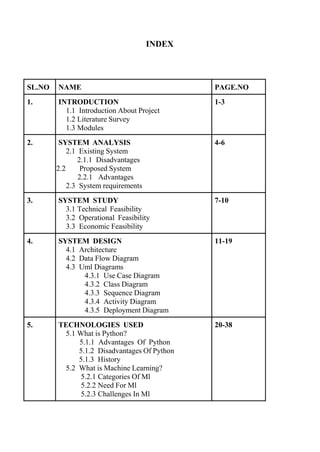
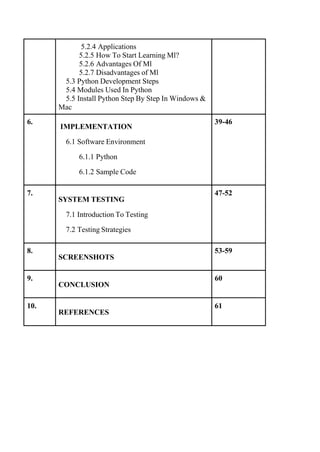
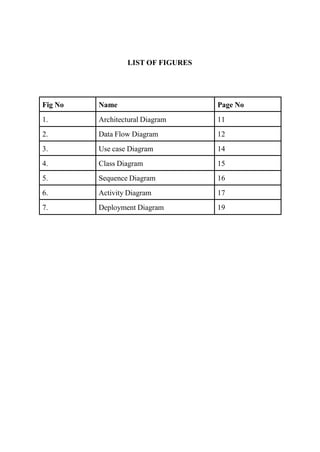
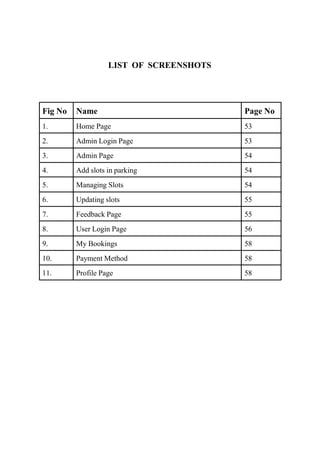
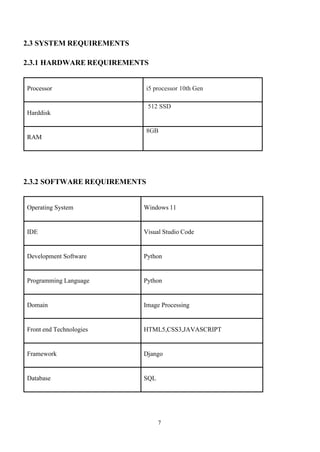
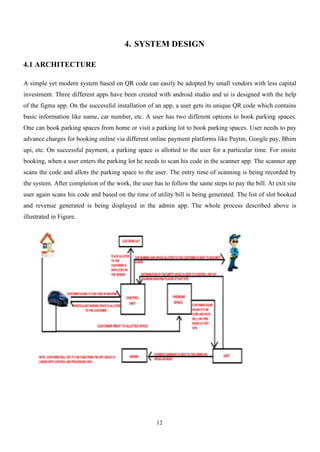
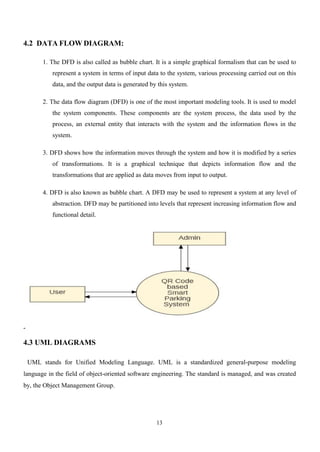
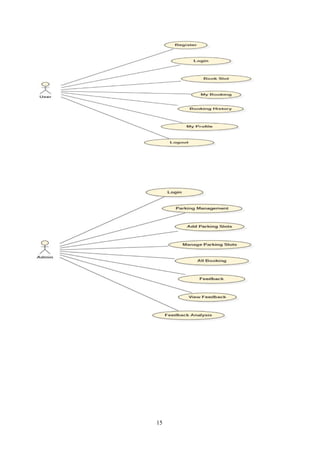
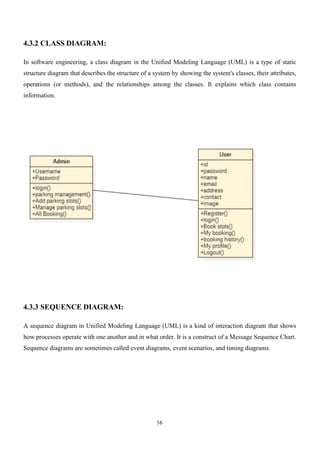
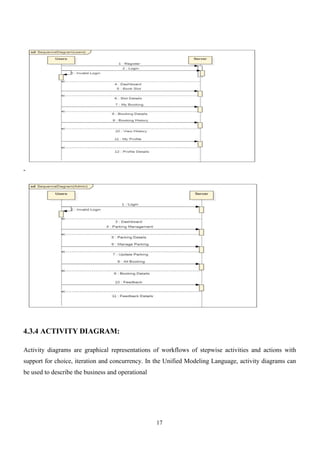
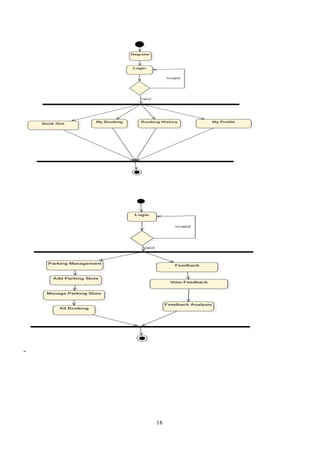
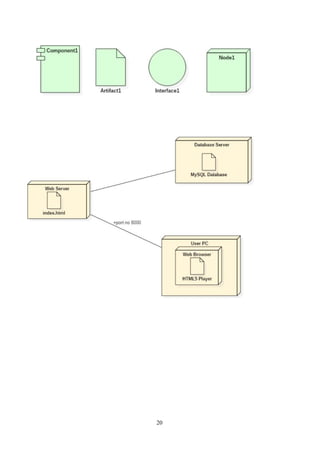
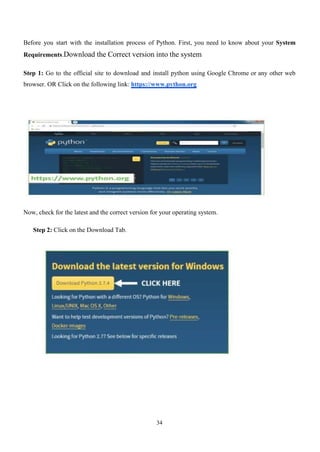
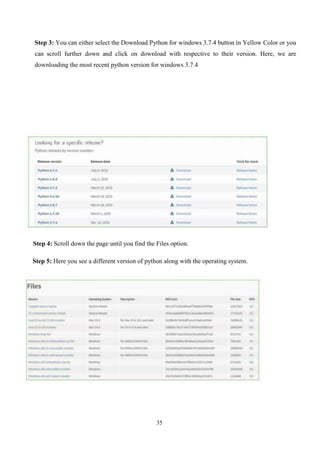
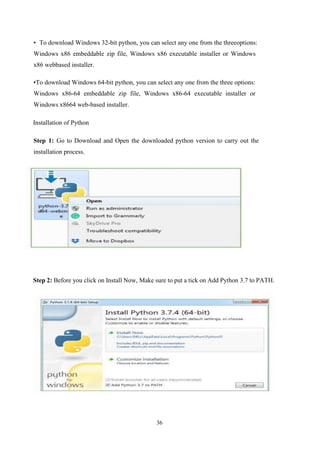
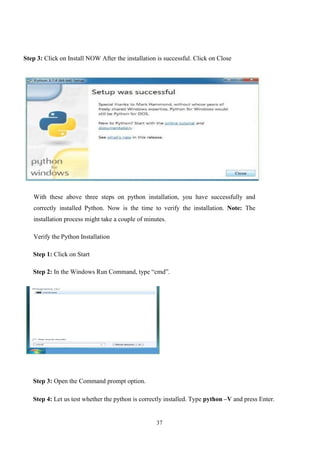
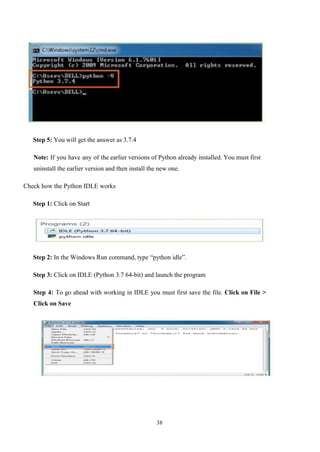
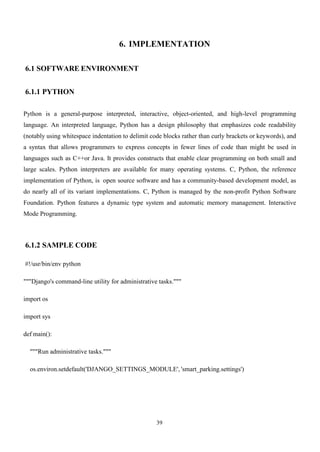
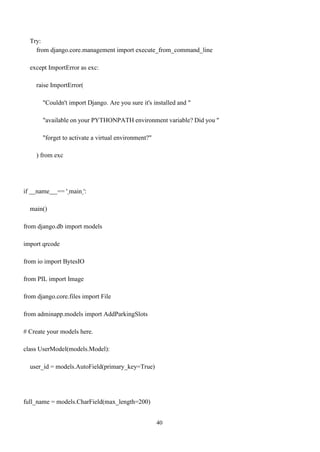
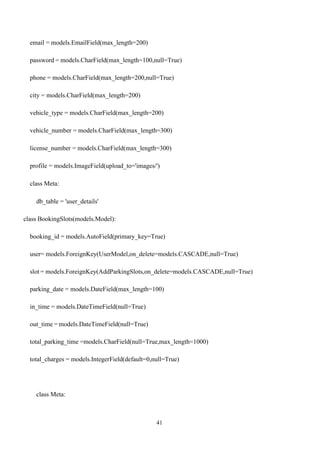
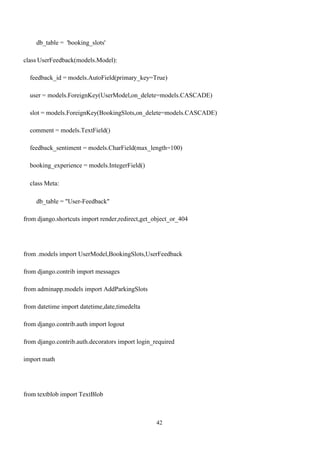
![43
import requests
from django.utils.crypto import get_random_string
from django.core.mail import EmailMultiAlternatives
from smart_parking.settings import DEFAULT_FROM_EMAIL
import random
# Create your views here
def user_registration(request):
if request.method == "POST" and 'profile' in request.FILES:
full_name = request.POST.get('name')
email = request.POST.get('email')
# password = request.POST.get('password')
phone = request.POST.get('phone')
city = request.POST.get('city')
vehicle_type = request.POST.get('vehicle_type')
vehicle_number = request.POST.get('vehicle_number')
license_number = request.POST.get('license_number')
profile = request.FILES['profile']
chars =
'01234567899876543210112233445566778899ABCDEFGHIJKLMNOPQRSTUVWXYZabcdefghijklm
nopqrstuvwxyz'
phone = phone,](https://image.slidesharecdn.com/ijeee-qrcodebasedsmartparkingsystem-250221125527-3c58277b/85/IJEEE-QR-CODE-BASED-SMART-PARKINGSYSTEM-pdf-51-320.jpg)
![44
city = city,
vehicle_type = vehicle_type,
vehicle_number = vehicle_number,
license_number = license_number,
profile = profile
)
mail =data.email
html_content = f'Dear Customer,Your Login Password is :{data.password}'
from_mail = DEFAULT_FROM_EMAIL
to_mail = [mail]
try:
print(mail)
message = EmailMultiAlternatives('Authentication Password is',html_content,from_mail,to_mail)
message.attach_alternative(html_content, 'text/html')
if message.send():
print(message)
# messages.success(request,'password sent successfully')
messages.error(request, 'there is a problem try again '
# return redirect('registration')
print(user_password,'this')](https://image.slidesharecdn.com/ijeee-qrcodebasedsmartparkingsystem-250221125527-3c58277b/85/IJEEE-QR-CODE-BASED-SMART-PARKINGSYSTEM-pdf-52-320.jpg)
![45
url = "https://www.fast2sms.com/dev/bulkV2”
# create a dictionary
my_data = {
'sender_id': 'FSTSMS',
'message': 'Dear Developer,Your Authentication Password is :'+str(data.password),
'language': 'english',
'route': 'q',
'numbers':data.phone,
}
print(my_data,'l')
# create a dictionary
headers = {
return render(request,'user/user-myprofile.html',context)
def user_feedback(request,id):
user_id = request.session['user_id']
user = UserModel.objects.get(pk=user_id)
slot = BookingSlots.objects.get(pk=id)
if request.method == 'POST':](https://image.slidesharecdn.com/ijeee-qrcodebasedsmartparkingsystem-250221125527-3c58277b/85/IJEEE-QR-CODE-BASED-SMART-PARKINGSYSTEM-pdf-53-320.jpg)
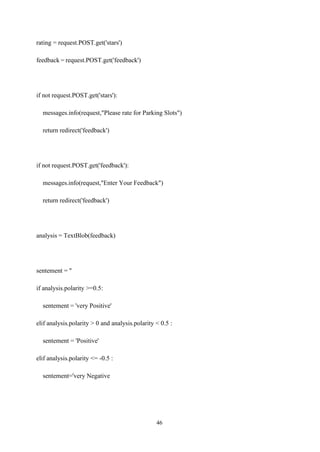
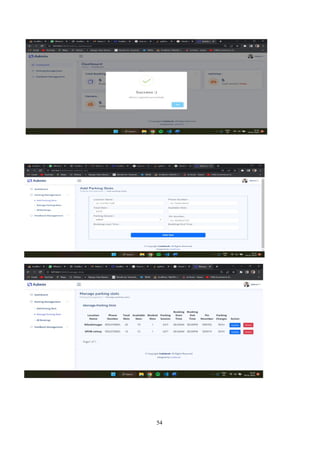
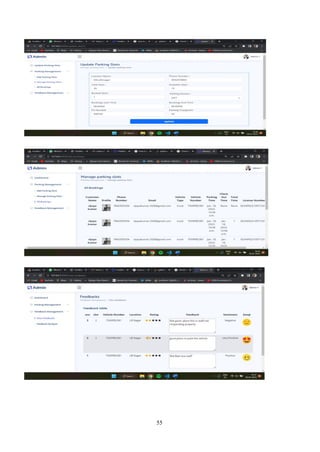
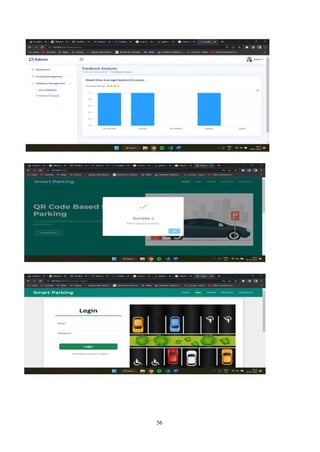
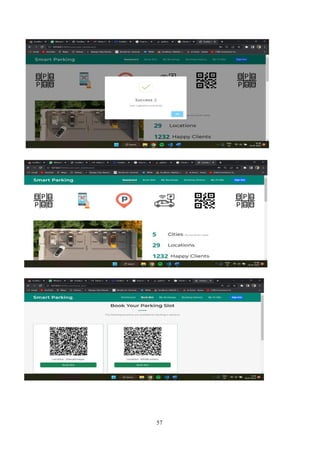
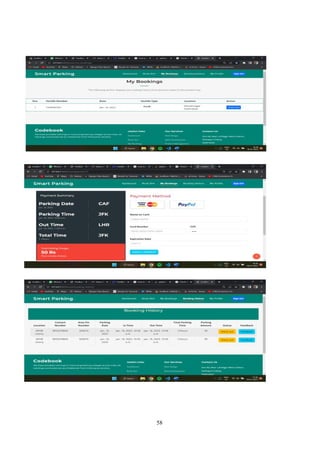
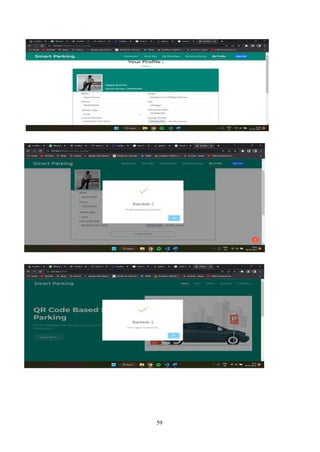
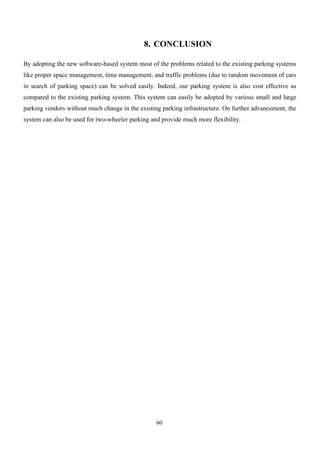
![61
9. REFERENCES
[1] Junhuai Li and Yang An on “Smartphone-based Car-Searching system for Parking lot” in 2016 IEEE
11th Conference on Industrial Electronics and Applications (ICIEA) on 24th October 2016.
[2] M.Praveen and V.Harini on “NB-IOT based Smart Parking System” in the IEEE 6th International
Conference on smart structures and systems ICSSS 2019 on 28th October 2019.
[3] https://www.figma.com/file/kfzxyQV16UmSEmMZ51VPYQ/Untitled? node-id=0%3A1 – GUI
Designing.
[4] https://wallpaperscraft.com/download/parking_cars_underground_1314 54/1920x1080 - Wallpaper
and Background Designing.
[5] https://www.rollapp.com/app/androidstudio- App Development.
[6] https://www.youtube.com/watch?v=3q3FV65ZrUs – UI Designing Tricks and Tips.
[7] B.D. Deore, S. R. Kurkute, Pooja Bhalerao, Kajal Barve on “IOT based Car Parking System using
Android App” in international journal of advanced research in computer and communication engineering
vol 7 issue 3 on March 2018.
[8] Android Studio IDE Quick Reference: A Pocket Guide to Android Studio Development Paperback –
by Ted Hag.](https://image.slidesharecdn.com/ijeee-qrcodebasedsmartparkingsystem-250221125527-3c58277b/85/IJEEE-QR-CODE-BASED-SMART-PARKINGSYSTEM-pdf-69-320.jpg)


![FAKE SOCIAL MEDIA ACCOUNT DETECTION DOCUMENTATION[6][1] (1).docx](https://cdn.slidesharecdn.com/ss_thumbnails/fakesocialmediaaccountdetectiondocumentation611-250830044225-8915adf4-thumbnail.jpg?width=640&height=640&fit=bounds)


