Towards ergonomic guidelines integration
 within graphical interface controls for the
       evaluation of the interactive system
                Application to a transport network Information Support System


Selem Charfi, Abdelwaheb Trabelsi, Houcine Ezzedine,
Christophe Kolski


                               Hammamet May, 31th 2011
Plan
    1.   Introduction

    2.   The interactive systems evaluation based on
         ergonomic guidelines validation

    3.   Ergonomic guidelines integration within GUI
         controls

    4.   Application to transport network Information
         Support System (ISS)

    5.   Conclusion & Research Perspectives
2                                          31/10/2012
1- Introduction
       The evaluation process is important => good
        ergonomic quality interactive system
       Failures non-tolerant interactive system (monitoring
        system)
       Evaluation methods are various
           Interactive system life cycle phase
           Cost (in material resources and evaluation time)
       Quality factors : the transportation system evaluation
           The utility
           The usability


    3                                                31/10/2012
1- Introduction
       HCI evaluation method operates on a given principle.
           User actions analysis
               electronic informer: MESIA, EMA, Sherlock, Usine ...

           Conversing with users (designers) => identify usability
            problems (Dedicated questionnaires, Usability focused interviews ,
            Cognitive Walkthrough method, …)

           Early evaluation based on oriented use traces
           Validating ergonomic guidelines in the HCI:
               ERGOVAL, Sierra, EvalAccess, Destine

    4                                                       31/10/2012
2- The interactive systems evaluation based
on ergonomic guidelines validation
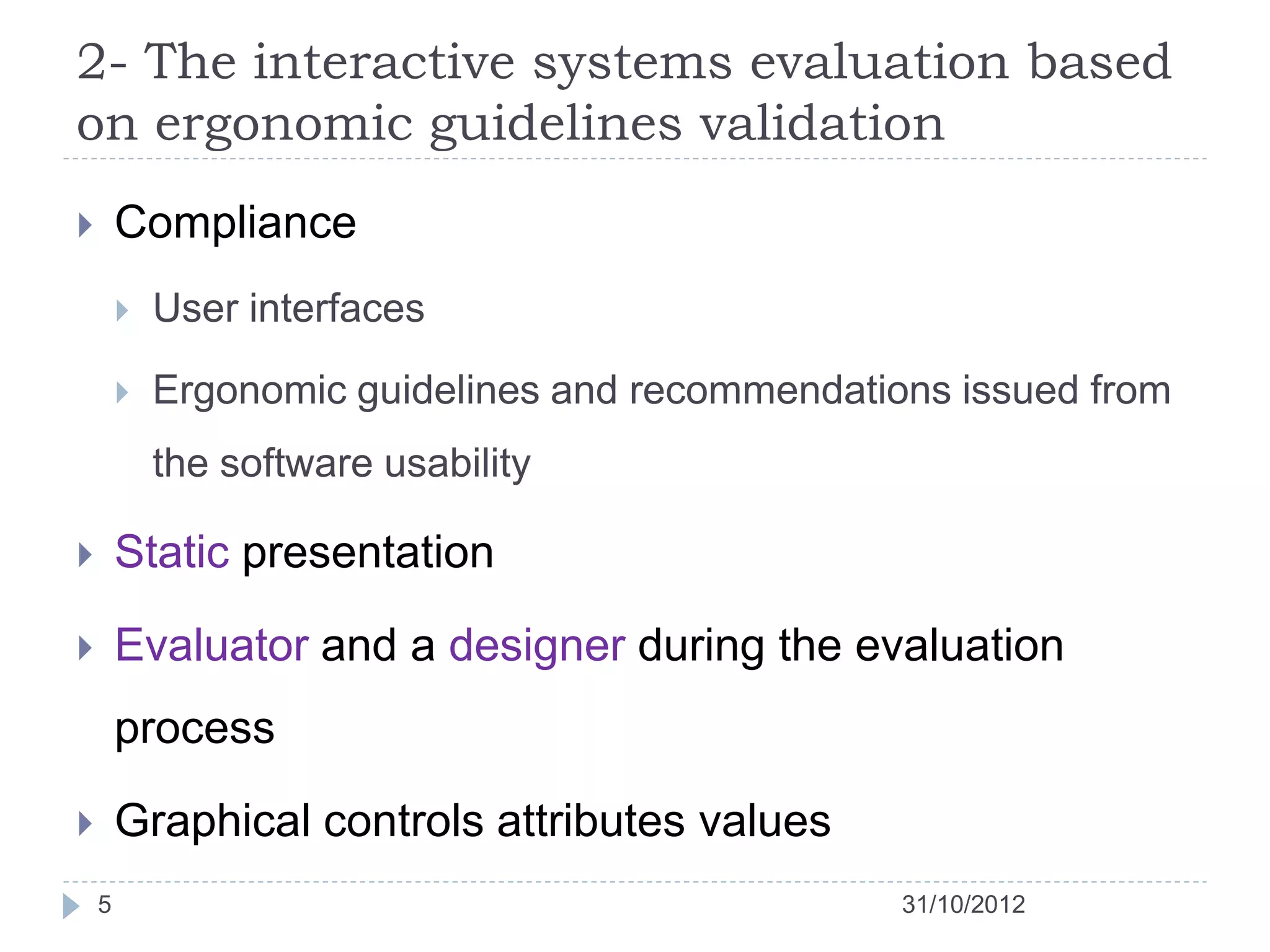
       Compliance
           User interfaces

           Ergonomic guidelines and recommendations issued from
            the software usability

       Static presentation

       Evaluator and a designer during the evaluation
        process

       Graphical controls attributes values
    5                                             31/10/2012
2- The interactive systems evaluation based
on ergonomic guidelines validation
       Provided services
        1.   Criticism or recommendations

        2.   Assistance in the interactive systems evaluation

        3.   Ergonomic guidelines violations

       Ivory and Hearst => automation level

                                    Capture
                                   Analysis
                                   Criticism


    6                                                31/10/2012
3- Ergonomic guidelines integration within
GUI controls
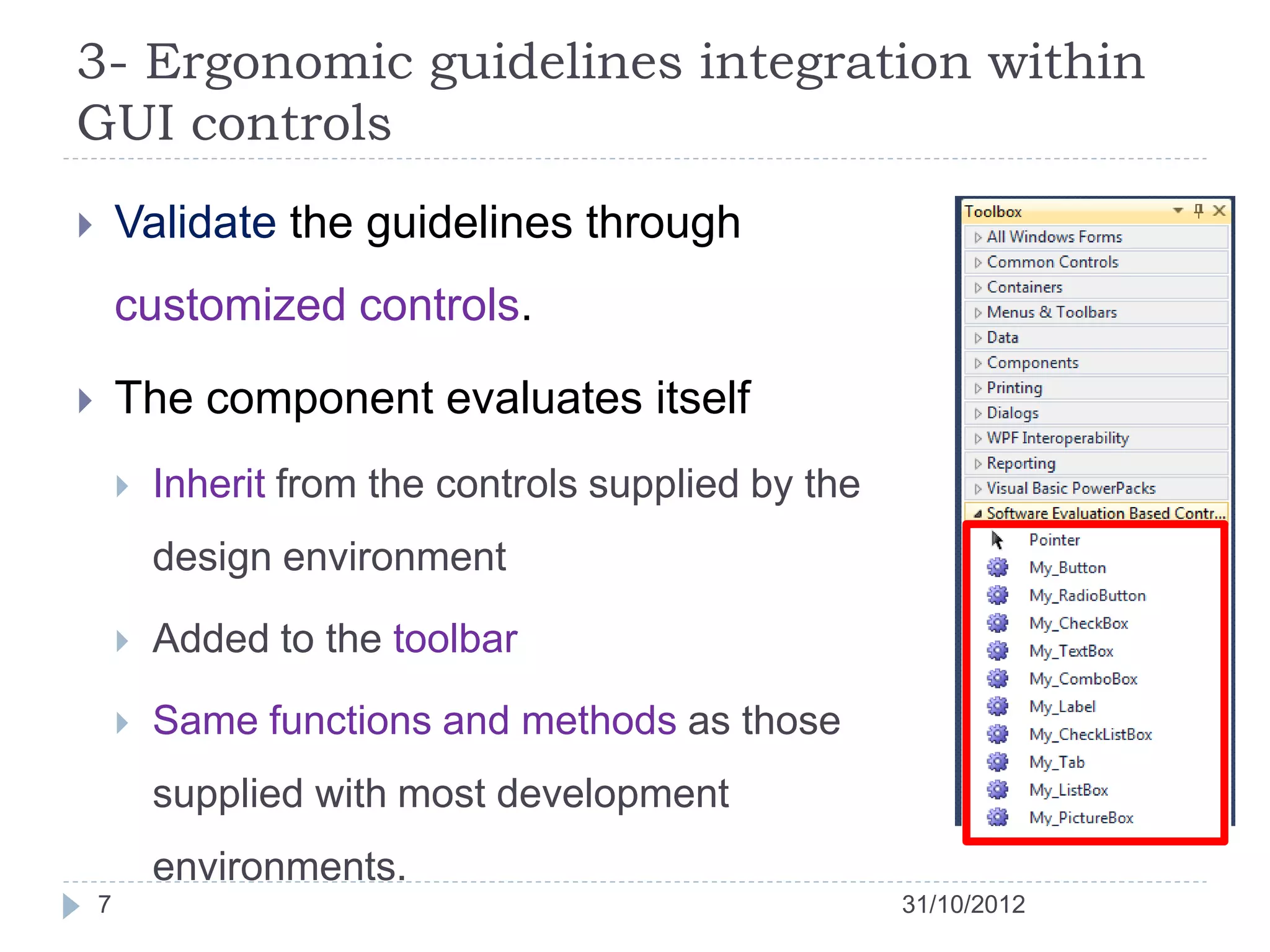
       Validate the guidelines through
        customized controls.

       The component evaluates itself
           Inherit from the controls supplied by the
            design environment

           Added to the toolbar

           Same functions and methods as those
            supplied with most development
            environments.
    7                                                   31/10/2012
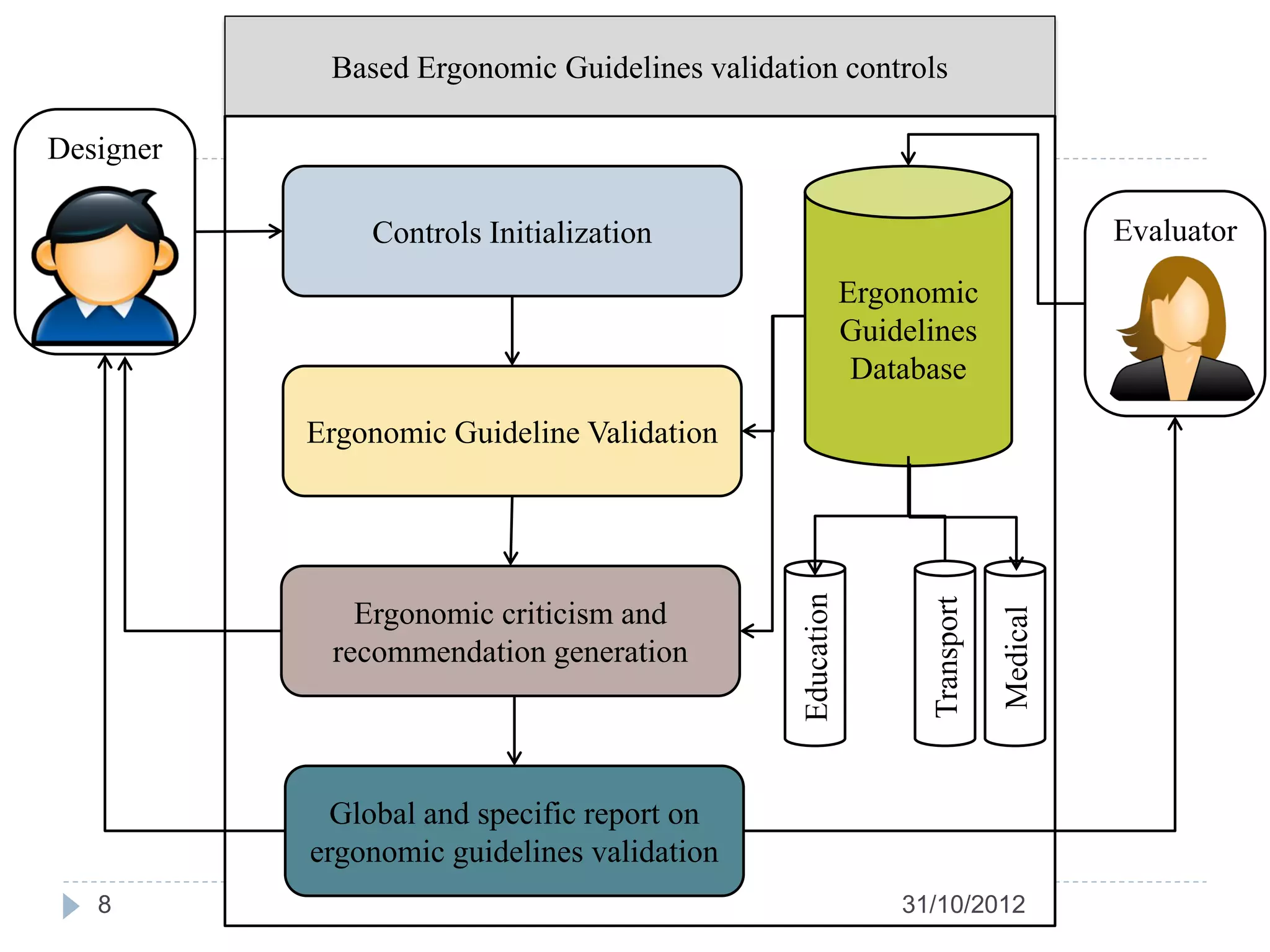
Based Ergonomic Guidelines validation controls

Designer

               Controls Initialization                                                 Evaluator
                                                           Ergonomic
                                                           Guidelines
                                                            Database

           Ergonomic Guideline Validation


                                               Education


                                                                 Transport
              Ergonomic criticism and


                                                                             Medical
            recommendation generation


             Global and specific report on
           ergonomic guidelines validation
   8                                                           31/10/2012
3- Ergonomic guidelines integration within
    GUI controls
   Advantage of the proposed approach
           Easy to use in the evaluation process

           The interface designer does not have to manually check the
            compliance of controls to the ergonomic guidelines

           Can be applied in the interface design at early stages

           Improvement suggestions are proposed to the designer
            automatically

           Assistance is provided in parallel with the interface design
            phase
        9                                                31/10/2012
3- Ergonomic guidelines integration within
GUI controls
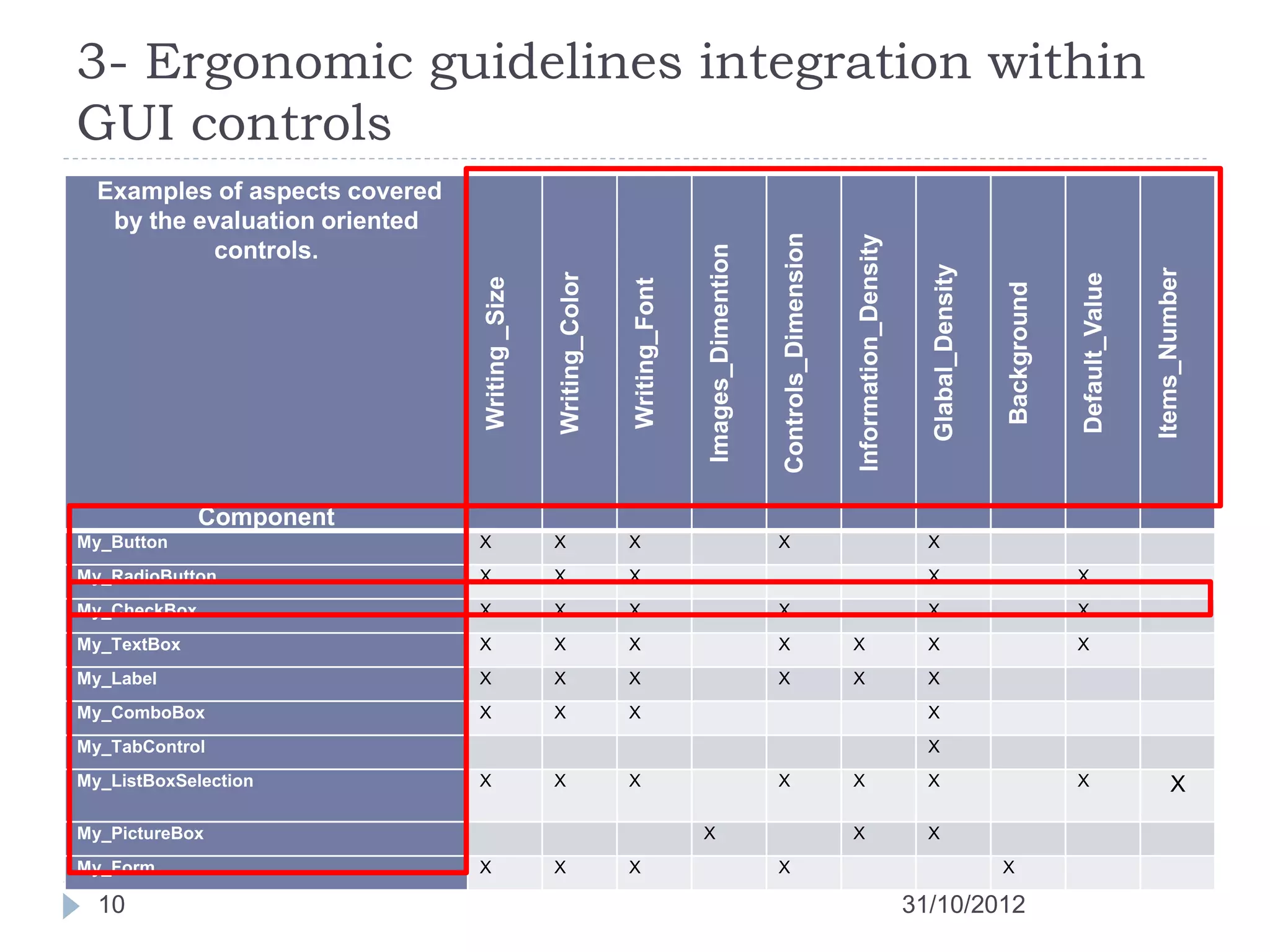
  Examples of aspects covered
   by the evaluation oriented


                                                                                                  Controls_Dimension


                                                                                                                       Information_Density
            controls.


                                                                               Images_Dimention


                                                                                                                                               Glabal_Density


                                                                                                                                                                                             Items_Number
                                                Writing_Color


                                                                                                                                                                             Default_Value
                                Writing _Size


                                                                Writing_Font


                                                                                                                                                                Background
              Component
My_Button                       X               X               X                                 X                                            X
My_RadioButton                  X               X               X                                                                              X                             X
My_CheckBox                     X               X               X                                 X                                            X                             X
My_TextBox                      X               X               X                                 X                    X                       X                             X
My_Label                        X               X               X                                 X                    X                       X
My_ComboBox                     X               X               X                                                                              X
My_TabControl                                                                                                                                  X
My_ListBoxSelection             X               X               X                                 X                    X                       X                             X                     X

My_PictureBox                                                                  X                                       X                       X
My_Form                         X               X               X                                 X                                                             X

  10                                                                                                                                         31/10/2012
3- Ergonomic guidelines integration within
GUI controls
public class My_Button : System.Windows.Forms.Button
{
     ArrayListError_List = new ArrayList ();
     struct Evaluation
     {string error; string recommendation;}
   public int density = 0;
   public Boutton(): base ()
   {
   writing_size (Errors_List, this.Controls[0].Size.ToString());

   writing_font (Errors_List, this.Controls[0].Font.ToString());

   gloabl_density(Errors_list, density);
   ...
   if (Errors_List.Count>0)
          { string errors="";
          string recommendation = "";
          for (int i=0; i<Errors_List.Count;i++)
          { errors +=Errors_List[i].error + 'n';
          recommendation+=Errors_List[i].recommendation+'n';
          …
          }
Evaluation_Form EF= new Evaluation_For(errors, recommendations);
EF.show();
   }
}
11                                                             31/10/2012
4- Application to transport network
Information Support System (ISS)


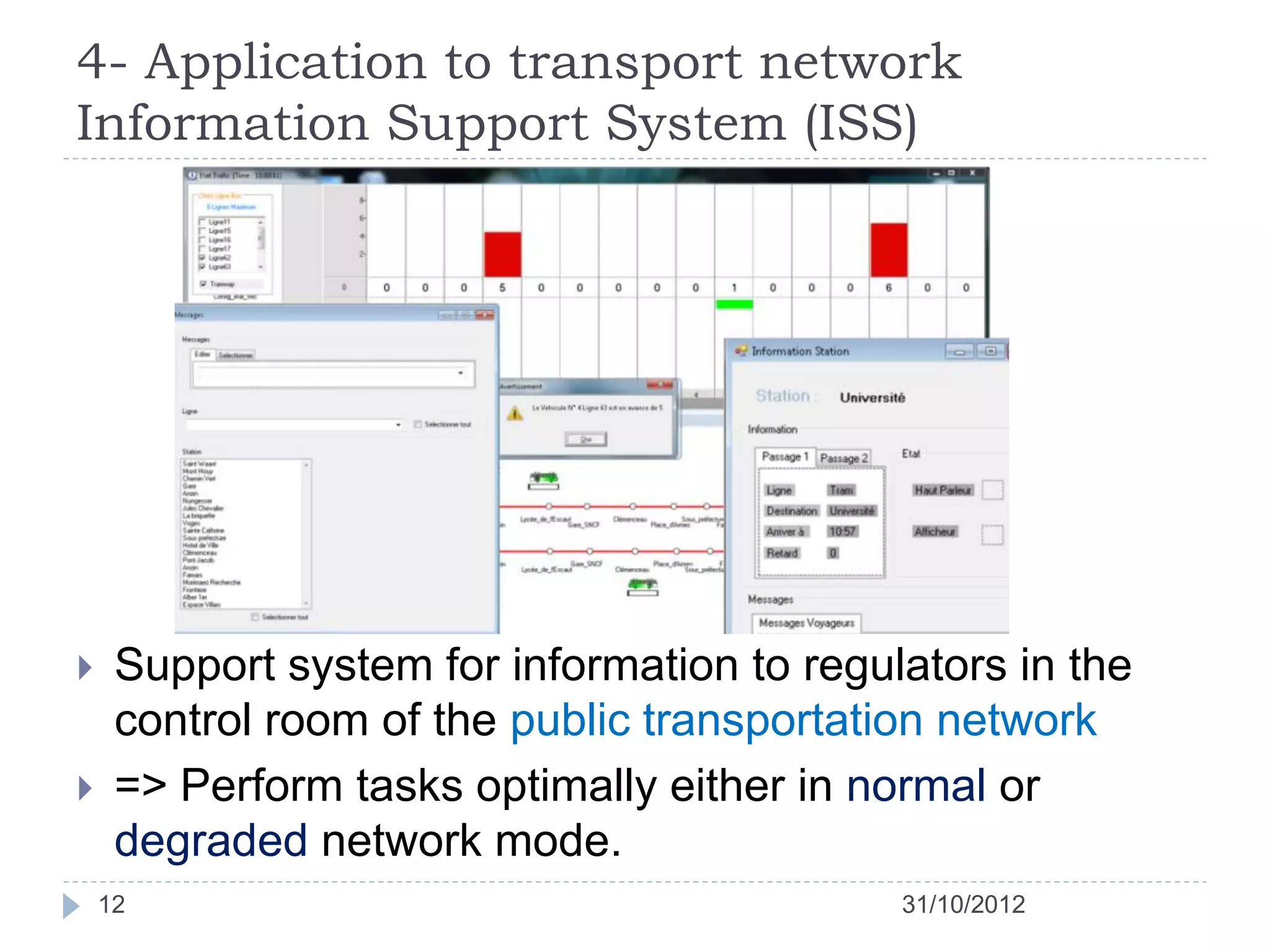
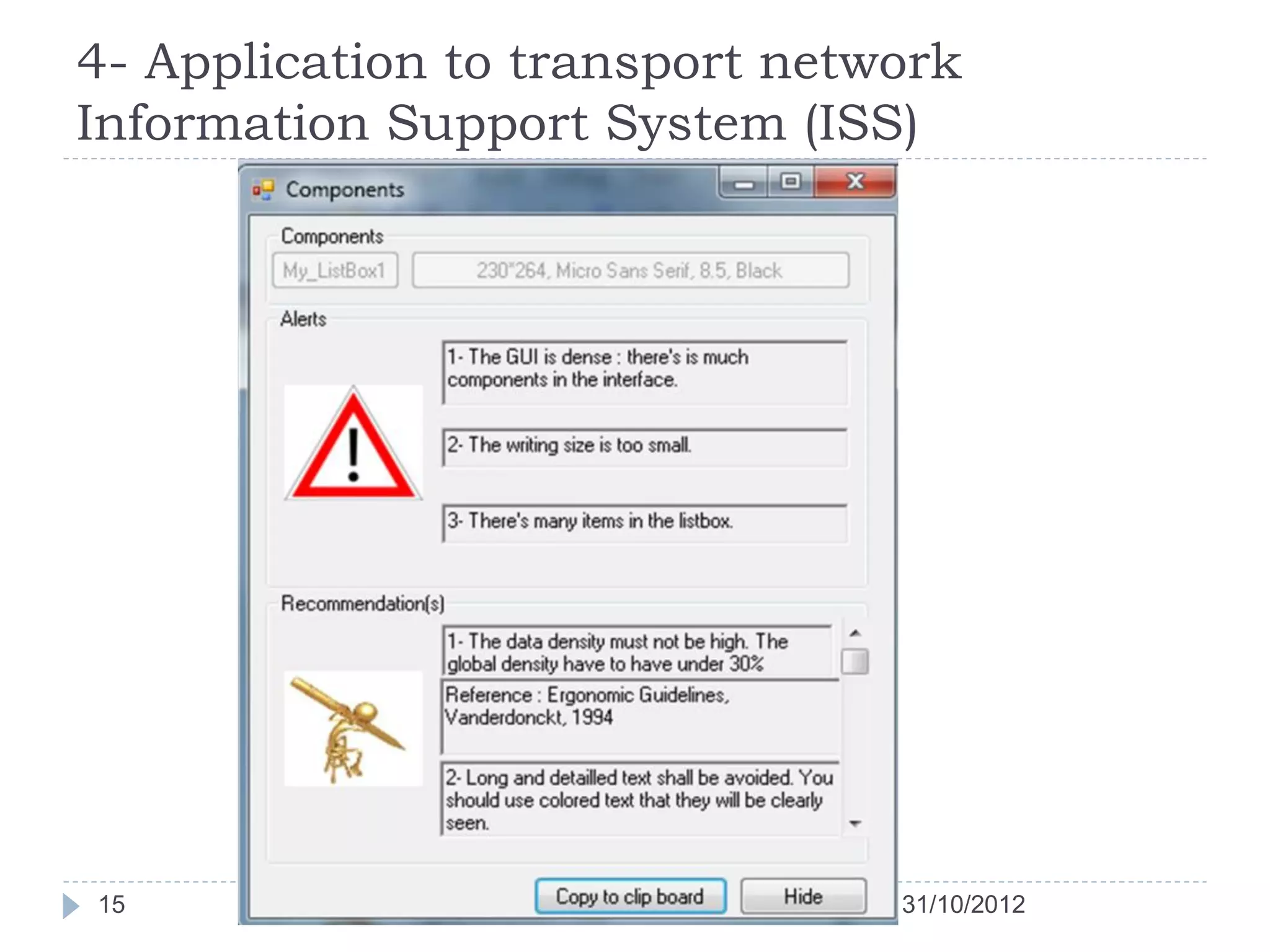
    Support system for information to regulators in the
     control room of the public transportation network
    => Perform tasks optimally either in normal or
     degraded network mode.
    12                                      31/10/2012
4- Application to transport network
Information Support System (ISS)


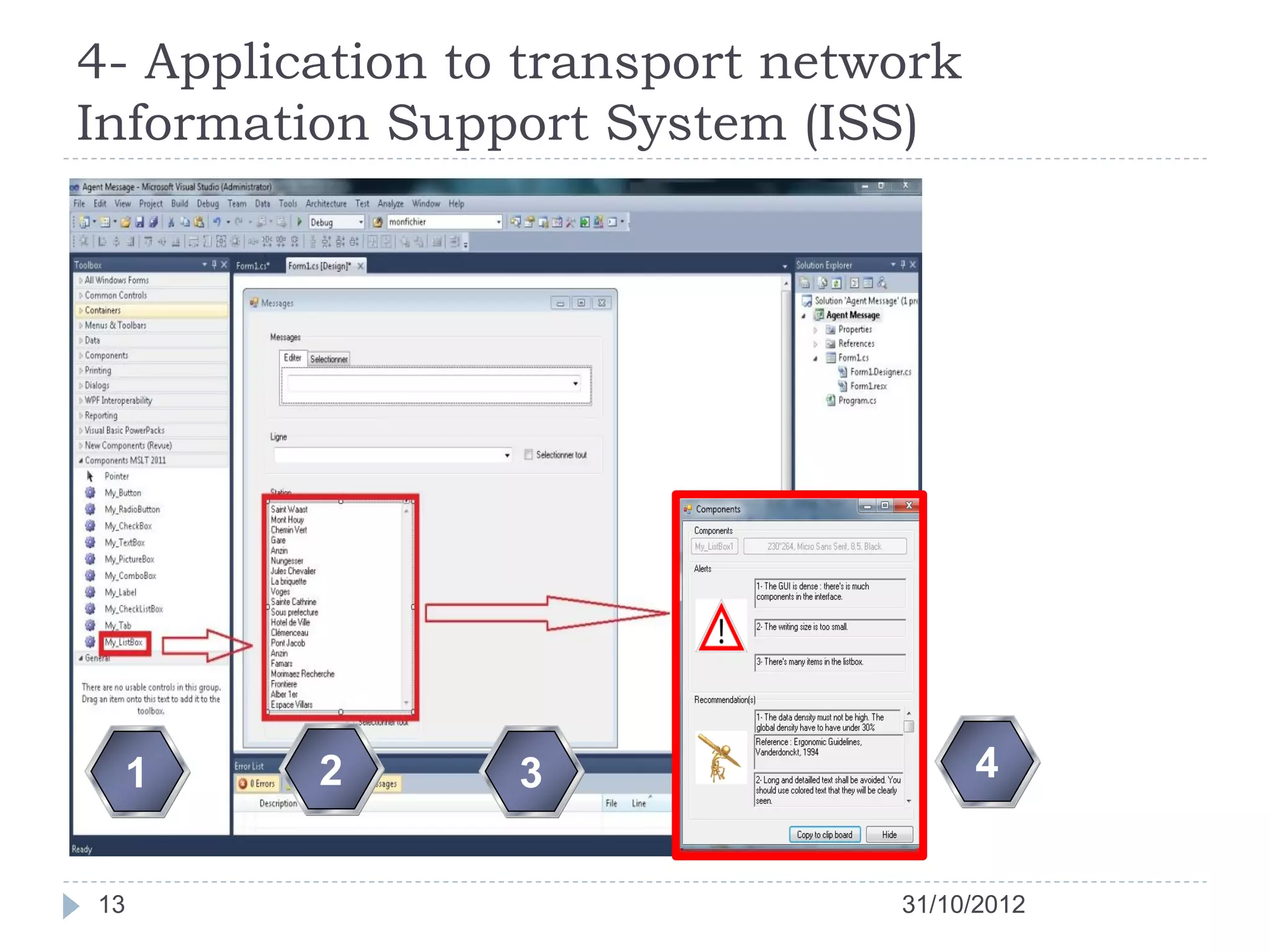
 1       2       3                    4


13                              31/10/2012
4- Application to transport network
Information Support System (ISS)


14                              31/10/2012
4- Application to transport network
Information Support System (ISS)


15                              31/10/2012
5- Conclusion and research perspectives
    Interactive system ergonomic quality evaluation
    Proposal for the validation of ergonomic guidelines in
     graphical interfaces
        Easy to apply.
        HCI Automated evaluation
        Built on graphical controls
        Inspect their own validity in relation to ergonomic guidelines.

    Technically validated by an experimental evaluation of a
     passenger Information Support System.

    16                                                  31/10/2012
5- Conclusion and research perspectives
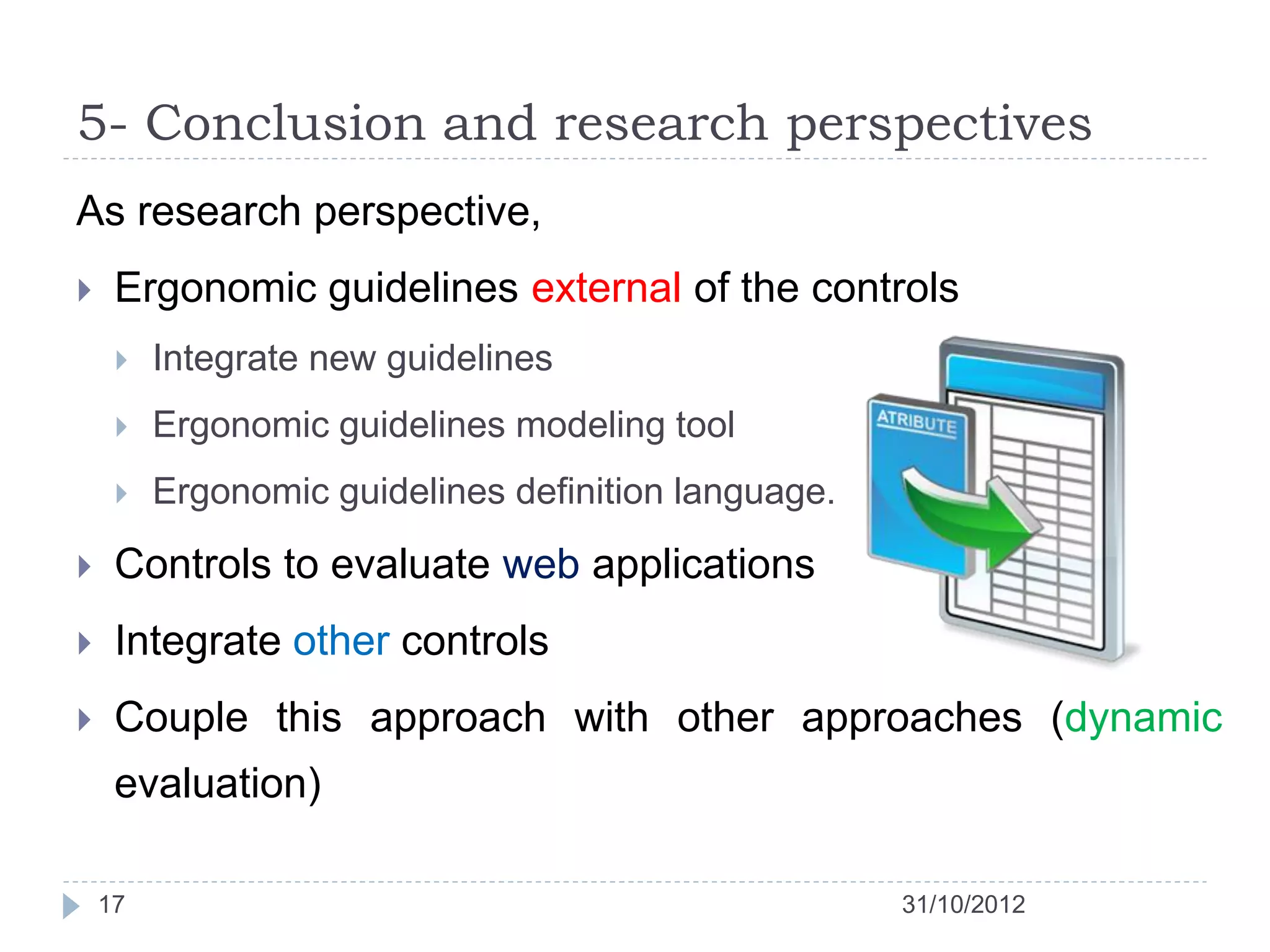
As research perspective,
    Ergonomic guidelines external of the controls
        Integrate new guidelines
        Ergonomic guidelines modeling tool
        Ergonomic guidelines definition language.

    Controls to evaluate web applications
    Integrate other controls
    Couple this approach with other approaches (dynamic
     evaluation)

    17                                               31/10/2012
We welcome your question,
suggestions and comments


18                          31/10/2012
Towards ergonomic guidelines integration
 within graphical interface controls for the
       evaluation of the interactive system
                Application to a transport network Information Support System

Selem Charfi, Abdelwaheb Trabelsi, Houcine Ezzedine,
Christophe Kolski


                               Hammamet May, 31th 2011

Towards ergonomic guidelines integration within graphical interface controls for the evaluation of the interactive system

  • 1.
    Towards ergonomic guidelinesintegration within graphical interface controls for the evaluation of the interactive system Application to a transport network Information Support System Selem Charfi, Abdelwaheb Trabelsi, Houcine Ezzedine, Christophe Kolski Hammamet May, 31th 2011
  • 2.
    Plan 1. Introduction 2. The interactive systems evaluation based on ergonomic guidelines validation 3. Ergonomic guidelines integration within GUI controls 4. Application to transport network Information Support System (ISS) 5. Conclusion & Research Perspectives 2 31/10/2012
  • 3.
    1- Introduction  The evaluation process is important => good ergonomic quality interactive system  Failures non-tolerant interactive system (monitoring system)  Evaluation methods are various  Interactive system life cycle phase  Cost (in material resources and evaluation time)  Quality factors : the transportation system evaluation  The utility  The usability 3 31/10/2012
  • 4.
    1- Introduction  HCI evaluation method operates on a given principle.  User actions analysis  electronic informer: MESIA, EMA, Sherlock, Usine ...  Conversing with users (designers) => identify usability problems (Dedicated questionnaires, Usability focused interviews , Cognitive Walkthrough method, …)  Early evaluation based on oriented use traces  Validating ergonomic guidelines in the HCI:  ERGOVAL, Sierra, EvalAccess, Destine 4 31/10/2012
  • 5.
    2- The interactivesystems evaluation based on ergonomic guidelines validation  Compliance  User interfaces  Ergonomic guidelines and recommendations issued from the software usability  Static presentation  Evaluator and a designer during the evaluation process  Graphical controls attributes values 5 31/10/2012
  • 6.
    2- The interactivesystems evaluation based on ergonomic guidelines validation  Provided services 1. Criticism or recommendations 2. Assistance in the interactive systems evaluation 3. Ergonomic guidelines violations  Ivory and Hearst => automation level Capture Analysis Criticism 6 31/10/2012
  • 7.
    3- Ergonomic guidelinesintegration within GUI controls  Validate the guidelines through customized controls.  The component evaluates itself  Inherit from the controls supplied by the design environment  Added to the toolbar  Same functions and methods as those supplied with most development environments. 7 31/10/2012
  • 8.
    Based Ergonomic Guidelinesvalidation controls Designer Controls Initialization Evaluator Ergonomic Guidelines Database Ergonomic Guideline Validation Education Transport Ergonomic criticism and Medical recommendation generation Global and specific report on ergonomic guidelines validation 8 31/10/2012
  • 9.
    3- Ergonomic guidelinesintegration within GUI controls  Advantage of the proposed approach  Easy to use in the evaluation process  The interface designer does not have to manually check the compliance of controls to the ergonomic guidelines  Can be applied in the interface design at early stages  Improvement suggestions are proposed to the designer automatically  Assistance is provided in parallel with the interface design phase 9 31/10/2012
  • 10.
    3- Ergonomic guidelinesintegration within GUI controls Examples of aspects covered by the evaluation oriented Controls_Dimension Information_Density controls. Images_Dimention Glabal_Density Items_Number Writing_Color Default_Value Writing _Size Writing_Font Background Component My_Button X X X X X My_RadioButton X X X X X My_CheckBox X X X X X X My_TextBox X X X X X X X My_Label X X X X X X My_ComboBox X X X X My_TabControl X My_ListBoxSelection X X X X X X X X My_PictureBox X X X My_Form X X X X X 10 31/10/2012
  • 11.
    3- Ergonomic guidelinesintegration within GUI controls public class My_Button : System.Windows.Forms.Button { ArrayListError_List = new ArrayList (); struct Evaluation {string error; string recommendation;} public int density = 0; public Boutton(): base () { writing_size (Errors_List, this.Controls[0].Size.ToString()); writing_font (Errors_List, this.Controls[0].Font.ToString()); gloabl_density(Errors_list, density); ... if (Errors_List.Count>0) { string errors=""; string recommendation = ""; for (int i=0; i<Errors_List.Count;i++) { errors +=Errors_List[i].error + 'n'; recommendation+=Errors_List[i].recommendation+'n'; … } Evaluation_Form EF= new Evaluation_For(errors, recommendations); EF.show(); } } 11 31/10/2012
  • 12.
    4- Application totransport network Information Support System (ISS)  Support system for information to regulators in the control room of the public transportation network  => Perform tasks optimally either in normal or degraded network mode. 12 31/10/2012
  • 13.
    4- Application totransport network Information Support System (ISS) 1 2 3 4 13 31/10/2012
  • 14.
    4- Application totransport network Information Support System (ISS) 14 31/10/2012
  • 15.
    4- Application totransport network Information Support System (ISS) 15 31/10/2012
  • 16.
    5- Conclusion andresearch perspectives  Interactive system ergonomic quality evaluation  Proposal for the validation of ergonomic guidelines in graphical interfaces  Easy to apply.  HCI Automated evaluation  Built on graphical controls  Inspect their own validity in relation to ergonomic guidelines.  Technically validated by an experimental evaluation of a passenger Information Support System. 16 31/10/2012
  • 17.
    5- Conclusion andresearch perspectives As research perspective,  Ergonomic guidelines external of the controls  Integrate new guidelines  Ergonomic guidelines modeling tool  Ergonomic guidelines definition language.  Controls to evaluate web applications  Integrate other controls  Couple this approach with other approaches (dynamic evaluation) 17 31/10/2012
  • 18.
    We welcome yourquestion, suggestions and comments 18 31/10/2012
  • 19.
    Towards ergonomic guidelinesintegration within graphical interface controls for the evaluation of the interactive system Application to a transport network Information Support System Selem Charfi, Abdelwaheb Trabelsi, Houcine Ezzedine, Christophe Kolski Hammamet May, 31th 2011