WHITE PAPER
Identifying Common
Reliability/Stability
Problems Caused by
File Fragmentation
Think Faster.™ Visit us at Condusiv.com
CT Reliability-Stability WP 12-03-01.indd 1 3/2/12 5:19 PM
IDENTIFYING COMMON RELIABILITY/STABILITY PROBLEMS
CAUSED BY FILE FRAGMENTATION ii
Table of Contents
INTRODUCTION	1
AN OVERVIEW OF THE PROBLEM 	 1
RELIABILITY AND STABILITY ISSUES TRACEABLE
TO FILE FRAGMENTATION	 2
	 1. 	 Crashes and system hangs 	 3
	 2. 	 Slow backup time and aborted backup 	 5
	 3. 	 File corruption and data loss 	 6
	 4. 	 Boot-up issues 	 7
	 5. 	 Errors in programs 	 7
	 6. 	 RAM use and cache problems 	 8
	 7. 	 Hard drive failures 	 9
CONTIGUOUS FILES = GREATER UP TIME	 10
BIBLIOGRAPHY	11
CT Reliability-Stability WP 12-03-01.indd 2 3/2/12 5:19 PM
IDENTIFYING COMMON RELIABILITY/STABILITY PROBLEMS
CAUSED BY FILE FRAGMENTATION 1
Introduction
Over the years, numerous manufacturers, third party analysts and labs have reported on the
effects of disk/file fragmentation on system speed and performance. Defragmentation has also
gained recognition for its critical role in addressing issues of system reliability and improved
uptime, particularly since Microsoft’s decision to include a defragmentation utility in the Windows
2000 and newer operating systems.
In this white paper, we explain some of the most common reliability and downtime phenomena
associated with fragmentation, and the technical reasons behind them. This includes a discussion
of each of the most common occurrences documented by our R&D labs, customers (empirical
results presented), as well as others, in recent years. At the end of this report, there is a short
bibliography providing links to references or Knowledge Base articles.
An Overview of the Problem
Having all program and data files stored in contiguous form on the hard drive is a key factor in
keeping a system stable and performing at peak efficiency. Though unavoidable, the moment a file
is broken into pieces and scattered across a drive it opens the door to a host of stability/reliability
issues. Having even just a few key files fragmented can lead to crashes, conflicts and errors.
The principle of fragmentation’s impact on system or application reliability is the timing-out of a
requestor or service provider in collecting/reassembling fragmented data. This principle holds true
for both IP datagram1
fragmentation and file/disk fragmentation.
Many system and application breakage points can be defined as “exerted stress on buffers to
the point of overflow/overrun.” Denial of Service (DoS) attacks are well documented examples of
exploiting IP datagrams, but far less information abounds for reliability considerations in the case
of file objects. A good overview of the affect of stress when requesting file objects comes from a
Microsoft Knowledge Base article which states “The Server service cannot process the requested
network I/O2
items to the hard disk quickly enough to prevent the Server service from running out
of resources.”
Disk fragmentation is often the “straw that broke the camel’s back” when noting issues of stability
or reliability. Stressed I/O activity, compounded by fragmentation can expose faulty device drivers
or file filters that may otherwise operate effectively (in non-fragmented environments). The
reliability of third party applications is highly dependent on the degree to which those applications
can accommodate bottlenecks, such as in disk subsystems.
1. IP Datagram is the fundamental unit of data transmitted across internetworks using the Internet Protocol (IP).
2. I/O is shorthand for Input/Output; which refers to data transfer between devices in a computer system. An adjective such as network or disk may prepend “I/O” to
specify a particular device type.
Disk fragmentation is
often the “straw that broke
the camel’s back” when
noting issues of stability
or reliability. Stressed I/O
activity, compounded by
fragmentation can expose
faulty device drivers or file
filters that may otherwise
operate effectively
(in nonfragmented
environments).
CT Reliability-Stability WP 12-03-01.indd 1 3/2/12 5:19 PM
IDENTIFYING COMMON RELIABILITY/STABILITY PROBLEMS
CAUSED BY FILE FRAGMENTATION 2
The point at which application or system stability is compromised is difficult, if not impossible, to
calculate. It is a combination of hardware and software and operations at the moment of instability.
A poorly written driver or file filter can be exposed in some environments but not in others, and the
amount of fragmentation required to reach “critical mass” on a specific file or files, will vary greatly
upon all the other variables involved.
This issue can be exampled by better understanding asynchronous I/O3
. Example: a Windows
application creates either an I/O completion port4, executes an overlapping completion routine5
,
or calls WaitForSingleObject/WaitForMultipleObjects6
APIs at the time of thread creation. In any
case where the wait state is exceeded (e.g., queued I/O is paged to disk), a failure can occur. As
suggested, low available memory (non-paged pool) can exacerbate failures as it re-introduces the
physical disk into the equation. In lieu of failures, extended queuing/waiting and proper exception
handling can mitigate issues, at the expense of lower performance (operations take longer) for the
application, or increased system resource requirements.
“The problem we were having was the server would get
so busy that it would stop processing I/O requests and
network traffic would just hang. Working with Microsoft and
Compaq we concluded it was due to fragmentation. When
we installed Diskeeper it resolved the problem overnight.”
– Mike N, System Administrator, John Deere
Failure to routinely address or understand fragmentation and its role in helping to cause these
problems results in increased IT staff workloads attempting to troubleshoot and identify the source
of problems. This frequently leads to such common and often unnecessary actions as reinstalling
software, re-imaging of hard drives, expensive replacement of hardware, an unnecessary “work-
around,” as well as overwork at the Help Desk. Forcing IT to work reactively on problems, increases
IT costs and adversely affects user productivity due to unacceptable levels of downtime.
Reliability and Stability Issues
Traceable to Disk Fragmentation
The most common problems caused by file fragmentation are:
1. Crashes and system hangs/freezes
2. Slow boot up and computers that won’t boot up
3. Slow backup times and aborted backup
4. File corruption and data loss
5. Errors in programs
6. RAM use and cache problems
7. Hard drive failures
3. Asynchronous I/O exists to compensate for variables that may prevent or eliminate the possibility of synchronous I/O (e.g. I/O is much slower than data processing).
The alternative to handling I/O asynchronously, which generally offers lower performance, is to “block” other I/O.
4. http://msdn.microsoft.com/library/default.asp?url=/library/en-us/fileio/fs/i_o_completion_ports.asp
5. http://windowssdk.msdn.microsoft.com/library/default.asp?url=/library/en-us/dllproc/base/getoverlappedresult.asp
6. http://msdn.microsoft.com/library/default.asp?url=/library/en-us/dllproc/base/waitformultipleobjects.asp
Failure to routinely
address or understand
fragmentation and its
role in helping to cause
these problems results in
increased IT staff workloads
attempting to troubleshoot
and identify the source of
problems.
CT Reliability-Stability WP 12-03-01.indd 2 3/2/12 5:19 PM
IDENTIFYING COMMON RELIABILITY/STABILITY PROBLEMS
CAUSED BY FILE FRAGMENTATION 3
1. CRASHES AND HANGS
There are many documented cases of errors and crashes on Windows and third party applications
caused by fragmentation. These types of errors include but are not limited to system hangs, time
outs, failure to load, failure to save data and in worse case blue-screens (where fragmentation
aggravates flawed device drivers).
Perhaps the most prevalent of these circumstances in modern systems is the Event ID 2021 and
2022 errors found on systems hosting data.
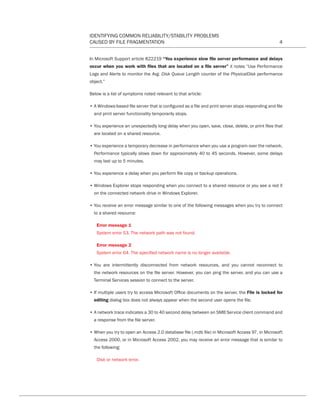
Event ID: 2021
Source: Srv
Description: Server was unable to create a work item n times in the last seconds seconds.
Event ID: 2022
Source: Srv
Description: Server was unable to find a free connection n times in the last seconds seconds.
In such circumstance the client requesting the data will return related errors along the lines of
Event ID 3013 or status code 1450.
Event ID: 3013
Source: Rdr
Description: The redirector has timed out to computer name.
It is important to note that in a corporate IP network bottlenecks may be incorrectly advertised
or diagnosed as network related bottlenecks. In reality, these bottlenecks often exist in the disk
subsystem on a remote system. The specification of Windows file sharing services (CIFS)7
is such
that file requests (supposedly only “valid” ones) will time out as the reliability of the network is a
variable that might otherwise cause undue and unnecessary wait requests (should a client be
disconnected). In reality, extended waits can be interpreted as dropped client connections.
An important clue to investigating fragmentation as a potential or lead contributor to reliability
issues are when recommendations are made (by a support article or support engineer) to measure
the following Physical Disk Counters related to Disk I/O:
• Average Disk Queue Length
• Average Disk Read Queue Length
• Average Disk Write Queue Length
• Average Disk Sec/Read
• Average Disk Sec/Transfer
• Average Disk Writes/Sec
• Split I/Os
MS TechNet article from the Microsoft titled “Examining and Tuning Disk Performance” notes
defragmentation as a primary solution to resolving disk bottlenecks such as those identified by the
above-detailed Physical Disk counters.
7. Common Internet File System is the file sharing protocol. It is an Application layer (OSI layer 7) protocol. More info: http://www.microsoft.com/mind/1196/cifs.asp
CT Reliability-Stability WP 12-03-01.indd 3 3/2/12 5:19 PM
IDENTIFYING COMMON RELIABILITY/STABILITY PROBLEMS
CAUSED BY FILE FRAGMENTATION 4
In Microsoft Support article 822219 “You experience slow file server performance and delays
occur when you work with files that are located on a file server” it notes “Use Performance
Logs and Alerts to monitor the Avg. Disk Queue Length counter of the PhysicalDisk performance
object.”
Below is a list of symptoms noted relevant to that article:
• A Windows-based file server that is configured as a file and print server stops responding and file
and print server functionality temporarily stops.
• You experience an unexpectedly long delay when you open, save, close, delete, or print files that
are located on a shared resource.
• You experience a temporary decrease in performance when you use a program over the network.
Performance typically slows down for approximately 40 to 45 seconds. However, some delays
may last up to 5 minutes.
• You experience a delay when you perform file copy or backup operations.
• Windows Explorer stops responding when you connect to a shared resource or you see a red X
on the connected network drive in Windows Explorer.
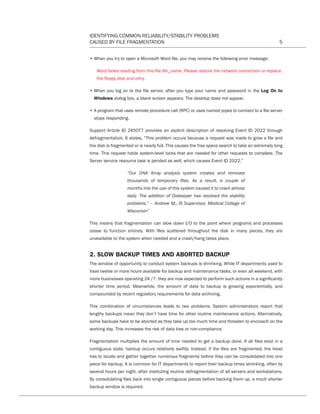
• You receive an error message similar to one of the following messages when you try to connect
to a shared resource:
Error message 1
System error 53. The network path was not found.
Error message 2
System error 64. The specified network name is no longer available.
• You are intermittently disconnected from network resources, and you cannot reconnect to
the network resources on the file server. However, you can ping the server, and you can use a
Terminal Services session to connect to the server.
• If multiple users try to access Microsoft Office documents on the server, the File is locked for
editing dialog box does not always appear when the second user opens the file.
• A network trace indicates a 30 to 40 second delay between an SMB Service client command and
a response from the file server.
• When you try to open an Access 2.0 database file (.mdb file) in Microsoft Access 97, in Microsoft
Access 2000, or in Microsoft Access 2002, you may receive an error message that is similar to
the following:
Disk or network error.
CT Reliability-Stability WP 12-03-01.indd 4 3/2/12 5:19 PM
IDENTIFYING COMMON RELIABILITY/STABILITY PROBLEMS
CAUSED BY FILE FRAGMENTATION 5
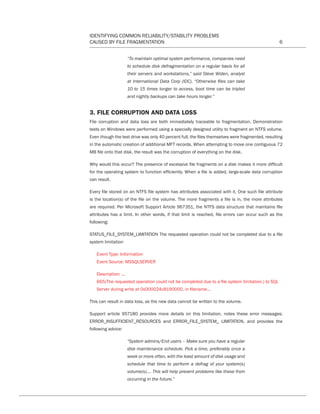
• When you try to open a Microsoft Word file, you may receive the following error message:
Word failed reading from this file file_name. Please restore the network connection or replace
the floppy disk and retry.
• When you log on to the file server, after you type your name and password in the Log On to
Windows dialog box, a blank screen appears. The desktop does not appear.
• A program that uses remote procedure call (RPC) or uses named pipes to connect to a file server
stops responding.
Support Article ID 245077 provides an explicit description of resolving Event ID 2022 through
defragmentation. It states, “This problem occurs because a request was made to grow a file and
the disk is fragmented or is nearly full. This causes the free space search to take an extremely long
time. This request holds system-level locks that are needed for other requests to complete. The
Server service resource task is pended as well, which causes Event ID 2022.”
“Our DNA Array analysis system creates and removes
thousands of temporary files. As a result, a couple of
months into the use of this system caused it to crash almost
daily. The addition of Diskeeper has resolved the stability
problems.” – Andrew M., IS Supervisor, Medical College of
Wisconsin”
This means that fragmentation can slow down I/O to the point where programs and processes
cease to function entirely. With files scattered throughout the disk in many pieces, they are
unavailable to the system when needed and a crash/hang takes place.
2. SLOW BACKUP TIMES AND ABORTED BACKUP
The window of opportunity to conduct system backups is shrinking. While IT departments used to
have twelve or more hours available for backup and maintenance tasks, or even all weekend, with
more businesses operating 24 /7, they are now expected to perform such actions in a significantly
shorter time period. Meanwhile, the amount of data to backup is growing exponentially, and
compounded by recent regulatory requirements for data archiving.
This combination of circumstances leads to two problems. System administrators report that
lengthy backups mean they don’t have time for other routine maintenance actions. Alternatively,
some backups have to be aborted as they take up too much time and threaten to encroach on the
working day. This increases the risk of data loss or non-compliance.
Fragmentation multiplies the amount of time needed to get a backup done. If all files exist in a
contiguous state, backup occurs relatively swiftly. Instead, if the files are fragmented, the head
has to locate and gather together numerous fragments before they can be consolidated into one
piece for backup. It is common for IT departments to report their backup times shrinking, often by
several hours per night, after instituting routine defragmentation of all servers and workstations.
By consolidating files back into single contiguous pieces before backing them up, a much shorter
backup window is required.
CT Reliability-Stability WP 12-03-01.indd 5 3/2/12 5:19 PM
IDENTIFYING COMMON RELIABILITY/STABILITY PROBLEMS
CAUSED BY FILE FRAGMENTATION 6
“To maintain optimal system performance, companies need
to schedule disk defragmentation on a regular basis for all
their servers and workstations,” said Steve Widen, analyst
at International Data Corp (IDC). “Otherwise files can take
10 to 15 times longer to access, boot time can be tripled
and nightly backups can take hours longer.”
3. FILE CORRUPTION AND DATA LOSS
File corruption and data loss are both immediately traceable to fragmentation. Demonstration
tests on Windows were performed using a specially designed utility to fragment an NTFS volume.
Even though the test drive was only 40 percent full, the files themselves were fragmented, resulting
in the automatic creation of additional MFT records. When attempting to move one contiguous 72
MB file onto that disk, the result was the corruption of everything on the disk.
Why would this occur? The presence of excessive file fragments on a disk makes it more difficult
for the operating system to function efficiently. When a file is added, large-scale data corruption
can result.
Every file stored on an NTFS file system has attributes associated with it. One such file attribute
is the location(s) of the file on the volume. The more fragments a file is in, the more attributes
are required. Per Microsoft Support Article 967351, the NTFS data structure that maintains file
attributes has a limit. In other words, if that limit is reached, file errors can occur such as the
following:
STATUS_FILE_SYSTEM_LIMITATION The requested operation could not be completed due to a file
system limitation
Event Type: Information
Event Source: MSSQLSERVER
Description: ...
665(The requested operation could not be completed due to a file system limitation.) to SQL
Server during write at 0x000024c8190000, in filename...
This can result in data loss, as the new data cannot be written to the volume.
Support article 957180 provides more details on this limitation, notes these error messages;
ERROR_INSUFFICIENT_RESOURCES and ERROR_FILE_SYSTEM_ LIMITATION, and provides the
following advice:
“System admins/End users – Make sure you have a regular
disk maintenance schedule. Pick a time, preferably once a
week or more often, with the least amount of disk usage and
schedule that time to perform a defrag of your system(s)
volume(s)…. This will help prevent problems like these from
occurring in the future.”
CT Reliability-Stability WP 12-03-01.indd 6 3/2/12 5:19 PM
IDENTIFYING COMMON RELIABILITY/STABILITY PROBLEMS
CAUSED BY FILE FRAGMENTATION 7
Microsoft Support Article 826936 describes how slow hard disks, low memory, low CPU speed, or
disabled disk caching (i.e., a bottleneck) contribute to loss of backups and a Volume Shadow Copy
Service failure during periods of heavy I/O activity.
Microsoft Support Article 825444, 208488 and others related to Microsoft Access, document
fragmentation of the database file or structure and recommend disk defragmentation in addition
to database compaction and repair procedures.
4. BOOT UP ISSUES
In-depth testing by Condusiv Technologies Corporation discovered that a heavily fragmented MFT
can almost double the time it takes for a system to boot. Similar tests on boot volumes with file
fragmentation showed bootup slows up to 15%. Studies done by NSTL demonstrated Windows
Vista computers defragmented with Diskeeper booted over four seconds faster.
Earlier versions of Windows were highly susceptible to fragmentation of metadata files, to the extent of
black screens and other boot failures. The extent of Support articles related to fragmentation related
boot failures of those legacy platforms exemplifies the affect fragmentation plays in system reliability.
Modern NT-based platforms have improved, but issues still exist. According to Microsoft Support
Article 265509, “The System hive file is usually the biggest file that is loaded and is likely to be
fragmented because it is modified often. If the System hive file is too fragmented, it is not loaded
from an NTFS volume, and the computer hangs.”
5. ERRORS IN PROGRAMS
Errors also occur when applications are substantially fragmented. As in the previous section, this
is related to the sheer size of such applications and the time it takes to physically gather up all
of the pieces in order to load properly. In some cases, fragmentation slows down the loading of
applications, sometimes significantly. In other cases, the application will time out or freeze.
The guide “Improving .NET Application Performance and Scalability” published by Microsoft,
serves to direct architects and developers in the building of .NET applications that meet required
performance objectives. In several sections discussing performance they discuss the importance
of disk I/O bottlenecks as a factor that to consider in development and in other sections note
defragmentation as a solution to improve these bottlenecks.
Microsoft Article 324958 documents a list of actions, including disk defragmentation to optimize
SMTP8
queues in Microsoft Exchange.
On Microsoft Word 2000, for example, an error message may appear stating:
“There are too many edits in this document. This operation
will be incomplete. Save your work.” (Microsoft KB article
Q224029). This is caused by insufficient disk space on the
hard disk containing the Windows Temp folder as well as
fragmented or cross-linked files.”
8. Simple Mail Transfer Protocol. It is the most commonly used protocol for server-to-server email messaging over the internet.
CT Reliability-Stability WP 12-03-01.indd 7 3/2/12 5:19 PM
IDENTIFYING COMMON RELIABILITY/STABILITY PROBLEMS
CAUSED BY FILE FRAGMENTATION 8
CD Writers and other media devices also experience problems caused by fragmentation. Why?
Such devices require data to be supplied sequentially in a steady stream. If the associated files
are fragmented, this data stream is interrupted as the system struggles to gather together various
file fragments. This interferes with the quality of video playback and leads to CD writes aborting.
Regular defragmentation heightens the reliability of such devices.
Per Microsoft Support Article 306524, CD recording may fail intermittently. The document lays
out several ways to resolve this issue; however, the primary step is to defragment the hard disk
containing the data destined for the CD.
Symantec Knowledge Base articles note applications such as Partition Magic, Server Magic
(Example error message:
“Error 1650 Partition too fragmented to copy or resize”) and Ghost are all negatively affected
by fragmentation and may subsequently fail at operations.
Video Editing Professionals also acknowledge that disk fragmentation causes dropped frames and
poor quality multimedia. A White Paper published by Accurate Vision, Inc., a full-service legal video
company, concluded, “From the tests we conducted as described in this report, we are convinced
that drive fragmentation is one of the major culprits that impede the performance, stability and
productivity of NLE systems.”9
6. RAM USE AND CACHE PROBLEMS
Files often become so fragmented that they take a long time to be read into cache. As well as
delays, this can lead to system hangs. Similarly, a fragmented paging file creates system stability
challenges. “Out of virtual memory” error messages are prevalent, for example, on Domain
Controllers and data loss results.
“The instruction at referenced memory at (number) The memory could not be read.” described in
Microsoft Support article 966646 is attributed to a program encountering issues reading files that
are fragmented. It is resolvable with defragmentation:
“Disk Cleanup and Defrag are regular maintenance tasks
that are essential to maintaining performance on a Windows
system. It is recommended that you do this every two weeks.”
According to Microsoft Support article 215859, “The pagefile.sys file is either not large enough or
is severely fragmented. This may also cause users to experience problems when they attempt to
change their password or gain access to the network.”
As covered earlier, such memory issues are rooted in the fact that excessive overhead is required to
compile files that are scattered around a disk in many pieces. By keeping files consolidated, these
memory problems are prevented.
Applications that increase buffers to accommodate for slowed I/O such as that caused by disk
fragmentation, inevitably use additional memory to compensate.
9. Acronym for “Non-Linear Editing System”. These systems employ digital editing technology that supports immediate random access to any point within any given multiple
media clip.
Files often become so
fragmented that they take
a long time to be read into
cache. As well as delays,
this can lead to system
hangs.
CT Reliability-Stability WP 12-03-01.indd 8 3/2/12 5:19 PM
IDENTIFYING COMMON RELIABILITY/STABILITY PROBLEMS
CAUSED BY FILE FRAGMENTATION 9
7. HARD DRIVE FAILURES
Fragmentation hastens the onset of hard drive failure by increasing the amount of disk head
movement. Diametrically, regular defragmentation extends drive longevity. The reason for this is
simple. Running a defragmentation program consolidates fragments, minimizing I/O required for
future file access activity. The long-term effect is reduced total physical disk head movement; the
measure used to determine disk lifespan (or Mean Time Between Failure – MTBF).
To demonstrate, consider a file fragmented into one hundred pieces. The disk head has to move
100 times to access it. If this is occurring every time a file is read or written to disk, the head and
associated moving parts are effectively performing 100 times more work than one that is fragment
free. Result: more wear and tear on the disk and an earlier failure.
One hundred pieces per file may be a conservative estimate, however. A study by American Business
Research conducted on 100 companies revealed that 56 percent of Windows workstations had
files fragmented into between 1,050 and 8,162 pieces. One in four reported finding files with as
many as 10,000 to 51,222 fragments. For servers, an even greater degree of fragmentation exists.
Half of the respondents discovered 2,000 to 10,000 fragments and another 33 percent had files
fragmented into 10,333 to 95,000 pieces.
The early wear and tear is frequently realized in corporate enterprise,
“I have been a supporter of having Diskeeper installed on
servers as well as workstations. By my recommendation,
Texas Dept. of Transportation installed it on all workstations,
preventing many hard drive crashes. Defragmentation is
vital to data integrity and it lengthens the life of hard drives.”
– Christopher S, CEO, CSS Media Inc.
This precept was documented in a study by IDC highlighting the fact that regular defragmentation
enhances performance and lengthens the lifespan of a machine. “It can be considered that
defragmentation software can extend the life of a typical workstation,” said Widen. “IDC estimates
that enterprises can add up to two additional years of life to the normal three-year usable life of
workstations.”
Large-scale studies by Google and Carnegie Mellon University confirm that usage impacts drive
lifespan.
“...failure rate is not constant with age, and that, rather than
a significant infant mortality effect, we see a significant
early onset of wear-out degradation.” – Carnegie Mellon
University
“It can be considered that
defragmentation software
can extend the life of a
typical workstation,” said
Widen. “IDC estimates that
enterprises can add up to
two additional years of life to
the normal threeyear usable
life of workstations.”
CT Reliability-Stability WP 12-03-01.indd 9 3/2/12 5:19 PM
IDENTIFYING COMMON RELIABILITY/STABILITY PROBLEMS
CAUSED BY FILE FRAGMENTATION 10
Contiguous Files = Greater Uptime
Conclusive evidence exists on the issue of file fragmentation being a primary factor in the most
common system stability/reliability problems that companies contend with daily. To greatly lessen
these problems, advanced defragmentation of every server and workstation should be considered
high-level, proactive system maintenance.
Microsoft Support Article 259421 notes “Registry hives, log files, and databases (such as the
Exchange .edb files) may be the most fragmented files on the drive. Corruption of event log files, IIS
metabase, and proxy cache files can also exhibit many of these symptoms,” it later concludes “…
and then running a file defragmentation utility may significantly stabilize the computer and reduce
backup and file transfer problems.”
To do this easily and cost-effectively, automation and advanced technology are vital. When
advanced site-wide defragmentation is fully automated, it represents one of the simplest, yet most
effective, system maintenance activities to protect and improve the stability and uptime of an
entire network. It’s just not possible to reactively keep up with the defragmentation demands of
more than a handful of machines.
By using automated, proactive defragmentation on a network to minimize Help Desk calls,
troubleshooting and other reactive system maintenance demands, there are benefits to a System
Administrator that go beyond system stability. There is the additional gain of saving significant time
and manpower, allowing IT staff to do more important things and delivering a hard dollar savings
to a company.
© 2013 Condusiv Technologies Corporation. All Rights Reserved. Condusiv, Diskeeper, IntelliWrite, I-FAAST, InvisiTasking, Instant Defrag, HyperFast, “Set It and Forget It,” “The
only way to prevent fragmentation before it happens,” “Think Faster” and Terabyte Volume Engine are registered trademarks of Condusiv Technologies Corporation. All other
trademarks are the property of their respective owners.
CT Reliability-Stability WP 12-03-01.indd 10 3/2/12 5:19 PM
IDENTIFYING COMMON RELIABILITY/STABILITY PROBLEMS
CAUSED BY FILE FRAGMENTATION 11
BIBLIOGRAPHY
Microsoft Support Article 306524, How to Copy Information to a CD in Windows XP,
http://support.microsoft.com/default.aspx?scid=kb;en-us;306524
Windows Kernel Internals (I/O Architecture) by David B. Probert, PH.D.; Windows Kernel
Development, Microsoft Corporation,
http://www.i.u-tokyo.ac.jp/edu/training/ss/lecture/new-documents/Lectures/06-IOArchitecture/
IOArchitecture.pdf
Microsoft Support Article 967351, A heavily fragmented file in an NTFS volume may not grow
beyond a certain size, http://support.microsoft.com/kb/967351
Problem: Extending a File may fail with “Disk Full” Error even though Volume has Free Space,
http://support.microsoft.com/kb/957180
Microsoft Support Article 826936, Time-out errors occur in Volume Shadow Copy service writers,
and shadow copies are lost during backup and during times when there are high levels of input/
output, http://support.microsoft.com/kb/826936
Microsoft Support Article 825444, How to troubleshoot fatal system errors in Access 2003 when
Access 2003 is running on the Windows 2000 operating system,
http://support.microsoft.com/kb/825444
Microsoft Support Article 208488, ACC2000: How to Troubleshoot Invalid Page Faults in
Microsoft Access 2000, http://support.microsoft.com/kb/208488
OFFXP: Office Stops During Setup: Troubleshooting Steps on Windows XP,
http://support.microsoft.com/default.aspx?scid=KB;EN-US;Q309191ID=KB;EN-US;Q309191#X
SLTH3212121123120121120120
Improving .NET Application Performance and Scalability, J.D. Meier, Srinath Vasireddy, Ashish
Babbar, and Alex Mackman; Microsoft Corporation,
http://msdn.microsoft.com/library/default.asp?url=/library/en-us/dnpag/html/scalenetchapt17.asp
Media Drives and Fragmentation, An Accurate Vision Research  Development Report,
http://www.accurate-vision.com/articles/fragmentation.htm
Symantec Knowledge Base, Error 1650 Partition too fragmented to copy or resize,
http://service1.symantec.com/SUPPORT/powerquest.nsf/76b08a3dd4dc166e88256e970047c
ea9/38b681bf5c1f9f2888256e75007c541e?OpenDocumentsrc=bar_sch_namseg=hm
NSTL study on Windows Vista performance gains from defragmentation,
http://downloads.diskeeper.com/pdf/NSTL_20Tests_20Diskeeper_20vs_20Built_20In.pdf
Carnegie Mellon study “Disk failures in the real world,” http://www.cs.cmu.edu/~bianca/fast07.pdf
Microsoft Support Article 259421, SBS hangs or restarts with low free disk space or
fragmentation, http://support.microsoft.com/kb/259421
CT Reliability-Stability WP 12-03-01.indd 11 3/2/12 5:19 PM

Identify_Stability_Problems

  • 1.
    WHITE PAPER Identifying Common Reliability/Stability ProblemsCaused by File Fragmentation Think Faster.™ Visit us at Condusiv.com CT Reliability-Stability WP 12-03-01.indd 1 3/2/12 5:19 PM
  • 2.
    IDENTIFYING COMMON RELIABILITY/STABILITYPROBLEMS CAUSED BY FILE FRAGMENTATION ii Table of Contents INTRODUCTION 1 AN OVERVIEW OF THE PROBLEM 1 RELIABILITY AND STABILITY ISSUES TRACEABLE TO FILE FRAGMENTATION 2 1. Crashes and system hangs 3 2. Slow backup time and aborted backup 5 3. File corruption and data loss 6 4. Boot-up issues 7 5. Errors in programs 7 6. RAM use and cache problems 8 7. Hard drive failures 9 CONTIGUOUS FILES = GREATER UP TIME 10 BIBLIOGRAPHY 11 CT Reliability-Stability WP 12-03-01.indd 2 3/2/12 5:19 PM
  • 3.
    IDENTIFYING COMMON RELIABILITY/STABILITYPROBLEMS CAUSED BY FILE FRAGMENTATION 1 Introduction Over the years, numerous manufacturers, third party analysts and labs have reported on the effects of disk/file fragmentation on system speed and performance. Defragmentation has also gained recognition for its critical role in addressing issues of system reliability and improved uptime, particularly since Microsoft’s decision to include a defragmentation utility in the Windows 2000 and newer operating systems. In this white paper, we explain some of the most common reliability and downtime phenomena associated with fragmentation, and the technical reasons behind them. This includes a discussion of each of the most common occurrences documented by our R&D labs, customers (empirical results presented), as well as others, in recent years. At the end of this report, there is a short bibliography providing links to references or Knowledge Base articles. An Overview of the Problem Having all program and data files stored in contiguous form on the hard drive is a key factor in keeping a system stable and performing at peak efficiency. Though unavoidable, the moment a file is broken into pieces and scattered across a drive it opens the door to a host of stability/reliability issues. Having even just a few key files fragmented can lead to crashes, conflicts and errors. The principle of fragmentation’s impact on system or application reliability is the timing-out of a requestor or service provider in collecting/reassembling fragmented data. This principle holds true for both IP datagram1 fragmentation and file/disk fragmentation. Many system and application breakage points can be defined as “exerted stress on buffers to the point of overflow/overrun.” Denial of Service (DoS) attacks are well documented examples of exploiting IP datagrams, but far less information abounds for reliability considerations in the case of file objects. A good overview of the affect of stress when requesting file objects comes from a Microsoft Knowledge Base article which states “The Server service cannot process the requested network I/O2 items to the hard disk quickly enough to prevent the Server service from running out of resources.” Disk fragmentation is often the “straw that broke the camel’s back” when noting issues of stability or reliability. Stressed I/O activity, compounded by fragmentation can expose faulty device drivers or file filters that may otherwise operate effectively (in non-fragmented environments). The reliability of third party applications is highly dependent on the degree to which those applications can accommodate bottlenecks, such as in disk subsystems. 1. IP Datagram is the fundamental unit of data transmitted across internetworks using the Internet Protocol (IP). 2. I/O is shorthand for Input/Output; which refers to data transfer between devices in a computer system. An adjective such as network or disk may prepend “I/O” to specify a particular device type. Disk fragmentation is often the “straw that broke the camel’s back” when noting issues of stability or reliability. Stressed I/O activity, compounded by fragmentation can expose faulty device drivers or file filters that may otherwise operate effectively (in nonfragmented environments). CT Reliability-Stability WP 12-03-01.indd 1 3/2/12 5:19 PM
  • 4.
    IDENTIFYING COMMON RELIABILITY/STABILITYPROBLEMS CAUSED BY FILE FRAGMENTATION 2 The point at which application or system stability is compromised is difficult, if not impossible, to calculate. It is a combination of hardware and software and operations at the moment of instability. A poorly written driver or file filter can be exposed in some environments but not in others, and the amount of fragmentation required to reach “critical mass” on a specific file or files, will vary greatly upon all the other variables involved. This issue can be exampled by better understanding asynchronous I/O3 . Example: a Windows application creates either an I/O completion port4, executes an overlapping completion routine5 , or calls WaitForSingleObject/WaitForMultipleObjects6 APIs at the time of thread creation. In any case where the wait state is exceeded (e.g., queued I/O is paged to disk), a failure can occur. As suggested, low available memory (non-paged pool) can exacerbate failures as it re-introduces the physical disk into the equation. In lieu of failures, extended queuing/waiting and proper exception handling can mitigate issues, at the expense of lower performance (operations take longer) for the application, or increased system resource requirements. “The problem we were having was the server would get so busy that it would stop processing I/O requests and network traffic would just hang. Working with Microsoft and Compaq we concluded it was due to fragmentation. When we installed Diskeeper it resolved the problem overnight.” – Mike N, System Administrator, John Deere Failure to routinely address or understand fragmentation and its role in helping to cause these problems results in increased IT staff workloads attempting to troubleshoot and identify the source of problems. This frequently leads to such common and often unnecessary actions as reinstalling software, re-imaging of hard drives, expensive replacement of hardware, an unnecessary “work- around,” as well as overwork at the Help Desk. Forcing IT to work reactively on problems, increases IT costs and adversely affects user productivity due to unacceptable levels of downtime. Reliability and Stability Issues Traceable to Disk Fragmentation The most common problems caused by file fragmentation are: 1. Crashes and system hangs/freezes 2. Slow boot up and computers that won’t boot up 3. Slow backup times and aborted backup 4. File corruption and data loss 5. Errors in programs 6. RAM use and cache problems 7. Hard drive failures 3. Asynchronous I/O exists to compensate for variables that may prevent or eliminate the possibility of synchronous I/O (e.g. I/O is much slower than data processing). The alternative to handling I/O asynchronously, which generally offers lower performance, is to “block” other I/O. 4. http://msdn.microsoft.com/library/default.asp?url=/library/en-us/fileio/fs/i_o_completion_ports.asp 5. http://windowssdk.msdn.microsoft.com/library/default.asp?url=/library/en-us/dllproc/base/getoverlappedresult.asp 6. http://msdn.microsoft.com/library/default.asp?url=/library/en-us/dllproc/base/waitformultipleobjects.asp Failure to routinely address or understand fragmentation and its role in helping to cause these problems results in increased IT staff workloads attempting to troubleshoot and identify the source of problems. CT Reliability-Stability WP 12-03-01.indd 2 3/2/12 5:19 PM
  • 5.
    IDENTIFYING COMMON RELIABILITY/STABILITYPROBLEMS CAUSED BY FILE FRAGMENTATION 3 1. CRASHES AND HANGS There are many documented cases of errors and crashes on Windows and third party applications caused by fragmentation. These types of errors include but are not limited to system hangs, time outs, failure to load, failure to save data and in worse case blue-screens (where fragmentation aggravates flawed device drivers). Perhaps the most prevalent of these circumstances in modern systems is the Event ID 2021 and 2022 errors found on systems hosting data. Event ID: 2021 Source: Srv Description: Server was unable to create a work item n times in the last seconds seconds. Event ID: 2022 Source: Srv Description: Server was unable to find a free connection n times in the last seconds seconds. In such circumstance the client requesting the data will return related errors along the lines of Event ID 3013 or status code 1450. Event ID: 3013 Source: Rdr Description: The redirector has timed out to computer name. It is important to note that in a corporate IP network bottlenecks may be incorrectly advertised or diagnosed as network related bottlenecks. In reality, these bottlenecks often exist in the disk subsystem on a remote system. The specification of Windows file sharing services (CIFS)7 is such that file requests (supposedly only “valid” ones) will time out as the reliability of the network is a variable that might otherwise cause undue and unnecessary wait requests (should a client be disconnected). In reality, extended waits can be interpreted as dropped client connections. An important clue to investigating fragmentation as a potential or lead contributor to reliability issues are when recommendations are made (by a support article or support engineer) to measure the following Physical Disk Counters related to Disk I/O: • Average Disk Queue Length • Average Disk Read Queue Length • Average Disk Write Queue Length • Average Disk Sec/Read • Average Disk Sec/Transfer • Average Disk Writes/Sec • Split I/Os MS TechNet article from the Microsoft titled “Examining and Tuning Disk Performance” notes defragmentation as a primary solution to resolving disk bottlenecks such as those identified by the above-detailed Physical Disk counters. 7. Common Internet File System is the file sharing protocol. It is an Application layer (OSI layer 7) protocol. More info: http://www.microsoft.com/mind/1196/cifs.asp CT Reliability-Stability WP 12-03-01.indd 3 3/2/12 5:19 PM
  • 6.
    IDENTIFYING COMMON RELIABILITY/STABILITYPROBLEMS CAUSED BY FILE FRAGMENTATION 4 In Microsoft Support article 822219 “You experience slow file server performance and delays occur when you work with files that are located on a file server” it notes “Use Performance Logs and Alerts to monitor the Avg. Disk Queue Length counter of the PhysicalDisk performance object.” Below is a list of symptoms noted relevant to that article: • A Windows-based file server that is configured as a file and print server stops responding and file and print server functionality temporarily stops. • You experience an unexpectedly long delay when you open, save, close, delete, or print files that are located on a shared resource. • You experience a temporary decrease in performance when you use a program over the network. Performance typically slows down for approximately 40 to 45 seconds. However, some delays may last up to 5 minutes. • You experience a delay when you perform file copy or backup operations. • Windows Explorer stops responding when you connect to a shared resource or you see a red X on the connected network drive in Windows Explorer. • You receive an error message similar to one of the following messages when you try to connect to a shared resource: Error message 1 System error 53. The network path was not found. Error message 2 System error 64. The specified network name is no longer available. • You are intermittently disconnected from network resources, and you cannot reconnect to the network resources on the file server. However, you can ping the server, and you can use a Terminal Services session to connect to the server. • If multiple users try to access Microsoft Office documents on the server, the File is locked for editing dialog box does not always appear when the second user opens the file. • A network trace indicates a 30 to 40 second delay between an SMB Service client command and a response from the file server. • When you try to open an Access 2.0 database file (.mdb file) in Microsoft Access 97, in Microsoft Access 2000, or in Microsoft Access 2002, you may receive an error message that is similar to the following: Disk or network error. CT Reliability-Stability WP 12-03-01.indd 4 3/2/12 5:19 PM
  • 7.
    IDENTIFYING COMMON RELIABILITY/STABILITYPROBLEMS CAUSED BY FILE FRAGMENTATION 5 • When you try to open a Microsoft Word file, you may receive the following error message: Word failed reading from this file file_name. Please restore the network connection or replace the floppy disk and retry. • When you log on to the file server, after you type your name and password in the Log On to Windows dialog box, a blank screen appears. The desktop does not appear. • A program that uses remote procedure call (RPC) or uses named pipes to connect to a file server stops responding. Support Article ID 245077 provides an explicit description of resolving Event ID 2022 through defragmentation. It states, “This problem occurs because a request was made to grow a file and the disk is fragmented or is nearly full. This causes the free space search to take an extremely long time. This request holds system-level locks that are needed for other requests to complete. The Server service resource task is pended as well, which causes Event ID 2022.” “Our DNA Array analysis system creates and removes thousands of temporary files. As a result, a couple of months into the use of this system caused it to crash almost daily. The addition of Diskeeper has resolved the stability problems.” – Andrew M., IS Supervisor, Medical College of Wisconsin” This means that fragmentation can slow down I/O to the point where programs and processes cease to function entirely. With files scattered throughout the disk in many pieces, they are unavailable to the system when needed and a crash/hang takes place. 2. SLOW BACKUP TIMES AND ABORTED BACKUP The window of opportunity to conduct system backups is shrinking. While IT departments used to have twelve or more hours available for backup and maintenance tasks, or even all weekend, with more businesses operating 24 /7, they are now expected to perform such actions in a significantly shorter time period. Meanwhile, the amount of data to backup is growing exponentially, and compounded by recent regulatory requirements for data archiving. This combination of circumstances leads to two problems. System administrators report that lengthy backups mean they don’t have time for other routine maintenance actions. Alternatively, some backups have to be aborted as they take up too much time and threaten to encroach on the working day. This increases the risk of data loss or non-compliance. Fragmentation multiplies the amount of time needed to get a backup done. If all files exist in a contiguous state, backup occurs relatively swiftly. Instead, if the files are fragmented, the head has to locate and gather together numerous fragments before they can be consolidated into one piece for backup. It is common for IT departments to report their backup times shrinking, often by several hours per night, after instituting routine defragmentation of all servers and workstations. By consolidating files back into single contiguous pieces before backing them up, a much shorter backup window is required. CT Reliability-Stability WP 12-03-01.indd 5 3/2/12 5:19 PM
  • 8.
    IDENTIFYING COMMON RELIABILITY/STABILITYPROBLEMS CAUSED BY FILE FRAGMENTATION 6 “To maintain optimal system performance, companies need to schedule disk defragmentation on a regular basis for all their servers and workstations,” said Steve Widen, analyst at International Data Corp (IDC). “Otherwise files can take 10 to 15 times longer to access, boot time can be tripled and nightly backups can take hours longer.” 3. FILE CORRUPTION AND DATA LOSS File corruption and data loss are both immediately traceable to fragmentation. Demonstration tests on Windows were performed using a specially designed utility to fragment an NTFS volume. Even though the test drive was only 40 percent full, the files themselves were fragmented, resulting in the automatic creation of additional MFT records. When attempting to move one contiguous 72 MB file onto that disk, the result was the corruption of everything on the disk. Why would this occur? The presence of excessive file fragments on a disk makes it more difficult for the operating system to function efficiently. When a file is added, large-scale data corruption can result. Every file stored on an NTFS file system has attributes associated with it. One such file attribute is the location(s) of the file on the volume. The more fragments a file is in, the more attributes are required. Per Microsoft Support Article 967351, the NTFS data structure that maintains file attributes has a limit. In other words, if that limit is reached, file errors can occur such as the following: STATUS_FILE_SYSTEM_LIMITATION The requested operation could not be completed due to a file system limitation Event Type: Information Event Source: MSSQLSERVER Description: ... 665(The requested operation could not be completed due to a file system limitation.) to SQL Server during write at 0x000024c8190000, in filename... This can result in data loss, as the new data cannot be written to the volume. Support article 957180 provides more details on this limitation, notes these error messages; ERROR_INSUFFICIENT_RESOURCES and ERROR_FILE_SYSTEM_ LIMITATION, and provides the following advice: “System admins/End users – Make sure you have a regular disk maintenance schedule. Pick a time, preferably once a week or more often, with the least amount of disk usage and schedule that time to perform a defrag of your system(s) volume(s)…. This will help prevent problems like these from occurring in the future.” CT Reliability-Stability WP 12-03-01.indd 6 3/2/12 5:19 PM
  • 9.
    IDENTIFYING COMMON RELIABILITY/STABILITYPROBLEMS CAUSED BY FILE FRAGMENTATION 7 Microsoft Support Article 826936 describes how slow hard disks, low memory, low CPU speed, or disabled disk caching (i.e., a bottleneck) contribute to loss of backups and a Volume Shadow Copy Service failure during periods of heavy I/O activity. Microsoft Support Article 825444, 208488 and others related to Microsoft Access, document fragmentation of the database file or structure and recommend disk defragmentation in addition to database compaction and repair procedures. 4. BOOT UP ISSUES In-depth testing by Condusiv Technologies Corporation discovered that a heavily fragmented MFT can almost double the time it takes for a system to boot. Similar tests on boot volumes with file fragmentation showed bootup slows up to 15%. Studies done by NSTL demonstrated Windows Vista computers defragmented with Diskeeper booted over four seconds faster. Earlier versions of Windows were highly susceptible to fragmentation of metadata files, to the extent of black screens and other boot failures. The extent of Support articles related to fragmentation related boot failures of those legacy platforms exemplifies the affect fragmentation plays in system reliability. Modern NT-based platforms have improved, but issues still exist. According to Microsoft Support Article 265509, “The System hive file is usually the biggest file that is loaded and is likely to be fragmented because it is modified often. If the System hive file is too fragmented, it is not loaded from an NTFS volume, and the computer hangs.” 5. ERRORS IN PROGRAMS Errors also occur when applications are substantially fragmented. As in the previous section, this is related to the sheer size of such applications and the time it takes to physically gather up all of the pieces in order to load properly. In some cases, fragmentation slows down the loading of applications, sometimes significantly. In other cases, the application will time out or freeze. The guide “Improving .NET Application Performance and Scalability” published by Microsoft, serves to direct architects and developers in the building of .NET applications that meet required performance objectives. In several sections discussing performance they discuss the importance of disk I/O bottlenecks as a factor that to consider in development and in other sections note defragmentation as a solution to improve these bottlenecks. Microsoft Article 324958 documents a list of actions, including disk defragmentation to optimize SMTP8 queues in Microsoft Exchange. On Microsoft Word 2000, for example, an error message may appear stating: “There are too many edits in this document. This operation will be incomplete. Save your work.” (Microsoft KB article Q224029). This is caused by insufficient disk space on the hard disk containing the Windows Temp folder as well as fragmented or cross-linked files.” 8. Simple Mail Transfer Protocol. It is the most commonly used protocol for server-to-server email messaging over the internet. CT Reliability-Stability WP 12-03-01.indd 7 3/2/12 5:19 PM
  • 10.
    IDENTIFYING COMMON RELIABILITY/STABILITYPROBLEMS CAUSED BY FILE FRAGMENTATION 8 CD Writers and other media devices also experience problems caused by fragmentation. Why? Such devices require data to be supplied sequentially in a steady stream. If the associated files are fragmented, this data stream is interrupted as the system struggles to gather together various file fragments. This interferes with the quality of video playback and leads to CD writes aborting. Regular defragmentation heightens the reliability of such devices. Per Microsoft Support Article 306524, CD recording may fail intermittently. The document lays out several ways to resolve this issue; however, the primary step is to defragment the hard disk containing the data destined for the CD. Symantec Knowledge Base articles note applications such as Partition Magic, Server Magic (Example error message: “Error 1650 Partition too fragmented to copy or resize”) and Ghost are all negatively affected by fragmentation and may subsequently fail at operations. Video Editing Professionals also acknowledge that disk fragmentation causes dropped frames and poor quality multimedia. A White Paper published by Accurate Vision, Inc., a full-service legal video company, concluded, “From the tests we conducted as described in this report, we are convinced that drive fragmentation is one of the major culprits that impede the performance, stability and productivity of NLE systems.”9 6. RAM USE AND CACHE PROBLEMS Files often become so fragmented that they take a long time to be read into cache. As well as delays, this can lead to system hangs. Similarly, a fragmented paging file creates system stability challenges. “Out of virtual memory” error messages are prevalent, for example, on Domain Controllers and data loss results. “The instruction at referenced memory at (number) The memory could not be read.” described in Microsoft Support article 966646 is attributed to a program encountering issues reading files that are fragmented. It is resolvable with defragmentation: “Disk Cleanup and Defrag are regular maintenance tasks that are essential to maintaining performance on a Windows system. It is recommended that you do this every two weeks.” According to Microsoft Support article 215859, “The pagefile.sys file is either not large enough or is severely fragmented. This may also cause users to experience problems when they attempt to change their password or gain access to the network.” As covered earlier, such memory issues are rooted in the fact that excessive overhead is required to compile files that are scattered around a disk in many pieces. By keeping files consolidated, these memory problems are prevented. Applications that increase buffers to accommodate for slowed I/O such as that caused by disk fragmentation, inevitably use additional memory to compensate. 9. Acronym for “Non-Linear Editing System”. These systems employ digital editing technology that supports immediate random access to any point within any given multiple media clip. Files often become so fragmented that they take a long time to be read into cache. As well as delays, this can lead to system hangs. CT Reliability-Stability WP 12-03-01.indd 8 3/2/12 5:19 PM
  • 11.
    IDENTIFYING COMMON RELIABILITY/STABILITYPROBLEMS CAUSED BY FILE FRAGMENTATION 9 7. HARD DRIVE FAILURES Fragmentation hastens the onset of hard drive failure by increasing the amount of disk head movement. Diametrically, regular defragmentation extends drive longevity. The reason for this is simple. Running a defragmentation program consolidates fragments, minimizing I/O required for future file access activity. The long-term effect is reduced total physical disk head movement; the measure used to determine disk lifespan (or Mean Time Between Failure – MTBF). To demonstrate, consider a file fragmented into one hundred pieces. The disk head has to move 100 times to access it. If this is occurring every time a file is read or written to disk, the head and associated moving parts are effectively performing 100 times more work than one that is fragment free. Result: more wear and tear on the disk and an earlier failure. One hundred pieces per file may be a conservative estimate, however. A study by American Business Research conducted on 100 companies revealed that 56 percent of Windows workstations had files fragmented into between 1,050 and 8,162 pieces. One in four reported finding files with as many as 10,000 to 51,222 fragments. For servers, an even greater degree of fragmentation exists. Half of the respondents discovered 2,000 to 10,000 fragments and another 33 percent had files fragmented into 10,333 to 95,000 pieces. The early wear and tear is frequently realized in corporate enterprise, “I have been a supporter of having Diskeeper installed on servers as well as workstations. By my recommendation, Texas Dept. of Transportation installed it on all workstations, preventing many hard drive crashes. Defragmentation is vital to data integrity and it lengthens the life of hard drives.” – Christopher S, CEO, CSS Media Inc. This precept was documented in a study by IDC highlighting the fact that regular defragmentation enhances performance and lengthens the lifespan of a machine. “It can be considered that defragmentation software can extend the life of a typical workstation,” said Widen. “IDC estimates that enterprises can add up to two additional years of life to the normal three-year usable life of workstations.” Large-scale studies by Google and Carnegie Mellon University confirm that usage impacts drive lifespan. “...failure rate is not constant with age, and that, rather than a significant infant mortality effect, we see a significant early onset of wear-out degradation.” – Carnegie Mellon University “It can be considered that defragmentation software can extend the life of a typical workstation,” said Widen. “IDC estimates that enterprises can add up to two additional years of life to the normal threeyear usable life of workstations.” CT Reliability-Stability WP 12-03-01.indd 9 3/2/12 5:19 PM
  • 12.
    IDENTIFYING COMMON RELIABILITY/STABILITYPROBLEMS CAUSED BY FILE FRAGMENTATION 10 Contiguous Files = Greater Uptime Conclusive evidence exists on the issue of file fragmentation being a primary factor in the most common system stability/reliability problems that companies contend with daily. To greatly lessen these problems, advanced defragmentation of every server and workstation should be considered high-level, proactive system maintenance. Microsoft Support Article 259421 notes “Registry hives, log files, and databases (such as the Exchange .edb files) may be the most fragmented files on the drive. Corruption of event log files, IIS metabase, and proxy cache files can also exhibit many of these symptoms,” it later concludes “… and then running a file defragmentation utility may significantly stabilize the computer and reduce backup and file transfer problems.” To do this easily and cost-effectively, automation and advanced technology are vital. When advanced site-wide defragmentation is fully automated, it represents one of the simplest, yet most effective, system maintenance activities to protect and improve the stability and uptime of an entire network. It’s just not possible to reactively keep up with the defragmentation demands of more than a handful of machines. By using automated, proactive defragmentation on a network to minimize Help Desk calls, troubleshooting and other reactive system maintenance demands, there are benefits to a System Administrator that go beyond system stability. There is the additional gain of saving significant time and manpower, allowing IT staff to do more important things and delivering a hard dollar savings to a company. © 2013 Condusiv Technologies Corporation. All Rights Reserved. Condusiv, Diskeeper, IntelliWrite, I-FAAST, InvisiTasking, Instant Defrag, HyperFast, “Set It and Forget It,” “The only way to prevent fragmentation before it happens,” “Think Faster” and Terabyte Volume Engine are registered trademarks of Condusiv Technologies Corporation. All other trademarks are the property of their respective owners. CT Reliability-Stability WP 12-03-01.indd 10 3/2/12 5:19 PM
  • 13.
    IDENTIFYING COMMON RELIABILITY/STABILITYPROBLEMS CAUSED BY FILE FRAGMENTATION 11 BIBLIOGRAPHY Microsoft Support Article 306524, How to Copy Information to a CD in Windows XP, http://support.microsoft.com/default.aspx?scid=kb;en-us;306524 Windows Kernel Internals (I/O Architecture) by David B. Probert, PH.D.; Windows Kernel Development, Microsoft Corporation, http://www.i.u-tokyo.ac.jp/edu/training/ss/lecture/new-documents/Lectures/06-IOArchitecture/ IOArchitecture.pdf Microsoft Support Article 967351, A heavily fragmented file in an NTFS volume may not grow beyond a certain size, http://support.microsoft.com/kb/967351 Problem: Extending a File may fail with “Disk Full” Error even though Volume has Free Space, http://support.microsoft.com/kb/957180 Microsoft Support Article 826936, Time-out errors occur in Volume Shadow Copy service writers, and shadow copies are lost during backup and during times when there are high levels of input/ output, http://support.microsoft.com/kb/826936 Microsoft Support Article 825444, How to troubleshoot fatal system errors in Access 2003 when Access 2003 is running on the Windows 2000 operating system, http://support.microsoft.com/kb/825444 Microsoft Support Article 208488, ACC2000: How to Troubleshoot Invalid Page Faults in Microsoft Access 2000, http://support.microsoft.com/kb/208488 OFFXP: Office Stops During Setup: Troubleshooting Steps on Windows XP, http://support.microsoft.com/default.aspx?scid=KB;EN-US;Q309191ID=KB;EN-US;Q309191#X SLTH3212121123120121120120 Improving .NET Application Performance and Scalability, J.D. Meier, Srinath Vasireddy, Ashish Babbar, and Alex Mackman; Microsoft Corporation, http://msdn.microsoft.com/library/default.asp?url=/library/en-us/dnpag/html/scalenetchapt17.asp Media Drives and Fragmentation, An Accurate Vision Research Development Report, http://www.accurate-vision.com/articles/fragmentation.htm Symantec Knowledge Base, Error 1650 Partition too fragmented to copy or resize, http://service1.symantec.com/SUPPORT/powerquest.nsf/76b08a3dd4dc166e88256e970047c ea9/38b681bf5c1f9f2888256e75007c541e?OpenDocumentsrc=bar_sch_namseg=hm NSTL study on Windows Vista performance gains from defragmentation, http://downloads.diskeeper.com/pdf/NSTL_20Tests_20Diskeeper_20vs_20Built_20In.pdf Carnegie Mellon study “Disk failures in the real world,” http://www.cs.cmu.edu/~bianca/fast07.pdf Microsoft Support Article 259421, SBS hangs or restarts with low free disk space or fragmentation, http://support.microsoft.com/kb/259421 CT Reliability-Stability WP 12-03-01.indd 11 3/2/12 5:19 PM