Introductio
n
“Those who know, do. Those that understand,
teach.” ― Aristotle
Barriers to the
successful integration
of ICT in Teaching
and Learning
environments: A
REVIEW OF THE
LITERATURE.
ABSTRA
CT
OBSTACLES/BARRIERS FOR
TEACHERS/STUDENTS
1. Use of ICT in classroom.
2. Barriers for teachers to integrate ICT.
3. Teachers lack in confidence, competence and
access to resources.
4. Difficulties faced by teachers while
implementing ICT.
5. Improve quality of education through ICT.
2. Provides a general
discussion of the relationship
between ICT and science
education
THE PURPOSE OF THIS
PAPER
1. Provides recommendations
on improving ICT integration
in classrooms.
“The importance of ICT in
education in the future”
1. Enhance student
achievement and teacher
learning ( Bransford et al.
(2000)
2. Helps teachers to enhance
their pedagogical practice,and
assist students in their
learning ( Wong et al.(2006)
3. Enhance student skills,
motivation and knowledge (
Grabe and Grabe (2007)
Science education and ICT
1. It encourages the communication
and collaboration in science
research activities.
2. It expands the pedagogical
resources available to science
teachers ( Al-Alwani)
3. Benefits as tools for enhancing
science teaching and learning in
schools (Skinner & Preece)
BARRIERS TO INTEGRATION OF ICT INTO
EDUCATION
TEACHERS LEVEL - BARRIERS
1. Lack of teachers confidence
2. Lack of competence
3. Resistance to change and
negative attitude
SCHOOL - LEVEL
BARRIERS
1. Lack of time
2. Lack of effective training
3. Lack of technical support
4. Lack of accessibility
DISCUSSI
ON
FOCUSES ON:
1. Lack of accessibility
2. Lack of competence
3. Other factors like time, training and technical
support.
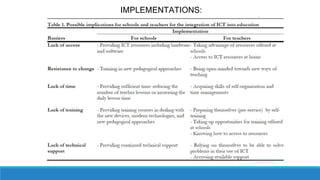
IMPLEMENTATIONS:
1. Lack of classroom
management skills
2. Poor administrative support
3. Poor school funding
LIMITATIONS:
CONCLUSIO
N
• What is the aim of this
paper?
• What are the Major
Barriers?

ICT Integration Slides

  • 1.
    Introductio n “Those who know,do. Those that understand, teach.” ― Aristotle
  • 2.
    Barriers to the successfulintegration of ICT in Teaching and Learning environments: A REVIEW OF THE LITERATURE.
  • 3.
  • 4.
    OBSTACLES/BARRIERS FOR TEACHERS/STUDENTS 1. Useof ICT in classroom. 2. Barriers for teachers to integrate ICT. 3. Teachers lack in confidence, competence and access to resources. 4. Difficulties faced by teachers while implementing ICT. 5. Improve quality of education through ICT.
  • 5.
    2. Provides ageneral discussion of the relationship between ICT and science education THE PURPOSE OF THIS PAPER 1. Provides recommendations on improving ICT integration in classrooms.
  • 6.
    “The importance ofICT in education in the future” 1. Enhance student achievement and teacher learning ( Bransford et al. (2000) 2. Helps teachers to enhance their pedagogical practice,and assist students in their learning ( Wong et al.(2006) 3. Enhance student skills, motivation and knowledge ( Grabe and Grabe (2007)
  • 7.
    Science education andICT 1. It encourages the communication and collaboration in science research activities. 2. It expands the pedagogical resources available to science teachers ( Al-Alwani) 3. Benefits as tools for enhancing science teaching and learning in schools (Skinner & Preece)
  • 8.
    BARRIERS TO INTEGRATIONOF ICT INTO EDUCATION
  • 9.
    TEACHERS LEVEL -BARRIERS 1. Lack of teachers confidence 2. Lack of competence 3. Resistance to change and negative attitude
  • 10.
    SCHOOL - LEVEL BARRIERS 1.Lack of time 2. Lack of effective training 3. Lack of technical support 4. Lack of accessibility
  • 11.
  • 12.
    FOCUSES ON: 1. Lackof accessibility 2. Lack of competence 3. Other factors like time, training and technical support.
  • 13.
  • 14.
    1. Lack ofclassroom management skills 2. Poor administrative support 3. Poor school funding LIMITATIONS:
  • 15.
  • 16.
    • What isthe aim of this paper? • What are the Major Barriers?

Editor's Notes

  • #3 Faded background picture (Basic) To reproduce the background effects on this slide, do the following: On the Home tab, in the Slides group, click Layout and then click Blank. Right-click the slide and click Format Background. In the Format Background dialog box, click Fill in the left pane. In the Fill pane, select Picture or texture fill, and then under Insert from, click File. In the Insert Picture dialog box, select a picture, and then click Insert. Also in the Format Background dialog box, in the Fill pane, in the Transparency box, enter 85%.
  • #17 It’s a part of PHD thesis.