JavaScript framework
for writing less
Client Side Rendering
code
iCSR.GitHub.io
1
For SharePoint Power Users
with basic understanding of
HTML, CSS & JavaScript
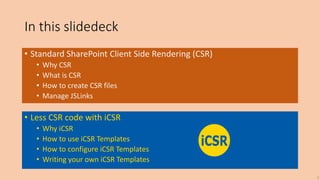
In this slidedeck
• Standard SharePoint Client Side Rendering (CSR)
• Why CSR
• What is CSR
• How to create CSR files
• Manage JSLinks
• Less CSR code with iCSR
• Why iCSR
• How to use iCSR Templates
• How to configure iCSR Templates
• Writing your own iCSR Templates
2
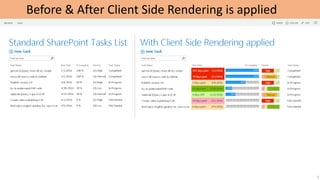
Before & After Client Side Rendering is applied
3
Data
HTML
CSS
JavaScript
Browser jQuery
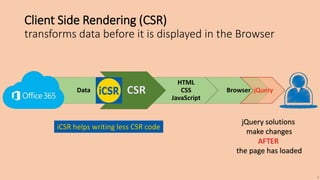
jQuery solutions
make changes
AFTER
the page has loaded
iCSR helps writing less CSR code
Client Side Rendering (CSR)
transforms data before it is displayed in the Browser
4
2. Add a new file with the +
Cisar saves files to the Style
Library, which has
Versioning enabled, you
need to publish (checkmark
button) the file so everyone
can view your CSR
transformations.
Tip:
When you are about the
make many changes in the
editor, use the Pause button
to pause the Live Update
(after Play you need to
make an edit to thrigger
your updates or press F5 to
reload the page
!! CSR can only be applied to fields available in the View !!
So in this example the Task Name could only be formatted with Priority values.
Tip: When you do need more (non displayed) fields;
wrap them in a Calculated Column, and apply CSR code to rewrite the HTML
Creating NEW CSR files with the Cisar Chrome Browser Extension(by Andrei Markeev) With Live Editing!
1. The Cisar Chrome Browser Extension (by Andrei Markeev)
is available in the Chrome App Store
5
WebPart CSR file
JSLink
2
3
4
1
5
6
8
7 ~sitecollection/…/csr_file1.js | ~sitecollection/…/csr_file2.js
Setting the WebPart Properties JSLink connection to existing CSR files by hand in 9 clicks
9
Can you image the work when applying
JSLinks connections to CSR files in multiple Lists and Libraries?
So we quickly built an extra iCSR tool to automate this..
6
LinkManager
Bookmarklet
for clicking less
iCSR.GitHub.io
7
1
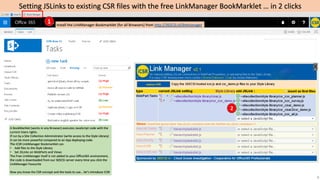
Setting JSLinks to existing CSR files with the free LinkManager BookMarklet … in 2 clicks
Install the LinkManager Bookmarklet (for all Browsers) from http://365CSI.nl/linkmanager
2
A BookMarklet (works in any Browser) executes JavaScript code with the
current Users rights.
If run by a Site Collection Administrator (write access to the Style Library)
It can be more powerful compared to an App deploying code.
The iCSR LinkManager Bookmarklet can
• Add files to the Style Library
• Set JSLinks on WebParts and Views
The Free LinkManager itself is not added to your Office365 environment,
the code is downloaded from our 365CSI server every time you click the
LinkManager Favourite
Now you know the CSR concept and the tools to use… let’s introduce iCSR
8
9
Client Side Rendering
as easy as
and as much fun as
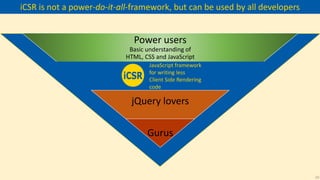
Power users
Basic understanding of
HTML, CSS and JavaScript
jQuery lovers
Gurus
JavaScript framework
for writing less
Client Side Rendering
code
iCSR is not a power-do-it-all-framework, but can be used by all developers
10
Write less CSR code with iCSR
This is mainly
the same
boilerplate
code for every
CSR file
11
Step #1 : get rid of boilerplate code
iCSR.Me() function takes care of all the boilerplate code
You only have to supply the configuration
12
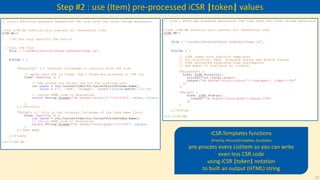
Step #2 : use (Item) pre-processed iCSR |token| values
iCSR.Templates functions
(Priority, PercentComplete, DueDate)
pre-process every ListItem so you can write
even less CSR code
using iCSR |token| notation
to built an output (HTML) string
13
color the TD cell use SharePoints _layouts/images
iCSR.Priority User configuration examples
or add your own |tokens| and HTML (SVG)
Kpi- Image names: peppers, default, pepperalarm, normal
14
iCSR Templates are interactive in Views, who needs Forms?
By default an iCSR Template is interactive (for those with edit rights)
No additional configuration is required, but can still be applied
Loading
GIF
animation
15
Animated GIFs
do not play in
PowerPoint Online
So iCSR can enhance any List or Library
With the icsr.js Framework
and one 14 line CSR file
Ofcourse you can concatenate the files into one file if you want
16
F12 Dev console goodies
• Template tokens
• ‘icPriority’
• ‘icPercentComplete’
• ‘icDueDate’
• ‘iccolors’ Colornames
iCSR.GitHub.io
17
Template: iCSR.Priority
F12 Console functions help explore
Template configurations
18
Template: iCSR.PercentComplete
19
Template: iCSR.DueDate
The iCSR.js development version has extensive logging
20
Don’t know all the HTML color names?
Type ‘icColors’ in the developer console
21
creating
new
Templates
iCSR.GitHub.io
22
How iCSR Templates work
“Priority”:{
View: iCSR.Priority
}
iCSR Priority
FUNCTION
(declaration)
Hey CSR
call me
for displaying
Priority fields
CSR engine
CSR engine
Give me the
HTML for one
Priority Item
iCSR Priority
FUNCTION
(execution)
CSR engine
The Template Function has TWO operations
1. When called without the ctx object parameter,
it returns the function declaration to CSR
2. When called (by CSR) with the ctx object,
it executes the Template function returning HTML
Template Configuration
User Configuration
iCSR.Priority( { colors: “red,yellow,blue” } );
User Configurations overwrite default Template
configuration
23
Creating a NEW Template:
iCSR.Planner
(Color rows with Office365 Planner colors)
takes only a few lines of JavaScript
24
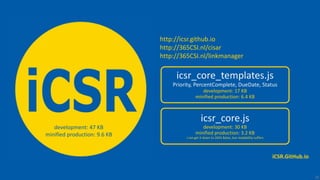
icsr_core_templates.js
Priority, PercentComplete, DueDate, Status
development: 17 KB
minified production: 6.4 KB
icsr_core.js
development: 30 KB
minified production: 3.2 KB
I can get it down to 2691 Bytes, but readability suffers
development: 47 KB
minified production: 9.6 KB
25
iCSR.GitHub.io
http://icsr.github.io
http://365CSI.nl/cisar
http://365CSI.nl/linkmanager

iCSR simplifies SharePoint CSR development

  • 1.
    JavaScript framework for writingless Client Side Rendering code iCSR.GitHub.io 1 For SharePoint Power Users with basic understanding of HTML, CSS & JavaScript
  • 2.
    In this slidedeck •Standard SharePoint Client Side Rendering (CSR) • Why CSR • What is CSR • How to create CSR files • Manage JSLinks • Less CSR code with iCSR • Why iCSR • How to use iCSR Templates • How to configure iCSR Templates • Writing your own iCSR Templates 2
  • 3.
    Before & AfterClient Side Rendering is applied 3
  • 4.
    Data HTML CSS JavaScript Browser jQuery jQuery solutions makechanges AFTER the page has loaded iCSR helps writing less CSR code Client Side Rendering (CSR) transforms data before it is displayed in the Browser 4
  • 5.
    2. Add anew file with the + Cisar saves files to the Style Library, which has Versioning enabled, you need to publish (checkmark button) the file so everyone can view your CSR transformations. Tip: When you are about the make many changes in the editor, use the Pause button to pause the Live Update (after Play you need to make an edit to thrigger your updates or press F5 to reload the page !! CSR can only be applied to fields available in the View !! So in this example the Task Name could only be formatted with Priority values. Tip: When you do need more (non displayed) fields; wrap them in a Calculated Column, and apply CSR code to rewrite the HTML Creating NEW CSR files with the Cisar Chrome Browser Extension(by Andrei Markeev) With Live Editing! 1. The Cisar Chrome Browser Extension (by Andrei Markeev) is available in the Chrome App Store 5 WebPart CSR file JSLink
  • 6.
    2 3 4 1 5 6 8 7 ~sitecollection/…/csr_file1.js |~sitecollection/…/csr_file2.js Setting the WebPart Properties JSLink connection to existing CSR files by hand in 9 clicks 9 Can you image the work when applying JSLinks connections to CSR files in multiple Lists and Libraries? So we quickly built an extra iCSR tool to automate this.. 6
  • 7.
  • 8.
    1 Setting JSLinks toexisting CSR files with the free LinkManager BookMarklet … in 2 clicks Install the LinkManager Bookmarklet (for all Browsers) from http://365CSI.nl/linkmanager 2 A BookMarklet (works in any Browser) executes JavaScript code with the current Users rights. If run by a Site Collection Administrator (write access to the Style Library) It can be more powerful compared to an App deploying code. The iCSR LinkManager Bookmarklet can • Add files to the Style Library • Set JSLinks on WebParts and Views The Free LinkManager itself is not added to your Office365 environment, the code is downloaded from our 365CSI server every time you click the LinkManager Favourite Now you know the CSR concept and the tools to use… let’s introduce iCSR 8
  • 9.
    9 Client Side Rendering aseasy as and as much fun as
  • 10.
    Power users Basic understandingof HTML, CSS and JavaScript jQuery lovers Gurus JavaScript framework for writing less Client Side Rendering code iCSR is not a power-do-it-all-framework, but can be used by all developers 10
  • 11.
    Write less CSRcode with iCSR This is mainly the same boilerplate code for every CSR file 11
  • 12.
    Step #1 :get rid of boilerplate code iCSR.Me() function takes care of all the boilerplate code You only have to supply the configuration 12
  • 13.
    Step #2 :use (Item) pre-processed iCSR |token| values iCSR.Templates functions (Priority, PercentComplete, DueDate) pre-process every ListItem so you can write even less CSR code using iCSR |token| notation to built an output (HTML) string 13
  • 14.
    color the TDcell use SharePoints _layouts/images iCSR.Priority User configuration examples or add your own |tokens| and HTML (SVG) Kpi- Image names: peppers, default, pepperalarm, normal 14
  • 15.
    iCSR Templates areinteractive in Views, who needs Forms? By default an iCSR Template is interactive (for those with edit rights) No additional configuration is required, but can still be applied Loading GIF animation 15 Animated GIFs do not play in PowerPoint Online
  • 16.
    So iCSR canenhance any List or Library With the icsr.js Framework and one 14 line CSR file Ofcourse you can concatenate the files into one file if you want 16
  • 17.
    F12 Dev consolegoodies • Template tokens • ‘icPriority’ • ‘icPercentComplete’ • ‘icDueDate’ • ‘iccolors’ Colornames iCSR.GitHub.io 17
  • 18.
    Template: iCSR.Priority F12 Consolefunctions help explore Template configurations 18
  • 19.
  • 20.
    Template: iCSR.DueDate The iCSR.jsdevelopment version has extensive logging 20
  • 21.
    Don’t know allthe HTML color names? Type ‘icColors’ in the developer console 21
  • 22.
  • 23.
    How iCSR Templateswork “Priority”:{ View: iCSR.Priority } iCSR Priority FUNCTION (declaration) Hey CSR call me for displaying Priority fields CSR engine CSR engine Give me the HTML for one Priority Item iCSR Priority FUNCTION (execution) CSR engine The Template Function has TWO operations 1. When called without the ctx object parameter, it returns the function declaration to CSR 2. When called (by CSR) with the ctx object, it executes the Template function returning HTML Template Configuration User Configuration iCSR.Priority( { colors: “red,yellow,blue” } ); User Configurations overwrite default Template configuration 23
  • 24.
    Creating a NEWTemplate: iCSR.Planner (Color rows with Office365 Planner colors) takes only a few lines of JavaScript 24
  • 25.
    icsr_core_templates.js Priority, PercentComplete, DueDate,Status development: 17 KB minified production: 6.4 KB icsr_core.js development: 30 KB minified production: 3.2 KB I can get it down to 2691 Bytes, but readability suffers development: 47 KB minified production: 9.6 KB 25 iCSR.GitHub.io http://icsr.github.io http://365CSI.nl/cisar http://365CSI.nl/linkmanager