
Characterizing and Detecting Performance
Bugs for Smartphone Applications
Yepang Liu1, Chang Xu2, and S.C. Cheung1
1The Hong Kong University of Science and Technology
2State Key Lab for Novel Software Technology, Nanjing University
Smartphone Era
1 million+ apps
1/30
Apps for different purposes
App performance is critical
2/30
11,108 of 60,000 Android apps randomly sampled
from Google Play suffer from performance bugs!
App performance is critical
3/30
App performance is critical
3/30
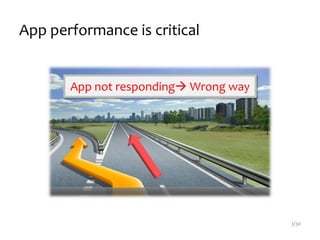
App not responding Wrong way
App performance is critical
4/30
Bad
performance
User
complaints
Market
failure
Assuring good performance is NOT easy
• Small team
• No dedicated QA
5/30
Assuring good performance is NOT easy
• Small team
• No dedicated QA
5/30
• Limited bug understanding
• Lack of useful tool support
Assuring good performance is NOT easy
• Fierce competition
• Short time to market
• Small team
• No dedicated QA
5/30
• Limited bug understanding
• Lack of useful tool support
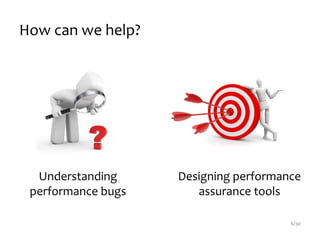
How can we help?
Designing performance
assurance tools
Understanding
performance bugs
6/30
Overview
• Empirical study: understanding performance bug
– Research questions and study design
– Empirical findings and implications
• PerfChecker: a performance bug detection tool
– Tool design and implementation
– Detected bugs and developers’ feedback
Overview
• Empirical study: understanding performance bug
– Research questions and study design
– Empirical findings and implications
• PerfChecker: a performance bug detection tool
– Tool design and implementation
– Detected bugs and developers’ feedback
Research questions
• RQ1: Bug types and impact
• RQ2: Bug manifestation
• RQ3: Debugging and bug-fixing effort
• RQ4: Common bug patterns
7/30
Application and bug selection
8 popular Android apps with well-maintained
bug tracking system and code repository
8/30
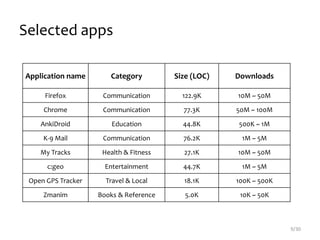
Selected apps
Application name Category Size (LOC) Downloads
Firefox Communication 122.9K 10M ~ 50M
Chrome Communication 77.3K 50M ~ 100M
AnkiDroid Education 44.8K 500K ~ 1M
K-9 Mail Communication 76.2K 1M ~ 5M
My Tracks Health & Fitness 27.1K 10M ~ 50M
c:geo Entertainment 44.7K 1M ~ 5M
Open GPS Tracker Travel & Local 18.1K 100K ~ 500K
Zmanim Books & Reference 5.0K 10K ~ 50K
9/30
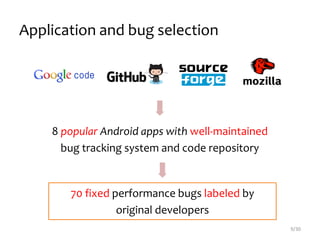
Application and bug selection
9/30
70 fixed performance bugs labeled by
original developers
8 popular Android apps with well-maintained
bug tracking system and code repository
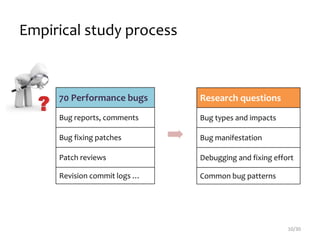
Empirical study process
70 Performance bugs
Bug reports, comments
Bug fixing patches
Patch reviews
Revision commit logs …
Research questions
Bug types and impacts
Bug manifestation
Debugging and fixing effort
Common bug patterns
10/30
Overview
• Empirical study: understanding performance bug
– Research questions and study design
– Empirical findings and implications
• PerfChecker: a static performance analysis tool
– Analysis tool design and features
– Detected bugs and developers’ feedback
2
4
View my
items
SHOPPING
CART
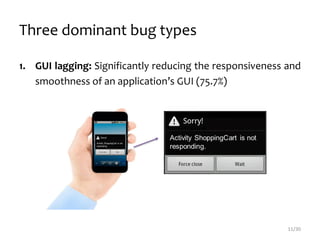
Three dominant bug types
1. GUI lagging: Significantly reducing the responsiveness and
smoothness of an application’s GUI (75.7%)
11/30
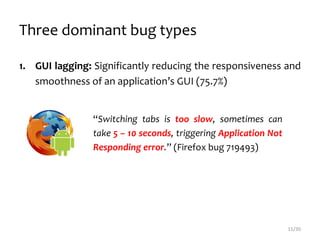
Three dominant bug types
1. GUI lagging: Significantly reducing the responsiveness and
smoothness of an application’s GUI (75.7%)
“Switching tabs is too slow, sometimes can
take 5 – 10 seconds, triggering Application Not
Responding error.” (Firefox bug 719493)
11/30
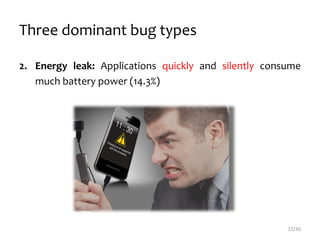
Three dominant bug types
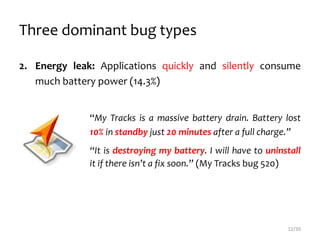
2. Energy leak: Applications quickly and silently consume
much battery power (14.3%)
12/30
Three dominant bug types
2. Energy leak: Applications quickly and silently consume
much battery power (14.3%)
“My Tracks is a massive battery drain. Battery lost
10% in standby just 20 minutes after a full charge.”
“It is destroying my battery. I will have to uninstall
it if there isn’t a fix soon.” (My Tracks bug 520)
12/30
Three dominant bug types
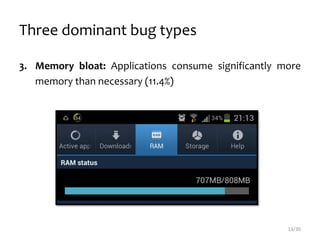
3. Memory bloat: Applications consume significantly more
memory than necessary (11.4%)
13/30
Three dominant bug types
3. Memory bloat: Applications consume significantly more
memory than necessary (11.4%)
“I went to a few websites, played < 10 minutes,
5.6 MB memory is consumed … causing crashes
on Galaxy S4.” (Chrome bug 245782)
13/30
Three dominant bug types
3. Memory bloat: Applications consume significantly more
memory than necessary (11.4%)
“I went to a few websites, played < 10 minutes,
5.6 MB memory is consumed … causing crashes
on Galaxy S4.” (Chrome bug 245782)
13/30
GUI lagging, energy leak and memory bloat are three dominant
types in our studied performance bugs.
Observation 1: Special user interactions needed to expose
performance bugs (25 / 70)
Manifesting performance bugs
14/30
Manifesting performance bugs
14/30
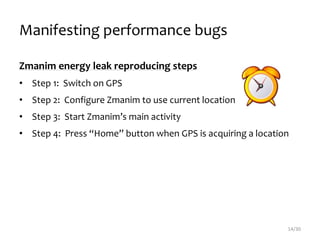
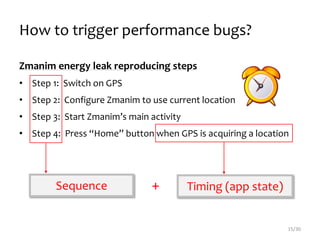
Zmanim energy leak reproducing steps
• Step 1: Switch on GPS
• Step 2: Configure Zmanim to use current location
• Step 3: Start Zmanim’s main activity
• Step 4: Press “Home” button when GPS is acquiring a location
Manifesting performance bugs
14/30
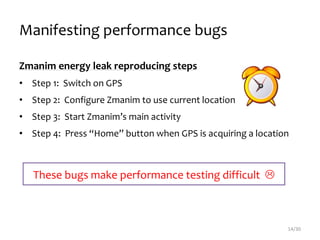
Zmanim energy leak reproducing steps
• Step 1: Switch on GPS
• Step 2: Configure Zmanim to use current location
• Step 3: Start Zmanim’s main activity
• Step 4: Press “Home” button when GPS is acquiring a location
These bugs make performance testing difficult 
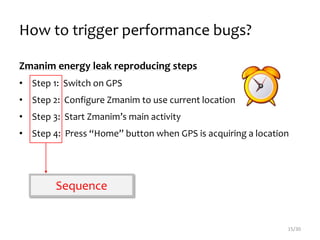
How to trigger performance bugs?
15/30
Zmanim energy leak reproducing steps
• Step 1: Switch on GPS
• Step 2: Configure Zmanim to use current location
• Step 3: Start Zmanim’s main activity
• Step 4: Press “Home” button when GPS is acquiring a location
Sequence
How to trigger performance bugs?
15/30
Zmanim energy leak reproducing steps
• Step 1: Switch on GPS
• Step 2: Configure Zmanim to use current location
• Step 3: Start Zmanim’s main activity
• Step 4: Press “Home” button when GPS is acquiring a location
Sequence Timing (app state)+
Performance oracles
Observation 2: No well-defined performance oracle
• Performance bugs rarely cause fail-stop consequences
16/30
Performance oracles
Observation 2: No well-defined performance oracle
• Performance bugs rarely cause fail-stop consequences
16/30
How do developers judge performance
degradation in reality?
Performance oracles
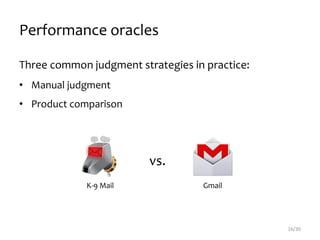
Three common judgment strategies in practice:
• Manual judgment
16/30
Performance oracles
Three common judgment strategies in practice:
• Manual judgment
• Product comparison
16/30
vs.
K-9 Mail Gmail
Performance oracles
Three common judgment strategies in practice:
• Manual judgment
• Product comparison
• Developers’ consensus
16/30
“Generally, 100 ms is the threshold beyond which
users will perceive slowness in application.”
Performance oracles
Three common judgment strategies in practice:
• Manual judgment (manual effort)
• Product comparison (manual effort)
• Developers’ consensus (not well defined)
17/30
Automated and well-defined oracles are desirable to facilitate
performance testing and analysis.
Performance oracles
Three common judgment strategies in practice:
• Manual judgment (manual effort)
• Product comparison (manual effort)
• Developers’ consensus (not well defined)
17/30
General oracles may not exist. Bug specific oracles are still helpful.
(Zhang et al. CODES+ISSS’12, Liu et al. PerCom’13, TSE’14)
Common bug patterns
Observation: More than one third of performance bugs are
amenable to automated detection.
We observed three common bug patterns:
• Long running operations in main threads
• Wasted computation for invisible GUI
• Inefficient callbacks (frequently invoked)
18/30
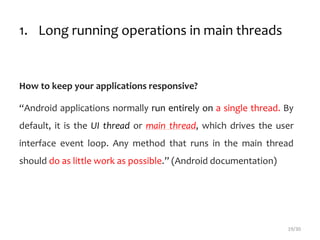
1. Long running operations in main threads
How to keep your applications responsive?
“Android applications normally run entirely on a single thread. By
default, it is the UI thread or main thread, which drives the user
interface event loop. Any method that runs in the main thread
should do as little work as possible.” (Android documentation)
19/30
1. Long running operations in main threads
2
4
View my
items
SHOPPING
CART
19/30
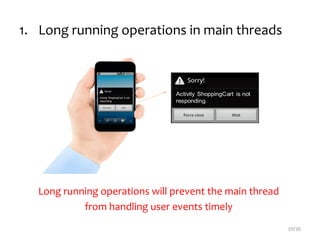
Long running operations will prevent the main thread
from handling user events timely
2. Wasted computation for invisible GUI
A dilemma:
• One great feature of Android is multitasking
• Potential drawback: bad apps conducting useless computation in
background can eat up precious battery life
“I have noticed there are a few people who have phones where
there is software running in the background that just sort of
exhausts the battery quickly.” (Larry Page, Google’s co-founder)
20/30
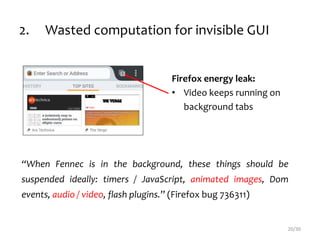
“When Fennec is in the background, these things should be
suspended ideally: timers / JavaScript, animated images, Dom
events, audio / video, flash plugins.” (Firefox bug 736311)
Firefox energy leak:
• Video keeps running on
background tabs
20/30
2. Wasted computation for invisible GUI
3. Inefficient frequently-invoked callbacks
21/30
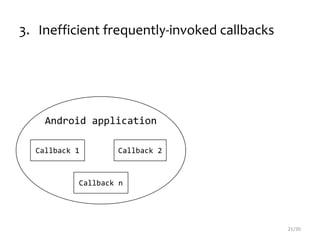
Android application
Callback 1 Callback 2
Callback n
3. Inefficient frequently-invoked callbacks
21/30
Android application
Callback 1 Callback 2
Callback n
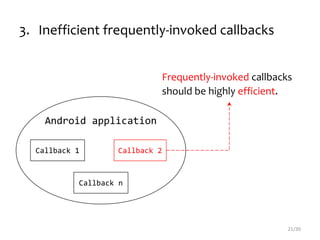
Frequently-invoked callbacks
should be highly efficient.
22/30
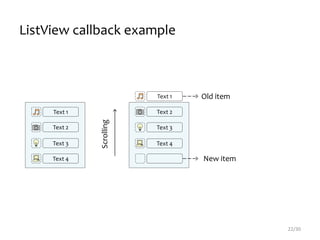
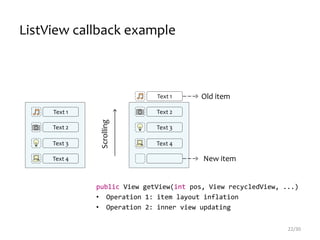
Text 1
Text 2
Text 3
Text 4
Text 1
Text 2
Text 3
Text 4
Scrolling
ListView callback example
Old item
New item
Text 1
Text 2
Text 3
Text 4
Text 1
Text 2
Text 3
Text 4
Scrolling
Old item
New item
ListView callback example
22/30
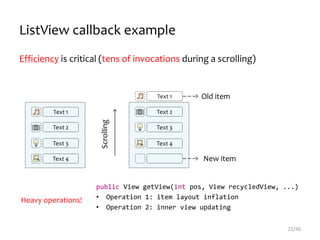
public View getView(int pos, View recycledView, ...)
• Operation 1: item layout inflation
• Operation 2: inner view updating
Text 1
Text 2
Text 3
Text 4
Text 1
Text 2
Text 3
Text 4
Scrolling
Old item
New item
public View getView(int pos, View recycledView, ...)
• Operation 1: item layout inflation
• Operation 2: inner view updating
ListView callback example
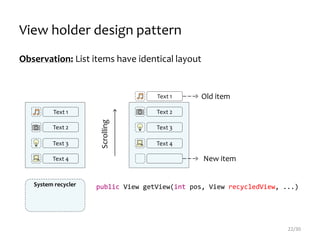
Efficiency is critical (tens of invocations during a scrolling)
22/30
Heavy operations!
Observation: List items have identical layout
public View getView(int pos, View recycledView, ...)
22/30
Text 1
Text 2
Text 3
Text 4
Text 1
Text 2
Text 3
Text 4
Scrolling
View holder design pattern
Old item
New item
System recycler
public View getView(int pos, View recycledView, ...)System recycler
Text 1
22/30
Text 1
Text 2
Text 3
Text 4
Text 1
Text 2
Text 3
Text 4
Scrolling
View holder design pattern
Old item
New item
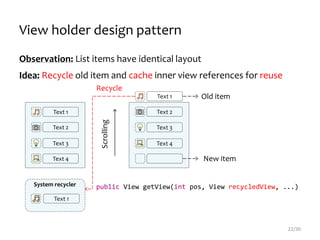
Observation: List items have identical layout
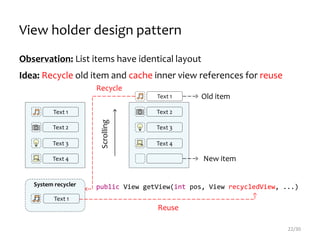
Idea: Recycle old item and cache inner view references for reuse
Recycle
public View getView(int pos, View recycledView, ...)System recycler
Text 1
Reuse
22/30
Text 1
Text 2
Text 3
Text 4
Text 1
Text 2
Text 3
Text 4
Scrolling
View holder design pattern
Old item
New item
Observation: List items have identical layout
Idea: Recycle old item and cache inner view references for reuse
Recycle
Violating view holder design pattern
23/30
//Simplified from Firefox bug 735736
public View getView(int pos, View recycledView, ViewGroup parent) {
View item = mInflater.inflate(R.layout.listItem, null);
TextView txtView = (TextView) item.findViewById(R.id.text);
ImageView imgView = (ImageView) item.findViewById(R.id.icon);
txtView.setText(DATA[pos]);
imgView.setImageBitmap((pos % 2) == 1 ? mIcon1 : mIcon2);
return item;
}
Violating view holder design pattern
//Simplified from Firefox bug 735736
public View getView(int pos, View recycledView, ViewGroup parent) {
View item = mInflater.inflate(R.layout.listItem, null);
TextView txtView = (TextView) item.findViewById(R.id.text);
ImageView imgView = (ImageView) item.findViewById(R.id.icon);
txtView.setText(DATA[pos]);
imgView.setImageBitmap((pos % 2) == 1 ? mIcon1 : mIcon2);
return item;
}
Recycled item not used at all
item inflation and inner view updating on each call!
23/30
Consequence: bad scrolling performance!
Overview
• Empirical study: understanding performance bug
– Research questions and study design
– Empirical findings and implications
• PerfChecker: a performance bug detection tool
– Tool design and implementation
– Detected bugs and developers’ feedback
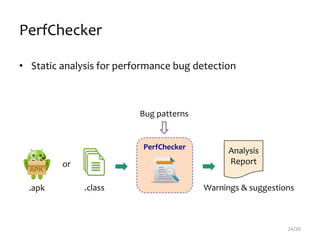
PerfChecker
• Static analysis for performance bug detection
24/30
.apk .class
Analysis
Report
PerfChecker
Warnings & suggestions
or
Bug patterns
PerfChecker
24/30
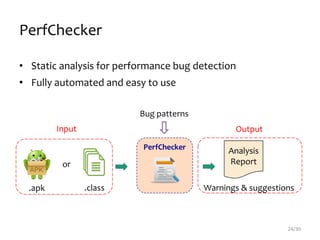
• Static analysis for performance bug detection
• Fully automated and easy to use
Input Output
.apk .class
Analysis
Report
PerfChecker
Warnings & suggestions
or
Bug patterns
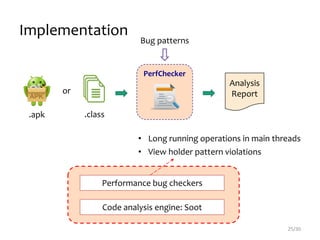
Implementation
25/30
.apk .class
PerfChecker
or
Code analysis engine: Soot
Bug patterns
Performance bug checkers
• Long running operations in main threads
• View holder pattern violations
Analysis
Report
Application subjects
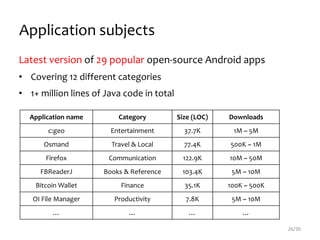
Latest version of 29 popular open-source Android apps
• Covering 12 different categories
• 1+ million lines of Java code in total
Application name Category Size (LOC) Downloads
c:geo Entertainment 37.7K 1M ~ 5M
Osmand Travel & Local 77.4K 500K ~ 1M
Firefox Communication 122.9K 10M ~ 50M
FBReaderJ Books & Reference 103.4K 5M ~ 10M
Bitcoin Wallet Finance 35.1K 100K ~ 500K
OI File Manager Productivity 7.8K 5M ~ 10M
… … … …
26/30
Analysis results
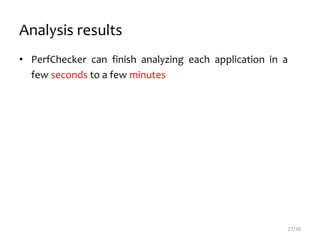
• PerfChecker can finish analyzing each application in a
few seconds to a few minutes
27/30
Analysis results
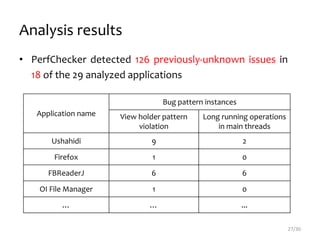
• PerfChecker detected 126 previously-unknown issues in
18 of the 29 analyzed applications
27/30
Application name
Bug pattern instances
View holder pattern
violation
Long running operations
in main threads
Ushahidi 9 2
Firefox 1 0
FBReaderJ 6 6
OI File Manager 1 0
… … ...
Analysis results
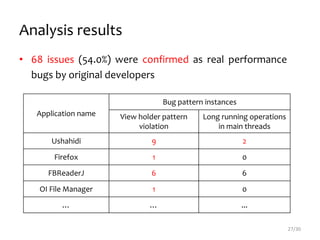
• 68 issues (54.0%) were confirmed as real performance
bugs by original developers
Application name
Bug pattern instances
View holder pattern
violation
Long running operations
in main threads
Ushahidi 9 2
Firefox 1 0
FBReaderJ 6 6
OI File Manager 1 0
… … ...
27/30
Analysis results
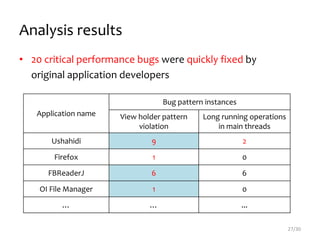
• 20 critical performance bugs were quickly fixed by
original application developers
27/30
Application name
Bug pattern instances
View holder pattern
violation
Long running operations
in main threads
Ushahidi 9 2
Firefox 1 0
FBReaderJ 6 6
OI File Manager 1 0
… … ...
Feedback from developers
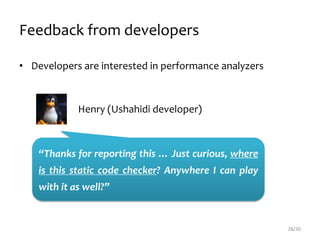
• Developers are interested in performance analyzers
28/30
Henry (Ushahidi developer)
“Thanks for reporting this … Just curious, where
is this static code checker? Anywhere I can play
with it as well?”
Feedback from developers
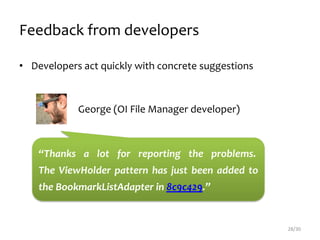
• Developers act quickly with concrete suggestions
28/30
“Thanks a lot for reporting the problems.
The ViewHolder pattern has just been added to
the BookmarkListAdapter in 8c9c429.”
George (OI File Manager developer)
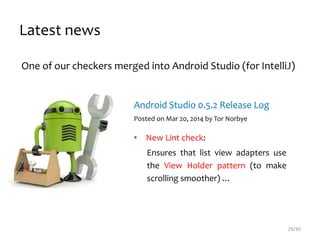
One of our checkers merged into Android Studio (for IntelliJ)
Android Studio 0.5.2 Release Log
Posted on Mar 20, 2014 by Tor Norbye
• New Lint check:
Ensures that list view adapters use
the View Holder pattern (to make
scrolling smoother) …
Latest news
29/30
Conclusion
• We discussed several characteristics of performance bug
• Performance bug detection tools are helpful to developers
• Future work on improving PerfChecker
– More bug patterns to boost its detection capability
– Improve the effectiveness of bug detection algorithms
30/30
For empirical study data and tool runnable, please visit:
http://sccpu2.cse.ust.hk/perfchecker/
Thank you 

Characterizing and detecting performance bugs for smartphone applications

  • 1.
    Characterizing and DetectingPerformance Bugs for Smartphone Applications Yepang Liu1, Chang Xu2, and S.C. Cheung1 1The Hong Kong University of Science and Technology 2State Key Lab for Novel Software Technology, Nanjing University
  • 2.
    Smartphone Era 1 million+apps 1/30 Apps for different purposes
  • 3.
    App performance iscritical 2/30 11,108 of 60,000 Android apps randomly sampled from Google Play suffer from performance bugs!
  • 4.
    App performance iscritical 3/30
  • 5.
    App performance iscritical 3/30 App not responding Wrong way
  • 6.
    App performance iscritical 4/30 Bad performance User complaints Market failure
  • 7.
    Assuring good performanceis NOT easy • Small team • No dedicated QA 5/30
  • 8.
    Assuring good performanceis NOT easy • Small team • No dedicated QA 5/30 • Limited bug understanding • Lack of useful tool support
  • 9.
    Assuring good performanceis NOT easy • Fierce competition • Short time to market • Small team • No dedicated QA 5/30 • Limited bug understanding • Lack of useful tool support
  • 10.
    How can wehelp? Designing performance assurance tools Understanding performance bugs 6/30
  • 11.
    Overview • Empirical study:understanding performance bug – Research questions and study design – Empirical findings and implications • PerfChecker: a performance bug detection tool – Tool design and implementation – Detected bugs and developers’ feedback
  • 12.
    Overview • Empirical study:understanding performance bug – Research questions and study design – Empirical findings and implications • PerfChecker: a performance bug detection tool – Tool design and implementation – Detected bugs and developers’ feedback
  • 13.
    Research questions • RQ1:Bug types and impact • RQ2: Bug manifestation • RQ3: Debugging and bug-fixing effort • RQ4: Common bug patterns 7/30
  • 14.
    Application and bugselection 8 popular Android apps with well-maintained bug tracking system and code repository 8/30
  • 15.
    Selected apps Application nameCategory Size (LOC) Downloads Firefox Communication 122.9K 10M ~ 50M Chrome Communication 77.3K 50M ~ 100M AnkiDroid Education 44.8K 500K ~ 1M K-9 Mail Communication 76.2K 1M ~ 5M My Tracks Health & Fitness 27.1K 10M ~ 50M c:geo Entertainment 44.7K 1M ~ 5M Open GPS Tracker Travel & Local 18.1K 100K ~ 500K Zmanim Books & Reference 5.0K 10K ~ 50K 9/30
  • 16.
    Application and bugselection 9/30 70 fixed performance bugs labeled by original developers 8 popular Android apps with well-maintained bug tracking system and code repository
  • 17.
    Empirical study process 70Performance bugs Bug reports, comments Bug fixing patches Patch reviews Revision commit logs … Research questions Bug types and impacts Bug manifestation Debugging and fixing effort Common bug patterns 10/30
  • 18.
    Overview • Empirical study:understanding performance bug – Research questions and study design – Empirical findings and implications • PerfChecker: a static performance analysis tool – Analysis tool design and features – Detected bugs and developers’ feedback
  • 19.
    2 4 View my items SHOPPING CART Three dominantbug types 1. GUI lagging: Significantly reducing the responsiveness and smoothness of an application’s GUI (75.7%) 11/30
  • 20.
    Three dominant bugtypes 1. GUI lagging: Significantly reducing the responsiveness and smoothness of an application’s GUI (75.7%) “Switching tabs is too slow, sometimes can take 5 – 10 seconds, triggering Application Not Responding error.” (Firefox bug 719493) 11/30
  • 21.
    Three dominant bugtypes 2. Energy leak: Applications quickly and silently consume much battery power (14.3%) 12/30
  • 22.
    Three dominant bugtypes 2. Energy leak: Applications quickly and silently consume much battery power (14.3%) “My Tracks is a massive battery drain. Battery lost 10% in standby just 20 minutes after a full charge.” “It is destroying my battery. I will have to uninstall it if there isn’t a fix soon.” (My Tracks bug 520) 12/30
  • 23.
    Three dominant bugtypes 3. Memory bloat: Applications consume significantly more memory than necessary (11.4%) 13/30
  • 24.
    Three dominant bugtypes 3. Memory bloat: Applications consume significantly more memory than necessary (11.4%) “I went to a few websites, played < 10 minutes, 5.6 MB memory is consumed … causing crashes on Galaxy S4.” (Chrome bug 245782) 13/30
  • 25.
    Three dominant bugtypes 3. Memory bloat: Applications consume significantly more memory than necessary (11.4%) “I went to a few websites, played < 10 minutes, 5.6 MB memory is consumed … causing crashes on Galaxy S4.” (Chrome bug 245782) 13/30 GUI lagging, energy leak and memory bloat are three dominant types in our studied performance bugs.
  • 26.
    Observation 1: Specialuser interactions needed to expose performance bugs (25 / 70) Manifesting performance bugs 14/30
  • 27.
    Manifesting performance bugs 14/30 Zmanimenergy leak reproducing steps • Step 1: Switch on GPS • Step 2: Configure Zmanim to use current location • Step 3: Start Zmanim’s main activity • Step 4: Press “Home” button when GPS is acquiring a location
  • 28.
    Manifesting performance bugs 14/30 Zmanimenergy leak reproducing steps • Step 1: Switch on GPS • Step 2: Configure Zmanim to use current location • Step 3: Start Zmanim’s main activity • Step 4: Press “Home” button when GPS is acquiring a location These bugs make performance testing difficult 
  • 29.
    How to triggerperformance bugs? 15/30 Zmanim energy leak reproducing steps • Step 1: Switch on GPS • Step 2: Configure Zmanim to use current location • Step 3: Start Zmanim’s main activity • Step 4: Press “Home” button when GPS is acquiring a location Sequence
  • 30.
    How to triggerperformance bugs? 15/30 Zmanim energy leak reproducing steps • Step 1: Switch on GPS • Step 2: Configure Zmanim to use current location • Step 3: Start Zmanim’s main activity • Step 4: Press “Home” button when GPS is acquiring a location Sequence Timing (app state)+
  • 31.
    Performance oracles Observation 2:No well-defined performance oracle • Performance bugs rarely cause fail-stop consequences 16/30
  • 32.
    Performance oracles Observation 2:No well-defined performance oracle • Performance bugs rarely cause fail-stop consequences 16/30 How do developers judge performance degradation in reality?
  • 33.
    Performance oracles Three commonjudgment strategies in practice: • Manual judgment 16/30
  • 34.
    Performance oracles Three commonjudgment strategies in practice: • Manual judgment • Product comparison 16/30 vs. K-9 Mail Gmail
  • 35.
    Performance oracles Three commonjudgment strategies in practice: • Manual judgment • Product comparison • Developers’ consensus 16/30 “Generally, 100 ms is the threshold beyond which users will perceive slowness in application.”
  • 36.
    Performance oracles Three commonjudgment strategies in practice: • Manual judgment (manual effort) • Product comparison (manual effort) • Developers’ consensus (not well defined) 17/30 Automated and well-defined oracles are desirable to facilitate performance testing and analysis.
  • 37.
    Performance oracles Three commonjudgment strategies in practice: • Manual judgment (manual effort) • Product comparison (manual effort) • Developers’ consensus (not well defined) 17/30 General oracles may not exist. Bug specific oracles are still helpful. (Zhang et al. CODES+ISSS’12, Liu et al. PerCom’13, TSE’14)
  • 38.
    Common bug patterns Observation:More than one third of performance bugs are amenable to automated detection. We observed three common bug patterns: • Long running operations in main threads • Wasted computation for invisible GUI • Inefficient callbacks (frequently invoked) 18/30
  • 39.
    1. Long runningoperations in main threads How to keep your applications responsive? “Android applications normally run entirely on a single thread. By default, it is the UI thread or main thread, which drives the user interface event loop. Any method that runs in the main thread should do as little work as possible.” (Android documentation) 19/30
  • 40.
    1. Long runningoperations in main threads 2 4 View my items SHOPPING CART 19/30 Long running operations will prevent the main thread from handling user events timely
  • 41.
    2. Wasted computationfor invisible GUI A dilemma: • One great feature of Android is multitasking • Potential drawback: bad apps conducting useless computation in background can eat up precious battery life “I have noticed there are a few people who have phones where there is software running in the background that just sort of exhausts the battery quickly.” (Larry Page, Google’s co-founder) 20/30
  • 42.
    “When Fennec isin the background, these things should be suspended ideally: timers / JavaScript, animated images, Dom events, audio / video, flash plugins.” (Firefox bug 736311) Firefox energy leak: • Video keeps running on background tabs 20/30 2. Wasted computation for invisible GUI
  • 43.
    3. Inefficient frequently-invokedcallbacks 21/30 Android application Callback 1 Callback 2 Callback n
  • 44.
    3. Inefficient frequently-invokedcallbacks 21/30 Android application Callback 1 Callback 2 Callback n Frequently-invoked callbacks should be highly efficient.
  • 45.
    22/30 Text 1 Text 2 Text3 Text 4 Text 1 Text 2 Text 3 Text 4 Scrolling ListView callback example Old item New item
  • 46.
    Text 1 Text 2 Text3 Text 4 Text 1 Text 2 Text 3 Text 4 Scrolling Old item New item ListView callback example 22/30 public View getView(int pos, View recycledView, ...) • Operation 1: item layout inflation • Operation 2: inner view updating
  • 47.
    Text 1 Text 2 Text3 Text 4 Text 1 Text 2 Text 3 Text 4 Scrolling Old item New item public View getView(int pos, View recycledView, ...) • Operation 1: item layout inflation • Operation 2: inner view updating ListView callback example Efficiency is critical (tens of invocations during a scrolling) 22/30 Heavy operations!
  • 48.
    Observation: List itemshave identical layout public View getView(int pos, View recycledView, ...) 22/30 Text 1 Text 2 Text 3 Text 4 Text 1 Text 2 Text 3 Text 4 Scrolling View holder design pattern Old item New item System recycler
  • 49.
    public View getView(intpos, View recycledView, ...)System recycler Text 1 22/30 Text 1 Text 2 Text 3 Text 4 Text 1 Text 2 Text 3 Text 4 Scrolling View holder design pattern Old item New item Observation: List items have identical layout Idea: Recycle old item and cache inner view references for reuse Recycle
  • 50.
    public View getView(intpos, View recycledView, ...)System recycler Text 1 Reuse 22/30 Text 1 Text 2 Text 3 Text 4 Text 1 Text 2 Text 3 Text 4 Scrolling View holder design pattern Old item New item Observation: List items have identical layout Idea: Recycle old item and cache inner view references for reuse Recycle
  • 51.
    Violating view holderdesign pattern 23/30 //Simplified from Firefox bug 735736 public View getView(int pos, View recycledView, ViewGroup parent) { View item = mInflater.inflate(R.layout.listItem, null); TextView txtView = (TextView) item.findViewById(R.id.text); ImageView imgView = (ImageView) item.findViewById(R.id.icon); txtView.setText(DATA[pos]); imgView.setImageBitmap((pos % 2) == 1 ? mIcon1 : mIcon2); return item; }
  • 52.
    Violating view holderdesign pattern //Simplified from Firefox bug 735736 public View getView(int pos, View recycledView, ViewGroup parent) { View item = mInflater.inflate(R.layout.listItem, null); TextView txtView = (TextView) item.findViewById(R.id.text); ImageView imgView = (ImageView) item.findViewById(R.id.icon); txtView.setText(DATA[pos]); imgView.setImageBitmap((pos % 2) == 1 ? mIcon1 : mIcon2); return item; } Recycled item not used at all item inflation and inner view updating on each call! 23/30 Consequence: bad scrolling performance!
  • 53.
    Overview • Empirical study:understanding performance bug – Research questions and study design – Empirical findings and implications • PerfChecker: a performance bug detection tool – Tool design and implementation – Detected bugs and developers’ feedback
  • 54.
    PerfChecker • Static analysisfor performance bug detection 24/30 .apk .class Analysis Report PerfChecker Warnings & suggestions or Bug patterns
  • 55.
    PerfChecker 24/30 • Static analysisfor performance bug detection • Fully automated and easy to use Input Output .apk .class Analysis Report PerfChecker Warnings & suggestions or Bug patterns
  • 56.
    Implementation 25/30 .apk .class PerfChecker or Code analysisengine: Soot Bug patterns Performance bug checkers • Long running operations in main threads • View holder pattern violations Analysis Report
  • 57.
    Application subjects Latest versionof 29 popular open-source Android apps • Covering 12 different categories • 1+ million lines of Java code in total Application name Category Size (LOC) Downloads c:geo Entertainment 37.7K 1M ~ 5M Osmand Travel & Local 77.4K 500K ~ 1M Firefox Communication 122.9K 10M ~ 50M FBReaderJ Books & Reference 103.4K 5M ~ 10M Bitcoin Wallet Finance 35.1K 100K ~ 500K OI File Manager Productivity 7.8K 5M ~ 10M … … … … 26/30
  • 58.
    Analysis results • PerfCheckercan finish analyzing each application in a few seconds to a few minutes 27/30
  • 59.
    Analysis results • PerfCheckerdetected 126 previously-unknown issues in 18 of the 29 analyzed applications 27/30 Application name Bug pattern instances View holder pattern violation Long running operations in main threads Ushahidi 9 2 Firefox 1 0 FBReaderJ 6 6 OI File Manager 1 0 … … ...
  • 60.
    Analysis results • 68issues (54.0%) were confirmed as real performance bugs by original developers Application name Bug pattern instances View holder pattern violation Long running operations in main threads Ushahidi 9 2 Firefox 1 0 FBReaderJ 6 6 OI File Manager 1 0 … … ... 27/30
  • 61.
    Analysis results • 20critical performance bugs were quickly fixed by original application developers 27/30 Application name Bug pattern instances View holder pattern violation Long running operations in main threads Ushahidi 9 2 Firefox 1 0 FBReaderJ 6 6 OI File Manager 1 0 … … ...
  • 62.
    Feedback from developers •Developers are interested in performance analyzers 28/30 Henry (Ushahidi developer) “Thanks for reporting this … Just curious, where is this static code checker? Anywhere I can play with it as well?”
  • 63.
    Feedback from developers •Developers act quickly with concrete suggestions 28/30 “Thanks a lot for reporting the problems. The ViewHolder pattern has just been added to the BookmarkListAdapter in 8c9c429.” George (OI File Manager developer)
  • 64.
    One of ourcheckers merged into Android Studio (for IntelliJ) Android Studio 0.5.2 Release Log Posted on Mar 20, 2014 by Tor Norbye • New Lint check: Ensures that list view adapters use the View Holder pattern (to make scrolling smoother) … Latest news 29/30
  • 65.
    Conclusion • We discussedseveral characteristics of performance bug • Performance bug detection tools are helpful to developers • Future work on improving PerfChecker – More bug patterns to boost its detection capability – Improve the effectiveness of bug detection algorithms 30/30 For empirical study data and tool runnable, please visit: http://sccpu2.cse.ust.hk/perfchecker/
  • 66.