App Performance Optimization: What It Is
and Why It Matters
App Performance Optimization What It Is and Why It Matters
Mobile users expect apps to respond fast, run smoothly, and work without glitches. When apps
fall short, users often abandon them. This behavior affects retention, revenue, and visibility on
app stores. Developers and businesses must keep app performance high to stay competitive.
This article breaks down what app performance means, why it matters, and how teams can
manage it effectively. With the right strategies, teams can improve app performance and
provide a better experience for users across devices and platforms.
What Is App Performance Optimization?
What Is App Performance Optimization
App performance optimization refers to how well an application runs in real-world conditions.
It includes speed, responsiveness, memory use, CPU load, network efficiency, and battery
impact. When performance suffers, users experience delays, crashes, or unresponsive screens.
The process of improving app performance involves identifying bottlenecks and applying
changes to remove or reduce them. The goal is to deliver a fast, stable, and consistent
experience under various network and device conditions.
Key areas that influence mobile app performance:
● Load times
● Frame rate and UI smoothness
● Background process handling
● Battery and memory usage
● API response times
Why App Performance Should Never Be an Afterthought
A slow app affects more than just the user’s patience. Poor performance leads to high uninstall
rates and negative reviews. It also reduces time spent in the app, which can affect monetization
models, especially for ad-supported or in-app purchase-based platforms.
Search rankings in the App Store and Google Play also consider technical quality. Performance
issues hurt visibility and limit the reach of even the most well-designed apps.
If an app runs well on some devices but crashes or stutters on others, the result is inconsistent
feedback, fragmented support efforts, and a shrinking user base. That’s why performance
needs regular attention, not just occasional fixes.
Also Read: Mobile App Development – Complete Process Guide 2024
Key Factors That Affect App Performance
Several technical choices and development practices affect mobile app performance. Ignoring
these can lead to widespread performance issues over time.
● Code Efficiency
Inefficient loops, blocking operations, or redundant code paths slow down app behavior.
Clean, concise code helps prevent these issues.
● Network Requests
Unoptimized network activity drains battery and delays screen updates. Large payloads,
too many API calls, or frequent retries can create lag.
● Device Compatibility
Apps must run on various screen sizes, processors, and OS versions. Not testing across a
range of devices leads to missed issues.
● Image and Asset Handling
Large or uncompressed images and videos increase load times. Lazy loading,
compression, and asset caching reduce strain on bandwidth and memory.
● Third-Party SDKs
Extra SDKs add size, may conflict with each other, and often run in the background. Each
one needs to be reviewed before integration.
● Background Processes
Long-running background tasks or sync operations can drain battery and cause
slowdowns, especially when not managed correctly.
Also Read: Mobile App Development Tools For 2025: The Ultimate Guide
Signs Your App Performance Needs Attention
Some signs are easy to spot, while others appear over time through data and user feedback.
Recognizing these early helps prevent damage to your brand.
● The app takes more than three seconds to load
● UI freezes when switching screens
● Frequent crashes or force closes
● Battery drain complaints in user reviews
● Drop in user retention after new releases
● The app feels sluggish on older devices
If your support team keeps receiving similar feedback or if your analytics show higher bounce
rates, the issue might lie in performance, not features.
Testing Methods for Measuring App Performance
Teams need a structured way to measure how their app behaves. Performance testing
highlights weak points and helps track improvements over time.
Load Testing
Simulates real-world usage under pressure. Helps find limits in API, backend, and app
architecture.
UI Performance Testing
Checks screen transitions, animation smoothness, and interaction latency. Helps improve the
overall feel of the app.
Monitoring Frame Rates (FPS)
Low frame rates mean jerky motion or input lag. A stable frame rate above 50–60 FPS on most
devices is ideal.
Useful Tools
● Android Profiler – Tracks CPU, memory, and network use in real time
● Xcode Instruments – For iOS apps; monitors threads, energy usage, and memory
● Firebase Performance Monitoring – Logs slow screen loads and traces in production
These tools help detect problems during development and after release, making performance
testing an ongoing process.
Also Read: Mobile App Development Costs: Development & Maintenance 2024
Strategies to Improve App Performance Optimization
Improving performance requires consistent action during development and testing. Below are
practical methods that teams can apply at any stage.
● Reduce Overdraw
Each pixel should be drawn once. Complex layouts that overlap elements waste
processing power.
● Compress Assets
Minify JavaScript, CSS, and media files. Load only the required content based on screen
size and resolution.
● Manage Network Calls
Batch API requests when possible. Add caching to reduce repeated calls. Avoid making
unnecessary calls on every screen load.
● Improve Database Queries
Slow or unindexed queries cause noticeable delays. Use indexing, limit joins, and keep
local databases optimized.
● Lazy Load Content
Load heavy content only when the user reaches that part of the screen. This reduces the
initial load time and memory use.
● Limit Background Tasks
Avoid constant background syncs. Schedule background work during idle times or based
on user actions.
Best Tools for Tracking App Performance
Using the right tools helps track and improve performance in real time. Here are some that
cover both frontend and backend metrics:
● Firebase Performance Monitoring
Monitors slow screens, network response times, and custom traces in real-world
conditions.
● New Relic
Captures detailed performance data across mobile and backend. Helps identify
bottlenecks in real time.
● AppDynamics
Provides crash analytics, performance metrics, and real-user monitoring.
● Sentry
Focuses on error and crash reporting, but includes performance monitoring for slow
functions and API requests.
● Android Profiler / Xcode Instruments
Native tools are built into development environments. Help find problems early during
testing.
Choosing the right combination of tools makes it easier to track app performance metrics and
fix issues before they grow. Next Gen Mobile Apps, powered by AI and smart logic, leverage
advanced monitoring and diagnostic capabilities to detect potential bottlenecks early and
maintain optimal performance across devices.
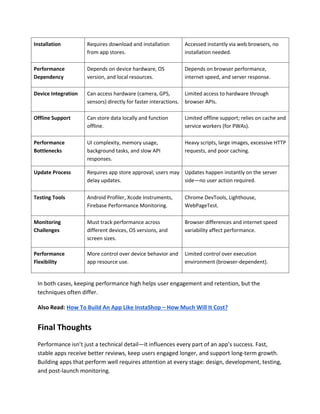
Mobile vs Web App Performance: What's Different?
While web and mobile app development share common goals—speed, responsiveness, and
stability—their technical environments create unique performance challenges. Understanding
these differences helps development teams make better choices during design, testing, and
launch.
Aspect Mobile Apps Web Apps
Platform
Environment
Run directly on devices using native or
hybrid code.
Run inside browsers using HTML, CSS, and
JavaScript.
Installation Requires download and installation
from app stores.
Accessed instantly via web browsers, no
installation needed.
Performance
Dependency
Depends on device hardware, OS
version, and local resources.
Depends on browser performance,
internet speed, and server response.
Device Integration Can access hardware (camera, GPS,
sensors) directly for faster interactions.
Limited access to hardware through
browser APIs.
Offline Support Can store data locally and function
offline.
Limited offline support; relies on cache and
service workers (for PWAs).
Performance
Bottlenecks
UI complexity, memory usage,
background tasks, and slow API
responses.
Heavy scripts, large images, excessive HTTP
requests, and poor caching.
Update Process Requires app store approval; users may
delay updates.
Updates happen instantly on the server
side—no user action required.
Testing Tools Android Profiler, Xcode Instruments,
Firebase Performance Monitoring.
Chrome DevTools, Lighthouse,
WebPageTest.
Monitoring
Challenges
Must track performance across
different devices, OS versions, and
screen sizes.
Browser differences and internet speed
variability affect performance.
Performance
Flexibility
More control over device behavior and
app resource use.
Limited control over execution
environment (browser-dependent).
In both cases, keeping performance high helps user engagement and retention, but the
techniques often differ.
Also Read: How To Build An App Like InstaShop – How Much Will It Cost?
Final Thoughts
Performance isn’t just a technical detail—it influences every part of an app’s success. Fast,
stable apps receive better reviews, keep users engaged longer, and support long-term growth.
Building apps that perform well requires attention at every stage: design, development, testing,
and post-launch monitoring.
Teams that track app performance metrics and follow app performance best practices reduce
the risk of poor user experiences and negative feedback. If you're looking to improve app
performance or build a high-performing product from the ground up, working with the right
development team makes a difference.
Shiv Technolabs delivers custom app development services built around speed, reliability, and
user satisfaction. Our approach prioritizes performance from day one, helping you launch apps
that meet user expectations and business goals. Contact us now!

Improve App Performance: Key Tips Explained

  • 1.
    App Performance Optimization:What It Is and Why It Matters App Performance Optimization What It Is and Why It Matters Mobile users expect apps to respond fast, run smoothly, and work without glitches. When apps fall short, users often abandon them. This behavior affects retention, revenue, and visibility on app stores. Developers and businesses must keep app performance high to stay competitive. This article breaks down what app performance means, why it matters, and how teams can manage it effectively. With the right strategies, teams can improve app performance and provide a better experience for users across devices and platforms.
  • 2.
    What Is AppPerformance Optimization? What Is App Performance Optimization App performance optimization refers to how well an application runs in real-world conditions. It includes speed, responsiveness, memory use, CPU load, network efficiency, and battery impact. When performance suffers, users experience delays, crashes, or unresponsive screens. The process of improving app performance involves identifying bottlenecks and applying changes to remove or reduce them. The goal is to deliver a fast, stable, and consistent experience under various network and device conditions. Key areas that influence mobile app performance: ● Load times ● Frame rate and UI smoothness ● Background process handling ● Battery and memory usage ● API response times
  • 3.
    Why App PerformanceShould Never Be an Afterthought Why App Performance Should Never Be an Afterthought A slow app affects more than just the user’s patience. Poor performance leads to high uninstall rates and negative reviews. It also reduces time spent in the app, which can affect monetization models, especially for ad-supported or in-app purchase-based platforms. Search rankings in the App Store and Google Play also consider technical quality. Performance issues hurt visibility and limit the reach of even the most well-designed apps. If an app runs well on some devices but crashes or stutters on others, the result is inconsistent feedback, fragmented support efforts, and a shrinking user base. That’s why performance needs regular attention, not just occasional fixes. Also Read: Mobile App Development – Complete Process Guide 2024 Key Factors That Affect App Performance Several technical choices and development practices affect mobile app performance. Ignoring these can lead to widespread performance issues over time.
  • 4.
    ● Code Efficiency Inefficientloops, blocking operations, or redundant code paths slow down app behavior. Clean, concise code helps prevent these issues. ● Network Requests Unoptimized network activity drains battery and delays screen updates. Large payloads, too many API calls, or frequent retries can create lag. ● Device Compatibility Apps must run on various screen sizes, processors, and OS versions. Not testing across a range of devices leads to missed issues. ● Image and Asset Handling Large or uncompressed images and videos increase load times. Lazy loading, compression, and asset caching reduce strain on bandwidth and memory. ● Third-Party SDKs Extra SDKs add size, may conflict with each other, and often run in the background. Each one needs to be reviewed before integration. ● Background Processes Long-running background tasks or sync operations can drain battery and cause slowdowns, especially when not managed correctly. Also Read: Mobile App Development Tools For 2025: The Ultimate Guide Signs Your App Performance Needs Attention Some signs are easy to spot, while others appear over time through data and user feedback. Recognizing these early helps prevent damage to your brand. ● The app takes more than three seconds to load ● UI freezes when switching screens ● Frequent crashes or force closes ● Battery drain complaints in user reviews ● Drop in user retention after new releases
  • 5.
    ● The appfeels sluggish on older devices If your support team keeps receiving similar feedback or if your analytics show higher bounce rates, the issue might lie in performance, not features. Testing Methods for Measuring App Performance Teams need a structured way to measure how their app behaves. Performance testing highlights weak points and helps track improvements over time. Load Testing Simulates real-world usage under pressure. Helps find limits in API, backend, and app architecture. UI Performance Testing Checks screen transitions, animation smoothness, and interaction latency. Helps improve the overall feel of the app. Monitoring Frame Rates (FPS) Low frame rates mean jerky motion or input lag. A stable frame rate above 50–60 FPS on most devices is ideal. Useful Tools ● Android Profiler – Tracks CPU, memory, and network use in real time ● Xcode Instruments – For iOS apps; monitors threads, energy usage, and memory ● Firebase Performance Monitoring – Logs slow screen loads and traces in production These tools help detect problems during development and after release, making performance testing an ongoing process. Also Read: Mobile App Development Costs: Development & Maintenance 2024 Strategies to Improve App Performance Optimization Improving performance requires consistent action during development and testing. Below are practical methods that teams can apply at any stage.
  • 6.
    ● Reduce Overdraw Eachpixel should be drawn once. Complex layouts that overlap elements waste processing power. ● Compress Assets Minify JavaScript, CSS, and media files. Load only the required content based on screen size and resolution. ● Manage Network Calls Batch API requests when possible. Add caching to reduce repeated calls. Avoid making unnecessary calls on every screen load. ● Improve Database Queries Slow or unindexed queries cause noticeable delays. Use indexing, limit joins, and keep local databases optimized. ● Lazy Load Content Load heavy content only when the user reaches that part of the screen. This reduces the initial load time and memory use. ● Limit Background Tasks Avoid constant background syncs. Schedule background work during idle times or based on user actions. Best Tools for Tracking App Performance Using the right tools helps track and improve performance in real time. Here are some that cover both frontend and backend metrics: ● Firebase Performance Monitoring Monitors slow screens, network response times, and custom traces in real-world conditions.
  • 7.
    ● New Relic Capturesdetailed performance data across mobile and backend. Helps identify bottlenecks in real time. ● AppDynamics Provides crash analytics, performance metrics, and real-user monitoring. ● Sentry Focuses on error and crash reporting, but includes performance monitoring for slow functions and API requests. ● Android Profiler / Xcode Instruments Native tools are built into development environments. Help find problems early during testing. Choosing the right combination of tools makes it easier to track app performance metrics and fix issues before they grow. Next Gen Mobile Apps, powered by AI and smart logic, leverage advanced monitoring and diagnostic capabilities to detect potential bottlenecks early and maintain optimal performance across devices. Mobile vs Web App Performance: What's Different? While web and mobile app development share common goals—speed, responsiveness, and stability—their technical environments create unique performance challenges. Understanding these differences helps development teams make better choices during design, testing, and launch. Aspect Mobile Apps Web Apps Platform Environment Run directly on devices using native or hybrid code. Run inside browsers using HTML, CSS, and JavaScript.
  • 8.
    Installation Requires downloadand installation from app stores. Accessed instantly via web browsers, no installation needed. Performance Dependency Depends on device hardware, OS version, and local resources. Depends on browser performance, internet speed, and server response. Device Integration Can access hardware (camera, GPS, sensors) directly for faster interactions. Limited access to hardware through browser APIs. Offline Support Can store data locally and function offline. Limited offline support; relies on cache and service workers (for PWAs). Performance Bottlenecks UI complexity, memory usage, background tasks, and slow API responses. Heavy scripts, large images, excessive HTTP requests, and poor caching. Update Process Requires app store approval; users may delay updates. Updates happen instantly on the server side—no user action required. Testing Tools Android Profiler, Xcode Instruments, Firebase Performance Monitoring. Chrome DevTools, Lighthouse, WebPageTest. Monitoring Challenges Must track performance across different devices, OS versions, and screen sizes. Browser differences and internet speed variability affect performance. Performance Flexibility More control over device behavior and app resource use. Limited control over execution environment (browser-dependent). In both cases, keeping performance high helps user engagement and retention, but the techniques often differ. Also Read: How To Build An App Like InstaShop – How Much Will It Cost? Final Thoughts Performance isn’t just a technical detail—it influences every part of an app’s success. Fast, stable apps receive better reviews, keep users engaged longer, and support long-term growth. Building apps that perform well requires attention at every stage: design, development, testing, and post-launch monitoring.
  • 9.
    Teams that trackapp performance metrics and follow app performance best practices reduce the risk of poor user experiences and negative feedback. If you're looking to improve app performance or build a high-performing product from the ground up, working with the right development team makes a difference. Shiv Technolabs delivers custom app development services built around speed, reliability, and user satisfaction. Our approach prioritizes performance from day one, helping you launch apps that meet user expectations and business goals. Contact us now!